

Nothing OS 5.0 brings more than 80 updates across design, personalization, performance, and AI, built on the latest Android 17.
LONDON, August 25, 2026 — Nothing, the London-based consumer technology company, today unveiled Nothing OS 5.0, the latest evolution of its Android experience. Built around the principle of pure Android, the new operating system offers more control, personalization, and fun.
A refreshed design with greater depth
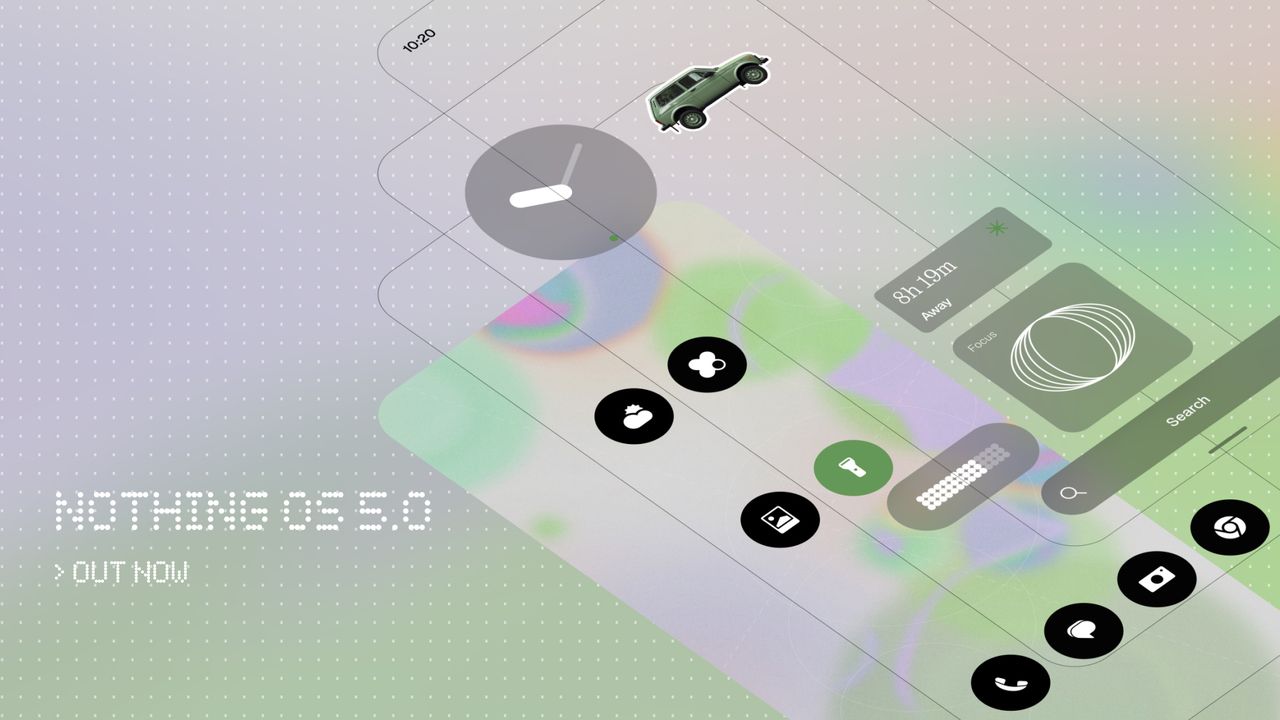
Nothing OS 5.0 introduces a redesigned home screen, available as an additional theme alongside the existing Nothing OS style. Widgets and the search bar feature transparent details that add depth and layering, with similar visual treatments extending to apps such as Gallery for a softer, more consistent look across the system.
A new adaptive color system draws inspiration from the user’s wallpaper. App icons receive subtle tints, while widgets combine adaptive colors with transparent details. The 1×1 Quick Settings widgets also use the wallpaper’s primary color and update automatically whenever the wallpaper changes.
The status bar, Settings, Camera, and Gallery have been refreshed with updated icons, spacing, and animations. Gallery also gains new sorting options and a redesigned album view to help users find photos faster.
The system now uses the Geist typeface, alongside revised text sizing, more consistent corner shapes, unified blur effects, and consistent iconography throughout the interface.
More ways to personalize your phone
Nothing OS 5.0 introduces two new lock screen clock faces. Gooey features bold, fluid shapes that make the time stand out, while Micrographics offers a clean, hardware-inspired design that displays the date, time, weather, and upcoming meetings at a glance. Users can also customize clock face colors to match their wallpaper.
Home screen editing has been improved, allowing users to select and move multiple apps and widgets at once instead of rearranging them individually.
The update also introduces two new widgets. Collector lets users build a growing visual collection of favorite objects captured through Camera or Gallery and display it on the home screen and lock screen. Away Time tracks how long users stay off their phones, records their longest break, and shows how their screen-free time changes throughout the week.
The Glyph Interface now has its own dedicated app, bringing its features, sounds, ringtones, and schedules together in one place. A new Glyph Timer widget lets users start a timer directly from the home screen, while the Glyph lights on the back of the phone display the remaining time.
Smoother performance for everyday use
Nothing OS 5.0 improves touch response, background app retention, and system resource management. These changes help prioritize the app currently in use and reduce interruptions when memory resources are under pressure.
On-device intelligence learns which apps users open most often and keeps them ready to launch. Overnight maintenance also optimizes memory to help maintain performance over time.
System animations have been expanded and refined across apps, folders, widgets, multitasking, and shortcuts for a more consistent experience.
Bluetooth controls have been redesigned in Quick Settings, making it easier to find, connect to, and disconnect from nearby devices in fewer steps. The Camera app also keeps detected QR codes fixed on screen, making them easier to tap without scanning them again.
Essential AI tools get smarter
Essential Voice is now faster and delivers cleaner, better-formatted transcriptions. It better recognizes when speech should be organized into a list or kept as a paragraph, helping reduce missed points and inconsistent formatting while preserving the original meaning.
Real-time transcription now displays words as users speak. Users can also capture audio directly from the Ear (3) case using SuperMic.
Essential Space introduces Smart Collections, which organize scattered memories by recommending content for new and existing collections. It also adds Model Context Protocol (MCP) support, allowing other AI tools to search and read selected Essential Space data.
Capturing content with the Essential Key is now simpler and more consistent across the lock screen, home screen, and apps.
Essential Apps Builder is now available as a dedicated app on the phone. It lets users describe, build, and deploy AI-powered apps directly from their devices without coding, then access those apps from the home screen.
Built on Android 17 with new features
Nothing OS 5.0 is built on Android 17, which introduces separate panels for Notifications and Quick Settings. Users can swipe down from the left side of the screen to open Notifications and from the right side to access Quick Settings.
The update also introduces cross-platform Quick Share, allowing users to share files with iPhone and Android devices through a QR code without installing additional apps.
New privacy enhancements indicate when an app is using the camera, microphone, or location. The update also includes clearer screen-recording controls and revised location permission settings.
Additional refinements include Noto 3D emojis, expanded Dark Theme support, separate Assistant volume controls, higher-brightness HDR viewing, and a redesigned Recents screen.
Nothing OS 5.0 availability
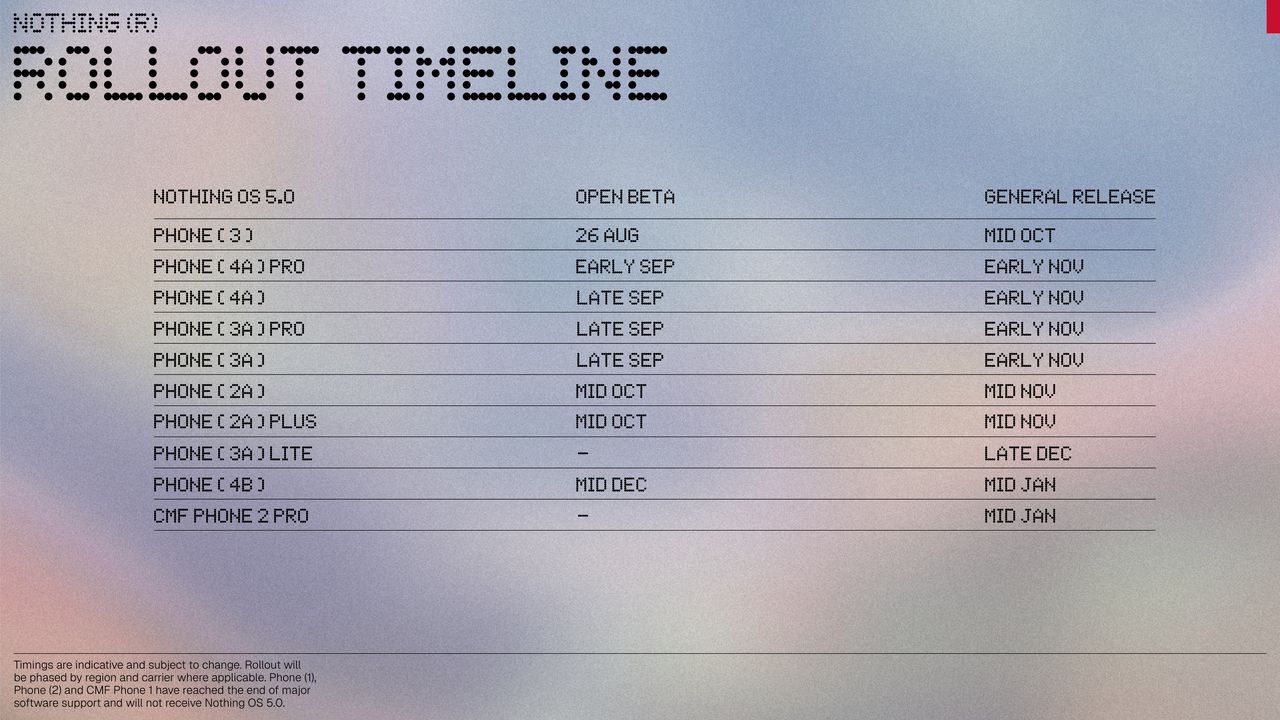
The Nothing OS 5.0 Open Beta is available now, starting with the Phone (3). More eligible devices will join the rollout soon.


