AndroidGuys
  • Home
  • Featured
  • The Best
  • News
  • Reviews
    • Accessory Reviews
    • Audio Reviews
    • Phone Reviews
    • Smart Home Reviews
    • Tablet & Laptop Reviews
    • TV & Display Reviews
    • Wearable Reviews
  • Promoted
No Result
View All Result
  • Home
  • Featured
  • The Best
  • News
  • Reviews
    • Accessory Reviews
    • Audio Reviews
    • Phone Reviews
    • Smart Home Reviews
    • Tablet & Laptop Reviews
    • TV & Display Reviews
    • Wearable Reviews
  • Promoted
No Result
View All Result
AndroidGuys
No Result
View All Result

Baseus Has Not One, But Three Different Amazing Docking Stations for Your Workflow

Andrew Allen by Andrew Allen
July 28, 2025
in Featured, Level-Up
Baseus Has Not One, But Three Different Amazing Docking Stations for Your Workflow

Baseus may not be quite the household name as other tech accessories company, but they are becoming a common name in my house. The company continues to expand into new markets like security cameras and now full-fledged docking stations for your desk space. I spent some time with three of these new stations, and you can Level Up your workflow with any of them.

The first two docking solutions are siblings. You have a Baseus Spacemate tailored specifically for Windows and Mac users. There’s a ton of shared DNA and design with these two, with a few tweaks for each operating system.

Level Up is where we explore the gear that actually makes a difference, whether that’s in how you live, work, or unwind. Each edition brings together standout products, whether tied by brand or by theme, that turn the everyday into something a little more exceptional.

Baseus Spacemate 11-in-1 Docking Station for Windows
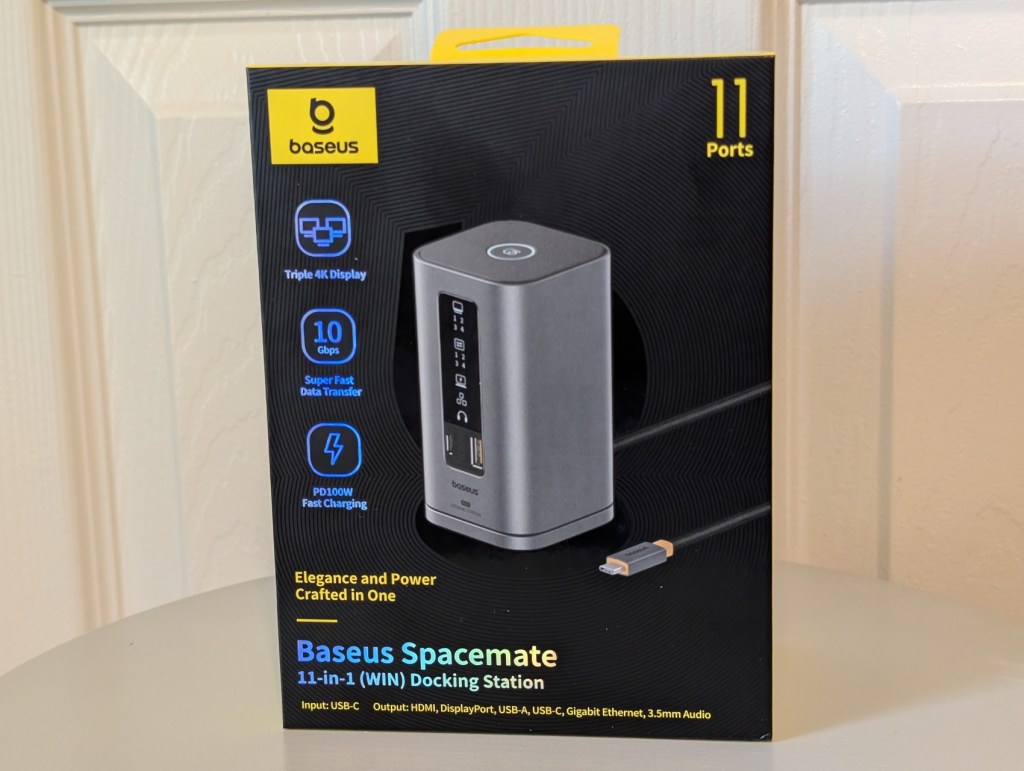
Baseus Spacemate 11-in-1 docking station for Windows displayed in packaging, showcasing features like triple 4K display, USB-C input, and multiple ports.

The first thing you’ll notice is these stations are all around the size of a Coke can, making them insanely tiny in comparison to other options on the market. There’s a front panel LED display that comes in handy to see how many ports and monitors are currently in use. There’s also a dedicated button on top of the station to lock your screens quickly if you need to leave your workstation in a public space.

But let’s be real, the star of the Baseus Spacemate for Windows is the 11 port selection for inputs and outputs. Here you have a full-featured USB-C 4 input that serves as the main connection to your PC. On the front you have a USB-C and USB-A port capable of 10Gbps transfer speeds. 
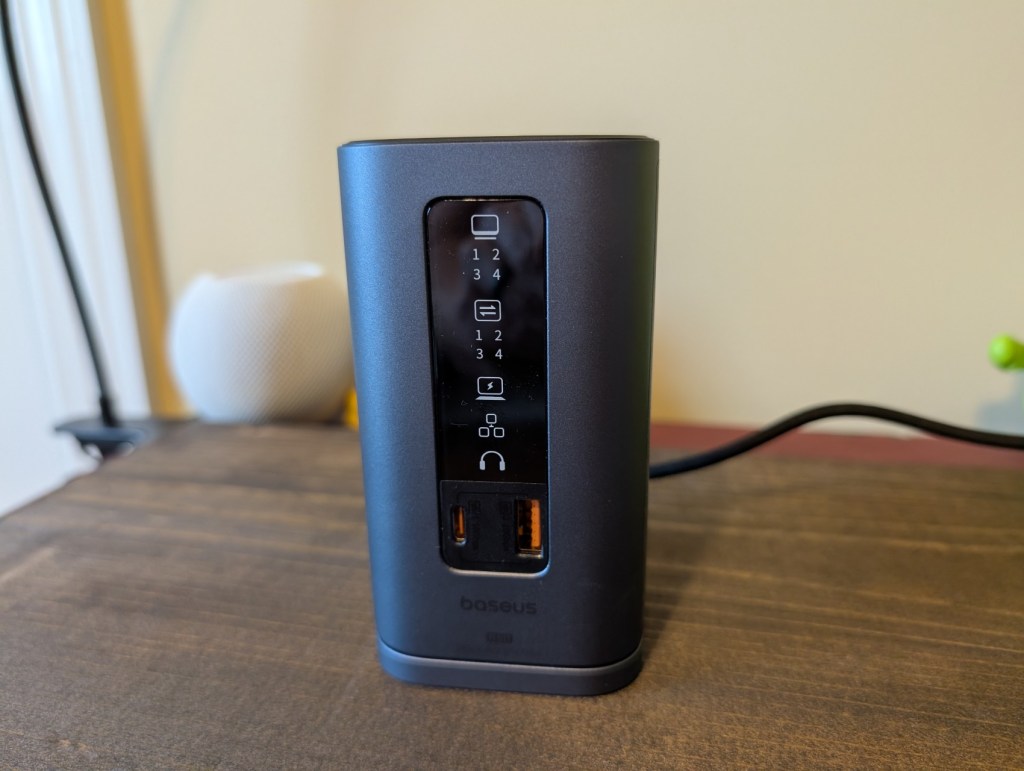
Close-up view of the Baseus Spacemate 11-in-1 Docking Station for Windows, showcasing the LED display and multiple ports.
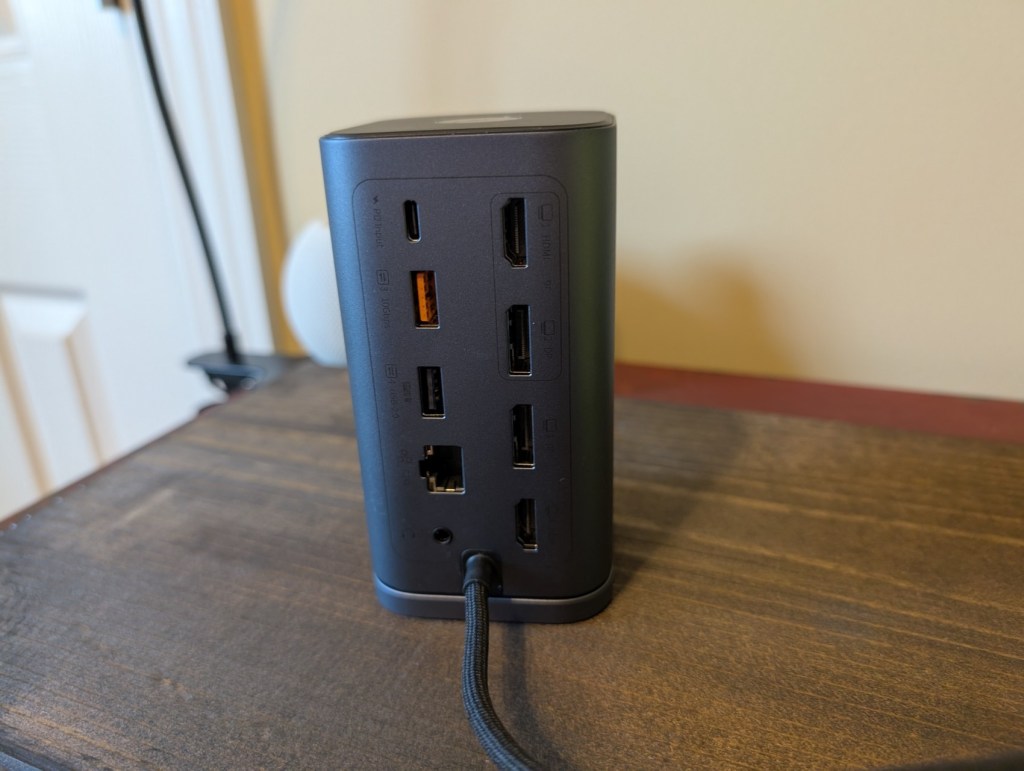
Rear view of the Baseus Spacemate docking station, showcasing multiple USB ports, HDMI connections, an Ethernet port, and a power input.

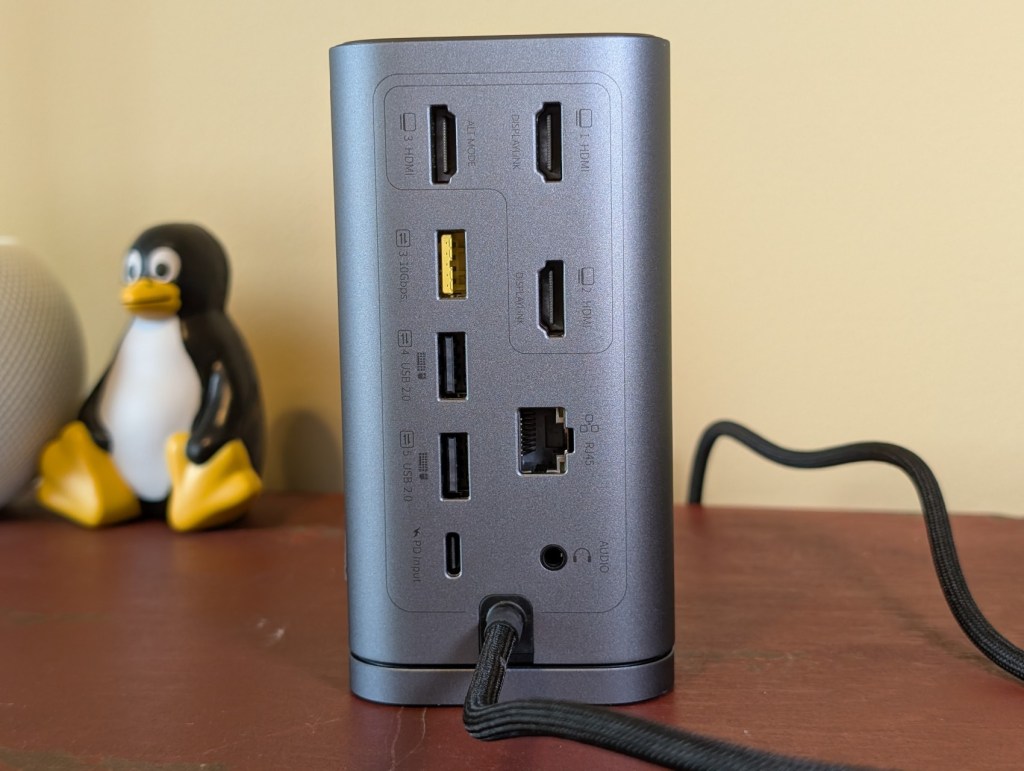
Around the back you have the power port that serves as the power adapter capable of up to 100 Watts of output, two HDMI, two DisplayPort, 1Gbps Ethernet, USB-A at 480Mbps transfer, USB-C at 10Gbps, and a 3.5mm audio jack. This should be more than enough options to support any work situation you could have in most desk layouts.

All this and for just $130 on Amazon, and you have a true powerhouse of a docking station capable of triple 4k monitors. 

Purchase the Baseus Spacemate 11-in-1 for Windows

Baseus Spacemate 11-in-1 Docking Station for Macs
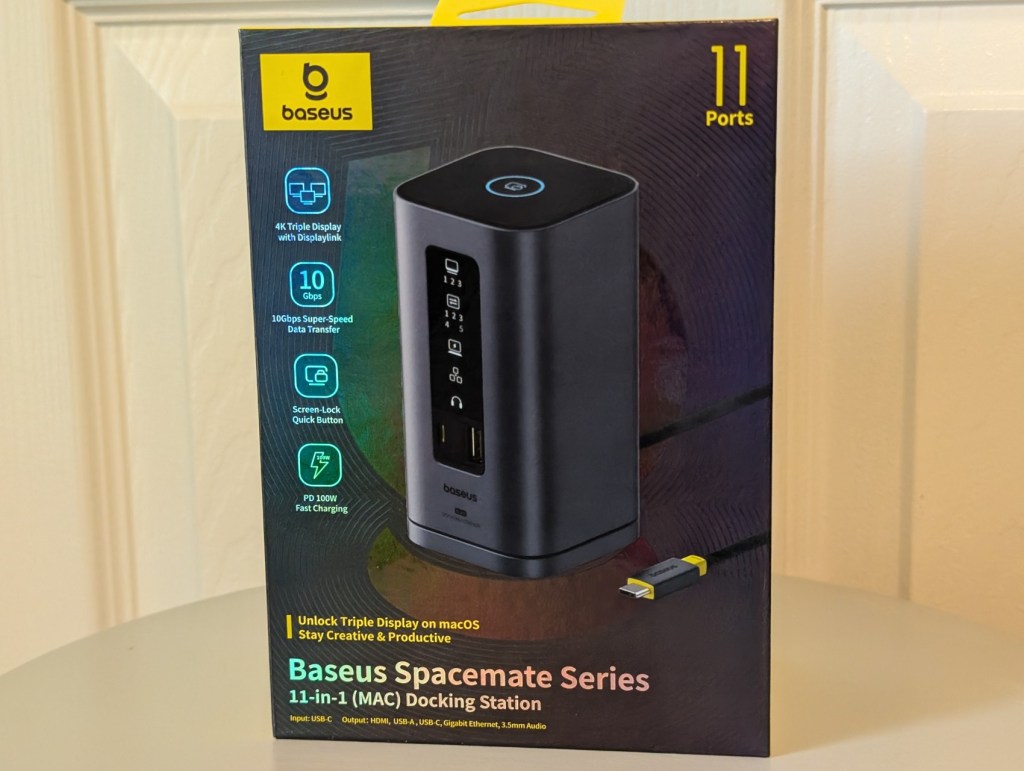
Baseus Spacemate 11-in-1 Docking Station for Mac packaging, featuring specifications and design details.

This will be a slightly shorter feature, as these siblings are very closely related. You have the same basic design, footprint, and front LED panels. You even have the same two USB-C and USB-A ports on the front. At first glance out of the box, you’d swear they are the same unit.

It’s when you get the back panel that the Mac specific details arise. See, Mac doesn’t play well with DisplayPort out over multiple monitors. Never has and apparently will never, even with the new M-series chipsets. To compensate, Baseus has removed these ports in favor of a third HDMI and an additional USB-A capable of 480Mbps transfers.
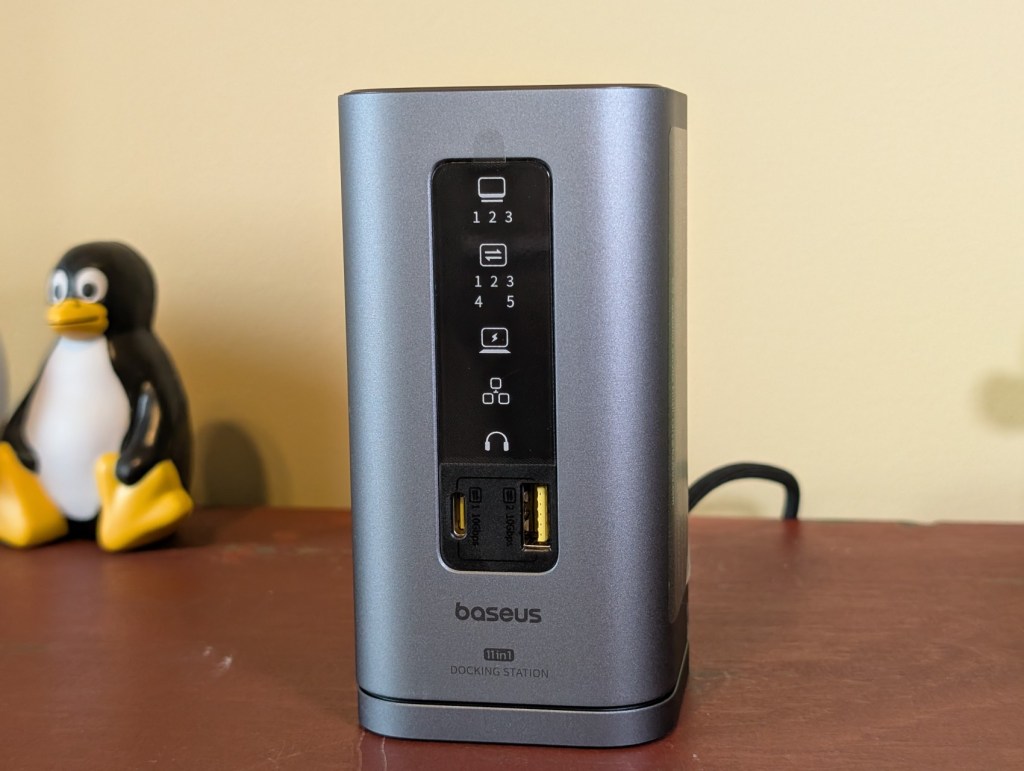
Baseus Spacemate 11-in-1 docking station for Windows featuring front panel LED display and various input/output ports, including USB-C and HDMI, on a desk.
Back view of a Baseus docking station showing multiple ports including HDMI, USB, and Ethernet connections.

The rest of the port offerings are the exact same on the Mac Spacemate: USB-C input of 100 Watts, USB-C 10Gbps, Ethernet, 3.5mm audio, and USB-C 4 to the PC. You’ll also pay a bit of a premium for the Mac edition at $200 retail, but for those that need it, the Baseus Spacemate offering the preferred Mac ports is a big selling point.

Purchase the Baseus Spacemate 11-in-1 Docking Station for Macs

Baseus Nomos NU1 Air Spacemate

Baseus Nomos NU1 Air Spacemate 12-in-1 docking station packaging showcasing its features including dual 4K display support and various port options.

Lastly, we have the smallest, and maybe my favorite, of the Baseus Spacemate family: the Nomos NU1 Air. This compact little docking station packs a punch with 12-in-1 port selections over USB-C 4. By removing the front LED display on the Air, you get a front output of full-sized SD card, microSD, USB-C 100Gbps, and USB-A 5Gbps.

Around the back you have the same integrated USB-C 4 input capable for your connection to a PC. Outputs are not lacking, but this one can only push dual 4k displays over the two HDMI ports. Other plugs include USB-C at 10Gbps, USB-A at 5Gbps, two USB-A at 480Mbps, and 1Gbps Ethernet.

Baseus Nomos NU1 Air docking station showing USB ports, SD card slots, and a compact design.
Close-up view of the back panel of a Baseus docking station, showcasing multiple USB, HDMI, and Ethernet ports, alongside a USB-C cable.

All this is packed into a tiny package and will only set you back $100 full retail for the Nomos Air Spacemate. This thing is a powder keg in a small can that’s well worth that price tag.

Purchase the Baseus Nomos NU1 Air Spacemate 

Tags: Baseus
Previous Post

Sound, Light, and Peace of Mind: This Weekend’s Worthwhile Upgrades

Next Post

Anker SOLIX F3000 Power Station Review

Andrew Allen

Andrew Allen

I'm a tech nerd and dog lover. I do enjoy CrossFit, but don't hold that against me. I've used most major mobile OS dating back to Symbian and was a huge webOS advocate. I've used Linux for over a decade. Long-time pitbull lover and a new Boston Terrier owner.

Related Posts

Compact Tech for Busy Days and Weekend Trips
Weekend Recommender

Compact Tech for Busy Days and Weekend Trips

August 1, 2026
Hands-On: Baseus Bowie MC2 Open-Ear Earbuds
News

Hands-On: Baseus Bowie MC2 Open-Ear Earbuds

June 11, 2026
Four Baseus Gadgets That Quietly Solved Everyday Charging Problems
News

Four Baseus Gadgets That Quietly Solved Everyday Charging Problems

March 27, 2026
Gift-Ready Gear: This Trio of Baseus Products Quietly Improve Daily Routines
Featured

Gift-Ready Gear: This Trio of Baseus Products Quietly Improve Daily Routines

December 15, 2025

Latest Reviews

Google Pixel 11 Pro Review
Featured

Google Pixel 11 Pro Review

by Scott Webster

Holding onto a smartphone for three, four, or five years is hardly unusual in 2026. Trade-in promotions and annual launch...

Read moreDetails
Nothing Phone (4b) Review
Phone Reviews

Nothing Phone (4b) Review

by Andrew Allen

Nothing recently released the Phone (4b) and it brings a unique flair to the budget market. This device serves as...

Read moreDetails
AmazFit Balance 3 Review
Featured

AmazFit Balance 3 Review

by Andrew Allen

The smartwatch market often forces you to choose between a stylish daily driver and a hardcore fitness tool. Most people...

Read moreDetails

Recent News

Keychron Launches V6 Ultra Hybrid With Magnetic, Mechanical Switches
News

Keychron Launches V6 Ultra Hybrid With Magnetic, Mechanical Switches

by Jude Chukwuemeka
August 20, 2026
Boulies Master Rex 2026: Upgraded Ergonomic Gaming Chair
News

Boulies Master Rex 2026: Upgraded Ergonomic Gaming Chair

by Jude Chukwuemeka
August 20, 2026
T-Mobile Student Perks Plans Start at $30 With Back-to-School Phone and Internet Deals
News

T-Mobile Student Perks Plans Start at $30 With Back-to-School Phone and Internet Deals

by Scott Webster
August 19, 2026
Fairphone Gen. 6+ Brings Repairable Android Phone to the US for $649
News

Fairphone Gen. 6+ Brings Repairable Android Phone to the US for $649

by Scott Webster
August 19, 2026
Google Pixel 11 Pro Review
Featured

Google Pixel 11 Pro Review

August 19, 2026

Recent Posts

  • Keychron Launches V6 Ultra Hybrid With Magnetic, Mechanical Switches
  • Boulies Master Rex 2026: Upgraded Ergonomic Gaming Chair
  • T-Mobile Student Perks Plans Start at $30 With Back-to-School Phone and Internet Deals
  • Fairphone Gen. 6+ Brings Repairable Android Phone to the US for $649
  • Google Pixel 11 Pro Review

Categories

  • Deals
  • Featured
    • Level-Up
    • Opinion
    • Weekend Recommender
  • News
  • Promoted News
  • Reviews
    • Accessory Reviews
    • App & Game Reviews
    • Audio Reviews
    • Phone Reviews
    • Smart Home Reviews
    • Tablet & Laptop Reviews
    • TV & Display Reviews
    • Wearable Reviews
  • The Best
  • Tips & Tools

Contact

  • Contact
  • About
  • Join Our Team
  • Promotional Opportunities
  • Awards
  • Promote Your Product
No Result
View All Result
  • Home
  • Featured
  • The Best
  • News
  • Reviews
    • Accessory Reviews
    • Audio Reviews
    • Phone Reviews
    • Smart Home Reviews
    • Tablet & Laptop Reviews
    • TV & Display Reviews
    • Wearable Reviews
  • Promoted