

In a world where family dynamics are as diverse as they are complex, Pinwheel has taken a significant step forward with the launch of its “Multiple Caregivers” feature. Designed to tackle the unique challenges faced by two-household families, this new feature promises to transform the way parents manage their children’s digital lives.
Addressing a Growing Need

Statistics reveal that over 36% of U.S. children under 15 are part of families with divorced or separated parents, often navigating life between two homes. This reality brings with it a host of challenges, particularly around managing technology usage. Disagreements over screen-time and app permissions can lead to stress and conflict. A survey of Pinwheel users highlighted that parents in separate households are twice as likely to experience disputes over their child’s phone use compared to those in a single household.
Pinwheel, renowned for its child-friendly smartphones and smartwatches, aims to alleviate these tensions with its new feature. The “Multiple Caregivers” option allows primary parents to tailor permissions for secondary caregivers, creating a flexible digital co-parenting system that caters to each family’s distinct needs.
Customizable Control for Families
Traditional parental controls often force divorced parents into rigid roles, either granting full control to one parent or sharing complete access, which can lead to conflicts. Issues such as one parent blocking the child’s contact with the other, or allowing unauthorized apps, are common. Pinwheel’s latest offering seeks to change this narrative by introducing a more nuanced approach.

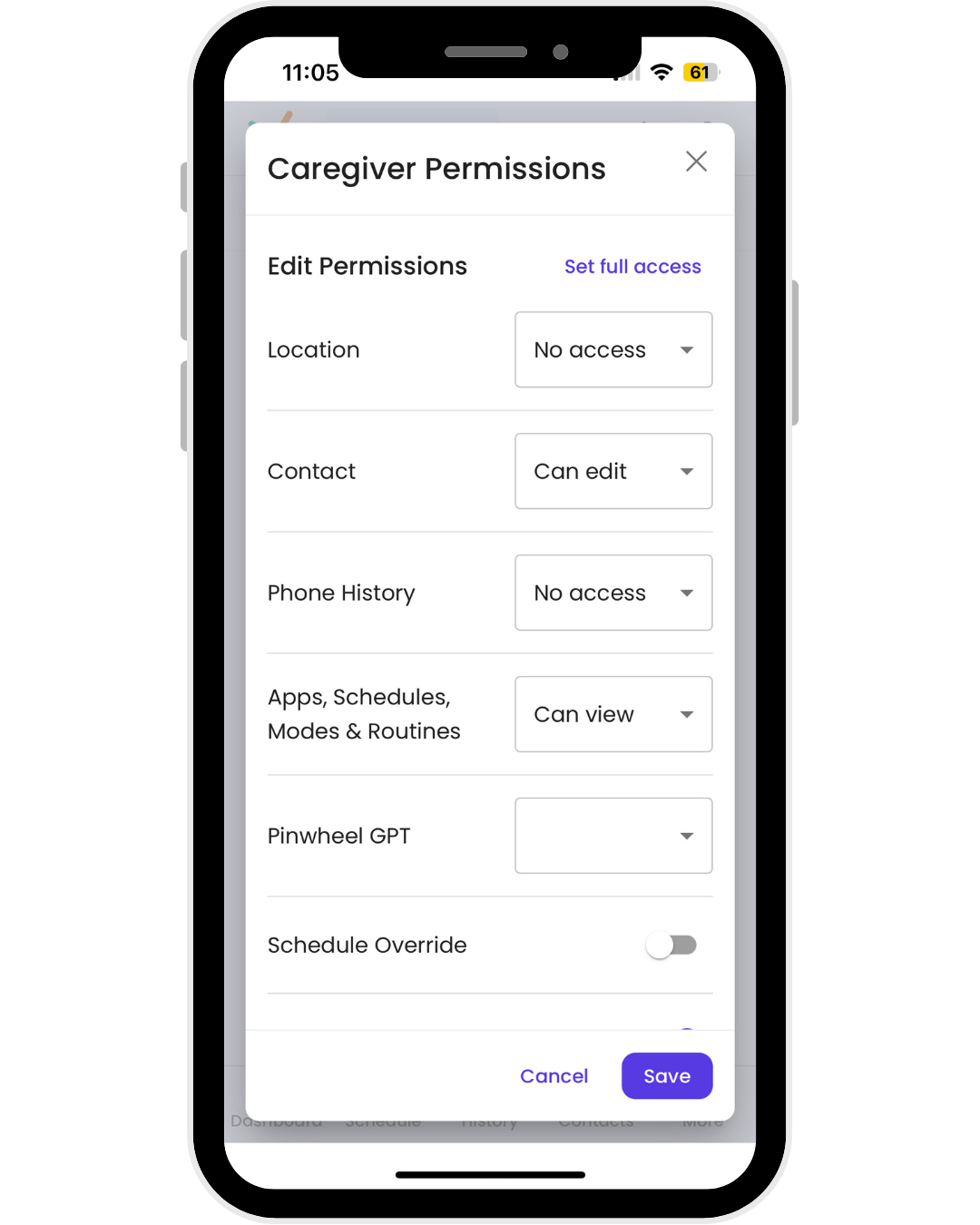
The “Multiple Caregivers Mode” provides three levels of access: Edit, View, or No Access. This flexibility allows for tailored permissions, such as enabling a secondary parent to approve contacts without reading text messages or set bedtime restrictions without tracking location. The ultimate goal is to give families the ability to implement whatever digital parenting strategy best suits their situation, whether that means different rules for each household or consistent guidelines across both.
Practical Features for Daily Use
The new feature allows access to be adjusted based on custody arrangements, providing practical solutions for common co-parenting scenarios:
- Contact Safelist: Secondary caregivers can be given the ability to add or edit contacts or simply view them.
- Apps: Permissions can range from downloading new apps to only viewing the existing app library.
- Schedules: Caregivers can create or edit schedules or override existing ones as necessary.
- Text Monitoring and GPS Tracking: Access can be granted or restricted, depending on the agreed-upon rules.
Dane Witbeck, CEO and Founder of Pinwheel, emphasizes the importance of this new feature, stating, “The typical cookie-cutter parent controls fail to adequately serve the reality of today’s families – a huge number of which have children splitting time between two homes. Pinwheel’s Multiple Caregivers feature adapts to any co-parenting situation and can help prevent conflict before it even starts.”
A Step Towards Harmonious Co-Parenting
With this new feature, Pinwheel aims to reduce the friction often associated with co-parenting in a digital age. By providing a customizable and adaptable tool, parents can focus more on their children’s well-being rather than getting caught up in technological disputes.
Pinwheel’s approach represents a thoughtful response to the evolving needs of modern families, helping to pave the way for more harmonious co-parenting relationships.


