

In today’s economy, savvy shopping is not just a skill—it’s a necessity. As prices continue to rise, finding ways to stretch your grocery budget while still filling your cart with nutritious and delicious items has become a challenge for many households. Fortunately, that phone in your pocket is here to help.
A number of compelling apps are available, each designed specifically to ease the burden on your wallet without compromising on the quality of your meals. From cashback deals and digital coupons to price comparison tools and personalized savings recommendations, these apps are transforming the way we shop for groceries.
In this roundup, we’ve sifted through the plethora of options to bring you the five best apps that promise to help you save money on your grocery bills. Whether you’re a busy parent looking to cut costs without cutting corners, a college student on a tight budget, or simply someone who loves a good deal, these apps offer innovative solutions to help you manage your shopping more effectively and economically.
Ibotta
Ibotta helps you to earn cash back from everything you buy whether in-store or online. Everything? Yes, because you never know what product is listed in the app. Ibotta makes it easy for buyers to save and earn from things like groceries, fashion products, tech gadgets, and more!
It’s available for Walmart, Starbucks, Lowe’s, Kohl’s and many more retailers.
Four ways to start earning
- First, add cash back offers: This means you have to check the app for available offers and add them. Don’t skip this step, as some of the things you believed won’t be on offers can actually be there.
- Next, proceed to shop: It don’t matter if you’re shopping at a bar, restaurant, or even with another app. Check to see if you could redeem offers.
- If there are offers, redeem them: Just upload your receipt or link your loyalty card for cash back.
- Cash Back: Last step is to do the actual step of getting cash back. You could do that through PayPal or through gift cards.
Do more, save with cash bonuses
There are several other things you can do to earn more with Ibotta app. You could refer your friends and get extra cash. Strive to reach shopping milestones as this can also mean more cash for you.
Did you know that you can really earn with this app as you engage on every shopping spree? Download the app now to begin. More than 10 million people are already on it. Use the app with ads but without paying a dime.
Ibotta is only available in the United States.
Get Ibotta app or visit the website
See Also: Essential kitchen tech and gear for the aspiring chef
Flipp
A first look makes the app appear to be available only for grocery deals. The good thing is, the app is known as an all-in-one savings app. Users love it because it shows weekly deals, organizes and highlights the best deals available.
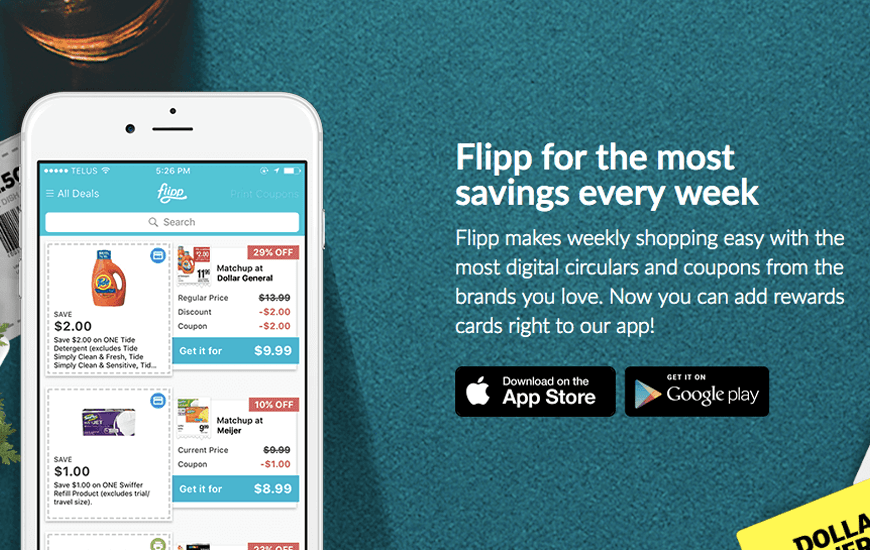
The three main things you could do with the app is finding the best deals, managing your grocery list, and saving money. Furthermore, you’ll be happy to know that you could explore deals from more than 2,000 stores such as Walmart, Dollar General, Walgreens, and others. Flipp is available in the United States and Canada.
Features of Flipp
- Quickly search for what you need: You’ll get savings and offers on pharmacy, electronics, pet supplies, and more.
- Find up-to-date local deals: Get to see local weekly coupons and ads on a timely basis.
- Organize your list by retailer: There’s hardly another way to get better at staying on top of tracking what you need weekly.
- Clip deals: That helps to keep them till you come back for them later.
- Keep track of your favorite stores: Add them to the favorites list so you can quickly find the best deals and coupons from them.
Flipp is free with ads, you don’t have to pay a dime. Would you love to know what deals you can get through the app?
Get Flipp app or visit the website
Flashfood

Flashfood may not be as popular as Ibotta or Flipp but it becomes indispensable when you need offers of things like fruit, vegetables, meat, fish, bread, and other types of groceries.
Once you download the app and enter your location, you get to find nearby grocery stores. Some of these stores offer you up to 50 percent savings on food nearing its best by date.
Salient features of Flashfood
- Browse groceries offering discounts nearby.
- Simply add items to cart and buy from your phone.
- Get to the Flashfood Zone at your local store to pick up your order.
Why Flashfood?
Grocers are partnering with Flashfood to reduce food waste. Furthermore, by using the app, you lend a helping hand in directly helping to reduce food waste in your locality. Thirty to forty percent of food in the U.S gets wasted, and when the food is sent to a landfill, it decomposes and emits dangerous gas.
If that’s not enough, think about getting a great meal at a killer price. Flashfood app is free to download and use. Visit the website to see the impact of the team behind the app. Flashfood is only available in North America.
Get Flashfood app or visit the website
Fetch
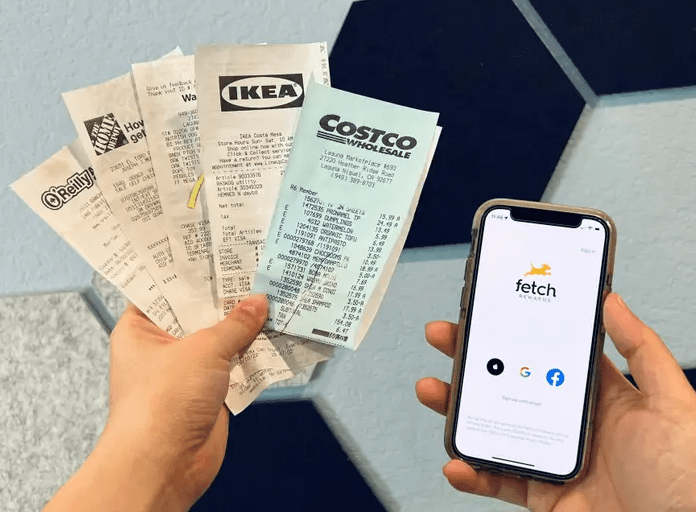
This app is popular among users. That’s probably because they can do more than just save on deals and offers. There’s opportunity to shop personalized offers or deals, to play free point games, and to connect with friends.
The Fetch team said that users will find something they love every day as they use the app.
Features of Fetch
- Rewarding new favorites: Always ensure you check out your app before you embark on shopping. You can discover rewarding new favorites. These are the offers that earn points fast.
- Choose from hundreds of rewards: The rewards include gift cards from Amazon, Apple, Walmart, and others. Turn Fetch points to merch or donate points to charities.
- Fetch with Friends: This enables you to save and compete with your friends. You can see what your friends are up to every month. There’s so much to go around friends on Fetch.
- Earn of every receipt: Imagine earning at least 25 points on every receipt you scan. Say goodbye to coupons and hello to rewards.
The good thing about Fetch is that your online (web) purchases count as well. All you have to do is submit your eReceipts to popular online retailers like Amazon, UberEats, Walmart, and others. Little wonder, Motley Fool calls Fetch #1 best cash back app for 2022. At this time, Fetch is only available in USA and Puerto Rico.
Get Fetch app or visit the website
Checkout 51
Checkout 51 promises to help you earn cash back on gas and groceries. At this time, over 5,000 stations are making the gas offers possible for users. Another spectacular aspect of the app is that it presents offers every week on everyday items.

Every week, you have the pleasure of redeeming coupons and deals from your favorite brands. Just a few taps can accomplish a lot. Members are earning cash back at gas stations like BP, Exxon, Shell, and more. Now is your time to combat the rising cost of living as it increases.
Here are four steps to explore in a bid to save and earn:
- You can shop for groceries, clothes, home goods.
- Add offer to your C51 list.
- Upload a photo of your purchase with Cashout 51 scanner.
- Earn cash rewards.
Checkout 51 is available only in the United States for now. New deals are available to members every week. The items can be found in stores near you. CleverRx has partnered with C51 to offer discounts on prescriptions. Also, users can complete surveys and earn extra cash doing so. Checkout 51 is free to download and use.
Get Cashout 51 app or visit the website
Final Thoughts
If you’ve tried some of the apps listed above, you must have noticed that they are simple, easy-to-use, free apps. Once downloaded, users basically have to browse and select offers, upload photos of receipts, and redeem them.
Also, note that the apps are free to use with ads. No subscription required whatsoever. However, their usage is restricted in terms of smartphone edition and the physical location of the users. The best of the best regarding all the apps is that you can save a ton of money while using them.


