Get ready to upgrade your cleaning game with YEEDI’s Prime Day discounts on their state-of-the-art robot vacuums. Known for their innovative and user-friendly cleaning solutions, YEEDI is offering substantial savings starting July 16, 2024, for a limited time. Here’s the lowdown on these must-have deals.
What’s on Offer?
YEEDI’s Prime Day lineup includes several advanced robot vacuums designed to make home cleaning a breeze:
YEEDI M12 PRO+: Originally priced at $1099, now available for $669. Save $430 on this top-tier model.
YEEDI C12 PRO PLUS: Originally $599, now $349. A $250 discount for deep-clean enthusiasts.
YEEDI C12 PLUS: Originally $479, now $329. Enjoy a $150 saving.
YEEDI C12: Originally $299, now $249. Save $50 on this efficient model.
Why YEEDI?
YEEDI’s robot vacuums come packed with features that make cleaning less of a chore and more of a convenience:
ZeroTangle Technology: This innovative feature ensures that hair and debris are effectively captured without clogging, thanks to a unique V-shaped roller brush and dual comb teeth arrays.
Truedge Adaptive Edge Mopping: The M12 PRO+ excels in reaching those pesky edges and corners with its adaptive edge mopping pads.
OZMO Mega Mopping System: The C12 PRO PLUS applies a powerful 6N downward pressure, offering superior dirt removal and more efficient cleaning cycles.
Auto-Empty Station: Equipped with PureCyclone Technology and a 4-Stage Filtration System, the C12 PRO PLUS and C12 PLUS ensure powerful dust collection and minimal maintenance.
Who Should Get One?
These robot vacuums are ideal for anyone looking to maintain a spotless home with minimal effort. Whether you’re a busy professional, a pet owner, or someone who simply appreciates cutting-edge technology, YEEDI’s range has something to suit your needs.
When Does the Deal End?
These Prime Day discounts are only available for a limited time starting July 16, 2024. Don’t miss out on the chance to snag one of these high-tech cleaning marvels at a fraction of the price.
Where to Learn More?
For more details and to shop the deals, head over to Amazon YEEDI Prime Day Discounts. Grab your preferred model before the sale ends and experience the future of home cleaning today.
Stay smart, shop smart, and let YEEDI’s robot vacuums do the dirty work for you.
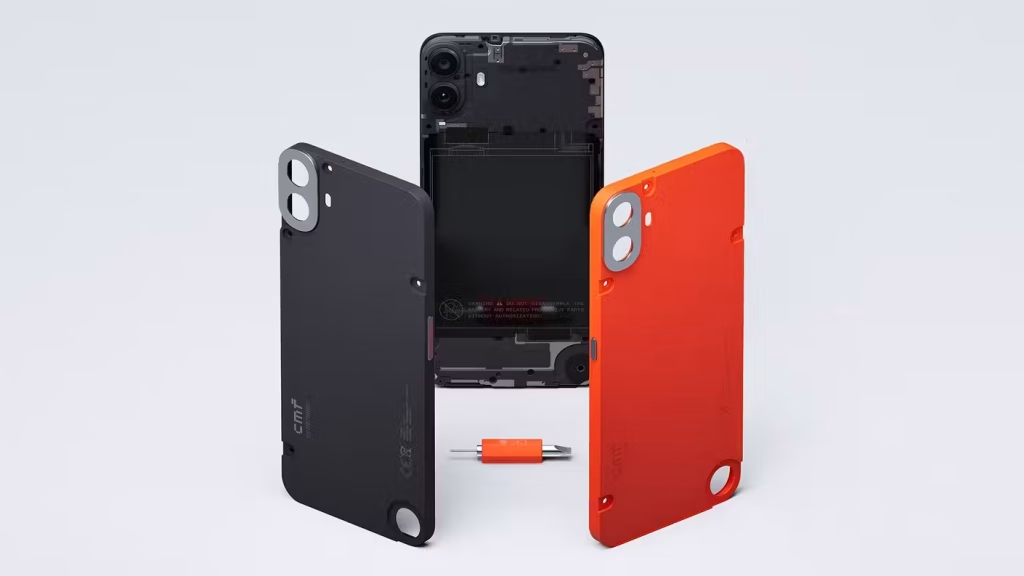
CMF, Nothing’s budget-conscious subbrand has introduced its first CMF Phone 1 smartphone in the global market. The Phone 1 comes with a new modular approach to phone customization. One of the main highlights of the Phone 1 is the replaceable back panel that lets you effortlessly swap it with a different one. Starting at just $199, making it Nothing’s most affordable smartphone.
The replaceable back panel isn’t the only thing you get in this modular budget smartphone, there’s also a round accessory port in the bottom-right corner of the phone which you can use it for a lanyard or a kickstand. All accessories such as a lanyard, a wallet, and a kickstand are sold separately for $25 each.
The CMF Phone 1 features a stunning 6.67-inch OLED panel with a 120Hz refresh rate, ensuring a smooth scrolling experience. For lenses, the device has a dual rear camera setup at the back consisting of a 50MP f/1.8 primary camera and a portrait sensor. There’s a 16MP shooter on the front for capturing stunning selfies and video chats.
Under the hood, the smartphone is powered by a MediaTek Dimensity 7300 chipset paired with 8GB of RAM and 128GB of internal storage. It houses a 5,000mAh battery with a 33W fast charging support. The device runs on Android 14 based on Nothing OS 2.6 out of the box. CMF also promises two major OS updates (up to Android 16) and three years of security patches.
CMF also launched a new Watch 2 Pro and CMF Buds Pro 2 alongside the Phone 1. The CMF Phone 1 retails at £209 in the UK and open sales will begin later this month. The replaceable back panel costs $35/£29 each and comes in Black, Green, Orange, and Blue color options.
Welcome to this week’s edition of the Weekend Recommender, where we’ve curated a collection of versatile, innovative, and reliable products that are sure to enhance your daily life.
From kitchen appliances to smart home security systems, high-tech soundbars, and powerful Bluetooth speakers, there’s something for everyone in this week’s roundup.
Whether you’re looking for convenience, entertainment, or peace of mind, these products have got you covered. So sit back, relax, and discover the latest must-have items that we’ve handpicked just for you.
TOSHIBA Rice Cooker
The Toshiba Rice Cooker is a multi-functional kitchen appliance that offers convenience and versatility. With 8 cooking functions, including options for different types of rice, slow cooking, making cakes, and more, this rice cooker can handle a variety of dishes with ease.
The fuzzy logic technology ensures perfectly cooked rice every time, without any manual adjustments needed. The intuitive control panel and accessories included make it easy to use, while the non-stick coating and removable parts make cleaning a breeze. In terms of safety features, this rice cooker has various safeguards to prevent accidents and overheating.
Additionally, the convenience of a detachable power cord and a delayed timer make it a hassle-free addition to your kitchen. The Toshiba Rice Cooker is a great option for individuals or families looking for a reliable and budget-friendly cooking appliance. $90
Midea Dual Basket Air Fryer Oven
The Midea Dual Basket Air Fryer Oven aims to change the air fryer game. With an innovative double-decker design, this air fryer boasts both an upper 6QT basket and a lower 5QT baking pan, giving you an impressive 11QT capacity without taking up much space in your kitchen. Whether you’re in the mood for fries, nuggets, pizza, or bread, this air fryer has got you covered.
This versatile appliance offers 8 preset menus, including air fry, grill, dehydrate, bake, roast, broil, reheat, and toast. Plus, with 3 heating tubes for precise temperature control and even cooking, you can be sure that every dish comes out perfectly. With its Wi-Fi connectivity and MSmart App, you can access 50+ recipes and monitor and control the cooking process from anywhere.
And with Smart Sync Finish tech, you can finish two different dishes at the same time, making mealtime a breeze. If you’re looking for an efficient and convenient way to cook, this air fryer is definitely worth considering. $250
Arlo Home Security System
The Arlo Home Security System is a versatile and comprehensive smart home security system designed for easy setup and maintenance, without requiring any contracts. With an all-in-one sensor that can detect motion, open and closed doors and windows, water leaks, temperature changes, and more, this award-winning system provides complete protection for your entire home. It also features 24/7 professional monitoring and one-tap emergency response.
The system includes a Keypad Sensor Hub for easy operation, stronger connectivity with SecureLink, built-in siren, and cellular and battery backup for uninterrupted protection even in the event of a power or Wi-Fi outage. With features like video verification, insurance savings, and faster emergency response when combined with professional monitoring, the Arlo Home Security System offers peace of mind and protection for your home. $200
BlueAnt Soundblade
The BlueAnt Soundblade is a powerful under monitor soundbar that delivers crystal clear audio and thundering bass, ideal for a wide range of digital media, including AI-generated content. Its stunning award-winning design, HD audio designed by studio engineers, and powerful 120W peak power output make this soundbar a game-changer for anyone seeking an enhanced gaming experience with heightened realism and auditory detail.
The sleek, low-profile form factor fits seamlessly under your existing monitor, creating a harmonious and unobtrusive addition to your workspace. The Soundblade also offers a mini-cinema experience for streaming movie enthusiasts, while its one-touch control on the unit and remote control make it easy to use.
With plug & play functionality, connectivity options including USB-C, Bluetooth 5.3, and AUX connectivity, and compatibility with PC, Mac, PS5, PS4™, and mobile phone USB-C audio support, the Soundblade is a versatile and advanced piece of technology for handling complex soundscapes in AI-generated media. $200
SOUNDBOKS Go
SOUNDBOKS Go may be your new favorite Bluetooth speaker; it’s one of ours, that’s for sure. Despite its relatively compact size, this speaker is full of power and surprises, delivering sound that goes beyond its dimensions.
Perfect for on-the-go adventures, the swappable battery provides up to 10 hours of playtime at full volume. Plus, the ability to connect with other SOUNDBOKS Go speakers means you can amplify your sound and customize your listening experience. The SOUNDBOKS app lets you fine-tune your sound profiles and access performance upgrades, making it truly futureproof.
Thanks to its durable and lightweight design, the SOUNDBOKS Go is dentproof, splashproof, and easy to carry around without the need for a backpack. With 72 watts of continuous power, a 10” woofer, and a 1” tweeter, this speaker delivers concert-level experiences wherever you are. Whether you’re headed to the beach, the park, or a weekend getaway, the SOUNDBOKS Go fits seamlessly into your lifestyle and ensures that your music never misses a beat. $200
Wireless speakers are a great way to add a bit of ambiance to any situation. Whether it’s upbeat tunes for a party or listening to a conference call, these are tools to have audio readily available. Tronsmart has been in this segment for several years now, and its latest offering, the Mirtune C2 wireless speaker may be small in size, but it produces a deceptively large presence.
Design
The basic cylinder look and feel isn’t groundbreaking, but it gets the job done. The industrial design of the Mirtune C2 is a mix of plastics and weather-treated fabrics. Around the front of the speaker, you have soft-touch rubber controls that are raised from the rest of the unit. This makes it easy to find and offers a great tactile click when pressing the options.
Each end of the Mirtune C2 houses small subwoofers and an LED light ring. The subs offer a punch of bass while the LEDs add a bit more flare to a room when playing audio. Internally, you get Bluetooth 5.4 and a battery pack capable of 24 hours of playback at around 50 percent volume.
Lastly, the Mirtune C2 is rate for full IPX7 water and dust resistance. This won’t make the speader fully submersible, but should make it hold up in most outdoor situations including a slight rain. Carrying the Mirtune C2 into almost any environment is possible.
Sound
I really like the sound of the Mirtune C2 for a compact-sized speaker. The mids and highs do a good job of staying clear even at loud volumes. Music and podcasts come through with a crisp listening experience. The bass is surprising as well. It’s not going to ever compete with the larger sibling from Tronsmart, but for the size and portable nature of the Mirtune C2, you get enough punch to fill a space with robust sound.
I’m also happy to see the LEDs and included controls on the outside of the Mirtune C2. The LEDs play along nicely with your playlists with a full spectrum of colors. The controls make for an easy way to manipulate playback when your connected device might not be readily within arms-length. It’s a little thing you see on most devices, but worth a mention either way.
Battery Life
As mentioned in the previous section, Tronsmart rates the maximum hours of usage at 24 hours for the Mirtune C2. The caveat is that this metric is while using the speaker at around 50 percent volume. I’ve found this to be fairly accurate. It’s hard to tell exactly where your volume output percentage is on some devices, but I completely a full work week of 8-hour days on a single charge with the Mirtune C2.
With my intermittent playback, I’d say the 24 hours is definitely achievable. You’d have to be throwing one hell of a party to need 24 hours of uninterrupted audio, but you can definitely make it happen in my eyes. When you need to top off the power banks, you can recharge with the included USB-C charging cable at 5 Volts.
Awarded to products with an average rating of 3.75 stars or higher, the AndroidGuys Smart Pick recognizes a balance of quality, performance, and value.
Products with this distinction deserve to be on your short list of purchase candidates.
Final Thoughts
Tronsmart is constantly challenging the balance of pricing versus quality of its wireless speaker lineup. The Mirtune C2, at just under $40, is a great option for those looking for satisfactory audio playback outdoors. The long battery life, decent sound, and LED lighting make it a perfect companion speaker around the pool or campsite.
You can snag the new Tronsmart Mirtune C2 directly from Tronsmart or the Amazon links below. The speaker is available in a single black colorway in the US region.
If you’ve been eyeing some state-of-the-art smart home appliances and innovative gadgets, then you are in for a treat. DREO, a go-to brand for top-notch smart home technology, and a favorite of ours, is in the midst of their Mid-Year Sale from June 26th to July 16th, offering unbeatable deals and dazzling new products that will make your home even more comfortable and convenient.
So, what’s up for grabs? DREO is giving fantastic discounts on their top-of-the-line products such as the ChefMaker combi-fryer, the CLF712S ceiling fan, and the HM524S humidifier. The ChefMaker is the world’s first combi-fryer, now featuring a new ‘Creative Cook’ mode that allows you to customize and share your very own cooking programs. And yes, you can save up to $140 on this kitchen wizard during the sale.
For those looking to beat the heat this summer, the CLF712S ceiling fan will be up for grabs with a $30 discount from June 29th to July 2nd. This sleek and powerful fan not only keeps your room breezy with its whisper-quiet operation and customizable lighting but also offers voice control through Alexa and Google Home. Plus, the HM524S humidifier is set to provide you with the best relief from dryness, and you can snag an early-bird discount of 15% from July 6th to 8th by subscribing with your email on dreo.com.
Sound good, right? So head on over to dreo.com, its Amazon store, or any of the major offline stores including Walmart, Target, Best Buy, and Kohl’s to browse through DREO’s Mid-Year Sale and score some revolutionary smart home tech at irresistible prices. But remember, this amazing promotion only lasts until July 16th, so don’t miss out on this golden opportunity to upgrade your home with cutting-edge products from DREO. Happy shopping!
Cambridge has launched its first over-ear headphones – the Melomania P100. The company’s latest premium P100 headphones feature hi-fi grade class AB amplification, and premium sound drivers to deliver truly emotive sound with clear crystal clear vocals and deep bass.
The headphones join the recently launched Melomania M100 true wireless earphones to form the new Melomania lineup. It features a massive 60-hour battery life with ANC on and up to 100 hours with ANC off, making it one of the longest-lasting headphones on the market. It also has fast charging support and offers two hours of playback with ANC on and 4 hours without ANC from a five-minute charge.
In terms of design, you get memory foam earpads covered in premium faux leather, offering an ultra-comfortable fit with ideal clamping force to suit the largest variety of head sizes. The headphones are made up of 50% recycled plastic, and the packaging is 100% recyclable plastic-free.
Cambridge packed a custom 40mm premium three-layer composite driver with neodymium magnets and Cambridge’s highly acclaimed CX series hi-fi amplifiers into the Melomania P100 headphones, producing incredible sound quality with deep controlled bass, realistic vocals, and beautiful treble clarity.
The P100 has Qualcomm’s Snapdragon Sound with aptX Lossless wireless technology, enabling wireless playback in CD quality with no lossy compression. The headphones are equipped with advanced Active Noise Cancellation (ANC) tech which offers three different user-selectable settings for an immersive listening experience while removing background noises.
Cambridge offers a dedicated Melomania Connect companion app that lets you customize the audio to your taste. There’s a seven-band EQ to tweak the sonics and six presets for different music genres. The headphones have gaming mode support, ensuring near-perfect audio/video sync, with latency reduced to 80ms.
Cambridge Melomania P100 headphones retail at £229/€279/$279 and are available in white and black color options. Open sales will begin from July 2024 onwards through Cambridge Audio’s official website and Amazon.
Handheld gaming PCs have begun to take off after the overwhelming success of the Steam Deck. While there are a few on the market from Chinese vendors, the latest have come from well-known PC makers such as Asus.
Thankfully, the brand was nice enough to lend us one for a review, and here’s my experience after spending the past few months using the Asus ROG Ally.
Key specs
Display: 7-inch 1920 x 1080 120Hz LCD touchscreen with 500 nits brightness
CPU: AMD Ryzen™ Z1 Extreme Processor (“Zen4” architecture with 4nm process, 8-core /16-threads, 24MB total cache, up to 5.10 Ghz boost)
GPU: AMD Radeon™ Graphics (AMD RDNA™ 3, 12 CUs, up to 2.7 GHz, up to 8.6 Teraflops)
Memory: 16GB LPDDR5 (6400MT/s dual channel)
Storage: 512GB PCIe® 4.0 NVMe™ M.2 SSD (2230)
Battery: 40WHrs, 4S1P, 4-cell Li-ion
Ports: 1 3.5mm Combo Audio Jack; 1 ROG XG Mobile Interface; 1 USB Type-C combo port (with USB 3.2 Gen2 support DisplayPort™ 1.4); 1 UHS-II microSD card reader (supports SD, SDXC and SDHC)
The Asus ROG Ally has a lot going for it. It’s one of the most compact PC gaming handhelds on the market with a large, bright, and vibrant 7-inch display. Compared to a couple of other handhelds I’ve used, it was a pleasant surprise at how beautiful the display is on the ROG Ally. The front-facing speakers were also welcomed and provided a wonderfully immersive experience while gaming.
Furthermore, the ROG Ally feels great in the hand. It’s not too heavy or large, but it’s still thick enough to provide a nice grip while maintaining a small footprint. The face buttons, trigger buttons, and analog sticks all performed perfectly. My only nitpick is that I wish Asus would have gone with Hall effect sensors to prevent the likelihood of stick drift in the future.
You are a little limited port-wise. There is only one USB Type-C port, but that’s not uncommon for handheld PCs, which is why a dock really comes in handy. At least there is a 3.5mm audio jack and the ROG XG Mobile Interface for the addition of an external GPU.
The power button houses a fingerprint sensor that works well and never gave me any issues. It made logging into Windows quick and convenient so I could get back to gaming as soon as possible.
While the ROG Ally comes with a beefy 512GB drive, tech-savvy users will be pleased to know that replacing the drive is an easy task. There are six Philips screws on the back, making it simple to open up and swap out the drive. This also allows quick access for repairing or replacing other parts.
Setup
The Asus ROG Ally runs Windows 11 making it stand out from its biggest competition, the Steam Deck, which runs Steam OS based on Linux. The reason this is important is because that means the ROG Ally runs games natively, while the Steam Deck needs to run them through an emulation layer.
To put it simply, the ROG Ally is able to essentially run almost any game that is compatible with Windows, while the Steam Deck can run most games through software emulation, but not all. That is why you’ll often hear of games getting Steam Deck verified, while the ROG Ally doesn’t need games to be verified. If it runs on Windows, it’ll most likely run on the ROG Ally.
Running Windows has its benefits, but it also has drawbacks. Windows is not built to be used on handheld devices with a controller, nor is it 100% touchscreen optimized. There are several occasions where having a mouse and keyboard will be beneficial when using the ROG Ally, especially during the initial setup.
I found it much easier to set up my Windows login, download all of the game launchers I required, log into them, and start downloading and installing all of my games with a mouse and keyboard. It would still be possible with the touchscreen alone, but far more tedious. It’s better to put the ROG Ally on the included stand, connect a wireless mouse and keyboard, and get everything ready to go before switching over into handheld mode.
Plus, you’re going to need to install all of the Windows updates, Asus firmware updates, and go through several restarts before you can start gaming anyway. Might as well put it on the stand, plug it in, and get settled in while getting it set up. A third-party dock comes in really handy for this since you’ll be able to charge and connect other accessories at the same time given that the ROG Ally only has one USB Type-C port.
User experience
Navigating around the Windows desktop on the ROG Ally is made simpler by using the right analog stick to move the pointer and the left analog stick to scroll up or down. The right bumper simulates a left mouse click, while the right trigger simulates a right mouse click. This will help you easily traverse the desktop and the on-screen keyboard will automatically pop up in many cases when needed, or it can be opened manually with the command center.
The command center will become an essential part of your ROG Ally experience. It gives you quick access to many convenient shortcuts that can be customized and rearranged, such as an end task button, overlay controls, brightness controls, power menu, performance settings, and much more.
Bonus tip, long pressing the command center button will bring up the ctrl+shift+del menu. There are several other shortcuts that will come in handy while using the ROG Ally. However, it is much easier to do the initial setup using a mouse and keyboard as I recommended above.
Once you’ve got all the updates and your games installed, you’re pretty much ready to switch over into handheld mode full-time. Asus tries to make this as user-friendly as possible with the Armoury Crate front end. Overall, it does a great job of making the ROG Ally feel more like a gaming handheld than a Windows PC, and it makes it far easier to use with a gamepad.
From the Armoury Crate software, you can install game stores, add shortcuts for installed games, launch games, adjust performance settings, customize the audio and video settings, control the RGB lighting around the joysticks, calibrate the controller, and more.
Asus has created an impressive piece of software here to help bridge the gap between Windows PC and gaming handheld. Regardless, the ROG Ally is not a gaming handheld with a dedicated OS like the Steam Deck. That means it can be cumbersome to hop back and forth between Armoury Crate and Windows while you try to manage all of the constant Windows updates or for when you need to tweak settings.
On the flip side, users who are comfortable using Windows will enjoy the flexibility of having full access to the OS with the ability to change settings or run it like a desktop PC when docked. In regards to docking the ROG Ally, I experienced some trouble connecting an external controller and navigating around at times. I had to ensure that I disabled the built-in controller and had Steam Big Picture mode opened for the external gamepad to work, even when it wasn’t a Steam game. Basically, it works, but it’s not as simple as docking and connecting a controller and can be a bit of a hassle.
I also have bad news for those of you who planned on relying on the microSD card slot to expand the included 512GB of native storage. There have been many reports of the SD card slot failing. It is believed this is due to heat, and in response, Asus has increased the fan speed with an update along with offering to fix the hardware without charge for those who are affected. Supposedly, the latest models have some shielding that should help prevent this from happening, but I’d still advise caution when using the microSD card slot. I used it a handful of times without issue during my review, and thankfully, 512GB of internal storage holds enough games to keep me happy when I’m offline. Still, it’s important to inform potential buyers of any common flaws when making your purchasing decision.
Performance
The performance of the Asus ROG Ally will greatly depend on the graphics settings and resolution you choose. I found the ROG Ally was perfectly capable of running games like Assassin’s Creed Odyssey or Death Stranding at 1080p with most settings at high with FPS while plugged in. Both of these games are a few years old but it shows that the hardware is capable of running Triple-A games with acceptable frame rates and high graphics settings when maxed out.
However, the tradeoff is that the fan will run at max speed and be extremely audible the entire time. It would also result in battery life that will limit your gaming time to 30 minutes or less if you unplug the ROG Ally.
Instead, I suspect many users will opt to strike a balance between performance and power draw. At least, that’s what I did. Most of the time, I would run the ROG Ally at 900p instead of 1080p, and drop the graphics settings down to medium or low. The graphics didn’t look stunning, but it was good enough on a 7-inch display and gave me much more time to enjoy my games.
If you’re choosing to run docked instead, then feel free to crank the settings up and push the ROG Ally. It won’t give you great performance for modern Triple-A titles, but running them at 1080p at 30FPS with a mix of medium to high settings should be feasible. Even 60FPS should be achievable, but you’re going to have to spend more time adjusting various graphics settings.
Battery life
The battery life is not one of the ROG Ally’s biggest strengths. In my testing, I found that you’ll usually get close to 90 minutes of consecutive playing time when running Triple-A games at 15W with low graphics settings. That’s not a whole lot if you mainly play big-hit games.
However, this can be increased to nearly 150 minutes when playing smaller indie titles at 10W with graphic’s settings set to low. Making the ROG Ally much more friendly for indie gaming.
I also tested the ROG Ally with cloud gaming, and when using services such as Xbox Game Pass or one of my current favorites, NVIDIA’s GeForce NOW, you can squeeze almost 240 minutes or four hours out of the battery. This should be no surprise given that all the processing is happening in the cloud and that allows for much longer play sessions while running games at higher graphics settings.
One thing is for certain, you’re going to want an external battery pack if you plan to play on the go. Something such as this Anker power bank will work perfectly or the Shargeek Storm2 that I previously reviewed for the site. These both pack a lot of power with enough output to charge while you play.
Final thoughts
PC-based gaming handhelds are still in their infancy. This first generation from major players shows a lot of promise though. The Asus ROG Ally, in particular, is a capable Windows-based gaming handheld that has only gotten better over the past few months thanks to software updates. During that time, Asus has increased performance, fixed bugs, and added additional features—which shows that it is committed to supporting the device over time and improving the experience.
Should you buy the Asus ROG Ally? It’s difficult to compete against the refreshed Steam Deck OLED handheld, but the ROG Ally still manages to stand out in some key ways. It runs Windows for users who prefer a Windows-based OS or want to use it as a Windows PC when docked.
Additionally, the ROG Ally is more compact, weighs less, and supports an external GPU for increased performance while docked. Besides the microSD card flaw, I’d say there’s still some compelling reasons to pick up the ROG Ally, and I’ve personally enjoyed my time with it.
REDMAGIC, a leading name in gaming technology, has introduced its latest flagship gaming phone series: the REDMAGIC 9 Pro. This includes the REDMAGIC 9S Pro and the REDMAGIC 9S Pro+. Both models feature the Snapdragon 8 Gen 3 processor and offer storage options up to 24GB of RAM and 1TB. They come equipped with UFS 4.0 + LPDDR5X for fast and efficient performance.
These phones feature a full display without camera bumps, enhanced gaming space with Mora, and new gaming features. Key specs include a 6500mAh battery, 80W quick charging, 520Hz shoulder triggers, and customizable RGB lighting. The REDMAGIC 9S Pro has achieved the highest AnTuTu score ever for an Android device, scoring over 23 million.
REDMAGIC also introduced the Titan 16 Pro gaming laptop, powered by an Intel Core i9 processor and advanced NVIDIA graphics. This laptop is available with either the GeForce RTX 4060 or RTX 4070 graphics card and boasts a durable all-metal design made from aviation-grade aluminum alloy. The Titan 16 Pro features the REDMAGIC Gaming Space, an 80Wh battery, and 10W fast charging.
Powerful Performance
The REDMAGIC 9 Pro series, with its Snapdragon 8 Gen 3 processor, offers up to 24GB of RAM and 1TB of storage. It includes a 120Hz refresh rate display, customizable RGB lighting, and 520Hz shoulder triggers. The 6500mAh battery ensures long-lasting power, and the triple-camera setup on a flat rear panel makes it a strong choice for gamers.
The REDMAGIC Titan 16 Pro gaming laptop is equipped with an Intel Core i9 and RTX 4060 or 4070 graphics, ensuring top-tier gaming visuals and smooth gameplay. It supports up to 96GB of high-speed memory and features a 1TB SSD for quick file access, with an option for storage upgrades up to 8TB.
Design and Durability
The REDMAGIC 9S Pro and 9S Pro+ come in four designs: Dark Knight, Transparent Silver Deuterium, Transparent Dark Knight, and White Knight. The flat front and back provide a comfortable grip and viewing experience.
The REDMAGIC Titan 16 Pro features a full metal body with a ceramic sandblasted surface and anti-fouling UV coating. It includes dust-proof internal components and a REDMAGIC lighting logo, and it’s available in Glacier and Dark Knight iterations.
Cooling Systems
The REDMAGIC 9S Pro series includes the ICE 13.5 cooling system, with a 10182mm² single-layer vapor chamber plate and frost cooling gel, reducing the core temperature significantly. The high-speed turbofan operates silently at 4dB.
The Titan 16 Pro features the Magic Cooling system with a dual-fan design and high-specification composite heat pipes. This system effectively conducts heat away, ensuring optimal performance during intense gaming sessions.
Impressive Displays
The REDMAGIC 9 Pro series has a 6.8-inch FHD+ display with BOE Q9+ technology, a 50MP rear camera with optical image stabilization, and a 16MP front camera. It also includes custom RGB lights and an eye protection solution.
The Titan 16 Pro laptop offers a 16-inch 2.5K display with a 16:10 aspect ratio, 500 nits brightness, 100% DCI-P3 color space, 240Hz refresh rate, and G-Sync support, making it ideal for gaming.
Gaming Features
The REDMAGIC 9 Pro series has an upgraded Game Space with new AI features powered by the REDMAGIC 9.5 operating system. These include Smart Navigator Gaming, AI Trigger, Sound Recognition technology, and REDMAGIC Moments for capturing in-game highlights.
The Titan 16 Pro’s Game Space offers performance tuning, peripheral configuration, device lighting synchronization, and independent graphics switching for the best gaming experience.
Availability and Pricing
The REDMAGIC 9S Pro and 9S Pro+ will be available globally starting July 16, 2024, at redmagic.gg. The Titan 16 Pro gaming laptop will be available in the fourth quarter of 2024.
In China, the REDMAGIC 9S Pro and 9S Pro+ will be available from July 9, 2024, with prices starting at 4799 RMB for the base model. The Titan 16 Pro Dark Knight will be available from July 9, 2024, starting at 10499 RMB, and the Glacier edition will follow in late July.
For more details and to purchase, visit redmagic.gg.
The HiDock H1 audio dock, powered by ChatGPT, is set to enhance productivity and streamline communications. This compact, 11-in-1 audio dock offers lifetime free AI transcription, making it an invaluable tool for recording, transcribing, and summarizing calls, thus saving significant time and effort.
Priced at $299/£235, with a current discount knocking some $89/£69 off of the cost, the HiDock H1 is available on The HiDock website.
This device goes beyond being a mere speaker system. It functions as an intelligent work companion, transforming conversations into structured transcriptions and capturing ideas, taking notes, and summarizing details from any audio source using advanced AI technology.
One of the standout features of the HiDock H1 is its AI-powered transcription and summary capability. By integrating ChatGPT technology, users can highlight key conversations at the press of a button, and the proprietary HiNotes software will handle the transcription and summarization. This allows users to stay focused on meetings and calls without missing crucial information.
The HiDock H1 also boasts Bidirectional Noise Cancellation (BNC), which minimizes distracting noise from both ends of a conversation. This technology is a significant improvement over standard Active Noise Cancellation, ensuring perfect conversation clarity for both parties.
Features Snapshot:
11-in-1 Future Proof Docking Station
100% Auto: Record->Transcribe->Summary
GPT-4o Powered AI Meeting Summary
World 1st Bi-Directional Noise Cancellation
Power Station with 118W PD Fast Charging
Free Companion App and OTA Supported
Beyond the conference room, the HiDock H1’s Bluetooth 5.2 capabilities enable seamless connection to smartphones for recording phone conversations, podcasts, and other online audio.
To keep workspaces tidy, the HiDock H1 functions as an 11-in-1 docking station with multiple USB-C ports, two HDMI ports, an Ethernet port, and two SD Card readers. This ensures that all essential devices are connected and ready to use, streamlining productivity. An optional earphone add-on, connecting via a proprietary protocol, enhances call security and privacy, making it possible to take breaks during long meetings without compromising privacy.
The HiDock H1 sets a new standard as a versatile, next-generation productivity assistant, designed to streamline workflow and boost efficiency. Its user-friendly ergonomic design and ChatGPT integration make it an essential tool for any audio task.
The HiDock H1 is available to purchase for $299/£235 on the HiDock website.
OpenRock a well-known professional sports headphones brand has launched its new open-ear earbuds called OpenRock X. The earbuds are specially designed for the outdoor enthusiast to elevate the open-ear audio experience. OpenRock X has a super lightweight ergonomic design with a custom dual-center biaxial joint for seamless angle adjustments, ensuring a perfect fit for different ear sizes.
The slender ear hook design perfectly balances the earbuds’ weight while ensuring a stable and comfortable fit and preventing the earbuds from falling, no matter the intensity of the workout. OpenRock claims 12 hours of battery life on a single charge for the X, and 48 hours with the case. It also has quick charging support, 5 minutes of charging offers 1 hour of playtime.
OpenRock X is equipped with a new BassDirect technology which ensures clear, and deep bass. It has a 14.2mm custom dynamic sound driver with an LISO 2.0 algorithm that further enhances audio details and delivers an immersive listening experience with powerful bass. OpenRock incorporated four high-quality microphones with advanced AI noise cancellation tech into the X earbuds, ensuring a crystal clear calling experience even on windy days.
It has an antiseptic layer on top that prevents bacteria and ensures on-ear hygiene and healthy listening. The earbuds have an automatic volume control feature that adjusts to surroundings and offers balanced sound levels while protecting your hearing with limited high frequencies.
OpenRock also offers a dedicated companion app for the X earbuds. The OpenRock companion app lets you customize EQ settings and choose from three specialized sound modes – Rock, Boom, and Relax. Additionally, you get an IPX5 water and sweat resistance that protects the earbuds from sweat and water splashes.
OpenRock X retails at $179.99 and comes in Gold White and Black color options. The X earbuds are now available for purchase via OpenRock’s official store and Amazon US.