

The playlist that works at your desk can disappear beneath traffic on the way home. Later, you might want an album to fill the living room instead of keeping it inside a pair of headphones. Your Android phone can supply the music in all three situations, but the equipment around it has different jobs.
These three options illustrate how to choose an upgrade around the place you listen: the Baseus Bowie MC2 for an open-ear desk setup, Bose QuietComfort Headphones (2nd Gen) for noise control, and the MIXX Revival 65 for a first vinyl system. The observations below draw on TunedRoom‘s published reviews, with the limitations kept alongside the strengths.
Baseus Bowie MC2 for a desk where you want to hear the room
Open-ear earbuds make sense when you want a soundtrack without shutting out a colleague, a doorbell or someone speaking from a nearby doorway. The Bowie MC2 uses a clip-on design with its speaker outside the ear canal. There is no sealed tip to insert.
The Baseus Bowie MC2 review found that positioning mattered: moving the speaker closer to the canal entrance improved the bass. It also reported reliable switching between a connected phone and laptop, a useful detail for anyone moving between music and desk work.
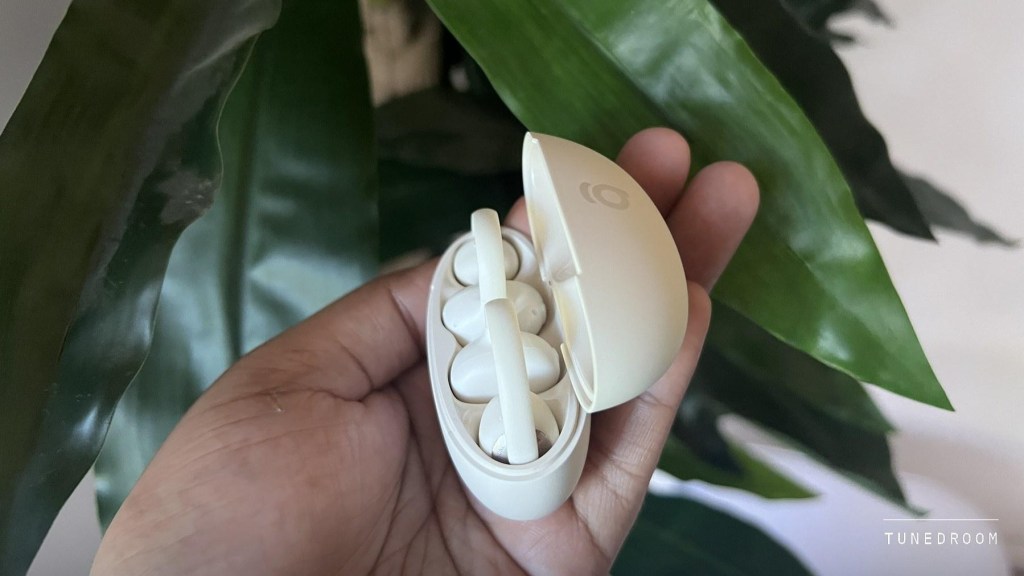
The limitation is the room itself. In the review, traffic and wind overwhelmed the music, while pushing the earbuds near maximum volume made their sound less composed. That makes them a better candidate for a relatively quiet home or workspace than a noisy commute.
Check the fit before reaching for more volume, and keep playback low enough for the conversations you want to hear. If you share a quiet desk, ask whether someone nearby can hear your music. An open ear does not guarantee privacy or awareness at every volume.
Bose QuietComfort Headphones for the noisy part of the day
When background noise is the problem, an over-ear seal and active noise cancellation serve a different purpose. The second-generation QuietComfort Headphones are worth considering for travel or a busy workspace where you want less of the surrounding sound.
TunedRoom’s Bose QuietComfort 2nd Gen review reported effective cancellation in moving traffic, comfortable extended wear and dependable switching between a phone and laptop. Those are practical advantages if your listening day includes both a commute and time at a computer.
There is also a useful wired option. Bose’s official announcement confirms USB-C audio supporting lossless playback up to 24-bit/48 kHz, alongside Google Fast Pair for Android and Bluetooth multipoint. USB-C can be convenient at a desk, particularly when you want to listen while charging. Lossless support alone does not establish how noticeable a difference will be with your music.
Try the fit with your usual glasses and check whether the cups stay comfortable after more than a few minutes. For video, test the connection with your actual phone or laptop. The review did not test direct television pairing, so its video observations should not be treated as a guarantee for every TV.
MIXX Revival 65 for albums away from your phone screen
A turntable changes how you listen as much as what you hear. Choosing a record and playing a side gives you a reason to stay with an album. The Revival 65 combines that experience with built-in speakers, Bluetooth input from a phone and several ways to send the record’s audio elsewhere.
The MIXX Revival 65 review identified its Audio-Technica cartridge, replaceable stylus and RCA line output as the reasons to consider it. The built-in speakers suited casual listening in a small room, but their bass remained modest and the sound thinned when pushed.
Bluetooth needs a closer look here. The review found phone-to-player streaming reliable and successfully used wireless headphones for records. However, the tested Bluetooth speaker and soundbars connected without producing audio. That is a specific compatibility finding, rather than proof that every wireless speaker will fail, but it matters if wireless room playback is your main plan.
For that setup, choose speakers with a suitable analog input and plan around the RCA cable. A Bluetooth label on both products does not establish that the combination will work as expected.
Give the turntable a sensible speaker upgrade
External speakers are a practical next step when the Revival 65’s built-in pair starts to feel limiting. Its RCA jacks already carry a line-level signal from an internal phono preamp.
Connect that output to the line input on powered speakers, or to an amplifier’s Aux or CD input. Passive speakers need an amplifier between them and the player. Avoid the amplifier’s Phono input here, because it is intended for a signal that still needs phono amplification.
TunedRoom’s guide to connecting a turntable to speakers explains these routes for different equipment combinations. Check the input labels before buying cables, and keep separate speakers off the turntable’s supporting surface where possible to reduce vibration reaching the stylus. Start with the connections and the room before buying another component.
Check the Android features you will actually use
For headphones, make a short checklist: pairing, controls, calls, app access and switching to a second device. Fast Pair makes initial setup simpler on supported combinations; multipoint addresses a different need, keeping two devices connected. One feature does not substitute for the other.
AndroidGuys’ Soundcore AeroFit 2 Pro review explores another approach: earbuds with open-ear and noise-canceling positions. Its reviewer found the open-ear fit less successful for his ears, a useful reminder to check comfort and positioning even when a design offers both formats.
Check the exact product model and the connection you intend to use. USB-C charging does not, by itself, mean a headset accepts audio through that port. Likewise, a turntable receiving music from your phone is doing a different job from transmitting a record to wireless headphones. Reading those details prevents an appealing feature list from becoming a setup problem.
Keep background noise from becoming a volume contest
The World Health Organization’s safe-listening guidance recommends keeping volume down, taking breaks and using well-fitted, noise-canceling headphones in noisy places to reduce the urge to turn music up. An open-ear design can be convenient at a quiet desk, but it is not hearing protection. Choose the environment and listening level together.
Buy for the moment your current setup gets wrong
Choose the Bowie MC2 when hearing the room is part of the appeal. Consider the Bose when you want to reduce that room’s intrusion. Start with the Revival 65 when you want to play records, allowing for its speaker and connection limits.
You do not need all three. Identify the frustrating part of your listening day, then choose the format and connection that address it. That is a more useful upgrade than buying another product with a longer specification sheet.
EDITOR NOTE: This is a promoted post and should not be considered an editorial endorsement


