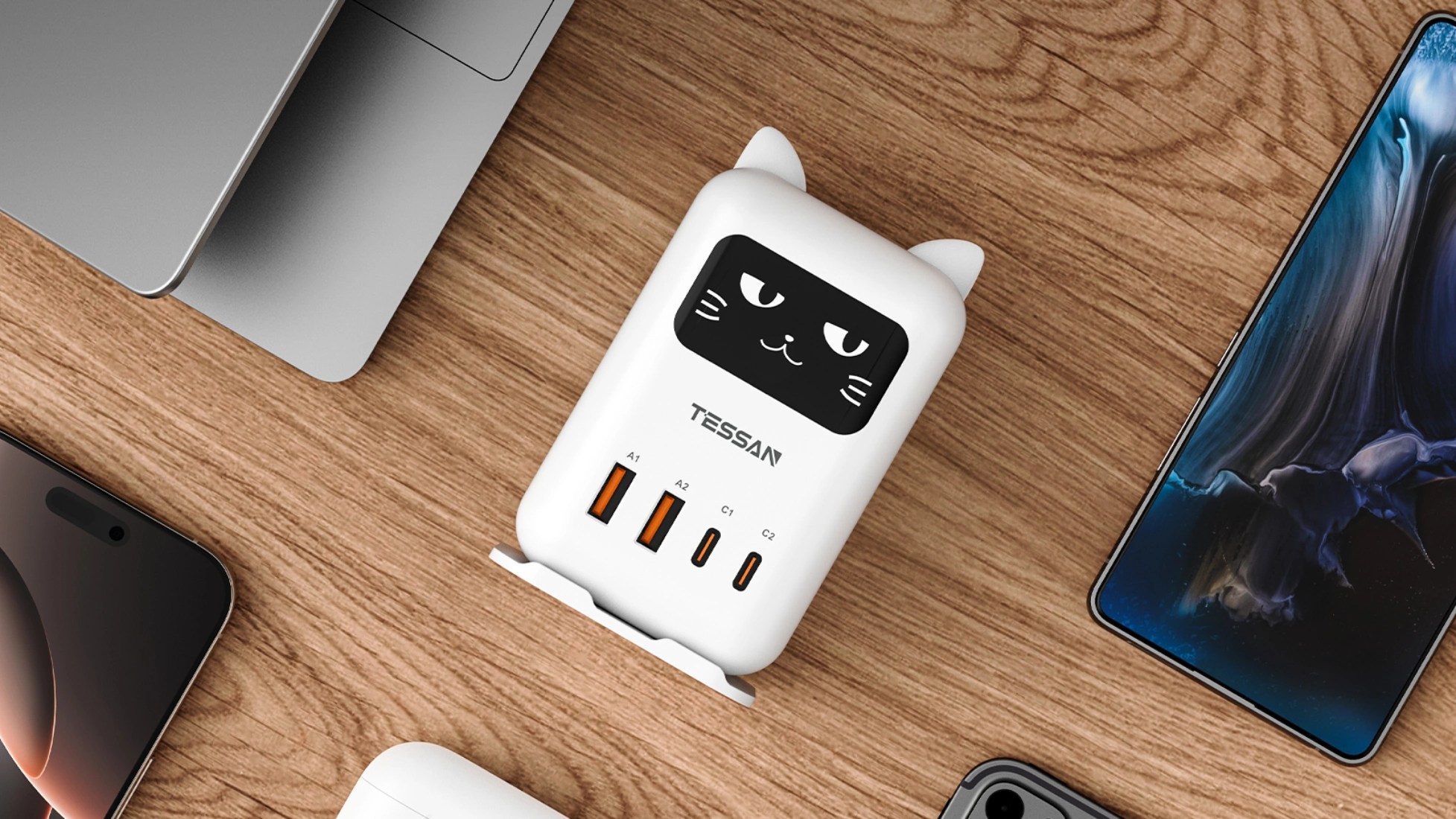
TESSAN, a prominent developer of global power solutions, has officially announced the release of the 65W Cat Desktop Charging Station. This innovative multi-device hub integrates high-speed Gallium Nitride (GaN) technology with a unique, character-driven design, specifically engineered to enhance the aesthetics and efficiency of modern workspaces.
High-Performance Power Delivery
The charging station is anchored by advanced GaN (Gallium Nitride) technology, enabling a total output of 65W. This allows for the rapid charging of high-demand hardware, including laptops, alongside mobile peripherals. The device features a versatile four-port configuration:
Two USB-C ports for modern high-speed requirements.
Two USB-A ports for legacy device compatibility.
By consolidating power delivery into a single wall outlet, the station significantly reduces cable clutter, facilitating a more organized and productive environment.
Interactive User Interface
Distinguishing itself from standard industrial hardware, the station features an animated cat interface. This integrated screen displays various facial expressions that change during the charging process, providing a sense of companionship and visual feedback. This tech-pet concept is designed to soften the clinical feel of home offices, dormitories, and creative studios.
Ergonomic and Secure Design
The station utilizes a vertical tower architecture to minimize its physical footprint on crowded surfaces. For added versatility, the unit includes an anti-slip base that supports both vertical and horizontal orientations. To further assist with cable management, TESSAN includes dedicated cable ties with every unit.
Safety remains a primary focus, with integrated Smart Charging Technology. This system autonomously identifies the power requirements of connected devices to optimize delivery while providing rigorous protection against:
Over-current and short circuits.
Thermal overheating.
Voltage fluctuations.
CEO’s Vision
TESSAN CEO Jordan Cohen highlights how the 65W Cat Desktop Charging Station fuses high-performance GaN tech with playful, emotional design to add joy to everyday work routines.
“At TESSAN, we believe that functional technology should not be devoid of character,” said Jordan Cohen, CEO and co-founder of TESSAN.
“The 65W Cat Desktop Charging Station represents our commitment to merging top-tier GaN performance with emotional design. We wanted to create a product that doesn’t just power a user’s career, but also brings a brief moment of joy to their workday.”
Deciding between obtaining a free solar savings report and undertaking a DIY solar installation is a significant choice for homeowners considering solar energy. While a detailed report can offer insights into potential savings, a self-installation project may promise more hands-on control and upfront cost savings. Establishing which path serves the homeowner’s interests best can be a challenging yet essential task.
Understanding the benefits and drawbacks of both options is crucial for making an informed decision. Consequently, homeowners must weigh the financial implications, the complexities involved, and the long-term effects on energy independence. In this article, we delve into these critical factors and provide guidance for homeowners.
Assessing the Pros and Cons of Free Solar Savings Reports
A free solar savings report provides a comprehensive analysis of how much money a homeowner can save by switching to solar. These reports typically offer an estimate of energy savings over time, taking into account the specific geographic location, local utility rates, and potential government incentives.
However, these reports can sometimes oversimplify the costs and benefits, leading to misinformed expectations. They may not take into account specific household consumption patterns or the nuances of different solar panel brands and configurations. This is why it’s important to cross-reference a free report with an independent assessment or additional trusted resources.
For actionable guidance, homeowners should consider getting multiple reports from different providers to compare results. Furthermore, consulting with a solar energy professional can provide a personalized and more accurate financial outlook, complementing the free reports.
Navigating the Complexities of DIY Solar Installation
DIY solar installations offer homeowners the opportunity to save on labor costs and gain detailed knowledge about their solar energy system. Many find the prospect of self-installation both challenging and rewarding, as it provides a hands-on approach to achieving energy independence.
But the process isn’t without complexity. Permits, electrical codes, roof analysis, and the physical installation of solar panels have steep learning curves and potential safety risks. Mistakes in installation can lead to less efficient systems and might void warranties or fail to comply with local regulations. To tackle these complexities, homeowners need ample preparation and research before starting.
Actionable guidance for those considering DIY includes taking online courses or workshops on solar installation, familiarizing oneself with local building codes, and possibly consulting with an electrician for the electrical components. These steps can help ensure a successful DIY solar project.
Making the Financial Comparison: Free Reports and Self-Installation Costs
When considering financial savings, it’s important to perform a thorough comparison between the projected savings from a free solar savings report and the actual costs of a DIY installation. While the former offers an estimate, the latter involves real expenses such as purchasing solar panels, inverters, mounting systems, and potentially, auxiliary equipment.
Material costs can vary significantly depending on the quality and efficiency of solar equipment chosen for the DIY project. Additionally, potential hidden costs such as tools, safety gear, and unforeseen structural upgrades can increase the budget. For some, the time investment of a DIY project also represents an opportunity cost that should be considered.
Before embarking on a DIY venture, homeowners should create a detailed budget that includes all possible expenses and compare it to the estimated savings from the free solar reports. This side-by-side analysis can spotlight the most cost-effective choice for their circumstances.
Evaluating Long-Term Implications for Homeowners’ Energy Independence
The decision to go solar involves not only immediate costs and benefits but also long-term implications for a homeowner’s energy independence. Harnessing solar power can substantially reduce reliance on traditional energy sources, leading to long-lasting environmental and financial benefits.
While free solar savings reports can project long-term savings, these estimates may not fully account for potential increases in utility rates or additional benefits of being less reliant on the grid such as resilience during power outages. On the other hand, a DIY installation can provide more flexibility to expand the system or adapt to new solar innovations over time.
To evaluate the long-term implications, homeowners should consider the lifespan of solar panels, maintenance costs, and the potential for increased property value. Additionally, staying informed about evolving solar technologies and energy policies can help homeowners make the most of their solar investments for years to come.
Ultimately, the choice between leveraging a free solar savings report and pursuing a DIY solar installation hinges on a variety of factors, including cost, skill level, long-term goals, and personal preferences. By considering the intricacies of both options and their impact on long-term energy independence and financial savings, homeowners can make a decision that aligns with their values and circumstances. The key lies in thorough research, careful planning, and an honest assessment of one’s capabilities and objectives.
EDITOR NOTE: This is a promoted post and should not be considered an editorial endorsement
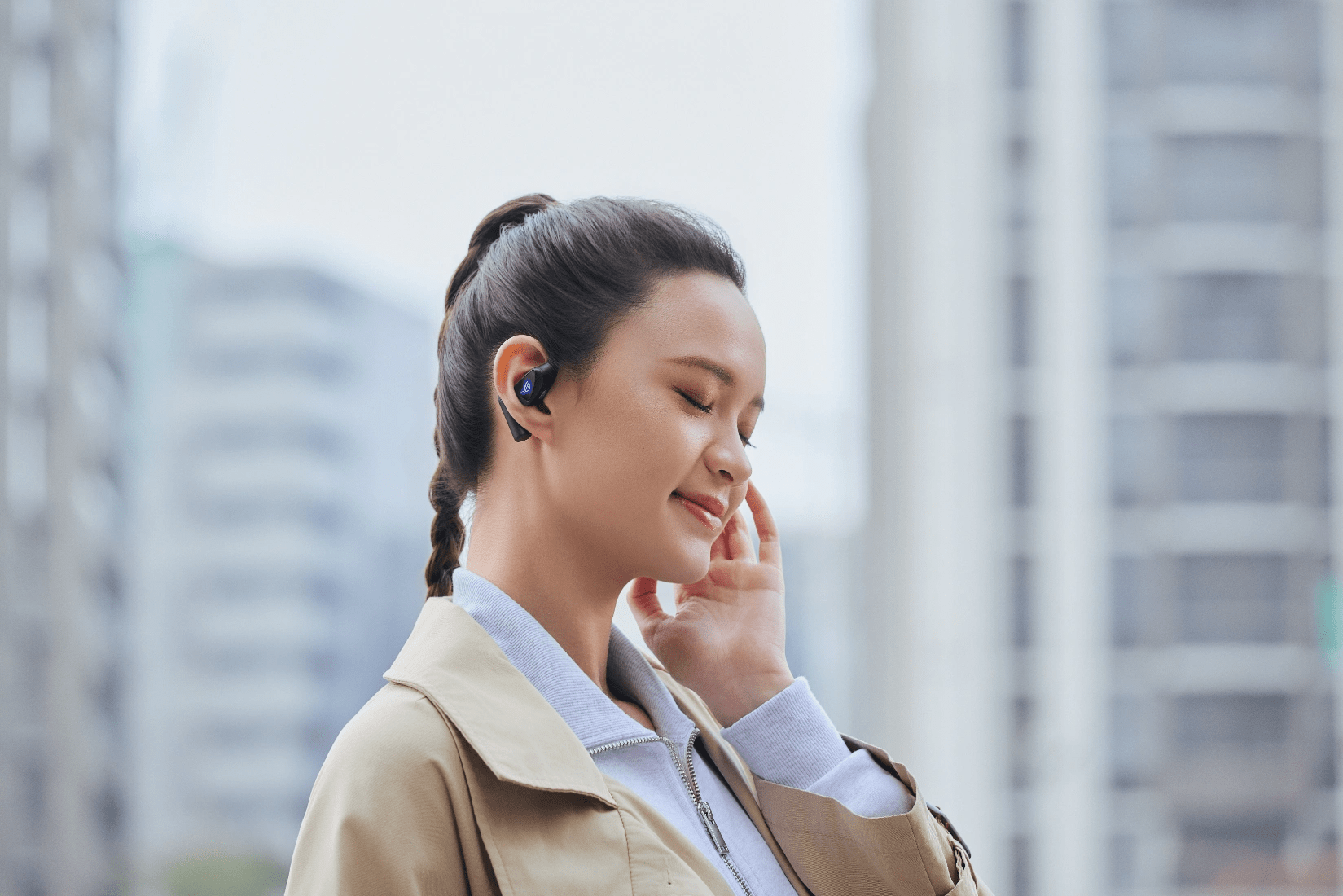
ASUS Republic of Gamers (ROG) has officially announced the United States market release of the ROG Cetra Open Wireless earbuds. This latest addition to the ROG audio portfolio is engineered to bridge the gap between high-fidelity gaming audio and environmental transparency, catering to users who require situational awareness during active use.
Advanced Acoustic Engineering and Dual-Mode Connectivity
The ROG Cetra Open Wireless features an open-ear architecture designed to keep users connected to their physical surroundings. At the core of the device are 14.2mm drivers coated in diamond-like carbon (DLC). This specialized diaphragm construction is intended to provide high-resolution audio with minimal distortion, offering a wide soundstage suitable for both competitive gaming and media consumption.
The earbuds utilize ROG SpeedNova 2.4GHz wireless technology, providing ultra-low latency connections for precise audio-to-video synchronization. Additionally, the device supports standard Bluetooth for mobile versatility. A notable hardware inclusion is the USB-C 2.4GHz dongle, which features integrated pass-through charging—a first for the ROG lineup—allowing users to charge their primary device while maintaining a wireless connection.
Ergonomics and Durability for Active Use
Designed for long-term comfort, the earbuds are equipped with liquid silicone ear hooks and a detachable reflective neck strap for added security during physical activity. To ensure reliability in various environments, the device carries an IPX5 water-resistance rating, protecting against perspiration and light rain.
Unlike many contemporary competitors that rely on touch gestures, the Cetra Open Wireless utilizes physical tactile buttons. This design choice aims to eliminate accidental inputs and ensure responsive control during intense workouts or inclement weather.
“With the launch of the ROG Cetra Open Wireless, we are addressing the growing demand for versatile audio solutions that don’t isolate the user from their environment,” said S.Y. Hsu, Co-CEO of ASUS.
“By integrating our proprietary SpeedNova technology into an open-ear form factor, we are providing gamers and active professionals with a premium audio experience that balances high-performance gaming needs with real-world safety and comfort.”
Battery Life and Customization
The earbuds offer a comprehensive suite of software enhancements, including:
Phantom Bass: An algorithm-driven mode that boosts low-end frequencies.
Immersion Mode: A setting designed to optimize focus by managing ambient sound profiles.
In terms of endurance, the device provides up to 16 hours of playback via Bluetooth; with lighting and specialized sound modes disabled. A 15-minute rapid charge provides an additional three hours of utility, ensuring minimal downtime for the user.
Pricing and Market Availability
The ROG Cetra Open Wireless is currently available for purchase at a suggested retail price of $229.99. Consumers can find the product at the ASUS eStore and major third-party retailers, including Amazon, Micro Center, and Newegg.
If you have ever struggled to choose between the safety of open-ear headphones and the immersion of noise-canceling buds, the Soundcore Aerofit 2 Pro is designed to end that debate. Launched by Anker at CES 2026, these earbuds introduce a “transforming” hybrid design that aims to provide the best of both worlds for fitness enthusiasts and commuters alike. Priced at $179.99, they represent a bold step forward in wearable tech, offering a level of versatility rarely seen in the audio market.
Design
The centerpiece of the Aerofit 2 Pro is its innovative adjustable ear hook, which features five different positions. By moving the driver housing, you can choose to have the earbuds hover over your ear for total situational awareness or sit right at the ear canal for a more traditional, “closed” fit. While the design is a bit heavier than competitors at 11g per bud, the setup is easy to adjust even mid-run.
The buds come in various stylish finishes, including matte black, gloss white, and matte purple, and they feature a satisfying physical button that “clicks” to confirm your commands. The package is completed by a wireless charging case that includes a helpful LED power bar to track your battery levels.
The unique hybrid design of the AeroFit 2 Pro has been hit or miss for me. I love that Anker is trying to conquer two problems in one, but for my ears, I never quite got the open-ear fit to work as well as a dedicated model like previous AeroFits.
The positioning that was the most natural for me always led to the buds being fully in my ears. Thankfully, Soundcore is offering extended return windows if you find this not to be to your liking, with the AeroFit 2 Pro allowing for a full 30 days of testing.
With its innovative five-position adjustable hook and Adaptive ANC 3.0, the AeroFit 2 Pro represents a bold step forward in versatile wearable tech for the modern commuter and athlete.
Performance and Sound
Performance is driven by a suite of high-end features, including Bluetooth 6.1 and an IP55 rating for water and dust resistance. The earbuds utilize Adaptive ANC 3.0, which employs a six-microphone array to adjust noise cancellation up to 180 times per second based on your surroundings. This is particularly useful for dampening consistent background hums, like office AC or airplane noise.
Equipped with an 11.8mm driver, the Aerofit 2 Pro delivers a surprisingly detailed audio experience with excellent spacing between instruments. For those who prioritize high-fidelity audio, the buds support LDAC and are Hi-Res Audio Wireless certified.
While the default “Soundcore Signature” EQ might feel a bit treble-heavy for some, the Soundcore app allows for in-depth customization through various presets and an eight-band manual equalizer. The “Balanced” preset is highly recommended for a more even sound, and a special “Volume Booster” mode provides the extra punch needed to cut through the noise of a busy gym or street.
Battery Life
Battery life is solid for the category, offering 7 hours of playback in open-ear mode and roughly 5 hours when the active noise cancellation is engaged. To ensure a seamless experience, internal sensors detect which mode you are using and automatically recalibrate the EQ to maintain a consistent sound.
I would have liked to see this be a little longer with the size of each earbud. The overall package of the AeroFit 2 Pro can be a little bulky, and I’d guess most of that is the power bank. The same is true for the included charging case. In comparison to AirPods, this thing is massive but does include both wired and wireless charging for a combined 34 hours of maximum runtime.
Final Thoughts
Awarded to products with an average rating of 3.75 stars or higher, the AndroidGuys Smart Pick recognizes a balance of quality, performance, and value.
Products with this distinction deserve to be on your short list of purchase candidates.
The Soundcore Aerofit 2 Pro is a premium option for those who value flexibility above all else. It is a “two-in-one” solution that excels during outdoor activities where staying aware of your environment is a safety priority, yet it can still pivot to a focused listening mode when you need to buckle down. While the noise cancellation is not as powerful as high-end, tip-based earbuds, the novelty of the transforming design and the inclusion of features like wireless charging make it a compelling choice for tech-forward buyers.
If you are looking for a single pair of earbuds that can handle a bike ride, a gym session, and a quiet office, the Aerofit 2 Pro is a valiant and innovative contender. The launch price from March 9th to the end of the month will be just $150 from Soundcore directly. If you miss this window of savings, prefer Amazon, they’ll be available there as well.
Hisense has introduced its 2026 ULED MiniLED television lineup, highlighting the latest additions to the company’s U6 and U7 Series. The new models aim to make large-screen home entertainment more accessible, blending MiniLED display technology with gaming features, immersive audio, and flexible smart TV platforms.
The rollout begins with the U7 Series, which is available now, with the U6 Series scheduled to follow at retailers in the coming weeks. Hisense positions both lines as part of its broader ULED category, designed to offer strong performance without pushing into ultra-premium pricing tiers. The company’s upcoming RGB MiniLED lineup will represent the higher-end tier above ULED.
The announcement arrives as anticipation builds for the FIFA World Cup 2026, set to take place in the United States, Canada, and Mexico. Hisense is framing the new TVs as living-room centerpieces built for shared viewing moments, from sports watch parties to movie nights.
According to James Fishler, Chief Commercial Officer at Hisense USA, the trend toward larger screens is shaping how the company approaches product design. He notes that consumers increasingly gather around bigger displays for entertainment, sports, and gaming, and the goal with the 2026 lineup is to bring key viewing features across a wider range of price points rather than reserving them for flagship models.
U7 Series Focuses on Sports, Gaming, and Large Screens
The U7 Series leads the 2026 lineup and is designed with sports viewing and fast-paced content in mind. Hisense says the series combines high brightness, strong motion handling, and immersive sound to create a viewing experience suited for large gatherings.
One of the headline features is screen size availability reaching up to 116 inches on the U7SG model. That scale reflects a broader industry shift toward oversized living room displays, turning TVs into focal points for shared entertainment.
Under the hood, the U7 Series uses Hi-QLED MiniLED Pro technology paired with Full Array Local Dimming. Thousands of MiniLED backlights work with the company’s Hi-View AI Engine Pro to maintain strong contrast and clarity across a variety of content types, including live sports, movies, and streaming shows.
Motion performance is another area of emphasis. The U7 Series includes a native 165Hz refresh rate and motion processing designed to keep fast action smooth and clear. That capability is particularly useful for sports broadcasts and modern gaming systems that push high frame rates.
Audio receives attention as well. The TVs feature a 50-watt multi-channel audio system in a 2.1.2 configuration, supporting both Dolby Atmos and DTS Virtual:X formats. The goal is to provide fuller sound without immediately requiring an external sound system.
Hisense offers the U7 Series with two different smart TV platforms depending on the model and retailer. The U7SG runs Google TV, while the U7SF uses Amazon’s Fire TV interface, allowing buyers to choose the ecosystem that best fits their streaming setup.
U6 Series Aims to Bring MiniLED to More Homes
The U6 Series continues Hisense’s effort to push MiniLED technology into more accessible price tiers. The lineup is led by the U6SF Pro model and includes an additional entry-level MiniLED option called the U6SF.
Across the series, Hisense emphasizes features that enhance everyday viewing. The TVs combine Hi-QLED MiniLED technology with Full Array Local Dimming and Quantum Dot color, producing improved brightness and color performance compared with traditional LED displays.
Artificial intelligence plays a role in picture processing as well. The TVs use AI-driven optimization to adjust picture settings automatically based on the type of content being viewed. The intent is to deliver consistent picture quality without requiring manual adjustments.
Sound also receives a boost in the U6 lineup. An integrated subwoofer adds extra depth to the audio experience, and Dolby Atmos support provides a more dimensional soundstage for movies, sports broadcasts, and streaming content.
Screen sizes for the U6 Series range from 55 inches up to 100 inches, giving buyers a wide selection depending on room size and budget. All models in the lineup use Fire TV as their smart TV platform.
Availability and Pricing
The 2026 Hisense ULED MiniLED lineup will be offered through major retail partners in a variety of configurations. Model availability, screen sizes, and smart TV platforms may vary by retailer.
The U7 Series is available now, starting at $1,299 MSRP through Best Buy, with additional models expected to arrive at Amazon soon. The U6 Series will begin appearing at retailers in the weeks ahead.
More information about the new lineup and other upcoming Hisense products can be found on the company’s website.
The general public probably recognizes three names in the fitness wearable market: Garmin, Fitbit, and Apple. I’m here today to tell you about how an upstart has become the daily driver on my wrist. This includes step counting, food logging, and general fitness recording.
The devices are from AmazFit, but the real compelling feature is the companion Zepp Health app.
Consistent Metric Tracking
You can’t have a good fitness watch experience without reliable data. Thankfully, AmazFit has nailed this in my usage over the last six months. I’ve found the heart rate sensor and basic biometric logging of their devices to be on par with anything from Garmin, Coros, or Suunto.
Even more nuanced measurements like BioCharge have been consistent for me and add value. Taking the combined sleep, heart rate variability metric, and my excretion from the last 24 hours, the Zepp Health app gives me a combined score. The goal is to give you a numeric value on how you “should feel” at the start of your day.
AI-Used Well Food Logging
Another feature that I didn’t think I needed was food logging inside the Zepp app. I recently found out my total BMI is a little high for my height, weight, and age. The same is true of my slightly elevated blood pressure. A quick talk with my doctor led to altering my diet and workout routines to drop a few pounds to lower both issues.
Again, AmazFit and the Zepp Health app have a robust food journaling system that uses OpenAI. This allows you to quickly log meals with text, voice, or snapping a picture. The LLM then takes this data and estimates the nutritional metrics and calories. I’ve found this to be pretty accurate overall and a huge win to quickly log my food.
Not only does it log the dietary information, but it also takes out the calories you’ve burned. I need a small calorie deficit to reach my goals, but I also don’t want to burn too many and be unhealthy. Zepp knows how active you’ve been and adjusts your daily calorie meter accordingly to make sure you’re reaching your goal but still taking in what you need as well.
PAI is a Feature and Not a Gimmick
This might be the feature of the Zepp Health app I dismissed the most on first use, and now I can’t live without it. PAI stands for “personal activity intelligence,” and I get it; this sounds like some more AI-age gimmicks. But after using it, I think it’s one of the most motivating metrics you can find on any fitness platform.
Using just your heart rate data, PAI gives you a score. When you first get the watch, it slowly starts building this metric off your activities and heart rate. You’ll find it’s learning you and will often undershoot the score the first few weeks. If you have a very hard workout at the same time, it may shoot up significantly, but as it builds more data, it begins to “settle in” and find a more realistic value.
The research papers behind the PAI score indicate that people who have a weekly exertion rating of over 100 live an average of eight years longer than others. I still have my reservations on how true that is in a statistical study, but I have found the PAI has checked a box for motivating me to stay active on a weekly basis. Better yet, the study was founded using data from 39,000 participants and a data set that ranges over 20 years.
Since the PAI is based on a 7-day rolling scale, if you have too many days of inactivity, the score drops off on the 8th day each morning, and you’ll see your score plummet. After I consistently saw this in the 100s while being active on my new journey, it really shook me when I took a few “lazy days” and it dropped back to a score of 64 PAI.
Often, the fitness watch market leans too heavily into advanced metrics and acronyms that are overwhelming for the average person just trying to be active at the gym. That data is still here with AmazFit devices in the Zepp app, but something the PAI can be a game-changer. Keeping that simple algorithm is something anyone can learn and keep as their benchmark to healthier habits.
Multiple Devices are Aggregated if Needed
The other killer feature for me is the flexibility to use different devices, and they all feed back seamlessly to the Zepp app. I can bounce from wearing the Helio Ring, Helio Strap, or Balance 2 with ease, and my metrics sync to the Zepp app in aggregate.
This gives you the opportunity to truly specialize your fitness and health logging in a way that just doesn’t exist in other apps. Want to wear the Balance 2 (or other AmazFit watch) as your daily driver but don’t want to sleep in it? Cool, then you can tag team the watch with either the Helio Strap or Ring.
You can even wear the Helio Strap as a traditional heart rate monitor and pair it with most of the watches. Here you can find a more consistent reading using a chest or bicep strap with the Helio and push the heart rate metrics to the Balance 2, for instance. I’ve found this extremely useful while doing something like kettlebell workouts, where a wrist position isn’t ideal while the bells are crashing down on my wrist with certain movements.
The fact that you can cherry pick from each device to work specifically for different environments is fantastic. The Zepp app does a fluid job of “just knowing” which one you are using and adjusting the algorithms accordingly. This allows all the devices to sync back into metrics like calories, sleep, and even BioCharge.
One of the Most Well-Rounded Fitness Apps on the Market
The Zepp app is phenomenal and captures metrics that work for the layman or an advanced athlete. If you’re in the market for a new fitness tracker or smartwatch, I can’t recommend them enough. The device lineup offers price points for almost anyone, and the Zepp app is available for all of them to elevate your experience to new levels.
Hit the links below to check out the current AmazFit lineup. I don’t think any of them will disappoint. I’d link to the Helio Strap, but it seems to be sold out across the market.
It’s been a while since AI chatbots and agents started to poke their metal (or ethereal, for that matter) heads through the wholes of civilization. Khm, sorry if that’s too poetic, but that’s what it feels like to me sometimes. Contrary to popular belief, I think they are way too ‘underoptimized’ to threaten our job market in the coming decade. I know, the entry-level positions are already suffering, and I’ve felt that too. But we are still at a point where a cool metal head can still solve a lot of problems and not replay a ‘Skynet’ scenario and dispatch us with a clever algorithm.
In other words, a cool online video editor based on AI is fine, but it can go too far sometimes.
All that said, there’s an area of AI research that chills me in a very profound way and that’s AI Companions. Let me explain what I mean and then you can throw all the rotten tomatoes you want in my general direction.
AI Companions. Why? I mean, WHY??
First of all, let me specify. By AI companions, I mean the adult-oriented segment of software that combines the following:
conversational AI
role-play systems
parasocial relationship design
adult entertainment monetization
gamification psychology
What do they produce as a result? Personalized intimacy, emotional simulation, and fantasy interaction. Some names for general public education, because I believe in free will and freedom of choice: Replika, CharacterAI, AnimaAI, and the particularly disturbing DreamGF, created specifically for adult content.
These companies, as mentioned, monetize intimacy, or rather, try to simulate intimacy. And I personally, without a doubt, believe that this is the most evil route the whole AI industry could take. I’m not just saying that lightly, i have some psych background to go along with the claim, but you’ll have to stick around a bit longer for me to get there.
Main Question: Why?
Going back to the question of why. It would seem pretty obvious, right? If we take into account the ongoing proclivity of the younger generation to interact digitally vs. approaching each other in real life, it does make sense. According to commentary and sociological observations, many Gen Z-ers feel discomfort about asking someone out in real life, partly because flirting in person has become less common and there’s worry about doing it “wrong.” There are also some anecdotal figures shared online (that we can’t blindly trust) that claim up to 45% of men aged 18-25 report they’ve never asked someone out in person.
This is sad and a little alarming for a few reasons. For one, how do you ever read face expressions if you don’t see faces that often??? Text messages contain only a sliver of the info we would get if we saw someone in person and talked to them.
This situation has created some shyness we never asked for. A total inability to conduct ourselves in an ambiguous situation. But that’s just a side effect.
Convenience Is The Truth Killer
The core problem is the CONVENIENCE. Aaaaah, yes, the modern drug that plagues society these days. We know that consuming products of any illegal labour is wrong. Yes, but if it’s CONVENIENT, we wouldn’t even bother finding out (child labour or deliberate disregard of regulations in smartphone production? Nope, never heard of those).
Clideo — Video Editor? Heard of that one, but that’s not the matter of discussion at this point. Now let’s get back to relationships. Aaand let’s face the truth that doesn’t go down very well. Relationships are messy. They are a drag sometimes, they can be dangerous even, especially to women. They require compromise, time, work, effort, and everything else that makesgreat things worthwhile.
So what do we do? And by we, I mean companies that choose to feed off loneliness and despair… We create AI Companions! Software that answers to all your prayers, treats you like a king/queen, understands you, you know, really gets you (SPOILER ALERT! It doesn’t) and most horrifically, agrees with you on everything.
Danger of Agreeable AI
People are not built to do well in a bubble. We are social animals, we need competition, we need to bounce our ideas off something or someone to make sure we’re not being batshit crazy, which is a harder task than you think, our sanity is fleeting, according to psych specialists and my aunt Asther.
Now if you are lonely, gullible, and generally uninterested in being challenged, AI Companions may seem like a good idea at some point. STOP. Capture that feeling, and try to stop right here. They are NEVER a good idea, because all they can lead to is deeper loneliness, deeper delusion, weeker character and general uselessness.
I know you’re worth more than that. So if you are ever tempted to go that route, catch yourself in time, go take a shower, put on fresh clothes, call your friend/acquaintance/colleague, ask them out for a coffee, and have a human conversation. Reconnect with what’s real, warm, and there for you. Why? Because at the end of the day, AI will watch you unravel with the same unbothered smile as when asking “what do you want right now?” At some point, trust the feeling you have of what’s good for you and what’s not. And the difficult route of messy, and wonderful, will be immeasurably better than the mechanical calm of the always-unbothered, eager-to-please, and you’re-always-right world of AI companions.
As video content continues to dominate the digital space, with 82% of all consumer internet traffic projected to come from videos by 2032, companies are seeking innovative ways to streamline their production processes. Artificial Intelligence (AI) is emerging as a transformative tool in this landscape, offering solutions that enhance efficiency and creativity.
The integration of AI into video production services promises a faster, cost-effective, and more personalized content creation journey. In this article, we delve into the advantages and practical applications of AI technology in the realm of video production.
Harnessing AI for Streamlined Video Production Services
AI Video Production Services implementing AI in video production marks a significant shift from traditional methods, notably in terms of speed and resource allocation. AI-driven platforms can analyze vast amounts of data to suggest content trends, predict audience preferences, and even generate video scripts, cutting down the time usually required for pre-production tasks.
Moreover, AI tools like automated editing software are revolutionizing the way footage is processed. For instance, they can swiftly compile the best takes, apply color correction, and insert transitions, enabling editors to focus on the more nuanced aspects of storytelling.
For businesses, embracing AI video production services means evaluating available AI features such as scripting assistance, automated editing, and data analytics. By integrating these into their workflows, they can significantly reduce labor hours and elevate the creative process.
AI Video Production Services and Their Role in Content Creation
In the dynamic sphere of content creation, AI video production services facilitate the crafting of more engaging and targeted videos. Personalization is one of the key benefits, with AI’s ability to customize content based on user behavior and preferences.
Content creators can leverage AI for tasks like object and facial recognition to optimize videos for different demographics or even individual viewers. As a result, videos can have personalized ad insertions or scene variations that resonate more with specific audiences, potentially improving viewer retention and conversion rates.
The actionable guidance for using AI in content creation includes conducting thorough audience research to feed the AI systems with accurate data and specify the desired personalization parameters. This will ensure that the AI algorithms can generate highly personalized content that aligns with viewer interests.
Overcoming Challenges in Video Production with AI Technology
Video production can be fraught with challenges such as inconsistent quality, time-consuming editing processes, and the need for numerous reshoots. AI can alleviate these issues by providing consistency and precision through advanced algorithms that detect errors or areas for improvement.
AI tools are equipped with machine learning capabilities that allow them to improve over time, learning from each video produced to ensure fewer mistakes and enhanced quality. This continuous improvement mechanism means that the more content is created, the smarter the AI system becomes, thus reducing the frequency of rework and reshoots.
Manufacturing companies and other businesses seeking to integrate AI should assess the specific challenges in their video production pipeline and identify the AI tools that address these pain points. For instance, selecting AI services that offer automated quality control could be advantageous for ensuring consistent video quality.
Measuring the Impact of AI on Video Production Quality and Efficiency
Quantitatively measuring the impact of AI on video production services is critical to gauge its effectiveness. Metrics such as production time, cost savings, and the rate of content engagement pre- and post-AI implementation can provide concrete evidence of AI’s value.
Real estate marketing companies, for example, have reported reductions in video production time by up to 40% thanks to AI’s predictive analytics and automated editing, thereby accelerating property showcases to potential buyers. Audience engagement metrics have also been positively influenced by AI’s ability to tailor content to individual preferences.
To maximize the benefits of AI video production, it is advisable to establish clear KPIs (Key Performance Indicators) to monitor AI’s impact on both the quality and efficiency of video content. Regularly reviewing these KPIs can assist in fine-tuning AI systems to ensure continuous improvement in production workflows.
Ultimately, AI video production services are proving to be an indispensable asset in today’s content-rich environment. They offer tangible benefits like reduced production times, cost efficiency, and content that connects more deeply with viewers. As the technology evolves, it will likely become a standard tool in the video production industry, driving innovation and transforming the way we create and consume video content.
EDITOR NOTE: This is a promoted post and should not be considered an editorial endorsement
Electric scooters and bicycles have been drifting through the AndroidGuys office over the past couple of years, but until recently they were mostly the lightweight, stand-up commuter variety. You know, the kind designed for quick trips across a college campus or the last mile between a train station and the office.
Seated electric scooters occupy a slightly different category than the more common stand-up commuter models. They tend to emphasize stability, utility, and comfort rather than portability, and the Gyroor C1 Pro fits squarely into that philosophy. After spending time looking through its design and specifications, it is clear this scooter is built less like a lightweight last-mile gadget and more like a small personal transport vehicle designed for errands, short commutes, and neighborhood mobility.
Design
The frame of the Gyroor C1 Pro is constructed from a rigid metal chassis designed to support a relatively high payload while keeping the riding geometry stable. Unlike stand-up scooters where the rider’s mass sits high above the deck, the seated configuration places the rider’s weight lower and more centered along the scooter’s axis. That change in center of gravity improves stability at higher speeds and reduces the front-to-back sway that sometimes appears during braking or acceleration on traditional scooters.
Dimensionally, the C1 Pro is substantial. The deck measures 9.5 inches wide, giving riders plenty of room for foot placement, and the overall length of the scooter is about 44 inches. The body width comes in at roughly 9.8 inches across the main frame. It is not a compact machine, and that becomes especially clear when the scooter is folded for storage or when you’re putting it in the back of an SUV.
The Gyroor C1 Pro blends scooter agility with utility-bike practicality, making short trips and local errands genuinely convenient.
The handlebar stem folds down using a locking mechanism designed to keep the steering column secure during riding. Once collapsed, the scooter’s vertical profile drops to less than two feet, making it easier to fit into a trunk or storage space. Even folded, however, the C1 Pro remains fairly bulky compared to minimalist commuter scooters.
Weight is another important factor here. The scooter weighs just under 50 pounds but varies depending on configuration. That places it firmly in the heavier end of the electric scooter spectrum. While the folding design helps with storage, carrying the scooter up stairs or navigating tight transit stations would quickly become inconvenient. The weight largely comes from the reinforced frame, larger battery pack, suspension hardware, and the integrated seating system.
The handlebar layout reflects the scooter’s utility focus. The bars span roughly 19 inches wide and sit about 38 inches above the deck. That wider stance provides more leverage for steering, which becomes particularly useful when the “front” cargo basket is carrying extra weight.
The seat is adjustable using a telescoping post that allows riders to set the saddle height between roughly 25.6 and 29.5 inches. Gyroor says this accommodates riders from about four feet nine inches to just over six feet tall, which should cover most users comfortably.
The saddle itself is larger than expected, with thick foam padding designed to reduce pressure points during longer rides. Underneath the seat, mechanical coil springs add another layer of shock absorption. Riders who prefer standing can remove the seat entirely using quick-release hardware, converting the scooter into a more traditional stand-up configuration.
In terms of capacity, the frame supports a maximum payload of 265 pounds. That includes the rider as well as anything carried in the cargo baskets.
Motor Performance and Riding Modes
Powering the Gyroor C1 Pro is a rear-mounted brushless hub motor. The system is rated for 550 watts of continuous output with a peak power capability of 800 watts. That distinction between nominal and peak output matters in real-world riding.
Digging a bit deeper, the continuous 550-watt rating represents the level of power the motor can sustain without overheating. The 800-watt peak output comes into play during moments of higher demand, such as accelerating from a stop, climbing hills, or pushing against headwinds.
Gyroor rates the scooter for hills up to about 20 degrees, though actual performance will depend on rider weight and terrain. As with most electric scooters, sustained climbing will eventually trigger thermal limits that reduce motor output until the system cools.
Top speed is rated at approximately 18.6 miles per hour on flat ground. The scooter offers three riding modes that control power delivery and speed limits.
Eco mode caps speed around 12 mph and prioritizes battery efficiency.
Daily mode raises the limit to about 15 mph for balanced commuting.
Sport mode unlocks the full top speed of roughly 18.6 to 19 mph.
These modes noticeably change the scooter’s character. Sport mode delivers sharper throttle response and quicker acceleration, while Eco mode smooths the power curve to conserve battery and maintain traction on slippery surfaces.
One safety feature built into the system is a push-to-start mechanism. The motor will not engage from a complete stop until the rider manually kicks the scooter forward slightly. This prevents accidental throttle activation while standing beside the scooter or waiting at an intersection. That is to say, you need to take a step or two to activate the trottle.
Battery and Range
Energy for the scooter comes from a 36-volt lithium-ion battery pack rated at 10 amp-hours. That works out to roughly 360 watt-hours of total energy capacity.
The pack uses standard 18650 lithium cells, a format widely used in consumer electronics due to its balance of energy density and reliability. Compared to the earlier Gyroor C1 model, which used a smaller 7.5Ah battery, the C1 Pro’s larger capacity helps extend range and reduce how often riders need to recharge.
Gyroor estimates a maximum range of up to 25 miles per charge. As usual with manufacturer range estimates, that number assumes ideal conditions: a lightweight rider, flat terrain, minimal stops, and use of the lower-speed riding modes.
In real-world riding scenarios, range will vary depending on terrain, speed mode, rider weight, and cargo load. Frequent stops, hill climbs, and higher speeds will naturally reduce that figure.
Charging the battery takes roughly four to five hours using the included 42-volt charger. The charger uses a standard LED indicator that turns red while charging and switches to green once the battery is full.
The battery pack is protected by an integrated battery management system that monitors voltage levels, temperature, and electrical faults. This system helps prevent overcharging, deep discharge, and short circuits, all of which could damage the battery.
Suspension and Ride Comfort
One of the more notable aspects of the C1 Pro is its multi-layer suspension system. The scooter rides on 12-inch pneumatic tires, which are significantly larger than the solid tires often found on compact electric scooters.
Air-filled tires naturally absorb smaller vibrations from rough pavement, gravel, and uneven asphalt. Larger wheels also improve obstacle handling. A 12-inch tire rolls over potholes and cracks more smoothly than the smaller 8-inch or 10-inch wheels commonly seen on entry-level scooters.
In addition to the tires, the C1 Pro includes front and rear suspension springs that help absorb larger impacts such as curbs, bumps, and rough road transitions.
The final layer of comfort comes from the seat suspension. The springs beneath the saddle add another buffer between the rider and the road, which can make longer rides noticeably more comfortable compared to rigid scooters.
Combined, these three layers of shock absorption create a ride that is considerably smoother than most compact commuter scooters.
You’ll definitely feel the absorption and cushion the first times you step on and sit on the scooter. And as you get used to riding around, little curbs and seams in the sidewalk and roads are easily absorbed. Everything feels soft and comfortable from your butt all the way to the ground.
Braking and Safety Features
Stopping power on the C1 Pro comes from mechanical disc brakes mounted on both the front and rear wheels. Disc brakes offer strong braking performance and better heat management compared to drum brakes or electronic braking systems.
Each brake lever on the handlebars controls one wheel, allowing riders to modulate braking force as needed. The exposed disc rotors also help dissipate heat more effectively during repeated braking.
As with any mechanical braking system, occasional adjustment may be required as the brake pads wear down. Riders can tighten the cable tension at the calipers to maintain proper lever feel. This is very easy to do should you want to, or need to, do so.
Lighting is integrated into the scooter as well. A bright LED headlight mounted on the steering column helps illuminate the road ahead and improves visibility to other vehicles. This one sits just above the front wheel and can be adjusted for distance. A rear tail light provides additional visibility and functions as a brake light when the rider slows down. Worth noting, though, is that the rear brake light is only installed when you have the rear basket in place.
A mechanical bell mounted on the handlebars provides a simple but effective way to alert pedestrians.
Display and Controls
The control center of the scooter sits on a digital LCD display located between the handlebars but residing mainly on the right side. The screen shows basic ride data including current speed, battery level, riding mode, and total mileage.
The display uses backlighting to remain visible in bright outdoor conditions. Some firmware versions reportedly display speed in kilometers per hour rather than miles per hour, which may require a bit of mental conversion for riders accustomed to mph.
The scooter also includes a cruise control feature that activates automatically if the throttle is held steady for several seconds. Once engaged, the scooter maintains its speed until the rider taps the brake lever.
Cargo Capacity and Practical Use
What really sets the Gyroor C1 Pro apart from most electric scooters is its cargo capability.
The scooter includes two baskets: a large removable basket mounted on the front (or more like the middle of the unit) and a smaller one positioned above the rear wheel. The front basket measures roughly 19.6 inches long, 9.3 inches wide, and 10 inches tall.
That size allows it to carry groceries, bags, small packages, or even a backpack. Gyroor even suggests the basket could be used to transport small pets weighing under 40 pounds.
The rear basket adds extra storage capacity and can hold smaller items such as a helmet or additional bags.
Adding cargo to the front basket changes the scooter’s handling slightly by increasing the inertia of the steering column. This can actually stabilize the ride at higher speeds but requires a bit more effort when making tight turns.
Assembly and Setup
Like many scooters in this category, the C1 Pro ships partially assembled. Initial setup typically involves raising and locking the handlebar stem, aligning the handlebars, installing the seat post, and attaching the baskets.
Most of the necessary tools are included in the box, usually in the form of hex keys and basic wrenches.
Before riding, it is also important to check tire pressure. The 12-inch tires should be inflated to roughly 2.2 to 2.5 bar to ensure proper handling and prevent pinch flats.
Pricing and Market Position
The Gyroor C1 Pro sits in an interesting price segment for electric scooters. The scooter is often sold at promotional prices ranging from $460 to $950. At the upper end of that level it competes with mid-range commuter scooters while offering features that lean more toward utility mobility.
Compared with the standard Gyroor C1 model, the Pro version brings several upgrades including a more powerful motor, a larger battery, front and rear suspension, and additional cargo capacity.
For riders who simply want a short-distance commuter scooter, the base model may be sufficient. The C1 Pro, however, makes a stronger case for users who want something capable of handling errands, light cargo, or longer rides with greater comfort.
Warranty and Ownership Considerations
Gyroor provides a one-year warranty covering the scooter’s structural components and electronics against manufacturing defects.
The battery is covered for six months, which is fairly typical for lithium-ion powered mobility devices. Because battery longevity depends heavily on charging habits and storage conditions, manufacturers often provide shorter warranty periods for these components.
Like many electric scooters, the C1 Pro is not fully waterproof. Light splashes should not pose a problem, but riding through heavy rain or deep puddles could potentially expose internal electronics to moisture.
Awarded to products with an average rating of 3.75 stars or higher, the AndroidGuys Smart Pick recognizes a balance of quality, performance, and value.
Products with this distinction deserve to be on your short list of purchase candidates.
Final Thoughts
The Gyroor C1 Pro stands out by leaning into practicality rather than portability. Between the large pneumatic tires, dual suspension system, and integrated cargo baskets, it functions more like a compact personal transport vehicle than a typical electric scooter.
For riders looking for something comfortable, stable, and capable of carrying groceries or gear around town, the design makes a lot of sense. It is not the scooter someone buys to carry on public transit every day, but rather for neighborhood errands, short commutes, or recreational cruising. And thanks to the basket flexibility, optional foot rests, and soft adjustable seat, it offers a combination of comfort and utility that many smaller scooters simply cannot match.
Google used the Game Developers Conference (GDC) Festival of Gaming to outline several updates aimed at improving how players discover, purchase, and play games across the Google Play ecosystem. The changes focus on expanding paid game availability, improving cross-platform play between mobile and PC, and introducing new community and AI-assisted tools to help players get more from their favorite titles.
The announcements build on Google’s push to blend mobile and PC gaming experiences. The company says that more than 160 million gamers now use the You tab in Google Play every month to track their gaming activity, progress, and recommendations.
More Paid Games Coming to Google Play
Free-to-play titles remain a large part of the Google Play catalog, yet Google is now placing greater emphasis on premium games. The company confirmed that a growing number of paid indie titles will arrive on the platform in the coming months.
Upcoming releases include Moonlight Peaks, Sledding Game, and Low-Budget Repairs, all of which will be playable through Google Play Games across both mobile devices and Windows PCs. Progress will sync across platforms through a user’s Gamer Profile, allowing players to pick up where they left off regardless of device.
This cross-device continuity reflects Google’s broader effort to make Google Play Games function as a bridge between mobile gaming and traditional PC play.
A New PC Gaming Section and Game Trials
Google Play is introducing new ways to help players find games that fit their interests. A new PC section within the Play Store’s Games tab will act as a hub for titles optimized for Windows PCs. The section highlights games designed specifically for PC play within the Google Play Games environment.
Players can add upcoming titles to a wishlist and receive notifications when those games become available or go on sale.
Another feature arriving soon is Game Trials, which allow players to try the full version of select paid games at no cost for a limited time. If a player decides to purchase the game afterward, progress made during the trial carries over to the full version.
Game Trials will begin rolling out on mobile for select paid games first. Support for trials inside Google Play Games on PC is planned for a later stage.
“Buy Once, Play Anywhere” Pricing
Google is introducing a cross-platform purchasing model designed to simplify gaming across mobile and PC devices.
The new “Buy once, play anywhere” pricing model allows players to purchase a game a single time and access both the mobile and PC versions through Google Play. The feature launches with select titles, including entries in the Reigns series, OTTTD, and Dungeon Clawler.
The approach removes the need to purchase separate versions for different platforms, which has been a common friction point for players who move between devices.
Community Posts and AI Game Tips
Google is expanding its social and support tools inside Google Play to help players improve their skills and connect with other gamers.
Community Posts are now available in English for dozens of popular games. The feature creates a dedicated space within Google Play where players can ask questions, share strategies, and trade tips without leaving the app. Google says support for additional languages and more games will arrive over time.
The company is also expanding Play Games Sidekick, an in-game overlay introduced last year. Sidekick surfaces contextual information during gameplay, including AI-generated Game Tips designed to help players navigate difficult moments or understand game mechanics.
Beginning now, Sidekick can be used with select paid games downloaded from Google Play.
Expanding the Google Play Gaming Ecosystem
The updates reflect Google’s broader strategy to position Google Play as a unified gaming hub spanning phones, tablets, and Windows PCs. By combining cross-platform purchases, synchronized progress, and integrated community tools, the company aims to create a more cohesive gaming environment.
Google notes that these features represent early steps in a larger set of updates planned for 2026. Further improvements to the Google Play gaming experience are expected throughout the year.
Developers interested in the new features and tools can learn more through Google Play’s developer resources, which outline how the updates may help expand reach and engagement for games published on the platform.