Home Blog Page 45

Instant Payout UX: What Android Apps Can Teach Every Fintech Team

0

Android users expect speed that feels effortless. One tap sign in, biometric approvals, and money that moves when the screen says it will. Whether you are shipping a wallet, a marketplace, or a creator payout feature, instant withdrawal design is now table stakes. Done right it lowers support load, lifts trust, and keeps churn in check. Done poorly it becomes the number one reason people uninstall.

Early in a session, clarity matters more than raw speed. Readers who prefer quick, predictable cash out flows in digital entertainment often look for transparent comparisons such as online pokies with instant withdrawal in Australia to sanity check how fast and under what conditions funds arrive. The same clarity first mindset belongs in every Android money flow.

Why “time to money” beats “time to click”

Most teams track how fast a user reaches the withdraw button. Users care about when funds hit the destination. The difference is where great UX lives. Android patterns like foreground service notifications, biometric prompts, and dynamic status tiles can make the path to money feel smooth and honest.

Design for these moments:

  • Pre-commit view that shows method, fees, and estimated arrival before confirm
  • Biometric confirm using BiometricPrompt for a fast, familiar approval
  • Live status via WorkManager updates and concise notifications
  • Receipt and reference that can be copied with one tap

When people see what is happening, why, and when it will land, they stop refreshing and start trusting.

The three levers that actually move payout speed

Every millisecond counts, but not every tweak is equal. Focus engineering on the levers that reduce retries and human reviews.

  1. Method selection
    Offer the fastest two options per region by default. Hide edge cases behind an “All methods” drawer. Pre select the last used rail to reduce thinking.
  2. Verification tiering
    Stage KYC. Keep small, everyday withdrawals at light verification and only escalate when limits or risk signals require it. Explain the step with a single sentence on screen.
  3. Error containment
    Preserve state on failure. If a bank alias is wrong, return to the same screen with the value cached, highlight the field, and offer inline fixes.

These changes cut abandonment and make the system feel quick even when the underlying rail is not instant.

Android patterns that remove friction

Small details turn anxiety into confidence. Use platform-native components so flows feel familiar and reliable.

  • Auto fill and hints with TextInputLayout so account fields are unambiguous
  • Input masks for BSB, sort codes, or wallet tags to prevent format errors
  • Deep links from notification to the exact payout detail screen
  • Offline friendly queuing that safely holds an instruction and syncs when back online
  • Accessibility first labels so screen readers announce amounts and destinations clearly

These touches are invisible when they work which is the point.

Communicating speed without overpromising

Accuracy beats bravado. If the rail settles in minutes, say so. If it is same day before 5 pm, show a countdown. Use language that sets expectations with zero jargon.

A simple copy pattern:

  • “Arrives in about 2 minutes” for true instant rails
  • “Usually today if requested before 5 pm” for batch windows
  • “By Tuesday, Oct 28” for cross border or slower methods

Pair each with a status chip, Pending, Processing, Sent, and Landed. Consistent chips reduce support tickets because users learn the meanings fast.

Guardrails that protect both sides

Fast does not mean reckless. Bake risk controls into UX so safety feels like part of the design rather than a hidden tripwire.

Add guardrails like:

  • Daily and per transfer limits visible next to the amount field
  • New recipient cooling where the first payout to a new destination uses the slower but safer rail
  • Change alerts when bank details are edited, with a brief lock and a confirm email or push
  • Device binding so high risk actions require the enrolled device or a second factor

Explaining these in plain language prevents confusion and keeps trust intact.

What to measure after launch

Forget vanity metrics. Track the signals that reveal whether users trust and reuse payouts.

  • First attempt success rate
  • Median time from confirm to “Landed” by rail and region
  • Cancel or edit rate within the first 60 seconds
  • Support contacts per 1,000 withdrawals by category
  • Repeat withdrawals within 7 days for new users

Review weekly with product, risk, and support in the same room. Small fixes at this edge ripple through retention.

A lightweight roadmap you can ship this quarter

You do not need a rebuild to feel faster on Android. Ship in tight loops.

  1. Add a pre-commit summary card with fee and ETA
  2. Implement BiometricPrompt for confirm on supported devices
  3. Create a payout tracker screen with copyable reference and status chips
  4. Cache form state and add input masks for destinations
  5. Localise timelines and currency formats for top markets

Instant payout UX is not just about the rail. It is about reducing uncertainty at every step. When the journey is predictable, the numbers honest, and the UI unmistakably Android, users relax. That is when they stay.

EDITOR NOTE: This is a promoted post and should not be considered an editorial endorsement. AndroidGuys received compensation for the aforementioned content.

Please exercise caution when using a gambling or betting service which employs real money.

If you reside in a location where gambling, sports betting or betting over the internet or through an is illegal, please do not click on anything related to these activities within this post. You must be of proper legal age to click on any betting or gambling related items even if it is legal to do so in your country.

nubia Z80 Ultra: Global Pre-Orders Open for Snapdragon 8 Gen 5 Phone

0

The nubia Z80 Ultra, launched globally late last month, is a premium smartphone engineered for top-tier performance and photography. The device is powered by the Snapdragon 8 Elite Gen 5 chip, and a CUBE Gaming Engine.

The smartphone delivers smooth, high-frame-rate gaming on its 1.5K 144Hz display.

Z80 Camera, Power, and Design Highlights

Its camera system is built around dual focal-length 35mm and 18mm lenses, allowing for professional-grade stills and videos with seamless zoom. Also, the massive 7200mAh battery with 80W wired/wireless charging is a powerful attraction for fans. The charging system is supported by an advanced cooling system for sustained performance.

The phone features a robust design with IP68/IP69 resistance and comes in Black, White, and Blue. With the optional Retro Kit 2.0, it offers enhanced tactile controls for photography, blending classic design with modern innovation.

Pricing & Availability

The innovative device will be available at the manufacturer’s suggested retail price for the different variants.

  • 12GB+256GB: $649 (International), £579 (UK), €649 (EU)
  • 16GB+512GB: $799 (International), £709 (UK), €799 (EU)
  • 16GB+512GB (Blue): $829 (International), £729 (UK), €829 (EU)
  • 16GB+1TB: $899 (International), £799 (UK), €899 (EU)

That outlines pricing for a device available in various memory and storage configurations across different regions.

Prices generally increase with higher specifications, with a slight premium for the blue 16GB+512GB model.

nubia Z80 Ultra Early Bird Offer

The nubia Z80 Ultra is available for an early bird offer on the official nubia website based on their location: $30 off globally, £20 off in the United Kingdom, and €20 off in European Union countries.

Official Global Launch and Early Bird Offer has already started, making it possible for customers to enjoy amazing discounts on any of these devices.

The Psychology of Place: Why Swapping your Photo Backdrop Changes How People See You Online

0

First impressions online are made in a split second, and images matter more than words. A simple photo background change can drastically change the way that other people perceive you. Substitute a cluttered wall with a clean studio background and instantly you appear professional. Plunk yourself into a dramatic landscape and you appear artistic. The environment creates the narrative, and Pippit’s Image Studio makes such modifications immediate, spontaneous, and innovative. Rather than at the whim of whatever is behind you, you are able to select the environment that defines your identity.

Screenshot of Pippit's homepage showcasing various creation tools like Marketing Video, Avatar Video, AI Talking Photo, Product Photo, and Product Showcase, with a welcome message.

Why do Surroundings Bear so Much Weight

Our minds make instantaneous judgments. The environment within an image is interpreted as a part of the individual. A minimalist office background implies seriousness, whereas a homey domestic scene implies coziness and accessibility. By changing the background, you direct these presumptions. It’s not about deceiving viewers but coordinating the visuals with the narrative you wish to share. Consider how a woodland background is quite different from a high-tech cityscape. Without even stating it, people start imagining their way of life, values, and temperament. Audiences attribute characteristics to you based on the environment, and those characteristics linger. That’s why environmental decisions are such potent branding agents.

Each background also has an emotional charge. Blue-ish backgrounds feel cool and formal, and red-ish backgrounds feel friendly. Depth of field comes into play as well: soft focus backgrounds maintain emphasis on the subject, and broad scenery appeals contribute story. But plausibility is paramount.

A digital interface showcasing an AI background tool, featuring a stylish living room with an orange sofa and modern decor, accompanied by options for background customization.

How to Select and Utilize the Appropriate Setting

Request that which message you wish to convey. If trust and authority are the intention, utilize plain textures or office settings. If you’re looking for energy and imagination, choose bold colors or graphic patterns. The secret to success is concentration: a single strong signal is more effective than a bunch of confusing signals mixed together. Unrelated backdrops confuse your audience, so building consistency in your feed is beneficial.

A steady visual lexicon creates familiarity with the work. By keeping a roster of environments, the posts will deliver a consistent narrative. In the long run, this distinction enhances your brand recognition. Make it easy on yourself with editing habits. Keep the subject and background illumination even, consider a soft color cast to unite both, and consider how the shot will fit in small screens. When done correctly, the edit will look organic, not forced.

Step-by-step: Background Photo Switching in Pippit

Step 1: Access the background modification tool

To get started, simply log in to Pippit, navigate to Image Studio, and select the AI Background, With that, you can swap environments with ease, whether it’s for business or creative endeavors.

Screenshot of Pippit's Image Studio homepage showcasing the AI background feature and various editing tools for enhancing marketing images.

Step 2: Upload image and choose background

Upload an image from your phone or library. The tool will remove the old background automatically. Next, either choose from presets or enter a prompt to create a new one that suits your imagination.

User interface displaying an AI background tool, featuring options for prompts and presets, with three colored vases and flowers set against a mountain backdrop.

Step 3: Personalize and download

Use the editing panel to refine colors, add small elements, or adjust shadows. Preview until satisfied, then download in high resolution. Your new image is ready to share.

Screenshot of an image editing interface displaying options for AI background modification, including 'Upload', 'Generate', and 'Download' features, alongside a selection of graphics like a vase with flowers.

Composition Also Influences Perception

A close crop can be intimate, and an open frame provides context. Small props can anchor the subject and create a sense of realism. It’s similar to stage design: each element, from shadows to accents, contributes to the way the viewer is going to perceive the scene. Once you have your background, the photo can quickly turn into video content. Animate a gentle zoom or parallax for dimension, or stitch together multiple background options into a rapid reel. With pacing, an online video trimmer assists in chopping the clips into platform-compliant formats that sustain flow.

Tempo Tricks — Three Playful Steps to Change Audio Speed in Pippit

  1. Open your project and select the audio track you need to edit on the timeline
  2. Choose the speed control and tweak until the tempo of the track is suitably in line with the mood, slower for drama, faster for energy or humor
  3. Preview against the visuals to check that it is properly sync’d, then export the track for a completed piece with the appropriate rhythm

A Pippit’s audio speed changer can change the emotional tempo of your piece as completely as a background switch changes the narrative.

A woman sitting in a chair with a microphone in front of her, adjusting audio settings on a digital interface displaying speed and duration sliders.

Applying Edits Responsibly

Background swaps are strong, but should be applied with caution. They are most effective when they enhance truth rather than invent it. When the background suggests professionalism, ensure your work measures up. Trust is delicate, and exaggerated images can do damage to credibility. Cultural awareness is also important: what appears to be neutral in one situation may be imbued with deep significance in another. Careful decisions promote inclusivity and steer clear of stereotypes.

In the end, context trumps captions and hashtags. Setting provides your viewers with a shortcut to determine how they feel about you. By choosing intentionally, you guarantee that shortcut benefits you.

Final Call to Action — Try Your Own Edit with Pippit

Switching up your background is not mere design play, it’s identity design. By choosing the proper spot, you define how others perceive your personality, your professionalism, and your narrative. Pippit’s Image Studio allows you to easily try out, adjust, and distribute those changes until the message is right. Combine a backdrop change with a minor audio tweak and you’ll see how much your content reshapes itself. Open Pippit now and begin redefining how people view you with each photo you share.

EDITOR NOTE: This is a promoted post and should not be considered an editorial endorsement

Introducing Hedgehog DRIVE: New Ultra-Portable Gear Dryer by Hedgehog Dryer

0

Scandinavian tool creators, Hedgehog Dryer, has unveiled Hedgehog DRIVE, an ultra-portable gear dryer designed to conveniently dry shoes, boots, and gloves in as little as 30 minutes. Despite its compact size, the Hedgehog DRIVE packs seven times the power of comparable portable dryers. It can be plugged into both AC and DC power sources and maintains a consistent 105°F heat setting, making it perfect for drying anything from kids’ sneakers to adult cleats and boots.

The Hedgehog DRIVE: Powerful and Safe Drying for Outdoor Gear

The Hedgehog DRIVE, equipped with 80 watts of power and a 12-volt, fire-safe ceramic heating element, is ideal for skiers and snowboarders, allowing them to dry out boots and gloves after a day on the slopes and pre-warm boots for a comfortable start the next day.

“Being on the road, you don’t have time to wait for gear to dry. The Hedgehog DRIVE provides the freedom to keep moving, drying everything from golf shoes to ski boots in no time,” said Bjørn Holte, founder of Hedgehog Dryer.

Availability and Pricing

The Hedgehog DRIVE is currently available at us.hedgehogdryer.com for $59 USD / $79 CAD and will soon be available at Amazon, Dick’s Sporting Goods, Walmart Marketplace, Best Buy Canada, Home Depot, Lowe’s, Scheels, Sharper Image, and select ski retailers.

For more information about the Hedgehog Drive and Hedgehog Dryer’s full lineup of products, visit us.hedgehogdryer.com.

Motorola Expands Budget Lineup with moto g (2026) and moto g play (2026)

0

Motorola is strengthening its budget-friendly smartphone lineup with two new models: the moto g (2026) and moto g play (2026). Both are designed for users who want smooth streaming, dependable performance, and battery life that won’t quit, without breaking the bank.

Entertainment Meets Affordability

At the core of both devices is a shared goal: making mobile entertainment accessible and enjoyable. Each features a 6.7-inch 120Hz display capable of reaching 1,000 nits of brightness, keeping everything from binge sessions to TikTok scrolls crisp and fluid, even outdoors.

For the first time, the moto g play brings 5G support to its series, paired with up to 12GB of RAM Boost, giving users snappier app switching and smoother gameplay. The standard moto g takes things up a notch with the same 5G speeds but a few premium flourishes that make it feel more flagship than entry-level.

A Motorola smartphone with a sleek design is placed on a wooden table alongside sunglasses and a potted plant, showcasing its texture and color.
Moto G Play 2026

AI Cameras for Everyday Shooters

Motorola continues to push its camera software with AI-powered imaging across both models.

The moto g (2026) features a 50MP main camera with Quad Pixel Technology, ensuring detailed and vibrant shots even in tough lighting conditions. It’s joined by a dedicated Macro Vision lens for close-ups and a 32MP selfie camera that delivers social-ready portraits with ease.

The moto g play (2026) carries its own 32MP main sensor with familiar AI perks like Night Vision, Portrait mode, and Auto Smile Capture. Its 8MP front camera offers reliable performance for selfies and video calls which is good news for anyone tired of grainy conference calls.

Power That Lasts Days

Both phones come equipped with a 5,200mAh battery, offering up to two days of use per charge. When it’s time to top off, the moto g supports 30W TurboPower charging, while the moto g play uses an 18W fast charge, still enough to get several hours of power in minutes.

In short: these phones are built for users who’d rather spend more time streaming and less time hugging a wall outlet.

Design That Blends Style and Strength

Motorola didn’t forget about looks. Both devices sport IP52 water resistance and Corning Gorilla Glass 3 protection, ensuring they can handle daily wear and tear.

The moto g (2026) comes in two PANTONE-certified finishes: Slipstream Gray, a sleek neutral tone, and Cattleya Orchid, a deep, vibrant purple. The moto g play (2026) arrives in PANTONE Tapestry, a timeless navy blue. Each model features a leather-inspired texture for an upscale feel and better grip.

Smarter Software Experience

Out of the box, both handsets run Android 16 with Motorola’s Hello UX, combining Google’s latest AI tools, Gemini and Circle to Search, with helpful extras like Moto Secure, Family Space, and gesture controls. These features aim to make the devices not only more intuitive but also safer and more customizable for families and everyday users.

Availability and Pricing

The moto g (2026) launches December 11 in the U.S., priced at $199.99 unlocked through motorola.com, with wider retail availability at Best Buy and Amazon on January 15. Carrier launches will follow across major networks including Verizon, T-Mobile, AT&T, Boost Mobile, and Cricket Wireless. Canadian availability begins the same day at motorola.ca and select national retailers.

The moto g play (2026) arrives earlier, launching November 13 in the U.S. for $179.99 unlocked on motorola.com, BestBuy.com, and Amazon.com, with carrier rollouts following soon after. Canadian buyers can find it starting November 13 on motorola.ca.

Final Thoughts

Motorola’s latest duo continues the company’s long-standing formula: reliable performance, clean Android software, and standout value. With 5G now standard across both devices, a boosted display experience, and thoughtful design touches, the moto g and moto g play (2026) make a compelling case for affordable smartphones that don’t end up feeling like compromises.

Three Ways to Level Up: Anker’s Smartest Power Accessories Yet

Tech enthusiasts and lifestyle lovers, get ready for another curated collection of cool products that blend functionality with great design. This roundup showcases remarkable gear from Anker, highlighting how its modern tech can seamlessly integrate into our daily lives, improving things in subtle ways.

From portable power solutions to intelligent charging stations, these devices represent the next wave of smart, user-centric tech that goes beyond mere gadgetry to become genuine lifestyle companions.

Each is a bit different from the others, but all three of them help move the conversation forward for their respective types.

Anker Prime Power Bank (26K, 300W)

The Anker Prime Power Bank (26K, 300W) ($230) is a portable charging solution for techies who need serious power on the go. This high-capacity power bank packs an impressive 26,250mAh battery in a sleek, travel-friendly design measuring just 6.3 × 1.5 × 2.5 inches.

What makes this power bank exceptional is its remarkable charging capabilities. With 300W total output power, it can simultaneously charge three devices at full speed. The 140W max fast charging through a single USB-C port is enough to rapidly power laptops, tablets, and smartphones. For Samsung and iPhone users, it supports Samsung Fast Charging 2.0 and 40W max charging for iPhone 17 Series.

The smart display and app control features set this power bank apart from basic options. Users can monitor charging status in real-time, adjust power distribution between ports, and even personalize the screensaver. The PowerIQ 4.0 technology intelligently detects connected devices and optimizes charging efficiency by shifting power where it’s needed most.

The Anker Prime Power Bank is a flight-approved device that charges quickly with a 250W max input via dual USB-C ports. It features ActiveShield 4.0 for safety, conducting over 10 million temperature checks daily.

Compatible with various devices like MacBooks, Dell XPS laptops, iPhones, and gaming handhelds, it offers high-speed charging in a portable design, making it ideal for frequent travelers and remote workers.

Anker Prime Charger (160W, 3 Ports, Smart Display)

The Anker Prime Charger (160W, 3 Ports, Smart Display) ($149) packs remarkable charging capability into a surprisingly compact form factor. About the size of a set of your favorite earbuds, this powerhouse delivers consistent 140W output from a single port, enough to fast-charge even the most power-hungry laptops.

What sets this charger apart is its smart display that shows real-time power distribution across all three USB-C ports. The built-in screen rotates automatically based on orientation, letting you monitor exactly how much power each of your devices is receiving. No more guessing which port is delivering what.

The charger utilizes GaNPrime 2.0 technology with PowerIQ 5.0 for efficient power allocation, automatically redistributing energy every two minutes for optimal multi-device charging. It features the ActiveShield 4.0 system for safety, performing over 10 million temperature checks daily.

Close-up of an Anker Prime power bank being held in a hand, featuring a sleek silver design and the Anker logo, with a colorful background of tech gadgets.

With a scratch-resistant finish and foldable plug, it’s travel-friendly. Bluetooth connectivity allows customization through the Anker app, including prioritizing power to specific ports and enabling dual-laptop charging. Ideal for digital nomads and remote workers, it replaces three chargers while saving space in your bag.

Anker Prime Wireless Charging Station (3-in-1, MagGo, AirCool, Dock Stand)

The Anker Prime Wireless Charging Station ($230) combines cutting-edge technology with practical design to create a premium charging solution for your essential devices. This 3-in-1 charging dock simultaneously powers your modern smartphone, Apple Watch, and wireless earbuds with impressive efficiency.

At the heart of this charging station is Qi2 25W certification, delivering ultra-fast wireless charging that can boost an iPhone 17 Pro to 50% in just 22 minutes. What sets this charger apart is its aerospace-grade TEC active cooling system, which pulls heat away through a fan to maintain optimal charging speeds without compromising battery health.

The smart interactive display shows real-time charging status, power flow, and temperature readings. Users can customize their experience through the companion app, selecting from three charging modes: Boost for maximum speed, Ice for cooler operation, or Sleep for quiet nighttime charging. When not actively charging, the display transforms into a customizable clock.

The thoughtfully designed V-rod stand offers an 80° adjustable viewing angle perfect for video calls or movie watching. The Apple Watch module sits at a fixed 40° angle for stability, while the earbuds charging pad accommodates AirPods and other Qi-compatible earbuds.

Setup is remarkably simple with NFC one-tap pairing that instantly connects via Bluetooth. The station works with a wide range of devices, including iPhone 12 through 17 series (with newer models supporting higher wattage) and Qi2-enabled Android phones, Apple Watch Series 1-11, and various wireless earbuds.

UGREEN NASync Series: Smarter, Private Cloud Storage for Home and Work

0

For most people, cloud storage started as convenience. How great is it to use someone else’s computers to house your files or back things up? Today, however, cloud storage is likely a monthly bill that never goes away.

Photos, videos, and work files live somewhere “out there,” managed by third parties and subject to storage limits or rising fees, or unexpected policy changes — similar to how businesses rely on multiple cloud phone management to control access, devices, and data across distributed team. UGREEN’s recently launched NASync series aims to end that dependency with a smarter, more secure, and subscription-free way to manage your digital life.

These next-generation NAS (Network Attached Storage) systems bring enterprise-grade performance and AI-powered organization to homes and small offices, letting you build a private cloud that’s as capable as it is easy to use.

We’ve got both of the new models here in the office, and have been kicking the proverbial tires on them over the last few weeks. Here’s what we think you should know about each.

NASync DH2300: Compact Power for Everyday Storage

The UGREEN NASync DH2300 offers an approachable entry into personal cloud storage. This compact 2-bay system supports up to 60TB of total capacity, providing plenty of room for family photos, 4K videos, and essential documents. All of this is stored locally and under your control.

Under the hood, it’s powered by a Rockchip RK3576 octa-core processor, paired with 4GB of LPDDR4X RAM and a dedicated NPU for AI-based tasks. Despite the power, it sips just 10–12 watts, making it efficient enough for continuous use.

Running UGOS Pro, UGREEN’s clean, user-friendly operating system, the DH2300 eliminates the usual NAS complexity. Setup takes minutes, and once connected, you can access your files from Windows, macOS, Android, iOS, or any web browser.

Where this NAS truly shines is in its AI photo organization. It automatically sorts images by faces, objects, and locations, building intelligent albums you can search or browse without effort. OCR recognition even allows you to search text inside images—a lifesaver when tracking receipts or scanned documents.

Connectivity includes Gigabit Ethernet (up to 125 MB/s), multiple USB-A and USB-C 3.2 Gen 1 ports, and 4K 60 Hz HDMI output for direct media playback. With RAID 0/1, JBOD, and Basic options, plus encryption and two-factor authentication, your files stay both fast and secure.

At $188.99, the DH2300 replaces ongoing cloud fees with a one-time investment that quickly pays for itself.

NASync DH4300 Plus: A Scalable Powerhouse for Home and Business

If your needs extend beyond just personal storage, the UGREEN NASync DH4300 Plus scales the concept to professional levels. This 4-bay NAS accommodates up to 120 TB and is designed for families, creative professionals, and small teams handling large media or project files.

The DH4300 Plus steps up with a Rockchip RK3588C eight-core processor and 8 GB of LPDDR4X RAM, delivering smooth multitasking and rapid file transfers through a 2.5 GbE network connection, which is fast enough to move 1 GB in roughly three seconds.

Beyond raw speed, it builds on UGREEN’s intelligent ecosystem. The same AI photo tools are here, complete with duplicate removal and a “baby growth album” feature that automatically organizes milestones. Privacy is prioritized through end-to-end encryption, firewall protection, TÜV and TRUSTe certification, and two-factor authentication.

RAID options range from JBOD to RAID 10, offering flexible combinations of performance and redundancy. The UGOS Pro interface supports NFC quick connect, cross-platform file access, and private folders for each family member or team member. Sharing content is as simple as generating a QR code or secure link, without complex network setups.

Its compact design includes USB 3.2 Gen 1 ports, a 4K HDMI output, and whisper-quiet cooling for 24/7 operation. With no subscription fees and a $365 price tag, it provides a long-term, cost-effective solution for anyone tired of cloud dependence.

The Smarter Alternative to the Cloud

Both NASync models are built around the same idea: take back ownership of your data. Whether you’re archiving family memories or managing terabytes of creative work, UGREEN’s NASync lineup combines powerful hardware, intuitive software, and local AI processing to deliver a truly modern storage experience and without the ever-increasing or hidden costs.

The NASync DH2300 and DH4300 Plus are available now at nas.ugreen.com, each backed by a two-year warranty and free shipping.

With UGREEN’s NASync series, your cloud isn’t somewhere else. It’s right where it belongs: with you.

If You’re Concerned About a Hasselblad-less OnePlus 15, Don’t Be

0

The OnePlus 15 is just weeks away from a global launch. The new OnePlus will follow up the best phone the company has ever released, and arguably still one of the best phones from the past few years from any OEM. Now, in the same calendar year we get a refreshed model, some think maybe somewhat rushed.

One thing long-time OnePlus supporters have grown concerned about is the expiration of the Hasselblad camera technology of the OnePlus 15. For those that may not know, Hasselblad is Swedish camera maker with over 150 years of experience in photogenic results. The company partnered with OnePlus back in 2021 to launch the OnePlus 9 series and has greatly enhanced the state of photo processing on OnePlus devices in that time through last year’s OnePlus 13.

So what happened? OnePlus has decided to take this division internal with the inclusion of its new DetailMax Engine starting with the OnePlus 15. I’ll get to the point here. If you’ve hesitated on pre-ordering the new OnePlus 15 due to this, stop worrying. I’ve included some photos I’ve taken with the device over the last two weeks, and I can assure you it performs very well in the smartphone landscape.

I’ve been very impressed in the camera functions and performance so far in my testing. From the zoom to low-light situations, the OnePlus 15 holds its own in any setting. I also love the Stage auto settings for catching live performances that the software was able to detect and suggest before I ever started shooting. Check out my full gallery below and let us know in the comments what you think of this small preview of the OnePlus 15 photo prowess.

Google Map Gets New Navigation Features With Gemini Capabilities

0

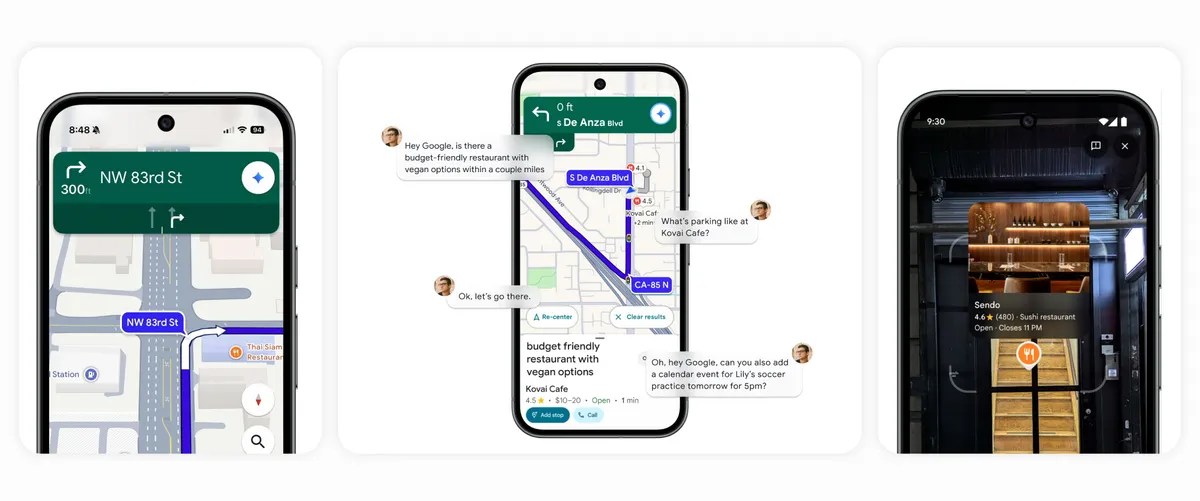
The Google Maps application is undergoing a foundational transformation via the integration of Gemini artificial intelligence, paving the way for intuitive, highly efficient travel. This strategic upgrade introduces the industry’s first fully conversational, zero-touch driving interface, effectively embedding an astute copilot into your vehicle, powered by Gemini’s deep synthesis of real-world geographical data.

Easier Ways to Get Things Done While Driving

By integrating the Gemini AI assistant directly into the hands-free driving experience within the Google Maps app, efficiency reaches new heights. Drivers can now command the system to handle complex logistical operations: pinpointing necessary stops along the current route, checking nearby EV charging station availability, or, for Android users, instantly updating contacts with arrival estimates—all without requiring manual input.

This capability excels at managing chained commands, allowing users to ask multi-step questions such as: “Locate an affordable restaurant with vegan options within two miles of my path. Analyze the parking situation there,” followed immediately by route confirmation. Furthermore, with the user’s explicit authorization, the AI can seamlessly interface with other productivity applications. You can issue a cross-functional command like, “While you’re at it, please add a calendar entry for soccer practice tomorrow at 5 p.m.”

Enhanced Navigation and Real-Time Reporting

Gemini connects directly to your Calendar to schedule the event automatically. You can also dive into specific inquiries, like “Which items are most popular on the menu there?” or catch up on major news headlines, ensuring continuous focus on the road.

Maintaining system accuracy is also now a collective, effortless process. Users can instantly communicate real-time road hazards by uttering simple phrases, such as: “Collision sighted,” “Flooding observed ahead,” or “Note the impending traffic slowdown.” This Gemini-powered navigation capability is scheduled for phased deployment across Android and iOS platforms wherever the AI is available, with subsequent integration into Android Auto forthcoming.

Anticipating Congestion: Preemptive Travel Warnings

The frustration of unexpected gridlock or traffic disruptions is significantly reduced through predictive analytics. Google Maps now possesses the ability to monitor the road conditions ahead and issue immediate, proactive notifications regarding unforeseen obstacles, rapid road closures, or severe traffic backups—even when a specific navigation path has not been initiated. Proactive traffic monitoring is currently rolling out to U.S. Android users.

Gemini Helps with Identifying Real-World Landmarks

Gemini enhances navigation by integrating well-known points of interest, like eateries, fuel stations, and notable structures, into driving instructions. Rather than simply being told “in 500 feet, make a right,” drivers will receive guidance such as “make a right after you pass the Thai Siam Restaurant,” with this visual marker also appearing on their map display. This innovative approach leverages information from Google Maps and Street View to deliver precise and practical navigation. This feature, which offers landmark-assisted routing, is now available for both Android and iOS devices within the United States.

The fusion of Google Maps with Gemini provides a new standard for road travel, offering productive assistance and enjoyable discovery, allowing users to navigate every journey with enhanced assurance.

Metro by T-Mobile Launches New Device Protection Portfolio

0

Metro by T-Mobile has just launched Metro Protection, a new device protection portfolio designed to cater to the demands of modern consumers. The new service offers more benefits, more claims, and a lower deductible, ensuring devices stay functional and protected.

Metro Protection replaces Metro’s previous Premium Handset Protection (PHP) program. The new plans offer more than just traditional device insurance. The lineup includes features such as same-day screen repairs, digital security, unlimited tech support, and more, all at a value-driven price point.

Here are the highlights of the newly introduced Metro Protection:

  • More claims, without breaking the bank: Customers can enjoy up to 50% lower deductibles and unlimited claims on accidental damage, Loss & Theft, and Mechanical or electrical failure with the top-tier plan.
  • Same-day repairs: Customers can have their cracked screens repaired on the same day, eliminating the need for a full replacement.
  • Digital security built in: Selected plans include McAfee protection, identity theft coverage up to $1M, and Scam Shield Premium.
  • Instant, easy support: Select plans include unlimited tech support, assisting customers with device setup, troubleshooting, and everyday usage.
  • Three plans for every customer: Metro Basic Protection is the most affordable, Advanced provides great value, and Complete offers the best protection coverage.

Mobile devices, tablets, and smartwatches have become everyday essentials. With Metro Protection, customers can keep their devices working without breaking the bank, secure in the knowledge that they’re covered against both everyday mishaps and digital threats.

Nationwide Security Expansion

In addition to device protection services, Metro Protection has significantly expanded its service reach, now offering comprehensive security and protection across the entire country, except in a few locations. Previously limited to localized operations, this nationwide availability means that individuals and businesses in every state can now benefit from Metro Protection’s diverse portfolio.

This extensive range of services typically includes home security systems, business surveillance, personal safety measures, and alarm monitoring. The company’s broader geographic scope not only opens doors to a larger customer base but also aims to establish a consistent level of excellence and reliability in their security provisions, ensuring that a unified standard of safety and peace of mind is accessible everywhere.

Metro Protection is now available nationwide, excluding New York, and also in Puerto Rico. For more details, visit Metro by T-Mobile website.