Home Blog Page 369

Carsifi wireless Android Auto review

I can’t live without Android Auto now. I’ve had it several years in my previous vehicle via a Pioneer aftermarket addition and it was a “have to have it” option in the new car I purchased last month. Unfortunately, Android Auto is pretty standard on modern cars, but most manufacturers still consider the fully wireless variant a premium option.

Thankfully, we are in the fun world of tech and multiple companies are filling this void in the market with aftermarket Android Auto wireless adapters. We’ve covered a few others, but the latest we’ve spent time with is Carsifi. This new dongle brings all we’ve come to expect but also has a few surprises up its sleeve.

Plug and Play

You can’t get much easier of a setup. Like the competition we’ve used, the Carsifi Android Auto dongle is a breeze to get going in your car. Plug the included USB cable into the appropriate port in your car, connect to the dongle via Bluetooth settings, and then complete your onboarding via the car infotainment.

That’s it. You should have the Carsifi ready to enjoy your wireless jams in less than five minutes.

The Magic Button

So what sets Carsifi apart from other wireless Android Auto adapters? It’s the Magic Button. The company has built a dongle that supports multiple connections. Whether you carry a work phone and personal, or the more common, you and the significant other both have an Android, then Carsifi can be the solution.

You can accomplish this by independently setting up the secondary phone using the same steps above. Then, you can “hot swap” devices in the car by double-clicking the Magic Button. The unit defaults to the last known connection but easily swaps between owners with just the tap of this button.

Performance

The Carsifi dongle has performed exceptionally in my time with it installed. At first setup, it’s truly plug-and-play as if it’s any other Bluetooth audio unit. Afterward, your car should remember the connection and preset it moving forward.

My only complaint is that occasionally the Magic Button didn’t swap devices on the first try. Usually, a second double-click did the trick. Otherwise, you shouldn’t have any issues getting the Carsifi up and running in your vehicle.

Another notable is the battery life of the connected Android phone. It’s not great, but this is true for every other option to add wireless Auto as well. Using the combination of WiFi and Bluetooth simultaneously is taxing for the endurance of the phone attached.

An added bonus is that Carsifi has a companion app. This allows for basic software tweaks and more importantly, software updates. This makes it on par with the AAWireless and a step ahead of Moto MA1. Being able to fix bugs as they arise with little input from the consumer is a huge plus.

Conclusion

Carsifi is another outstanding way to add wireless Android Auto to a car that doesn’t have it from the factory. With a USB cable and quick connection to Bluetooth, you can add it to any car with wired Android Auto.

The last selling feature is that Carsifit won’t break the bank. At $100, this puts it firmly in the same range as its competition. Honestly, of the three wireless Android Auto options I’ve tested, Carsifi is my favorite.

I can’t put my finger on it, but it just seems to launch and perform slightly better than both AAWireless and the Moto. Add in the multiple device support with the Magic Button, and I think you’ve got the most complete aftermarket wireless adapter Android Auto users should take a look at.

T-Mobile’s Un-carrier On – Smartest magenta Wi-Fi suitcase on the market

0

T-Mobile has taken a surprising move by announcing its latest product, the Un-carrier On suitcase. The bag comes with a sleek design looking smart. Also, it is manufactured in collaboration with Samsara Luggage.

Furthermore, people who travel can have something to enjoy as the holidays roll in. They are able to explore the world in new ways. The suitcase is not just smart-looking, it is the ultimate statement piece sure to stand out in a sea of travel bags.

The company is already known for providing industry-leading travel benefits. It takes another step in satisfying the desires of its customers who love to travel. Hence, T-Mobile, by announcing the Un-carrier On makes travel look good.

What to expect from Un-carrier On

There are three main features T-Mobile customers should look for, according to the T-Mobile blog: tag smart technology, eight-bag packing set, and flat top work surface.

Here’s a new way to keep satisfied T-Mobile customers connected in America’s skyways and around the world with Coverage Beyond, said Mike Sievert, CEO of T-Mobile. Coverage Beyond assures customers that their belongings are covered too.

Why wireless and USB-C charging?

Travelers can stop worrying about finding a charging outlet at public places like airports, or office lounges. As previously stated, the Un-carrier On is the only suitcase on the market with wireless charging. An additional benefit is the removable battery pack that arrived with USB-C charging. It ensures that all your devices are always powered up no matter where you are.

Features

  • Wireless and USB-C Charging – The Un-carrier On is the only carry-on suitcase on the market with wireless charging, and it also comes with a removable battery pack with USB-C charging to ensure all your devices are always powered up. Say goodbye to frantically searching for an outlet in the airport or devices running out of battery on a road trip.
  • Tag Smart Technology –Turn up the relaxation and rest easy knowing the Un-carrier On helps keep track of belongings from takeoff to touchdown and nearly everywhere in between.
  • Workstation on Wheels – Its flat top work surface provides the perfect place to rest a laptop while sending that final email before entering vacation mode, or streaming movies and shows while drowning out the chaos at your gate.
  • Eight-Bag Packing Set – ​As if the Un-carrier On isn’t already a standout, it also comes with an eight-bag packing set to ensure your underwear and toothbrush never touch again. Just let that one sit a minute.

See Also: T-Mobile kicks off its Back-to-School sales with free 5G phones and more

T-Mobile really took things to a whole new level by making sure that Un-carrier On suitcase users can even keep connected even outside of T-Mobile’s network.

T-Mobile also announced that its customers are able to qualify for free Wi-Fi on the biggest U.S airlines. In addition, they get 5GB of free high-speed data per month and that comes with free texting in more than 215 countries and destinations.

Visit Travel Magenta if you’re interested in pre-ordering it. Pre-orders start on November 3 at $325.

Google Play Games beta on PC release reaches more markets

0

Google Play Games have been coming to PCs as beta experience since the early parts of 2022. However, it was enjoyed in a limited number of countries. The beta experience has been announced to be reaching new frontiers as of this month.

The beta experience reached players in Korea, Hong Kong, Taiwan, Thailand, and Australia in August. The number of markets where the games reached has increased from five in August to 13 in November 2022.

New markets receive Google Play Games beta

Android Developers reports that from the second day of November, the Google Play Games beta has reached all players in newly added markets. These include the United States, Canada, Mexico, Brazil, Indonesia, Philippines, Malaysia, and Singapore.

Download the Google Play Games beta and enjoy playing your favorite mobile games if you live in any of these countries. The games catalog has also been growing with many popular mobile titles added regularly. Some of these are the “1945 Air Force”, “Blade Idle”, “Cookie Run: Kingdom”, and “The King’s Return.”

Players who want to enjoy these mobile games on PCs can now do so by means of a separate application built by Google.

See Also: Google Play Games now supports avatars and unique usernames

In addition, it is the company’s goal to reach players wherever they are with these games. However, the fantastic part is that they are able to have access to their favorite games on as many devices as they want.

The result has been amazing. Players express delight at being able to play their desired games across phones, tablets, Chromebooks, and PCs in a seamless manner.

Google also reduced the minimum specs required on PCs so that more players can enjoy the beta experience. They can play the games on Windows 10+ with an integrated graphics card and 4+ core CPU. Check out the spec requirements here.

As Google Play Games beta moves towards a full release, players are urged to expect new features. Google will continue to evaluate developer and player feedback as time goes on.

According to Google, players in the aforementioned markets can download the beta version on its Play Store.

Dreo Air Fryer Pro Max review

Air fryers have become a staple in most modern kitchens these days, and for good reason. They are an easier and healthier way to heat your food up and get that crispy texture without needing to deep fry it in oil. Additionally, air fryers are capable of replacing your oven in many scenarios with modes for baking, broiling, or roasting.

Fortunately, I was able to spend some time with one recently when Dreo was nice enough to send out its Air Fryer Pro Max to us for review.

Design

One of the standouts of the Dreo Air Fryer Pro Max is the see-through window on the front. I’ve browsed a lot of air fryers, and typically, most of them lack a window. This won’t be a dealbreaker for some, but I really love the reassurance of being able to check on my food while it’s cooking to ensure it’s not burning. A see-through window with a built-in light makes this much more convenient than having to manually remove the basket.

Speaking of the basket, the Dreo Air Fryer Pro Max features a large 6.8QT nonstick basket and plate included in the box. The plate uses food-safe silicone to hold it in place and rests on the bottom of the basket allowing heat to circulate and cook the underside of your food.

While many air fryers put the controls on the front of the unit, the Dreo Air Fryer Pro Max places them on the top to make space for the transparent window. I found no issue with this during use though. All of the buttons are laid out well and the display is easy to read.

User experience

I’ve spent the past few weeks cooking food in the Dreo Air Fryer Pro Max and everything has gone perfectly. The manual suggests subtracting 25 degrees from the cooking temperature and 25% off of the cooking time because air fryers cook more quickly, which has saved me time while also producing crispy results.

I love the built-in window for checking food and the automatic shake reminder. Plus, food wipes off easily when cleaning the nonstick surface when it’s time to give it a wash.

My only complaints would be that the removable tray on the inside can be a little difficult to insert or remove because of the silicone protectors, and there is still a slight smell after several uses.

I followed all of the guidelines in the manual to remove any smells, but regardless, there’s still a hint of a plasticky smell. Thankfully, it usually gets covered up by the smell of the food cooking and I believe it’s getting weaker with each use.

Final thoughts

Air fryers are fantastic for retaining the crunch of fried food without having to deep fry in more oil. They are also great for baking, roasting, and cooking without heating up the kitchen the way an oven does. Furthermore, ovens take more time and use more power.

All of this makes an air fryer a great addition to your kitchen, and the Dreo Air Fryer Pro Max would be a great choice due to all of its many features.

For starters, it has a spacious 6.8QT basket making it easy to cook for large families, it’s easy to clean, it has a maximum temperature of 450 degrees Fahrenheit, and it features 5 different cooking modes and 6 presets. However, my favorite feature is the transparent window that allows me to check on food while it’s cooking.

The Dreo Air Fryer Pro Max is currently available from Amazon or Dreo’s website for $120 or less.

Buy from Amazon Buy from Dreo

OnePlus Black Friday and Cyber Monday Deals already underway

0

Black Friday and Cyber Monday deals are showing up on the web. People are also searching and trying to find the best fit for this holiday period. For these reasons, OnePlus announced some exciting deals for its customers. These include a full collection of holiday promotions that last through November 30.

OnePlus Black Friday Sale: October 31 – November 20

OnePlus is offering customers the chance to purchase the OnePlus 10 Pro 5G 8GB for $799. Another option is to purchase the 12GB RAM of the same device for $869. Buyers can also get 80 percent off Buds Pro or Buds Z2 when they purchase the 10 Pro 5G device.

Check the deal out. Take note that this deal is already on and will last till November 20. Buyers can choose between volcanic black and emerald forest.

During this same Black Friday sale, the OnePlus 10T 8GB RAM device price will go for $649. The 16GB edition sells for $749. This deal runs from October 31 to November 20 as well. It’s available in moonstone black and jade green colors.

See Also: OnePlus unveils the OnePlus 10T in NYC

An additional benefit includes getting 80 percent off Buds Pro or Buds Z2 for any of these devices.

OnePlus Black Friday & Cyber Monday Hot Sale November 21 – November 30

This deal has the OnePlus 9 selling at $349 during the period stated above. OnePlus 10 Pro 5G is included in this as it sells for $599 and $799 for the 8GB and 12GB versions. Get it in either astral black or in winter mist.

Also, the OnePlus 10T price is $549 for the 10T 8GB and $699 for the 10T 16GB. As usual, both deals will attract 80 percent off Buds Pro or Buds Z2 when buyers make purchases during this time.

OnePlus N20 5G is also included in this deal as it sells for $229 with 80 percent off Nord Buds when purchased. Get it in blue quantum color.

There’s the opportunity for trade-in in which customers can enjoy a $100 bonus, and up to $500 trade-in instant credit. Those interested in the OnePlus 10T deals can save up to $600 with an eligible trade-in. Visit the OnePlus website to learn more.

Arlo reveals all-new Pro 5S 2K Security Camera

0

A recognized award-winning brand, Arlo Technologies, Inc. has announced the all-new Pro 5S 2K Security Camera. This is the most innovative addition to its award-winning Pro series.

Arlo clarifies that the camera is supported by its most comprehensive app experience ever. It is backed by the redesigned Arlo Secure App featuring a highly intuitive interface. This interface streamlines access to critical tools like the Emergency Response.

Pro 5S 2K key features

  • Dual-Band Wi-Fi support: It connects to the strongest network available between 5 GHz and 2.4 GHz
  • 2K Video with HDR: users can get crystal-clear details in every picture
  • Better Battery Life: Multiple ways of conserving battery life, especially by connecting to SecureLink-enabled devices. The battery offers 30 percent longer battery life than the Pro 4 camera
  • Built-in Smart Siren: This triggers the alarm remotely or during an event
  • Two-Way Audio: Enables users to listen and speak to visitors. Distracting noise like the wind is reduced
  • Color Night Vision: User can still see videos in colors, not the old-style black and white
  • Wire-Free and Weather-Resistant: No problem when installed indoors or outdoors

How Pro 5S 2K Security Camera works

The major plus of this camera is when connected to Arlo’s exclusive SecureLink technology. It offers huge user benefits people can’t find in the existing security devices.

When in sleep mode, users benefit by achieving a boost in battery life. The Pro 5S 2K Security Camera pairs with other SecureLink devices as well.

Furthermore, the tri-band connectivity offers a longer Wi-Fi range and mitigates RF interference and active jamming attempts. Picture quality is maximized for the user.

See Also: Arlo adds two cameras to Essential line

Arlo Technologies’ Pro 5S 2K Security Camera is the most reliable camera the company has engineered to date. Its power is seen with the integration of three wireless technologies into one without sacrificing simplicity.

With this new device, users will be able to protect everything that matters in their homes. The intuitive Arlo Secure App ensures easy access to comprehensive monitoring tools, thereby providing more efficiency for the overall Pro 5S experience.

Need to get the Pro 5S 2K right now? It is available for pre-order through Arlo and Best Buy for $249.99 MSRP.

Arlo launches all-in-one multi-sensor home security system

0

Arlo Technologies has taken a big leap in the design and engineering of a first-of-its-kind home security system. Known as Arlo Home Security System, the award-winning product touts some incredible features.

The company announced the security system in early November and it features a multi-sensor allowing for up to eight different sensing tasks. According to Arlo, this new product “pairs with the company’s new 24/7 Professional Monitoring service. Further, grants access to highly trained Security Experts who are adept at monitoring and responding to emergency situations.”

As one might expect there’s an app – Arlo Secure App – for managing the home security device. The app makes it easy for users to access new critical tools such as Arlo’s 24/7 Emergency Response and other routine tasks.

Arlo Home Security System provides whole home protection and offers users peace of mind.

This product can be placed anywhere in the home. It’s usually best to place it in places such as walls, windows, and doors. Other places where it can be placed are under sinks, and water heaters.

Arlo Home Security System advantage

The easy-to-install wireless multi-sensor is able to detect movement, from windows and doors. It can detect water leaks, freezing temperatures, lighting changes, smoke, and noise.

See Also: Arlo announced a new first-of-its-kind DIY security solution

The advantage of the multi-sensor is that it reduces installation complexity, and users can now use a single security system to accomplish tasks that used to require multiple products installation.

Break-ins, fire outbreaks, and water leaks are very common nowadays, making Arlo to manufacture a product that levels up the smart home security experience. People don’t have to invest in multiple types of single-purpose sensors anymore.

Families can now be happy to protect everything they love in their homes with this one-of-a-kind home security system. They can enjoy the one-tap access to the Emergency Response service that directs responders to problematic locations.

The Arlo Home Security System price is reasonable at $199. Arlo is already allowing buyers to pre-order through national retailers such as Best Buy, Amazon, and also on the Arlo website.

Arlo Starter kits bundles

Starter kits include Starter Bundle ($199.99 MSRP) and the Step Up Bundle ($299.99 MSRP). Both bundles include 30 days of 24/7 professional monitoring.

MediaTek serves up Dimensity 9200 for tomorrow’s flagship phones

0

MediaTek on Tuesday announced its Dimensity 9200 processor which will power high-end handsets in the coming months. The new mobile chip features 5G support for both sub-6 and mmWave and offers up a couple of firsts.

The Dimensity 9200 is the first smartphone system-on-chip (SoC) to integrate an Arm Cortex X3 with speeds that clock higher than 3GHz; it’s bolstered by an Arm Immortalis-G715 GPU with hardware-based ray tracing. The other cores that comprise the Dimensity 9200 include three Arm A715 and four Arm Cortex A510 cores.

Leading in power efficiency with its eXtreme Power Saving Technology for AI-noise reduction and AI-super resolution tasks, the Dimensity 9200 provides up to 30% power savings with AI-NR and 45% power savings with AI-SR in all visual applications. The chipset’s sixth generation AI Processing Unit (APU 690) enhancements include up to 35% faster performance in ETHZ5.0 benchmark compared to the fifth generation APU.

  • 1x Arm Cortex-X3 at 3.05GHz
  • 3x Arm Cortex-A715 at 2.85GHz
  • 4x Arm Cortex-A510 at 1.8GHz

The new chip is the first to include support for Wi-Fi 7 (up to 6.5 Gbps data rates) as well as native support for new RGBW camera sensors. Moreover, the Dimensity 9200 supports high-end displays at Full HD+ resolution up to 240Hz, WHQD up to 144Hz, and 5K (2.5Kx2) up to 60Hz.

Rounding things out, the chip is the first to support LPDDR5X (up to 8533Mbps) memory and boasts Bluetooth LE Audio-ready technology for “best-in-class audio latency with Dual-Link True Wireless Stereo Audio for incredible sound quality.”

Look for the first handsets with the flagship processor to roll out by the end of 2022 with a wider adoption in the coming year.

DroidKit: Step by step to bypass factory reset protection

0

We recently covered iMobie’s DroidKit, an app designed to bypass Android’s factory reset protection to help recover phones that are locked out of Google accounts. That, and a whole host of other solutions.

Indeed, DroidKit is designed to provide Android users with help for issues including screen unlock, FRP bypass, data recovery, system repair, and more. In this post, we will dive further into the desktop application and how it works step-by-step.

Head over to iMobie

First, you need to download the desktop application from iMobie. DroidKit is available in both Windows and Mac formats. Following your operating system’s normal processes to add the application to your machine should then be used to get DroidKit installed.

After the installation is complete, launch DroidKit. Here you’ll be greeted with the initial home page of the application. There are many options to choose from, but here we want the bottom left FRP Bypass option.

Recovery Mode is needed

Once the wizard for FRP pops up, we just need to follow along. iMobie has done a great job here by making this informative and well laid out for users. You can’t really mess this up if you follow the steps, but we will outline them below as well.

Your first screen gives you basic declarations of supported devices and what to expect. YOu then need to plug in your Samsung device you need to be tweaked. If your phone is not detected DroidKit will let you know.

Next, the software suite will build a configuration file specific to your handset. This might take a minute but there’s a nifty progress bar to indicate the situation. Once the config file is built you are presented with a confirmation pop-up and press Start to continue.

This is the most complicated step in the entire bypass. Now, you need to manually put your Samsung into Recovery Mode. First, you’ll shut down the phone completely. Then using the appropriate key combination while powering it back on should get you to this hidden Android menu. Recovery Mode key combos are slightly different depending on the device, but DroidKit breaks this down in the top tabs of this app page.

Wipe and Bypass is Next

DroidKit has gotten you to the hidden menu of Android Recovery Mode and will now need a full wipe of the device. From the Recovery menu, choose Wipe Cache Partition and select the option by pressing the Power button.

This will fully reset and remove all data from your phone. I repeat this will completely wipe and reformat the phone. The reset will take a few minutes, but once the process is done, you will be ready to move forward with the bypass.

The DroidKit wizard will again walk you through the next steps on how to locate and identify the Android version your phone is currently using. Once that’s designated you click the “Download Now” button to start the bypass process.

The last step is to connect your phone via USB to your PC if it’s not already. You will then be prompted to wipe the cache partition via the Recovery menu and reboot. At reboot, follow the screens on DroidKit to start the first launch process on your Samsung device.

Lastly, you will click the “Send Notification” button on DroidKit. A pop-up will ask for your confirmation and press “Yes”. This will send your Samsung

 device directly to the Google Play Store to download an app called Alliance Shield X. Follow the remaining steps from the DroidKit application to complete the bypass.

Done!

That’s it, folks. After you follow all these steps you should be able to bypass the Factory Reset Protection on most Samsung devices. As a note, we don’t support anyone using this for devices they don’t currently own. This tool is meant as a last-ditch effort to recover a device in your possession.

iMobie DroidKit: the complete one-stop Android toolkit

0

Software developer iMobie makes a stable of Windows tools to help you maintain, fix, and stabilize your mobile phones. Among its portfolio of options is a tool called DroidKit which features a very specific skillset for removing Android’s factory reset protection on Samsung  devices.

What is DroidKit?

DroidKit is a desktop app that helps you navigate some situations that may arise as an Android user. These include factory reset protection (FRP) bypass, screen unlocker, recovery of lost photos or messages, and even the random black screen some Samsung devices can have.

This toolkit makes working with these issues a thing of the past. DroidKit packs all these fixes into an intuitive, well design package for you to use on your Windows or Mac computer. In less than 20 minutes you can be back to using your phone like nothing was ever wrong in most cases.

What is FRP Bypass?

There are a few instances where FRP bypass can come in handy. If you have kids, you know that sometimes that added layer of security might get in the way. Maybe they forgot their new Google account credentials, or unintentionally locked themselves out of their Google account. This leads to a parental headache of how to get back access to this device if you need to reset the unit.

Another opportunity to need FRP bypass is the secondhand Android market. Many small businesses struggle to provide users with a handset that may be improperly reset at times. eBay is full of such devices that are not stolen but may be locked from previous users for a variety of reasons. Many could take the gamble on this heavily discounted device on marketplaces, but don’t have the means to properly remove the FRP.

iMobie built DroidKit to streamline this process for Android phones, and more specifically Samsung devices. It’s worth noting that the company only guarantees DroidKit for Samsung models, but it may work for others. This Windows application is far easier to get going for FRP removal than any other methods we’ve found.

Screen Unlocker

Another common issue you may run into with Android devices is screen locks. Sometimes we have a scenario where you’ve been unceremoniously locked out of your device. This can be caused by several reasons. Did your kid enter the incorrect password too many times? Did you recently change the passcode to something you thought you’d remember but now you can’t?

Under any of these root causes, DroidKit can have you back into your device in no time. By following a few prompts, the software suite will help you reset your passcode back to something user-friendly in under 20 minutes.

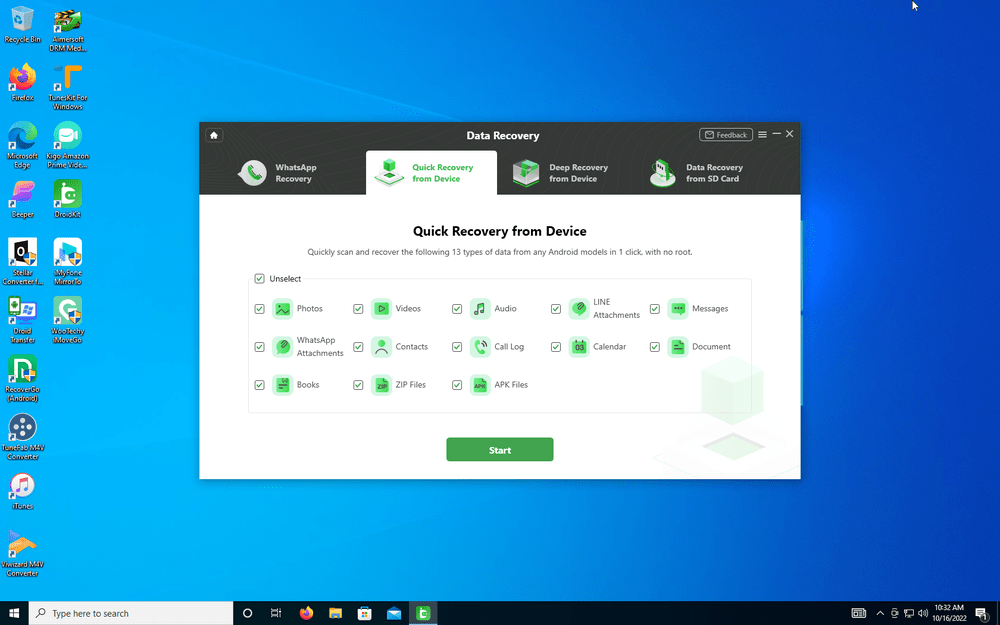
Data recovery is another issue in the modern tech world. There are times we just mistakenly delete or remove things from our phones that we later want to keep. DroidKit has an excellent solution for this as well.

Whether it’s old archived messages from popular options, photos, or even deleted calendar events, DroidKit may be able to recover them. Using several options for quick, deep, or external recovery, the toolkit searches your config files for possible solutions to reinstate your files back to the original state.

System Fix

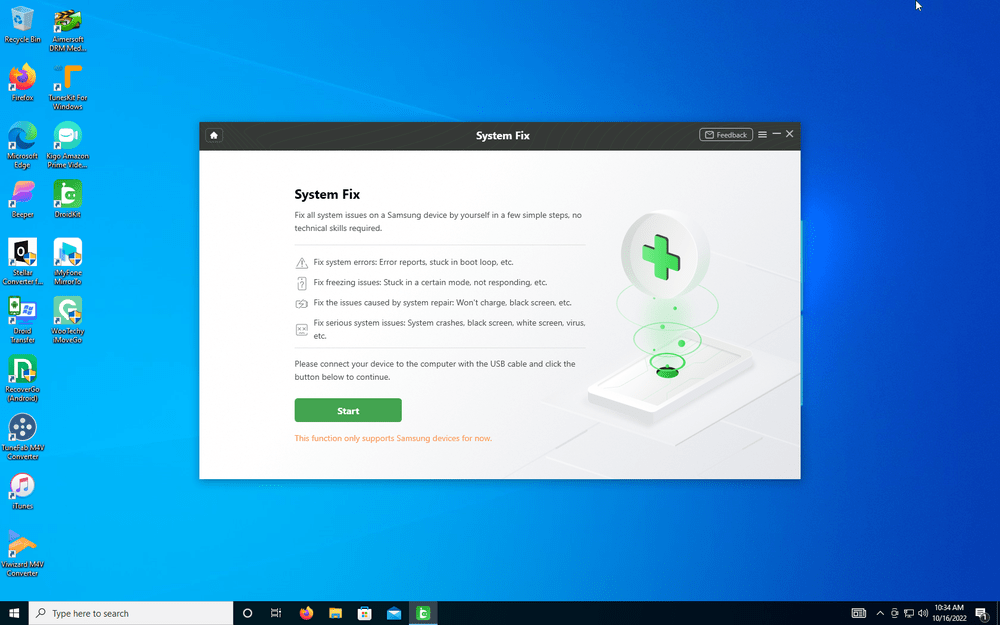
Lastly, computers don’t always cooperate. Similar to the “blue screen of death” on PCs, our smartphones can lock up or present weird screens from time to time. Using DroidKit System Fix is just as dead simple as the other solutions.

Following a few on-screen prompts should have you back to a functional device in no time. If DroidKit can’t fix your issue, you’ve at least removed some doubts that it’s software related. It may be time to move on to the conclusion that the issue is a hardware-related failure.

Conclusion

DroidKit offers a nice suite of features that can come in handy for a variety of Android software problems. The program toolkit covers most of the common issues users can run across and offers a well-laid-out solution for both Windows and Mac computers.

Pricing also gives you flexibility. You can unlock each individual DroidKit fix ranging from $20 to $40 depending on which tool you need. If you’d rather have the full chest, then you can currently get the entire suite for a year for just $70.