Home Blog Page 367

Dreo Air Fryer Pro Max review

Air fryers have become a staple in most modern kitchens these days, and for good reason. They are an easier and healthier way to heat your food up and get that crispy texture without needing to deep fry it in oil. Additionally, air fryers are capable of replacing your oven in many scenarios with modes for baking, broiling, or roasting.

Fortunately, I was able to spend some time with one recently when Dreo was nice enough to send out its Air Fryer Pro Max to us for review.

Design

One of the standouts of the Dreo Air Fryer Pro Max is the see-through window on the front. I’ve browsed a lot of air fryers, and typically, most of them lack a window. This won’t be a dealbreaker for some, but I really love the reassurance of being able to check on my food while it’s cooking to ensure it’s not burning. A see-through window with a built-in light makes this much more convenient than having to manually remove the basket.

Speaking of the basket, the Dreo Air Fryer Pro Max features a large 6.8QT nonstick basket and plate included in the box. The plate uses food-safe silicone to hold it in place and rests on the bottom of the basket allowing heat to circulate and cook the underside of your food.

While many air fryers put the controls on the front of the unit, the Dreo Air Fryer Pro Max places them on the top to make space for the transparent window. I found no issue with this during use though. All of the buttons are laid out well and the display is easy to read.

User experience

I’ve spent the past few weeks cooking food in the Dreo Air Fryer Pro Max and everything has gone perfectly. The manual suggests subtracting 25 degrees from the cooking temperature and 25% off of the cooking time because air fryers cook more quickly, which has saved me time while also producing crispy results.

I love the built-in window for checking food and the automatic shake reminder. Plus, food wipes off easily when cleaning the nonstick surface when it’s time to give it a wash.

My only complaints would be that the removable tray on the inside can be a little difficult to insert or remove because of the silicone protectors, and there is still a slight smell after several uses.

I followed all of the guidelines in the manual to remove any smells, but regardless, there’s still a hint of a plasticky smell. Thankfully, it usually gets covered up by the smell of the food cooking and I believe it’s getting weaker with each use.

Final thoughts

Air fryers are fantastic for retaining the crunch of fried food without having to deep fry in more oil. They are also great for baking, roasting, and cooking without heating up the kitchen the way an oven does. Furthermore, ovens take more time and use more power.

All of this makes an air fryer a great addition to your kitchen, and the Dreo Air Fryer Pro Max would be a great choice due to all of its many features.

For starters, it has a spacious 6.8QT basket making it easy to cook for large families, it’s easy to clean, it has a maximum temperature of 450 degrees Fahrenheit, and it features 5 different cooking modes and 6 presets. However, my favorite feature is the transparent window that allows me to check on food while it’s cooking.

The Dreo Air Fryer Pro Max is currently available from Amazon or Dreo’s website for $120 or less.

Buy from Amazon Buy from Dreo

OnePlus Black Friday and Cyber Monday Deals already underway

0

Black Friday and Cyber Monday deals are showing up on the web. People are also searching and trying to find the best fit for this holiday period. For these reasons, OnePlus announced some exciting deals for its customers. These include a full collection of holiday promotions that last through November 30.

OnePlus Black Friday Sale: October 31 – November 20

OnePlus is offering customers the chance to purchase the OnePlus 10 Pro 5G 8GB for $799. Another option is to purchase the 12GB RAM of the same device for $869. Buyers can also get 80 percent off Buds Pro or Buds Z2 when they purchase the 10 Pro 5G device.

Check the deal out. Take note that this deal is already on and will last till November 20. Buyers can choose between volcanic black and emerald forest.

During this same Black Friday sale, the OnePlus 10T 8GB RAM device price will go for $649. The 16GB edition sells for $749. This deal runs from October 31 to November 20 as well. It’s available in moonstone black and jade green colors.

See Also: OnePlus unveils the OnePlus 10T in NYC

An additional benefit includes getting 80 percent off Buds Pro or Buds Z2 for any of these devices.

OnePlus Black Friday & Cyber Monday Hot Sale November 21 – November 30

This deal has the OnePlus 9 selling at $349 during the period stated above. OnePlus 10 Pro 5G is included in this as it sells for $599 and $799 for the 8GB and 12GB versions. Get it in either astral black or in winter mist.

Also, the OnePlus 10T price is $549 for the 10T 8GB and $699 for the 10T 16GB. As usual, both deals will attract 80 percent off Buds Pro or Buds Z2 when buyers make purchases during this time.

OnePlus N20 5G is also included in this deal as it sells for $229 with 80 percent off Nord Buds when purchased. Get it in blue quantum color.

There’s the opportunity for trade-in in which customers can enjoy a $100 bonus, and up to $500 trade-in instant credit. Those interested in the OnePlus 10T deals can save up to $600 with an eligible trade-in. Visit the OnePlus website to learn more.

Arlo reveals all-new Pro 5S 2K Security Camera

0

A recognized award-winning brand, Arlo Technologies, Inc. has announced the all-new Pro 5S 2K Security Camera. This is the most innovative addition to its award-winning Pro series.

Arlo clarifies that the camera is supported by its most comprehensive app experience ever. It is backed by the redesigned Arlo Secure App featuring a highly intuitive interface. This interface streamlines access to critical tools like the Emergency Response.

Pro 5S 2K key features

  • Dual-Band Wi-Fi support: It connects to the strongest network available between 5 GHz and 2.4 GHz
  • 2K Video with HDR: users can get crystal-clear details in every picture
  • Better Battery Life: Multiple ways of conserving battery life, especially by connecting to SecureLink-enabled devices. The battery offers 30 percent longer battery life than the Pro 4 camera
  • Built-in Smart Siren: This triggers the alarm remotely or during an event
  • Two-Way Audio: Enables users to listen and speak to visitors. Distracting noise like the wind is reduced
  • Color Night Vision: User can still see videos in colors, not the old-style black and white
  • Wire-Free and Weather-Resistant: No problem when installed indoors or outdoors

How Pro 5S 2K Security Camera works

The major plus of this camera is when connected to Arlo’s exclusive SecureLink technology. It offers huge user benefits people can’t find in the existing security devices.

When in sleep mode, users benefit by achieving a boost in battery life. The Pro 5S 2K Security Camera pairs with other SecureLink devices as well.

Furthermore, the tri-band connectivity offers a longer Wi-Fi range and mitigates RF interference and active jamming attempts. Picture quality is maximized for the user.

See Also: Arlo adds two cameras to Essential line

Arlo Technologies’ Pro 5S 2K Security Camera is the most reliable camera the company has engineered to date. Its power is seen with the integration of three wireless technologies into one without sacrificing simplicity.

With this new device, users will be able to protect everything that matters in their homes. The intuitive Arlo Secure App ensures easy access to comprehensive monitoring tools, thereby providing more efficiency for the overall Pro 5S experience.

Need to get the Pro 5S 2K right now? It is available for pre-order through Arlo and Best Buy for $249.99 MSRP.

Arlo launches all-in-one multi-sensor home security system

0

Arlo Technologies has taken a big leap in the design and engineering of a first-of-its-kind home security system. Known as Arlo Home Security System, the award-winning product touts some incredible features.

The company announced the security system in early November and it features a multi-sensor allowing for up to eight different sensing tasks. According to Arlo, this new product “pairs with the company’s new 24/7 Professional Monitoring service. Further, grants access to highly trained Security Experts who are adept at monitoring and responding to emergency situations.”

As one might expect there’s an app – Arlo Secure App – for managing the home security device. The app makes it easy for users to access new critical tools such as Arlo’s 24/7 Emergency Response and other routine tasks.

Arlo Home Security System provides whole home protection and offers users peace of mind.

This product can be placed anywhere in the home. It’s usually best to place it in places such as walls, windows, and doors. Other places where it can be placed are under sinks, and water heaters.

Arlo Home Security System advantage

The easy-to-install wireless multi-sensor is able to detect movement, from windows and doors. It can detect water leaks, freezing temperatures, lighting changes, smoke, and noise.

See Also: Arlo announced a new first-of-its-kind DIY security solution

The advantage of the multi-sensor is that it reduces installation complexity, and users can now use a single security system to accomplish tasks that used to require multiple products installation.

Break-ins, fire outbreaks, and water leaks are very common nowadays, making Arlo to manufacture a product that levels up the smart home security experience. People don’t have to invest in multiple types of single-purpose sensors anymore.

Families can now be happy to protect everything they love in their homes with this one-of-a-kind home security system. They can enjoy the one-tap access to the Emergency Response service that directs responders to problematic locations.

The Arlo Home Security System price is reasonable at $199. Arlo is already allowing buyers to pre-order through national retailers such as Best Buy, Amazon, and also on the Arlo website.

Arlo Starter kits bundles

Starter kits include Starter Bundle ($199.99 MSRP) and the Step Up Bundle ($299.99 MSRP). Both bundles include 30 days of 24/7 professional monitoring.

MediaTek serves up Dimensity 9200 for tomorrow’s flagship phones

0

MediaTek on Tuesday announced its Dimensity 9200 processor which will power high-end handsets in the coming months. The new mobile chip features 5G support for both sub-6 and mmWave and offers up a couple of firsts.

The Dimensity 9200 is the first smartphone system-on-chip (SoC) to integrate an Arm Cortex X3 with speeds that clock higher than 3GHz; it’s bolstered by an Arm Immortalis-G715 GPU with hardware-based ray tracing. The other cores that comprise the Dimensity 9200 include three Arm A715 and four Arm Cortex A510 cores.

Leading in power efficiency with its eXtreme Power Saving Technology for AI-noise reduction and AI-super resolution tasks, the Dimensity 9200 provides up to 30% power savings with AI-NR and 45% power savings with AI-SR in all visual applications. The chipset’s sixth generation AI Processing Unit (APU 690) enhancements include up to 35% faster performance in ETHZ5.0 benchmark compared to the fifth generation APU.

  • 1x Arm Cortex-X3 at 3.05GHz
  • 3x Arm Cortex-A715 at 2.85GHz
  • 4x Arm Cortex-A510 at 1.8GHz

The new chip is the first to include support for Wi-Fi 7 (up to 6.5 Gbps data rates) as well as native support for new RGBW camera sensors. Moreover, the Dimensity 9200 supports high-end displays at Full HD+ resolution up to 240Hz, WHQD up to 144Hz, and 5K (2.5Kx2) up to 60Hz.

Rounding things out, the chip is the first to support LPDDR5X (up to 8533Mbps) memory and boasts Bluetooth LE Audio-ready technology for “best-in-class audio latency with Dual-Link True Wireless Stereo Audio for incredible sound quality.”

Look for the first handsets with the flagship processor to roll out by the end of 2022 with a wider adoption in the coming year.

DroidKit: Step by step to bypass factory reset protection

0

We recently covered iMobie’s DroidKit, an app designed to bypass Android’s factory reset protection to help recover phones that are locked out of Google accounts. That, and a whole host of other solutions.

Indeed, DroidKit is designed to provide Android users with help for issues including screen unlock, FRP bypass, data recovery, system repair, and more. In this post, we will dive further into the desktop application and how it works step-by-step.

Head over to iMobie

First, you need to download the desktop application from iMobie. DroidKit is available in both Windows and Mac formats. Following your operating system’s normal processes to add the application to your machine should then be used to get DroidKit installed.

After the installation is complete, launch DroidKit. Here you’ll be greeted with the initial home page of the application. There are many options to choose from, but here we want the bottom left FRP Bypass option.

Recovery Mode is needed

Once the wizard for FRP pops up, we just need to follow along. iMobie has done a great job here by making this informative and well laid out for users. You can’t really mess this up if you follow the steps, but we will outline them below as well.

Your first screen gives you basic declarations of supported devices and what to expect. YOu then need to plug in your Samsung device you need to be tweaked. If your phone is not detected DroidKit will let you know.

Next, the software suite will build a configuration file specific to your handset. This might take a minute but there’s a nifty progress bar to indicate the situation. Once the config file is built you are presented with a confirmation pop-up and press Start to continue.

This is the most complicated step in the entire bypass. Now, you need to manually put your Samsung into Recovery Mode. First, you’ll shut down the phone completely. Then using the appropriate key combination while powering it back on should get you to this hidden Android menu. Recovery Mode key combos are slightly different depending on the device, but DroidKit breaks this down in the top tabs of this app page.

Wipe and Bypass is Next

DroidKit has gotten you to the hidden menu of Android Recovery Mode and will now need a full wipe of the device. From the Recovery menu, choose Wipe Cache Partition and select the option by pressing the Power button.

This will fully reset and remove all data from your phone. I repeat this will completely wipe and reformat the phone. The reset will take a few minutes, but once the process is done, you will be ready to move forward with the bypass.

The DroidKit wizard will again walk you through the next steps on how to locate and identify the Android version your phone is currently using. Once that’s designated you click the “Download Now” button to start the bypass process.

The last step is to connect your phone via USB to your PC if it’s not already. You will then be prompted to wipe the cache partition via the Recovery menu and reboot. At reboot, follow the screens on DroidKit to start the first launch process on your Samsung device.

Lastly, you will click the “Send Notification” button on DroidKit. A pop-up will ask for your confirmation and press “Yes”. This will send your Samsung

 device directly to the Google Play Store to download an app called Alliance Shield X. Follow the remaining steps from the DroidKit application to complete the bypass.

Done!

That’s it, folks. After you follow all these steps you should be able to bypass the Factory Reset Protection on most Samsung devices. As a note, we don’t support anyone using this for devices they don’t currently own. This tool is meant as a last-ditch effort to recover a device in your possession.

iMobie DroidKit: the complete one-stop Android toolkit

0

Software developer iMobie makes a stable of Windows tools to help you maintain, fix, and stabilize your mobile phones. Among its portfolio of options is a tool called DroidKit which features a very specific skillset for removing Android’s factory reset protection on Samsung  devices.

What is DroidKit?

DroidKit is a desktop app that helps you navigate some situations that may arise as an Android user. These include factory reset protection (FRP) bypass, screen unlocker, recovery of lost photos or messages, and even the random black screen some Samsung devices can have.

This toolkit makes working with these issues a thing of the past. DroidKit packs all these fixes into an intuitive, well design package for you to use on your Windows or Mac computer. In less than 20 minutes you can be back to using your phone like nothing was ever wrong in most cases.

What is FRP Bypass?

There are a few instances where FRP bypass can come in handy. If you have kids, you know that sometimes that added layer of security might get in the way. Maybe they forgot their new Google account credentials, or unintentionally locked themselves out of their Google account. This leads to a parental headache of how to get back access to this device if you need to reset the unit.

Another opportunity to need FRP bypass is the secondhand Android market. Many small businesses struggle to provide users with a handset that may be improperly reset at times. eBay is full of such devices that are not stolen but may be locked from previous users for a variety of reasons. Many could take the gamble on this heavily discounted device on marketplaces, but don’t have the means to properly remove the FRP.

iMobie built DroidKit to streamline this process for Android phones, and more specifically Samsung devices. It’s worth noting that the company only guarantees DroidKit for Samsung models, but it may work for others. This Windows application is far easier to get going for FRP removal than any other methods we’ve found.

Screen Unlocker

Another common issue you may run into with Android devices is screen locks. Sometimes we have a scenario where you’ve been unceremoniously locked out of your device. This can be caused by several reasons. Did your kid enter the incorrect password too many times? Did you recently change the passcode to something you thought you’d remember but now you can’t?

Under any of these root causes, DroidKit can have you back into your device in no time. By following a few prompts, the software suite will help you reset your passcode back to something user-friendly in under 20 minutes.

Data recovery is another issue in the modern tech world. There are times we just mistakenly delete or remove things from our phones that we later want to keep. DroidKit has an excellent solution for this as well.

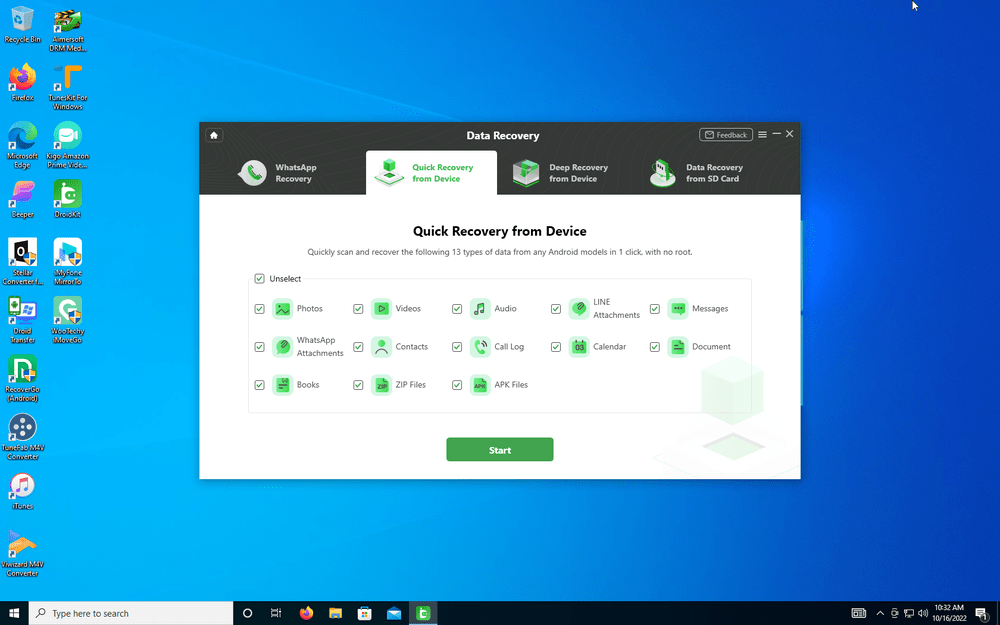
Whether it’s old archived messages from popular options, photos, or even deleted calendar events, DroidKit may be able to recover them. Using several options for quick, deep, or external recovery, the toolkit searches your config files for possible solutions to reinstate your files back to the original state.

System Fix

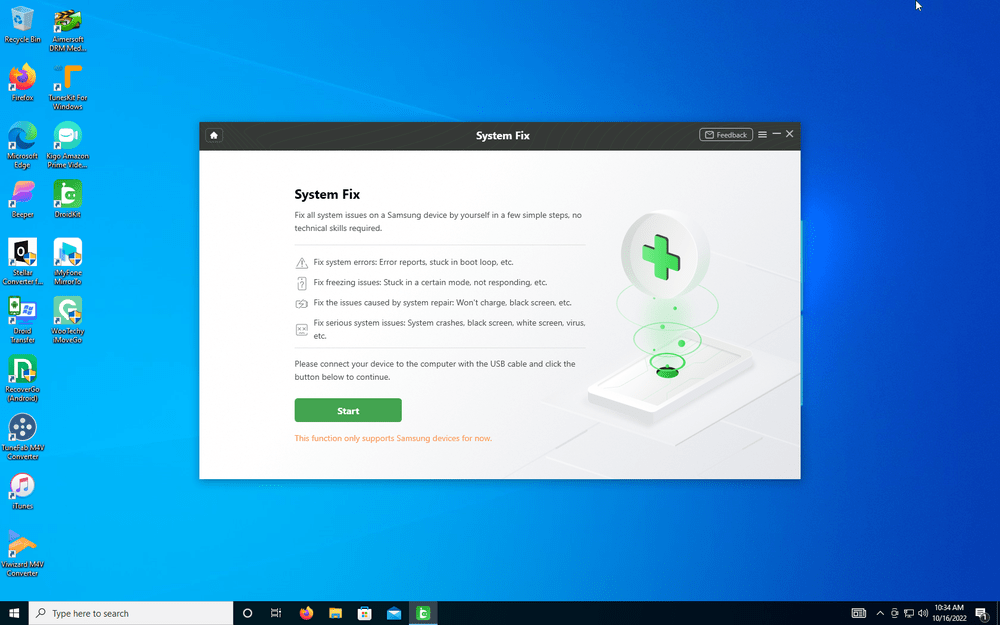
Lastly, computers don’t always cooperate. Similar to the “blue screen of death” on PCs, our smartphones can lock up or present weird screens from time to time. Using DroidKit System Fix is just as dead simple as the other solutions.

Following a few on-screen prompts should have you back to a functional device in no time. If DroidKit can’t fix your issue, you’ve at least removed some doubts that it’s software related. It may be time to move on to the conclusion that the issue is a hardware-related failure.

Conclusion

DroidKit offers a nice suite of features that can come in handy for a variety of Android software problems. The program toolkit covers most of the common issues users can run across and offers a well-laid-out solution for both Windows and Mac computers.

Pricing also gives you flexibility. You can unlock each individual DroidKit fix ranging from $20 to $40 depending on which tool you need. If you’d rather have the full chest, then you can currently get the entire suite for a year for just $70.

Switchbot Lock review

I have spent countless nights getting ready to sleep after a long day, spending no more than a few minutes with my eyes closed after being comfy under the covers, when this intrusive thought inevitably enters my brain: “Did I remember to lock the front door?”

Inevitably, not trusting my own memory, I get out of bed and walk all the way to the front door to check the lock. Probably nine times out of ten, the deadbolt was in fact locked, and I returned to my bedroom annoyed, but with peace of mind.

Not a week before I came across the SwitchBot Lock, I was brainstorming how I could attach a motor to the deadbolt on my front door so that the lock could be controlled from my bedside to solve my nightly conundrum. I nearly leapt with excitement when I realized I had the opportunity to review a product that did exactly that, and more.

Overview

The SwitchBot Lock is an adapter that fits on the deadbolt of any standard door lock. With the SwitchBot Lock installed, the user can control the state of their locks from the SwitchBot app on their phone.

The lock adapter is about the size of a deck of cards. It has a battery compartment with a Bluetooth receiver that controls a motor that spins the user’s deadbolt in the desired direction to either lock or unlock the door.

The manual included with the SwitchBot Lock made installation a breeze, and I was able to get my smart lock up and running within fifteen minutes. The SwitchBot lock comes with three different-sized adapters to be able to mount to many deadbolt shapes.

The lock itself attaches to the door around the deadbolt. There is also a very small sensor that attaches to the doorframe so that the smart lock can tell when the door is opened or closed. Both components adhere to the door and frame with a sticky foam pad that reminded me of Command Strips.

Once the components are in place, the SwitchBot lock connects to a smart device via the SwitchBot app. Then after a simple calibration, the lock is ready to use. While the overall setup process was relatively easy to follow along in the manual, I would not recommend trying to setup the smart lock without consulting the manual, as the positions of the components are very important.

Another cool feature about the Switchbot Lock that I would like to mention is that it also comes with programmable SwitchBot Tags. These tags can be set to either lock or unlock the SwitchBot Lock.

I made sure to put a tag on my nightstand so I could lock my door simply by tapping my phone against the tag.

Aesthetics

Once the SwitchBot Lock is attached to the door, it is a little bulky, and sticks out a couple extra inches from the door. The texture and look of the smart lock are clean, but in some cases, it could look a little clunky.

Also, the extra few inches that it adds beyond the thickness of the door means that the user needs to be wary that opening the door all the way could now slam the lock into the wall, which is something to keep in mind.

Accessories

One of the best things that I like about SwitchBot, is how all their products work together so cohesively. With my SwitchBot Lock, I also got a SwitchBot Keypad, and a SwitchBot Mini Hub. The keypad sits on the outside of the door and adds many new abilities for locking and unlocking the door. The mini hub attaches to the wall near an outlet and connects the device to WiFi rather than Bluetooth so that the lock can be controlled from anywhere.

The SwitchBot Keypad connects easily to the smart lock through the SwitchBot App and adds the ability to operate the lock with a code or a fingerprint. I found this functionality to be very useful. Now I can not only leave my apartment without my keys, but I’m even safe if I forget my phone as well.

The SwitchBot Mini Hub also adds another layer of convenience to using the SwitchBot Lock. Having the hub allows a push notification to be sent to your phone if your door has been unlocked for too long so that you never leave it open. It was also nice to have the SwitchBot Mini Hub because if I left for work in the morning and forgot to lock the door, I could lock it from my phone from wherever I was.

Smart App

The SwitchBot App is very clean and easy to use. Of the smart device apps that I have seen, this app was one of the most user-friendly. It made connecting all the SwitchBot devices to each other very easy.

Inside the app, locking and unlocking my apartment door happens with the click of a button. The app also made it especially easy to add new valid codes and fingerprints to the SwitchBot Keypad, as well as temporary codes and fingerprints for visitors.

Conclusion

The SwitchBot lock, though simple in design, saves me many trips to the front door to check the lock. All my worrying now goes away by just opening the SwitchBot App or tapping my phone against a SwitchBot Tag.

With the help of the included manual, installing this product for use went without a hitch. The sleek, inconspicuous colors of the smart lock’s design make of for its bulkiness.

Adding more SwitchBot devices to my home setup was a seamless process that added even more useful features to the smart lock itself. And as for me, I can stop lying awake at night, running through my evening, trying to remember if I locked the door.

You can purchase the SwitchBot Lock for about $100 at the manufacturer’s website.

Doogee’s first tablet T10 will refresh you with ultimate entertainment

0

The world-leading rugged phone brand, Doogee, has decided to take a step in a new direction. On November 1st, it globally launched the Doogee T10 – the company’s first tablet, laying the necessary foundation for its entrance to the tablet industry. 

With a 7.5mm ultra-thin and sleek look, Doogee T10 makes its perfect debut. The confidence partly comes from the aviation-grade aluminum alloy material used which gives it a lightweight body, and partly comes from the big 10.1-inch FHD+ Fullview display.

The large and clear display offers more than visual enjoyment. Certified by TÜV Rheinland, it offers a strong cover to protect your eyes, freeing you from eye fatigue even if you look at the screen from dawn to dusk. Equipped with eye comfort mode, dark mode, and sleep mode, Doogee T10 accompanies you at any time without any disturbance to your eyes.

To users’ bigger surprise, Doogee T10’s Google Widevine L1 backs up 1080P high-definition streaming or playing on mainstream websites like Netflix, Hulu,etc., offering immersive cinematic visual experience. Combined with technology and aesthetics, Doogee T10 is engineered in three gorgeous colors: Space gray, Neptune blue and Moonlight silver.


The investment in Doogee T10’s smart outlook does not slash its performance and efficiency. Unisoc T606 Octa-core processor gives the slap an expanded 7GB RAM based on the original fast 8GB. The 128GB storage with up to 1TB expandable meets your demands for large volumes of files, music, videos, and photos. The 8300mAh mega battery coming with 18W fast charging promises solid longevity and easier recharge. In addition, Doogee T10 supporting 2-In-1 mode and split-screen mode is indeed friendly to office workers who pursue both efficiency at work and relaxation in their spare time. Being a pad as it is, T10 is your perfect entertainment electronic product; connected to a keyboard and stylus, T10 becomes your productive office PC. If you are tired of switching from one app to another, T10 is your lifesaver, allowing a dual-task on one screen with its split-screen function.

Other features of this tablet include a 13MP wide rear camera, a dual stereo speaker, a versatile USB-C interface, 2.4G & 5G dual-band Wi-Fi, and Android 12 OS…

Doogee T10 has been officially released on November 1st at Doogee AliExpress Store and DoogeeMall (official shopping platform), with an amazing world premiere price of only $119. If you’re thinking of getting one, this would be great timing. Grab it before the price goes up.

How to redact PDF- online and offline solutions

0

Pdf is a handy tool used by varied professionals in different fields to send files across platforms. However, you would require a good online tool to redact your pdf. Choosing the right tool from a swarm of free and paid tool options can be a tricky task.

Moreover, the choosing process becomes more complex when you look for the tool accessibility as per your device. Tired of hunting for a good tool that can redact your pdfs? Well, here is a wonderful tool that can serve your purpose the best.

Why Do You Need to Redact PDF Files?

PDFelement is a free pdf editor that can be used on Windows, Mac, iOS, and Android devices at the same time. It can easily redact your pdf as per your preference anywhere anytime. It provides an easy encryption cipher to keep sensitive information such as credit card numbers, or any other personal or professional details secure while accessing pdf documents. Thereby, providing a safe and secure space for professionals like lawyers, teachers, bank clerks, etc. in keeping their data confidential. One can easily redact text and images with the help of this tool.

How To Redact PDFs With PDFelement?

PDFelement is a great tool that not only helps you edit your pdfs but also provides reliable encryption solutions. It has three levels of encryption for providing maximum safety to users. Moreover, it has a user-friendly interface which makes the redacting process even easier.

To redact on pdf using PDFelement, follow the given steps:

Step 1: Open PDF Protector

The initial step of encrypting your important document is by setting a password. For this, switch to the Pdfelement app. Once the page is loaded, look for the ‘Protect’ tab. Tap on it to get started. As you click it, a dialogue box will appear. From the varied list of options, click on the ‘Set Password’ option. Fill in the desired password.

Step 2: Encrypt PDF Files

Encryption usually offers two safety options. First to protect the pdf from viewing and second to protect it from editing and printing. If you want to protect your documents from viewing, set an open password. If you want to protect your files/documents from editing and printing, set a permission password. Choose as per your preference.

Step 3: Redact Text/Images In PDF

Select the files/images which you wish to encrypt and click on ‘Mark for Redaction’. And, you are good to go. The desired texts/images get redacted immediately.

How To Redact PDFs With HiPDF?

HiPDF is the next best tool when thinking of redacting your pdf. One can easily redact a pdf with just a few clicks. To redact PDF online with HiPDF follow the following steps:

Step 1: Open Redact PDF

Firstly, log on to the HiPDF website. As the page gets loaded, visit the top bar and click on ‘All Tools’. As you click it, you will be shifted to a new page. Start scrolling and searching for a PDF Tools section. That’s when you will see the redacting pdf tool. Click on the Redact pdf option.

Step 2: Drop Or Choose Files

The next step that comes after you get redirected to the pdf redaction tool page is to choose the desired files. This can be done two ways. One by choosing the file, and two by dropping/uploading the desired file. Suit yourself.

Step 3: Redact Text/Images In PDF

Now comes the actual and crucial step of redaction. The uploaded or selected file will be displayed. To get started with redaction processes, you just have to press the right-click button on the mouse and move your cursor over the text. Be careful and try not to hurry. Take your time, read and select. After selecting, click on the apply button to save these changes.

Features Of Wondershare PDFelement

Wondershare Pdfelement provides an affordable, fastest, and easiest way to edit, sign, and convert pdf. It can be accessed easily through windows, Mac, iOS, and android devices. Translation has been made easier than ever with more than 80+ languages.

Additionally, it keeps on updating its features to improve user accessibility. Some of the most prominent features offered by Wondershare Pdfelement are:

  • Wondershare Pdfelement is a great editing tool that can help you add text, images, and shapes to pdf. One can also insert links and watermarks into the pdf.
  • It aids you in the conversion of files from or to pdf, word, excel, JPG, PNG, and other formats without any loss in quality.
  • It also supports batch conversion, thereby, making your work faster.
  • Pdfelement allows you to rotate, merge, split, organize, extract or compress pdf.
  • With the help of this tool, one can add notes, comments, highlight, draw and underline texts in the easiest way ever.
  • Moreover, you can also create and fill out pdf forms with this tool.
  • This tool offers an intuitive user interface to enhance the reader experience. One can adjust page size and layout to suit your needs.
  • One can also combine different pdfs with the help of this tool.
  • It offers its users to create pdf from any file such as images, word documents, and others.
  • It is also used by professionals for scanning pdf, updating pdf forms, pdf filler, and recognizing pdf from images.
  • Wondershare Pdfelement understands the importance of privacy and security, therefore, it also has exclusive encryption solutions to protect documents from accessing and editing. One can create an e-sign or password to keep sensitive information safe and inaccessible.

Verdict

PDFelement is an excellent and affordable option when looking for a tool to redact pdf. It can be accessed by any device be it Windows, Mac, iOS, or Android. It provides three levels of encryption, thereby, ensuring maximum safety for users.

One can set encryption as per their requirement. It also allows the users to upload files through cloud storage which makes the work easier and quicker. Moreover, it is a great editing tool and offers incredible editing options. All the provided specifications and incredible features make it a great choice for a good tool to redact pdf.