Home Blog Page 311

7+ Best Visual Regression Testing Tools For Testers

0

Visual regression testing, also known as visual validation testing, is a form of regression testing that ensures the Graphical User Interface (GUI) of a program remains unaffected by any changes. Unlike functional testing, which emphasizes the software’s functionality, visual regression testing concentrates on validating the software’s aesthetic aspects.

The primary goal of visual regression testing is to confirm that all visual elements, such as buttons, menus, icons, text, and fields, are displayed correctly across various browsers, devices, and platforms. It aims to identify any discrepancies or inconsistencies in the visual appearance of the application.

Why Visual Testing is Important?

Visual testing plays a crucial role in ensuring the success of a product’s User Experience (UX) and overall brand image. A well-designed UI enhances the interaction between users and digital products or services, resulting in a seamless user experience. This positive user engagement has a direct impact on the brand’s reputation and ultimately its profitability.

By neglecting visual regression testing, there is a risk of overlooking visual bugs that can affect the application’s GUI. Since the GUI is what users directly interact with, any significant bugs or inconsistencies can hinder their ability to navigate the product effectively. This leads to a subpar User Experience, which can have detrimental consequences for the company’s financial performance.

The Role of AI in Automated Visual Regression Testing

The utilization of AI in automated visual regression testing addresses the challenges associated with false positives, improving the effectiveness and efficiency of the testing process. False positives occur when testers report visual bugs that do not actually exist, leading to wasted time and resources in filtering out these erroneous results.

Traditional approaches to visual regression testing involve comparing a reference or baseline image of the desired UI with the actual UI, identifying differences as visual regressions that need fixing. However, these approaches have inherent weaknesses that contribute to false positives, particularly when dealing with dynamic content.

AI-driven visual regression testing overcomes these challenges by employing advanced algorithms and machine learning techniques. By training AI models on large datasets of valid UI changes, these models can intelligently distinguish between intentional changes and genuine visual regressions.

By leveraging AI in automated visual regression testing, development teams can streamline their workflows, optimize resource utilization, and ensure a more efficient bug-fixing process. This ultimately contributes to the delivery of higher-quality applications with improved user experiences.

Challenges with the Image Comparison Approach in Visual Regression Testing

The Image Comparison approach, although widely used in visual regression testing, can encounter certain limitations that lead to false positives. These limitations include the following scenarios:

  • Animation & GIFs: Dynamic content such as animations and GIFs, including elements like the “Loading” button, can be mistakenly flagged as buggy in visual regression testing. These dynamic elements may trigger false positives as they undergo expected changes during the interaction.
  • Rendering differences: Rendering variations among different hardware configurations can result in disparities in color rendering and anti-aliasing. Accommodating these rendering differences within visual test scripts becomes exceedingly difficult and can contribute to false positives.
  • Padding/margin: On-screen padding and margins can vary across different devices, browsers, and operating systems. These variances in visual spacing may not indicate actual bugs but can still be erroneously flagged as such in automated visual testing scripts.
  • Font size and colors: Differences in font-related attributes, such as size and colors, may not necessarily be visual bugs but rather intentional design choices. However, automated visual testing scripts may not always discern these distinctions, potentially leading to false positives.

Implementing AI in visual regression testing enhances the accuracy and reliability of bug detection, reducing false positives and enabling testers to focus their efforts on resolving critical issues that truly impact the user experience.

What Are Visual Regression Testing Tools?

Visual regression testing tools are crucial in supporting the visual testing process by mitigating the risk of false positives and enabling teams to optimize their resources effectively. These tools are typically equipped with AI-powered capabilities, eliminating the need for manual comparison between the current and expected graphical user interfaces (GUI) to identify visual bugs.

Visual testing tools can be categorized as automated visual testing tools and open-source visual regression testing tools. Testing teams often require a comprehensive platform that supports various testing types, including UI and API testing, along with visual regression testing. Such a platform enables teams to effectively manage software quality.

Top automated testing tools and visual testing frameworks available:

  1. LambdaTest

LambdaTest is a cloud-based digital experience testing platform that provides a powerful Smart Visual Testing feature, enabling teams to compare and identify discrepancies between two image layouts. With LambdaTest’s image-to-image comparison technology, testers can effortlessly detect even the smallest visual bugs by uploading screenshots of the baseline and comparison images, while the AI engine handles the rest.

Key Features of LambdaTest:

  • Smart on-cloud visual regression testing: LambdaTest’s advanced visual testing capability can identify visual bugs related to various aspects such as Icon Size, Padding, Color, Layout, Text, and Element positions. This ensures comprehensive coverage and accurate bug detection.
  • Wide browser and operating system coverage: With LambdaTest, you have access to over 3000 real browsers and operating systems, including popular options like Chrome, Firefox, Safari, Internet Explorer, Edge, and many more. This extensive browser and OS support enables thorough testing across different environments.
  • Parallel testing for faster execution: LambdaTest supports parallel testing, allowing you to significantly reduce test execution time. By executing tests concurrently on multiple browsers or devices, you can achieve up to 10 times faster testing cycles, increasing efficiency and productivity.
  • Robust integration ecosystem: LambdaTest integrates seamlessly with over 120 tools and platforms, providing a diverse integration ecosystem. This enables easy collaboration with your preferred automation testing frameworks, issue trackers, project management tools, and more, enhancing your workflow and flexibility.

2. Katalon

The Katalon Platform is renowned for being an All-In-One quality management solution, providing a comprehensive set of features. By leveraging the power of Appium and Selenium, Katalon enables you to conduct both functional and visual testing seamlessly within a single, unified platform. With a strong emphasis on visual quality and usability, Katalon offers a wide array of AI-powered features that enhance accuracy, and efficiency, and reduce the risk of false positives.

Katalon empowers you to effortlessly detect and capture the vital UI elements of your application, establishing a baseline image for precise comparisons. It also excels at identifying and highlighting dynamic regions within the application, such as banners or pop-ups, ensuring that even if these areas undergo changes during tests, they will not be falsely flagged as bugs.

3. Kobiton

Kobiton offers a comprehensive Visual Testing solution that is specifically designed for mobile testing, providing a seamless and user-friendly experience. With Kobiton, there is no need for any complex setup or integration processes. All you need to do is initiate a single baseline manual session on a real device, and Kobiton’s advanced AI engine will handle the rest.

Through Kobiton’s automated visual testing solution, valuable metadata is captured from each test run. This data is then meticulously analyzed and compared across multiple devices, ensuring comprehensive coverage. By examining the page layout, structure, and color, Kobiton can precisely identify any visual discrepancies that may arise. Furthermore, Kobiton goes beyond simple bug detection by offering valuable recommendations on how to enhance the application’s aesthetic appeal and user experience.

4. Applitools

Applitools is a renowned and widely used Visual Testing tool that has established itself as a pioneer in the industry. With its early entry into the market, Applitools revolutionized the visual testing landscape by introducing cutting-edge scanning technology. This innovation humanized testing scripts and significantly shortened the product release cycle, enabling teams to deliver high-quality software at an accelerated pace.

Applitools offers a range of standout features, including its flagship offering, Applitools Eyes. Powered by advanced AI-driven computer vision algorithms, Eyes emulate the human eye to effectively detect both visual and functional regressions, ensuring the highest level of quality assurance. Additionally, Eyes have the capability to recognize dynamic content, such as ads or personalized dashboards, and intelligently ignore them during the testing process.

5. AyeSpy

AyeSpy is a valuable solution for automating visual testing tasks, even though it may not enjoy widespread recognition. It stands out as one of the top open-source tools available for visual testing.

Seamless integration with Selenium Grid enables efficient distributed testing across multiple environments, ensuring comprehensive coverage. AyeSpy draws inspiration from renowned visual regression testing tools like Wraith and Backstop, incorporating proven methodologies and best practices to deliver reliable results.

AyeSpy caters to parallel testing scenarios by facilitating the capture of screenshots for multiple branches simultaneously, reducing testing time and effort. With its notable features and focus on performance, AyeSpy emerges as a valuable tool for automating visual testing processes. It empowers teams to achieve enhanced efficiency and obtain reliable results, making it a worthy choice for organizations seeking effective visual testing solutions.

6. SikuliX

SikuliX is a standout open-source tool for visual regression testing, distinguished by its use of Image Recognition and Control GUI technology. Testers using SikuliX can easily identify and interact with specific buttons or elements on the screen, manipulating them through mouse and keyboard control. This functionality makes SikuliX an invaluable tool, particularly in situations where access to the application’s or web page’s source code is limited or unavailable.

With its powerful features and ability to automate visual testing across different platforms, SikuliX emerges as a versatile tool for testers. Its Image Recognition and Control GUI technology enable efficient testing, making it a valuable asset in the arsenal of visual regression testing tools.

7. Hermione

Hermoine formerly known as Gemini, is a specialized tool designed for regression testing the visual appearance of web pages. It serves as a browser test runner built on Mocha and Wdio, offering unique functionalities and simplifying the testing workflow.

Enhanced capabilities beyond what WebdriverIO offers, providing added value and efficiency to the testing process. Focused on visual regression testing, Hermione allows testers to specifically verify the visual appearance of web pages during regression testing.

.

Hermione introduces additional features and improvements that streamline the testing workflow, making it easier for testers to achieve accurate and reliable results. With its targeted focus on visual regression testing and the added benefits it brings to the table, Hermione is a valuable utility for testers seeking a specialized tool to enhance their regression testing efforts.

Conclusion

Visual regression testing plays a vital role in guaranteeing a top-notch graphical user interface (GUI) for your users. However, relying solely on manual testing or traditional open-source UI testing tools can be time-consuming and inefficient. That’s why it is crucial to invest in a long-term, low-code solution.

Fortunately, the market offers a range of cutting-edge tools for visual regression testing that harness the power of AI and machine learning (ML) to maximize their effectiveness. These advanced solutions excel at detecting GUI changes and swiftly pinpointing errors with remarkable accuracy. By embracing these high-quality tools, organizations can confidently deploy their products in the most efficient manner possible.

Vertagear SL3800 Gaming Chair review

Discover a new level of comfort and support with the Vertagear SL3800 Gaming Chair. Its sleek and ergonomic design, coupled with adjustable headrest and lumbar support, ensures optimal posture alignment during long gaming sessions.

Built with a durable steel frame and upholstered in high-quality PVC leather, this chair offers both style and durability. The high-density foam padding provides superior comfort, while the 4D armrests allow for customizable positioning. The Vertagear SL3800 Gaming Chair works well not just for gaming but for general office needs, too.

Features

  • Ergonomic design with adjustable headrest and lumbar support
  • Steel frame construction for durability and stability
  • High-resilience foam padding for enhanced comfort
  • PUC synthetic faux leather upholstery for a sleek and easy-to-clean finish
  • 3D armrests for customizable positioning

This chair is meticulously designed to provide gamers with a premium and comfortable seating experience. Crafted with the utmost attention to detail, the SL3800 boasts high-quality materials and cutting-edge features.

The chair is constructed with a sturdy steel frame, ensuring exceptional durability and stability. This robust foundation allows it to withstand the demands of intense gaming sessions and provides long-lasting support. The SL3800 is upholstered in luxurious PUC faux leather, which not only adds a touch of elegance but also offers easy maintenance and cleaning.

Setting this chair up takes maybe ten minutes and can be done by just one person. The instructions are very easy to understand (color photos!) and require little more than screwing in eight screws.

With a weight capacity of up to 200 pounds, the SL3800 provides ample space and support for a wide range of users. The ergonomic design focuses on promoting proper posture, with adjustable features such as a headrest and lumbar support that can be tailored to individual preferences. This ensures that gamers can maintain comfort and minimize strain even during extended gaming sessions.

The SL3800 is packed with features that enhance the gaming experience. Its high-density and resilient foam padding offers exceptional cushioning and support, providing comfort for hours on end. Forget gaming, I love this thing for general office needs. The 3D armrests allow for personalized positioning, enabling users to find the optimal height, angle, and position to alleviate strain on their arms and wrists.

This gaming chair is perfect for a variety of users, from casual gamers to esports enthusiasts. Whether you’re diving into an epic RPG, engaging in intense multiplayer battles, or working on creative projects, the SL3800 is designed to enhance your overall experience. Its sleek design and premium materials make it a stylish addition to any gaming setup.

The version we were sent is Carbon Black which looks quite sharp in the office without coming across as flashy. Other options include Black/White, Midnight Blue, Midnight Green, Midnight Purple, and Burgundy Red. Despite their names, these are also rather unassuming and modern with just the right amount of character.

In our first few weeks with the chair we’re finding that it breathes well and never gets warm or “swampy”, something that tends to happen with fake leather or PVC. Moreover, the fabric wipes down easily, too.

The Vertagear SL3800 Gaming Chair combines superior craftsmanship, premium materials, ergonomic design, and adjustable features to deliver unparalleled comfort and support. Moreover, it’s backed by a ten-year warranty.

You can learn more about the Vertagear SL3800 Gaming Chair, and other models, at the manufacturer’s website. Currently, this model retails for about $330, a price which we feel very comfortable with endorsing.

Xiaomi Pad 6 goes official in India

0

Xiaomi India brings the Successor to the Xiaomi Pad 5- the Xiaomi Pad 6 which was announced in April in China and now it goes official in Indian markets. Notably, the Pad 6 gets major upgrades in terms of design, camera, and battery performance over its predecessor. Xiaomi also launched the Redmi Buds 4 Active TWS earbuds alongside Xiaomi Pad 6. Let’s take a look at the specifications and pricing of the Xiaomi Pad 6. 

Xiaomi Pad 6 comes in two variants options in India- the base 6GB + 128GB model costs Rs 26,999 while the 8GB + 256GB retails at ₹28,999 and the sale begins from June 21 via Mi.com, Amazon, and other retail stores. 

The Pad 6 accessories such as the Xiaomi keyboard, Xiaomi smart pen second generation, and Xiaomi Pad 6 smart cover kicks off at ₹4,999, ₹5,999, and ₹1,499 respectively. 

Xiaomi Pad 6 goes official in India

Xiaomi Pad 6 flaunts an 11-inch 2.8K resolution display with a 144Hz variable refresh rate, 240Hz touch sampling rate, HDR10+, and Dolby Vision support. It has a corning gorilla Glass protection on top, protecting it from accidental falls and scratches. For optics, it has a 13MP single rear camera at the back and an 8MP snapper at the front for selfies and video chats. 

Under the hood, the Pad 6 is powered by a Qualcomm Snapdragon 870 processor paired with up to 8GB of RAM and up to 256GB of internal storage. The tablet runs on Android 13 based on MIUI 14 out of the box. You’ll get a massive 8840mAh battery with support for 33W fast charging tech. 

Other highlights of the Pad 6 include quad speakers with Dolby Atmos support, Xiaomi Keyboard, and Smart Pen support.

Unihertz launches Kickstarter for new Jelly Star mini phone

0

Few phone manufacturers have committed to the minimalist, tiny smartphone more than Unihertz. The company is at it again with a new addition to the Jelly lineup via a Kickstarter campaign. The Jelly Star adds a unique chassis and much beefier internals to the smallest Unihertz brand.

Get your Early Bird Pricing now

The new Kickstarter page launches today June 13 and has a great “early bird” price of just $139. This is a 39% cut from the projected retail price of the Jelly Star. The Kickstarter should be live now as of 8 AM EST so don’t waste time running over there and snagging one of these.

LEDs and new internals

The most illuminated addition to the Jelly Star over the other models we’ve reviewed is the dual LED arrays on the back cover. The launch page is a little vague on the usage of the lights, but one can assume they’ll be used in notifications and similar interactions with the Jelly Star.

The Jelly Star will also be the most powerful member of the Jelly smartphone family. Featuring the new MediaTek helio G99, 8GB of RAM, and 256GB of storage. The Jelly Star also contains a promisingly specced camera module. At 48MPs, the new shooter should outshine the previous lineup.


Get it now

As mentioned, the details are available at the Kickstarter campaign and you can pre-order there. We will also have a full review coming in a few weeks to help users really determine if the Jelly Star is the device for them.

Pre-order the Unihertz Jelly Star from Kickstarter

A Guide To Simple And Painless Selenium Automation Testing

0

Automation testing has brought immense relief to manual testers by offering numerous advantages. Manual testing is susceptible to errors, time-consuming, and particularly tedious when it comes to testing multilingual websites. In contrast, automation testing significantly enhances test coverage and execution speed. The initial and crucial step in adopting automation testing is selecting an appropriate test tool. This article focuses on Selenium automation testing. Through straightforward examples, you will gain an understanding of how Selenium operates.

What is Selenium?

Selenium, established in 2004, is a freely available open-source automated testing framework. Its primary purpose is to verify web applications and automate web interactions across various platforms and browsers. It supports multiple programming languages such as Java, C#, Python, PHP, Perl, or Ruby, enabling the creation of concise or intricate test scripts. With its cross-browser compatibility and parallel testing capabilities, Selenium has emerged as a highly valuable and widely utilized tool for automated testing in the present day.

Architecture of the Selenium WebDriver

  1. Selenium Client Library: This component consists of the libraries and APIs that allow interaction between the test scripts written in programming languages (such as Java, C#, Python, etc.) and the Selenium WebDriver.
  1. JSON Wire Protocol over HTTP: The communication between the test scripts and the WebDriver is facilitated by the JSON Wire Protocol. It enables the exchange of commands and responses in a standardized format over HTTP.
  1. Browser Drivers: Each web browser (such as Chrome, Firefox, Safari, etc.) requires a specific browser driver to establish a connection with the Selenium WebDriver. These browser drivers act as intermediaries, enabling the WebDriver to control and interact with the browser.
  1. Browsers: The actual web browsers installed on the system, such as Chrome, Firefox, or Safari, are the final component of the WebDriver architecture. The WebDriver interacts with these browsers through their respective browser drivers to automate the desired actions and retrieve information from web pages.

There are several common types of Selenium tests that serve different purposes:

Unit Tests:

Unit tests focus on verifying the behavior of a specific unit of code, such as a function or feature. These tests ensure that the code behaves as intended by defining expected outcomes and running the tests using the Selenium WebDriver.

Functional Tests:

Functional tests assess the functionality of a web application from an end-user perspective. They simulate user interactions, such as input, form submission, navigation, and data validation, to ensure that the application’s features and functions work correctly.

Integration Tests:

Integration tests verify the interaction and cooperation between different components or modules of a web application. They ensure that integrated parts work together seamlessly and produce the expected outcomes. Selenium can automate the process by simulating interactions between components and validating their behavior.

Regression Tests:

Regression tests are crucial for ensuring that new changes or updates to a web application do not introduce unintended side effects or break existing functionality. By re-executing predefined test cases using Selenium, regression tests help detect any regressions and allow for timely corrective action.

Tools for Selenium Automation Testing:

Having understood the concept of Selenium Automation Testing, let’s explore various tools that can be utilized for testing purposes.

Selenium IDE:

Created by Shinya Kasatani in 2006, Selenium IDE (Integrated Development Environment) serves as a prototype tool. It functions as a plugin for Firefox and Chrome, logging user interactions and generating code in different programming languages. Originally designed for rapid automation script creation, Selenium IDE has undergone recent updates with additional features such as script reusability, debugging capabilities, and improved locator functionality.

Pros:

  • Easy installation process
  • Requires knowledge of DOM and HTML for usage
  • Supports extensions
  • Test scripts can be exported for use with other Selenium testing tools

Cons:

  • Limited compatibility with Chrome and Firefox
  • Primarily suitable for creating test prototypes
  • Slower execution speed compared to other testing tools

Selenium Grid:

Initially known as Hosted QA, Selenium Grid, developed by Patrick Lightbody, aims to reduce test execution time. Its key feature is parallel execution, which enables simultaneous testing across different environments and browsers, thereby saving time.

Pros:

  • Supports multiple browsers
  • Compatible with various operating systems
  • Enables fast execution
  • Supports multiple programming languages.

Cons:

  • Requires skilled engineers
  • Can incur high costs
  • Limited scalability

Selenium WebDriver:

Selenium WebDriver, developed by Simon Stewart, revolutionized cross-platform testing as the first framework that directly interacts with the browser at the operating system (OS) level. It offers a more modern approach compared to Selenium IDE and Selenium RC, making it a preferred testing tool.

Pros:

  • Easier installation compared to Selenium RC
  • Native interaction with the browser
  • Faster execution than Selenium RC and IDE
  • Does not require a separate component like Selenium RC
  • Supports multiple programming languages
  • Easy integration

Cons:

  • More complex installation process compared to IDE
  • Requires programming knowledge
  • Does not provide instant support for new browsers

By considering the features and trade-offs of each tool, you can select the most suitable one for your Selenium Automation Testing needs.

Why Choose Selenium for Automation Testing?

Having familiarize ourselves with Selenium and its capabilities, let’s explore the various advantages that make it stand out as a tool for automation testing:

  1. Open-source: Selenium is an open-source tool, eliminating the need for licensing costs, giving it a competitive edge over other automation testing tools.
  1. Comprehensive tool suite: Selenium offers a suite of tools, including Selenium WebDriver, Selenium Grid, and Selenium IDE, catering to diverse automation testing requirements.
  1. Multi-language support: Selenium supports major programming languages such as JavaScript, Python, Java, Ruby, C#, Perl, .Net, and PHP, making it accessible and user-friendly for testers and developers.
  1. Browser and operating system compatibility: Selenium supports a wide range of browsers, including Chrome, Firefox, Opera, Internet Explorer, Edge, Safari, and various versions of these browsers. It also works seamlessly across multiple operating systems, including Windows, Linux, and Mac.
  1. Active community support: Selenium has a vibrant and active open-source community that provides assistance, resolving queries and issues related to Selenium, making it a reliable choice for automation testing.

However, it’s important to consider the limitations and drawbacks of Selenium:

  1. Windows-based application automation: Selenium does not support the automation of Windows-based applications.
  1. Reporting mechanism: Selenium lacks a built-in reporting mechanism, requiring the use of additional tools or frameworks for generating detailed test reports.
  1. Limitations in automation: Selenium does not provide native support for automating CAPTCHA and QR code functionalities.
  1. Lack of parallel testing support: Selenium WebDriver does not natively support parallel testing, which can impact test execution time.

To harness the full potential of Selenium, utilizing a cloud-based Selenium Grid, such as the one provided by a digital experience testing platform like LambdaTest, can significantly enhance testing capabilities. LambdaTest offers a secure and scalable online Selenium Grid, enabling parallel execution of Selenium tests across 3,000+ browser and platform configurations, empowering you to take your website testing to the next level.

By leveraging the strengths of Selenium and addressing its limitations, you can effectively conduct automation testing and ensure the quality and reliability of your web applications.

Testing Guide with Different Selenium Tools

As mentioned earlier, there are various tools available for Selenium testing. Let’s go through the steps involved in using each of these tools.

Steps for Automation Testing using Selenium IDE

Selenium IDE consists of three stages: recording, playback, and saving. Here are the steps to utilize Selenium IDE for testing:

Step 1: Install Selenium IDE

Firstly, install Selenium IDE as an add-on in your Firefox browser. To do this, open the browser, click on the menu, select “Add-ons,” and search for Selenium IDE. Install the add-on to integrate it with your browser.

Step 2: Create a Test

Next, create your initial test case. For practice purposes, you can create a dummy Facebook ID and password to simulate a test scenario.

Step 3: Recording

Open the Selenium IDE in your browser and click on the “Record a Test” option. Provide a name for your project and enter the URL of the webpage you wish to test. Selenium IDE will navigate to the specified page, and the recording of your interactions will commence. Utilize the web application as intended during the recording.

You have the flexibility to pause the recording at any point. Once you stop recording, Selenium IDE will convert your interactions into a script.

Step 4: Save Progress

Save your progress by selecting the “Save” option located in the top-right corner of the Selenium IDE. The test case will be saved as a.side file, preserving your work for future use.

Step 5: Playback

To validate the functionality of the web application, you can play back the recorded test. Simply click on the “Play” button in the menu bar to view the playback. This allows you to observe which commands were executed successfully and identify any errors that may have occurred during the test.

By following these steps, you can effectively utilize Selenium IDE for automation testing and assess the proper functioning of your web applications.

Steps for Automation Testing using Selenium Grid

To perform automation testing using Selenium Grid, follow these steps:

Step 1: Install Selenium Grid and ensure that Java is installed on your system.

Step 2: Set up the Selenium Hub by using the command prompt. The Hub acts as the central point for routing JSON commands to the nodes.

Step 3: Start the nodes using the command prompt, and you can configure them according to your specific requirements.

Step 4: Utilize the DesiredCapabilities and RemoteWebDriver objects to execute your tests.

By leveraging Selenium Grid, testers can conduct parallel tests across multiple browsers and operating systems. The test command is routed from the hub to a node that matches the test requirements. Upon receiving the command, the node executes the test, providing an efficient and scalable approach to automation testing.

Steps for Automation Testing using Selenium WebDriver

To utilize Selenium WebDriver for automation testing, follow these steps:

Step 1: Install the latest version of Java on your system.

Step 2: Configure Eclipse and set up a workspace for your testing project.

Step 3: Head over to the official Selenium website and acquire the Selenium WebDriver Java Client by initiating the download process.

Step 4: Download the appropriate browser driver and configure WebDriver with Eclipse IDE to establish the connection between WebDriver and the browser.

Step 5: Add a project to your Eclipse workspace for your automation testing.

Step 6: Create a test script using Selenium WebDriver, and then select “run” to execute the script.

By following these steps, Selenium WebDriver will execute the test script, and you will be able to observe the results of your automation testing.

Conclusion

By adopting Selenium testing, you can reap multiple advantages in your testing workflow. Primarily, it improves your efficiency by automating tedious and time-consuming tasks. Rather than conducting manual tests across different browsers and operating systems, Selenium testing empowers you to execute tests with a simple click, saving you valuable time and effort.

Furthermore, Selenium testing guarantees precision and accuracy in your testing endeavors. By eliminating the potential for human error, automated tests consistently provide reliable results, enabling you to make informed decisions based on the test outcomes. This level of accuracy plays a vital role in identifying and resolving potential issues before they affect end-users.

EcoFlow Glacier review

The EcoFlow Glacier is a game-changer in the world of portable refrigeration as it is the first of its kind to feature a fridge, freezer, and ice maker in one machine. With its durable design, dual-zone cooling, and advanced power management capabilities, this compact refrigerator is a must-have for outdoor enthusiasts and frequent travelers.

The Glacier’s intelligent app control, efficient cooling performance, and versatile storage options make it an ideal companion for camping trips, road adventures, and picnics. Stay chilled and enjoy fresh food and drinks wherever you go with the EcoFlow Glacier, the ultimate portable refrigerator for the adventurous soul.

Features

  • Compact and robust design with a 38-liter capacity
  • Dual-zone cooling for simultaneous storage of frozen and chilled items
  • Advanced power management with support for multiple power sources
  • Efficient cooling performance with precise temperature control
  • Intelligent app control with remote monitoring

In today’s fast-paced world, staying connected and powered up on the go has become essential. If you’re not connected to a grid of some sorts, you’re at least using something with a battery — or so it sure seems.

EcoFlow, a leader in portable power solutions, presents the EcoFlow Glacier, a remarkable portable refrigerator designed to keep your food and beverages fresh and chilled no matter where your adventures take you. With its innovative features and premium rugged design, the Glacier is the perfect companion for outdoor enthusiasts, campers, road-trippers, and anyone who values convenience and reliability.

The EcoFlow Glacier is a compact and sturdy portable refrigerator that boasts a 38-liter capacity. Its sleek and modern design, combined with robust build quality, ensures that it can withstand the rigors of outdoor environments.

As tough as this refrigerator is, it looks altogether futuristic and like something you’d find in a cutting-edge kitchen ten years from now. The Glacier features a durable stainless steel exterior, reinforced corners, an IPX4 rating, and a sturdy handle for easy transportation. With its ergonomic and user-friendly design, it’s a breeze to set up and operate.

While you can opt for a single zone at 38 liters, you can also set up for a dual-zone system. The Glacier offers dual-zone cooling, allowing you to independently set different temperatures for the two compartments. This feature is incredibly useful for storing different types of food and beverages simultaneously, such as frozen goods in one zone and chilled drinks in the other.

Powered by EcoFlow’s cutting-edge battery technology, the Glacier can operate for up to 40 hours on a single charge using the optional external battery. It also supports multiple power sources, including AC, DC, and solar, ensuring you have a reliable power supply wherever you are.

The Glacier utilizes a high-performance compressor that provides rapid cooling and maintains precise temperature control. It can cool all the way down to -4°F (-20°C) which means you’ll have no problems keeping things on ice. Oh, and speaking of which, the Glacier can even create ice cubes. In fact, just 12 minutes is all it takes to make 18 ice cubes.

With the dedicated EcoFlow app, you can monitor and control the Glacier’s settings remotely. Adjust the temperature, check the battery status, and even receive notifications when the power source changes.

The Glacier offers versatile storage options, including a removable wire basket and adjustable dividers, allowing you to organize your items efficiently. Its low-power mode helps conserve energy, making it ideal for long camping trips or off-grid adventures.

The EcoFlow Glacier is tailored for outdoor enthusiasts, weekend warriors, and frequent travelers who prioritize convenience, durability, and reliability.

Whether you’re embarking on a camping trip, going on a road adventure, or simply enjoying a picnic in the park, the Glacier ensures that your food and beverages stay fresh and properly chilled, allowing you to focus on your experience without worrying about spoiled provisions.

The only real downside to the Glacier is in its price tag. At about $1,000 before you’re adding the external battery or handle with wheels, you’ve got to be pretty serious about your outdoors fridge needs. Can a traditional cooler handle your demands? You’ll have a tough time justifying the price.

On the other hand, if you’re living the van lifestyle or spend a lot of time in an RV, on a boat, or at a campsite, you’ll appreciate not wasting precious cooler space on ice. Plus, when using the external battery or solar charger there is a seemingly endless supply of power.

If you’re going to purchase the Glacier, you definitely need to opt for that removable battery. With up to 40 hours of usage per charge, you’re looking at nearly a whole weekend’s worth of ice cold drinks and cold cuts.

I love the way this fridge and freezer combo device looks but I’d also like to see this done with a less polished shell. Maybe something that’s rough and tumble like a rugged phone case might make it easier to toss in the back of a pickup truck without worrying about scratches.

Realme GT Neo 5 Pro specifications surfaced online ahead of the launch

0

Latest reports suggest that Realme is gearing up for the launch of the Realme GT Neo 5 Pro smartphone though the firm hasn’t revealed any details yet but the smartphone will soon make its debut in Chinese markets.

Realme’s upcoming GT Neo 5 Pro smartphone will be a flagship smartphone. Except Realme, all Chinese brands (Xiaomi, Redmi, Nubia, Vivo, OPPO, OnePlus) brought their flagship smartphone equipped with Snapdragon 8 Gen 2 chipset. A reliable tipster Digital Chat Station, in its recent Weibo post, revealed key specifications of Realme’s upcoming flagship smartphone.

The rumored specifications of the Realme GT Neo 5 Pro include a 6.74-inch 1.5K resolution  OLED display with a 144Hz refresh rate, a Snapdragon 8 Gen 2 processor paired with up to 16GB of LPDDR4X RAM, and support for 100W fast charging tech. 

For optics, the smartphone is said to feature a triple rear camera setup at the back with a 50MP primary sensor with OIS (Optical Image Stabilization). The remaining camera details of the Pro models haven’t been revealed yet. The smartphone is expected to run on Android 13 based on Realme UI 4.0 out of the box. 

New Xbox Console unveiled, comes in new Carbon Black color and gets big 1TB SSD storage

0

Microsoft has officially announced the new Xbox Series S console at its Xbox Games Showcase event. The firm also announced new games for the Xbox along with the new S series console. The new Xbox S console kicks off at $349 and is now available for pre-order and shipping will start from 1st September. 

Microsoft’s new Xbox series S console gets a big 1TB SSD storage upgrade and new Carbon Black color. Apart from the storage upgrade and new color option, Microsoft’s Xbox Series S console has the same internals as the original. But one thing has changed, it gets a straight $50 bump from the original (which was launched at a $299 price).

Microsoft launched the original Xbox Series S 512GB model back in 2020 for budget-conscious gamers. With the addition of 1TB model gamers can now store big sizes of games at once. It doesn’t has a disc drive, so you must have to download all games. 

Also Read:- GameSir G7 Controller review 

Speaking about the internals, the Xbox series S draws power from AMD Ryzen Zen 2 processor paired with 10GB GDDR6 RAM which is powerful enough to run all the latest Xbox games without any hiccups. The new Xbox Series S is now available for pre-order today via Microsoft website and Xbox.com and the worldwide shipping is set for 1st September.  

Blackview MP200 rumored with 11th Gen Intel Core i5-11400H CPU, 16GB RAM, and more

0

Nowadays, where living spaces are becoming increasingly cramped and the COVID-19 pandemic has brought new challenges, there has been a steady rise in the demand for portable computer hosts that cater to the mobile office, learning, and entertainment needs of most users. In order to meet these requirements, the well-known tech brand Blackview is planning to launch its latest mini PC globally, Blackview MP200. Leaked information available on the internet indicates that MP200 comes with impressive specifications, including a portable design, a more powerful 11th Gen Intel® Core™ i5-11400H processor, 16GB RAM with support for up to 128GB RAM expansion, 512GB SSD with support for max 2TB scalable HDD, which provide users with a more convenient, fluent, efficient, and versatile solution for their work, learning, and entertainment needs.

No.1 Convenience Upgrades:

– Ultra-compact Enclosure, Anti-slip Hardware Stand, Improving Efficiency & Convenience in Work, Entertainment, Learning

To facilitate users in easily placing the host in limited spaces or carrying it for work, entertainment, and learning on the go, Blackview MP200 has compact dimensions of only 183.2mm × 150mm × 75.5mm, smaller in length and width compared to the size of an A4 paper, and weighs a mere 690g. In comparison to traditional desktops or laptops, MP200 has undergone significant compression in terms of its body design and weight, offering unparalleled portability. Additionally, MP200 is equipped with an anti-slip stand, which not only reduces the risk of mini PC toppling over but also improves heat dissipation, enhancing system stability. Furthermore, the anti-slip stand of MP200 minimizes cable clutter, ensuring a neat and organized workspace, providing convenience and comfort to users, and improving efficiency in work, entertainment, and learning.

No.2 Fluency Upgrades:

– 11th Gen Intel® Coreâ„¢ i5-11400H processor, up to 4.5GHz, 16GB DDR4 RAM & up to 128GB RAM expansion, 512GB SSD & Max 2TB Scalable HDD Expansion, Smoothly Run Multiple Apps and Tasks for Work, Study, and Entertainment

To ensure smooth operation during long hours of intensive work tasks or running demanding applications, MP200 is equipped with a large cooling fan of a volume of 63,960mm³ and thermal grease, which operates at a high speed of 4300 RPM. Even in high-performance overload situations with the Intel® Core™ i5-11400H processor, which can generate high temperatures, MP200 maintains excellent cooling temperatures below 102°F. Its cooling performance is 25% better than its predecessors in the same processor category, enabling users to experience a smoother performance when multitasking or performing complex calculations. Additionally, MP200 has upgraded its active noise reduction capabilities. Even under heavy usage, the noise level remains below 39dB, equivalent to baby sleep-friendly conditions, which allows users to enjoy a comfortable and tranquil work, entertainment, and learning environment while maintaining high productivity.

To enable users to smoothly run multiple apps and tasks for work, study, and entertainment, as well as effortlessly handle document editing, online learning, and multimedia courses, Blackview MP200 is equipped with a Hexa-core, twelve-thread 11th Gen Intel® Core™ i5-11400H processor, which boasts a burst frequency of up to 4.5GHz and a large 12MB cache, allowing MP200 to handle multitasking more quickly, while also providing an enhanced gaming experience. MP200 is also equipped with 16GB DDR4 3200MHz RAM and supports up to 128GB RAM expansion, providing ample space to handle multitasking and resource-intensive applications. In addition, MP200 offers the possibility of future expansion by manually upgrading memory to accommodate changing needs and workloads.

To allow users to quickly store a large number of files, favorite TV shows, movies, games, and applications without worrying about storage space, MP200 features a 512GB solid-state drive (SSD) and supports a maximum scalable HDD capacity of 2TB, which provides users with a more convenient, efficient, and reliable storage solution to meet various storage needs in work, study, and entertainment scenarios.

No.3 Functionality Upgrades:

– Well-function Organized Ports: Four USB 3.2 Gen 2 Ports, DisplayPort, HDMI 2.0, Type-C Ports, 3.5mm HP/MIC TRRS interface, Faster and More Efficient Data Transfer, Triple Display for Triple Productivity

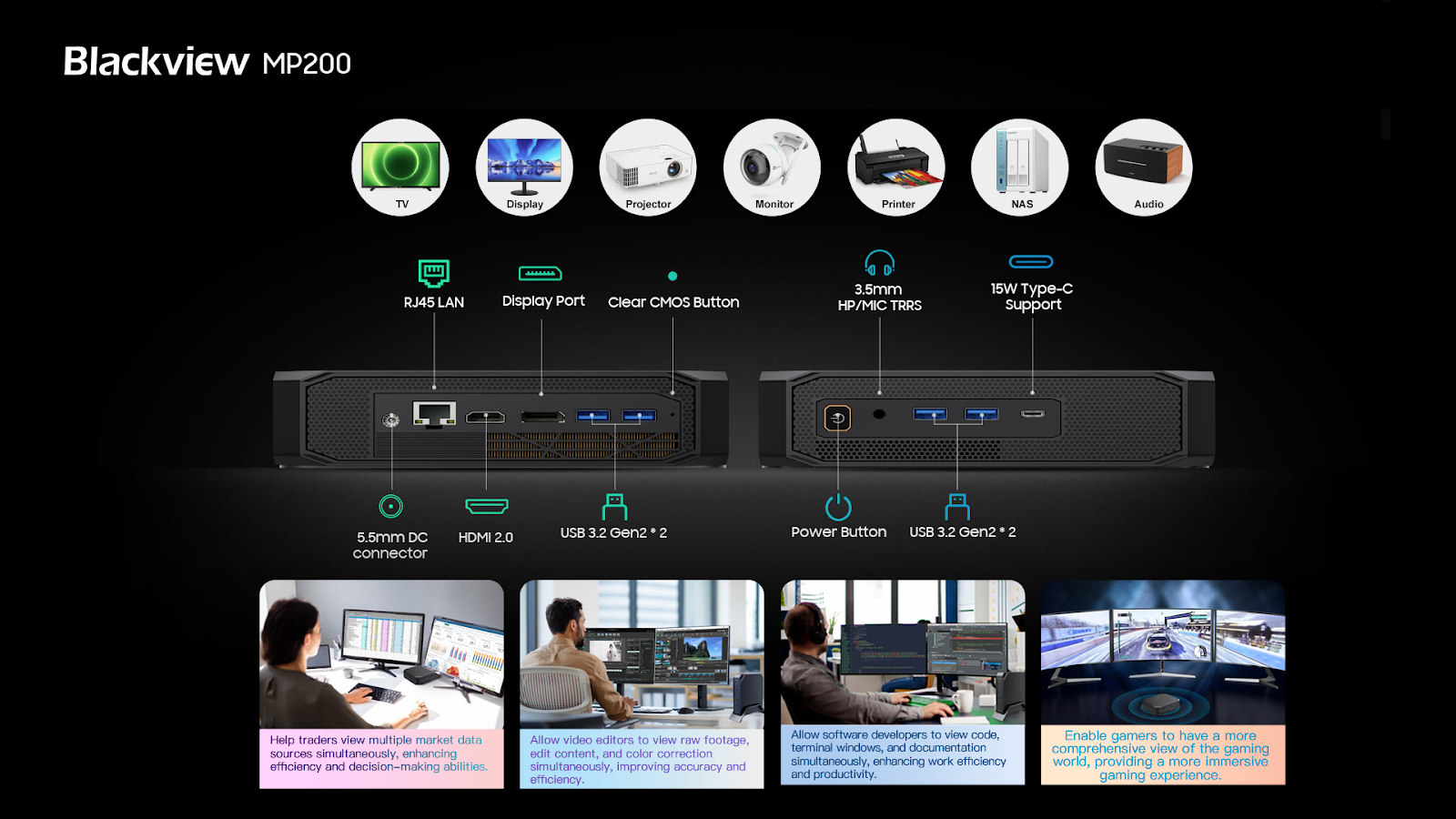
To meet the needs of users who require faster and more efficient data transfer, as well as those who demand high-quality and efficient image output, Blackview MP200 is equipped with a range of well-function organized ports, which include four USB 3.2 Gen 2 ports, capable of achieving a throughput of up to 10Gbps for quick data transfer. Additionally, MP200 is equipped with a DisplayPort that supports 8K image output, as well as HDMI 2.0 and Type-C ports that support 4K image output. These three image output ports allow for simultaneous connection to three displays, enabling multi-screen display. Whether it’s traders needing to monitor multiple market data sources simultaneously, or entertainment enthusiasts wanting to play games or watch movies while having music or chat applications open, MP200 provides a seamless and efficient workflow for your work and entertainment needs.


Furthermore, MP200 features a 3.5mm HP/MIC TRRS interface that supports both headphone and microphone audio input and output, providing you with an immersive audio experience. Overall, the various ports and interfaces of MP200 allow for connectivity to a range of devices, from keyboards, mice, headphones, and displays, to TVs, projectors, monitors, and printers, making MP200 versatile for use in different environments. Blackview MP200 provides users with the majority of the functions needed for work and entertainment, ensuring a perfect experience regardless of the scenario.

 No.4 Efficiency Upgrades:

– The Latest WiFi 6, Bluetooth 5.2, 1000Mbps RJ 45 LAN, Faster and More stable Connection for More Efficient Transmission

To meet the demand for faster and more stable wireless connections when streaming favorite movies, music, videos, and downloading large files, MP200 supports the latest and most advanced wireless technologies in the market: WiFi 6 and Bluetooth 5.2, MP200 also features RJ 45 LAN support for ultra-fast speeds of up to 1000Mbps, allowing users to enjoy high-speed downloads, seamless streaming, and lag-free online gaming. Additionally, MP200’s Bluetooth 5.2 enables wireless connections with other devices, including mice, keyboards, headphones, and other peripherals, with transfer speeds of up to 2Mbps, providing users with smoother audio streaming, faster file transfers, and a seamless device pairing experience, significantly improving efficiency in work, study, and entertainment activities.

To provide users with top-notch professional business applications and privacy protection, MP200 comes pre-installed with Windows 11 Pro, which seamless integration with Microsoft services facilitates collaboration, communication, and cross-device file synchronization, enhancing users’ productivity in work and learning environments.

According to reliable sources, the highly anticipated world debut of Blackview MP200 will be unveiled from June 12th to June 18th, 2023, PST. Click here  to stay tuned for further information.

HP Poly Voyager Free 60 earbuds with ANC support debuts in India

0

HP introduced its latest Poly Voyager Free 60 series wireless earbuds at Consumer Electronics Show (CES) 2023. The Poly Voyager Free 60 series was announced back in January in US markets and now straight after five months, HP officially launched Poly Voyager Free 60 TWS earbuds in the Indian markets. Sadly, HP hasn’t brought its Free 60+ model to India. Poly Voyager Free 60 series is comprised of Voyager Free 60 and Free 60+. In terms of external design, both earbuds have an almost similar stick-style design which looks quite attractive. HP’s latest Voyager 60 series earbuds are the best companion for those who want earbuds for just work and play. HP’s latest audio product comes with premium features and price too.

HP Poly Voyager Free 60 kicks off at Rs 41,999 and there’s no word on its availability details as of now. It comes in two beautiful color options in India- White Sand and Carbon Black. In the Us markets, the Poly Voyager Free 60 series starts at $299 (~₹24,658).

Both earbuds are optimized and certified for use with communications platforms such as Google, Microsoft, Zoom, and more. The lightweight ergonomics and conical shape ear tips design offer all-day wear comfort.

HP unveils Poly Voyager Free 60 series earbuds with ANC support

In terms of specifications, the Poly Voyager Free 60 and Free 60 Plus are very similar, both earbuds come with adaptive Active Noise Cancellation (ANC) support with a transparency mode, WindSmart technology, and the advanced noise-blocking algorithm ensures crystal-clear audio in a noisy environment. Each bud has a dedicated three-mic array which makes sure your voice is loud and clear during calls or meetings. Both the earbuds are dust and splash-resistant, HP rates them at IP54.

Voyager Free 60 series offers eight hours of listening time with ANC on and with the case lasts up to 24 hours. Both cases can charge via Qi wireless or USB C and it takes up to 3 hours to fully charge. The Voyager Free 60 series has fast charge support with just 15 min of charge it offers up to 1 hour and 12 minutes of talk time. They both support multipoint pairing of up to two devices at once via Bluetooth and can remember up to eight connections.

HP unveils Poly Voyager Free 60 series earbuds with ANC support

The Voyager 60 series is a hybrid work solution that comes with 10mm speaker drivers and HiFi sound which transforms your buds into a portable stereo. They both are compatible with Windows, iOS, Android, and macOS.

Also Read:- LG announces award winning CordZero A9 Kompressor with Steam Power Mop at CES 2023

The Voyager Free 60 Plus comes with more advanced features when compared to the base variant. The first notable feature is its charging case, the Free 60+ charging case has a built-in OLED touchscreen display that lets you control the volume, music playback, and settings, and you can even view battery status, and control your meetings and calls.

HP unveils Poly Voyager Free 60 series earbuds with ANC support

The Voyager Free 60+ variant comes with USB C to 3.5mm cable which is most suitable for inflight entertainment systems. Simply, it turns the charging case into a wireless transmitter so that you can enjoy movies or music without wires. Though it’s not the first earbuds to come with this feature, LG’s Tone Free T90Q has a similar feature. It comes in Black and White color options.