Home Blog Page 231

5 Types of Behavior That Will Keep Your Phone Safe

0

Your phone is one of your most prized possessions. It’s not because of its cost; your computer, and probably even your console and TV, are more expensive than that. 

However, the content of your phone has some of the most important personal info. It also has you logged into apps that contain your bank accounts, private chats, and even medical records.

With that in mind, you need to learn how to reduce (or at least limit) risky behavior. These habits expose your most important device to risks and unnecessary harm. Here are five such risky behaviors to avoid. 

1 – Using VPN and Antivirus

The right selection of software can drastically improve the overall security of your phone. There are two major types of software that you should use to keep your phone safe: VPN and antivirus.

Using a VPN offers encryption, which means that it adds an extra layer of protection during all forms of communication that you engage in. Most IM services that you’re using already have their own encryption, but some extra won’t hurt.

The use of a VPN also helps you bypass geo-restrictions. This means that you can watch content unavailable in your areas and even avoid some local censorship (and algorithmic feed manipulation). Choosing a VPN may seem like a challenge, but the truth is that there are not too many VPNs specific for Android devices. Regardless of which you choose, Jacob O’Shea recommends you look for 256-bit encryption, fast and secure VPN protocol options, a kill switch, and a strong no-log policy.

You must also get an antivirus for your phone (not just your PC). The problem with this is that while a lot of people have heard of antivirus (and use it on their other devices), they don’t have it on their phones.

Keep all these platforms updated at all times since this is the only way they provide adequate protection.

2 – Paying attention to a network before you access it

While every guide will tell you to avoid using public networks, everyone knows that this is really not an option. Imagine sitting in a park or in a coffee place waiting for a friend who is late. Meanwhile, you get the idea to visit your favorite crypto casino and play a few spins while waiting for them to arrive. 

Now, you don’t want to use your SIM data, which means that you’ll look for free Wi-Fi to use. So, instead of imposing a restriction that you definitely won’t honor, here are a few tips that will help you pick the safest networks available.

First, you should read the name of the network and use intuition. Public parks and most coffee places have their own Wi-Fi, but it’s always named intuitively. Signal strength and some other factors will show you if it’s genuine or if something suspicious is taking place. 

You can also ask the waiting staff for a password. This is the best-case scenario where the network is locked, and the password is written on the menu or in the possession of a waiting staff. This is how you know that the network is legit. 

3 – Not letting anyone touch your phone

This is supposed to be common sense but there are a lot of scenarios in which these things get a bit blurry. 

Just remember that your phone has all your information on it, from your mBanking app and money-saving apps all the way to your private gallery and social media platforms (that you’re already logged into).

In other words, allowing someone to use your phone makes as much sense as allowing someone to use your toothbrush (you know, just this one time since they forgot their own).

The problem is that they’ll usually approach you with a sad story that you’re likely to fall for. They’ll tell you that they’ve just suffered an accident and need to contact their emergency (or call the first responders). They’ll play a sympathy card and ask you to give them the phone.

When they take your phone, they can either make a run for it or install a keylogger/spy app. This takes a few seconds, doesn’t appear in your menu, and could harvest enough information to ruin your life effectively. 

In these scenarios, there are only a handful of things you can do. First, you can always say “No!” If this doesn’t feel right, you can offer to be the one to call or send a message. If they refuse… even if they seem to be in distress, something’s fishy. 

4 – Understanding all types of phishing

Everyone knows about phishing, but there are various types, some of which you might not be familiar with. 

First of all, you have regular phishing, where someone sends you an email or a message to your DM with a link that you have to follow. Since most people read emails on their phone (and almost all of them chat via phone), this is a piece of advice that is more tightly tied to phone security than you may assume.

Second, you have the so-called smishing. This is a scenario where you receive this same email via SMS. The thing is that while this is supposed to be more suspicious (after all, who sends links via SMS) for a lot of people, this is (paradoxically) too weird to be suspicious. They assume that this is some sort of a bug since they usually don’t associate SMS with hackers (even if they do recognize that there are a lot of scammers present on this medium). 

Then, you have vishing. This is phishing via phone calls. Just think about it: if they convince you to follow a link or give your personal information (which is the main objective of most forms of phishing), they’ve completed their goal. 

Don’t make assumptions about what phishing is “supposed to look like.” There’s no such thing. 

5 – Keeping your phone in your front pocket

So far, we’ve mostly addressed hacking attacks. Even though we briefly mentioned that someone might ask to use your phone and then run away with it, the majority of that section focused on issues like installing a spy app on your phone. Now, let’s talk about the physical dangers of having your phone stolen or pickpocketed.

First, a lot of people keep their phones in their back pocket. This is a hazardous behavior, and just switching the phone to your front pocket will reduce the chance of it being pickpocketed. Sure, this is a hazardous form of behavior that you’ll somehow have to learn to avoid. 

Others carry their phones in their hand. This sounds like the most secure of ideas, but you overestimate the tightness of your grip, especially in scenarios where you don’t expect someone passing by (or riding on a Vespa) just to snatch it from your hand. If you did, you might clutch to it harder, but you don’t, and you won’t. 

Lastly, there’s a massive trend of people leaving their phones on their coffee shop tables or at a bar. It doesn’t take much to explain why this is a good idea and how easy it is for someone to snatch it from the table. 

You can’t afford to have your device fall into the wrong hands

Regardless of its physical or digital harm, the security of your device is one of the most important things for any modern person. Therefore, even if you don’t take extra steps to ensure the safety of your devices, just knowing what to avoid can already make a huge difference. 

EDITOR NOTE: This is a promoted post and should not be considered an editorial endorsement. AndroidGuys received compensation for the aforementioned content.

Please exercise caution when using a gambling or betting service which employs real money.

If you reside in a location where gambling, sports betting or betting over the internet or through an is illegal, please do not click on anything related to these activities within this post. You must be of proper legal age to click on any betting or gambling related items even if it is legal to do so in your country.

MediaTek Introduces New Dimensity 6300 Chipset for Mid-Range Smartphones

0

MediaTek has unveiled its latest chipset, the Dimensity 6300, designed to boost the performance of premium mid-range smartphones. Crafted using a 6nm process, this chipset features an octa-core configuration with two Cortex-A76 cores running at 2.4GHz and six Cortex-A55 cores at 2.0GHz.

The new Dimensity 6300 offers a 10% improvement in CPU performance over its predecessor, the Dimensity 6100+. It incorporates a Mali-G57 MC2 GPU and MediaTek’s UltraSave 3.0+ technology, which provides 13 to 30% more power efficiency in typical 5G sub-6Ghz conditions compared to other chipsets.

This chipset supports displays with resolutions up to 2520 x 1080 pixels and refresh rates up to 120Hz. It enhances camera functionality by supporting a 108MP main camera sensor and dual 16MP sensors, supplemented by advanced noise reduction technology for clearer images in low-light settings.

Gaming is optimized with MediaTek’s HyperEngine improvements, delivering up to 50% better GPU performance and smarter network connection management, ensuring seamless transitions between Wi-Fi and 5G for uninterrupted gaming experiences.

Additionally, the Dimensity 6300 features a 3GPP Release-16 standard 5G modem, enhancing international market compatibility, reducing design costs, and speeding up global market delivery. It offers enhanced features like up to 3.3Gb/s 5G downlink speeds and carrier aggregation, improving data throughput in varied network environments.

Why Does This Matter?

This chip is designed to make mid-range, or reasonably priced, smartphones work better and faster. It improves the phone’s processing speed by 10% compared to its previous version, which means apps and games will run smoother and quicker.

The Dimensity 6300 also uses less battery power while connecting to 5G networks, making your phone last longer on a single charge. It supports very high-quality displays and can handle extremely high-resolution cameras up to 108MP, allowing for clearer and more detailed photos, especially in low light.

For gamers, this chip ensures better graphics and smoother online gaming without interruptions. Plus, it’s equipped with the latest technology for fast 5G internet speeds, making browsing, downloading, and streaming much faster.

This new technology from MediaTek means that upcoming mid-range smartphones will be faster, more efficient, and more capable, all without breaking the bank.

Wacom One 13 Touch review

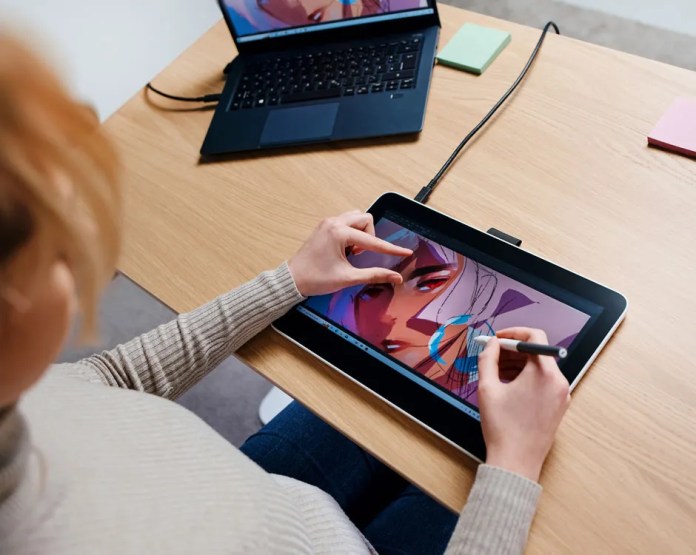
The Wacom One 13 Touch is a digital pen display tablet designed for artists, designers, and professionals who seek a direct, pen-on-screen experience for drawing, sketching, and navigating applications. It positions itself in the market as an entry-level to mid-range option within the digital art and design space, offering a blend of features that cater to both novice users and seasoned professionals looking for a secondary device.

Wacom, as a brand, has a solid reputation in the digital art and design space and is known for its high-quality drawing tablets and pen displays. The Wacom One 13 Touch, for its part, is designed to expand the accessibility of pen display technology to a broader audience. It’s a more affordable entry point, especially when compared to the high-end models like those in the Wacom Cintiq line. Its pricing and features position it an attractive option for beginners who are serious about delving into digital art. Likewise, established professionals seeking a compact and portable addition to their toolkit might also be interested in it.

The device supports connections to macOS, Windows, Chrome OS, and Android, making it versatile for various workflows and software preferences. However, it differentiates itself from purely standalone devices like the iPad by requiring a connection to a computer, positioning it as a dedicated tool for digital art creation rather than a general-purpose tablet.

Design and Features

The Wacom One 13 Touch sports a lightweight design, tipping the scales at just under two pounds, making it rather portable despite its wired connection. It boasts a 13.3-inch display with a 1920 x 1080 pixel resolution, providing ample screen real estate for detailed work.

The screen’s matte, textured finish not only minimizes glare and fingerprints but also offers a tactile drawing experience reminiscent of pen on paper. A notable upgrade in this model is the single USB-C cable, simplifying the connection process and reducing clutter.

The pen, a critical component of tablets like this, operates without a battery, eliminating the need for charging and also contributes to its light weight presence. The nib is removable and replaceable, allowing customization of the drawing experience. The Wacom One’s pen offers immediate responsiveness with over 4,000 levels of pressure sensitivity, ensuring precision and ease of use.

Setup and Performance

Setting up the Wacom One 13 Touch is straightforward, thanks to its USB-C connectivity. However, some may encounter initial hiccups, such as display signal errors, which are often resolved. Between troubleshooting steps like driver reinstallation or switching USB ports, online support, Reddit, and the like, you ought to have no problems getting going.

Once up and running, the tablet delivers an exceptional drawing experience, with its high-resolution display and pressure-sensitive pen offering up smooth and accurate strokes. Touchscreen capabilities add convenience, though they can be disabled to suit user preferences.

Value

At a price point of around $500, the Wacom One 13 Touch is designed to be an affordable choice for digital artists and professionals. Although it doesn’t have all the fancy features of more expensive models like wireless connectivity and extra input options, it strikes a good balance between usefulness and affordability. The touchscreen and customizable pen make it more appealing, but it’s a bummer that it doesn’t have built-in angle adjustment. That, and the stand costs extra.

When you register your device, you unlock a treasure trove of creative and educational software designed to enhance your digital art and learning experience. This exclusive offer includes complimentary access to a suite of professional creative applications, ensuring you have all the tools you need to bring your artistic vision to life.

For the artist and designer:

  • Bamboo Paper Pro, Magma Pro Plan, Affinity Photo, Affinity Publisher, and Affinity Designer are all at your disposal, offering a wide range of functionalities from sketching to professional publishing.
  • Enjoy a 3-month subscription to Skillshare, where you can expand your creative skills through thousands of online classes.
  • Clip Studio Paint Pro further enhances your drawing and painting capabilities, with a 6-month license available for Mac and PC users, and a 3-month license specifically for Chromebook users.

For the student and educator:

  • Access the Kami App and Foxit PDF Editor for Education for a full year, enhancing your ability to edit, annotate, and manage documents in a digital environment.
  • A 3-month access to Explain Everything, Pear Deck, and Limnu offers interactive teaching and collaboration tools, perfect for enhancing educational engagement and creativity in and out of the classroom.

By registering your device, you not only enhance its functionality but also open up a world of possibilities for both creative expression and educational advancement. This comprehensive software package is designed to support and inspire users at every level, from novice artists to experienced educators, making it easier than ever to explore, create, and learn in a digital age.

General Observations

The tablet integrates well with major art programs and supports multiple operating systems, including macOS, Windows, Chrome, and Android, broadening its usability.

Color reproduction is solid to my untrained and novice eye, but I suspect professionals may still rely on calibrated displays for precise color work.

The lack of an eraser function on the pen and the extra cost for the stand are minor inconveniences compared to the overall benefits offered by the tablet. I’ve become accustomed to having an eraser button on other devices, I feel like it’s almost silly to not have one on a tablet designed for markup and graphics.

Pros

The Wacom One 13 Touch boasts several pros that make it an attractive option for digital artists and professionals, including:

  • Ease of Setup: The setup process, and its single USB-C cable, lead to a quick and straightforward connection to computers.
  • Responsive Pen: The stylus is highly responsive, offering over 4,000 levels of pressure sensitivity. Plus, the pen’s battery-free design means I never have to worry about charging.
  • Comfortable Drawing Experience: The tablet’s 1920 x 1080 pixel resolution display features a matte, textured surface that mimics the feel of drawing on paper, reducing glare and minimizing fingerprints. It feels natural to use this one, and you get used to it pretty quickly
  • Portability: Weighing just under two pounds it’s relatively easy to move around, despite its tethered nature.
  • Compatibility: The device works seamlessly with a broad range of operating systems, including macOS, Windows, Chrome, and Android, and integrates well with major art applications.
  • Affordability: Priced at around $500, the Wacom One 13 Touch presents a cost-effective solution for users seeking a high-quality drawing tablet. Beginners and professionals alike will find compelling reasons to purchase one of these.
  • Nib Customization: The ability to replace and customize the pen’s nibs allows users to tailor the drawing feel to their preference, providing a more personalized and comfortable user experience.

Considerations

  • Wired Connection: The tablet requires a wired connection to operate, limiting mobility and flexibility. If you’re accustomed to wireless devices, you may find this restrictive. If anything, I would love some offline app support for markups, sketching, or notetaking.
  • No Built-in Stand or Angle Adjustment: The Wacom One 13 Touch does not come with a built-in stand or offer angle adjustments.
  • Additional Cost for Stand: The stand, designed to support the tablet, is sold separately and adds extra cost to the overall investment. At $45, it’s considered pricey, especially given its limited functionality and lack of adjustability.
  • No Eraser on Pen: The stylus does not have an eraser end, a feature found in some digital pens. This omission might slow down the workflow for users who frequently switch between drawing and erasing modes.
  • Plastic Construction: The tablet’s build, primarily plastic, might not feel as premium as some of its higher-priced counterparts or compared to devices like the Amazon Fire Max, iPad, or higher-end Android tablets.
  • Bezels Around the Screen: The presence of significant bezels around the display might turn some away, especially if they’re used to edge-to-edge screens.
  • Initial Setup Challenges: Some users may experience difficulties during the initial setup, such as display signal errors. While these issues are easily resolved with troubleshooting, they might be frustrating and could deter less tech-savvy individuals.
  • Touchscreen Can Register Unwanted Touches: Although the touchscreen capability enhances the experience, it can also register unintended touches. While that’s not a big deal in some instances, it could frustrate users working on a detailed project.
  • Affordability: While the Wacom One 13 Touch is positioned as an entry-level device, its price point of around $500, plus additional costs for accessories like the stand, may still be considered steep for hobbyists or those on a tight budget. It could either be a great bargain or a lot to ask for, depending on the individual’s needs.
via Wacom

Conclusion

The Wacom One 13 Touch represents a sizable step forward for artists and designers seeking an immersive and intuitive digital drawing experience without breaking the bank. It balances affordability and functionality, and maintain Wacom’s industry-leading quality. It’s all of the things I needed it to be, particularly as a newbie in the field.

I found it has precision, responsiveness, and comfort, and the tactile drawing surface captured each stroke and detail with accuracy. While it might come with its set of limitations, such as the wired connection and the absence of an eraser feature on the pen, these are minor compared to the overall value and performance it delivers.

Once I got beyond the notion of what I thought the tablet would be and how it would work, I came to enjoy it quite a bit. I’ve long been in search of a great note-taking tablet for markup and sharing docs, and hoped this would be that. It’s not, but that’s Wacom’s fault as it was never positioned to be those things.

For beginners, the Wacom One 13 Touch offers a welcoming gateway into the world of digital art, providing a well-rounded platform to explore and develop their skills. For professionals, it serves as a reliable and portable companion, perfectly suited for bringing creative ideas to fruition or as a supplementary tool to a more extensive setup. Whether you are taking your first steps into digital creation or looking to expand your artistic arsenal, the Wacom One 13 Touch is a worthy investment.

Google’s Structural Changes to Closer Align Android with Hardware Teams in Name of AI

0

Google is introducing significant organizational changes aimed at streamlining decision-making processes and enhancing the development and deployment of its AI technologies and platform services. Sundar Pichai, CEO of Google, detailed these changes following the recent Cloud Next event, where Google’s advancements in AI tools and infrastructure were prominently featured.

Consolidation of AI Research and Development

Google is consolidating its AI model development teams under the Google DeepMind umbrella. This strategic move will combine the strengths of the Google Brain team and DeepMind’s researchers to accelerate the development of Google’s Gemini AI models. The focus will be on creating more advanced and versatile AI systems. This consolidation is intended to centralize compute-intensive tasks, simplifying the development process and enhancing the capacity to deliver more capable AI solutions.

Focused Mandate for Google Research

In addition to the changes in AI development, Google Research will now focus more on foundational and applied computer science research. This includes computing systems, foundational machine learning (ML) and algorithms, and the application of science to societal issues. This sharper focus aims to leverage Google’s historical strengths in computer science to pave the way for future technological advancements.

Enhancements in Responsible AI Practices

Google is also restructuring its Responsible AI teams, moving them closer to the core AI model development teams at Google DeepMind. This shift aims to improve the integration of responsibility and safety measures throughout the development cycle of AI technologies. Google is reinforcing its commitment to developing AI that is not only powerful but also trustworthy and transparent.

New Structure for Computing Platforms and Devices

Google is reimagining its approach to computing platforms for the next decade by integrating its hardware, software, and AI efforts into a new Platforms & Devices product area (PA). This PA will merge the capabilities of the Device Software Platform & Ecosystems (DSPA) and the Product & Experience teams. The restructured group aims to elevate the Android and Chrome ecosystems and accelerate innovation across Google’s product lines, including computational photography and on-device intelligence.

What Could This Mean for Consumers?

The recent organizational changes announced by Google are designed to streamline their operations and focus on integrating and advancing AI technologies. Here’s what this could mean for consumers:

  1. Faster and More Innovative AI Features: By consolidating AI research and development under Google DeepMind, consumers can expect quicker advancements in AI capabilities. This might lead to more sophisticated features in Google products such as enhanced natural language processing, better image recognition in Google Photos, or more intuitive AI-driven functionalities in other Google services.
  2. Improved Product Integration: The formation of the new Platforms & Devices product area suggests a more unified approach to how Google’s hardware and software integrate. For consumers, this could mean more cohesive user experiences across devices and platforms. Android and Chrome could see benefits like enhanced synchronization, shared features, and smoother operation between devices.
  3. Enhanced Trust and Safety: Moving the Responsible AI teams to be closer to the model development process indicates a stronger commitment to ethical AI development. For users, this could translate into AI products that are not only powerful but also safer and more transparent in terms of data handling and privacy.
  4. Better Consumer Products: With a focus on computational photography and on-device intelligence moving under the same organizational umbrella, consumers might see improvements in smartphone photography, smarter home devices, and more responsive AI applications that run directly on their devices without needing to communicate with the cloud.
  5. Continued Focus on Accessibility and Usefulness: Google’s reiterated mission to organize the world’s information and make it universally accessible and useful ensures that these changes aim to benefit a broad user base. This aligns with Google’s long-term goals to make information more accessible through intuitive, user-friendly technology.

Leadership and Organizational Updates

Rick Osterloh will lead the new Platforms & Devices PA, with Sameer Samat stepping up to oversee the Android ecosystem. Hiroshi Lockheimer will transition to advising on the integration while taking on new roles across Alphabet, including as the executive sponsor of Japan.

Commitment to Google’s Mission and Workplace Culture

Finally, Google is emphasizing the importance of focus and clarity towards its mission to organize the world’s information and make it universally accessible and useful. Sundar Pichai expressed the need for a workplace environment that supports vibrant discussions and innovation while maintaining professionalism and respect.

These changes are designed to help Google maintain its leadership in AI and technology while fostering an environment that accelerates both technological and collaborative innovation.

Morel Audio Unveils New BIGGIE Portable Speaker: A Fusion of Compact Design and High-Quality Sound

0

Morel Audio, known for their excellence in creating high-end speakers, is excited to announce the launch of their latest product, the BIGGIE. This portable speaker is set to captivate users with its dynamic sound, minimalist design, and an appealing price tag.

Precision-Crafted Sound in a Compact Package

The BIGGIE stands out not just for its size but for the quality of sound it offers. At its core are precision-crafted drive units: a custom 4″ woofer and a 25mm soft dome tweeter by Morel, renowned for delivering accurate bass and crystal-clear high frequencies. This speaker proves that great things indeed come in small packages, delivering a sound that is both powerful and immersive, thanks to advanced DSP technology. With Bluetooth 5.3 BLE, it provides a seamless wireless experience up to a 100-meter range. Not forgetting the TWS pairing capability for a true stereo sound and a battery life that ensures up to 20 hours of enjoyment.

Key Features at a Glance

  • Handcrafted Drivers: A testament to Morel’s commitment to quality, featuring a 2-way bass reflex system for an accurate and immersive listening experience.
  • Advanced Connectivity: Bluetooth 5.3 BLE for superior wireless range and reliability, enabling smooth audio playback without interruptions.
  • Long-Lasting Battery: Up to 20 hours of playtime on a normal volume level, supported by fast charging capabilities for those who are always on the go.
  • Design and Personalization: A modern, chic design that fits any decor, available in nine captivating colors, complemented by a portable, leather-like handle.

Bridging Style and Functionality

Morel Audio does not sacrifice aesthetics for performance. The BIGGIE’s sleek and modern design, available in nine vibrant colors, ensures it blends seamlessly into any home décor. It’s not only a statement piece but also a testament to personalized audio experiences, thanks to its portable nature and array of color options. With dimensions of 18×18×11.5cm (7×7×4.5inch) and weighing just 2.6kg (5.7 lbs), it combines power with portability.

State-of-the-Art Sound Technology for Every Listener

The BIGGIE uses state-of-the-art DSP technology to fine-tune its audio output, ensuring a natural sound across all volume levels. This attention to sound quality, coupled with its dynamic EQ feature, allows for a balanced and distortion-free listening experience that is hard to find in portable speakers.

Connectivity and Portability Reimagined

Embracing the latest in Bluetooth technology, the BIGGIE offers an extended wireless range and easy connectivity allowing for a versatile listening experience whether indoors or out. Its impressive 20-hour battery life and the convenience of TWS pairing for stereo sound makes it the perfect companion for any music lover on the move.

Pricing and Availability

The BIGGIE retails for $299 and is available for purchase on Morel Audio’s official website in nine color options. Dive into a world where quality sound meets sleek design with the BIGGIE portable speaker.

Visible Rolls Out New Annual Plans for Mobile Service

0

Visible, a prepaid carrier owned by Verizon, now offers its customers the option to pay for a full year of service upfront with the launch of its first annual plans. This new structure includes two tiers, aimed at providing cost-effective solutions for mobile users.

The higher-tier option, Visible Plus, is priced at $395 per year, which Visible claims can save customers $145 annually compared to the monthly payment plan. The standard Visible plan is available at $275 per year, offering a modest $25 saving over the monthly rate.

Currently, these annual plans are available only to new customers. Visible plans to extend this offer to existing customers in the future, though they might find the savings less compelling if they are currently using a discount code. For example, customers on a discounted rate of $35 per month for the Visible Plus plan would save just $25 over the year by switching to an annual payment, a consideration that might not justify losing the flexibility to switch carriers freely.

The standard Visible plan features unlimited data with mobile hotspot capabilities, though hotspot speeds are limited to 5Mbps. The Visible Plus plan enhances the offering with unlimited premium data on Verizon’s 5G Ultra Wideband network, providing the highest speeds available. It also includes 50GB of premium data on regular 5G and 4G bands each month before potential speed throttling occurs, alongside faster mobile hotspot speeds, complimentary smartwatch service, and superior international coverage.

One notable downside of the Visible Plus plan is the restriction of video streaming to SD quality on the 5G UW network, which could be a deterrent for users who frequently stream video content.

Visible’s new annual plans could attract new customers looking for a yearly mobile service payment option that provides some savings. However, current Visible customers with discounted monthly rates should weigh the benefits of slight annual savings against the loss of service flexibility.

Meet M-Cube: HOZO Design’s Modular Measuring Tool

0

HOZO Design is excited to announce the release of the M-Cube, a modular laser measure designed to meet a variety of measuring needs. This tool integrates a laser measure, smart planner, bilateral laser+, and smart roller as interchangeable modules, making it suitable for different scenarios.

The M-Cube is now available for purchase on the HOZO website, priced at $89/£72 for individual modules or $395/£318 for the complete set. Consumers can also find the product on Amazon USA, and it will be offered on Amazon UK starting in May.

This innovative tool has been recognized with the 2024 iF Design Award, affirming its outstanding design and practicality in measuring applications.

Key Features of the M-Cube:

  • Precision Measurement: Features a 50M/164ft Single Laser and a fast Multi-functional Laser with a 10FPs rate for precise measurements.
  • User-Friendly Interface: Comes with a touchscreen that provides clear numeric readings, enhancing usability for all types of users.

Modular Components:

  • M-Cube 01 Smart Planner Module: This module uses a joystick to effectively capture entire spaces, increasing measurement speed and accuracy by 38%.
  • M-Cube 03 Bilateral Laser+ Module: Equipped with a bilateral laser that facilitates quick measurements in large areas and an M-Green line level for accurate alignment, supported by a smart algorithm.
  • M-Cube 05 Scale Roller Module: Makes measuring curves and complex structures simple with customizable scales and a red cross-line alignment for precise scaling.

The M-Cube excels in versatility and efficiency, offering a powerful yet compact solution for various measuring tasks. It provides a sustainable alternative in the measuring tools market, adapting to user requirements and minimizing the need for multiple devices.

Hands-On: HOZO Design Neoruler

According to a company spokesperson, “M-Cube caters to everyone, from professionals like interior designers and surveyors to DIY enthusiasts, offering precise measurement capabilities for a wide range of applications.”

For more information or to make a purchase, please visit the HOZO website or check Amazon listings.

TECNO Unveils CAMON 30 Premier 5G, a Videography Powerhouse with Dual-Chip Imaging

0

TECNO today announced the launch of the CAMON 30 Premier 5G, marking a milestone in their CAMON series with enhanced videography features that cater to both amateurs and professionals. This device, part of the new CAMON 30 Series, is equipped with advanced technologies to deliver superior video and photo quality in various environments.

The new smartphone features the Sony CXD5622GG Imaging Chip, enabling 4K 30fps full-scene AI-NR HDR video capability. This technology provides users with high dynamic range video, optimizing footage in extreme lighting conditions such as bright lights or low light scenes. The CAMON 30 Premier 5G is also outfitted with four 50MP lenses, including a Sony IMX890 50MP OIS Main Camera, enhancing detailed image capture.

Key Highlights of the CAMON 30 Premier 5G:

  • Dual-Chip Technology: Facilitates 4K Ultra-night Vision and 4K Portrait Video, allowing for 20-bit color restoration in portrait videos.
  • Four 50MP Cameras: A set that includes a periscopic portrait lens, a wide-angle & macro lens, and a front camera with eye-tracking autofocus, catering to diverse photography needs.
  • AI-Enhanced Features: Offers tools such as Social App Turbo for improved video interactions, AI Erase for clearing unwanted elements from photos, and multi-skin tone imaging technology for accurate color representation.
  • Classic Design: Inspired by rangefinder cameras, featuring a zoom ring and an Action Dot for function alerts, and covered in suede Tech-Art Leather for a sophisticated look.

TECNO’s Jack Guo, General Manager, highlighted, “The CAMON 30 Premier 5G introduces groundbreaking capabilities that open new creative avenues for users. With its sophisticated imaging technologies and AI functionalities, this smartphone is set to inspire a new generation of content creators.”

The device also boasts a MediaTek Dimensity 8200 Ultimate 5G chip, ensuring smooth operation and connectivity. Memory options go up to 512GB+24GB, accommodating extensive media libraries. The cooling system keeps the phone efficient even under heavy use.

For those concerned with battery life, the CAMON 30 Premier 5G comes with a 5000mAh battery capable of up to 7.02 hours of gaming or 7.99 hours of video viewing on a single charge. The 70W Ultra Charge technology can power the phone to 50% in just over 16 minutes.

The CAMON 30 Premier 5G also features a 6.77” 1.5K LTPO AMOLED screen with a high refresh rate, optimized for vivid, sharp visuals and efficient power consumption. Audio enhancements include Dolby Atmos and stereo dual speakers, creating a rich sound environment for multimedia experiences.

Set for release in early May following its debut at MWC Barcelona 2024, the CAMON 30 Premier 5G will be available globally in stages, with local pricing details available closer to market launch dates. This launch signifies TECNO’s continued commitment to integrating cutting-edge technology with user-centric designs to meet the evolving needs of global consumers.

Motorola Debuts Edge 50 Series Smartphones

0

Motorola on Tuesday unveiled three new additions to its Edge series: the Edge 50 Ultra, Edge 50 Pro, and Edge 50 Fusion, each featuring a mix of classic and modern design elements. The standout of the bunch, the Edge 50 Ultra, reintroduces the unique wooden back panel, a nod to a design first seen a decade ago.

Motorola Edge 50 Ultra: Elegance Meets Innovation

The Edge 50 Ultra showcases a stylish design with a real wood back panel and premium vegan leather options. This model combines aesthetics with durability, featuring a sandblasted aluminum frame and Corning Gorilla Glass Victus, complemented by IP68 water resistance.

Camera capabilities are a highlight, with a setup that includes a 50MP main lens, 64MP telephoto with 3x optical zoom and 100x Super Zoom, and a 50MP ultrawide lens. The device’s advanced camera system is powered by moto AI, enhancing photo and video quality automatically. It sports a 6.67-inch Super HD pOLED display, enriched by Dolby Atmos audio, and runs on the Snapdragon 8s Gen 3 Mobile Platform for robust performance.

Motorola Edge 50 Pro: Sophistication in Every Aspect

Following the Ultra’s design philosophy, the Edge 50 Pro features vegan leather or a special Italian-crafted pearl polymer finish. It maintains the series’ IP68 rating for dust and water resistance.

The Pro’s camera system includes a 50MP main camera with a large aperture for superior low-light performance, a 10MP 3x telephoto camera, and a 13MP ultrawide camera with Macro Vision. It also enjoys the same AI enhancements as the Ultra, ensuring superior imaging. The Pro version offers a 6.7-inch 144Hz pOLED display and immersive Dolby Atmos sound, powered by the Snapdragon 7 Gen 3 Mobile Platform.

Motorola Edge 50 Fusion: Premium Features, Accessible Price

The Edge 50 Fusion is designed to deliver premium features at a more affordable price, making it suitable for a wide range of users. It is available in vibrant vegan materials and includes robust protection with IP68 rating and Corning Gorilla Glass.

The Fusion features a 50MP main camera and a 13MP ultrawide camera, alongside a 32MP front camera. Its 6.7-inch Full HD+ pOLED display supports a 120Hz refresh rate for smooth visuals. The device also boasts Dolby Atmos audio, providing a comprehensive multimedia experience.

All three models are set to launch in the coming weeks in regions including Europe, Asia, Latin America, and Oceania. Motorola plans to expand these offerings to North America later in the year.

In addition to the phones, Motorola also announced the Moto Buds Plus, new wireless earbuds priced at $130, set to be released in the US. These earbuds incorporate head tracking and a triple-mic system for noise suppression, aiming to enhance user experience during voice calls and media playback.

With these launches, Motorola continues to blend nostalgic design elements with contemporary technological advances, aiming to appeal to both long-time fans and new customers seeking the latest in smartphone innovation.

Marshall Launches New Major V and Minor IV Headphones

0

Marshall has announced the introduction of two new audio products: the Major V on-ear headphones and the Minor IV True Wireless earbuds. Each product is designed to elevate the listening experience with advancements in sound quality and durability, tailored to meet the demands of modern music lovers.

The Major V headphones feature over 100+ hours of wireless playtime, significantly increasing from the previous Major IV model which offered 80+ hours. This update allows users to enjoy prolonged periods of music playback without the need for frequent recharging. These headphones are built to last, with a sturdy and foldable design that can withstand daily usage.

For audio quality, the Major V is equipped with custom-tuned dynamic drivers that focus on clear sound output and ambient noise reduction, appealing to those who prioritize high-quality audio. The headphones include a newly designed ‘M-button’ that provides users with the ability to personalize their listening experience, including options for Spotify tap, switching EQ settings, and accessing voice assistants.

Minor IV

The Minor IV earbuds are compact yet powerful, designed for optimal sound output without sacrificing size. They offer more than 30 hours of battery life, factoring in the additional charge from their carrying case, and are intended for extended wear. The fit of the earbuds not only increases comfort but also improves acoustic performance, and users can tailor settings through the Marshall app.

Both models retain the classic Marshall look, inspired by the company’s iconic amplifiers, with a textured outer casing that contributes both to aesthetics and durability. The Minor IV earbuds also come with water and dust resistance features, making them suitable for active users or outdoor conditions.

Priced at $149 for the Major V and $129 for the Minor IV, these devices are available for pre-order and will be sold worldwide starting April 23rd on Marshall’s official website.

With these new releases, Marshall continues to uphold its legacy of combining expert audio engineering with practical features, serving the needs of dedicated music enthusiasts and everyday users alike.