Home Blog Page 1186

Here's what the upcoming Google+ app update will bring

0

It’s been a while since us Google+ users have see a significant change to the Android app. Well, Google has just tipped the Update 7.0.0, incoming over the next couple of days. What’s great is that user feedback has been a focus in this update.

Here is the provided list of changes:

  • 69 bugs fixed
  • 14 accessibility issues addressed
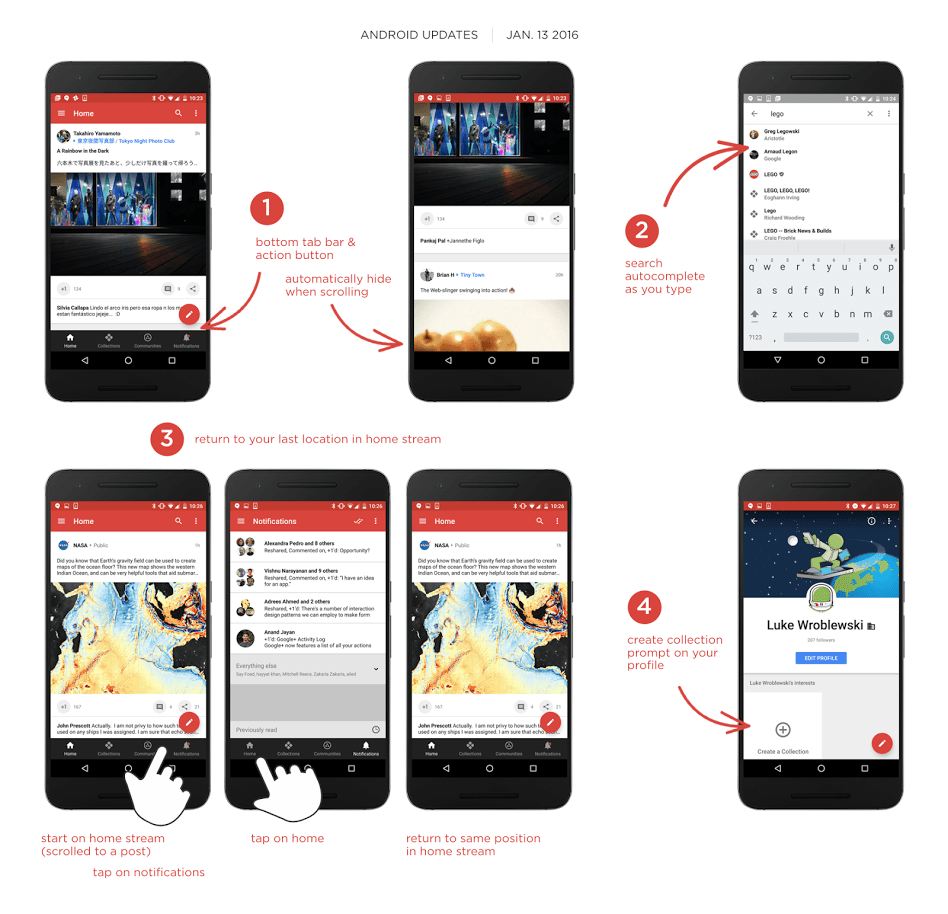
  • Automatically hide the bottom tab bar when scrolling (note: not on Notifications screen yet)
  • The home stream now remembers your position when you return to it (after going to a different screen like Notifications)
  • Search now displays autocomplete suggestions as you type
  • If you have no Collections or Communities visible on your profile, we include a prompt for you to add one

One of the more exciting features coming is the auto-hide of the bottom tab bar. Many folks (including myself) really value screen real estate for their content.

Google_plus_update

Another annoyance was that the home stream would restart if you went somewhere else in the app. It will now maintain your position (saving you time from having to scroll back to the place that you were).

Is this update going to fix your main issue with the G+ app, or was there another change you wanted to see? Check out the Google+ page below for the official announcement.

Source: Google+ Updates

Sony announces its plans for the Xperia Z5 and Z5 compact in the US

0

Sony fans rejoice! The tech giant is finally announcing plans to bring two of its current flagship devices to the United States. You may remember that Sony announced the Z5, Z5 Premium and Z5 compact way back in September at IFA in Berlin but nary a peep about US availability. Until now.

Sony has announced that beginning February 7, you’ll be able to pick up the Sony Xperia Z5 and Sony Xperia Z5 compact. The phones will be sold unlocked and support GSM networks (Sorry Verizon and Sprint customers). As for pricing, the Z5 will run you $599.99, which is about standard for flagship devices, and the Z5 Compact will come in at $499.99.

[df-gallery url=”https://www.androidguys.com/gallery/sony-xperia-z5-compact/”%5D

The Sony Xperia Z5 has a 5.2″ 1080p (401 PPI) screen, 3 gigs of RAM, 32 GB of on-board storage and a 2,900 mAh battery. The Xperia Z5 Compact has a 4.6″ 720p (319 PPI) screen, with 2 GB of RAM, the same 32 GB of storage, and a 2,700mAH battery. The phones both share a huge 23 megapixel rear shooter. The compact has a 5 MP front facing shooter, while its big brother has an 8 MP selfie cam.

[df-gallery url=”https://www.androidguys.com/gallery/sony-xperia-z5/”%5D

Will you be picking up either of the Sony flagships? Did Sony wait too long to bring them to the US? And what about the Sony Xperia Z5 Premium with its 4K screen? Let us know your thoughts down in the comments.

[graphiq id=”iG2btBiiugt” title=”Sony Xperia Z5″ width=”600″ height=”403″ url=”https://w.graphiq.com/w/iG2btBiiugt” link=”http://smartphones.specout.com/l/3976/Sony-Xperia-Z5″ link_text=”Sony Xperia Z5 | SpecOut”]

[graphiq id=”hiRN7YtxlpX” title=”Sony Xperia Z5 Compact” width=”600″ height=”403″ url=”https://w.graphiq.com/w/hiRN7YtxlpX” link=”http://smartphones.specout.com/l/4173/Sony-Xperia-Z5-Compact” link_text=”Sony Xperia Z5 Compact | SpecOut”]

Google Now Launcher set to allow home screen rotation

0

Now this is an exciting news for Android users who use the Google Now Launcher. A new update is set to support rotation of home screen and app drawer to make the landscape mode truly possible. The update will also allow you to resize the app icons in case you feel the existing size is too small for your home screen’s landscape screen.

Screenshot_20160114-175123

While the update has yet to hit the Google Play Store, you can download the APK files of Google Now Launcher’s version: 5.8.47.19 from here [APK Mirror (arm) and APK Mirror (arm64)]. The update is available for devices running Android KitKat and up. The process is quite simple. Just follow these links to download APK files and “allow download from unknown sources.” Once complete, install the APK files and then go to hamburger menu settings. Select “Allow rotation” and that’s it.

Screenshot_20160114-175140

If you rotate your phone, your home screen will look something like the first picture above. And your app drawer will look something like this. Unfortunately, the app drawer doesn’t look very proportionate to the rest of the display. As you can see in the screen shot below, the app drawer doesn’t fill the entire screen, which can be annoying to some of us.

Screenshot_20160114-175115

Home screen rotation is not a new thing. We first saw it during the third Marshmallow Developer Preview and the capability was available on tablets for sometime too. But the popular feature was removed in later Developer Preview releases, and did not make it’s way to the final build of Marshmallow. Now it looks like that auto-rotation is set to come back in a few days.

As for App Normalization or app resizing, this is a feature that has been hitting the various third-party launchers as early as September, such as Nova Launcher and Action Launcher 3. But if you are anything like me, you would rather wait for Google to finish testing their own app-resizing capabilities instead of downloading a separate launcher for that.

Source: Android Police

Google Maps simplifies your life by predicting where you're going

0

For those of you who demand ultimate privacy and think it’s not right to follow your movements, and you have a smartphone, this new ‘driving’ feature is not for you. But if you are like me and have given into technology, Google Maps is here to help you make your life easier by helping you avoid traffic during your normal daily routines.

“If you’ve preset home and work in Google Maps, you’ll see ETAs at times when you’re likely to be heading to these destinations. If you have location history enabled, we base these suggestions on location data, time of day and day of week. And if you’re logged in, we’ll suggest destinations based on recent Google Maps and Google searches when you open driving mode.”

pasted image 0

Google has already been helping predict what we are going to search on the internet, and now it is taking it one step further. All you have to do is create a shortcut on your homescreen.

To add a driving shortcut, press on your homescreen until Android widgets appear, then select the Google Maps driving shortcut icon.

You can also access this feature through the sidebar menu in Google Maps. Tap the sidebar menu and select the “Start Driving” option.


If you want to make sure Google is not following you they have made it easy to opt out of this feature. Otherwise, if you want a more informed path on your way home go ahead and enable this feature.

How to delete your location history

View your location history using Google’s web page.

Set a time period to view — up to 30 days at a time.

Select the period you want to delete.

Click the “Delete history from this time period” link on the left side of this page.

If you have multiple Google accounts, check the history for each one.

To turn off location tracking in Android

Go to the Settings app.

Scroll down and tap on the Location section.

Tap Google Location Reporting.

Switch Location History to “off.”

Google Maps Blog

Get a new phone for the price of lunch from Cricket Wireless

1

Start the new year off right with Cricket Wireless and its latest promotion to save you money on a brand new smartphone. Cricket Wireless is a subsidiary of AT&T Wireless and offers prepaid plans that can save you a ton of money over traditional post-paid plans. Right now you can take advantage of the New Year’s Promotion where you can get a new phone for the price of lunch($9.99) if you bring your own phone number to Cricket Wireless.

With Cricket, taxes and fees are already included in plans, and they even have more 4G LTE coverage than T-Mobile, MetroPCS, Sprint, or Boost. The price listed is the price you pay for service. With the Group Save Plan you can even bring up to five lines for a savings of $100 a month. Plans start as low as $35 a month for 2.5GB of data without overages, with unlimited talk and texts if you select the auto pay option. Otherwise plans start at $40 per month and run up to $60 for 10GB of data.

cricket plans

The phones that are not on sale aren’t flagships in terms of specs but they are flagships if you’re conscious about how much money you spend on cellular service. Check them out below.
Motorola Moto E – Originally priced at $129.99, Now: $9.99 (discount of $20 when you bring your own number)

Motorola Moto E Front

Specifications

OS
  • Android 5.0 (Lollipop)

Display Size & Type:

  • 4.5″ qHD
Memory
  • Up to 8 GB internal storage
  • microSD slot for up to 32 GB card
Connectivity
Camera
  • Rear: 5 MP with HD video
  • Front: VGA
GPS/Maps
  • Google Maps turn-by-turn navigation
Processor/Battery

Processor

  • 1.2 GHz quad-core

Battery

  • 2390 mAh
Hearing Aid Compatibility
  • Rated for hearing aids M3 and T3
Rate Plan Requirements
  • Qualifying monthly service plan required

HTC Desire 520 – Originally priced at $99.99, Now: $19.99

HTC Desire<sup>®</sup> 520 Front

Specifications

 OS
  • Android 5.1 (Lollipop)

Display Size & Type

  • 4.5″ FWVGA
Memory
  • 1 GB RAM
  • Up to 8 GB internal storage
  • microSD slot for up to 200 GB card
Connectivity
Camera
  • Rear: 8 MP with flash and HD video
  • Front: 2 MP with HD video
GPS/Maps
  • Google Maps turn-by-turn navigation
Processor/Battery

Processor

  • 1.1 GHz quad-core

Battery

  • 2000 mAh
Hearing Aid Compatibility
  • Rated for hearing aids M4 and T3
Rate Plan Requirements
  • Qualifying monthly service plan required

ZTE Overture 2 – Originally priced at $49.99, Now: $29.99

ZTE Overture™ 2 Front

Specifications

OS
  • Android 5.0  (Lollipop)

Display

  • 4.5″ FWVGA
Memory
  • 1 GB RAM, up to 8 GB ROM
  • microSD slot for up to 32 GB card
Connectivity
Camera
  • Rear: 5 MP with flash and HD video
  • Front: VGA
GPS/Maps
  • Google Maps turn-by-turn navigation
Processor/Battery

Processor

  • 1.2 GHz quad-core

Battery

  • 2100 mAh
Hearing Aid Compatibility
  • Rated for hearing aids M4 and T4
Rate Plan Requirements
  • Qualifying monthly service plan required

Google shares 154 tips for improving your efficiency

0

There is a LOT that you can do with Google’s tools. Within each Google app, there are numerous features that are prone to be overlooked. Therefore, the search giant has compiled a list of a whole 154 tips that you should know when invested in its ecosystem.

The tips range from Google Voice commands, productivity features in Drive or Docs, neat options within app settings, and media tricks. The layout of the list is in Tile format (easier on the eyes). Each tile suggests the feature and clicking on one details how to use it (supplemented with a helpful image).

[row][double_paragraph]google_tips_3[/double_paragraph][double_paragraph]google_tips_4[/double_paragraph] [/row]

154 tips can make for a tedious list, so Google has two filters available for narrowing it down. The first one is by Category.

google_tips

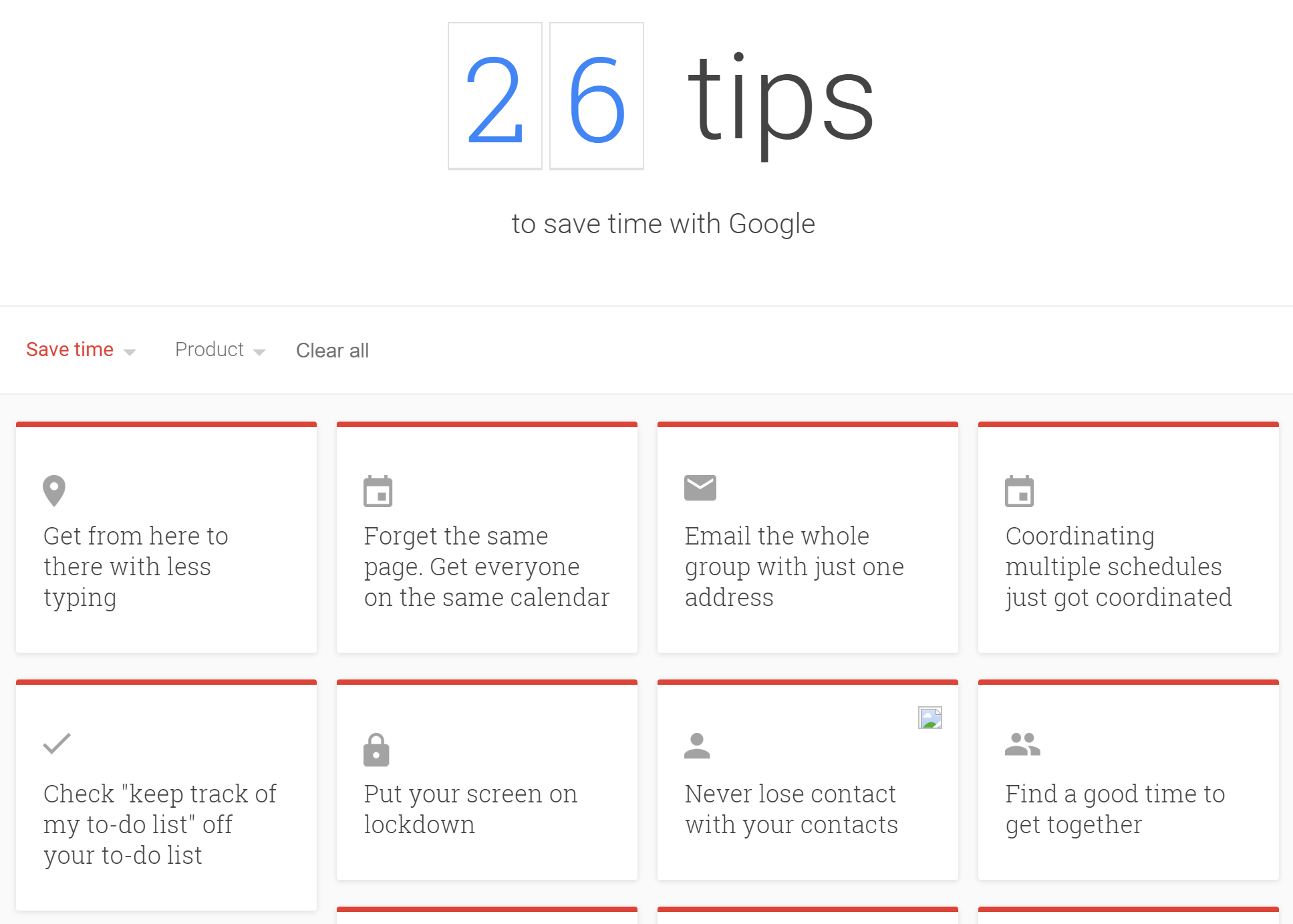
The tiles are colored so that you can visually distinguish the categories. For instance, under “Save time” (red accent) you’ll find tips on how to accomplish common tasks more quickly among various Google apps.

google_tips_7

Alternatively, filtering via Product only shows you tips Google made relevant to the app you’re interested in.

google_tips_6

 Pretty cool huh? Hit up the source link below and see if there’s a feature you’ve been missing out on.

Source: Google Tips

The best-selling unlocked Android phones from B&H (January 13)

0

[df-subtitle]Save $50-$130 on select models[/df-subtitle]

Nexus 5XIn the hunt for a new smartphone? Have you ever considered an unlocked model? The benefit, of course, is that the handset can be used on a wide variety of wireless service providers. It might cost a little more up front than your last device, but it could pay off in the long run.

Why unlocked?

Whereas a lot of today’s flagship models tend to run in the $500-$600 range, or higher, there’s an awful lot of smartphone to be had for less money. In fact, you can sometimes spend $200-300 for a phone and get a substantial upgrade over your previous one.

We’ve gathered up the 10 best-selling unlocked Android devices from B&H so you can get a sense for what’s available. Indeed, you’ll see a nice mix of big-name vendors and devices from other, scrappy players. Note that we’ve omitted color variations; you might find other colors available.

Why B&H Photo Video?

As the largest non-chain photo and video equipment store in the United States, B&H also offers consumers a wide selection of smartphones. Indeed, you’ll find just about every major manufacturer from around the globe, plus some from other, growing names, too. There’s something here for everybody.

So, the next time you need to replace your existing phone, consider scooping up one of these. It’s often a heck of a lot cheaper than going through your carrier in the end. Depending on which model you purchase, you could save big on an unlocked Android device from B&H.

  1. Google Nexus 5X 32GB – $399.00
  2. Asus ZenFone 2 Laser 32GB – $229.00
  3. Samsung Galaxy S6 32GB – $599.99 
  4. Alcatel One Touch Idol 3 4.7 16GB – $179.99
  5. Samsung Galaxy S5 16GB – $349.99
  6. Samsung Galaxy S6 Edge+ 64GB – $669.99 SAVE $130
  7. Motorola Moto G 3rd Gen 16GB – $219.99
  8. BlackBerry Priv 32GB – $699.99
  9. Motorola Moto G 2nd Gen 8GB – $99.99 SAVE $70
  10. Sony Xperia M4 Aqua  16GB- $199.99 SAVE $50

Google I/O is being held in Mountain View on May 18-20

0

Google I/O is an annual conference held by Google for software developers. Google has some of the brightest minds in the world, and I/O features a place for like minded people to attend highly focused technical sessions, focused on building web, mobile, and enterprise applications with Google.

google io 1

Software such as Android, Chrome, Chrome OS and more are discussed and talked about at Google I/O. It’s a software developers dream to attend this event.

Google’s CEO, Sundar Pichai, announced that Google I/O will be held in Google’s backyard in Mountain View, CA. at the Shoreline Amphitheatre.

Google IO Tweet

The “I” and “O” stand for input/output, and “Innovation in the Open”. – Wikipedia

Google I/O should be a place of excitement for all fans of Google, or Alphabet. Last year’s I/O event is when we learned of Android Marshmallow and its newest features like Doze, Android Pay, new Android Wear features, Offline Google Maps and more. I/O is just five months away and it may introduce us to Android N, and an Android-Chrome hybrid software platform.


Last year’s Google I/O can been seen in the video below.

If you remember, Sundar Pichai was a Vice President last year so this will be his first I/O event as CEO.

Verykool Maverick SL5550 review: Unlocked phones get another strong contender

You may have not yet heard of the verykool brand, and that’s okay. It’s a startup based out of San Diego. The parent company, InfoSonics Corp, has a past history as a distributor for more known brands (Samsung, LG) before it branched off to do its own thing.

Verykool has quite a few smartphones under its belt now, and the experience shows. We were given its latest, the Maverick SL5550, to review for you guys today.

DSC05518 (2)

The SL5550 comes with a considerable 5.5″ screen and is LTE-ready. Verykool thinks it’s packed with all the things you’d need from a top-notch smartphone, at a very cool retail price of $179. Let’s check out if the Maverick SL5550 is the unlocked smartphone for you.

[spacer color=”264C84″ icon=”fa-android”]

Design

DSC05462

I’ll cut to the chase about the Maverick SL5550’s design. I was majorly impressed upon opening the box. An asking price of $179 doesn’t beg for high expectations. I was wrong. Budget phones are beginning to offer a lot, and the SL5550 is certainly no exception.

DSC05475

The classy metal frame slapped me in the face when picking up the smartphone for the first time. It looks and feels so good. The finish on the metal is smooth and matte. It’s flanked by shiny chamfers on both sides, which create a lovely contrast. The metal alone gives the phone an appearance way past its price.

[row][double_paragraph]DSC05526[/double_paragraph][double_paragraph]DSC05515[/double_paragraph] [/row]

I also like the front of the phone as well. Tempered glass protection dominates the entire front panel, and verykool was considerate with minimizing bezel.

DSC05508

However, with such an aggressive price, something indeed had to give. The back cover doesn’t keep up with the quality feel of the rest of the phone.

DSC05487 (2)

The plastic has a cheap feel, and there’s a hollow response when you tap on it. The glossy finish tries to hide the fact, but it can’t really.

DSC05483

I’m not suggesting that the backing won’t hold up, and the fact that it is removable can be a point of redemption. Yes, the battery in this guy is replaceable. Access to the back also provides a microSD card slot and two SIM slots.

[row][double_paragraph]DSC05502[/double_paragraph][double_paragraph]DSC05504[/double_paragraph] [/row]

Performance

The SL5550 is powered by a MediaTek MT6735P processor, which consists of four ARM Cortex-A53 cores running at 1.0 GHz. The MT6735P is comparable to the Qualcomm’s Snapdragon 400 SoC (low-mid range). Therefore, you shouldn’t expect mind-blowing performance.

That isn’t to say it won’t get you by. In my experience, the SL5550’s performance was just fine for basic phone functionality (moving through the UI, opening applications, internet browsing, etc.).

What had me most worried was the fact that the processor is bundled with only 1GB of RAM. It is a big risk going with such a low memory capacity (bear in mind that part of it is reserved for the OS). In my opinion, 2GB should be the minimum in this day and age. It may forgivable for a sub-$100 phone, but not at $179. Fortunately, it didn’t show a problem for basic phone functionality. But there can be slowdown when you ask for more from the system (gaming, camera, multi-tasking, etc.).

The SL5550 comes with 16GB of internal storage. That isn’t a lot when you consider that the OS takes up a chunk of that space. However, it’s fantastic that the concern is supplemented by microSD expansion support (up to 64GB of additional storage).

Screenshot_2015-12-22-10-07-30

Regarding audio performance, I was pleasantly surprised. The external speaker (bottom-facing) isn’t anything to write home about, but I felt the headphone output was superb for a phone at this price range.

DSC05513

The sound is clear and rich. And where most budget phones I’ve tried make my favorite tunes uninspiring, the SL5550 is engaging and has that articulated oomph from strong-hitting notes in the music.

Display

DSC06043

I’m always worried when powering up a budget phone for the first time. You never know what you’re gonna get with the display. They usually have some kind of standout weakness in the form of color degradation or a washing-out effect.

I was pleasantly surprised with the SL5550’s display. No, it won’t match top-end panels from Samsung or LG, but it’s not far off either (and that’s saying a lot for a budget phone). It most definitely surpasses what you’d expect from this price range. It’s clear that we’re looking at an IPS panel, because blacks are deep and the image quality is maintained at angles (even surprisingly at extreme viewing angles). Colors are neither vivid nor dull; they should be just right for most people.

But what I will red mark is the resolution. At a 5.5″ display size, a 720p resolution (267 ppi) does show weakness. Elements in the images show a slight blur, especially to someone used to seeing a much more pixel dense display (which isn’t hard these days). However, I admit that this is more of a snobby complaint. The display is just fine for general use.

Camera

DSC05485

I’ll cut to the chase and say I wasn’t overly impressed with the camera performance. The capturing speed is what bugged me the most. It can be too slow to focus and take the shot. But don’t get me wrong, it’s not incompetent. I’m speaking from the perspective of snappy shooters in many smartphone cameras these days.

Spec-wise, we’re looking at a 13MP module as the primary camera and a 8MP front shooter. The megapixel count is impressive for a budget device, but the general consumer must know by now that the amount of megapixels don’t determine camera quality.

Rather than just talk about it, I’ll let you be the judge (click the image to go to the collection):

verykool_sl5550_camera_samples

The camera software is verykool’s own implementation. Navigation through it is just fine, and it has the essential functions you’d expect from smartphone camera software (HDR, panorama, picture effects). There’s a feature called Live Photo Mode, which is a gif-like capture (or moving set of pics).

[row][double_paragraph]Screenshot_2016-01-10-10-17-22[/double_paragraph][double_paragraph]Screenshot_2016-01-10-10-17-04[/double_paragraph] [/row]

A minor annoyance in my experience with the camera is the software’s shutter button. You have to hit it right at the center. Many times when I thought I got the picture, it actually only focused where I tapped.

Battery

The SL5550 packs a modestly-sized 2,500 mAh battery. Considering the price and size, I have no complaints over the capacity. The value is also raised by the fact that can buy another battery and swap it out at desperate times (an ability that many phones have now lost).

But how does that 2,500 mAh battery pack perform in the SL5550? In my experience, fabulously. I consistently managed to get over a day. Specifically, it would be around 30% by the time I went to bed.

[row][double_paragraph]Screenshot_2016-01-10-22-42-16[/double_paragraph][double_paragraph]Screenshot_2016-01-10-22-42-46[/double_paragraph] [/row]

This was with being out and about half the day and at home on WiFi. I tried to cover several use cases (internet browsing, music listening, picture taking, and navigation). The SL5550 held up like a champ. Note that although the battery stats say “Use since last full charge”, it doesn’t actually display the complete usage (must be a bug).

A neat feature verykool has implemented to help on battery life is called Standby Intelligent Power Saving. As implied, it helps minimize usage while the phone is in standby. It worked pretty well in my test. I went to bed at 37% and woke up to 32%

Screenshot_2016-01-11-05-32-46

However, note that Google baked this kind of battery-saving feature into Android 6.0 (Marshmallow) – Doze. The SL5550 is on Android 5.1 (Lollipop), so it’s generous that verykool has a similar feature in the meantime until Marshmallow comes through.

Software

[row][third_paragraph]Screenshot_2016-01-10-11-45-14[/third_paragraph][third_paragraph]Screenshot_2016-01-10-11-45-27[/third_paragraph][third_paragraph]Screenshot_2016-01-10-11-44-44[/third_paragraph][/row]

Verykool did it right with regard to software in the SL5550. It is practically stock Android (version 5.1, Lollipop). I will always praise when budget phone manufacturers don’t waste their resources in trying to create a standout UI (which end up being fugly) and just let Android be Android. Stock Android has a UI, just use it and put the effort into something that matters.

/rant.

With that said, the SL5550’s software isn’t completely free of verykool’s own touches. I must say that I was extremely worried about the presentation upon the phone’s initial power up. I was taken to a home screen that didn’t look one bit like Android. Fortunately, this only turned out to be a verykool app that launches on startup (not very cool at the slightest).

Screenshot_2015-01-01-20-49-25

You have to press the Home button to get into Android. I also need to say that launcher isn’t Google’s own (you won’t find Google Now on the far left panel), but it might as well be. Lollipop transitions, icons, app drawer, and notification shade are present. And the fluidity and animations when moving through the UI is how it should be.

[spacer color=”264C84″ icon=”fa-android”]

Final Thoughts

DSC05510

My overall opinion is that verykool did a fine job with the Maverick SL5550. I think the manufacturer is progressing nicely, and it is making the right compromises for the aggressive price target.

The way I give a passing grade to a budget phone is if I could say I could drop my flagship and use it as my daily driver if I really needed to. With the SL5550, I no doubt could. But what keeps me from saying “I totally could” is the 1GB of RAM and sub-par camera performance. I hope that verykool has these refinements on the priority list for the next phone.

Nonetheless, the SL5550 would definitely be one of my top recommendations for someone looking for a sub-$200 smartphone.

Maverick SL5550 product page
Today's best-selling unlocked Android phones at Best Buy (January 12th)

0

A discounted Motorola Moto G returns to nab the top spot

New new, new you? Why not new phone, too?

Purchasing a new smartphone can be quite a fun thing to do. But, it can also be quite expensive or confusing, too. Not only that, but it can also be a bit of a headache as consider which phone, which carrier, and which rate plan is right. We’re here to help you with at least one of those segments: the phone. And, more specifically, we’re going to help nail down at least one place to check for your handset needs. This time up we are looking at Best Buy.

best_buy_android_feature

Why unlocked?

The benefit of an unlocked smartphone, for those who aren’t aware, is that it can be used on a variety of wireless service providers. Going this route ensures you don’t have to worry about contracts or long-term obligations. Want to hop from T-Mobile to AT&T or vice-versa? That’s no problem when you’re using an unlocked GSM phone.


We’ve gathered up the 10 best-selling unlocked Android devices from Best Buy so you can get a sense for what’s available. Indeed, you’ll see a nice mix of big-name vendors and devices from other, scrappy players. Note that we’ve omitted color variations; you might find other colors available.

So, the next time you need to replace your existing phone, consider scooping up one of these. It’s often a heck of a lot cheaper than going through your carrier in the long run.

If there’s one piece of advice we can offer, it’s jump on the instant discounts. These prices are gone as quickly as they show up. In other words, act fast if you see a savings of $30 or more.

  1. Motorola Moto G 2nd Generation – $99.99 SAVE $50
  2. Sony Xperia C4 4G – $249.99 SAVE $50
  3. BLU Life X8 – $99.99 SAVE $30
  4. BLU Adance 4.0 L – $49.99 SAVE $10
  5. Motorola Moto G 3rd Generation 8GB – $179.99
  6. Motorola Moto X Pure – $399.99
  7. Samsung Galaxy S6 32GB – $599.99
  8. BLU Studio G 4G – $99.99
  9. BLU Life One XL 4G – $199.99
  10. Huawei P8 Lite – $219.99 SAVE $30