Home Blog Page 101

OnePlus Pad 3 Review

0

OnePlus has long been a player that may not be a household name in the US, but challenges the top tier manufacturers on a regular basis. Whether it’s releasing one of the best phones of the year, to pushing the limits of fast charging tech, OnePlus moves the needle all the time. The company is back in 2025 with the new OnePlus Pad 3, and this heritage continues with arguably the best Android tablet on the market.

Design

OnePlus didn’t change much of the overall design from the previous Pad 2, but it did grow in size. The new 13.2 inch LCD with a 3.4k resolution, 7:5 aspect ratio, 12-bit color and pixel density of 315 PPI offers a crisp display ready for pretty much anything you throw at it. This offers much more screen real estate over the 12.1 display on last year’s Pad 2.

Internally, you have the latest Snapdragon 8 Elite paired with 12GB of RAM and 256GB of storage. You might be surprised to learn this is the only RAM and hard drive options, but OnePlus stated that they’ve found this is the sweet spot for users for the Pad lineup over the years and made the decision to minimize the SKUs available. I think it was the right move. This gives plenty of horsepower and storage for most users.

Oh, did we mention how thin the tablet is? At less than 6mm, its svelte design can be easily moved around the office space, or throw in a bag, with no issues. Even with the optional keyboard, the overall footprint is less than most modern 13-inch laptops.

One omission I wish was here on the hardware side is a fingerprint reader. Having this built into the power button seems easy enough and something I’ve missed coming over from my Pixel Tablet. There is OnePlus’ face recognition that is excellent, and fast, but I just would have liked to see the more secure biometrics option.

Daily Use

I’ve been blown away by the consistency and daily driving of the OnePlus Pad 3 and keyboard combo. This truly is the most mature laptop replacement I’ve used in the Android market, and it’s not even close. While I’ve always made the argument that Android at its core is a better desktop replacement than iOS, manufacturers have failed to nail this presentation. 

“The OnePlus Pad 3 isn’t just a tablet; it’s the most mature Android laptop replacement I’ve used, seamlessly integrating into my workflow with its expansive display and desktop-level UI. It truly redefines what an Android tablet can be, offering a powerful and versatile experience that challenges traditional laptops.”

OnePlus is the first one where I didn’t feel like I missed my laptop completely. The excellent UI elements like Open Canvas, Floating Windows, and split screen options are really the options that make it feel like a true operating system and not a big phone like many tablets. If you’ve used a modern desktop, then you won’t feel as out of water when you sit down in front of the OnePlus Pad 3 interface.

The additional screen size makes is slightly cumbersome as a standalone tablet, but the tradeoff while using it in keyboard mode is well worth it. Having more physical space to open docs, answer emails, or take a web call was the right move to grow the panel size.

Adding in the flexibility of the removable keyboard and the Stylo 2 (no new stylus this year) round out the feature set to make this an even better for the new generation of tech buyer who may have never owned a real PC. That’s the market I feel like OnePlus is covering here, and smartly so.

The new 13.2-inch panel makes it obvious this is meant to be a full iPad Pro competitor. Honestly, this makes sense for OnePlus. The company has long had one of the most complete ecosystems inside the bigger Android environment. Having a full desktop/laptop level device fills a void they need to cover. This is a computer that is housed in a tablet format. Hard stop.

You may have also noticed that I’ve referenced the entire review to this point, as the keyboard and tablet are one device. While you can purchase them separately, and OnePlus has a very nice origami folio case as well, to understand the true power of this tablet the OnePlus Smart Keyboard is a must. You are doing yourself, and OnePlus, a disservice if you don’t buy them as a combo, and it’s not surprising when we get to cost that early bird buyers have fantastic options to make this a reality.

While I think it’s a full desktop replacement for most people, OnePlus has another neat trick for those using other operating systems as well. The previous sharing of notifications and first party sharing with other OnePlus devices is there just like last year, but now you can also share docs and files across Windows and macOS with the company’s OConnect software.

This news suite makes sharing files across all our operating systems seamless. Need to drag and drop files to your Mac. Done. Share notifications with the OnePlus 13. Yep. OnePlus is offering a full ecosystem amongst its own devices, but also taking in consideration of existing workflows outside of Android makes it top-notch using the latest OxygenOS 15 with OConnect.

Oh, and we have to have the obligatory future updates software talk. The OnePlus Pad 3 will receive three Android OS updates (Android 15 out of the box, then Android 16, Android 17, and Android 18). The OnePlus Pad 3 will receive 6 years of security updates, which is an increase of 2 years from the OnePlus Pad 2. I’d love to see OnePlus extend the OS updates to five years of Android versions. Laptops get replaced every 6–7 years, more like an appliance in most homes. If positioning the Pad 3 as a more “only computer” device, longevity matters.

AI is Here Too 

It wouldn’t be a gadget launch in 2025 without some coverage here. OnePlus has the combination of its internal AI found built into OxygenOS 15 and first party support for Gemini with the Pad 3 software side of things. OnePlus AI handles all the on device options that it can and has been very useful in my testing. Things like universal search and conversation recommendations have come in handy to help lessen the tediousness of trivial workload tasks.

When I need to delve a little further with the full backing of Google and the web, I was able to easily use Gemini as the onboard assistant on the Pad 3. This replaces the previous iteration of Google Assistant found on the Pad 2 as we’ve seen in many devices this year like the OnePlus 13. The combination Gemini and OnePlus AI seems like the right balance of local task helper and online powerhouse for a device like the Pad 3 toeing the line of mobile and desktop environments.

Battery Life

Another fantastic performance metric of the OnePlus Pad 3 is endurance. The Pad 2 was already a great tablet for battery life, and the new tablet is even better. The massive internal battery is the largest OnePlus has ever offered in a device, at 12,140mAh. The power station gives the Pad 3 plenty of cells to get you through a full work day without issue.

Standby power has been significantly increased as well. I noticed this in my usage immediately. I never really saw a noticeable drop in battery percentage coming back to the Pad 3 if it was lying unused on my desk. OnePlus advertises that the tablet with stay charged up to 70 days of consistent dormant use, and I’d estimate this to be mostly true.

I’m also impressed in both the charge times and that OnePlus included the appropriate SuperVOOC charger in the box. Yes, in the box. No cheaping out to have you searching for a secondary charger with the purchase of the Pad 3 tablet. This gives you the full 80 Watts of power needed to fully charge from zero percent in around 90 minutes. Thanks OnePlus!

Final Thoughts and Pricing

I’ve been blown away by the entire lineup of OnePlus devices released in 2025. The OnePlus Pad 3 simply rounds out this portfolio to offer one of the most powerful, mature Android tablets you can buy. I can’t think of any competition on the market that offers a more full-fledged media tablet that can fully replace most laptop tasks when paired with the OnePlus Smart Keyboard.

Pricing and Availability: The OnePlus Pad 3 is available for pre-order now in the US, with the 12GB RAM/256GB storage model priced at $699.99. For those looking to maximize their productivity, the Smart Keyboard is available for $199.99, and the OnePlus Stylo 2 for $99.99. A Folio Case is also available for $49.99.

Pre-order Dates and Deals (US/Canada via OnePlus.com):

  • Pre-order/Launch Date: The OnePlus Pad 3 was available for pre-order and launched on June 5, 2025.
  • Pre-order Offer (June 5 – July 7, 2025): Users who pre-order can enjoy two free gifts worth up to $299 (US) / CA $399 (Canada). Gift options include the OnePlus Pad 3 Smart Keyboard ($199.99 US / CA $249.99 Canada), the OnePlus Stylo 2 ($99.99 US / CA $149.99 Canada), and the OnePlus Pad 3 Folio Case ($49.99 US / CA $64.99 Canada).
  • Student Offer (June 5 – July 31, 2025): Students can save an extra 10% during this limited-time offer.
  • Trade-in Offer (June 5 – July 17, 2025): Trade in an eligible device to receive a $100 (US) / CA $100 (Canada) trade-in bonus.
  • Open Sale Date: The open sale for the Pad 3 begins on July 8, 2025, through OnePlus.com, Amazon, and Best Buy in the US, and OnePlus.com and Best Buy Canada in Canada.

Pairr Mini Wireless Android Auto and CarPlay Adapter Review

Android Auto and CarPlay have changed the way I drive my cars, plain and simple. Being able to have my phone just become the entire entertainment suite when I jump in my vehicle has been a fantastic and welcome enhancement to my in-vehicle time. A new company is attempting to take that a little further with the Pairr Mini, an Android Auto and CarPlay dongle to upgrade wired auto models.

Design

The design is pretty standard here, being it’s just a USB dongle. The key appeal of the Pairr Mini is that all the internal hardware and the USB-S A connection are all in a single item. No interconnected, or separate, cabling. Just one piece of tech to plug into your available car port.

While I love the seemingly seamless concept of the Pairr adapter, I can see one negative. Automotive interiors can be crowded at times. With this being essentially a short, stubby USB stick, I can see some layouts not allowing for the adapters dimensions to be plugged in. I can also see why some OEMs opt for the USB cord that plugs into a dongle.

Daily Use

Thankfully, neither one of my family’s cars had this issue. Both my Mazda, and the wife’s Jeep, had ample room and everything just works. If you’ve used wired Android Auto or CarPlay connections, getting the Pairr dongle going is identical. The unit has a Bluetooth ID instead of the immediate wired connection, but once established, you’ll go through the same steps to get your preferred OS on the infotainment of your vehicle.

Upgrade your ride effortlessly: The Pairr Mini delivers seamless wireless Android Auto and CarPlay in a remarkably compact, single-piece design. Say goodbye to cable clutter and hello to instant connectivity.

I literally had zero issues in my few weeks of using the Pairr Mini. The startup time is less than 20 seconds from starting the car to getting to your phone’s home screen. Afterward, the UI and interface are fluid. I notice very little latency issues or lag. If you didn’t know this was a wireless adapter, you’d never know the difference from being physically plugged into the dash.

This goes for both major mobile operating systems. I had the same consistent performance

Final Thoughts

My car not having wireless CarPlay/Auto from the factory has made me somewhat of a connoisseur of these type of dongles. The Pairr lives up to the competition and adds to it in a few ways. The compact, integrated design makes it very minimal if you have that space to plug in without issue. It really isn’t noticeable in either ports available in my Mazda once installed.

Lastly, the price is fantastic. At just $40, you don’t have to break the bank. I’d almost call it an impulse purchase or necessity for those with limited, wired infotainments systems. Once you’ve installed the Pairr Mini, you’ll never go back to reaching for a cable unless you need a phone recharge.

Yeedi M14 Plus Review

Let’s get this out of the way early: I’m not someone who gets excited about vacuuming. Or mopping. Or any kind of floor care, really. I live in a home where there’s always a bit of dust and fuzz tumbling across the floor, a spill that got missed, or mysterious crumbs that seem to appear out of nowhere. My 18-month-old dog can’t seem to walk past a toy without shredding them just a little more. So when a robot vacuum shows up claiming to clean better, mop smarter, and manage itself without constant babysitting, you better believe I’m paying attention.

That’s pretty much how I approached the Yeedi M14 Plus. It arrived promising next-level suction, hot water mop cleaning, edge-to-edge coverage, and nearly hands-free maintenance thanks to its all-in-one OMNI station. I’ve spent the last few weeks putting it through its paces across hardwood, tile, carpet, and a daily rotation of messes.

Here’s what stood out, and what may still need a bit of attention, after living with one of Yeedi’s most ambitious robot vacuums yet.

If your home is mostly hard floors like mine, the Yeedi M14 Plus feels built for it; it prioritizes mopping in a way that most hybrid robots just don’t.

First Impressions: Bigger Ambitions in a Big Box

Unboxing the M14 Plus is kind of like unboxing a small appliance suite. You’re not just pulling out a vacuum and charging cable. Inside the hefty box, you’ll find, including:

  • The robot vacuum itself
  • The large OMNI station (more on that later)
  • Clean and dirty water tanks
  • A 3-liter dust bag already in place
  • A roller mop, main brush, side brush, and filter
  • A power cord, a well-written manual, and a quick-start guide

Even before I had the app downloaded, I could tell Yeedi was aiming high. This is more of an ecosystem than a robot vacuum cleaner. The clean lines, the creamy white finish, the transparent water tank window on the station? It all feels considered and intentional, like something designed to live in your space, not hide in a closet.

Setup and First Use: Surprisingly Smooth

Pairing the robot with Yeedi’s app took just a few minutes, though it’s important to note: it only supports 2.4GHz Wi-Fi. That might throw off folks with newer mesh systems or 5GHz-only networks, but most homes will still be fine.

Once connected, the app guided me through my first clean and map creation. It built a full map of my downstairs level in under ten minutes, complete with room dividers and labels I could edit. I was able to name rooms, set no-go zones, and even tweak suction and mopping intensity per room.

Close-up view of the Yeedi M14 Plus OMNI station with open compartment for dustbin and mop cleaning functionality on a tiled floor.

There were no firmware updates or hiccups during setup, which already put this robot ahead of a few others I’ve tested recently.

Vacuuming Performance: Great on Hard Floors, Solid on Carpet

Hard Surfaces: This is where the M14 Plus shines. On hardwood, tile, and laminate, the 18,000Pa suction feels like overkill in a good way.

Whether it’s sand tracked in by shoes, pet toys that have been ripped to pieces, or a scattering of coffee beans, cereal, or bits of diced veggies under the counter, the robot picks it all up in one go. You’ll notice cleaner floors even if you’re used to running a robot daily. It just has more raw suction than most models in this class.

Carpets and Rugs: On low-pile and medium-pile rugs, the cleaning is solid. It lifts visible dirt and fluffs up the carpet in a way that makes the room feel fresh, but on high-pile or select rugs, it can hesitate or miss some debris.

It doesn’t have carpet boost settings as aggressive as some competing models, and that’s noticeable if you have a lot of plush flooring. Then again, these are the types of things that are sometimes only noticeable if you have a chance to try different brands and models. The auto-lift mop helps, too, so at least you don’t get wet streaks if it crosses over a rug.

Pet Hair: I tested it with a dog that doesn’t shed much but absolutely, and almost daily, leaves the living room looking like a pet store exploded. Between the strong suction and the updated ZeroTangle 3.0 brush, the M14 Plus keeps up nicely. Hair rarely wraps tightly around the roller, and most of it ends up in the bin on the first pass.

Mopping Performance: Better Than Just “Good for a Robot”

If you’ve ever owned a robot vacuum that tries to mop, you know the usual complaints: streaky floors, weak water flow, and worse, just smearing dirt around. Some models feel like they’re more of a 1.5-in-1 than a 2-in-1 when it comes to hard floors. The M14 Plus doesn’t have those issues.

  • Roller Action: The mop spins at 200 RPM, and it applies downward pressure that simulates a real scrubbing motion. That alone puts it above 90% of robot mops, which usually just glide a pad over the floor.
  • Stain Removal: I tested it on dried coffee, sticky juice, and those weird mystery stains that show up near the sink and fridge. Everything came up in a single pass. I didn’t need to pre-treat or manually follow up with a Swiffer; it legitimately removed stains I would’ve assumed required elbow grease.
  • Hot Water Mop Washing: When the robot returns to the OMNI dock, the mop is washed with hot water (167°F), then dried with warm air. That’s a big deal hygiene-wise and it feels like what should be standard in mopping robots in 2025. Not only does the mop stay clean, it doesn’t develop that musty smell you often get with pad-style robots.
  • No-Go Zones and Selective Mopping: The app lets you tell it exactly where to mop and where to skip. I used this to keep it out of carpeted rooms entirely or to send it just to the kitchen after a meal prep session. It’s not perfect, but it’s pretty accurate.

Navigation & Obstacle Handling: Smart, But Occasionally Stubborn

The M14 Plus uses a combination of AI-powered vision, 3D sensors, and radar mapping. In theory, this means it should recognize obstacles like shoes, cords, and furniture legs. In practice it gets most of it right most of the time.

Close-up view of the Yeedi M14 Plus robot vacuum showcasing its control panel and sensors on a tiled floor.
  • Furniture & Layout Awareness: It learns your home layout quickly and cleans in straight, efficient lines. It hugs walls well and does a particularly good job with corners and edges thanks to its TruEdge system.
  • Obstacles: Light cords and shoes are usually avoided, though it still struggles with very thin cables (like phone chargers). Rug fringe? Still a nemesis. It’s gotten tangled on the same decorative rug fringe more than once. But so have other vacuums.
  • Thresholds & Transitions: It’s rated for 20mm threshold crossings, which means it can move between most rooms, but very thick transitions (like older doorway lips or stone floor steps) may require assistance.

Surface Adaptability: Smart Switching, Mostly Reliable

The M14 Plus does a nice job adjusting its behavior based on the surface:

  • Vacuum-only on carpets: It lifts the mop out of the way, avoiding that dreaded damp rug issue.
  • Custom suction per room: You can set higher suction in the entryway and lower in the bedroom.
  • Multi-pass cleaning: Especially useful in high-traffic zones like the kitchen or hallway.

I should say here that you’ll want to verify that it correctly identifies room types. In one case, it misclassified a rug as part of the hard floor area, and while it avoided mopping it during the run, it didn’t mark it correctly on the map. You can fix this manually, but it takes some intervention.

Long-Term Consistency

What impresses me most about the M14 Plus isn’t just the initial runs, but how little it drops off after a few weeks of use. With many robots, you get great results out of the box, but then you start to see:

  • Reduced suction from clogged filters
  • Mop pads that smell
  • Poor navigation due to dirty sensors

Yeedi’s approach with the hot water mop wash, auto-empty dustbin, and reminders for filter or roller maintenance helps keep things running smoothly. You’re not cleaning up after your cleaner every other day.

App Experience: Functional, But Not Quite There

The Yeedi app does the job you’d expect (map, schedule, customize, and track) but it doesn’t feel as refined as some of its competitors. The UI is a bit plain, and while basic tasks are easy, digging into more advanced settings, like multi-pass mopping or adjusting cleaning intensity by room, isn’t always intuitive.

There’s also some lag between issuing a command and seeing the robot respond. Nothing deal-breaking, but if you’re used to near-instant control with another brand, you’ll maybe feel the difference.

Close-up view of the Yeedi M14 Plus robot vacuum's OMNI station showing the empty dust bag compartment.

Still, I’ve been able to set complex cleaning schedules, define quiet hours, and trigger mop-only passes when needed, all without much trouble. It’s serviceable, and for most users, more than enough.

Depending on the kind of homeowner/user you are the app experience may not even matter. Like to walk over and press the start button every few days and let it touch things up? You’ll have no UI or app settings to concern yourself with.

OMNI Station: Where the Magic Happens

Let’s talk about the dock. This thing is a powerhouse.

It handles:

  • Auto-dustbin emptying (3-liter bag lasts around two months)
  • Mop washing with hot water
  • Mop drying with warm air
  • Clean water refills
  • Dirty water collection

It really does reduce daily upkeep to nearly zero. After two weeks of near-daily use, I hadn’t emptied or refilled anything. The station notifies you when the water is low or the dust bag is getting full.

There’s some operational noise during mop washing and drying but it’s brief and tolerable. If you’re sensitive to noise, maybe don’t run a full clean at midnight. In all seriousness, it’s not loud enough to be disruptive in most homes.

Battery Life: Realistic and Reliable

Yeedi rates the M14 Plus for up to 241 minutes of runtime. In real-world use I’ve found the following so far:

  • A full vacuum and mop of 1,100 square feet used about 50–60 percent battery
  • A quick vacuum-only pass across two rooms barely made a dent in percentage

Recharge takes about six hours, and the robot will resume its run if it runs low mid-clean. For apartments or smaller homes, it’s overkill. Heck, I barely get this to halfway when doing the full downstairs. For larger spaces, I am certain it gets the job done without requiring a mid-clean nap. Unless you’re cleaning an entire two-story home in one go I imagine the Yeedi unit returns to its base with some juice left.

Close-up of the Yeedi M14 Plus robot vacuum on tiled flooring, showcasing its sleek design and sensors.

Cleaning Results: As Close to “Set and Forget” As I’ve Seen

What stands out after using the M14 Plus for weeks is just how little I’ve had to think about cleaning. My floors have stayed consistently clean. Not just “robot-clean,” but really clean. The combo of vacuuming and mopping, plus the fact that the robot maintains its own mop, means I can go days without even opening the app.

That’s the dream, right? It’s why we spend north of $1,000, isn’t it? We don’t want to think about our floors. The robot that actually lets you forget about cleaning for a while. The M14 Plus doesn’t entirely hit that goal, but it’s pretty close; alas, you’ll still need to refill the clean water and empty the dirty occasionally.

Who It’s For

The Yeedi M14 Plus is ideal for:

  • Homes with a lot of hard floors (tile, hardwood, laminate)
  • Pet owners dealing with daily fur and dander
  • Busy households or those with younger family members looking for automation
  • People who want to mop often, but never want to physically touch a wet mop pad again

It’s probably not ideal for:

  • Homes with mostly thick carpeting
  • Those expecting flawless object recognition
  • Users who want total app polish and deep software customization
  • Budget shoppers. It’s not cheap, even with discounts

Price and Value: Worth It?

At full price (around $1,199), the M14 Plus sits firmly in the premium robot vacuum tier. But, in my time testing it, I have found it often goes on sale for $999 or less. For that price, you’re getting a full cleaning suite: strong vacuuming, truly useful mopping, and a dock that handles nearly everything.

If you already own something like the Yeedi S14 Plus or another recent hybrid vacuum, this isn’t a must-upgrade unless edge cleaning or hygiene automation is a priority for you. But if you’re stepping up from a basic vacuum-only robot or an older mop-dragger, this feels like a leap forward.

Final Verdict: The Best Yeedi Yet?

I’ve used more robot vacuums than I can count at this point. Some impress early and fade fast. Others quietly chug along for years. The Yeedi M14 Plus sits somewhere in the sweet spot: it’s innovative enough to feel fresh, powerful enough to clean properly, and automated enough to actually reduce your cleaning load.

I like this one quite a bit and tend to think of it as a mop-first model with excellent carpet management. My rooms with the most traffic have hard floors so it’s been nice seeing it do its thing over the last few weeks. We’re not a “dirty” family so we don’t have much debris to pick up. And we’ve gotten in the habit of manually grabbing all the toy shreds and stuffing before running any vacuum. Somehow our kitchen and hallway end up with paw prints and footprints, especially as this season has been an usually wet one.

It’s not perfect as the occasional navigation quirk pops up, and app polish hold it back from being the best in its class. But the mop system alone might be worth the price for people who care about clean, streak-free floors and don’t want to babysit a robot daily.

Look for the Yeedi M14 Plus on sale and you’ll be getting a really good value. As of the time of publishing this review the price is just $849 and that’s as low as I’ve seen it. That’s an easy recommendation for me to make.

Ottocast Portable Smart Screen Review

Android Auto and CarPlay seem like standard features these days in 2025. Any new vehicle most likely has the option in some form or fashion to have your phone take over the infotainment system. Cars are long-term investments, and while the latest and greatest has this system in place, you don’t have to travel back in time long to find a car without them.

The maker of many popular wireless adapters for Auto/CarPlay, Ottocast, now offers a single solution for older model vehicles. With the new Ottocast Portable Smart Screen, you get Android Auto and CarPlay in a separate device for pretty much any car made after the early 2000s.

Design and Setup

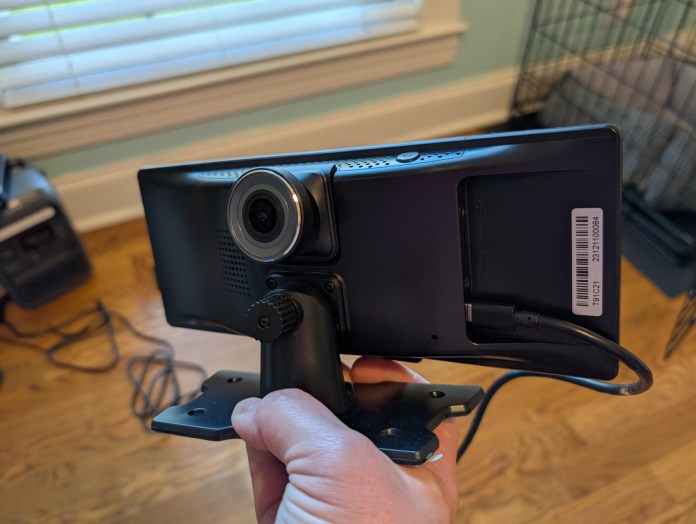
As mentioned, the Ottocast Smart Screen is an all-in-one solution for CarPlay or Auto. The portable screen has internals that mimic that of a car screen, built into the screen and mount combo. With just a power adapter and a way to push audio to your speakers, you have a solution.

Even the speaker part is pretty seamless and optional. There’s an internal speaker if you just had to function with it, although it’s not great in the volume department. Thankfully, you can use a 3.5mm audio auxiliary jack found in many cars, or even FM transmission, to get the Ottocast pumping tunes in no time.

Power is provided via a cigarette port charging cable over USB-C in the back of the Ottocast Smart Screen. Once powered up, you have options for general Bluetooth connection to devices, an Android Auto button, CarPlay button, or dash cam. Yes, it even has a dedicated dash cam. If you’ve ever setup Auto or CarPlay on another unit, it’s the exact same for the Ottocast. The prompts give you a device name to connect over Bluetooth, and then your phone of choice will take over the rest of the onboarding.

Daily Use

I’ve been pleasantly surprised by the Ottocast Smart Screen. I don’t currently have a car that doesn’t have it built into the existing system, but I did throw this guy on the dash of my wife’s Jeep to give it a test run. Using the aux jack and provided 3.5mm cable, I had it set up and ready in less than five minutes.

Mounting it was done easily with the provided adhesive on the bottom of the stand and has screw ports with included hardware if you needed a permanent solution. Using the Ottocast has been just like any other offering from a factory automotive company. You have a base system with the icons for entering your Auto or CarPlay interface and the rest is exactly the same, just on a portable screen you can place anywhere.

Instantly modernize any car with the Ottocast Portable Smart Screen, bringing seamless Android Auto and CarPlay to your dashboard in minutes, no tools required.

Final Thoughts

It’s a niche market, but I think the Ottocast Portable Smart Screen has a ton of potential for the right buyers. I immediately thought of my farming family and older farm trucks or even tractors that this accessory offers an immediate upgrade with zero tools. The same is true for some like industrial box trucks or conversion vans. 

You can snag your Ottocast Portable Smart Screen from the company directly now for just $130. While you can probably find after market in dash solutions in a similar price range, you won’t find any of them as easy to install.

Mammotion Rolls Out Father’s Day Discounts on Robotic Lawn Mowers

0

Mammotion is giving dads a well-deserved break from weekend yard work with a lineup of Father’s Day deals on its smart robotic lawn mowers. From now through June 15, shoppers can score up to $220 off select models directly from Mammotion.com or at Walmart.

Whether dad is a landscaping perfectionist or just wants to reclaim his Saturdays, Mammotion’s autonomous mowers offer a tidy solution, literally.

YUKA Series Mowers Get a Father’s Day Price Cut

The YUKA lineup is built for a range of yard sizes and mowing styles, all with smart tech features that make the job easier. Here’s a breakdown of the current promotions:

  • YUKA Mini 800H
    Was $1,299 – Now $1,099 (save 15%)
    Ideal for lawns up to 800 square meters, this compact model is built to navigate tight turns and sloped terrain.
  • YUKA Mini 600H + 4G Module Kit
    Was $1,228 – Now $1,038 (save 15%)
    Combines compact performance with remote control via app, great for dads who want lawn updates while away from home.
  • YUKA Mini 800H + 4G Module Kit
    Was $1,428 – Now $1,208 (save 15%)
    Adds 4G connectivity to the larger Mini model for seamless hands-off control.
  • YUKA 1000
    Was $1,499 – Now $1,399 (save 7%)
    Suited for bigger lawns (up to 1,000 square meters), it features quiet operation and high-precision mapping.
  • YUKA 1000 with Sweeper Kit
    Was $2,148 – Now $2,048 (save 5%)
    The included sweeper accessory handles small debris like leaves and twigs for a just-finished look after every mow.

Built for Smarter Yards and Smarter Gifting

Mammotion’s mowers are built to be low-maintenance, high-efficiency tools that integrate with smart home systems. It’s a practical upgrade that many dads probably wouldn’t buy for themselves, but definitely wouldn’t mind receiving.

More details, including full specs and ordering options, are available at Mammotion.com.

Xiaomi Expands Tablet Lineup with Redmi Pad 2 and 4G Variant

0

Xiaomi has officially introduced the Redmi Pad 2 and Redmi Pad 2 4G, a pair of budget-friendly tablets designed to deliver a more refined entertainment experience without the flagship price tag. Aimed at casual users and media lovers, both models feature upgraded specs, immersive audio-visual features, and Xiaomi’s latest HyperOS 2 system for a smoother, more connected experience.

Large Display, Comfortable Viewing

At the heart of the Redmi Pad 2 Series is an 11-inch 2.5K display offering 274 pixels per inch and a 90Hz AdaptiveSync refresh rate for smoother scrolling and playback. The display supports DC dimming and comes with multiple TÜV Rheinland certifications, including Low Blue Light (Software Solution), Flicker Free, and Circadian Friendly, all helpful for long viewing sessions. Whether streaming a movie or doom-scrolling your social feed, this panel is built for comfort.

A woman sitting at a table, holding a cup and smiling at a tablet in front of her, which displays a video call with another person. A stylus and a notebook are on the table.

Audio is handled by a quad-speaker setup supporting Dolby Atmos and Hi-Res Audio, rounding out the entertainment focus with room-filling sound.

HyperOS 2 Bridges Phones and Tablets

Running on Xiaomi HyperOS 2, the tablets bring cross-device features usually reserved for the brand’s higher-end offerings. Call sync allows incoming smartphone calls to be picked up directly on the tablet. Network sync makes it easy to tap into your phone’s mobile hotspot without jumping through menu hoops. A shared clipboard enables copy-paste across devices, handy for students, creatives, and productivity-minded users juggling between screens.

Helio G100-Ultra Power and All-Day Battery

Performance comes courtesy of the MediaTek Helio G100-Ultra, with enough muscle for casual gaming, streaming, and multitasking. Powering all that is a 9000mAh battery that’s designed for all-day use. For users who need more than Wi-Fi, the Redmi Pad 2 4G adds dual SIM support with 4G LTE, making it a better pick for travelers, commuters, or anyone who wants tablet access untethered.

Both versions sport a metal unibody design that adds a premium touch without bumping up the cost.

A young woman smiling while using a tablet, showcasing the Redmi Pad 2 in a casual setting.

Optional Accessories for Extra Utility

The Redmi Pad 2 Series is compatible with Xiaomi’s Redmi Smart Pen, featuring low-latency input, 60Hz refresh, and minimal activation force, making it a practical add-on for sketching, jotting down ideas, or signing documents. There’s also a Redmi Pad 2 Cover offering full-body protection and a built-in adjustable stand for hands-free media viewing.

Pricing and Availability

The Redmi Pad 2 is offered in Graphite Gray, Mint Green, and Lavender Purple, with configurations including 4GB+128GB, 6GB+128GB, and 8GB+256GB. Pricing starts at EUR 199.

The Redmi Pad 2 4G version comes in Graphite Gray and Mint Green with the same storage options, starting at EUR 249.

Mint Mobile Offers Galaxy S25 and Unlimited Wireless for $30/Month

0

Mint Mobile is turning heads with its boldest offer to date: the Samsung Galaxy S25 bundled with two years of unlimited premium wireless for just $30 a month. The deal, available to new customers through July 31, runs on the nation’s largest 5G network and features Galaxy AI, making it one of the most aggressive mobile packages currently on the market.

For those keeping score, that’s a flagship Android phone and unlimited data, talk, and text, without the fine print-heavy contracts or inflated pricing that tend to come standard elsewhere.

A Messaging Upgrade for All

Beyond the budget-friendly pricing, Mint Mobile is rolling out support for Rich Communication Services (RCS) across all compatible phones on its network. This brings modern texting features like read receipts, typing indicators, high-resolution media sharing, and group chats with smarter syncing, no matter what operating system you’re using.

In practical terms, Mint customers no longer need to juggle third-party messaging apps or explain why a group chat broke down after someone joined with a different device. RCS evens the playing field.

A Deal Even Ryan Reynolds Couldn’t Believe

Mint’s latest push isn’t just about flashy savings. According to Andrew Fried, the company’s Chief Marketing Officer, the deal originally sounded too good to be true, even internally.

“Unlimited data and the incredible Samsung Galaxy S25 for just $30/month seemed impossible, but here we are,” said Fried. “And now, because of RCS, you can fully embrace those green text bubbles in the group chat.”

The campaign is backed, unsurprisingly, by Mint’s co-owner and perpetual pitchman Ryan Reynolds, who continues to bring cheeky flair to the company’s marketing playbook.

The Fine Print That’s Actually Pretty Fine

This $30/month package covers:

  • The Samsung Galaxy S25 with Galaxy AI
  • Two full years of unlimited premium wireless
  • RCS support for enhanced messaging
  • Free mobile hotspot usage
  • Free Wi-Fi calling
  • Free roaming in Canada

New customers have until July 31 to take advantage of the offer. More details can be found on Mint Mobile’s official website.

AWOL Vision and Valerion Launch Massive June Sales with Up to 50% Off Home Projectors

0

AWOL Vision and Valerion recently joined forces, and now they’re kicking off their partnership with a pair of major sales events aimed at home entertainment fans. From June 11 through June 30, the newly aligned brands are hosting “AWOL Vision Day” and “Valerion Day,” featuring deep discounts across a range of 4K projectors, cinematic screens, and premium bundles. With savings up to $4,999, this event rivals even the most aggressive Prime Day promotions.

Big Screens, Bigger Savings

Known for their ultra short-throw and long-throw laser projectors, AWOL Vision specializes in high-end home theater setups without the usual high-end price tags, especially during this event. The AWOL Vision Day Sale offers deals both on its website and via Amazon, with bundles slashing prices by nearly half.

AWOL Vision website highlights include:

A 132-inch cinematic screen displaying a scenic sunset over the ocean, with a person taking a photo on the beach. In the foreground, there are speakers and a projection device.
LTV-3000 Pro

Amazon deals include:

Whether you’re turning a spare room into a home cinema or upgrading your living room setup, these options offer premium specs at far more approachable prices.

Valerion Adds Its Own Twist with Bonus Bundles

Valerion’s VisionMaster Pro2 is getting a temporary price drop, and a serious upgrade in value. During Valerion Day, shoppers who buy the projector directly from the brand will receive a full setup at no extra cost, including a matte white screen and walnut tripod stand.

Valerion website bundle:

Amazon discounts (use code “VALERION” at checkout):

A modern home theater setup featuring a large projection screen displaying a vibrant video game scene, with comfortable seating, snacks, and gaming accessories visible in the room.
VisionMaster Pro 2

These deals are only available through the end of June, making it an opportune time for home theater shoppers to go big without going broke.

More information and direct links to each deal can be found on the official website or through participating Amazon listings.

GameSir T7 Pro Floral Wired Controller Blends Precision and Personality for Xbox and PC

0

GameSir has officially introduced the T7 Pro Floral Wired Controller, a new entry in its controller lineup that brings a splash of color, and a stack of performance features, to Xbox and PC gamers. Now available for $49.99/£49.99 via Best Buy and the GameSir website, the T7 Pro Floral is designed to catch the eye and keep the gameplay sharp.

Sophisticated Style Meets Serious Specs

The most obvious update here is aesthetic: a floral-patterned matte shell paired with a semi-transparent finish and dynamic RGB lighting. It’s the kind of controller that looks just as at home in a curated setup as it does in the heat of battle. But underneath that glow is a full-featured wired controller built for responsive, accurate play.

Compatibility spans Xbox Series X|S, Xbox One, Windows 10/11, and Steam, ensuring it fits seamlessly into just about any gamer’s routine.

Close-up of hands holding the GameSir T7 Pro Floral Wired Controller with dynamic RGB lighting.

Hall Effect Tech and Haptic Nuance

Inside, the T7 Pro Floral features GameSir’s Anti-Drift Hall Effect sticks, which use non-contact magnetic sensors to reduce wear and boost accuracy, rated to last up to 5 million cycles. The controller also includes Hall Effect analog triggers with 2-stage trigger stops, giving players the flexibility to choose between gradual pressure control or fast, responsive actuation.

To deepen immersion, GameSir includes four vibration motors, two in the grips and two in the triggers. The asymmetric motor layout helps deliver more realistic feedback whether you’re landing a hit or dodging debris.

Customization and Comfort

Two remappable back buttons give players extra options for quick-access inputs, and the laser-engraved textured grips are designed to keep things secure during longer play sessions. A 3.5mm headphone jack is on board for plug-and-play audio and voice chat, and those who like to fine-tune their gear can take advantage of the GameSir Nexus software for deeper customization. Users can adjust button mapping, stick and trigger sensitivity, and vibration settings to fit their preferences.

Pricing and Availability

The GameSir T7 Pro Floral Wired Controller is priced at $49.99/£49.99 and available now through Best Buy and GameSir’s official website. It offers a unique blend of style, comfort, and competitive-grade control that should appeal to gamers who like their peripherals with a little extra flair.

Google Play Points Launches Roblox Experience and Limited-Edition Merch for Members

0

Google is expanding its Play Points loyalty program with new ways to earn rewards and unlock perks, starting with a first-ever branded experience on Roblox and a lineup of exclusive merchandise.

Explore the Diamond District on Roblox

From June 5 through July 2, Google Play Points members can enter the Diamond District, a custom-built experience on Roblox open to all users in supported Play Points markets. The interactive zone features an obstacle course, or obby, designed with procedurally generated modules, offering over four billion possible layouts. Weekly mini-games and collectible drops add replay value, encouraging users to revisit the space regularly.

Gold, Platinum, and Diamond tier members gain access to a VIP Vault within the Diamond District. This members-only area includes exclusive digital rewards for Roblox avatars. To enter, users must confirm their status by linking their Google Play Points account.

This marks Google’s first activation of a dedicated Roblox environment tied directly to its loyalty program, highlighting its interest in engaging younger audiences through game-based platforms.

Limited-Edition Merch and Collectibles Incoming

In addition to the Roblox event, Google is introducing physical merchandise inspired by the Diamond District experience. Play Points members will soon be able to redeem points for limited-edition items such as:

  • A custom Google Play x Backbone One controller
  • A mini fingerboard collectible
  • A themed gift box and portal pins

These collectibles are expected to roll out soon, and will be followed by a rotating selection of apparel and accessories throughout the year. Upcoming collaborations span Google’s broader ecosystem, including Android, YouTube, and Chrome, as well as developer partners like Duolingo and other lifestyle brands.

Play Points Continues to Evolve

Google Play Points remains free to join and rewards users for purchases on Google Play. Members earn points that can be redeemed for in-game items, discounts, and now, exclusive physical merchandise. With past perks ranging from VIP access at cultural events like San Diego Comic-Con to early entry into games such as Squad Busters, the program continues to expand into new categories of engagement.

More information about the new Roblox experience and upcoming collectibles can be found on the Google Play Points page.