Google has officially launched Android 16, marking its earliest major OS release in recent years. The update is rolling out now to Pixel devices, with support for other Android phone makers expected later this year.
Android 16 introduces several under-the-hood improvements and usability upgrades designed to make the platform more intuitive, secure, and accessible. The update also lays the groundwork for the new Material 3 Expressive design language, bringing a fresh layer of polish to Android’s visual experience.
Smarter Notifications and Real-Time Updates
Android 16 refines how users interact with notifications by introducing two key improvements. First, it enables real-time “live updates” from compatible ride-share and food delivery apps, letting users track their driver or order directly from the notification panel without diving into the app. This feature is expected to integrate with systems like Samsung’s Now Bar and OPPO and OnePlus’ Live Alerts as it expands.
To reduce visual clutter, Android 16 also introduces auto-grouping for app notifications. Instead of a rapid-fire stream of messages from a single app, related alerts are bundled together to keep things neat and scannable.
Better Support for Hearing Aids and Accessibility
For users with LE Audio hearing aids, Android 16 makes a noticeable leap in call clarity. Until now, most hearing aids relied on their own microphones, which are typically optimized for picking up the other caller’s voice, not yours. With this update, users can switch to using the phone’s microphone for better audio pickup, especially in noisy settings.
There’s also improved on-device control: Android 16 adds native volume and mic settings for hearing devices, offering a more consistent and accessible experience directly from the phone.
Stronger Security with Advanced Protection
Android 16 introduces system-level access to Google’s Advanced Protection Program, offering mobile users a more powerful defense against online threats. The feature is designed for high-risk users, journalists, political figures, or anyone who wants an extra layer of safety. Once activated, it shields the device from malicious apps, phishing attempts, scam calls, and unsafe sites with a single toggle.
Tablet Features Get a Desktop-Like Boost
Google is bringing more desktop-style flexibility to large-screen Android devices. In collaboration with Samsung, Android 16 debuts a new desktop windowing feature that allows users to open, resize, and move multiple app windows, much like on a traditional computer. It complements the existing split-screen and single-app views, making multitasking on tablets and foldables more seamless.
Keyboard power users will appreciate the upcoming support for custom shortcuts, along with taskbar overflow support for better app management. These productivity tools aim to bridge the gap between mobile and desktop workflows, and Google says additional features, like external display support, are on the horizon.
More to Come
Android 16 packs even more updates behind the scenes, including HDR screenshots, adaptive refresh rates, identity verification enhancements, and early glimpses at the new Material 3 Expressive UI. Future updates will extend to Wear OS 6 and other Android devices later in the year.
Developer Upgrades and a New SDK Cadence
Android 16 marks the beginning of a new major/minor SDK strategy. This release, the only one this year with behavior-affecting changes, is joined by a quarterly release cadence, one of which (Q3) will focus on visual polish, and another (Q4) will include new APIs without breaking existing apps.
Google is also pushing for more adaptive Android app experiences across screen sizes, aspect ratios, and device form factors. Developers targeting Android 16 (API level 36) will need to accommodate expanded support for resizable and multi-window layouts, especially on devices with a smallest width of 600dp or greater.
Time to Test and Target
Google encourages developers to begin testing and updating their apps now, using the Android Emulator or installing Android 16 on supported Pixel devices. Libraries, SDKs, and game engines should be audited for compatibility, especially for apps that interact with ART internals, rely on scheduled jobs, or use deprecated accessibility methods.
More details, including developer tools, compatibility guides, and links to the latest Android Studio, are available in the official announcement on the Android Developers Blog.
If systems are not integrated, teams work more slowly, important information is lost, and important opportunities are not found. Whenever your CRM and ERP are disconnected, your workers spend too much time on data instead of serving people. Therefore, a lot of companies choose to integrate NetSuite with Salesforce to overcome the gap and achieve better results.
What Is NetSuite – Salesforce Integration
NetSuite – Salesforce integration brings together the business’s most common platforms, Salesforce (CRM) and NetSuite (ERP). Both areas deal with sales data, client information, finance aspects, inventory, and many other subjects.
By integrating, the data is passed automatically from one system to the other. Once a deal is completed in Salesforce, it can automatically create a new order in NetSuite. No copy-pasting. The work does not require back-and-forth email messages.
The key data shared often includes:
Ways to reach out to customers
You should get sales orders and invoices from the company.
Prices of goods and the stock held by the company
Payment and billing history
Companies utilize this connection to minimize manual entry, prevent errors, and expedite business processes.
Many choose no-code or low-code integration tools like Skyvia because they’re faster to set up and don’t require full-time developers. This https://blog.skyvia.com/netsuite-salesforce-integration/guide shows how tools like Skyvia connect both systems in minutes.
How CRM Works Improves With Integration
A unified system boosts your process speed, makes your information cleaner, and enhances your customer experience. Here’s how:
1. Views into your customers’ behavior in real time
If Salesforce and NetSuite are connected in real-time, both your sales and support teams will always have a complete understanding of the entire customer situation. They don’t have to use a different tool to look at orders or check their account history. This speeds up the process and stops any delays from happening.
2. Only single accounting is used.
Manual work takes a lot of your time. Processing time is considerably slow, and tiny mistakes in the data can result in mistakes in billing and shipping. Precisely, integration skips this process. The moment data is entered in one system, the second system will also be updated, without any further effort.
3. Less waiting time and more prompt actions
It’s important to see if the product is available in stock before confirming a purchase. Find out whether some of the invoices the client has are past due. With everything working together, the results happen immediately. So, you’ll experience faster quotes, faster callbacks, and fewer sales being lost.
4. enhanced collaboration among several departments
When all these departments use the same information, there is less confusion. The fact that everyone sees the same numbers makes working in teams much easier.
All things considered, improving CRM helps both a specific team and the whole company.
Key Features to Look For in an Integration Tool
Some integration tools differ from one another. If you wish to link Salesforce and NetSuite, using a simple connector is not enough. You should select a solution that aligns with your approach, ensures your information is secure, and is straightforward to operate going forward.
Your first step should be to do a two-way data sync. If you make any changes in one platform, they will be instantly reflected in the other. As a result, both systems run together and do not require more effort from your team.
Find a way to build applications without knowing how to code. It’s unnecessary to hire a developer or develop new code. Skyvia provides your workers with a straightforward way to create and utilize workflows.
Make certain that log reports and alerts are in place. If an issue arises, your team should find out what happened and the reasons behind it. Good tools make it easy to spot records that do not sync, skipped ones, or delayed data.
Ensure that the data source includes filters and simplified maps. It is important that you are able to control the data going between systems and how fields are aligned. It makes things easier by using less space and taking less time.
Use Cases Where Integration Makes a Big Impact
We should examine how integration benefits our work and helps us save time. They are not simply helpful; these features are what NetSuite – Salesforce integration helps with each day.
1. Also, when leads are converted into sales orders, ensure that they are synced together.
A sales rep uses Salesforce to seal a completed deal. To raise an invoice without integration, they would have to contact finance by email or add all the details manually in NetSuite. Thanks to the automation of integration, there are no more repetitive tasks that take several hours every week.
2. Checking the performance of stocks before the deal is made.
Have you ever encountered a situation where a client requested a product and you weren’t sure if it was in stock? If the stock information in NetSuite reaches Salesforce, reps can see if an item is available right away and speed up the sales process.
3. The report will contain all the necessary information as soon as possible.
When your team has to create monthly reports, combining information from two resources takes time and is not accurate. When teams use integration, they have just one point of reference and work better and more dependably.
4. Customer support learns all about the problem.
A lot of the time, support teams need access to information about past orders, invoices, or shipping. Whenever they ask finance or sales for information, it decreases efficiency. It allows them to use all these things only when they are necessary.
They address the real problems, instead of only making little gains.
Why a Strong Salesforce – NetSuite Link Saves Time and Builds Trust
Things become a lot easier for businesses when Salesforce and NetSuite are synced. All the necessary details for finalizing sales are always available to them. By using finance, you can eliminate any problems that come with manual order entry. When support deals with complaints, they can act fast using all the available customer information. This results in a better service, fewer slip-ups, and a quicker rise in the company’s growth.
Time spent on data transfers between your tools is a warning sign that you are already losing ground. All you require is simple programming and short IT projects. With Skyvia, setting up the processes takes little time, and you don’t need to write code.
You should reflect on whether your tools are useful for your teams or if they slow them down instead.
In the case of the second one, you should connect Salesforce and NetSuite in an effective way. Changing technology is not what integration is about. This solution helps your team expand, offer support, and do sales with unlimited potential.
EDITOR NOTE: This is a promoted post and should not be considered an editorial endorsement
EUVOLA, a San Francisco-based startup, has announced the launch of its emotional AI companion device via Kickstarter, positioning itself as the first at-home product of its kind designed for emotional presence and human connection. The campaign is now live, with early bird pricing starting at $199 (regularly $299), including one year of Premium Access. Shipping is expected to begin around September 2025.
A New Kind of AI: One That Listens, Learns, and Feels Familiar
Unlike voice assistants or chatbot apps, EUVOLA is a standalone desktop device with an 8-inch HD touchscreen, proximity sensors, and an ambient light system that adjusts to the emotional tone of conversations. The goal isn’t to manage your calendar or order groceries so much as to offer a comforting, emotionally intelligent presence in the room.
Designed for users seeking companionship, emotional continuity, or simply a more meaningful way to interact with AI, EUVOLA builds emotional memory over time. Users can upload a voice sample and photo to craft a digital likeness of someone familiar, imagined, or missed. The result is a personalized avatar that doesn’t just reply, but remembers, adapts, and expresses empathy.
Key Features and Specs
Display: 8-inch HD touchscreen for expressive, lifelike avatars
Sensors: Proximity and ambient light sensing for presence and mood-aware lighting
Emotional Memory: Local-first storage with encrypted cloud support available by consent
Personalization: Create a custom companion using a photo and voice sample
Design: Aesthetic desktop presence with dynamic lighting tied to emotional context
At the core of the experience is the Empathetic Response System, built in collaboration with psychologists and emotional wellness experts. This system enables EUVOLA to engage with validating language, natural expressions, and responsive timing, whether that means offering a greeting or simply acknowledging your presence with a soft glow.
Built for Presence, Not Performance
EUVOLA’s design philosophy leans into emotional intimacy rather than digital productivity. It’s intended for individuals living alone, navigating grief, or seeking consistent emotional support, as well as for curious early adopters who want to see what emotionally aware AI can become.
The device does not include a camera, and conversations are encrypted and processed locally unless cloud storage is enabled by the user. After the first year, the Premium Access subscription, needed for personalized voices and memory features—will cost $14.99/month or $149/year, with a standard no-cost mode available for basic companionship.
I recently happened upon a company a few months ago when I began looking into some alternatives to Garmin watches. Suunto, as it turns out isn’t necessarily new, just new to me. The Garmin competitor has created quite the buzz over the last few years with solid releases of several fitness smartwatches. After spending time with the Suunto Race S, I began testing its new Aqua Open Ear Headphones. And I’ve come away impressed yet again.
Design
If you remember Jawbone or Shokz bone-conducting units, the Suunto Aqua will feel familiar when you take them out of the box. This technology uses vibrations to transmit the audio into the ear from an external position. It’s really cool tech for a very common job like listening to music.
You have a banded, over ear design that wraps around the back of your head. This allows for a large, internal battery and room for physical controls. It also gives them a sealed chassis throughout that lends to the full IPX68 waterproof. Yep, you can swim in these and Suunto has a large presence in the swimming market, allowing the Aqua headphones to fit right into the lineup.
The left earpiece on the has a dedicated button for play/pause of media and controlling calls. That side is devoid of any other buttons, but does have an NFC sensor in the portion just behind the ear. This makes for easier pairing with a new connected device, and honestly, NFC needs a resurgence.
The opposite side has most of the business end when it comes to controls. Here, under the main portion of the earpiece, you have a power button and volume control buttons. The last thing you want while working out or swimming is fumbling for buttons, and the layout on the Aquas makes it easy.
Audio
Listen, these types of open ear devices are never going to compete with the likes of Bose here. There’s no ANC or even passive noise cancellation with the earbuds being inserted into the ear canal. This can lead to a more muted audio experience.
This doesn’t mean that it’s bad, though. Audio is still very decent. There are three audio profiles that you can tweak the feedback as well. Changing these default settings can give you the opportunity to make the listening options fit your needs.
With full IPX68 waterproofing and 32GB of internal storage, the Suunto Aqua headphones are a swimmer’s dream, letting you take your tunes underwater without your phone. Plus, the integrated head tracking offers valuable insights into your technique, helping you train smarter and improve your swim.
Swimming
It’s not every day that you find a set of earbuds promoted to be used underwater. The Suunto Aqua have been built for this from the ground up and rated to be completely waterproof up to 5 meters. Naturally, I took these buds for a quick dip in my in-law’s pool to find out.
Surprisingly, the Aqua earbuds performed very well in this environment. The over ear, banded design allows them to move around without being constricting, while also keeping the Aquas in place well enough to keep listening. I was able to keep my tunes going throughout the pool session with zero issues.
You can even completely remove the need of having your phone connected if needed. Using the Suunto app, you can move up to 32GBs of audio files to the headphones internally. Having this flexibility in areas you may not be close to your phone like large pools or open water make this a huge win for the Aqua headphones.
Another swim specific technology on board is head tracking. While this can be used for some common audio controls, it really shines for swimming metrics. Using that same accelerometer, the Suunto Aqua logs techniques like head pitch, glide time, stroke type, and even breathing while you wear them in the water.
Battery Life
The Suunto Aqua open earbuds are rated for around ten hours of playtime alone. I’ve found this to be pretty accurate in my testing. Pumping up the equalizer using some of the “punchier” audio profiles can tank this a bit but still well within similar runtimes.
The includes charging cradle adds another 20 hours of charging on the go thanks to its internal battery bank. This gives you a total of 30 hours to swim your heart out while wearing the Suunto Aqua buds.
Final Thoughts
Awarded to products with an average rating of 3.75 stars or higher, the AndroidGuys Smart Pick recognizes a balance of quality, performance, and value.
Products with this distinction deserve to be on your short list of purchase candidates.
Water sports are a huge deal in many parts of the world. Having a dedicated, and well-thought-out product like the Suunto Aqua bone conducting earbuds fills a gap in that market. Having great battery life, full waterproofing up to five meters, and comfortable design to makes these a swimmer’s dream.
The Suunto Aqua headphones can be purchased in either Black or the Lime Blue you see in this review directly from the company’s site or Amazon. Full retail is $180, and I think that’s more than worth it if you need capable headphones while swimming or fitness outdoors in the elements regularly.
JBL is turning up the volume on home entertainment with the launch of its latest Bar Series, a collection of five new soundbars designed to deliver immersive, theater-quality audio in any living space. From casual streaming setups to full-blown surround sound experiences, the new lineup leans on JBL’s cinematic roots and fresh tech upgrades to meet a range of needs and budgets.
MultiBeam, Dolby Atmos, and Detachable Speakers Set the Stage
At the core of each model is HARMAN’s MultiBeam 3.0 technology, which delivers panoramic sound from a single soundbar. For more dramatic impact, most models support Dolby Atmos and DTS:X*, with up-firing drivers and detachable rear speakers included on higher-end variants like the JBL Bar 1300MK2 and Bar 1000MK2.
The new series doesn’t stop at big sound. JBL is introducing SmartDetails, a proprietary tech aimed at reproducing subtle audio cues such as footsteps and ambient textures, adding emotional depth to everything from action movies to indie dramas.
AI Sound Boost (exclusive to the flagship Bar 1300MK2) pushes subwoofer performance further, enhancing bass response without distorting at higher volumes. Dialogue clarity also gets a boost across the board thanks to PureVoice 2.0, JBL’s updated voice enhancement system.
Meet the New Lineup
JBL Bar 1300MK2: The flagship model features a dual 8-inch driver subwoofer, six up-firing speakers, and detachable wireless surrounds. It supports true Dolby Atmos and DTS:X and adds Bluetooth speaker functionality to the detachable units. AI Sound Boost is exclusive to this model’s subwoofer.
JBL Bar 1000MK2: Offers a similar setup in a more compact footprint, with two up-firing drivers, detachable rear speakers, and a 10-inch subwoofer.
JBL Bar 700MK2: Trades in physical up-firing drivers for a virtual Dolby Atmos setup while still offering detachable surrounds for true rear-channel sound.
JBL Bar 500MK2 and Bar 300MK2: Built for first-time home theater buyers, these more budget-friendly models scale back the hardware but still include virtual Dolby Atmos and access to the same software platform.
Powered by JBL One Platform
All five models are built on the JBL One Platform, which supports high-res streaming, spatial audio, and deep customization. Users can tweak a 7-band EQ, set up one-touch music “Moments,” and receive over-the-air software updates. Compatibility with major music services and apps means setup is as flexible as the soundstage.
Availability
The JBL Bar 1000MK2, 700MK2, 500MK2, and 300MK2 will be available on JBL.com starting June 2025. The flagship Bar 1300MK2 will follow in October 2025.
*DTS:X will be included at launch with the Bar 1000MK2; Bar 700MK2, 500MK2, and 300MK2 will receive DTS Virtual:X via OTA update later in 2025.
OnePlus has long been a player that may not be a household name in the US, but challenges the top tier manufacturers on a regular basis. Whether it’s releasing one of the best phones of the year, to pushing the limits of fast charging tech, OnePlus moves the needle all the time. The company is back in 2025 with the new OnePlus Pad 3, and this heritage continues with arguably the best Android tablet on the market.
Design
OnePlus didn’t change much of the overall design from the previous Pad 2, but it did grow in size. The new 13.2 inch LCD with a 3.4k resolution, 7:5 aspect ratio, 12-bit color and pixel density of 315 PPI offers a crisp display ready for pretty much anything you throw at it. This offers much more screen real estate over the 12.1 display on last year’s Pad 2.
Internally, you have the latest Snapdragon 8 Elite paired with 12GB of RAM and 256GB of storage. You might be surprised to learn this is the only RAM and hard drive options, but OnePlus stated that they’ve found this is the sweet spot for users for the Pad lineup over the years and made the decision to minimize the SKUs available. I think it was the right move. This gives plenty of horsepower and storage for most users.
Oh, did we mention how thin the tablet is? At less than 6mm, its svelte design can be easily moved around the office space, or throw in a bag, with no issues. Even with the optional keyboard, the overall footprint is less than most modern 13-inch laptops.
One omission I wish was here on the hardware side is a fingerprint reader. Having this built into the power button seems easy enough and something I’ve missed coming over from my Pixel Tablet. There is OnePlus’ face recognition that is excellent, and fast, but I just would have liked to see the more secure biometrics option.
Daily Use
I’ve been blown away by the consistency and daily driving of the OnePlus Pad 3 and keyboard combo. This truly is the most mature laptop replacement I’ve used in the Android market, and it’s not even close. While I’ve always made the argument that Android at its core is a better desktop replacement than iOS, manufacturers have failed to nail this presentation.
“The OnePlus Pad 3 isn’t just a tablet; it’s the most mature Android laptop replacement I’ve used, seamlessly integrating into my workflow with its expansive display and desktop-level UI. It truly redefines what an Android tablet can be, offering a powerful and versatile experience that challenges traditional laptops.”
OnePlus is the first one where I didn’t feel like I missed my laptop completely. The excellent UI elements like Open Canvas, Floating Windows, and split screen options are really the options that make it feel like a true operating system and not a big phone like many tablets. If you’ve used a modern desktop, then you won’t feel as out of water when you sit down in front of the OnePlus Pad 3 interface.
The additional screen size makes is slightly cumbersome as a standalone tablet, but the tradeoff while using it in keyboard mode is well worth it. Having more physical space to open docs, answer emails, or take a web call was the right move to grow the panel size.
Adding in the flexibility of the removable keyboard and the Stylo 2 (no new stylus this year) round out the feature set to make this an even better for the new generation of tech buyer who may have never owned a real PC. That’s the market I feel like OnePlus is covering here, and smartly so.
The new 13.2-inch panel makes it obvious this is meant to be a full iPad Pro competitor. Honestly, this makes sense for OnePlus. The company has long had one of the most complete ecosystems inside the bigger Android environment. Having a full desktop/laptop level device fills a void they need to cover. This is a computer that is housed in a tablet format. Hard stop.
You may have also noticed that I’ve referenced the entire review to this point, as the keyboard and tablet are one device. While you can purchase them separately, and OnePlus has a very nice origami folio case as well, to understand the true power of this tablet the OnePlus Smart Keyboard is a must. You are doing yourself, and OnePlus, a disservice if you don’t buy them as a combo, and it’s not surprising when we get to cost that early bird buyers have fantastic options to make this a reality.
While I think it’s a full desktop replacement for most people, OnePlus has another neat trick for those using other operating systems as well. The previous sharing of notifications and first party sharing with other OnePlus devices is there just like last year, but now you can also share docs and files across Windows and macOS with the company’s OConnect software.
This news suite makes sharing files across all our operating systems seamless. Need to drag and drop files to your Mac. Done. Share notifications with the OnePlus 13. Yep. OnePlus is offering a full ecosystem amongst its own devices, but also taking in consideration of existing workflows outside of Android makes it top-notch using the latest OxygenOS 15 with OConnect.
Oh, and we have to have the obligatory future updates software talk. The OnePlus Pad 3 will receive three Android OS updates (Android 15 out of the box, then Android 16, Android 17, and Android 18). The OnePlus Pad 3 will receive 6 years of security updates, which is an increase of 2 years from the OnePlus Pad 2. I’d love to see OnePlus extend the OS updates to five years of Android versions. Laptops get replaced every 6–7 years, more like an appliance in most homes. If positioning the Pad 3 as a more “only computer” device, longevity matters.
AI is Here Too
It wouldn’t be a gadget launch in 2025 without some coverage here. OnePlus has the combination of its internal AI found built into OxygenOS 15 and first party support for Gemini with the Pad 3 software side of things. OnePlus AI handles all the on device options that it can and has been very useful in my testing. Things like universal search and conversation recommendations have come in handy to help lessen the tediousness of trivial workload tasks.
When I need to delve a little further with the full backing of Google and the web, I was able to easily use Gemini as the onboard assistant on the Pad 3. This replaces the previous iteration of Google Assistant found on the Pad 2 as we’ve seen in many devices this year like the OnePlus 13. The combination Gemini and OnePlus AI seems like the right balance of local task helper and online powerhouse for a device like the Pad 3 toeing the line of mobile and desktop environments.
Battery Life
Another fantastic performance metric of the OnePlus Pad 3 is endurance. The Pad 2 was already a great tablet for battery life, and the new tablet is even better. The massive internal battery is the largest OnePlus has ever offered in a device, at 12,140mAh. The power station gives the Pad 3 plenty of cells to get you through a full work day without issue.
Standby power has been significantly increased as well. I noticed this in my usage immediately. I never really saw a noticeable drop in battery percentage coming back to the Pad 3 if it was lying unused on my desk. OnePlus advertises that the tablet with stay charged up to 70 days of consistent dormant use, and I’d estimate this to be mostly true.
I’m also impressed in both the charge times and that OnePlus included the appropriate SuperVOOC charger in the box. Yes, in the box. No cheaping out to have you searching for a secondary charger with the purchase of the Pad 3 tablet. This gives you the full 80 Watts of power needed to fully charge from zero percent in around 90 minutes. Thanks OnePlus!
Final Thoughts and Pricing
Pinnacle Selection represents our highest honor, one reserved for products that stand out in design, performance, and overall value.
Products earning this distinction exemplify excellence across the board, delivering an experience that truly rises above the rest.
When you see the badge, you’re looking at the best of what’s available in its category.
I’ve been blown away by the entire lineup of OnePlus devices released in 2025. The OnePlus Pad 3 simply rounds out this portfolio to offer one of the most powerful, mature Android tablets you can buy. I can’t think of any competition on the market that offers a more full-fledged media tablet that can fully replace most laptop tasks when paired with the OnePlus Smart Keyboard.
Pricing and Availability: The OnePlus Pad 3 is available for pre-order now in the US, with the 12GB RAM/256GB storage model priced at $699.99. For those looking to maximize their productivity, the Smart Keyboard is available for $199.99, and the OnePlus Stylo 2 for $99.99. A Folio Case is also available for $49.99.
Pre-order Dates and Deals (US/Canada via OnePlus.com):
Pre-order/Launch Date: The OnePlus Pad 3 was available for pre-order and launched on June 5, 2025.
Pre-order Offer (June 5 – July 7, 2025): Users who pre-order can enjoy two free gifts worth up to $299 (US) / CA $399 (Canada). Gift options include the OnePlus Pad 3 Smart Keyboard ($199.99 US / CA $249.99 Canada), the OnePlus Stylo 2 ($99.99 US / CA $149.99 Canada), and the OnePlus Pad 3 Folio Case ($49.99 US / CA $64.99 Canada).
Student Offer (June 5 – July 31, 2025): Students can save an extra 10% during this limited-time offer.
Trade-in Offer (June 5 – July 17, 2025): Trade in an eligible device to receive a $100 (US) / CA $100 (Canada) trade-in bonus.
Open Sale Date: The open sale for the Pad 3 begins on July 8, 2025, through OnePlus.com, Amazon, and Best Buy in the US, and OnePlus.com and Best Buy Canada in Canada.
Android Auto and CarPlay have changed the way I drive my cars, plain and simple. Being able to have my phone just become the entire entertainment suite when I jump in my vehicle has been a fantastic and welcome enhancement to my in-vehicle time. A new company is attempting to take that a little further with the Pairr Mini, an Android Auto and CarPlay dongle to upgrade wired auto models.
Design
The design is pretty standard here, being it’s just a USB dongle. The key appeal of the Pairr Mini is that all the internal hardware and the USB-S A connection are all in a single item. No interconnected, or separate, cabling. Just one piece of tech to plug into your available car port.
While I love the seemingly seamless concept of the Pairr adapter, I can see one negative. Automotive interiors can be crowded at times. With this being essentially a short, stubby USB stick, I can see some layouts not allowing for the adapters dimensions to be plugged in. I can also see why some OEMs opt for the USB cord that plugs into a dongle.
Daily Use
Thankfully, neither one of my family’s cars had this issue. Both my Mazda, and the wife’s Jeep, had ample room and everything just works. If you’ve used wired Android Auto or CarPlay connections, getting the Pairr dongle going is identical. The unit has a Bluetooth ID instead of the immediate wired connection, but once established, you’ll go through the same steps to get your preferred OS on the infotainment of your vehicle.
Upgrade your ride effortlessly: The Pairr Mini delivers seamless wireless Android Auto and CarPlay in a remarkably compact, single-piece design. Say goodbye to cable clutter and hello to instant connectivity.
I literally had zero issues in my few weeks of using the Pairr Mini. The startup time is less than 20 seconds from starting the car to getting to your phone’s home screen. Afterward, the UI and interface are fluid. I notice very little latency issues or lag. If you didn’t know this was a wireless adapter, you’d never know the difference from being physically plugged into the dash.
This goes for both major mobile operating systems. I had the same consistent performance
Final Thoughts
Awarded to products with an average rating of 3.75 stars or higher, the AndroidGuys Smart Pick recognizes a balance of quality, performance, and value.
Products with this distinction deserve to be on your short list of purchase candidates.
My car not having wireless CarPlay/Auto from the factory has made me somewhat of a connoisseur of these type of dongles. The Pairr lives up to the competition and adds to it in a few ways. The compact, integrated design makes it very minimal if you have that space to plug in without issue. It really isn’t noticeable in either ports available in my Mazda once installed.
Lastly, the price is fantastic. At just $40, you don’t have to break the bank. I’d almost call it an impulse purchase or necessity for those with limited, wired infotainments systems. Once you’ve installed the Pairr Mini, you’ll never go back to reaching for a cable unless you need a phone recharge.
Let’s get this out of the way early: I’m not someone who gets excited about vacuuming. Or mopping. Or any kind of floor care, really. I live in a home where there’s always a bit of dust and fuzz tumbling across the floor, a spill that got missed, or mysterious crumbs that seem to appear out of nowhere. My 18-month-old dog can’t seem to walk past a toy without shredding them just a little more. So when a robot vacuum shows up claiming to clean better, mop smarter, and manage itself without constant babysitting, you better believe I’m paying attention.
That’s pretty much how I approached the Yeedi M14 Plus. It arrived promising next-level suction, hot water mop cleaning, edge-to-edge coverage, and nearly hands-free maintenance thanks to its all-in-one OMNI station. I’ve spent the last few weeks putting it through its paces across hardwood, tile, carpet, and a daily rotation of messes.
Here’s what stood out, and what may still need a bit of attention, after living with one of Yeedi’s most ambitious robot vacuums yet.
If your home is mostly hard floors like mine, the Yeedi M14 Plus feels built for it; it prioritizes mopping in a way that most hybrid robots just don’t.
First Impressions: Bigger Ambitions in a Big Box
Unboxing the M14 Plus is kind of like unboxing a small appliance suite. You’re not just pulling out a vacuum and charging cable. Inside the hefty box, you’ll find, including:
The robot vacuum itself
The large OMNI station (more on that later)
Clean and dirty water tanks
A 3-liter dust bag already in place
A roller mop, main brush, side brush, and filter
A power cord, a well-written manual, and a quick-start guide
Even before I had the app downloaded, I could tell Yeedi was aiming high. This is more of an ecosystem than a robot vacuum cleaner. The clean lines, the creamy white finish, the transparent water tank window on the station? It all feels considered and intentional, like something designed to live in your space, not hide in a closet.
Setup and First Use: Surprisingly Smooth
Pairing the robot with Yeedi’s app took just a few minutes, though it’s important to note: it only supports 2.4GHz Wi-Fi. That might throw off folks with newer mesh systems or 5GHz-only networks, but most homes will still be fine.
Once connected, the app guided me through my first clean and map creation. It built a full map of my downstairs level in under ten minutes, complete with room dividers and labels I could edit. I was able to name rooms, set no-go zones, and even tweak suction and mopping intensity per room.
There were no firmware updates or hiccups during setup, which already put this robot ahead of a few others I’ve tested recently.
Vacuuming Performance: Great on Hard Floors, Solid on Carpet
Hard Surfaces: This is where the M14 Plus shines. On hardwood, tile, and laminate, the 18,000Pa suction feels like overkill in a good way.
Whether it’s sand tracked in by shoes, pet toys that have been ripped to pieces, or a scattering of coffee beans, cereal, or bits of diced veggies under the counter, the robot picks it all up in one go. You’ll notice cleaner floors even if you’re used to running a robot daily. It just has more raw suction than most models in this class.
Carpets and Rugs: On low-pile and medium-pile rugs, the cleaning is solid. It lifts visible dirt and fluffs up the carpet in a way that makes the room feel fresh, but on high-pile or select rugs, it can hesitate or miss some debris.
It doesn’t have carpet boost settings as aggressive as some competing models, and that’s noticeable if you have a lot of plush flooring. Then again, these are the types of things that are sometimes only noticeable if you have a chance to try different brands and models. The auto-lift mop helps, too, so at least you don’t get wet streaks if it crosses over a rug.
Pet Hair: I tested it with a dog that doesn’t shed much but absolutely, and almost daily, leaves the living room looking like a pet store exploded. Between the strong suction and the updated ZeroTangle 3.0 brush, the M14 Plus keeps up nicely. Hair rarely wraps tightly around the roller, and most of it ends up in the bin on the first pass.
Mopping Performance: Better Than Just “Good for a Robot”
If you’ve ever owned a robot vacuum that tries to mop, you know the usual complaints: streaky floors, weak water flow, and worse, just smearing dirt around. Some models feel like they’re more of a 1.5-in-1 than a 2-in-1 when it comes to hard floors. The M14 Plus doesn’t have those issues.
Roller Action: The mop spins at 200 RPM, and it applies downward pressure that simulates a real scrubbing motion. That alone puts it above 90% of robot mops, which usually just glide a pad over the floor.
Stain Removal: I tested it on dried coffee, sticky juice, and those weird mystery stains that show up near the sink and fridge. Everything came up in a single pass. I didn’t need to pre-treat or manually follow up with a Swiffer; it legitimately removed stains I would’ve assumed required elbow grease.
Hot Water Mop Washing: When the robot returns to the OMNI dock, the mop is washed with hot water (167°F), then dried with warm air. That’s a big deal hygiene-wise and it feels like what should be standard in mopping robots in 2025. Not only does the mop stay clean, it doesn’t develop that musty smell you often get with pad-style robots.
No-Go Zones and Selective Mopping: The app lets you tell it exactly where to mop and where to skip. I used this to keep it out of carpeted rooms entirely or to send it just to the kitchen after a meal prep session. It’s not perfect, but it’s pretty accurate.
Navigation & Obstacle Handling: Smart, But Occasionally Stubborn
The M14 Plus uses a combination of AI-powered vision, 3D sensors, and radar mapping. In theory, this means it should recognize obstacles like shoes, cords, and furniture legs. In practice it gets most of it right most of the time.
Furniture & Layout Awareness: It learns your home layout quickly and cleans in straight, efficient lines. It hugs walls well and does a particularly good job with corners and edges thanks to its TruEdge system.
Obstacles: Light cords and shoes are usually avoided, though it still struggles with very thin cables (like phone chargers). Rug fringe? Still a nemesis. It’s gotten tangled on the same decorative rug fringe more than once. But so have other vacuums.
Thresholds & Transitions: It’s rated for 20mm threshold crossings, which means it can move between most rooms, but very thick transitions (like older doorway lips or stone floor steps) may require assistance.
The M14 Plus does a nice job adjusting its behavior based on the surface:
Vacuum-only on carpets: It lifts the mop out of the way, avoiding that dreaded damp rug issue.
Custom suction per room: You can set higher suction in the entryway and lower in the bedroom.
Multi-pass cleaning: Especially useful in high-traffic zones like the kitchen or hallway.
I should say here that you’ll want to verify that it correctly identifies room types. In one case, it misclassified a rug as part of the hard floor area, and while it avoided mopping it during the run, it didn’t mark it correctly on the map. You can fix this manually, but it takes some intervention.
Long-Term Consistency
What impresses me most about the M14 Plus isn’t just the initial runs, but how little it drops off after a few weeks of use. With many robots, you get great results out of the box, but then you start to see:
Reduced suction from clogged filters
Mop pads that smell
Poor navigation due to dirty sensors
Yeedi’s approach with the hot water mop wash, auto-empty dustbin, and reminders for filter or roller maintenance helps keep things running smoothly. You’re not cleaning up after your cleaner every other day.
App Experience: Functional, But Not Quite There
The Yeedi app does the job you’d expect (map, schedule, customize, and track) but it doesn’t feel as refined as some of its competitors. The UI is a bit plain, and while basic tasks are easy, digging into more advanced settings, like multi-pass mopping or adjusting cleaning intensity by room, isn’t always intuitive.
There’s also some lag between issuing a command and seeing the robot respond. Nothing deal-breaking, but if you’re used to near-instant control with another brand, you’ll maybe feel the difference.
Still, I’ve been able to set complex cleaning schedules, define quiet hours, and trigger mop-only passes when needed, all without much trouble. It’s serviceable, and for most users, more than enough.
Depending on the kind of homeowner/user you are the app experience may not even matter. Like to walk over and press the start button every few days and let it touch things up? You’ll have no UI or app settings to concern yourself with.
OMNI Station: Where the Magic Happens
Let’s talk about the dock. This thing is a powerhouse.
It handles:
Auto-dustbin emptying (3-liter bag lasts around two months)
Mop washing with hot water
Mop drying with warm air
Clean water refills
Dirty water collection
It really does reduce daily upkeep to nearly zero. After two weeks of near-daily use, I hadn’t emptied or refilled anything. The station notifies you when the water is low or the dust bag is getting full.
There’s some operational noise during mop washing and drying but it’s brief and tolerable. If you’re sensitive to noise, maybe don’t run a full clean at midnight. In all seriousness, it’s not loud enough to be disruptive in most homes.
Battery Life: Realistic and Reliable
Yeedi rates the M14 Plus for up to 241 minutes of runtime. In real-world use I’ve found the following so far:
A full vacuum and mop of 1,100 square feet used about 50–60 percent battery
A quick vacuum-only pass across two rooms barely made a dent in percentage
Recharge takes about six hours, and the robot will resume its run if it runs low mid-clean. For apartments or smaller homes, it’s overkill. Heck, I barely get this to halfway when doing the full downstairs. For larger spaces, I am certain it gets the job done without requiring a mid-clean nap. Unless you’re cleaning an entire two-story home in one go I imagine the Yeedi unit returns to its base with some juice left.
Cleaning Results: As Close to “Set and Forget” As I’ve Seen
What stands out after using the M14 Plus for weeks is just how little I’ve had to think about cleaning. My floors have stayed consistently clean. Not just “robot-clean,” but really clean. The combo of vacuuming and mopping, plus the fact that the robot maintains its own mop, means I can go days without even opening the app.
That’s the dream, right? It’s why we spend north of $1,000, isn’t it? We don’t want to think about our floors. The robot that actually lets you forget about cleaning for a while. The M14 Plus doesn’t entirely hit that goal, but it’s pretty close; alas, you’ll still need to refill the clean water and empty the dirty occasionally.
Who It’s For
The Yeedi M14 Plus is ideal for:
Homes with a lot of hard floors (tile, hardwood, laminate)
Pet owners dealing with daily fur and dander
Busy households or those with younger family members looking for automation
People who want to mop often, but never want to physically touch a wet mop pad again
It’s probably not ideal for:
Homes with mostly thick carpeting
Those expecting flawless object recognition
Users who want total app polish and deep software customization
Budget shoppers. It’s not cheap, even with discounts
Price and Value: Worth It?
At full price (around $1,199), the M14 Plus sits firmly in the premium robot vacuum tier. But, in my time testing it, I have found it often goes on sale for $999 or less. For that price, you’re getting a full cleaning suite: strong vacuuming, truly useful mopping, and a dock that handles nearly everything.
If you already own something like the Yeedi S14 Plus or another recent hybrid vacuum, this isn’t a must-upgrade unless edge cleaning or hygiene automation is a priority for you. But if you’re stepping up from a basic vacuum-only robot or an older mop-dragger, this feels like a leap forward.
Final Verdict: The Best Yeedi Yet?
Awarded to products with an average rating of 3.75 stars or higher, the AndroidGuys Smart Pick recognizes a balance of quality, performance, and value.
Products with this distinction deserve to be on your short list of purchase candidates.
I’ve used more robot vacuums than I can count at this point. Some impress early and fade fast. Others quietly chug along for years. The Yeedi M14 Plus sits somewhere in the sweet spot: it’s innovative enough to feel fresh, powerful enough to clean properly, and automated enough to actually reduce your cleaning load.
I like this one quite a bit and tend to think of it as a mop-first model with excellent carpet management. My rooms with the most traffic have hard floors so it’s been nice seeing it do its thing over the last few weeks. We’re not a “dirty” family so we don’t have much debris to pick up. And we’ve gotten in the habit of manually grabbing all the toy shreds and stuffing before running any vacuum. Somehow our kitchen and hallway end up with paw prints and footprints, especially as this season has been an usually wet one.
It’s not perfect as the occasional navigation quirk pops up, and app polish hold it back from being the best in its class. But the mop system alone might be worth the price for people who care about clean, streak-free floors and don’t want to babysit a robot daily.
Look for the Yeedi M14 Plus on sale and you’ll be getting a really good value. As of the time of publishing this review the price is just $849 and that’s as low as I’ve seen it. That’s an easy recommendation for me to make.
Android Auto and CarPlay seem like standard features these days in 2025. Any new vehicle most likely has the option in some form or fashion to have your phone take over the infotainment system. Cars are long-term investments, and while the latest and greatest has this system in place, you don’t have to travel back in time long to find a car without them.
The maker of many popular wireless adapters for Auto/CarPlay, Ottocast, now offers a single solution for older model vehicles. With the new Ottocast Portable Smart Screen, you get Android Auto and CarPlay in a separate device for pretty much any car made after the early 2000s.
Design and Setup
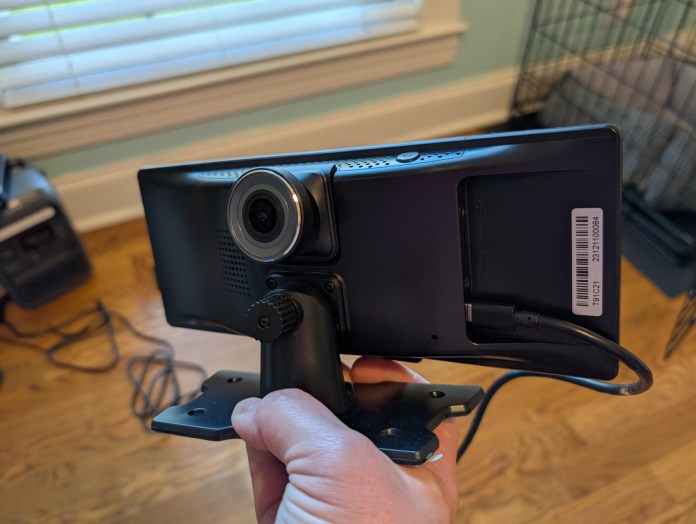
As mentioned, the Ottocast Smart Screen is an all-in-one solution for CarPlay or Auto. The portable screen has internals that mimic that of a car screen, built into the screen and mount combo. With just a power adapter and a way to push audio to your speakers, you have a solution.
Even the speaker part is pretty seamless and optional. There’s an internal speaker if you just had to function with it, although it’s not great in the volume department. Thankfully, you can use a 3.5mm audio auxiliary jack found in many cars, or even FM transmission, to get the Ottocast pumping tunes in no time.
Power is provided via a cigarette port charging cable over USB-C in the back of the Ottocast Smart Screen. Once powered up, you have options for general Bluetooth connection to devices, an Android Auto button, CarPlay button, or dash cam. Yes, it even has a dedicated dash cam. If you’ve ever setup Auto or CarPlay on another unit, it’s the exact same for the Ottocast. The prompts give you a device name to connect over Bluetooth, and then your phone of choice will take over the rest of the onboarding.
Daily Use
I’ve been pleasantly surprised by the Ottocast Smart Screen. I don’t currently have a car that doesn’t have it built into the existing system, but I did throw this guy on the dash of my wife’s Jeep to give it a test run. Using the aux jack and provided 3.5mm cable, I had it set up and ready in less than five minutes.
Mounting it was done easily with the provided adhesive on the bottom of the stand and has screw ports with included hardware if you needed a permanent solution. Using the Ottocast has been just like any other offering from a factory automotive company. You have a base system with the icons for entering your Auto or CarPlay interface and the rest is exactly the same, just on a portable screen you can place anywhere.
Instantly modernize any car with the Ottocast Portable Smart Screen, bringing seamless Android Auto and CarPlay to your dashboard in minutes, no tools required.
Final Thoughts
Awarded to products with an average rating of 3.75 stars or higher, the AndroidGuys Smart Pick recognizes a balance of quality, performance, and value.
Products with this distinction deserve to be on your short list of purchase candidates.
It’s a niche market, but I think the Ottocast Portable Smart Screen has a ton of potential for the right buyers. I immediately thought of my farming family and older farm trucks or even tractors that this accessory offers an immediate upgrade with zero tools. The same is true for some like industrial box trucks or conversion vans.
You can snag your Ottocast Portable Smart Screen from the company directly now for just $130. While you can probably find after market in dash solutions in a similar price range, you won’t find any of them as easy to install.
Mammotion is giving dads a well-deserved break from weekend yard work with a lineup of Father’s Day deals on its smart robotic lawn mowers. From now through June 15, shoppers can score up to $220 off select models directly from Mammotion.com or at Walmart.
Whether dad is a landscaping perfectionist or just wants to reclaim his Saturdays, Mammotion’s autonomous mowers offer a tidy solution, literally.
YUKA Series Mowers Get a Father’s Day Price Cut
The YUKA lineup is built for a range of yard sizes and mowing styles, all with smart tech features that make the job easier. Here’s a breakdown of the current promotions:
YUKA Mini 800H Was $1,299 – Now $1,099 (save 15%) Ideal for lawns up to 800 square meters, this compact model is built to navigate tight turns and sloped terrain.
YUKA Mini 600H + 4G Module Kit Was $1,228 – Now $1,038 (save 15%) Combines compact performance with remote control via app, great for dads who want lawn updates while away from home.
YUKA Mini 800H + 4G Module Kit Was $1,428 – Now $1,208 (save 15%) Adds 4G connectivity to the larger Mini model for seamless hands-off control.
YUKA 1000 Was $1,499 – Now $1,399 (save 7%) Suited for bigger lawns (up to 1,000 square meters), it features quiet operation and high-precision mapping.
YUKA 1000 with Sweeper Kit Was $2,148 – Now $2,048 (save 5%) The included sweeper accessory handles small debris like leaves and twigs for a just-finished look after every mow.
Built for Smarter Yards and Smarter Gifting
Mammotion’s mowers are built to be low-maintenance, high-efficiency tools that integrate with smart home systems. It’s a practical upgrade that many dads probably wouldn’t buy for themselves, but definitely wouldn’t mind receiving.
More details, including full specs and ordering options, are available at Mammotion.com.