

I’ve been on a bit of run of fitness watch reviews lately. It started with the OnePlus Watch 3 and has included two Suunto watches in between. Another company in the space I’ve been keeping an eye was AmazFit. I reached out, and they gladly sent over the new Balance 2 fitness smartwatch.
With a large display, epic advertised battery life, and a solid Garmin-like app, the AmazFit Balance 2 should stack up well to the competition. I’ve spent three weeks wearing this device now, and it’s time to find out just what I think in this full review.
Design
I really like the industrial build of the Balance 2. From the smooth metal chassis to the larger touchscreen, there’s a level of premium when taking it out of the box. It has a weight and nice balance on the wrist that would be $1000 from other manufacturers. There’s a slightly blue-tinted ring around the edge of the 1.5-inch screen, and while it doesn’t bother me, others online have found this a polarizing feature you either love or hate. But hey, they give you two excellent silicone watch bands out of the box (22mm standard if you don’t like them as well as I did).
The overall size of the watch is just around 47mm once you take in the bezel and screen together. That screen is also made from sapphire crystal glass, making is durable to any hike, swim, or gym settings. It should reduce scratching and potential cracking with this material. The chassis is aluminum, lending to a sturdy feel, while keeping the wrist weight at a minimum.


The right side of the AmazFit Balance 2 houses two buttons used for interactions in addition to the touch interface. One is a very good rotating crown that can be used for up and down motions and pressed for a click action. Holding down the digital crown launches the Zepp Flow AI app on the watch, which we’ll cover more in software, but it’s powered by OpenAI and allows for some quick voice functions and queries.
The bottom button has a knurled finish that makes it easily found without looking down each time, and functions a back button. Both buttons offer a clickie press and feedback and function well. I do wish the bottom button had an option in the OS for a long-press action. This customization is only available for the digital crown.
The AmazFit Balance 2 truly shines with its comprehensive Zepp app, offering free, in-depth health insights and a game-changing AI food logging feature that outpaces the competition.
General Software and OS
The software isn’t Android’s Wear OS, but it’s a worthy dupe. It borrows heavily from the Google operating system, but it’s built atop a custom embedded Linux called Zepp OS. I say it’s similar as most of your normal interactions mimic Wear a lot: swipe down from the home for control panel and quick tiles, tap the back button to see all apps, swipe up from home for notifications.


I’m not saying that’s a bad thing, or even something that you only see with Zepp OS. There’s only so many ways to interact with screens this size. What matters, is that the AmazFit Balance 2 blazes through these panels and faces of the operating system. There’s no lag or jitters of any kinda and the scrolling is fantastic.
You can’t have a connected device of any sort these days without artificial intelligence. The AmazFit Balance 2 has taken this into consideration with the inclusion of the Zepp Flow integration into the digital crown button. Here, a long-press gives you an AI assistant powered by OpenAI.


The LLM does a decent job of offering voice prompted actions like telling you the weather, quick replies to text messages, and setting timers. You can even ask it to change setting or pause notifications. As with many other large language models, it can struggle with real time info like “who is the current US President?”. Overall, it’s a nice addition to the software that has a ton of potential.
Similar to my recent Suunto Run review, I’d challenge AmazFit to take a long look at Android notifications. It’s easy to fall into the focus of coding just to the capabilities of dismissing notifications because that’s what works on both iOS and Android, but Google’s OS offers so much more in the API. Smartwatches are an extension of our phones, and Zepp OS needs to be able to interact with the rich notifications on Android like marking things as read, deleting emails, etc.
Zepp App
Where that potential already shines is inside the phone companion Zepp app for the AmazFit trackers and watches. The daily insights offered into my training, sleep tracking, and general health have been one of the best I’ve seen on any platform. Garmin and Suunto should take note on how this integrates real computational learning of your habits and gives you functional feedback that’s both easy to understand and very detailed into the metrics if you want to dig deeper.
Not only are all those insights free while others are actively starting to paywall similar options, the Zepp app even allows you to log your food directly inside the homepage. No extra app like MyFitnessPal, no addition features set behind a subscription. Oh, and it’s free and very good to top it off. You can easily manually log your food and calories, but where it jumps ahead of any competitor’s offering is levering that same new Zepp Flow assistant to scan photos to generally describe over voice your meals.
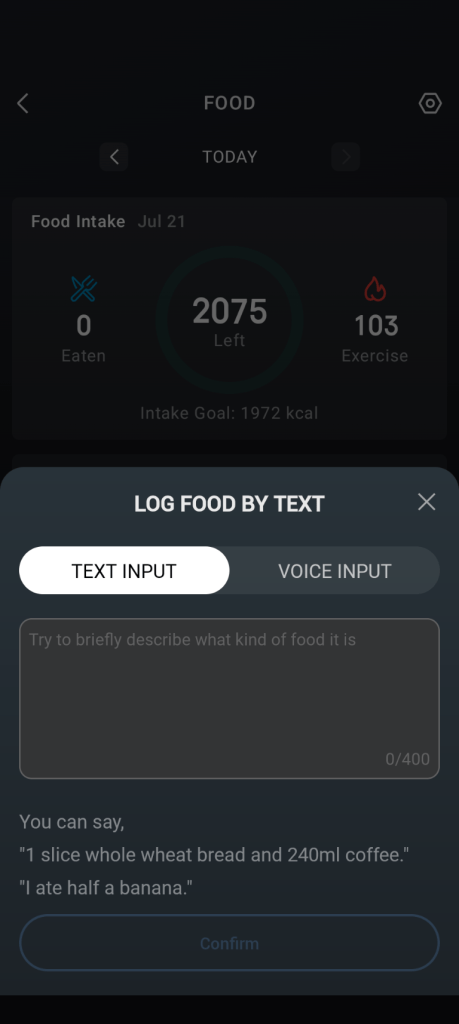


By sparking up a brief conversation, the Zepp Flow logging has gotten very close if not perfectly found the correct nutritional value of my eating habits during my testing. This is a game-changing feature that should have others on notice of how to properly use AI to add real world features to an app focused on healthier lifestyles.
Gym and Lifestyle Tracking
I have found the metrics of my activity to be tracked very effectively using the AmazFit Balance 2. My heart rate, sleep tracking, and heart rate variability have been fairly similar to my Garmin results under the same environments.
The few negatives I’ve seen, are the new BioCharge features isn’t yet available for watches while it’s currently exclusive to the new Helio Strap. This would bring another parity from the Garmin Body Battery over the AmazFit experience. The other would be the optical heart rates sensor is only taking spot measurements unless it’s in an activity mode like HIIT. It’s not a dealbreaker, as you probably aren’t losing a ton of insights here, but this is a feature included on almost any other fitness smartwatch.


The final thing is, I think the insights are a little generous on both sleep and training load. I’ve had what other watches show as not ideal sleep, and the Balance 2 give me a score well into the 80s. It’s not glaring different, but consistently gave me a higher score on that and how hard my training actually was.
Both are subjective algorithms, and if this is your only device, you’d never notice. I’m a big believer of set a pattern with the data you have and stick with it. Any spike in that data is still capable in the AmazFit Balance 2 and just thought this was worth pointing out for those coming from other options.
Battery Life
Another stellar feature of the AmazFit Balance 2 has been battery life. I’ve been using it over two weeks straight now, and I have around 36% battery left. The company estimates running it with the “raise to wake” screen feature it can last up to 21 days without charging, and I don’t doubt this in the least after my testing period.


Keeping the screen always on will most likely cut this down to around half that time, but this still puts it well ahead of anything in the Wear OS world, and even outpaces my Garmin and Suunto watches. When you do need to top off the Balance 2, you have a simple, but compact USB-C adapter that recharges the watch over POGO pins. It’s relatively fast and effective, giving me a full charge in around an hour.
Final thoughts

Pinnacle Selection represents our highest honor, one reserved for products that stand out in design, performance, and overall value.
Products earning this distinction exemplify excellence across the board, delivering an experience that truly rises above the rest.
When you see the badge, you’re looking at the best of what’s available in its category.
I’ve honestly been shocked on how much I like the AmazFit Balance 2. I had noticed the brand over the years and dismissed it as a budget option that can’t live up to the likes of Garmin or Suunto. Man, was I wrong. The Balance 2 is a superb fitness smartwatch paired with one of the most well-rounded companion Zepp apps on the market.
And I haven’t even gotten to the kicker that it’s only $300. The premium materials of the aluminum body and sapphire screen alone would push this well past $500 from other brands, but AmazFit nails this combination of build and software for those that don’t want to spend more.
Purchase the AmazFit Balance 2 from AmazFit US
Purchase the AmazFit Balance 2 from Amazon


