

OnePlus is a relatively young, but potent manufacturer in the Android market. While it may have started as the new upstart, the company is now entrenched as a true leader in the mobile space using Google’s operating system.
Last year, OnePlus dropped one of the best Android tablets you can buy with, the OnePlus Pad. The company is back this year with an iterative update with the Pad 2. How does this one match up to the previous generation? Let’s find out in this full review of the OnePlus Pad 2.
Design
The first thing that hits you out of the box is how thin this tablet is. At just 6.49mm, this is one of the most svelte devices of this size. It really is iPad Air levels of thinness. OnePlus’ machining is fantastic, and the quality of the Pad 2 is great. It’s slightly larger and heavier than the last gen, but the premium feel and impressions are top-notch.
You have a few physical buttons with the power and four speaker grilles at the top. To the right, you have volume rockers. Below the volume keys is a magnetic strip for the optional OnePlus Stylo 2 pen. At the bottom, while in portrait orientation, you have the USB-C charging port and four speaker grilles. To the left, or bottom in landscape, you have three pogo pins that sync data and power to the Smart Keyboard.


The screen on the front of the OnePlus Pad 2 is an exceptional panel. The 12.1-inch screen is capable of Dolby Vision with a resolution of 3000×2120 pixels. The variable refresh rate of 144Hz is above average as well. Things just pop off this screen, even in a bright environment. The 900 nits of max brightness also lend to this.
Internally, OnePlus never skimps on specs, and the powerhouse behind the Pad 2 is like a finely tuned race car. OnePlus is powered by a Snapdragon 8 Gen 3 processor capable of handling gaming tasks. This can be paired with single SKUs; either a 12GB/256GB combination of RAM and storage. There are some rumblings that in other regions there’s a lesser model with 8GB/128GB, but in the US, this is the only option.
Software and performance
Internals mean nothing if the user experience can’t harness that horsepower. Thankfully, OnePlus has nailed this again this year. Running OxygenOS 14, which in turn features Android 14 as the underpinnings, makes for a great user environment. OnePlus generally takes user feedback to heart, and it shows in their products.
Overall, the OnePlus Pad 2 is an Android tablet running Android 14. You get the more “desktop-like” interface and taskbar at the bottom much like any other tablet. Digging deeper shows things like the dedicated Recents button and App Launcher introduced last year. It’s small tweaks that start to surface the more you use the Pad 2.
Taking those mentioned reactions from previous devices, OnePlus also added the exceptional tiling methods for multitasking called Open Canvas. This was originally revealed on the OnePlus Open foldable, and many of us were disappointed that it has yet to make it to the OG OnePlus Pad. Thankfully, it’s here now on the Pad 2 and offers up to three apps via a drag and drop interface on the screen at a single time.

Being able to fully take advantage of the real estate of essentially a small laptop screen makes Open Canvas a killer feature for the OnePlus Pad 2. This easily makes this tablet one of the best multitasking models you can find from any mobile device maker today. It is worth mentioning, that this only seems to work when you turn off gesture navigation with the taskbar always visible.
The same is true with other OnePlus devices you may own. If you sign up for a OnePlus account, the units will recognize one another while in proximity and easily share features. This includes Wi-Fi credentials, automated hotspot from the phone if the Pad 2 loses Wi-Fi, and shared clipboards, docs, and photos.
You can’t have computing devices in 2024 without AI. OnePlus agrees and has a few new AI features here as well with the Pad 2. OnePlus plans a huge feature drop in September, but for now it’s mainly AI Eraser and Smart Cutout in the photos application. This allows you to remove unwanted folks and objects in recent photos.
Keyboard and Stylo 2
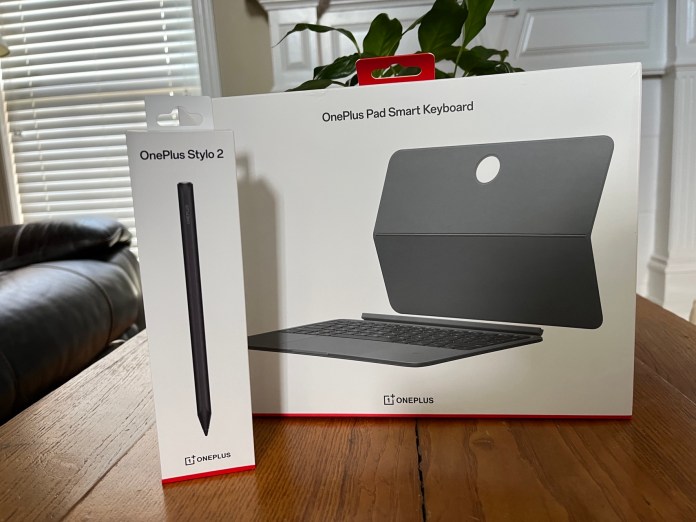
We’ve covered a ton of thoughts, and haven’t even gotten to the main accessories. Our review process included these optional add-ons during our testing period. Adding the OnePlus Pad Smart Keyboard ($150) and the Stylo 2 ($100) can also add a hefty sub-charge to your wallet. Both the keyboard and Stylo 2 work as expected. I like that the new Smart Keyboard offers a more traditional detachable setup with slightly better orientation options. The previous gen pretty much sat right on top of the Function keys, and this allows for much better key travel when using the top lines of the keyboard. The Stylo 2 feels good in the hand and does stylus things. I’m not a huge pen user on tablets, but the Stylo 2 does things like writing texts, quick notes, and sketching well enough. It’s on par with options from any other manufacturer.
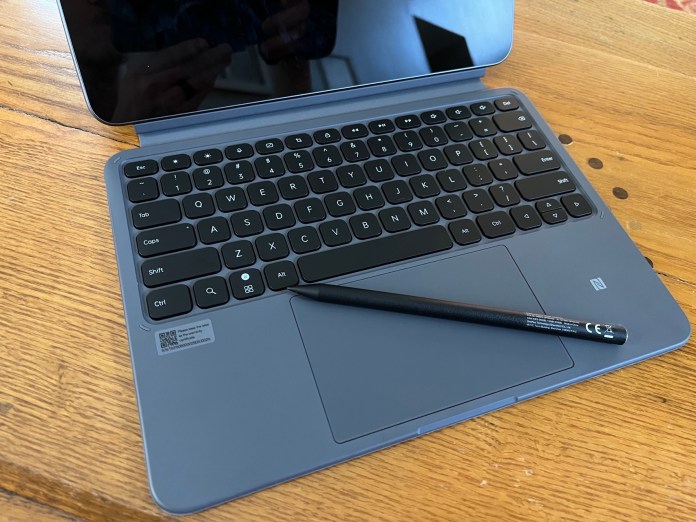
One small thing worth a note are the magnets. I found myself constantly dropping the Stylo 2 off the side of the Pad 2. I feel like the magnets aren’t as strong as the previous model. The same is true for the back panel case with the kickstand. I found I regularly removed the entire thing while just trying to prop out the stand portion. Neither are deal-breakers, and common with this type of hybrid setups, but worth a mention.
Battery life
Battery life has been phenomenal. The internal, 9510mAh battery is almost impossible to run dead in a single session. I found I got multiple days of general usage. Standby is where the tablet really shines. OnePlus estimates this at up to 40 days of idle use, and I’d say this is fairly accurate in my usage. I’ve kept the unit idle for a couple of days at a time with minimal percentage drops.

When you do need to top off the battery bank, the Pad 2 includes the SUPERVOOC charging protocol that allows for almost over-the-top fast charging via it’s chargers and cables. The OnePlus Pad 2 is capable of taking up to 67 Watts of power with the appropriate hardware and included charging brick. This allows for fully charging the tablet in 80 minutes and just 10 minutes of charge getting you back 23 percent.
Final thoughts

Pinnacle Selection represents our highest honor, one reserved for products that stand out in design, performance, and overall value.
Products earning this distinction exemplify excellence across the board, delivering an experience that truly rises above the rest.
When you see the badge, you’re looking at the best of what’s available in its category.
In my mind, the evaluation of the OnePlus Pad 2 is simple. This is the best Android tablet you can spend your money on at the moment. Especially if you own an OnePlus phone. The sharp screen, robust audio, OnePlus integrations, and Open Canvas make this the most compelling tablet, to possible laptop replacement, I’ve used outside an iPad.
Even at the full retail pricing, I think the Pad 2 is more than worth it. Thankfully, at the time of this review, OnePlus has some great incentives to sweeten the deal. You get a $50 discount on the tablet as well as the Stylo 2 and Smart Keyboard case with the “trade-in any device” option. Even better, you get a free Folio Case 2 that is essentially the Smart Keyboard minus the keyboard.
At current pricing, you can have the 12GB/256GB edition kit with Stylo 2 and Smart Keyboard for just $575USD with an eligible trade-in device. And that includes the Folio Case 2 as free gift. So, get it while it’s hot before the deals run out.


