Home Blog Page 88

Ready to Upgrade the Office? Boulies Has Your Workplace Essentials

Known for blending form with function, and mainly gaming chairs, Boulies has quietly built a name for itself in the world of ergonomic furniture. The brand focuses on workspace solutions that balance modern aesthetics with engineering know-how, which is ideal for those who want their setup to look sharp and feel even better. From standing desks with smart cable management to chairs that adjust to your every move, Boulies aims to support productivity without sacrificing comfort.

We were recently sent a pair of the brand’s newer products, one being a desk and the other a chair. While we’d previously checked out its gaming chairs, we’ve only had one other office chair to review from the brand. With that said, here’s a few things to know about the MagVida Standing Desk and the OP300 (formerly EP300) Chair.

Boulies MagVida Standing Desk

With dual motors, the Boulies MagVida Standing Desk offers smooth height adjustments, ensuring you can switch from sitting to standing with ease. Supporting up to 120 kg, it’s built to accommodate a variety of setups, from multiple monitors to hefty desktop computers.

One of the standout features of the MagVida is its EMO System, which allows for magnetic organization. This means you can easily attach accessories like a cable tray, hook, and silicone straps, all included in the package, to keep your workspace tidy and efficient. The underside of the desk has quite a bit of magnetic material on it so you can attach things in ways that make the most sense.

The desk operates quietly, with a noise level below 45 dB, so you can adjust it without disturbing your focus, or your colleagues. Crafted from medium-density fiberboard and steel, the MagVida is both durable and stable. Safety is a priority, with anti-collision technology to prevent accidents. The customizable control panel with memory presets adds a touch of personalization, allowing you to save your preferred heights for quick adjustments.

Available in sleek black and white, the desk measures 140 x 70 cm (55″ x 28″), making it a perfect fit for most office spaces. With a 5-year limited warranty, you can be confident in its longevity. Priced starting at $599.99 right now, the MagVida might sound pricey but it is an investment in your health and productivity. Learn more at Boulies MagVida Standing Desk.

Boulies OP300 Chair: Comfort Meets Customization

The Boulies OP300 Chair is thoughtfully designed and is crafted for individuals who value both comfort and adjustability. The chair’s ergonomic design provides optimal support, making it ideal for long workdays or gaming sessions. With a breathable mesh backrest, it ensures ventilation, while the padded mesh option adds an extra layer of comfort for those marathon sitting sessions.

In the weeks since we put this together and used it in the office, we found the chair stays quite cool unlike a gaming chair that sometimes leads to a sweaty lower back.

What sets the OP300 apart is its extensive adjustability. It features a multi-tilt mechanism, allowing users to find their perfect reclining position. The adjustable seat depth and backrest recline, ranging from 85° to 113°, cater to individual preferences. The height-adjustable backrest ensures proper lumbar support, while the multi-directional adjustable headrest offers personalized neck support. For those who like to fidget, the chair’s armrests can be adjusted in six different ways.

Built with a reinforced plastic frame and a heavy-duty engineering plastic base, the OP300 is designed for durability. It boasts Class 3 heavy-duty hydraulics for smooth height adjustments and 6cm nylon casters for easy movement. The 360° swivel function and seat rocking feature, complete with a tilt position lock, add to its versatility.

Priced at $369.99, the Boulies OP300 Chair is available with free shipping from Ontario, California. It comes with a 2-year limited warranty and a 14-day return policy, offering peace of mind to potential buyers. For more details, visit Boulies OP300 Chair.

Six Ways to Make Your Android Phone’s Sound Quality Better

Whether you’re focusing on the music or using it as a background to exercising, shopping, driving or even playing mobile games online, having good sound quality on your Android mobile phone is vital. And, if it isn’t, there are some quick ways to improve it. Before we get into the ways to improve the sound on your phone, here’s why good audio quality is a must.

The importance of good sound quality 

Good sound quality on an Android device is a must, as it significantly enhances the overall experience of using your phone. Clear, immersive audio helps us to engage more deeply with whatever we are doing, whether it’s watching videos, listening to music, or gaming. In gaming, especially, sound cues provide important feedback, helping players react quickly and stay immersed in the game world. This is particularly true for gambling apps, including those increasingly popular platforms that support Ethereum gambling. Without good audio, the experience can feel flat and less engaging. 

Gaming aside, though, good sound quality is important for the like of calls and video conferences, because we all need clear communication. It also heightens the enjoyment of podcasts and audiobooks, making it easier to focus and absorb content. And for those of us who use their Android devices for creative work like music production or video editing, accurate sound reproduction is essential to produce professional results. Ultimately, superior audio elevates all forms of media consumption, turning your device into a versatile entertainment and communication hub.

Clean it out

Sometimes, it’s best to start with the most simple things. Later on in this article, we will start getting a bit technical, but sometimes dealing with what might look like the most obvious thing could make a real difference in improving your Android device’s sound quality. Your problem with your phone’s sound could be nothing more than clogged up speakers. It’s quite easy to get old dust and dirt lodged in your speaker grills, and this can make your phone sound terrible. The first thing you will need to do is to get either an old toothbrush or a can of compressed air and carefully clean the phone’s speakers for bits of dirt and fluff. This can do wonders for your phone’s sound quality. The same approach can work with your headphones, too. So, if you’re listening to podcasts on anything from Ethereum gambling to obscure daytime soaps and it all goes muffled, you know what to try.

Equalize to level up

Maybe your problem with your Android’s sound quality is down to more than just your speakers or your headphones getting a bit dirty. You may find that what you’re listening to just doesn’t sound quite right. The bass could be too high or too low, the treble could either be overwhelming or cut out, or the middle range could just not be there at all. If this happens, you may need to make use of an equaliser. The good news is that it’s likely you will already have at least one of these on your phone. If, for instance, you have a Samsung phone, there’s an equalizer in the phone’s settings. If not, most music playing and streaming apps have one and you might even have an equalizer in your headphones app. Just change the equalizer’s settings to something that works for what you’re listening to, and the sound quality should get better.  

Get wired, not tired

Bluetooth headphones are incredibly popular, and it is easy to see why. Offering a great deal of flexibility and ranges of styles and comfort, as well as prices from the super-cheap to the four-figure range, there is a wireless headphone out there for everyone. That said, your dedication to wireless headsets might just be holding you back. This is because, as a rule of thumb, wired headphones offer a better bang for your buck than wireless ones. One of the reasons for this is that wireless headphones need some element of audio compression to work, meaning listeners could miss out on subtle details that could make a piece of music that much better. While lossless listening can work with Bluetooth headphones, it needs to have the latest mobile technology so, unless you’re willing and able to upgrade to the latest Android phones on a regular basis, it might be worth giving traditional, wired headphones a try. 

Become your own developer

Something that a certain subset of Android users like about the operating system is the idea that you, the user, can have a great deal of control over how you use your device. And it’s that concept of being your own developer that can help you improve your Android phone’s sound quality, especially if you are using Bluetooth to listen to something. If you go into your phone’s settings, click about phone and tap the build number a few times, you can open up the development options. If you do that, you can go in and change your Bluetooth audio codec selection. If, for example, you have a Sony phone or use the Japanese tech giant’s headphones, you might want to make use of LDAC. If, on the other hand, you have a Google Pixel phone, it might be worth trying AAC for your files. Either way, you can experiment a bit and see if you can find a better type of audio than the one you have now. However, you do need to be careful and make sure that your phone allows for the kind of Bluetooth Audio Codec that you want. 

Swap your files

The next bit of advice could be very useful if you are listening to music that you’ve downloaded onto your phone. When MP3s were first introduced in July 1995, part of the challenge involved getting a file’s worth of music on a pretty small file. The reason that the file had to be pretty small is that computers in those days only had a small drive, much smaller than even a run-of-the-mill modern smartphone. Nowadays, though, there are far better options available in terms of sound quality. You might want to see if you can transfer your music downloads into a larger format or even just download files in the likes of FLAC to improve your listening experience.   

Amplify to new heights

If you have a newer Samsung phone, there’s one way you can make how your Android device sounds better. The Korean company’s more high-end phones often have an option to let you listen through Dolby Atmos, which is a new type of surround sound. If you want to see whether this is the case for your phone – remember that some older, less powerful Samsungs won’t have it and that some high-end devices that aren’t made by Samsung might also give you Dolby Atmos – go into your audio settings and toggle Dolby Atmos on. Similarly, there is a setting called Sound Amplifier on most recent Google Pixel phones and some other Android devices, which lets you filter out unwanted sounds, boost both high and low frequencies and raise the volume of quiet sounds, and even change settings for each of your headphones’ ears. Not only that, but it also has a feature called conversation mode. This is particularly useful if you are making a phone call because then you’ll need to know what the other person is saying. It reduces background noises and lets you focus on the conversation, appropriately enough. Again, you will need to make sure your phone has Sound Amplifier, though. 

UGREEN’s Nexode Retractable Series is Practical and Price-Friendly

From the latest charging solutions to clever cable management, UGREEN’s Nexode Retractable Series brings a practical twist to everyday tech and lifestyle gear. This collection features products designed to keep devices powered up and workspaces tidy, with retractable designs that help banish cable chaos from cars, bags, and desks.

Whether it’s a high-wattage car charger, a compact power bank, or a tangle-free USB-C cable, these items aim to make staying connected a little easier, and a lot neater. Here’s a look at some of the highlights that recently landed in the review queue.

UGREEN Nexode Retractable 145W Car Charger

For those who find themselves juggling multiple devices, the UGREEN Nexode Retractable 145W Car Charger is a breath of fresh air. With its retractable design, this charger helps keep your vehicle clutter-free by allowing you to adjust the cable length as needed and retract it when not in use.

It features two USB-C ports and two USB-A ports, delivering a total of 145 watts of power. This means you can charge a laptop, tablet, and phone all at once, making it ideal for tech enthusiasts, busy professionals, and families on the go.

The charger’s rapid charging capability ensures that your devices get a quick boost, which is particularly handy during long road trips. It supports multiple fast charging protocols, including PD3.0 and QC3.0, and is compatible with a wide range of devices. Safety is also a priority, with built-in protections against over-current, over-voltage, short-circuit, and temperature issues.

Compact and portable, the UGREEN Nexode won’t take up much space in your car, and its LED indicator makes it easy to see the charging status even in low-light conditions. Available now for $35, you can learn more about this efficient and sleek car charger on Amazon.

UGREEN Nexode Retractable Series 65W Charger

The UGREEN Nexode Retractable Series 65W Charger is a compact powerhouse designed to keep your devices juiced up without the hassle of tangled cords. With a robust 65W power output, it caters to a variety of devices, from smartphones to laptops, ensuring quick and efficient charging. Its retractable cable design is a game-changer for those who value a tidy workspace, making it perfect for travelers and busy professionals alike.

This charger employs GaN technology, which not only allows for a smaller, more portable design but also ensures efficient energy management and heat dissipation. This means faster charging times without the risk of overheating, a crucial feature for those always on the move.

The Nexode charger is equipped with multiple ports, including USB-C and USB-A, offering flexibility to charge multiple devices simultaneously. Whether you’re a student, remote worker, or frequent traveler, this charger’s versatility and portability make it an ideal companion. Its durable construction and built-in safety features, such as overcurrent and short-circuit protection, add an extra layer of reliability.

For those interested in upgrading their charging experience, the UGREEN Nexode Retractable Series 65W Charger is available for $35. Learn more at Amazon.

UGREEN Nexode Retractable Series Power Bank 20000mAh 165W

The UGREEN Nexode Retractable Series Power Bank is a powerhouse in a compact package. With a hefty 20,000mAh capacity and a robust 165W output, it can charge multiple devices simultaneously, making it perfect for busy professionals, travelers, and anyone who needs to stay connected.

One of its most appealing features is the retractable cable design, which eliminates the need for extra cables and keeps your gear streamlined. This is a boon for minimalists and those who value efficiency. The power bank supports various charging protocols, ensuring compatibility with a wide range of devices, from smartphones and tablets to laptops and gaming devices.

Its compact design means it fits easily into bags or backpacks, making it a convenient travel companion. Fast charging capabilities ensure your devices spend less time plugged in and more time in use. Safety features like overcharge, short circuit, and heat protection provide peace of mind.

For those attending conferences, traveling, or simply needing a reliable power source on the go, the UGREEN Nexode Retractable Series Power Bank is a practical choice. Available now for $75 on Amazon.

UGREEN Nexode Retractable USB-C Cable 100W: Fast Power, Zero Tangles

Messy cables have a knack for turning even the most organized bag into a spaghetti junction. The UGREEN Nexode Retractable USB-C Cable 100W is the answer for anyone who’s ever fished around for a charger and come up with a knot. Compact and cleverly designed, this cable retracts smoothly into its case, making it easy to stash in a pocket or bag. No untangling required.

But it’s not just about tidiness. With support for up to 100W power delivery, this cable can charge everything from smartphones to power-hungry laptops at impressive speeds. It’s a solid pick for professionals who need to top up their devices between meetings, students juggling multiple gadgets, or anyone who wants to spend less time waiting for a battery bar to fill.

The cable doubles as a data transfer tool, moving files at up to 480Mbps. That’s handy for anyone who needs to shuttle documents, photos, or videos between devices without the patience-testing wait. Its nylon-braided exterior adds durability and flexibility, so it’s ready for daily use, whether you’re working at a café, commuting, or just charging on the couch.

Built-in protection against overheating and overcharging keeps both devices and peace of mind intact. The USB-C to USB-C connection ensures compatibility with a wide range of laptops, tablets, and smartphones, making it a versatile addition to any tech kit.

For those seeking a charging cable that’s as efficient as it is easy to manage, the UGREEN Nexode Retractable USB-C Cable 100W is available for $12 on Amazon.

Pokémon GO Adventure Week: Catch ‘Em All with New Pokémon and Exclusive Bonuses

0

Pokémon GO’s much-anticipated Adventure Week is set to make a grand return, bringing with it a host of exciting events and features for Trainers worldwide. Scheduled from Tuesday, July 29, at 10:00 a.m. to Sunday, August 3, 2025, at 8:00 p.m. local time, this event promises to be a delightful experience for Pokémon enthusiasts and explorers alike.

New Pokémon Debuts

Making their debut in the Pokémon GO universe are the Woodear Pokémon, Toedscool, and its evolution, Toedscruel. Trainers eager to expand their Pokédex can evolve Toedscool into Toedscruel using 50 Toedscool Candy.

Event Bonuses and Wild Encounters

During Adventure Week, Trainers can earn double XP for catching Pokémon, making it a perfect opportunity to level up faster. Incense, when activated (excluding Daily Adventure Incense), will last for two hours, ensuring a steady stream of Pokémon encounters.

The event’s wild encounters are diverse and location-specific, offering a range of Pokémon to catch. In city areas, Trainers might spot Snubbull, Trubbish, Elgyem, and Sizzlipede, with a rare chance of finding Espurr. Forests and grasslands will feature Skwovet, Fidough, Smoliv, and Tadbulb, with Toedscool making special appearances for some lucky Trainers.

Mountain regions will see Hippopotas, Drilbur, and Rufflet roaming, with Gligar adding to the thrill. Beaches and water areas boast Inkay, Mareanie, Dewpider, and Sandygast, with the potential to encounter a Shiny Wiglett for the first time in Pokémon GO.

Research Tasks and Rewards

Adventure Week offers event-themed Field Research tasks that reward Trainers with Stardust, Rare Candy, and encounters with special Pokémon. A free Timed Research opportunity is also available, offering rewards such as one Incense, four Rare Candy, and more event-themed Pokémon encounters. Trainers should note that these tasks and rewards expire on Sunday, August 3, 2025, at 8:00 p.m. local time.

For those looking to enhance their experience, a paid Timed Research option is available for US$1.99. This exclusive research provides three Lucky Eggs, four Rare Candy, and encounters with Pokémon like Beldum, Sandygast, and Fidough. Trainers can gift these tickets to friends they have reached Great Friends level with, though purchases are non-refundable and cannot be made with PokéCoins.

Adventure Week Ultra Ticket Box

A stylized gift box with a pink and lavender design, featuring a blue ribbon on top.
Adventure Week Ultra Ticket Box

An exciting offer awaits in the Pokémon GO Web Store with the Adventure Week Ultra Ticket Box. Priced at US$1.99, it includes an event ticket and three bonus Max Potions at no extra cost. This package is a great way to enhance your Adventure Week journey and ensure you’re well-prepared for any challenges that come your way.

For more details on Pokémon GO Adventure Week and to join the excitement, visit the official Pokémon GO website. Get ready to catch, explore, and enjoy the adventure!

Wacom Launches MovinkPad 11: A Portable Creative Pad Built for Instant Inspiration

0

Wacom has announced the MovinkPad 11, a portable Android-powered creative pad that aims to make digital drawing as immediate and accessible as grabbing a sketchbook. Unlike general-purpose tablets, the MovinkPad 11 is purpose-built for artists, doodlers, and creative minds who want to draw without delay, no PC, no setup, no distractions.

Designed for Spontaneous Creativity

At the heart of the MovinkPad 11 is a streamlined experience: turn it on, and it’s ready to draw. A quick tap-and-hold with the included Wacom Pro Pen 3 launches the built-in Wacom Canvas app, so users can sketch the moment inspiration hits. The device runs Android 14 and includes a multi-touch 11.45-inch display with anti-glare etched glass for a paper-like feel.

A person sitting on a chair, drawing on a digital tablet with a pen. The tablet displays an illustration, while the individual is wearing a black shirt and beige pants.

The lightweight design and all-in-one nature make it a flexible option for on-the-go use, whether you’re doodling in a café, sketching during a commute, or capturing an idea between classes.

Tools and Apps That Make Drawing Simple

The MovinkPad 11 ships with Wacom Canvas for freehand sketching and a two-year license for Clip Studio Paint DEBUT. The latter offers access to over 40,000 brushes and features that support everything from comic illustration to 3D and animation, making it a solid starting point for beginner and intermediate creatives.

All work is auto-saved to Wacom Shelf, and users can toggle between Wacom Canvas and Clip Studio Paint with simple pen gestures, streamlining the creative process from draft to detail.

Flexible Pen Support and Accessories

Beyond the Wacom Pro Pen 3, which doesn’t require charging, the MovinkPad 11 supports digital pens from familiar brands like STAEDTLER, LAMY, and Dr. Grip. This opens the door for artists who prefer different form factors without compromising precision. Wacom also offers a dedicated protective case that doubles as an adjustable stand.

Availability and More Information

The Wacom MovinkPad 11 is slated for release this summer. It’s positioned as the first in a new line of portable creative pads from Wacom, with more likely to follow. More information can be found on the official product page.

Adobe Expands Firefly AI Suite With Sound Effects, Frame-by-Frame Video Controls, and New Model Integrations

0

Adobe is leveling up its Firefly generative AI platform with a fresh set of tools designed to give creators more control, creative options, and flexibility, all from within the Firefly app. Rolling out now, the update brings beta support for text- and voice-generated sound effects, expanded video editing features, and access to a growing lineup of partner AI models, including Google Veo 3 and Moonvalley Marey.

Generate Custom Sound Effects With Text or Voice

Headlining the update is Generate Sound Effects (beta), a new feature inside the Firefly app that lets users create custom audio by simply typing a description or speaking it aloud. Whether it’s a cinematic thud, ambient rainfall, or the subtle hum of traffic, the tool supports impact sounds and atmospheric layers for more immersive content.

Firefly users can blend generated effects with uploaded footage, layering in ambience to set mood, location, or tone, without having to hunt through third-party libraries or fiddle with external tools. And yes, the feature works whether you’re chasing epic explosions or the delicate crunch of gravel underfoot.

A hand with red nails holds a tennis ball in front of a colorful sky, showcasing a menu of style options including anime, black and white, and vector art.
Adobe Firefly Style Presets

More AI Models, One Seamless Workflow

Adobe is further deepening its Firefly partner ecosystem with support for several new third-party models, including:

  • Moonvalley’s Marey
  • Google’s Veo 3, now with audio generation
  • Runway’s Gen-4 Video
  • Pika 2.2
  • Luma AI’s Ray2
  • Topaz Labs’ image and video upscalers

All of these join Adobe’s existing in-app models from OpenAI, Black Forest Labs, Ideogram, and others. The appeal: creators can access everything from stylized visuals to high-res video upscaling without bouncing between multiple tools or accounts. All partner content respects Adobe’s content policies, user uploads and generated assets are not used to train models, and Content Credentials are applied automatically to indicate the model used.

One login, one plan, zero app-hopping.

Firefly Video Gets Precision Tools for Creators

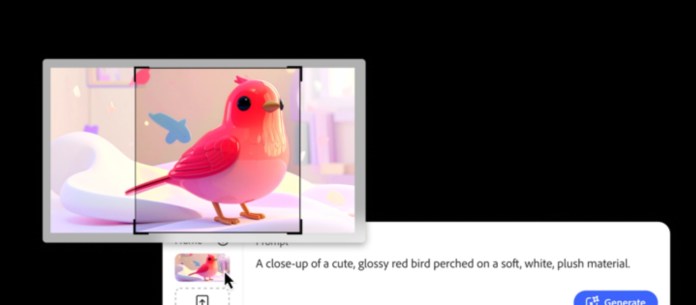
A close-up of a cute, glossy red bird perched on a soft, white, plush material, with a user interface overlay for generating images.
Keyframe Cropping

The Firefly app now offers deeper control over video generation and editing with new frame-specific tools aimed at professionals working on everything from vertical social clips to long-form cinematic cuts. New capabilities include:

  • Composition Reference: guide framing based on an existing image
  • Keyframe Cropping: adjust layout across multiple frames
  • Style Presets: quickly apply a consistent look across outputs

These tools are designed to save time while still allowing for detailed creative adjustments. This will be useful whether you’re building brand content, pitching client visuals, or simply fine-tuning a personal project.

One Platform, Billions of Creations

According to Adobe, Firefly users have generated over 26 billion assets to date using its family of AI models. With this latest update, that number is likely to accelerate as more creators explore what’s possible when sound, video, and visual design come together under one unified, customizable toolkit.

More details on the new features and model integrations can be found on the official Firefly site.

Alienware Expands Gaming Monitor Lineup with New Releases

0

Alienware has announced the launch of two new gaming monitors, the Alienware 27 280Hz QD-OLED Monitor and the Alienware 25 320Hz Gaming Monitor. Bringing these high-performance displays to the market, Alienware aims to cater to gamers who crave top-quality visuals and competitive gameplay without emptying their wallets.

Alienware 27 280Hz QD-OLED Monitor

A gaming monitor displaying an action-packed scene from a fighting game, featuring two characters in combat. The monitor showcases vibrant colors and a sleek design, emphasizing high-performance gaming visuals.

The Alienware 27 280Hz QD-OLED Monitor (AW2725D) sets its sights on delivering a premium gaming experience with its vibrant QHD resolution. Equipped with Quantum Dot OLED technology, this monitor promises vivid color reproduction and deep blacks, certified by VESA DisplayHDR True Black 400. Gamers can expect an immersive visual experience, whether they’re exploring open worlds or battling in action-packed arenas.

Performance is at the core of this monitor, thanks to a 280Hz refresh rate and an impressively low 0.03ms gray-to-gray response time. NVIDIA G-SYNC Compatibility, along with AMD FreeSync Premium Pro and VESA AdaptiveSync certification, ensure that gameplay remains smooth and free from screen tearing. All this is packaged at an accessible price of $549.99 USD, making high-end QD-OLED gaming more attainable.

Alienware 25 320Hz Gaming Monitor

Alienware 27 280Hz QD-OLED gaming monitor displaying an action scene from a video game, featuring vibrant colors and sharp graphics.

For those with a competitive edge, the Alienware 25 320Hz Gaming Monitor (AW2525HM) is designed to meet the demands of fast-paced gaming genres such as first-person shooters. With a blazing 320Hz refresh rate and a rapid 0.5ms gray-to-gray response time (in Extreme mode), this monitor delivers ultra-smooth visuals with minimal ghosting, keeping players ahead in the game.

This model features a fast IPS panel with FHD resolution, making it a perfect fit for those who want sharp, fluid graphics. The inclusion of NVIDIA G-SYNC Compatibility, AMD FreeSync Premium, and VESA AdaptiveSync ensures that gamers experience stutter-free visuals regardless of their GPU choice. Priced at $249.99 USD, this monitor is tailored for budget-conscious gamers seeking high performance.

Design and Warranty

Both models showcase Alienware’s new AW30 design language, inspired by extraterrestrial phenomena. The design seamlessly blends aesthetic appeal with functionality, including features like an integrated headset hanger on the Alienware 25. Alienware further supports gamers with a 3-year limited hardware warranty that covers OLED burn-in, providing peace of mind during intense gaming sessions.

Xfinity Mobile Says Switching to Them Could Save $1,000 Per Year

0

In a revealing new survey conducted in partnership with Morning Consult, Comcast has uncovered a surprising gap in consumer awareness regarding potential savings on mobile plans. The survey, released today, shows that over 75 percent of Americans underestimate the significant cost benefits of switching to Xfinity Mobile, with many missing out on savings of $1,000 or more annually.

Cost Concerns Lead the Charge

As budget-conscious consumers continue to seek relief from high wireless costs, 42 percent of those surveyed indicated they are actively looking to change mobile providers in the next year, with cost being the primary motivator. Despite this, a common misconception persists: a majority believe they would only save around $100 by switching providers, far less than the reality for those who make the jump to Xfinity Mobile. In fact, Xfinity Internet customers who add Xfinity Mobile can see savings multiply up to tenfold.

Features That Matter

Xfinity Mobile’s new Premium Unlimited Plan is tailored to meet the demands of today’s tech-savvy users. Advanced spam protection and the flexibility to upgrade devices anytime are prime features drawing interest, cited by 52 and 47 percent of respondents, respectively.

Additionally, nearly half of Americans are seeking the fastest internet speeds available, which Xfinity Mobile delivers with its WiFi PowerBoost, offering gigabit speeds when connected to Xfinity hotspots or home gateways.

Perfect Timing for Summer Travel

With 60 percent of Americans planning to travel this summer, the timing couldn’t be better to switch and save. Not only does Xfinity Mobile offer unlimited talk, text, and data in Canada and Mexico, but its Global Travel Pass ensures connectivity in more than 215 destinations worldwide for a modest $10 per day. The survey indicates that 41 percent of potential switchers plan to allocate their savings towards summer travel, making Xfinity Mobile an attractive option for jet-setters looking to stay connected without breaking the bank.

Three young adults sitting on a picnic blanket in a park, engaging with their smartphones and a laptop, surrounded by green grass and trees.

Breaking Free from the Big Three

In its ongoing mission to challenge the status quo, Xfinity Mobile celebrates its fifth annual “Break Free from the Big Three Day.” This initiative encourages consumers to break away from overpriced plans, with enticing offers including up to $500 per line to ease the transition. Xfinity Internet customers can further sweeten the deal with a complimentary Unlimited Mobile line for a year. Additionally, the Xfinity Refer-a-Friend program offers a win-win for existing and new customers, with rewards up to $500 for successful referrals.

Seamless Connectivity

Xfinity Mobile prides itself on providing the most reliable 5G network, boasting over 23 million hotspots across the United States. This robust infrastructure supports the company’s claim to fame as the fastest mobile provider in Comcast service areas, validated by recent consumer testing.

For those looking to save significantly while enjoying top-tier features and connectivity, Xfinity Mobile presents a compelling case. To see how much you could save and explore the benefits of breaking free from the Big Three, visit Xfinity Mobile.

Suunto Run Watch Review

I recently was introduced to Suunto as a fitness and outdoors, brand a few months back when I took the Race S Sports Watch for a spin. Suffice it to say, I came away very impressed with the company as a direct competitor to the likes of Garmin. Since then, Suunto introduced another watch called the Run which I was only too happy to check out.

Our Suunto contact offered up the Suunto Run for review as well, but how does it hold up to an ever more flooded market of more advanced sport watches? 

Design

If you set the Run and the Race S next to one another, you’d immediately assume they are the same watches. After closer inspection, you’ll find that the Run is composed of polycarbonate (plastic) housing with an impact resistant face. This makes the latest Suunto much lighter, and I think it slightly hugs my wrist better for some reason.

Otherwise, you have the same button layout and rotating crown from the Run to the Race S. Much like Garmin, Suunto seems to keep this continuity between devices. This usually lends to less confusion, and learning curve, from upgrading watches (more on this later in the software).

Close-up view of the side of the Suunto Run watch, featuring a bright lime strap, buttons, and a rotating crown.

Suunto doesn’t skimp on sensors with the Run, even at the palatable $240 cost. It’s tuned for runners, hence the name, and includes onboard GPS. There’s also real-time tracking of heart rate, steps, elevation, and heart rate variability. It’s a well-rounded package out of the box when you purchase the Suunto Run.

Changing bands are a snap with the industry standard 22mm quick release pins. Suunto includes a nice nylon strap in the box, and mine is a striking Lime colorway. If that doesn’t suit you, then Amazon is your friend. Finding a band that is your style can be had for less than $15 in my experience.

A close-up view of a wrist wearing a bright lime-colored Suunto strap, showcasing its vibrant design.

Fitness Tracking

Let’s start with the mostly positive portion of my daily experience with the Suunto Run. The overall fitness tracking has been pretty solid. I’ve found my daily steps, GPS run data, and HR all to be well within that same ranges I’d expect from my Garmin Forerunner 165. It’s not exactly the same, but I have seen improvements in the new heart rate sensor layout, and the step count, over my recent testing of the Suunto Race S.

The same is true for workouts. There’s a ton of included sports profiles that should easily get you started in the right place to log almost any workout you need. During these activities, the Run was accurate to reason on taking in metrics you’d expect like heart rate, calories burned, and even reps for some fitness profiles.

Smartwatch Things

Where I really struggled with the Suunto Run is in the smartwatch interactions. There’s a certain level of standard features that I was frankly shocked at what it lacked to perform well. My main gripes are UI elements and navigation, as well as customization via the Suunto Plus store in the app, are different from previous models.

This includes two main issues I’ve found in the lack of adding additional widgets and watch faces via the Suunto Store not being available for this device. This is the app Settings options on other Suunto watches, and it’s simply not available for the Run watch at launch. Having no way to add additional watches faces is pretty unacceptable for a $250 watch.

The same is true on general UI elements and navigation. The notifications are buried in the control panel for some reason, instead of having a dedicated widget for the Suunto Run. This adds an added layer that just doesn’t make sense. All modern smartphones, including other Suuntos, have a dedicated space for notifications. This makes them easily found in the UI and actionable.

Speaking of, the same is found when trying to action notifications, the ability to dismiss them from the current watch aggregation, but it doesn’t seem to action the swipe away on your phone and also seems to return when you get more notifications on the Run. The entire notifications system seems a little under baked.

This is all due to Suunto overhauling the underlying operating system on the Suunto Run. It’s running a different core variant that the company has hinted will come to other devices later. Even though the Run is the first one to run this new underpinning, I’d expect more cohesion from device to device and fewer bumps altogether like the lack of Suunto Store Plus access and essential notifications to be better. 

“With accurate fitness tracking, onboard GPS, and week-long battery life, the Suunto Run delivers serious training features at a runner-friendly price—just don’t expect full smartwatch perks.”

Battery Life

Despite some of the software hang-ups, I’ve been impressed with the battery life. I’m getting well over a week’s usage per charge. This depends on how many running activities or notifications I get during that time, but this is the top end of the spectrum from a smartwatch perspective. You can only really point to the likes of dedicated Fitbit or Garmin for similar runtimes.

Honestly, Wear OS could learn a lot here. When you have something that’s featured around outdoor life, fitness, and unplugging in general, battery endurance is a huge selling point. Some have come closer with four days with options like the OnePlus Watch 3, but most Wear OS watches fall well short of anything offered by the Suunto Run.

Charging is done via a magnetic puck found in the packaging. It’s quick, effective, and includes USB-C cable connection on the other end. No complaints here other than I think they could have nailed the cohesion again with having this be reverse compatible with previous models, but the charging contacts are in a different layout. It’s a small thing, but cuts down on waste, user buy-in, and SKUs for Suunto.

Final Thoughts

I had a fairly positive first experience with the Suunto Race S a few months ago. I fully expected the Run to build on that, but I was left with more questions than confidence. The biometrics and hardware are there, but the decision to vastly alter the software tarnishes the final product. And you should never buy a product on the promise of features in future software updates. 

I don’t want to bash the Suunto Run here. As I said, it does a ton very well for just fitness. If you don’t plan, or maybe consciously don’t want, better smartwatch options, the Run still checks a ton of boxes. My only counter to that thought is you can get the fantastic bargain buy of the Garmin Forerunner for the same price.

If you do want to give the Run a shot, you can snag one from both Suunto and Amazon. You have a palette of color options as well, but our review unit is the blinding Lime. Alternate colors are Black, Coral Orange, and Frost Gray.

UGREEN MagFlow 25W Magnetic Power Bank is First-Ever Device with Qi 2.2 Certification

0

UGREEN has announced the launch of its MagFlow Magnetic Power Bank, the first wireless charging device in the world to earn Qi 2.2 certification from the Wireless Power Consortium. The certification confirms full support for 25W wireless fast charging, setting the stage for improved performance and safer charging in future smartphones and accessories.

Leading the Qi 2.2 Charge

As the first officially certified product under the new Qi 2.2 standard, UGREEN’s MagFlow Magnetic Power Bank delivers a notable boost in wireless charging speed, especially for iPhone users. Qi 2.2 builds on the familiar MagSafe framework but ups the ante with higher power limits, tighter thermal control, and broader compatibility through the Magnetic Power Profile (MPP).

This milestone reflects UGREEN’s long-standing involvement in wireless charging innovation. The company has been active in adopting Qi standards through several product generations, and this latest move reinforces its role as a dependable option in the fast-charging space.

Designed for Portability and Everyday Use

The new MagFlow model works with current iPhone models and is positioned to support upcoming releases like the iPhone 16. It’s also compatible with other devices adopting the Qi 2.2 standard. With advanced power and heat management packed into a travel-friendly design, it’s suited for commutes, travel days, or quick top-ups during coffee breaks.

The emphasis on convenience carries through to the hardware itself, offering a magnetic, hands-free design that holds steady and charges quickly… no cables required.

Availability and Rollout

UGREEN says the new MagFlow Magnetic Power Bank will launch in Q3 2025, with availability through its official website and Amazon. It’s expected to roll out to major markets including the U.S., Europe, and Southeast Asia.

More information on the brand and its ever-expanding portfolio of products is available at UGREEN’s official website.