SOUNDBOKS is set to illuminate the party scene with the launch of Lightboks, an innovative audio-reactive party light. Slated for release on August 14, this cutting-edge device promises to inject life into any gathering by synchronizing light patterns with music, offering a transformative experience that’s sure to light up dance floors and chill zones alike.
The Lightboks Experience
At the heart of Lightboks is its ability to listen and respond to music from any speaker, creating dynamic light displays that match the rhythm and intensity of the tunes. From high-energy drops to serene melodies, Lightboks adapts its visuals to complement the music, turning any location into an immersive environment. It’s a light, sure, but it’s also more of a vibe enhancer that draws people together through shared experiences of sound and light.
Portability Meets Durability
A standout feature of Lightboks is its portability. Battery-powered and designed to be taken anywhere, it transforms any space into a party zone. Whether you’re hosting a backyard barbecue, preparing for game day, or heading into the woods for a rave, Lightboks is your trusty companion. Its robust design includes water-resistant IP65-rated coating and shock-absorbing rubber bumpers, ensuring it can withstand the occasional spill or bump typical of lively parties.
Customization at Your Fingertips
Customization is key with Lightboks. Users can tailor the light’s settings to suit the mood, with options ranging across three energy levels and ten curated color palettes. The accompanying Soundboks app allows for seamless adjustments, ensuring the light fits the energy of any event. For those looking to up the ante, the TeamUp feature enables the connection of unlimited Lightboks devices, creating a synchronized light show that’s sure to impress.
Ready to Transform Your Party?
The anticipation builds as Lightboks promises to be the missing element in creating unforgettable party experiences. As the launch date approaches, SOUNDBOKS is offering select individuals the chance to get a sneak peek, ensuring a party atmosphere that’s not just seen but felt. For more information or to express interest in a pre-launch sample, visit the official Lightboks page.
In an age where smart home technology is becoming increasingly accessible, Wyze has taken another leap forward by launching the Wyze Lamp Socket v2. This innovative product is designed to bring intelligence to your existing outdoor lighting, priced at a competitive $17. It’s available now on Wyze’s website, with immediate shipping, making it a timely addition for those looking to enhance their home security setup.
Power and Convenience Without the Hassle
The Wyze Lamp Socket v2 is engineered to harness electricity from any light fixture, providing continuous power to a range of Wyze Cams, including the Wyze Cam Pan v3 and the Wyze Cam OG. This upgrade means users can skip the hassle of dealing with cumbersome wiring or the risk of accidental electrocution—unless you’re into that sort of thrill. The setup is as simple as screwing in a light bulb, making it an ideal solution for those who prefer straightforward installations.
Smart Lighting Features
The smart lighting transformation takes mere seconds, thanks to the synergy between the Wyze Lamp Socket and Wyze Cam. Once installed, the socket not only powers the camera but also gives it the ability to control the lights. This means your outdoor lighting can become motion-activated, illuminating whenever the paired Wyze Cam detects movement. It’s like having a security guard who never clocks out—minus the coffee breaks.
For those who enjoy a bit of control (who doesn’t?), the Wyze app provides the ability to schedule and manage your lights from anywhere. Grouping multiple lamp sockets is a breeze, allowing for comprehensive coverage and unified control.
A Touch of Humor with Practical Benefits
The Wyze Lamp Socket v2 comes packed with features that are both practical and amusing. Dusk-to-dawn automation ensures you’ll no longer be the neighbor who leaves the porch lights on during vacations. Instead, you might need to find something else to forget, like where you left your flip-flops.
Compatibility and Specifications
The Lamp Socket v2 supports a variety of Wyze Cams, including future models, and works with CFL and LED bulbs under 20 watts. Its compact design ensures it fits seamlessly into existing fixtures, while its weather-resistant nature makes it suitable for damp locations. However, it’s not entirely weatherproof, so it should be shielded from direct rain.
For more information and to purchase the Wyze Lamp Socket v2, visit their official website.
When it comes to everyday audio gear, comfort and convenience matter just as much as sound quality. To that end, JOYROOM’s JR-OE3 Open-Ear Earbuds manage to check all three boxes. Designed with a lightweight clip-on style and packed with thoughtful features, these earbuds are built for real-world use, whether you’re commuting, working out, or just powering through a long day.
What stood out most during testing wasn’t just the design, but how easy they are to live with. From the flexible fit and surprisingly rich audio to the app customization and multitasking-friendly Bluetooth 5.4, the JR-OE3 feels like it was made to handle your daily routine. And they don’t weigh you down or blow your budget. Here’s a closer look at what makes them worth a spot in your everyday carry.
Who is JOYROOM?
Based in Shenzhen, JOYROOM has built a reputation for sleek, affordable tech that doesn’t compromise on performance. The brand covers everything from wireless audio and charging gear to car mounts and smartwatches, all with a focus on function-first design that still looks great on the go.
JOYROOMOE3 Clip On Earbuds
The JOYROOMOE3 Clip On Earbuds showcase the brand’s focus on innovation and user-friendly design. With an L-Bridge design, these earbuds provide excellent sound direction, bringing audio closer to your ear while minimizing sound leakage. Made from skin-friendly, elastic materials with flexible titanium alloy wires, they promise comfort and security, perfect for those long listening sessions. Weighing just 4.9 grams, they truly feel weightless and that’s ideal for both music lovers and those on the move.
Audio quality is impressive, featuring a 13mm composite diaphragm speaker that produces rich bass and clear mids and highs. The custom 10mm oversized magnetic circuit boosts sound precision, while a bass compensation algorithm tackles the low-frequency leakage often found in open-ear designs. With Auto Left-Right Recognition and Omni-Tap Control, adjusting your audio settings is a breeze.
On the tech side, the JROE3 comes with Bluetooth 5.4 support, ready for AAC and SBC codecs, and boasts a range of up to 10 meters. Connecting to two Bluetooth devices simultaneously makes it a multitasker’s dream. Plus, with an IPX4 water resistance rating, these earbuds can brave splashes—perfect for workouts under the rain or outdoor adventures.
Battery life stands strong, offering 5-6 hours of listening time and extending to 25 hours with the charging case. Charging via a Type-C port takes about 2 hours to reach full capacity. For call quality, the AI Clear Calling feature employs noise reduction, ensuring your conversations are crisp and clear.
Customization comes easily with app support, letting users adjust settings like Bass Boost Mode, Low Latency Mode, and EQ tuning. Available in Space Grey and White, the JROE3 is priced at $63.99, thanks to a limited-time discount. With a 1-Year Hassle-Free Warranty and a 30-Day Money-Back Guarantee, these earbuds make for a safe bet. Check them out at JOYROOM’s official site.
Save Big!
If you head to Amazon to pick these earbuds up, you’ll find a limited-time discount that puts them at just $29.99, which ultimately shakes out to around 58% off the standard retail price. All you’ve got to do is check the coupon box or add the code NBBJPSXK before the end of July.
At first, asking if using an offshore site is unsafe might seem strange. Most of the time, you don’t even know where a site is hosted. Unless it’s in a foreign language or uses UK or Aussie spelling, it barely registers. But in areas like online gambling, that detail can actually matter.
Plenty of people in countries with strong regulations—like the UK—still use offshore casino sites. If it were truly unsafe, why would so many do it? The truth is, while some offshore platforms are shady, many well-reviewed ones offer real safety, professionalism, and even better value than local options.
According to gambling expert Matt Bastock, it’s often easy to forget that using sites based offshore doesn’t mean they lack a top-notch team. These aren’t some shady basement operations—they’re full-fledged businesses with teams of developers, marketing experts, and customer support agents. A lot of them even follow stricter internal protocols than some of their regulated counterparts. So, calling them unsafe by default just doesn’t hold up.
A lot of these platforms hold licenses from reputable gambling authorities. They’re subject to audits, fairness checks, and strict rules on payouts. Curacao might sound exotic, but it has an established system for issuing and monitoring gambling licenses. Malta and the Isle of Man go even further with tight oversight and penalties for bad actors.
Some offshore casinos offer things you just don’t see locally—like 24/7 support that actually solves problems, same-day payouts, and advanced tools for responsible gambling. These aren’t gimmicks; they’re part of a well-built system that treats users with respect. In some cases, they’re more responsive and transparent than local platforms.
Why does offshore sound risky at first
The moment someone hears “offshore site,” there’s usually a red flag that goes off. It just sounds shady, even if you’re not quite sure why. People often associate the term with loopholes, anonymous servers, and operators trying to fly under the radar. It doesn’t help that mainstream media tends to lump every questionable online service into the same category, which reinforces the idea that offshore automatically equals trouble.
In the world of online casinos, a lack of local regulation can make people uneasy. There’s a comfort in knowing your casino is licensed by your own country’s authority. When that’s not the case, some users feel exposed or less protected. That said, it’s easy to forget that being locally licensed doesn’t always guarantee top-tier service or ethics either.
There’s a concern about payment reliability. Will your winnings actually arrive? Will you be able to cash out smoothly? These questions tend to echo louder when the site is based somewhere you’ve never visited and don’t understand the legal framework of. But again, these concerns aren’t exclusive to offshore platforms—bad actors exist everywhere.
What you should still watch out for
Even with the good ones out there, it’s smart to stay cautious. One real risk with offshore casinos is what happens when something goes wrong. You see, if a dispute arises and the site refuses to pay out, your options for recourse are limited. You can’t exactly take them to your local small claims court.
Another issue is the legal grey area. In some countries, playing on offshore sites might be discouraged or technically illegal. This doesn’t usually lead to personal fines, but it could mean that your bank refuses a transaction, or worse, you lose access to your account without warning. Legal status might not be enforced, but it still matters.
Then there’s the matter of payment processors, and picking according to market share is the only thing that makes sense. While many offshore casinos use trusted systems, some rely on lesser-known methods that can be tricky. Delays, high fees, or outright failures can pop up, especially if you’re using crypto or e-wallets without much support. And if something goes wrong, you won’t always have someone to call.
So… is it really unsafe?
It depends on the site, not just where it’s based. Offshore doesn’t mean dangerous any more than local means safe. What makes the real difference is how the platform operates, how transparent it is, and whether or not it listens to its users. And that’s something you can figure out with a little digging.
Also, informed users are rarely the ones who get burned. If you do your homework—read reviews, verify licensing, and check out the payment terms—you’re already ahead of most casual players. Plenty of offshore sites go above and beyond to prove they’re trustworthy, because that’s how they survive in such a competitive space.
Moreover, some offshore platforms outperform local casinos by every important metric. They pay out faster, run more promotions, and provide better user support. That’s why so many people choose them—and why they stick with them once they find a good one. They’re not settling for less. They’re choosing something that fits them better.
EDITOR NOTE: This is a promoted post and should not be considered an editorial endorsement. AndroidGuys received compensation for the aforementioned content.
Please exercise caution when using a gambling or betting service which employs real money.
If you reside in a location where gambling, sports betting or betting over the internet or through an is illegal, please do not click on anything related to these activities within this post. You must be of proper legal age to click on any betting or gambling related items even if it is legal to do so in your country.
If you’ve ever shopped for a phone under $300, you know the trade-offs come fast and often. But the POCO M7 Pro 5G bucks that trend in a few key areas. It’s not perfect, but it’s one of the better examples of how far budget Android phones have come. With standout battery life, a vibrant AMOLED display, and a commitment to long-term software support, this device punches above its weigh. Yet, somehow it manages to remind me a bit of Android’s messier roots.
I’ve been using the M7 Pro 5G as my secondary phone for the past few weeks, and while it won’t replace a flagship for power users, it offers real value for casual everyday use. Here’s how it held up in daily life.
Design: Light in the Hand, Easy on the Eyes
The POCO M7 Pro 5G makes a strong first impression, especially if you’re used to budget phones feeling like an afterthought. If you’ve been in the game since the early days of Android, you might recall some of the LG or ZTE phones that helped the platform gobble up market share. Those phones, while incredibly affordable, were cheaply made, kind of ugly, and felt half-baked.
With a bright 120Hz AMOLED screen, two-day battery life, and years of promised updates, the POCO M7 Pro 5G delivers an experience that feels far beyond its $250 price tag.
At just under eight millimeters thick and tipping the scale at 190 grams, the M7 Pro 5G is light without being flimsy. I’ve used heavier phones that cost more and felt worse in the hand.
The dual-tone rear finish adds just enough visual interest without veering into flashy or gimmicky. I tested the green model, which has a subtle shimmer and a matte texture that helps hide fingerprints. The back curves just enough to fit comfortably in the hand, and while the build is plastic, it doesn’t necessarily feel cheap.
Up front, you get Gorilla Glass 5 for added durability, which is fairly rare at this price. There’s also an official IP64 rating for dust and splash resistance which is another unexpected win for the ~$250 category.
Display: A High-End Experience at a Low-End Price
If you only care about one thing in a phone, you obviously make it the screen, because that’s what you look at and touch every day. The M7 Pro’s 6.67-inch AMOLED display is easily its best feature. It’s bright, colorful, and smooth, with a 120Hz refresh rate and FHD+ resolution that rivals phones twice the price.
The screen’s peak brightness hits 2,100 nits which means it’s still perfectly viewable under direct sunlight. Whether I was scrolling Twitter (X), watching Netflix, or playing a few rounds of Phase 10, PUBG Mobile, and other games, the display held up with vibrant colors and crisp detail.
You also get some nice-to-haves: HDR10+, Dolby Vision, and TÜV Rheinland certifications for low blue light and flicker reduction. PWM dimming is present but high-frequency, so I didn’t notice any eye strain even during longer sessions.
There’s no always-on display, which feels like a small miss considering the OLED tech, but that’s a minor nitpick.
Performance: Mostly Smooth, Sometimes Sluggish
Under the hood, the M7 Pro runs on the MediaTek Dimensity 7025 Ultra. Don’t let the “Ultra” fool you as it’s capable but not remarkable… or something designed with gaming at the forefront. Paired with 6GB or 12GB of RAM depending on the model (I had the 12GB version), it handled daily tasks well: messaging, light gaming, YouTube, Google Maps, and web browsing all ran without major hiccups.
That said, performance is not flawless. I encountered the occasional app crash and UI stutter, especially when switching quickly between multiple apps. It’s not unusable by any stretch, but power users will feel the limitations. There’s also a surprising amount of thermal stability for an entry-level chip. I noticed no overheating, and the phone stayed cool even during extended use. With that said, I’ve been using this more as an all-in-one device with little focus on gaming.
In benchmarks, Geekbench 6 scores look to hover around 945 (single-core) and 2,283 (multi-core), which puts it squarely in line with other budget phones. If you’re big on specs and benchmarks, you’ve probably already made up your mind about the phone. But for those who don’t care much, the rest of the review should help you out.
Gaming? It’ll run games like PUBG Mobile or Genshin Impact, but you’ll want to stick to low graphics settings. Anything more, and you’re going to see dropped frames and longer load times. That’s fine by me as I would rather stick to a console for anything beyond casual time wasting stuff.
Software: Great Support, Frustrating Experience
This is a complicated one. On paper, the POCO M7 Pro shines here: it ships with Android 14, layered with Xiaomi’s HyperOS, and promises six years of security updates and four major Android upgrades. That kind of long-term support on a budget phone is almost unheard of. Kudos to Xiaomi for stepping up here, especially with new EU regulations demanding longer device lifespans.
But then you use it, or dig deep into things, and the cracks start to show.
HyperOS is functional, but it’s a heavy skin. There’s duplication everywhere: Xiaomi’s calendar, Google’s calendar, Xiaomi’s app store, Google Play. On top of that, there’s an almost annoying amount of pre-installed bloatware with everything from unnecessary games to theme shops. Most of it can be uninstalled, but the initial out-of-box experience feels cluttered.
Perhaps most frustrating to some, I’ve learned that it seems to actively fight attempts to use third-party launchers. While this isn’t something I care much about, a more savvy or experienced user might have come up with some preferences over the years, and that can center around the launcher.
Underneath all the fluff and seemingly endless theming is a phone with good bones and long-term potential. Get past the first few days of familiarization and tweaking and you’ll probably find a software experience that can stay out of your way.
Cameras: Surprisingly Capable in Good Light
Camera setups on budget phones are rarely exciting, and the M7 Pro doesn’t break that mold. But it does perform above average where it counts. The main 50MP Sony sensor with f/1.5 aperture and OIS is the star here, and it delivers solid results in daylight. Shots had good color balance, decent sharpness, and dynamic range that exceeded my expectations.
Portrait mode works surprisingly well for simple subjects, thanks to the 2MP depth sensor. Edge detection wasn’t perfect with hair or complex shapes, but I’ve seen worse on more expensive phones. You can also adjust the blur after the shot, which is a nice touch.
Low-light performance is mixed. The wide aperture helps, and Night mode does lift shadows and reduce noise, but results can still be soft or grainy. It’s fine for casual shots, but don’t expect miracles.
The 20MP front camera gets the job done for selfies and video calls. Skin tones look natural in daylight, though the sensor struggles a bit in poor lighting.
Video is limited to 1080p at 30fps across both front and rear cameras. It’s stable thanks to OIS, but if you’re hoping to shoot 4K content, you’ll need to look elsewhere.
When reviewing phones I have to remind myself that I don’t have to be quite as critical as I tend to be. I think about the average phone users in my life and how they use their devices. To that end, it seems people are content with average shots or at least getting something that can be filtered and edited a bit for social media. And along those lines, just about everything I snapped with this phone provides a decent starting point.
Battery: The True MVP
Battery life on the M7 Pro is where this phone truly flexes. With a 5,110mAh cell, I was easily getting a day and a half of use, and sometimes two days with lighter tasks. That’s with 120Hz enabled, frequent Bluetooth streaming, and camera use. That’s great, and it should only prove to be that good as one settles in with the phone and spends less time customizing and familiarizing themselves with it.
Charging is fast too, thanks to the 45W charger that’s included with the phone. I clocked a full charge in just over an hour, with 50 percent reached in about 30 minutes. There’s no wireless charging here, but honestly, at this price, I didn’t expect it.
Features & Connectivity: Mostly Practical, Occasionally Dated
The M7 Pro keeps things grounded with a few thoughtful extras:
IP64 splash and dust resistance
3.5mm headphone jack
IR blaster (yep, it can double as a remote)
Dual SIM support
microSD expansion up to 2TB
Stereo speakers (not bad for the price)
On the downside, it only supports Wi-Fi 5 (no Wi-Fi 6 or 6E), and the USB-C port is USB 2.0 so forget about ultra-fast data transfer or video out. Also, no eSIM support here, which could be a deal-breaker for some international users. If you just read those sentences and wondered exactly what that stuff meant, you’ll likely be blissfully ignorant of what’s not on tap.
All things considered on the specs front, POCO packed in more convenience than I expected at this price.
Final Verdict: More Than the Sum of Its Parts
The POCO M7 Pro 5G is not a perfect phone but it’s a shockingly good one for the price. Truth be told, I don’t know that it earns any sort of “Pro” component in the moniker, but that’s maybe beside the point.
If you’ve only got $250 to spend, this is one of the easiest phones to recommend. You’re getting a flagship-grade display, stellar battery life, a decent main camera, and enough performance for daily life. And the long-term software support makes it an even smarter pick.
Awarded to products with an average rating of 3.75 stars or higher, the AndroidGuys Smart Pick recognizes a balance of quality, performance, and value.
Products with this distinction deserve to be on your short list of purchase candidates.
On the other hand, power users should probably look elsewhere, and I suspect they bowed out ten minutes ago. The MediaTek chip has its limits, HyperOS needs polish, and video recording capabilities are bare-bones. If we’re being honest, a heavier user has their eyes on something entirely different.
For students, first-time smartphone buyers, or anyone upgrading from a four- or five-year-old phone, this is a very easy phone to live with. And thanks to its global band network support, it’s compatible with a whole array of popular carriers, including T-Mobile, Metro, Mint Mobile, and Tello.
If you enjoy gaming on your Android device (let’s face it, who doesn’t?), you already know that performance can pretty much make or break the experience. Whether you are dropping into a battle royale, building your dream farm, or spinning the reels on your favourite slot app, it’s so important that your phone can keep up. The truth is, though, most phones are not set up for peak gaming right out of the box.
This guide is not just for traditional mobile gamers. If you enjoy iGaming too, such as poker, blackjack, or live casino games, these tips are just as relevant. Many mobile casinos now offer instant access games, including no sign-up slots or poker tournaments that you can join without deposit requirements. But when lag hits at the wrong time, it does not matter how lucky your hand is. Your phone needs to stay fast, cool, and reliable.
Here are some of the best ways to optimise your Android for a much smoother, more enjoyable gaming experience.
1. Clear out the digital clutter
Over time, your phone collects files, cache, background apps, and just general mess that slows everything down. The first and easiest step is to clean it up. Head into your storage settings and clear cached data. Delete unused apps, old screenshots, and anything else taking up space for no reason.
Some Android phones have built-in storage cleaners. If yours does, use it. Less clutter means more memory and processing power for the games you care about.
2. Turn on Gaming Mode or Performance Mode
Many of the fancier, newer Android devices come with a built-in gaming or performance mode. These features optimise your phone’s CPU and GPU for gameplay, while blocking pop-up notifications and limiting background tasks. The result? Smoother play and fewer distractions.
If your phone does not include a gaming mode by default, third-party boosters are available on the Play Store. Choose carefully, though. Stick to apps with strong user reviews and minimal permissions. You do not want to accidentally install something that drains your battery or slows your system even further.
3. Get your software and games updated
Outdated software can cause all sorts of glitches, slowdowns, and, well, headaches. So, make sure your Android system is running the latest version, and always install updates for your games and casino apps as soon as they are available. Updates often include bug fixes, performance improvements, and support for new features.
This is especially important for real-time gaming and iGaming apps. If you are spinning reels or playing a hand of blackjack, any lag caused by outdated software can cost you both time and opportunity. For example, some online casinos also offer time-limited promotions like free spins or table credit. And missing out because your app is not updated is the very definition of a missed chance!
4. Reduce graphics settings
Most games let you adjust graphics quality. While it is tempting to play with everything set to high, your phone might perform better with reduced detail. Lowering settings like shadows, frame rate caps, or resolution can result in smoother gameplay, especially on mid-range devices. While in casino games, it might not be about high-speed reaction, a smooth and responsive interface still makes the experience more enjoyable. Plus, your battery will thank you – a lot.
5. Limit background activity
Multitasking is great, but not so much during gaming. Apps running in the background can slow your device down significantly. Go into Settings and review which apps are allowed to run in the background. Disable any that are not essential.
You can also activate Developer Options and set the background process limit to one or two. This makes sure your phone is focused entirely on your game while you are playing.
6. Keep your phone cool
Heat is one of the biggest boss battles of mobile performance. When your phone overheats, it automatically slows down to prevent damage. That means slower gameplay, frame drops, and frustrating lag.
Avoid gaming while charging, keep your device out of direct sunlight, and take regular breaks if you feel the back of your phone getting hot. If you are a serious mobile gamer, a small phone cooling accessory can be a great investment.
7. Switch to 5GHz Wi-Fi or strong mobile data
Online games need a stable connection, not just a fast one. If you are still gaming on 2.4 GHz Wi-Fi, you might experience lag, especially in busy households. Switching to a 5 GHz network gives you more speed and less interference.
If Wi-Fi is weak, use mobile data instead. It often offers better stability, especially when playing games that involve real-time interaction, such as live casino sessions or multiplayer shooters.
8. Use a controller or gaming accessory
Some Android games support controllers, and if you are serious about performance and comfort, this is an easy upgrade. Bluetooth gamepads are widely available, and many are specifically designed for Android phones. Some even attach directly to the phone for a console-like feel.
OK, full disclaimer: This option definitely won’t suit everyone. But, if you are playing a high-action battle royale or navigating through slot games in a casino app, very often physical controls feel more precise and enjoyable, so it might be a viable option to pursue.
9. Adjust display settings
Most gamers think about processing power and storage, but few consider their screen settings. If your phone supports a high refresh rate, make sure it is enabled. A 90Hz or 120Hz screen can go a long way to making gameplay smoother and more responsive.
Some phones automatically switch between refresh rates to save battery. For gaming, you want to lock it in at the highest setting your device supports. You can usually change this in Display settings.
10. Disable notifications and Do Not Disturb
Few things are more annoying than a text or calendar alert popping up mid-game. Activate Do Not Disturb mode to avoid interruptions during gameplay. You can set exceptions for important contacts if needed, but turning off all notifications while gaming helps you stay focused and in the zone.
This is not just useful for competitive multiplayer games. Even in casino-style apps, a notification popping up while the game is in motion can result in accidental taps or errors. At best, annoying; at worst, well, you can imagine.
Final thoughts
Your Android phone is capable of great gaming performance if you take the time to set it up right. By following just a few of these tips, you can eliminate lag, reduce overheating, and improve overall responsiveness. Whether you prefer fast-paced action games or the thrill of iGaming platforms that offer bonuses without deposit, your device should be helping you win, not holding you back.
Think of it like tuning up a car before a long road trip. Once your system is cleaned, cooled, and connected properly, you will find the experience noticeably better. And let’s be honest, no one wants to lose a game – or miss out on a jackpot – all because of a slow phone.
EDITOR NOTE: This is a promoted post and should not be considered an editorial endorsement. AndroidGuys received compensation for the aforementioned content.
Please exercise caution when using a gambling or betting service which employs real money.
If you reside in a location where gambling, sports betting or betting over the internet or through an is illegal, please do not click on anything related to these activities within this post. You must be of proper legal age to click on any betting or gambling related items even if it is legal to do so in your country.
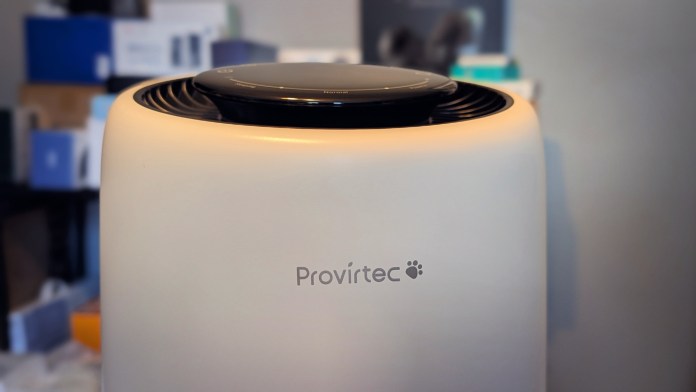
Whether you’re a pet owner dealing with dander or simply want cleaner air throughout your home, the Provirtec AP-01A Air Purifier offers a smart, compact solution that punches well above its price point. Designed to improve indoor air quality without taking up much space, this purifier covers up to 916 square feet, making it well-suited for living rooms, open layouts, or even larger bedrooms.
At just 8.11 x 13.46 x 8.11 inches and weighing a little over four pounds, it’s easy to move from room to room. And while the form is compact, the performance is anything but.
Clean Air from Every Angle
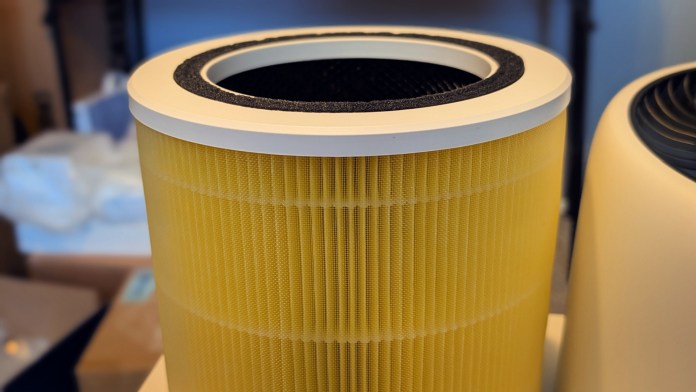
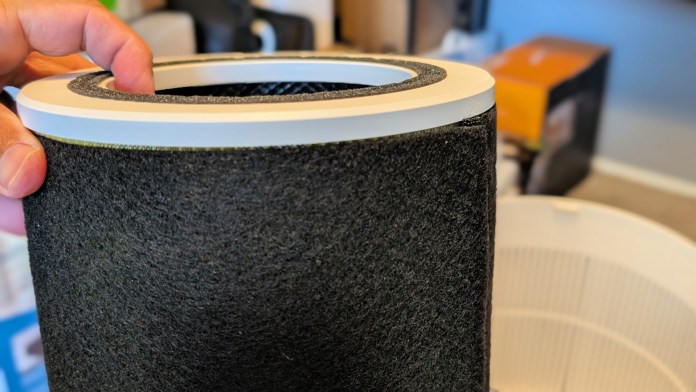
The AP-01A features a 5-stage H13 True HEPA filtration system, which captures 99.97% of airborne particles down to 0.3 microns. That includes everything from pet hair and dander to dust, pollen, and common household irritants.
With 360° air intake, real-time air quality monitoring, and a surprisingly powerful HEPA system, the Provirtec AP-01A quietly tackles pet dander, odors, and allergens, without taking over your space or your budget.
Its 360° grille air intake is designed for efficiency, drawing in air from all directions to ensure more consistent purification throughout the space. An enhanced activated carbon filter helps eliminate pet odors and other lingering smells, which is a real bonus if you’re used to spraying air fresheners just to stay ahead of pet funk.
Smart Enough to Adjust on Its Own
One of the AP-01A’s most helpful features is its real-time PM2.5 monitor, which keeps constant tabs on air quality. Paired with Smart Auto Mode, the purifier can automatically adjust its fan speed depending on the pollution level in the room. There’s no need to fiddle with settings every time you open a window or light a candle.
When it’s time to wind down, Sleep Mode drops the noise level to a whisper, making this model a great fit for bedrooms or nurseries.
Built with Families in Mind
If you’ve got curious kids or pets that like to press buttons, the Child Lock feature will come in handy. And with 10 fan speed settings, you can manually dial in the exact airflow you want, whether you’re dealing with a sudden spike in allergens or just want to keep things low and quiet in the background.
Designed for Homes with Pets
The big draw here is that the purifier is centered around homes that have pets in them. Why? Because that does something different to the air, doesn’t it? Surely you’ve been to a friend’s house and your immediate reaction upon entering the home is that it “smells like a dog.” Likewise, you don’t want to worry that this is the first thought when someone visits you.
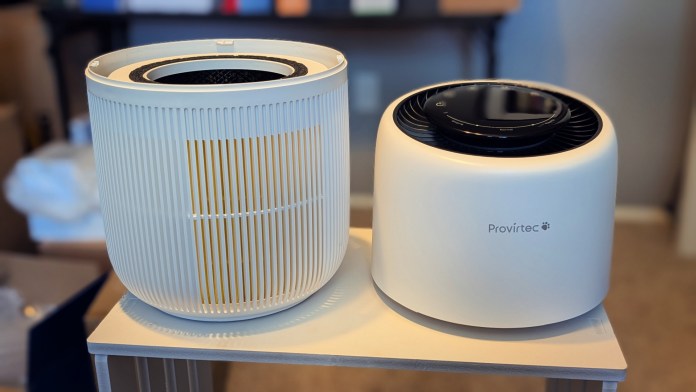
The Provirtec AP-01A is built with furry friends in mind, starting with its 360° fence-style air intake, which does more than just look smart. It’s shaped to pull in pet hair from every angle, keeping it from clumping along the outer surface like you see on many flat-panel purifiers.
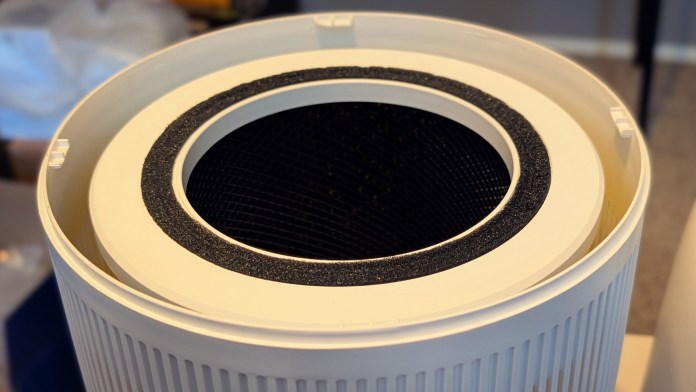
Inside, the pre-filter layer acts as the first line of defense, catching larger particles like hair and dander before they reach the main filtration system. It’s not only effective, but practical too: the pre-filter is easy to peel off, clean, or replace, which helps extend the lifespan of the more expensive filters underneath. That means better performance over time, and fewer replacements to budget for. And as it turns out, you get two of these in the box.
The AP-01A also goes big on odor control. Its activated carbon filter layer has 50% more content than earlier models, which significantly boosts its ability to trap and neutralize smells. Whether it’s litter box funk, wet dog after a walk, or the occasional pet accident, this model does a better job scrubbing the air clean. In fact, the odor removal efficiency has been improved by 1.5 times, making the air noticeably fresher in rooms shared with pets.
Reliable, Affordable, and Easy to Use
This purifier is CARB and EPA certified, which means it meets key safety and efficiency standards. It’s also powered by a DC motor and controlled via a sleek touch interface, keeping the experience simple and intuitive.
At a discounted price of around $66 on Amazon, the Provirtec AP-01A delivers strong performance without breaking the bank. It ships directly from Amazon and Provirtec’s website and includes a 30-day refund or replacement policy if it doesn’t meet your expectations. With an average 4.7-star rating on Amazon and 5-stars on Proviertec, early buyers seem more than satisfied.
Save on Yours
For a limited time you can save a little bit of money on your purchase of the purifier. From now until August 21, the coupon code of “5AXBPNLL” should take an additional 5% off. There’s currently an instant savings coupon which can be applied so results may vary based on when you check!
Quick Specs:
Model: AP-01A
Dimensions: 8.11 x 13.46 x 8.11 inches
Weight: 4.19 lbs
Color: White
Coverage Area: 916 sq ft
Filter: 5-Stage H13 True HEPA
Certifications: CARB Certified, EPA Certified
Key Features:
360° Air Intake
Enhanced Activated Carbon
Real-Time PM2.5 Monitoring
Smart Auto Mode
Ultra-Quiet Sleep Mode
Child Lock
10 Fan Speeds
Touch Controls
Final Thoughts
The Provirtec AP-01A is an excellent air purifier for households with pets, allergies, or anyone wanting to improve their indoor air quality. It combines smart automation, flexible controls, and reliable filtration in a compact, affordable package. Its features and design make it a solid addition to any home environment.
The Mammotion LUBA mini All-Wheel-Drive (AWD) is not what you might call a “run of the mill” robotic mower. Whereas most bots aim for broad appeal, the LUBA mini is unapologetically specialized. Mammotion calls it the “Best Solution for Uneven Lawns,” and that tagline seems to be more than just marketing. In a direct pitch to homeowners whose yards challenge traditional robotic mowers with slopes, dips, and rough patches. In other words, it’s aimed at pretty much everyone I know.
Within Mammotion’s lineup, the LUBA mini sits between the entry-level YUKA series and the larger, more expensive LUBA 2 AWD. But rather than being a shrunken version of the flagship, this mini is purpose-built for small to mid-sized lawns where terrain matters more than sheer square footage.
The LUBA mini’s all-wheel drive and zero-turn maneuverability make it one of the few robotic mowers built for the kinds of imperfect, slope-filled lawns most of us actually have.
If your yard is like mine, you’ve got weird pockets where things are uneven and taper in random areas. It’s “big-ish” and looks great when it’s lush and green, but closer inspection reveals the less-than-perfect edges. In other words, it’s a good match for the LUBA series of mowers.
LUBA mini Lineup at a Glance
There are two main models: the LUBA mini AWD 800 and the LUBA mini AWD 1500. Each comes in a standard (‘S’) and high-cut (‘H’) variant, with the latter offering taller grass height settings. That’s a smart nod to regional lawn care preferences, especially in North America, where grasses like St. Augustine benefit from higher cuts.
Pricing starts at $1,599, positioning the LUBA mini in more of a premium territory, but still under competitors like Husqvarna and even Mammotion’s own LUBA 2 series.
Model
Lawn Size (Recommended)
Max Area
Height Range
Battery
Price
AWD 800
0.2 acre / 800 m²
0.25 acre / 1000 m²
0.8–2.6 in
4.5 Ah
$1,599
AWD 800H
0.2 acre / 800 m²
0.25 acre / 1000 m²
2.2–4.0 in
4.5 Ah
$1,599
AWD 1500
0.37 acre / 1500 m²
0.44 acre / 1800 m²
0.8–2.6 in
6.1 Ah
$1,999
AWD 1500H
0.37 acre / 1500 m²
0.44 acre / 1800 m²
2.2–4.0 in
6.1 Ah
$1,999
From its motors to its maneuverability, the LUBA mini is all about mechanical performance. It’s clear that Mammotion prioritized terrain-tackling hardware. Even if that sometimes comes at the expense of polish in the software experience.
We were provided with a sample of the LUBA mini 800 S version and the following are my thoughts and insights into the robot lawn mower.
Design and Build
The LUBA mini cuts a striking figure. It looks like a remote controlled Formula One racer, a go-kart, and Wall-E’s Eve merged into one device. Its ABS plastic chassis feels solid, not cheap, and the overall build quality is praiseworthy. At roughly 33 pounds, it’s not exactly “mini” in heft, but the side handle spots do make it easier to pick up. One quirk I noticed after just one run is that the white body shows dirt easily, and grass clippings seem magnetically drawn to it at times. Though anything it does grab cleans up without much effort.
Key Mechanical Features
All-Wheel Drive (AWD): This is the heart of the LUBA mini. It can climb slopes up to 80% (about 38.6°), giving it serious off-road credentials.
Omni-Directional Wheels: The front wheels allow lateral movement and a true zero-turn radius which is great for sharp corners and lawn striping.
Adaptive Suspension: All four wheels stay grounded on uneven terrain, which keeps traction consistent and the cut even.
Navigation & Sensors
RTK-GPS: This uses a yard-placed reference station to refine GPS accuracy down to the centimeter level. But it needs a clear view of the sky to work reliably.
UltraSense AI Vision: A camera adds a second layer of navigation and object recognition, helping with obstacle avoidance, auto-mapping, and even live FPV control via the app.
On paper, it’s a smart stack. But in practice, the powerful hardware sometimes outpaces the software’s ability to keep up. The AWD may conquer steep slopes, but a slight tilt at the docking station can still derail auto-charging. That it so say, make sure you use the proved stakes to keep that charger in place.
This imbalance of mechanical strength versus software fragility showed up a few times in the user experience.
Unboxing and Assembly
Setup is straightforward. You’ll find everything needed in the box, including the mower, RTK station, charging dock, mounting pole, and extra blades. Assembly is minimal as you’ll just plug in a few wires and secure the vision module on the mower.
The dock can be placed anywhere you have power, even outside, and the RTK Station can be inserted upright in the ground or mounted (to a roof or side of a house).
Component Installation
Two components require precise placement:
RTK Station: Needs a 360° unobstructed view of the sky. If your first placement fails, moving it higher or farther from trees usually fixes signal issues. An optional solar panel helps with flexible placement. I mounted mine in a flower bed that rims my back patio.
Charging Dock: Here’s where things get sticky. The mower may be designed for hills, but the dock needs a perfectly flat surface. Even a slight tilt can cause docking to fail, forcing you to level the area manually. Indeed, the off-road mower that needs a parking spot as flat as a pancake.
Mapping and App Setup
You’ll connect the mower and RTK to WiFi, then define mowing zones through the app.
Manual Mapping: Drive the mower along the perimeter using a digital joystick.
Auto Mapping: The mower uses its vision system to detect grass boundaries on its own. This is a huge time-saver and a standout feature of the system.
Up to 10 zones (800 model) or 20 zones (1500 model) can be created, and you can designate no-go areas and pathways between sections.
I have three zones in my yard, a front, side, and back. A fence with a gate separates the back from everything else, and that’s also where my charger is located. So, I created channels, or paths between the back and the front/side yards. When I want to mow the other areas I simply open the gate so the mower can get to and from.
Cutting Quality
This is where the LUBA mini shines. Its six-blade disc leaves a clean cut, and the ability to mow in tidy patterns (stripes, checkerboards, diamonds) gives lawns a professionally manicured look. The omni-wheels help with sharp, damage-free turns and tidy finishes near edges.
Looking at the bottom of the unit, you’ll see it resembles a plate with six razor blades. You’ll get extras in the box, and they’re also available to purchase from the Mammotion website.
You can adjust each mow task on the fly or you can create and schedule them as well. Thus far, and because it’s been really weird with rain and grass growth, I’ve resorted to selecting areas every other day or so.
Noise
At under 60 dB, the LUBA mini is quieter than most electric mowers and nearly silent compared to gas models. It’s quiet enough to run at night, though the built-in headlight is fairly bright. This is something to keep in mind if windows or a sliding glass door separate your living room from the back yard.
I’ve run my mower at 10PM and the only conversations my neighbors have had about that were remarks that it looked like a Roomba escaped my home and that they questioned whether it was actually cutting grass.
Navigation and Autonomy
The Good: AWD performance is excellent. It climbs hills, handles bumps, and navigates playgrounds with ease but only when GPS is strong.
The Frustrating: Signal dropouts still stop the mower in its tracks, even though it’s supposed to fall back on camera navigation. Obstacle detection works well for big objects, but small saplings often get run over. And the rain sensor? It pauses mowing during wet weather by default but doesn’t resume automatically, requiring manual input to restart.
I like that I can adjust the blade height, the speed of the mower, and the width of the path, however, I think I’ll keep things at the upper end for all three. I tend to prefer my grass a bit more thick and full, especially in spring when things are quite green. Here in the middle of July I find that most of what grows is crabgrass, weeds, and the junk that sprouts up from the bird feeder.
The maximum height of this mower is 2.6-inches so if I were buying one of these, I’d opt for the mini 800H over the mini 800 because that one ranges from 2.2-inches to 4-inches.
I’m at the 2.6-inches and if I am not careful, I’ll end up with lots of clippings in the yard. They’ll be in nice straight lines, mind you, but the’ll need raked or blown if you wait too long between mowings.
Specs and Runtime
LUBA mini 800/800H: 4.5 Ah battery, 120 minutes per charge, 160-minute recharge.
LUBA mini 1500/1500H: 6.1 Ah battery, 165 minutes per charge, 200-minute recharge.
The batteries are swappable, which is a plus. But here’s the real caveat: the model numbers (800, 1500) refer to total lawn capacity, not per-charge coverage. That means it may take multiple charge cycles and 12+ hours to fully mow a mid-sized lawn.
It’s autonomous, yes, but not fast. The mower may need to run nearly all day to finish a job, which can be a surprise for anyone expecting one-and-done efficiency.
I’ve found that I can have it mow a different section every other day or so and keep a nice tidy yard. Should we get more regular rain and the ground cool a bit, that might change.
The mower can handle the side yard and front yard on a single charge but it only gets about 2/3 of the back yard before it heads back to the charger. But a short while later the mower gets back to work and picks up in the exact spot it left off.
I also appreciate that I didn’t have to worry about creating no-go zones, even though I can. With a few trees in my yard, the mower can see them and work around them, keeping the clean lines on all sides.
Ongoing Costs to Consider
Base Price: $1,599 (800) to $1,999 (1500)
Add-ons: Garage cover ($209), new blades, omni-wheels, and a 4G subscription after the trial ends.
Battery: A spare for the 800 costs $189.
Theft Protection
Built-in GPS, geofencing, account locking, and tilt alarms offer solid anti-theft protection. There’s also a slot for an Apple AirTag if you want extra peace of mind. Like I mentioned, it’s not exactly light, but I suspect it’s enticing enough for a ne’er-do-well type to snatch and throw in the back of an SUV.
Support and Warranty
Mammotion offers up to a three-year warranty and 30-day return window. But as a newer player, its support infrastructure is still developing. With no widespread dealer network, handling repairs could mean shipping your mower back to the manufacturer.
Final Thoughts
The LUBA mini AWD is a mechanically brilliant mower with a few rough edges, but it’s mostly in software and the app. Some of the issues I have are minor; popups for tips and alerts that you need to reconnect, or enable Bluetooth when it’s already on, can be abit aggravating early on. One you’ve settled into a groove and have things mapped and schedule, it’s a different story.
It’s not for everyone, but it fills a very real gap in the market.
The Right Fit
You have a small-to-midsize yard with slopes, dips, or rugged spots.
You value lawn aesthetics and don’t mind a little setup or supervision.
You’re tech-savvy and willing to troubleshoot when needed.
You’re okay with taking a calculated risk on a newer brand for better hardware.
Who Should Look Elsewhere
You want a true “set it and forget it” robot.
Your lawn is mostly flat and simple.
Your lawn is spacious.
You need guaranteed service support and peace of mind.
Awarded to products with an average rating of 3.75 stars or higher, the AndroidGuys Smart Pick recognizes a balance of quality, performance, and value.
Products with this distinction deserve to be on your short list of purchase candidates.
Verdict
This is a powerful tool, but it’s not a perfect appliance or unit. We still run the upright vacuum and manually mop our kitchen floor every so often but we’ll let our robot vacuums spruce things up 4-5 times a week. Likewise, I imagine I’ll still manually mow the yard here and there but let this fill in the gaps.
When I think about the price, I feel I can easily break that down and justify it. Finding the time, desire, and cooperating weather to perfectly align doesn’t happen often in Ohio.
On average I’ll spend 90 minutes mowing and edging my yard each time out. In the spring that could be every 4-5 days but it the hot summer days it might only be once every 10-14 days. But let’s say that time is valued at just $50. It only takes 30 mows for me to be at $1,500 and we’re not about talking gas. If your time is more precious, or if you don’t have a flexible schedule, you can probably imagine hitting that price in 10-15 mowings.
This year I spent a few month’s worth of weekends working on a new patio and landscaping the backyard so we actually paid a guy to mow our yard. At $45 per week he was reasonable and professional and things looked nearly immaculate. While the LUBA mini won’t get quite the pretty look, it still draws nice straight lines. And where the pro would capture and remove the clippings, this one leaves them right where they found them.
Would I love to have the professional do it all year long? Sure, but even he is beholden to rainouts and emergency situations. I can have the LUBA head out to get started any time of the day, or night. I can’t get away with starting a mower at 6AM or letting it work at 10PM but I can task the robot with a one-off cutting.
For the right user and lawn, the LUBA mini could be a time saver or provide some peace of mind. Just go into it with realistic expectations.
Whether you’re chasing sunsets down the interstate, jetting off to somewhere new, or simply soaking up a quiet weekend at home, the right gear can turn any trip, big or small, into something smoother, safer, and way more enjoyable.
From dash cams that document every scenic mile to pocket translators and portable monitors that keep you connected without weighing you down, today’s travel tech is built to keep pace with however (and wherever) you move.
In this edition, we’ve rounded up our favorite gadgets for road warriors, spontaneous vacationers, and laid-back loungers alike. These are the tools that make travel feel a little less chaotic and a lot more fun.
Arzopa A1 Travel Monitor
For those who can’t sever ties completely with digital life while traveling, the Arzopa A1 Travel Monitor is a lifeline. This portable monitor is ideal for travelers who need to maintain productivity on the go, without being tethered to their main workstation. Whether you’re fielding business emails from your hotel room or editing photos from the day’s adventures at a café, this lightweight screen can be your trusty digital sidekick.
Its portability doesn’t compromise on quality, offering a full HD experience that ensures your visual tasks are handled with clarity and finesse. The Arzopa A1 is like a pocket-sized office that fits snugly in your backpack. And while we’re all for breaking boundaries, this monitor will make sure you don’t break your luggage weight limit.
70mai Dash Cam 4K Omni
If road trips are your thing, the 70mai Dash Cam 4K Omni might just be the backseat driver you actually want. This high-resolution dash cam captures your journey in stunning detail, ensuring that every scenic view or surprise wildlife encounter is documented in impeccable 4K. With this level of clarity, reviewing footage might simply become the highlight of your evening.
But beyond capturing aesthetic road thrills, the dash cam also adds a layer of security, monitoring the road for you and possibly reducing any nasty surprises that might occur on unfamiliar roads. Plug it in, and let it play co-pilot, leaving you free to focus on navigating new territories without losing track of where you’ve been.
WOLFBOX G900 TriPro Cabin Monitor Mirror Dash Cam
For those needing a more comprehensive view of their driving escapades, the WOLFBOX G900 TriPro Cabin Monitor Mirror Dash Cam offers a 3-channel setup, making it the Swiss Army knife of dash cams. Designed to monitor not just the road but also the vehicle’s interior, it’s perfect for those who run a tight ship, even when that ship is on wheels.
With its mirror-integrated design, this dash cam seamlessly blends into your car’s aesthetics while providing a panoramic view that covers almost all angles. It’s the surveillance system you never knew you needed, offering peace of mind whether you’re parked in a bustling city or cruising down a deserted highway. Keeping an eye on everything with the G900 is like having your own travel-friendly guardian angel along for the ride.
Timekettle T1
When it comes to crossing language barriers, Timekettle’s Fluentalk T1 is like having a secret agent in your pocket, minus the tuxedo. This sleek translator device ensures that travelers can seamlessly communicate, whether they’re ordering tapas in Barcelona or haggling for a bargain in a bustling bazaar. Gone are the days of frantic gesturing; with T1, the world becomes your stage, and every conversation is a script you can follow effortlessly.
The T1’s real-time translation capabilities are its shining star, making awkward charades a thing of the past. It empowers travelers with instant translations, offering a level of connectivity and understanding that’s truly game-changing. Imagine striking up a chat with a local in Paris about the nuances of baguette baking, all thanks to your trusty T1.
Moreover, the T1’s compact design makes it a travel-friendly companion that won’t weigh you down. It’s a must-have for globetrotters looking to deepen their interactions and experiences, serving as a linguistic lifeline that ensures you’re never lost in translation.
VITURE Pro Glasses
Step into the future of entertainment with VITURE Pro Glasses, where your long-haul flight can transform into a personal cinema. These XR glasses offer an immersive viewing experience, perfect for when you’re tired of the recycled in-flight movies or the view from your tiny airplane window.
The VITURE Pro Glasses don’t just stop at visual appeal; they also come with the promise of hours of comfortable wear, making them a nifty piece of tech for those looking to binge their favorite series or catch up on blockbuster films while jet-setting. Think of them as your portable entertainment hub that fits snugly in your carry-on.
Beyond flights, these glasses can be used virtually anywhere, be it at a quiet café in Prague or a beach in Bali. Their electrochromic lenses adapt to the lighting conditions, ensuring your viewing experience is always optimal. So, who needs a reality check when you’ve got augmented reality at your fingertips, or rather, on your face?
UGREEN FineTrack Slim Smart Finder
For the traveler who swears they’d lose their head if it wasn’t attached, the UGREEN FineTrack Slim Smart Finder is your new best friend. This slim and sleek smart finder is your secret weapon against misplaced luggage, passports, or any essentials that tend to vanish right when you need them most.
Despite its name, the FineTrack doesn’t just track, it saves you time and sanity. Using advanced tracking technology, it helps locate your items with precision, so you can focus on the adventure ahead rather than retracing your steps. Say goodbye to the panic of a missing suitcase just minutes before your flight.
The FineTrack’s convenience is further bolstered by its compatibility with multiple devices, ensuring you can keep tabs on your belongings through your smartphone. It’s like hiring a private detective for your gear, except it won’t demand a fedora or trench coat. For those who prioritize both security and peace of mind, this smart finder is an indispensable part of any travel kit.
FindAll Luggage Tag
When it comes to keeping tabs on your belongings, the FindAll Luggage Tag is your new travel sidekick. Created by Satechi, this nifty gadget ensures that your luggage won’t embark on a solo tour of the world. Ever found yourself at baggage claim, waiting for what feels like an eternity, only to realize your suitcase has taken a wrong turn without you? Not anymore. With the FindAll Luggage Tag, you can channel your inner detective and track down your luggage with a quick glance at your smartphone.
The sleek design of this luggage tag blends in with your stylish suitcase and elevates your travel ensemble. Whether your luggage is boldly patterned or elegantly understated, this tag complements it all. Crafted with vegan leather, it’s a chic nod to sustainable style. Travelers can now control their baggage’s destiny without compromising on aesthetics.
For those whose travel plans frequently involve hopping from one country code to another, this tag serves as a constant companion. It’s an assurance that even if you’re flying halfway across the globe, your luggage is keeping up, both literally and figuratively. With FindAll, misplaced bags become a thing of the past, leaving you to focus on the joys of exploration.
CLIQ Chair
For the adventurers who believe that the journey is just as important as the destination, meet the CLIQ Chair from CLIQ Products. It’s designed for those moments when you need to sit and savor the scenery, whether you’re trekking through a bustling cityscape or nestled in a remote forest. Compactness is its middle name, we have to assume, because this portable wonder folds up to nothing and pops open into a comfortable perch, giving you a front-row seat to life’s little wonders.
Weighing in at less than a laptop, this chair says goodbye to the days of lugging around bulky folding chairs. Imagine taking a break at a scenic viewpoint or a spontaneous picnic in the park; the CLIQ Chair ensures you have the perfect excuse to pause and enjoy. The world can be your lounge with this innovative seat allowing for leisurely pit stops wherever your wanderlust takes you.
We know a good thing when we see it.
The First-Rate Find badge recognizes products that go beyond standards in performance, design, value, and/or innovation. They also tend to boast interesting features or distinct hallmarks.
We don’t need to assign any formal scores to indicate that this one is worth your attention.
Crafted with durability in mind, and capable of supporting up to several times its own weight, it’s the trusty steed for weary travelers. It’s as if Mary Poppins’ bag had a baby with a Transformer, creating a seating solution that’s always ready for action. So, whether you’re catching the sunrise over a mountain or relaxing in a foreign park, the CLIQ Chair is the efficient solution to your sit-down dilemmas.
SUPCASE MagFlip Magnetic Wallet
In today’s digital age, travel often involves a multitude of devices and cards that demand seamless management. Enter the SUPCASE MagFlip Magnetic Wallet, a must-have for the modern traveler who wants to keep everything sleek, simple, and secure. As you crisscross through airports or meander through marketplaces, having your essentials at hand, and stylishly so, is the way to go.
Designed by SUPCASE, this magnetic marvel attaches effortlessly, making it perfect for keeping your cards handy without the bulk of a traditional wallet. Picture this: you’re rushing through security, a coffee in one hand, boarding pass in the other. Thanks to the MagFlip, fumbling for your credit card to grab that last-minute snack is a thing of the past. Its neat, compact design lets you switch gears effortlessly.
But the MagFlip isn’t just about storage. No, it’s designed with actual functionality in mind. The nifty built-in stand means you can use it to prop up your phone for a quick video call or to view your travel itinerary hands-free. It’s like having a personal assistant. Or maybe someone who doesn’t mind living in your back pocket. Available in a number of colors, it’s a statement piece that says you’re organized, fashionable, and ready for any adventure that comes your way.
Duracell 3000 Lumen Tri-Power Solar Lantern
For the traveler who believes that just because the sun has set, the adventure shouldn’t, the Duracell 3000 Lumen Tri-Power Solar Lantern is a shining example of innovation meeting necessity. This gadget is the quintessential travel companion for those who find themselves camping under the stars or navigating dimly lit routes. With the power of three different charging options, including solar, the lantern ensures that darkness never cuts your trip short.
The genius of this lantern lies in its ability to harness renewable energy alongside traditional power sources. Imagine scrolling through picturesque travel memories captured during the day as this lantern illuminates your night. With its considerable 3000-lumen brightness, it can transform any campsite into a well-lit haven. It’s perfect for large group travels where everyone needs a piece of the spotlight.
Moreover, the durability of Duracell’s lantern means travelers can count on it surviving the rugged outdoors. The next time you’re packing for a journey where the itinerary includes both a sunrise and a sunset, don’t forget to pack one of these. After all, in the world of travel, being prepared is half the adventure.
REEVUS Bottle
Hydration is crucial when you’re scaling new heights, literally or metaphorically, and the REEVUS Bottle is here to ensure you do it with style and sustainability. Built by REEVUS, this insulated stainless steel bottle is the pinnacle of form meeting function, keeping your drinks at the ideal temperature whether you’re traversing the Sahara or exploring the Arctic Circle.
Thanks to its robust insulation capability, this bottle ensures your coffee stays hot and the water remains refreshingly cold, making it an indispensable item on any packing list. It’s the perfect addition for weekend warriors or globetrotters who prioritize health without wanting to compromise on performance or aesthetics.
Travelers will appreciate the eco-friendly aspect of the REEVUS Bottle as it offers a sustainable alternative to single-use plastics. Also, its sleek design fits snugly in your travel bag or car’s cup holder, appealing to those who demand convenience on-the-go. Next time thirst strikes during your travels, you’ll be glad to have this reliable hydration hub at your side.
Tiny Traveler Ai Classic
When you’re living on the road, whether in an RV, van, or something cobbled together with love and zip ties, peace of mind becomes a top priority. The same goes for that week-long getaway you absolutely deserve. The Tiny Traveler AI Classic gives mobile parents a way to stay connected with their baby without leaning on Wi‑Fi or a tangle of cords.
It’s a 4.3-inch wireless monitor and HD camera system with a solid transmission range (up to around 1,000 feet), which means you can be out grabbing firewood or flipping pancakes at the camp stove and still know if your kiddo is safe and snoozing.
We know a good thing when we see it.
The First-Rate Find badge recognizes products that go beyond standards in performance, design, value, and/or innovation. They also tend to boast interesting features or distinct hallmarks.
We don’t need to assign any formal scores to indicate that this one is worth your attention.
The camera mounts easily in your vehicle or rig, and the screen is compact enough to fit in a cupholder or on the dash. Battery-powered and purpose-built, it’s ready for those “we-just-found-this-place-on-the-map” detours and late-night campground arrivals. It even has night vision and AI features like cry detection, stand alerts, and motion zones. This way you’re not stuck staring at the screen, wondering if that wiggle was just a stretch or something more.
If you’ve ever tried to enjoy a quiet moment by the fire only to be derailed by “was that a cry or a raccoon?” panic, this system earns its keep. You get alerts when they matter and silence when they don’t. The Tiny Traveler AI Classic frees you to enjoy the road, trust your setup, and give your nerves a breather. And you won’t miss a beat should your tiny co-pilot need you.
Welcome to this week’s edition of the “Weekend Recommender,” where we showcase a curated selection of intriguing products that have captured our attention and sparked our curiosity. Whether you’re keen to boost your home security with modern surveillance systems, transform your gaming experience with the latest tech gadgets, or enjoy outdoor activities through innovative gear for the adventurous spirit, there’s something here for everyone.
From smart home devices that adapt to your routines to rugged outdoor equipment that keeps you connected while braving the elements, our picks promise to sprinkle a bit of convenience and excitement into your daily life.
Check out this week’s selections and uncover gadgets that merge practicality with innovation, allowing you to enjoy the comforts of now while peeking into the future. It’s time to geek out with style!
Synology CC400W Wi-Fi Camera
The Synology CC400W is a 4MP Wi-Fi camera ($150), offering clear video resolution (2560×1440) at 30 FPS, making it ideal for those seeking reliable smart surveillance. It features a 125° horizontal field of view, night vision capabilities with infrared LEDs effective up to 10 meters, and High Dynamic Range for vivid clarity in varied lighting scenarios.
This camera is enhanced by its AI-driven functionalities, including people and vehicle detection, auto tracking, and intrusion alerts, making it valuable for homeowners and businesses alike. The integrated two-way audio adds a personal touch, allowing for communication through the camera.
Weatherproof with an IP65 rating, the CC400W is suitable for both indoor and outdoor environments. With seamless integration into Synology’s Surveillance Station and a mobile app for monitoring, this camera is both user-friendly and practical. Supporting edge recording with microSD storage, it balances privacy and security with features like data encryption and customizable privacy masks.
DESLOC C110 Deadbolt
The Desloc C110 Fingerprint Smart Lock ($50) offers a seamless blend of security and convenience. The standout LockVue Display screen allows for effortless management of settings, user assignments, and alerts all without needing an internet connection, providing peace of mind. With rapid fingerprint recognition powered by the FlashPrint Algorithm, this lock can process fingerprints in under 0.3 seconds and holds up to 50 user profiles.
Unlocking flexibility comes from multiple access methods: fingerprint, passcode, or physical key. Security is enhanced by its BHMA Grade 3 certification, anti-peeping PIN protection, and the FingerShield technology which safeguards biometric data from unauthorized duplication.
Boasting a 12-month battery life and easy installation, this lock caters to door thicknesses from 35-50mm. Available in Matte Black, Silver, and Satin Nickel, it combines aesthetic appeal with robustness, making it ideal for homeowners prioritizing security and convenience. Priced at $40 through Amazon right now, it offers significant value and a solid warranty.
Woojer Vest 3
The Woojer Vest 3 ($300) marries technology and comfort, providing an immersive experience for gamers, movie lovers, and music enthusiasts. This haptic vest utilizes six patented Osci TRX2 transducers to deliver detailed and impactful feedback, allowing users to feel every explosion in a game or the pulse of bass in a song. With Bluetooth 5.0 connectivity, it seamlessly integrates with wireless headsets, enhancing your overall audio experience.
Designed with breathable, lightweight materials, the vest ensures that you can wear it for extended periods without discomfort. It offers an impressive 8 hours of playback on a single charge, accompanied by fast-charging capabilities, making it ideal for long gaming sessions or movie marathons. The versatile frequency range of 1-250Hz further enriches the experience, as it caters to a diverse array of audio content.
Included with the vest are essential accessories like a washable lining, wall and chair mounts, a quality 3.5mm audio cable, and a USB-C cable. With a price of $299, the Woojer Vest 3 is a noteworthy investment for those looking to elevate their entertainment experience with tactile sensations.
GameSir X5 Lite Mobile Game Controller
The GameSir X5 Lite Mobile Gaming Controller ($35) is designed for gamers seeking an enhanced mobile gaming experience. Its lightweight and ergonomic design ensures comfortable play during extended sessions, making it suitable for both casual and dedicated gamers. Compatible with Android devices and the iPhone 15/16 series, it features Hall Effect joysticks for precision control, allowing for improved accuracy in fast-paced games.
The controller includes cushioned membrane triggers and buttons, offering tactile feedback that can enhance gameplay. Pass-through charging capability means you can keep your device charged while playing, eliminating interruptions. The Turbo function caters to gamers requiring rapid button presses for action-oriented titles, while the GameSir app provides options for software customization, tailoring controls to personal preferences.
With a built-in Type-C wired connection, the GameSir X5 Lite ensures a stable connection during gameplay. It’s suitable for mobile gamers who appreciate portability without sacrificing performance. Weighing only 135.4g and measuring 196.7 x 88.3 x 46.2 mm, it won’t add bulk to your gaming setup. Available in Wasabi and Black colors, it combines functionality with style, appealing to a wide range of mobile gaming enthusiasts.
Bird Buddy Smart Bird Feeder PRO
The Bird Buddy Smart Bird Feeder PRO ($160) transforms the traditional birdwatching experience into a modern adventure. Priced at $189, this advanced feeder boasts a 5-megapixel camera capable of capturing stunning 2K video, featuring HDR and slow-motion options for those special moments. Its sleek, bird-friendly design includes dual-sided windows for easy seed visibility and a weather-resistant exterior.
With AI-powered species recognition, users receive alerts on bird types and even concern notifications for sick birds. The product supports sharing with up to 10 friends and family members, enhancing the communal aspect of birdwatching. A 3800 mAh rechargeable battery with optional solar charging ensures longevity, while its easy refilling design makes maintenance a breeze.
Ideal for bird enthusiasts, families, or anyone looking to connect with nature, the Bird Buddy Smart Bird Feeder PRO offers a unique integration of technology, aesthetics, and wildlife conservation efforts.