Home Blog Page 50

BOLD N4 Review

Every so often, a budget-friendly phone comes along that feels like itโ€™s been designed to make you question how much money you actually need to spend for something fast, capable, and modern. The BOLD N4 5G is one of those rare devices.

At $299, it reads like a value play. But after spending time with it, I came away convinced that BOLD isnโ€™t trying to compete with other budget phones. Itโ€™s trying to blur the line between midrange and flagship, and it gets closer than youโ€™d expect. From its performance and dual-display design to its ridiculous 512GB of built-in storage, this is one of the most ambitious attempts yet at delivering top-tier specs in an affordable shell.

This review walks through what makes the BOLD N4 so surprisingly complete, and where its ambition occasionally outpaces its polish.

But first, a trip down memory lane and a refresher on the brand.

The BOLD N4 5G feels like a wake-up call for the budget market. It’s a $299 phone with half a terabyte of storage, flagship-level speed, and a clever dual-display design that makes everyday use smarter and more fun.

Who is BOLD?

BOLD is a sub-brand of BLU Products, created to push beyond the companyโ€™s value-focused roots and deliver a more premium smartphone experience without the premium price tag. Where BLU (“Bold Like Us”) built its reputation on affordability and accessibility, BOLD serves as its forward-leaning, design-driven arm, if not somewhat of an experimental platform for higher-end materials, flagship-tier specs, and longer software support.

BOLD N4 5G smartphone packaging featuring a colorful design and specifications, with a focus on 512GB storage, displayed against a blurred background of shelves.

BOLD is the brand BLU uses to explore whatโ€™s next, blending style, performance, and practicality for users who want an elevated experience that still feels attainable. In short, BOLD leans more into BLUโ€™s revolution than its evolution.

BOLDโ€™s story began in 2019 with the BOLD N1, a phone that immediately set itself apart from its parent companyโ€™s lineup. It introduced a sleeker design language and a focus on flagship-style polish at a price point that undercut the competition. With its pop-up selfie camera, AMOLED display, and in-display fingerprint sensor, features rarely seen below $300 at the time, the N1 served as a clear statement that BLU intended BOLD to be its more premium, design-forward experiment.

Fast-forward to 2022 and the arrival of the BOLD N2, a major leap in both aesthetics and performance. It traded the mechanical selfie camera for a hole-punch design, upgraded to a curved AMOLED panel, and delivered a more refined unibody look that rivaled far pricier devices. Under the hood, it adopted a more capable MediaTek Dimensity chipset, offering 5G-level performance in a 4G phone, while maintaining the value-driven ethos that defined the brandโ€™s early promise.

By 2023, the BOLD N3 pushed things even further. It marked the brandโ€™s first true embrace of 5G, adding a sharper AMOLED display, faster charging, and improved imaging hardware, and all of this was wrapped in an even more premium frame. The N3 cemented BOLDโ€™s identity as the experimental edge of BLUโ€™s ecosystem, where new materials, software refinements, and bold (sorry!) design choices could debut before trickling down to more affordable lines.

That progression of refinement by refinement is what sets the stage for the BOLD N4 5G, a device positioned not just as another budget disruptor, but as more of a culmination of several years of deliberate iteration. Itโ€™s the most technically confident BOLD phone yet, designed to close the gap between affordability and genuine flagship capability.

Design and Display: Premium Where It Counts

The first thing I noticed when unboxing the N4 is that it doesnโ€™t look like a $299 phone. And it certainly doesn’t look like any previous BOLD N-series of phones. Each model is quite the departure from its predecessor and feels like a deliberate choice to try something different.

The curved edges of the 6.78-inch AMOLED display catch the light in a way that feels far more refined than the usual flat plastic you find in this tier. The 1200 x 2652 pixels display itself is a beauty: 120Hz refresh rate, rich contrast, and brightness that holds up outdoors. Just be prepared for it to grab fingerprints, oil, and other stuff from your hands if you’re not careful.

Scrolling feels genuinely flagship-smooth. Whether I was flipping through Gmail or gaming, the combination of that refresh rate and responsive touch input made everything feel faster than I expected. BOLD clearly wanted to deliver a screen that could stand toe-to-toe with the best Samsung and Motorola have to offer in the $500 range. And it mostly does.

Close-up of the BOLD N4 5G smartphone, showcasing its camera module with a 50MP lens and a dual-display design. The smaller secondary display shows the time, date, and battery percentage.

Around back, the phone adds a clever twist. Thereโ€™s a small 1.74-inch OLED display tucked near the camera module. It might seem gimmicky at first, but itโ€™s genuinely useful. I used it to check the time, peek at notifications, and line up selfies using the main 50MP camera instead of relying on the weaker front-facing one.

That trick alone makes a real difference if you like capturing better content. You get sharper images, better HDR, and a more natural depth of field because youโ€™re using the same lens that handles your standard photography. The rear mini-display acts as your viewfinder, turning what couldโ€™ve been a throwaway feature into something functionally smart. It’s like adding one of the best reasons to own a flip phone without changing the overall design.

Performance and Daily Use: Punching Far Above Its Price

Specs can be misleading when taken in isolation, but the BOLD N4 backs them up with real-world speed. Inside is MediaTekโ€™s Dimensity 7300X chip built on a 4nm process, which is the same class of architecture used in much pricier phones.

Day to day, that means smoother multitasking, quicker app launches, and less of the thermal throttling that tends to plague budget processors. In benchmarks, it looks to score around 704,000 on Antutu, essentially matching phones like Motorolaโ€™s Edge 2025, a device which costs nearly twice as much.

A close-up view of a smartphone screen displaying settings for virtual RAM configuration, with options for 8GB, 16GB, and 24GB, and a notification about needing to restart the phone to activate changes.

Numbers aside, I ran the N4 through my usual gauntlet: multitasking with Chrome, Gmail, Maps, Spotify, and Slack all active; switching between the camera and social apps; and streaming video while gaming in the background. It handled everything without lag. The combination of 8GB of DDR5 RAM and up to 24GB of “virtual Xtra RAM” helps here. Memory management feels tuned and responsive.

The real kicker, though, is storage. Half a terabyte of internal space in a $299 phone feels borderline absurd. I loaded it up with offline music, long-form video, a few games, and a mess of review photos, and still had breathing room. If youโ€™re used to constantly juggling space, this alone is a luxury that feels liberating.

Both the memory and the storage are the types of corners that brands often cut and it would have been very easy for BOLD to go with 256GB RAM and a slower DDR4 RAM. Had they done that I probably would not have even batted an eye so kudos here for leaning forward.

Software: Current and Surprisingly Refined, But a Bit Too Much

The BOLD N4 5G ships with Android 15, and itโ€™s mostly a clean implementation. There are a lot of custom features and settings one can do with the phone to make it feel truly unique. It looks and acts a lot like “stock” Android but it does invite users to look deeper and spend time with it.

I would like to say there are only a few extra apps loaded but that’s not the case. Indeed, there were at least a dozen titles installed that I can safely say I’d never touch. There’s also an Instant Games section that’s in the app drawer by default as well as a widget on the home screen’s right panel. These can be customized and removed. While I see their value for select people, I can imagine long-time Android users might feel put-off by the heavy-handedness.

There are a few other things you’ll want to enable, disable, or tailor to your liking as you get going, some of which might happen fairly early on in ownership. I wasn’t in love with the notifications and invisible hand pushing me to a few apps (Moments, News) so I turned them off.

I should also point out that the secondary display needs to be enabled in the settings to get the full experience. By default you can change the back to show a clock with custom colors but to use if for the camera and notifications, you’ve got to almost trip over that setting.

I looked through the phone’s settings and the camera app for more than a few minutes and could not really find anything. On a whim one night, I double tapped the rear screen and it told me I needed to adjust something in the phone. Flipping it over and allowing it, I then had access to the camera preview, notifications, a stopwatch, timer, recorder, and music player.

Android 15 adds its own nice touches, too: Private Space for hiding sensitive apps, better protection against theft, and smoother handling of media and PDF files. Combined with the N4โ€™s hardware, it feels modern and complete right out of the box.

What I appreciated most was how ready the N4 felt for the U.S. market. It supports all the key 5G bands youโ€™d expect (n2, n5, n25, n41, n66, n71, and n77) which translates to reliable signal and consistent speeds whether youโ€™re on T-Mobile or AT&T. Some global budget phones can stumble on network compatibility but this one gets it right.

Cameras: Ambitious Hardware, Slightly Confused Messaging

On paper, the BOLD N4โ€™s triple-camera setup looks impressive. The 50MP main lens delivers solid detail and color accuracy, backed by an 8MP ultra-wide camera for broader shots. In daylight, photos are sharp and well-balanced. The AI-driven processing helps keep exposure in check, and the dynamic range holds up surprisingly well.

Night Mode works decently too, though it leans into longer exposures and visible noise reduction that sometimes softens detail. Still, given the price, low-light results are respectable.

The elephant in the room is that third camera. BOLDโ€™s pre-launch materials refer to it alternately as an 8MP telephoto lens and an 8MP macro lens, which, as you know, are two very different things. My testing suggests itโ€™s a telephoto as the app shows .6x, 1x, and 3x zoom levels. Moreover, looking through the app settings I cannot find anything that enables a macro mode.

Video capture maxes out at 4K at 30fps and looks stable enough, thanks to Electronic Image Stabilization. For everyday clips and social content, itโ€™s absolutely serviceable.

Close-up of the BOLD N4 5G smartphone showcasing its rear design, featuring a camera module with three lenses and a secondary display, held in a person's hand.

Where the camera shines is in its dual-screen versatility. Using the secondary display to frame main-camera selfies or vlogs gives the N4 a creative edge. Here, youโ€™re capturing content on the best sensor available, not the usual underwhelming front lens.

Charging and Battery Life: The Fast Lane

Battery anxiety and nightly charging are tough habits to break, but the BOLD N4 makes things easier. The 5,000mAh battery easily lasts a full day, even with heavy use. Streaming, navigation, calls, gaming, etc… it all drains the phone at a slower pace than expected.

Then thereโ€™s the 66W fast charging. BOLD claims it can go from empty to full in 20 minutes. In my experience, it was closer to 25 to 30 depending on conditions, but thatโ€™s still lightning quick. Itโ€™s the kind of speed that changes how you use your phone. Plug it in while youโ€™re making breakfast, and itโ€™s ready before you leave the house.

Phones in this price bracket typically offer 30W or maybe 45W charging, so this feels like a genuine differentiator. Again, this would be a corner I’d expect to have seen cut.

Audio, Biometrics, and the Everyday Details

Audio is often an afterthought in budget phones, but the N4 delivers clear, full sound through its dual speakers. Thereโ€™s decent separation and enough bass to keep movies and games lively without distortion. I hate music on phones for the most part so I can’t speak to anything longer or much different than a few moments of testing. Audible books and podcasts, though, came out loud and clear.

A person holding the BOLD N4 5G smartphone, showcasing the top edge with a glossy finish, buttons, and speaker grill.

Biometric security is handled by an in-display fingerprint reader that unlocks in under half a second, paired with a quick and reliable Face ID system. Nothing flashy, just smooth execution.

Performance in Context: Outrunning the Competition

When you stack the BOLD N4 against its nearest rivals, the numbers tell the story. The Motorola Moto G Power (2025) costs about the same but runs on an older Dimensity 6300 processor and posts a much lower benchmark score. Plus there’s only 128GB of storage there, too. Samsungโ€™s Galaxy A36 costs $100 more and still trails behind in both performance and storage.

Even against the $549 Motorola Edge 2025, the N4 keeps pace within a few percentage points in performance. Youโ€™re essentially getting 98 percent of a mid-premium experience for just over half the cost.

Thatโ€™s why the N4 feels disruptive. Itโ€™s priced like a budget phone but behaves like something far higher up the food chain. If anything, I hope this changes expectations for consumers at $300.

Where It Falls Short

No phone at this price hits perfection, and the N4 has its rough edges. Now that it’s officially announced, the macro-versus-telephoto confusion seems to be wrapped up but I worry there may be a mixed signal out there somewhere

The software could also benefit from longer update guarantees. Android 15 is a strong starting point, but without a clear commitment to two or three years of updates, longevity becomes an open question.

Do we necessarily need to compete with the five and seven year stuff from flagship devices? Absolutely not. Yet still, we’re holding onto our phones longer, on average, so an update or two should be expected.

Lastly, while the secondary display is genuinely useful, its interface could evolve further. I would like to imagine customizable widgets or quick app controls rather than static info panels. Itโ€™s a promising idea that deserves refinement. For a first-gen attempt, I like it. Next time around, I want to love it.

Who Itโ€™s For

The BOLD N4 5G is priced for the everyman, but feels made for people who want premium speed, design, and flexibility without blowing their budget. Itโ€™s a great fit for mobile gamers who crave performance, creators who want more storage and camera control, or professionals who need fast charging and reliable 5G connectivity on a daily driver.

If youโ€™re the kind of person who measures value in tangible performance rather than brand recognition, this phone will likely surprise you.

Final Thoughts: BOLD Ambition That Mostly Delivers

The BOLD N4 5G isnโ€™t just another “affordable” phone trying to imitate something better or hope you notice it. Itโ€™s an intentional, well-calculated attempt to change what “midrange” can mean, and for the most part, it succeeds.

I love it when the race to the bottom changes quickly and I think that the baseline for entry-level and midrange phones needs adjusted. The N4 is the sort of device that can do that, provided it get enough attention.

Itโ€™s fast, generous with storage, cleverly designed, and genuinely practical in ways that make daily use better. Sure, a few details need tightening, but at this price, thereโ€™s little else that competes so evenly across performance, display, and charging.

Typically priced $299, the BOLD N4 5G is available through Amazon with launch day special. For a limited time, or perhaps while supplies last, you can get your hands on it for just $249. I’m already recommending it to readers at the standard price so that early adopter discount just makes it that much more appealing.

BOOX Intros Note Air5 C Color ePaper Tablet & Palma 2 Pro eReader

0

Global E Ink leader BOOX is expanding its diverse product ecosystem with the launch of two innovative color ePaper devices: the Note Air5 C and the Palma 2 Pro. Designed to cater to distinct user needs, these new additions underscore BOOX’s commitment to pushing the boundaries of E Ink, offering vibrant color displays and advanced features for a range of digital experiences.

The 10.3-inch Note Air5 C emerges as a powerful color ePaper tablet engineered for enhanced light productivity and creative workflows, while the 6.13-inch Palma 2 Pro redefines true portability and connectivity for digital reading and note-taking on the go.

Note Air5 C: A New Standard for Color E Ink Productivity

Building on the success of its predecessor, the Note Air4 C, the new Note Air5 C refines the professional ePaper experience with seamless keyboard connectivity, the latest Android 15 operating system, and an improved Pen3 stylus. Tailored for professionals, students, and creatives, it merges power and versatility within a slim, sophisticated profile.

Key Features:

  • Vibrant Kaleido 3 Color Display: A stunning 10.3-inch Kaleido 3 color E Ink display presents vibrant yet natural colors without the eye strain or glare associated with traditional backlit screens. Ideal for extended reading, annotation, and creative tasks, it features adjustable dual-tone front lights that guarantee optimal visibility in any environment.
  • Seamless Keyboard Integration: Magnetic pogo pins allow users to effortlessly attach a keyboard cover, transforming the Note Air5 C into a multi-functional workstation. Split-screen mode further enhances multitasking, enabling users to reference notes while composing documents with ease.
  • Enhanced Writing Experience: The redesigned Pen3 stylus improves handwriting with a traditional pen-like design, complete with a clip and integrated tip storage. Coupled with an enhanced textured surface, the sensation of writing is natural and reminiscent of paper.
  • Powerful Performance: Driven by an octa-core CPU, 6GB RAM, and 64GB of storage, alongside BOOX Super Refresh technology, the device delivers seamless performance for both professional and creative applications.
  • Smart Software: Running on Android 15 and powered by BOOX Firmware V4.1, the Note Air5 C facilitates limitless note-taking, mind mapping, and AI-driven Smart Scribe features for intelligent organization.

Palma 2 Pro: Connected Color ePaper in Your Pocket

Following the well-received original Palma device, BOOX now presents the Palma 2 Pro, a pocket-sized color ePaper device that incorporates 5G connectivity and Android 15 for an enhanced connected experience while on the move. It’s perfect for those in search of a minimalist, distraction-free digital companion for reading, writing, and organization.

Key Features:

  • Ultimate Portability: Weighing a mere 175 grams, the 6.13-inch Palma 2 Pro fits comfortably in one hand, offering unparalleled portability without compromising on features.
  • Gentle Color Display: Its Kaleido 3 E Ink color display delivers gentle, natural tones that are easy on the eyes and perfectly legible in sunlight. The dual-tone front light automatically adjusts to ambient conditions, while EInkWise display presets optimize the screen for reading, browsing, or sketching.
  • Advanced Connectivity: The new model’s 5G connectivity and hybrid SIM slot provide seamless internet access and expandable storage of up to 2TB, ensuring users stay connected and have ample space for all their content.
  • Robust Performance: Equipped with powerful features including BOOX Super Refresh Technology and 8GB RAM, the Palma 2 Pro offers smooth operation. It also boasts compatibility with the InkSense Plus stylus for quick notes and highlighting.
  • User-Centric Design: The Palma 2 Pro retains popular features such as fingerprint unlock, automatic screen rotation, and a textured, water-resistant finish. It is available in two sophisticated colors: Charcoal Black and Ivory White.

Pricing and Availability

The Note Air 5C is available from BOOX (US) and BOOX (EU) for US$529.99/Standard US$499.99/ยฃ499.99/โ‚ฌ529.99 and the Palma 2 Pro is available from BOOX (US) and BOOX (EU).

With the introduction of the Note Air5 C and Palma 2 Pro, BOOX continues to solidify its position as an innovator in the E Ink space. These devices represent a significant leap forward in merging the comfort of paper-like displays with the power and versatility of modern digital technology, catering to a broad spectrum of users seeking a more focused and eye-friendly digital experience.

Top Mobile Apps for Investors on Android

0

The fierce competition among smartphone manufacturers resulted in many cheap yet powerful devices, which flooded the markets globally. The result? Modern smartphones are advanced and enable developers and firms to provide sophisticated investing applications, with some of them even enabling advanced financial trading on the go. Android apps have initiated a new era where investors can execute trades or control their portfolio 24/7 with just a few taps on their smartphones. Letโ€™s review the most popular Android apps among traders and investors, and show how and why each of them is used to ensure smarter and more disciplined trading and investing decisions. 

Why mobile apps matter for investors 

Mobile apps make it much easier to access investment products, but there is a caveat: success in trading and investing is not guaranteed by an advanced app alone. Without a solid trading plan where entry and exit strategies are clearly outlined, together with risk control and position sizing, investors risk making impulsive decisions. 

Smartphone adoption caused a major shift in investing. Modern people trade mostly on the go. Mobile platforms are very comfortable, allowing anyone to invest and trade from anywhere. Investors can now track performance, execute orders, follow important news, and change their strategies in real-time according to their needs. Real-time access to data enables quick and precise investment decisions, while instant execution fuels scalping trading strategies, which are used on intraday charts. Investors can also track their portfolio and have a global reach to stay informed at all times across multiple markets. 

Top Android apps for investors

Modern investors do not just go to their app store to download a random app. They seek secure, reliable, and user-friendly investment apps which enable them to analyze markets and trade on the go without issues and lags. Below are the most popular and capable investment and trading apps that every investor should know.

MetaTrader 4 (MT4)

MT4 is a classic trading platform widely used by Forex and CFDs investors worldwide. The app on mobile devices is also very capable, with built-in technical indicators, chart analysis tools, and various order and chart types. It is an old app, but still very capable, offering full customization, one-click trading execution, and is offered by the majority of brokers. 

Pros and cons

Among the pros are a robust indicator library, a lightweight design, and very fast execution. However, its disadvantages include a focus on FX and CFD, and the interface feels outdated, especially for newcomers. The app is the best for Forex traders who need precision and reliability. 

MetaTrader 5 (MT5)

The MT5 mobile app is even better on Android, offering even more customization and features, while the design feels modern and appealing to the eyes. It is a multi-asset platform, meaning traders and investors can access a multitude of financial markets like stocks, cryptos, Forex, commodities, and CFDs. The app has everything MT4 offers but adds even more markets and greater analytical tools in a compact and modern design. Disadvantages include a steeper learning curve as it is not designed for casual stock investors. 

TradingView

TradingView is a popular multi-asset charting platform that enables access to a vast array of trading assets, including stocks, forex, cryptos, and many more. It aggregates pricing data from various sources and enables users to see everything they need in real-time. It has a very modern design and is fully customizable. 

Its main advantage is the sharing of indicators and a custom indicators library among different platforms. TradingView users can access custom indicators on their Android app, which gives them a distinctive advantage over other apps. However, it only allows 2 indicators simultaneously on the free version and requires a paid subscription for more features. 

cTrader

cTrader is another dominant platform that is available for Android devices. It is a multi-asset trading and investment platform that offers similar features to MT4 and 5. However, it is even more capable when it comes to stock trading for its Level II pricing features. While it has many pros like customization and a vast array of technical and market analysis tools, not many brokers offer cTrader, which makes it a bit of a niche app. 

Robinhood

Robinhood is a popular retail investment platform that enables users to invest in various stocks without hefty fees and commissions. It singlehandedly initialized a mobile stock trading revolution. Zero-commission trading, fractional shares, simple UI, and crypto access are among its biggest advantages. It is very intuitive as well. However, it has limited research tools, and gamification features often trigger impulsive behavior in beginner investors. 

Binance

Binance is a crypto platform that can be accessed on Android as well. It is an extension of the Binance website and offers diverse trading and investing features. While it has limited technical analysis tools, traders and investors can just buy and hold or trade their digital assets. It supports thousands of altcoins and is a secure app. Users can switch between the lite and pro versions of the app, which is very convenient. Among its cons are regulatory scrutiny and high crypto volatility. 

EDITOR NOTE: This is a promoted post and should not be considered an editorial endorsement

Surfshark Black Friday and Cyber Monday Deals for 2025

0

As Black Friday 2025 rolls in, Surfshark is dropping its biggest VPN and privacy suite discounts of the year. Whether youโ€™re looking to lock down your data, browse securely on public Wi-Fi, or simply access global content at lightning speeds, Surfsharkโ€™s limited-time Black Friday and Cyber Monday deals make it easier, and cheaper, than ever to take control of your online privacy.

Current Surfshark Black Friday Deals:

  • Surfshark VPN: $1.99/month (2-year plan) + 3 months free
  • Surfshark One: $2.19/month (2-year plan) + 3 months free
  • Surfshark One+: $4.19/month (2-year plan) + 4 months free

๐Ÿ‘‰ Get Surfsharkโ€™s 2-Year Deal for $1.99/mo + 3 Months Free


What You Get with the Surfshark Black Friday Deal

Promotional image for Surfshark's Black Friday deal featuring a man with sunglasses and an umbrella, highlighting Surfshark One subscription starting at $2.19/month with 3 months extra.

This isnโ€™t just a VPN sale, itโ€™s a gateway to Surfsharkโ€™s complete privacy ecosystem. Beyond encryption and IP masking, the companyโ€™s One and One+ bundles add antivirus, breach monitoring, anonymous browsing tools, and identity protection features that keep your digital footprint locked down.

Protection from Malware with Surfshark Antivirus

Surfsharkโ€™s built-in antivirus brings real-time protection against malware, spyware, and ransomware without bogging down system performance. Itโ€™s designed for those who prefer all-in-one security so there’s no need to juggle separate antivirus subscriptions.

Key features:

  • Real-time threat detection
  • Scheduled and quick scans
  • Lightweight engine that doesnโ€™t slow your device

Pros:

  • Seamlessly integrated with the VPN app
  • Runs quietly in the background
  • Covers unlimited devices

Cons:

  • No dedicated firewall feature
  • Requires active VPN subscription

Why it matters:
A reliable antivirus paired with a VPN means protection from both external network threats and internal system vulnerabilities.

๐Ÿ‘‰ Activate Surfshark One with Antivirus Protection


Alternative ID for Identity Protection

A woman in an orange hoodie holding a smartphone, promoting Surfshark's Alternative Number service for secure online transactions.

Identity theft is one of the fastest-growing online crimes, and Surfsharkโ€™s Alternative ID feature helps you stay ahead of it. Instead of sharing your real name or email when signing up for services, you can generate an alias, keeping your personal identity off spam lists and data brokers.

Highlights:

  • Generate unique online identities
  • Protects your real contact details
  • Helps reduce spam and targeted ads

Pros:

  • Great for managing online subscriptions safely
  • Easy integration with browser extensions
  • Keeps data leaks from linking back to you

Cons:

  • Currently browser-based only
  • May not work with all websites requiring verified identity

The benefit:
Alternative ID lets you explore the web more freely, meaning no more worrying that every newsletter signup or online form might compromise your privacy.

๐Ÿ‘‰ Get Surfshark One+ with Alternative ID


Surfshark Alert for Data Leak Protection

When your email or password leaks in a data breach, time is everything. Surfshark Alert continuously scans known breach databases and dark-web dumps to notify you if your data is compromised, so you can act before hackers do.

A person with curly hair holding a megaphone in front of a graphical interface displaying data breaches, indicating alert notifications for varying severities.

Features include:

  • Real-time breach monitoring
  • Alerts for compromised passwords, IDs, and credit cards
  • Dashboard summaries showing whatโ€™s at risk

Pros:

  • Clear and simple alert system
  • Works automatically once set up
  • Pairs perfectly with the VPNโ€™s encryption layer

Cons:

  • No recovery assistance if credentials are already leaked
  • Requires user action after notification

Benefits:
Itโ€™s like having a digital early-warning system for your identity: fast, accurate, and proactive.

๐Ÿ‘‰ Enable Surfshark Alert with the 2025 Black Friday Deal


Surfshark Search: Browse Without Being Tracked

Search engines love collecting data; Surfshark Search flips the script. Itโ€™s a private, ad-free search engine that delivers organic results without personalized tracking or profiling.

Key takeaways:

  • No targeted ads or data collection
  • Unbiased, ad-free search results
  • Fully integrated within the Surfshark One suite

Why itโ€™s useful:
If privacy is your top priority, this tool lets you explore the web with complete anonymity.


Incogni: The Power Behind Surfshark One+

A person standing beside a tablet displaying a graph with statistics about removal requests and time saved, emphasizing the benefits of using the Incogni service.

Exclusive to Surfshark One+, Incogni automates the tedious process of removing your personal data from marketing and data-broker databases. Instead of sending endless opt-out requests yourself, Incogni handles it all in the background.

How it helps:

  • Submits removal requests to data brokers automatically
  • Tracks compliance status over time
  • Helps reduce spam, robocalls, and unwanted exposure

Pros:

  • Saves hours of manual work
  • Reinforces GDPR and privacy law compliance
  • Integrates smoothly with Surfshark Alert

Cons:

  • Currently available in select regions
  • Takes several weeks for full data removal

๐Ÿ‘‰ Upgrade to Surfshark One+ with Incogni for Full Privacy Control


Surfshark Plan Comparison

Product / FeatureSurfshark VPNSurfshark OneSurfshark One+
VPN (Secure Browsing & Encryption)โœ… Includedโœ… Includedโœ… Included
Antivirus (Real-Time Protection)โŒโœ… Includedโœ… Included
Surfshark Alert (Data Breach Monitoring)โŒโœ… Includedโœ… Included
Surfshark Search (Private, Ad-Free Search)โŒโœ… Includedโœ… Included
Alternative ID (Identity Protection)โŒโœ… Includedโœ… Included
Incogni (Automatic Data Removal Requests)โŒโŒโœ… Included
Unlimited Device Connectionsโœ…โœ…โœ…
24/7 Customer Supportโœ…โœ…โœ…
Money-Back Guarantee (30 Days)โœ…โœ…โœ…

Which Surfshark Plan Offers the Best Value?

If youโ€™re just looking for a reliable VPN, Surfshark VPN at $1.99/month (2-year plan + 3 months free) is one of the most affordable premium options on the market this Black Friday. Itโ€™s ideal for secure browsing, streaming, and online shopping.

For a more complete privacy setup, Surfshark One at $2.49/month (2-year plan + 3 months free) adds antivirus protection, breach alerts, and a private search engine, a strong all-rounder for everyday users who want convenience and coverage in one app.

The top-tier Surfshark One+, priced at $4.19/month (2-year plan + 4 months free), includes everything from the previous tiers plus Incogni, the automated data-removal service that scrubs your personal info from data brokers. If youโ€™re serious about total digital privacy, this is the ultimate all-in-one package, and itโ€™s rarely discounted this steeply outside the Surfshark Black Friday and Cyber Monday sales.

Why You Should Choose Surfshark Black Friday 2025 Deal

Surfsharkโ€™s deal isnโ€™t just about saving a few dollars. Itโ€™s about securing long-term value from one of the most feature-rich VPNs in the market, especially during a season when privacy risks spike with online shopping.

Get Better Shopping Prices with a VPN

Did you know some e-shops adjust prices based on your location? Surfsharkโ€™s VPN helps you virtually switch countries, letting you see localized deals that might be cheaper elsewhere.

  • Compare airfare, hotel, or streaming subscription prices globally
  • Avoid region-based price discrimination
  • Shop securely even on public Wi-Fi

๐Ÿ‘‰ Use Surfshark to Unlock Global Shopping Deals This Black Friday


More Than 3,200 Servers Worldwide

Surfsharkโ€™s growing network covers over 100 countries with 3,200+ servers, ensuring stable speeds and minimal congestion no matter where you connect. Whether youโ€™re streaming, torrenting, or working remotely, youโ€™ll find a reliable connection nearby.

Highlights:

  • P2P-friendly servers
  • Private DNS on each server
  • Optimized for streaming services like Netflix and Disney+

Benefit:
Youโ€™ll never be tied to one location again as freedom and speed come standard.


A person holding a smartphone displaying the Surfshark VPN app, showing connection status and settings, with a scenic outdoor background.

Unlimited Devices, One Account

One of Surfsharkโ€™s strongest selling points: unlimited device connections. That means one subscription covers your phone, laptop, tablet, smart TV, and even your partnerโ€™s devices, all at no extra cost.

Why it matters:
Most competitors cap connections at five or ten devices. Surfshark doesnโ€™t. You can protect every gadget in your household under one simple plan.

๐Ÿ‘‰ Protect Unlimited Devices with Surfsharkโ€™s 2-Year Deal


How to Activate the Surfshark Black Friday or Cyber Monday Coupon

Promotional image for Surfshark's Black Friday 2025 VPN offer, featuring a person with an umbrella using a mobile phone, highlighting VPN prices starting at $1.99/month with an additional three months free.

Getting started is as simple as signing up:

  1. Visit Surfsharkโ€™s Black Friday Page.
  2. Select your preferred plan (VPN, One, or One+).
  3. The discounted price and free-month bonus will apply automatically so there’s no manual coupon needed.
  4. Complete checkout and install the Surfshark app on your devices.
  5. Log in and connect to your first secure server and youโ€™re all done!

If youโ€™re new to VPNs, the setup wizard walks you through every step, from downloading to your first connection. It takes less than two minutes.


FAQs

Are Surfsharkโ€™s Black Friday deals similar to Cyber Mondayโ€™s?

Yes, Surfsharkโ€™s Black Friday and Cyber Monday offers are nearly identical. Cyber Monday just leans more toward tech shoppers, while Black Friday targets broader audiences. Either way, youโ€™ll find the same massive discounts and bonus months.

Can I use my Surfshark Black Friday coupon after the sale ends?

Typically, Surfshark black friday coupons are time-limited. Once the sale window closes, prices revert to normal. Itโ€™s best to grab your subscription during the promotion to lock in the lowest rate.

Whatโ€™s included in the Surfshark Black Friday 2025 sale?

You can choose between the VPN-only plan, the Surfshark One bundle (with antivirus, Alert, and Search), or Surfshark One+ with Incogni, all deeply discounted for the Black Friday 2025 sale.

Is Surfshark available on multiple devices?

Absolutely. One of Surfsharkโ€™s standout advantages is unlimited simultaneous connections. Whether youโ€™re on Android, iOS, macOS, or smart TVs, you can use one account across all your devices.

Why pick Surfshark over competitors this Black Friday?

Few VPN providers offer this combination of value, speed, and comprehensive privacy tools. With Surfshark cyber monday and black friday pricing this low, youโ€™re essentially getting a full security suite for the cost of a cup of coffee per month.


Final Thoughts

Surfsharkโ€™s Black Friday 2025 sale is more than a discount, itโ€™s an investment in long-term digital privacy. With bundles that combine VPN, antivirus, breach alerts, and data-removal tools, Surfshark offers an entire ecosystem of protection under one subscription.

If youโ€™ve been waiting for the perfect moment to secure your online life, this is it.

๐Ÿ‘‰ Grab the Surfshark Black Friday 2025 Deal for $1.99/mo + 3 Months Free

Hands On: Status Pro X

0

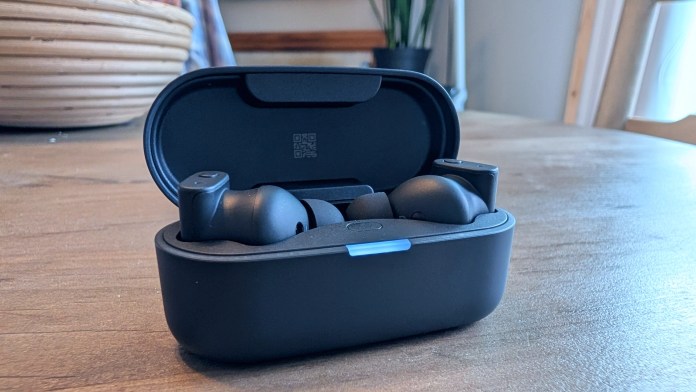
The Status Pro X represents a significant leap forward in wireless audio technology. These aren’t just another pair of earbuds with fancy marketing and an odd shape. No, they’re engineered with a triple-driver system that combines an upgraded 12mm dynamic driver with dual Knowles balanced armature drivers to create a listening experience that stands apart from the crowded true wireless market.

Triple Driver Powerhouse

The heart of the Pro X lies in its sophisticated driver configuration. The enlarged 12mm dynamic driver delivers deeper bass and a wider soundstage compared to typical 10mm drivers found in most wireless earbuds. Working alongside two custom-tuned Knowles balanced armature drivers, the system produces clear mids and detailed highs that reveal nuances in your music that smaller, single-driver earbuds simply can’t reproduce.

Status Pro X wireless earbuds displayed next to their charging case on a wooden surface.

The Status Pro X sets a new standard for wireless earbuds, combining a triple-driver system for rich, detailed sound with advanced noise cancellation and smart features that truly enhance everyday listening.

This hybrid setup isn’t just about creating impressive specs on paper. It actually translates to actual performance. The separation between instruments feels natural, vocals sit precisely in the mix, and the low-end response has both punch and control without overwhelming the other frequencies.

Hi-Res Audio Goes Wireless

The Pro X supports LDAC codec streaming at up to 990 kbps, delivering 24-bit/96 kHz audio that surpasses CD quality over Bluetooth. This Hi-Res Audio Wireless certification from the Japan Audio Society means you’re getting legitimate high-resolution playback, not just marketing claims. The earbuds also support Bluetooth LE Audio with LC3 codec and Auracast protocol, positioning them for future wireless audio standards.

Engineered for Real-World Use

Active noise cancellation reaches -52dB, effectively blocking out ambient noise during commutes or focused listening sessions. The transparency mode lets you stay aware of your surroundings without removing the earbuds, while six beam-forming microphones work with Voiceloom AI speech enhancement to ensure clear call quality even in noisy environments.

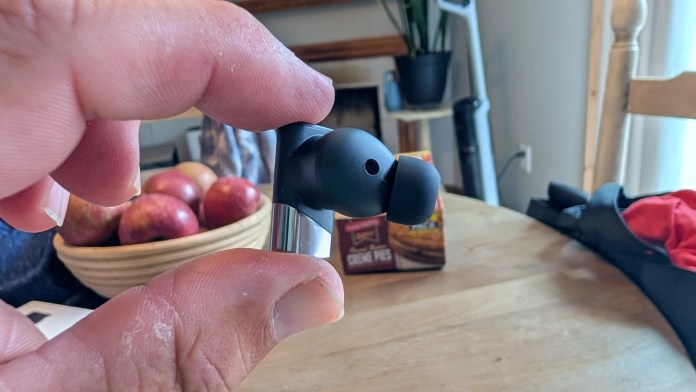
The Pro X earbuds are substantially smaller than their predecessors while maintaining the same driver configuration, which is quite the engineering achievement. The ergonomic design locks securely in your ears whether you’re moving around or sitting still, and the IP55 rating handles sweat, splashes, and everyday dust exposure.

Smart Features That Work

Battery life delivers 8 hours of playback per charge with ANC active, extending to 24 hours total with the charging case. The optical wearing sensor automatically detects when the earbuds are in your ears, pausing playback when removed. Multipoint connectivity lets you connect to two devices simultaneously, switching seamlessly between your phone and laptop.

The Status Hub app provides an 8-band EQ for sound customization, control remapping, and GPS tracking for lost earbuds. Wireless charging support means you can drop the case on any Qi-compatible charging pad.

The Bottom Line

The Status Pro X delivers on its promises through solid engineering rather than flashy gimmicks. The triple-driver system produces genuinely impressive sound quality for wireless earbuds, while the comprehensive feature set addresses real-world needs without unnecessary complexity.

At $299, they’re positioned as a premium option that justifies the price through performance and build quality rather than brand prestige alone. And while Status Audio might not be a brand you’re overly familiar with, something tells me that changes with time.

Motorola Announces Halloween Deals: Up to $400 Off Razr, Edge, and Moto G

0

This season, Motorola is unwrapping an incredible array of savings, inviting everyone to treat themselves to cutting-edge technology without the scary price tags. With discounts stacking up to a generous $400 off across various popular lines, there’s never been a better time to upgrade your mobile experience.

For those who crave both innovation and undeniable style, the Motorola razr family is beckoning with up to $400 off these stylish flip phones.

Discounts on Razr Ultra Family

This includes the highly coveted Motorola Razr Ultra – 1TB and Motorola Razr Ultra – 512GB, both now more accessible at $1,099.99. The original price for both smartphones are $1,499.99.

These premium devices boast leading-edge foldable technology, powerful processors, and expansive internal storage, perfect for tech enthusiasts who demand the best and want to make a statement.

Also included in this fashion-forward lineup are the Motorola Razr+ 2025 ($699.99), Motorola Razr 2025 ($599.99), Motorola Razr+ 2024 ($599.99), and the incredibly affordable Motorola Razr 2024 ($399.99).

Each model offers a unique blend of features, from advanced external displays for quick interactions to robust hinge mechanisms, ensuring a device that’s as durable as it is dazzling.

Discounts on Edge Family

Continuing the theme of “all treats and no tricks,” the sophisticated Motorola Edge family also enjoys substantial savings, with up to $400 off. Designed for users who demand exceptional performance, stunning displays, and advanced camera systems, the edge series offers a premium smartphone experience.

Dive into immersive visuals and capture breathtaking photos with models like the Motorola Edge 2025 ($449.99), offering the latest in mobile innovation, or the still-impressive Motorola Edge 2024 ($249.99).

For those seeking top-tier features at an incredible value, the Motorola Edge+ 2023 ($399.99) remains a formidable contender, known for its powerful processing and vibrant display. These deals make high-end features like rapid refresh rates, multi-lens camera arrays, and sleek, ergonomic designs more attainable than ever before.

Discounts on Moto G Family

Finally, summon scary-good savings with up to $200 off the reliable and feature-packed Moto G family. Renowned for delivering exceptional value, long-lasting battery life, and dependable performance, the Moto G series is perfect for everyday users, students, or anyone seeking a high-quality smartphone without breaking the bank.

Champion Moto G Power 2025 ($249.99), designed to keep up with your busiest days, to the versatile Moto G 2025 ($174.99), there’s a Moto G for every need.

Creative minds will appreciate the Moto G Stylus 2024 ($199.99), offering precision input for notes and sketches. And for those who need blazing-fast connectivity, the Moto G Power 5G 2024 ($149.99) and Moto G 5G 2024 ($129.99) bring next-generation speeds to an incredibly affordable price point.

These savings ensure that everyone can experience the benefits of modern smartphone technology, from crisp displays and capable cameras to robust processing for multitasking and gaming.

These limited-time offers are your chance to embrace the latest in mobile technology or upgrade to a more powerful device, all the while keeping your wallet happy.

Anker Prime DL7400 (Black Myth: Wukong Edition) Review

If you live in a multi-monitor, high-demand workspace, the Anker Prime DL7400 feels like the docking station that was designed for your kind of chaos. It is not simply another USB-C hub; it is a serious piece of desktop hardware built to power, connect, and sustain just about everything you can throw at it.

Or, if you’re like me, it’s a fantastic way to get more from a home office setup that’s largely centered around a laptop. Having a few USB hubs, an external hard drive, and other peripherals to work with when I’m stationary, I do grow tired of the plugs and cables. A product like this, though, tidies things up and makes them more efficient in the process.

The Wukong Edition, a special design collaboration tied to the Black Myth: Wukong game, takes that same powerhouse foundation and wraps it in a collectible, black-and-gold finish that gives it the look of premium hardware youโ€™d want to leave front and center.

Limited-edition gift box for the Anker x Black Myth: Wukong collaboration featuring intricate design and artwork, displayed on a table with a blurred shelving background.

At $339.99, the Wukong Edition commands a $40 premium over the standard DL7400โ€™s $299.99 price. Both are functionally identical, offering the same fourteen ports, the same DisplayLink DL7400 chipset, and the same high-wattage performance. That extra cost is all about aesthetic appeal and collectability. For everyone else, the standard version delivers the same power without the flair.

The Anker Prime DL7400 turns your desk into a command center, combining 140W charging, triple-display support, and active cooling in a design that feels every bit as premium as it performs.

The Core Idea: Power Meets Practicality

Ankerโ€™s positioning here is deliberate. The Prime DL7400 sits below the brandโ€™s $399.99 Thunderbolt 5 dock, trading away headline-grabbing 120Gbps transfer speeds for broader device compatibility and 140W of upstream charging power. In other words, this is the dock for people who care more about how many things they can plug in and keep charged not how fast a single drive can transfer.

That makes it especially appealing to MacBook owners. Appleโ€™s M-series chips, from what I gather, are notoriously stingy when it comes to external displays and often limited to just one monitor out of the box. The DL7400 gets around this through its namesake DisplayLink chipset, which effectively virtualizes GPU output and unlocks triple-display setups on M1, M2, M3, and M4 systems. If youโ€™ve been stuck juggling windows on one screen, this dock probably feels like a small miracle.

Design and the Wukong Collaboration

Physically, the DL7400 is no lightweight. Measuring roughly 7.7 by 3.6 by 1.9 inches and weighing just under two pounds, it is unapologetically large. It’s the kind of device that stays put and asserts itself on your desk. The size serves a purpose, though. It allows for proper internal power management, active cooling, and a dense array of ports without the heat buildup or throttling that plagues smaller hubs.

The Wukong Edition adds visual character to that footprint. Inspired by the mythology and cinematic style of Black Myth: Wukong, this version carries a striking black-and-gold palette and subtle graphic detailing. It actually looks less like a typical docking station and more like something that belongs in a collectorโ€™s setup. Functionally, though, everything under the hood is identical to the standard edition. We’re talking same ports, same chip, same power ceiling.

Smarter by Design

One of the standout touches on this dock is Ankerโ€™s built-in Smart Display. Think of it as a mini dashboard that replaces the guesswork with real-time information: charging wattage, data transfer status, fan activity, and display output specs are all visible right on the unit.

You can even set it to display a clock when idle, which feels like the kind of small detail that only comes from a brand that understands how people actually use their workspace.

The display is controlled via a physical rotary knob, a “gnarled crown,” as Anker calls it, that doubles as a navigation tool for switching between data views or adjusting settings. Itโ€™s tactile, simple, and a lot more elegant than the blinking indicator lights seen on most docks.

Thermal performance is another area where Ankerโ€™s engineering pays off. The DL7400 includes an Active Cooling system paired with its ActiveShield 4.0 safety tech, allowing it to maintain consistent wattage and bandwidth under sustained load. In daily use, that means fewer power drops, fewer display hiccups, and better stability when you have multiple high-draw devices connected. And it stays relatively cool in the process.

Connectivity: Fourteen Ways to Plug In

If there is one word to describe the DL7400โ€™s port selection, it is complete. The rear panel carries the heavy hitters:

  • Two HDMI 2.0 ports
  • One DisplayPort
  • A 2.5Gbps Ethernet jack
  • Two 10Gbps USB-A ports
  • The main USB-C upstream port (140W PD)

On the front, Anker gives you three USB-C ports, two at 10Gbps, one at 5Gbps, along with SD and microSD card slots, a 3.5mm audio jack, and a low-speed USB-A port for accessories. Each of the front USB-C ports can deliver up to 100W of charging power, though the total power draw is capped by the dockโ€™s 160W combined output limit.

That means if you want to take full advantage of the 140W laptop charging, you will need to minimize what else is plugged into the high-wattage ports. It is a balancing act, but one that keeps the system stable rather than pushing it to risky extremes.

DisplayLink and Multi-Monitor Performance

DisplayLinkโ€™s DL7400 chipset is what makes this dock shine for Mac users and multi-display workstations. It can output to three external monitors with one up to 8K and the other two up to 4K, via HDMI (x2) and DisplayPort. While the 8K option technically works, the color compression and 30Hz refresh rate make it more of a spec-sheet flex than a practical choice. For most setups, three 4K@60Hz displays will deliver a smoother and more visually satisfying experience.

To make the most of the dock, youโ€™ll need to install the DisplayLink driver and Anker Dock Manager software. On macOS, this setup includes granting โ€œscreen recordingโ€ permissions so the virtual GPU can handle display output. Once configured, it works reliably, though DisplayLinkโ€™s software layer can occasionally introduce flicker or minor delays, especially on older Macs. Keeping the drivers and firmware up to date through Ankerโ€™s companion app generally resolves those quirks.

Real-World Power Behavior

On paper, 140W of USB-C Power Delivery sounds like overkill, but in practice, it translates to headroom and stability. During testing, real-world figures landed slightly below the theoretical maximum , around 89W delivered to a 96W-rated laptop, suggesting that Anker favors consistent power regulation over raw numbers. The difference is hardly noticeable and likely contributes to the DL7400โ€™s overall reliability.

Ankerโ€™s documentation notes that to maintain full 140W host charging, users should limit simultaneous charging of other high-draw devices. When balanced correctly, the dock easily powers a laptop, peripherals, and multiple displays without voltage drops or thermal throttling.

There’s a lot of theory at play with devices that feature charging of multiple things, not just docking stations. To get everything humming along at top speeds and efficiency you’ll need to do a little manual work. Suffice it to say, things work very smoothly in my office and I appreciate getting back some power outlets and removing a few smaller “travel” hubs from my setup.

Software, Warranty, and Support

The Anker Dock Manager app is the unsung hero here. It’s also where you’ll get things optimized and squeeze more from your setup. Beyond handling firmware updates, it serves as a configuration center for settings like display timeout and power allocation. It is clean, intuitive, and does not try to reinvent the wheel.

Anker backs the DL7400 with a two-year limited warranty, a thirty-day money-back guarantee, and lifetime customer support. That level of coverage is reassuring given the dockโ€™s price and complexity, and it puts Anker in a stronger position than many competitors who stop at twelve months.

Verdict: Professional-Grade Power with Personality

The Anker Prime DL7400 is not the kind of dock you hide behind your monitor. It is a full-featured, visually confident desktop hub engineered for users who need real power delivery and true multi-monitor support.

The Wukong Edition takes all of that technical excellence and adds collectible appeal. The $40 premium is purely cosmetic, but for fans of Black Myth: Wukong or anyone curating a themed workspace, it is easy to justify.

For everyone else, the standard DL7400 is the smarter buy: same performance, same ports, same warranty. Either way, you are getting a best-in-class dock that feels as overbuilt as it is overqualified.

Hands On: PITAKA Aramid Fiber Magnetic Power Bank

0

The PITAKA Aramid Fiber Magnetic Power Bank represents a significant arrival in ongoing story that is portable charging technology. This Qi2-certified power bank combines premium materials with practical engineering to deliver a charging solution that’s both aesthetically pleasing and functionally superior. And with the Google Pixel 10 series featuring Pixelsnap, the timing couldn’t be better.

Qi2 Wireless Charging Performance

The power bank features Qi2 certification, delivering up to 15W of fast wireless charging. This represents a substantial upgrade from standard 7.5W wireless charging speeds, cutting charging time significantly. The 5000mAh battery capacity provides enough power to charge most flagship phones to roughly 100% on a single charge. A Pixel 10 houses a 4970mAh battery so it’s essentially like having a full spare on you.

The PITAKA Aramid Fiber Magnetic Power Bank combines ultra-fast Qi2 wireless charging with a slim, durable aramid fiber design, offering secure magnetic attachment and premium style for effortless power on the go.

For users who prefer wired charging, the USB-C port supports up to 20W output, offering flexibility for different charging scenarios. The power bank itself recharges completely in about 2 hours, minimizing downtime between uses.

Premium Aramid Fiber Construction

The standout feature lies in its aramid fiber construction. It just looks really classy. This aerospace-grade material creates distinctive woven patterns while maintaining remarkable durability and lightweight properties. At just 0.35 inches thick and weighing 4.16 ounces, the power bank slips easily into pockets without creating bulk.

The PITAKA Aramid Fiber Magnetic Power Bank comes in three colorways: Black/Grey Twill, Sunset, and Moonrise. The Sunset and Moonrise variants feature PITAKA’s Lumintex fiber technology, creating patterns that glow in the dark for enhanced visual appeal.

Magnetic Attachment System

Strong built-in magnets ensure secure attachment to MagSafe-compatible devices. The magnetic connection holds firmly during movement while remaining easy to detach when needed. This eliminates the fumbling associated with traditional cable connections and provides charging convenience during use.

The power bank works seamlessly with iPhone 12 and newer models, whether used with or without MagSafe cases. Galaxy S22, S23, S24, and S25 series phones are also compatible when paired with MagSafe cases, though users should note minor camera interference that doesn’t affect functionality.

Smart Features and Safety

Four LED indicators display battery levels at the press of a button, showing charge status in 25% increments. Smart temperature control prevents overheating during charging cycles, maintaining safe operating temperatures for both the power bank and connected devices.

The device supports both wireless and wired charging simultaneously, allowing users to charge their phone wirelessly while the power bank charges via USB-C. This pass-through functionality adds convenience for extended charging sessions.

Compatibility Considerations

While broadly compatible, the power bank isn’t suitable for select cases due to magnetic attachment limitations. Samsung S-Pen functionality, on some handsets, may also be affected when using the power bank with S23, S24, and S25 series devices due to magnetic field interference. Other than that, we couldn’t find any reasons to stay away.

Conclusion

The PITAKA Aramid Fiber Magnetic Power Bank delivers premium materials, advanced charging technology, and thoughtful design in a compact package. Its combination of Qi2 wireless charging, aramid fiber construction, and strong magnetic attachment creates a charging experience that’s both practical and refined.

For users seeking a wireless charging solution that matches premium device aesthetics while delivering reliable performance, the PITAKA Aramid Fiber Magnetic Power Bank presents a compelling option that justifies its position in the premium accessory market.

REDMAGIC 10 Air Gets Up to $100 Off in the US For Fall

0

This Fall, the world of mobile gaming is set to be revolutionized, and REDMAGIC is leading the charge, giving gamers even more compelling reasons to upgrade their arsenal.

For a limited time exclusively in the U.S., fans and newcomers alike can unlock unparalleled gaming prowess with an enticing promotion: enjoy up to a significant $100 off the cutting-edge REDMAGIC 10 Air series, alongside additional savings of up to $50 off select, performance-enhancing accessories.

Experience elite mobile gaming at an unbeatable value. Imagine immersing yourself in the most graphically intense titles without a hint of lag or compromise. Enjoy these and much more.

Smartphone reviewers have lauded it as “a smartphone with standout looks and some solid gaming optimization,” highlighting its aesthetic appeal married to serious performance.

Others went further, describing it as “a highly capable gaming phone that costs less than $600, and you won’t find better performance for the money,” underscoring its incredible value proposition in a premium market.

These accolades collectively paint a picture of a device that doesn’t just meet expectations but consistently exceeds them, delivering a top-tier gaming experience accessible to a wider audience.

REDMAGIC 10 Air: Sleek Design Meets Maximum Power

At its core, the REDMAGIC 10 Air is a masterpiece of engineering, seamlessly blending a winning combination of raw power, blistering speed, and an incredibly sleek design. It delivers an undeniable next-level performance in a device that measures an astonishingly thin 7.85mm.

This slim profile significantly enhances ergonomics, making the phone comfortable to hold for extended gaming sessions and effortlessly portable for gaming on the go.

As part of this exciting Fall promotion, all models within the REDMAGIC 10 Air series are available at substantial discounts, ranging from $50 to an impressive $100 off their regular price. To further enhance your gaming setup and maximize your mobile esports potential, you can also enjoy additional savings of up to $50 on select accessories.

This could include specialized cooling fans for even more extreme performance, ergonomic gamepads for console-like control, protective cases to safeguard your investment, or rapid-charging power bricks to keep you in the game. These exclusive offers are available only in the U.S.

Donโ€™t miss your unprecedented chance to level up your mobile gaming experience this season. With unmatched performance, incredibly immersive design, and these exclusive, time-sensitive savings.

For more information and to seize these incredible deals, visit the official REDMAGIC Website.

UREVO CyberPad for Office Brings Quiet Fitness to the Workplace

0

UREVO has introduced the CyberPad for Office, a smart treadmill designed for people who want to stay active without leaving their desks. The compact machine fits under 90% of office desks, operates at an ultra-quiet 35 decibels, and features automatic speed and incline adjustments, all for ยฃ499.99 or $499.99 through UREVO and Amazon UK.

Built for Real Workdays and Real Workouts

Unlike traditional under-desk treadmills, the CyberPad aims to merge office practicality with true workout capability. Itโ€™s powered by dual brushless motors delivering a combined 2.5 horsepower, twice the power of most home treadmills, all while maintaining a whisper-quiet hum that wonโ€™t interrupt meetings or phone calls. UREVO claims the motors have a 10x longer lifespan and require no maintenance, offering up to 6,000 hours of operation.

At just 6.4 inches tall, the treadmillโ€™s slim frame allows it to slide easily beneath most desks when not in use. The open-front design and 39.4 inches of walking space make it comfortable for extended sessions, whether walking during emails or pushing through a mid-afternoon power walk.

A person jogging on the UREVO CyberPad treadmill in a modern indoor setting, with a graph overlay showing calorie burn at different incline levels.

Incline Training Meets AI-Powered Fitness

The CyberPadโ€™s standout feature is its MegaLift 14% Auto Incline system, offering nine adjustable incline levels. UREVO says this can increase calorie burn by up to 230% and better replicate real-world terrain. Through the UREVO app, users can activate the AI All-Terrain Simulated Hike mode, which mimics hill climbs and adjusts incline automatically to match virtual conditions.

The app tracks real-time stats including distance, time, and calories, and syncs data with Apple Health and Google Fit. Built-in programs, covering HIIT, MIIT, and LIIT workouts, automatically adjust intensity for variety and progress.

More Room, Less Noise

UREVOโ€™s Full-Track design expands usable surface area by 30% over standard models, giving users extra space for comfortable strides. Ambient lighting along the sides adds a subtle touch of personality, with 256 RGB colors and three effects: flowing water, breathing, and constant glow.

Noise remains minimal even during incline changes, thanks to the brushless motor technology borrowed from electric vehicles. With zero carbon dust emissions, itโ€™s also cleaner and more durable for long-term indoor use.

Safety and Comfort in Every Step

The CyberPad for Office supports up to 400 pounds and includes an eight-point shock absorption system that reduces knee impact by roughly 30%. A gravity-sensitive auto-stop feature adds peace of mind, halting the treadmill after 15 seconds of inactivity to prevent mishaps.

Availability

The UREVO CyberPad for Office is available now for ยฃ499.99 / $499.99 from UREVO and Amazon UK. More details can be found on the official UREVO website or through its online retail listings.