Home Blog Page 359

Blackview unveils brand-new flagship rugged phone BV9200 with a 6.6-inch display, Arcsoft cameras, Harman AudioEFX Sound, 5000mAh battery with 66W wired & 30W wireless charging, MediaTek Helio G96 & Doke 3.1

0

Blackview is a thriving technology brand that specializes in rugged outdoor phones to support rugged lifestyles and survive tough and challenging environments. With a strong focus on quality and experience, all Blackview products undergo rigorous standards and quality testing processes to ensure a superb user experience. Through long experience and critical learning, Blackview has relentlessly pursued the perfect synergy of functional satisfaction and innovative technology in rugged phones, as evidenced by the latest released Blackview BV9200.

Here comes some basic selling points of Blackview BV9200.

Recently,  Blackview confirms that the brand new flagship rugged phone BV9200 will be on debut soon, which is on an extremely impressive streak of releasing the Doke 3.1 update on it. Blackview BV9200  is designed to reinvent the rugged phone with 5 big upgrades including entertainment, battery life, efficiency, personality, and practicality.

5 Big Upgrades in Blackview BV9200

NO.1 Entertainment Upgrades: 6.6-inch Display & Harman AudioEFX Sound & ArcSoft  Camera

6.6-inch Display: 120 Hz high refresh rate & 2.4 K high-resolution 

Blackview BV9200  flaunts an eye-catching display with a 6.6-inch large screen that supports 120Hz high refresh rate and 2.4K high resolution,  providing a vivid viewing experience without boundaries. It also brings skillfully crafted design to users with a 310g lightweight and 13.66 mm slim body in three color options black, orange, and green. For users to fully enjoy the eye-friendly experience, BV9200’s display is certificated by TÜV Rheinland Low Blue Light, which helps reduce harmful blue light without compromising visual image quality. Besides, Its Tough CORNING® GORILLA® GLASS 5 display acts as a sturdy screen protector against scratches and 1.2-meter drops.

Harman AudioEFX  Sound:  Harman AudioEFX   & Dual smart-PA BOX Speakers 

Youtube Video Link:

Blackview BV9200  is supported by  Harman AudioEFX for the first time, which is a significant step in driving forward the sound system in rugged phones. Through this cooperation, Blackview BV9200 expresses the same positive attitude to accompany users in any joyful moments. When you are listening to music, watching movies, playing games, or having calls, it catered to your needs by smart, music, movie, games, and voice modes. Blackview BV9200 brings the BWM and Mercedes-Benz-like premium audio enjoyment to the smartphone successfully. When it is the smart mode, all the sound quality is universally optimized; music mode intensifies music rhythm; movie mode provides live stereo sound; game mode helps the game sound effect real, and voice mode perfectly eliminates call noise. In addition, another complement to its sound is dual smart-PA BOX speakers, providing incredibly high-quality voice with maximum volume.

ArcSoft Camera: 16MP front camera & 50 MP with  8MP Rear Cameras

When it comes to the camera, Blackview BV9200 demonstrates the breakthroughs made in its camera performance by achieving a 30%  improvement in color reproduction.  BV9200 is equipped with 50MP Samsung® JN1 rear camera as the primary camera, which is making great upgrades in the image color fidelity while taking pictures of people, subjects, and scenery. The ancillary camera is an 8MP Rear Camera that supports 120° ultra-wide and up to 1 cm ultra-macro. As a result, you’ll get a stunning architectural image with a 120° ultra-wide shooter, as well as amazing close-up images of the tiny universe with a 1 cm ultra-macro shooter. Furthermore, there is a 16MP front-facing snapper,  which enables true-tone photography regardless of age, gender, and race, providing high accuracy of skin.

Blackview BV9200 is powered by Arcsoft technology, which boosts photography performance by 15%, escorting you to capture exciting moments at any time. Thanks to Arcsoft technology, BV9200 upgrades the photo modes to the third generation with HDR Mode 3.0, Beauty  Mode 3.0,  Portrait  Mode 3.0, and  Panorama Mode 3.0.  HDR Mode 3.0 makes lifelike images in high-contrast situations; Beauty  Mode 3.0 automatically adjusts your portrait to create a visually pleasing photo;  Portrait  Mode 3.0  lets you take sharp-focused photos against the blurred background; Panorama Mode 3.0 helps you take images with elongated fields of view. Apart from that, Blackview BV9200 comes with other splendid camera modes, including super night mode, 2K 30fps video recording with beauty, and underwater mode.

NO.2 Battery Life Upgrades: 5000mAh Large Battery & 66W Fast Charge &30W Wireless Charge & 5W Reverse Charge

The larger frame of the BV9200 enables a larger battery capacity of 5000mAh, which supports up to 500 hrs standby, 37.5 hrs calling, 19.5 hrs music, 12.5 hrs web browsing, and 8.5 hrs game playing. It also lends itself to a faster wired charging speed of 66 watts, allowing its massive battery to be replenished to 20% in just five minutes. What’s more, Blackview BV9200 is bringing its revamped wireless charge to rugged phones this time with 30W wireless charging, freeing up your hands while charging. To further facilitate users, Blackview BV9200 delivers an enhanced level of charging experience with 5W Reverse Charge which is an ideal solution for quickly powering up your everyday accessories especially outdoors. With Coulometer, users can benefit from advanced battery accuracy and control charging status at all times. For security, Blackview BV9200 carried out charging protection with intelligent and customized modes for over-charging protection. If it is intelligent charging protection, the phone will stop charging until the battery is up to  80%, whereas customized charging protection is free to set the charging zone from 70% to 90%.

NO. 3 Efficiency Upgrades: MediaTek Helio G96 & 8GB RAM +6GB Expansion & 256GB ROM +1TB TF Expansion

Blackview BV9200 is powered by Octa-core MediaTek Helio G96, which boosts energy efficiency and latency of processing, delivering a leap in the smooth, fast, and multitask connectivity experiences for users. It has 8GB of RAM onboard, which can be expanded virtually up to  14 GB with the 6GB RAM Plus feature, backing you up to run different kinds of tasks simultaneously without any lags. Storage capacity is offered up to 256GB with a 1TB expandable option via TF card, providing plenty of storage space and saving the hassle of another cloud storage. Another selling point is the integrated cooling system, which increases the cooling capacity by 15% and reduces the CPU temperature by 10°C, keeping your phone cooled off.

No.4  Personality Upgrades: Doke OS 3.1 Based on Android 12

Blackview BV9200  becomes the first device to receive the new Doke 3.1 update,  which marks a new stage in software development. Thanks to the tremendous effort of the team, users can enjoy a fully optimized operating experience with convenience and simplicity. It focuses on unleashing unprecedented performance by Low Memory killers,  delivering autonomic management of memory to make process-killing decisions. That’s no doubt that it brings some new apps such as New Focus Mode App and New Health App. The new focus mode app contains five modes including No-play Mode, Meditation Mode, Work & Sport & Read Mode, helping you maintain your focus by limiting the usage of selected apps. It’s fresh to pack with Health App which is served as the digital well-being feature with sports and health metric recording. Speaking of games, Blackview BV9200 takes full advantage of game modes to unlock next-level gaming experience with power saving mode, normal mode, and performance mode. Additionally,  Pre-Loading improves the average app-launching speed by 10% and saves your time waiting for the App-loading. 

NO.5 Practicality Upgrade: MIL-STD-810H &IP68 & IP69K&1.2m Death Broke Cameras

Blackview BV9200 boasts a MIL-STD-810H-certified body that’s drop-proof up to 1.2m high combined with Leading IP68 & IP69K Rated Waterproofness that’s waterproof up to 1.5m deep for 30 mins, which can survive extreme weather and environments. Along with those regular ratings for resistance, it features a sturdy frame with Aluminium alloy sides and thickened rubber around the corners for a stronger grip and better shock absorption. Even for the camera, It’s making a  significant advancement in camera ruggedness with its drop-proof performance withstanding a 1.2m death broke.

Other highlights:

Blackview BV9200, as an eligible rugged phone, is no less astounding in terms of practical performance. The 4-in-1 navigation system ensures your safety by providing accurate location, and the glove mode satisfies your need to work with gloves with enhanced touch sensitivity. With Multi-function NFC, It’s convenient for the contactless transfer of payments and data. It also includes some basic but important features such as  Customized Shortcut Button, Multi-touch with 10 points, and a Fingerprint sensor & power button 2-in-1 key. Especially for digital tools, there are a bunch of professional apps to help you get the job done, including Compass, HeightMeasure,  Torch, SoundMeter, and so on.

Price & Availability

The world premiere of Blackview BV9200 starts from January 9th to 13th, 2023 PST at only $199.99 (down from $399.99) with 50% off! Want to buy it? Click here for more information.

Zhiyun Fiveray F100 Light Stick Review

0

One of the most important tools in photography or videography is not the camera, it’s lighting. Even a bad camera can take a good photo or video with the proper lighting. Photographers use light to sculpt a subject in the same way a painter uses a brush and paint.

For that reason, I’m always on the lookout for new lighting tools to use. Over the years, I’ve experimented with big studio strobes, small camera flashes, various hot lights, and now LED lights such as Zhiyun’s Fiveray F100 Light Stick.

Zhiyun is more widely known for its lineup of popular camera and smartphone stabilizers, but the company began dipping its toes into lighting with the Fiveray FR100C earlier this year. Now, Zhiyun is back with an upgraded pro version dubbed the Fiveray F100.

Luckily, we were able to get our hands on one from Zhiyun for this review.

Design

Like many other light sticks, the Fiveray F100 uses a slender design measuring nearly 20-inches in length, is almost two-inches wide, and weighs in at a little over two pounds. It has a handle at the bottom with a rubberized grip to make it easier to hold with a small display, scroll wheel, and power button on the back used for controlling the light.

The back is lined with six fans for cooling, and there is a 1/4-inch threaded hole on the bottom that perfectly fits a tripod or most light stands. On the side, there is a USB Type-C and barrel connector hidden under a flap that is used for charging the six built-in 2600mAh batteries that power up the F100.

Along with the F100 Light Stick, there is a padded case and a few light modifiers which helps set it apart from the previous FR100C model. The case feels fantastic and has plenty of space for the F100, the included modifiers, and more. There’s even a handle to make carrying it around easier.

Speaking of modifiers, the Fiveray F100 comes with all the basic attachments you’d need to shape light. There’s a bracket that snaps onto the unit with barn doors attached that allows you to slide on a softbox or grid.

User experience

Using the Zhiyun Fiveray F100 is fairly simple. After powering on the light stick, you can use the power button to swap between options on the display, while the scroll wheel will adjust the value you have selected.

Pressing the top button will cycle you through the three different modes on the F100, including standard lighting for photos and videos, an HSI mode for RGB lighting, and a video effects mode.

All of these modes work remarkably well, with the standard lighting mode giving you the ability to change the color temp between 2700K-6200K, as well as being able to adjust the intensity. The HSI mode gives you access to a wide range of colors and has controls for Hue, Saturation, and Intensity of the light. While the video effects mode is very useful for filmmakers featuring standards such as candlelight, flickering TV, lightning, and more.

Navigating and adjusting the different values works well, and bonus tip, double pressing the power button will quickly jump you to the first value, the middle, or the end. That makes it much quicker to change the brightness, color, or other settings without having to scroll the wheel for days.

Performance

The Zhiyun Fiveray F100 is quite small and dimmer than the lights I normally use coming in at only 100W or 20708 lux. However, I soon found that it was not quite as dim as I thought, it was just a more tightly focused beam of light than I’m used to working with.

Regardless, I still needed to bump my ISO up to 400 or 800 instead of the usual 200 that I typically shoot at. That’s still workable for most cameras these days, and even though I lost some intensity, I gained more freedom and creative choices with my lighting using the F100.

Usually, I’m lugging around heavy lights with big modifiers searching for plugs to power them, running extension cords, or charging tons of batteries to power up pocket strobes. Not so with the Zhiyun Fiveray F100. This compact light stick and all of its modifiers are lightweight and ultra-portable.

They can be used attached to light stands or tripods using the mounting screw on the bottom or handheld. Although, I’d feel a little uneasy about mounting it sideways putting all that stress on the screw mount, and despite how lightweight the F100 is, holding it handheld can get a little tiring after a bit. Still, I found a variety of ways to mount and handhold the F100 while shooting.

Zhiyun F100 with diffuser and reflector

That gave me a lot of freedom to play with different setups and I found the modifiers to be invaluable. The bare light of the F100 was a little harsh in my opinion. Although, it’s still useable–especially if you feather it to the side–but adding the included diffuser is ideal. It does a lot to soften up your shadows and give a broader more even light to the scene.

I also loved playing with the barn doors and the grid when using it as a second or third light in my setup. Additionally, the HSI mode makes it so much easier and fun to play with colors while lighting. It’s way more convenient than messing around with gels on your lights.

Taken with two Zhiyun Light Sticks

For example, I was able to use the Zhiyun light stick to add a pop of blue backlighting to the photo I’ve posted above of the Lego Spider-Man bust. It really adds a lot to the feel of the image, and that shot was lit entirely with Zhiyun light sticks. I also used my smartphone to take all the photos in these examples, to show that you don’t need a DSLR to take nice pictures as long as you have proper lighting. The fixed f/1.8 aperture also helped me keep the ISO low for these images.

Zhiyun F100 used with a reflector

Special note to all of you videographers and streamers, the fans on the F100 run while using the light. It doesn’t seem to kick on that often unless you’re working at high intensities or you’ve had it on for a long period of time. Thankfully, in my experience, the fans were barely audible, even when running it at full brightness.

Video effects

Speaking of videographers, the Zhiyun Fiveray F100 offers a variety of effects lighting for video. These include, SOS, Fire, TV, Flash, Faulty bulb, and Candle. I tested these out a bit and found that they all worked well and some can be essential for creating a mood while filming. However, I was disappointed that there was not a police light setting, as this is a commonly used effect while filming.

Additionally, it would have been ideal if there was a way to adjust the speed of the effect, because most of these are just strobing lights of one color or another. Having control over the timing of the flashing would really take this light stick to another level.

Battery life

One of my biggest concerns with the Fiveray F100 was the battery life. Zhiyun rates it for only 30 minutes of continuous use at 100% brightness. That’s not a whole lot of time and when you’re trying to keep your ISO as low as possible, you’re usually going to want to shoot at 100% brightness.

To get around this, I found myself setting up shots at a lower brightness and then cranking it to 100% and adjusting settings for the final photo. There’s also a high-speed charger you can purchase from Zhiyun that allows you to run it at high outputs consistently without worrying about battery life. I didn’t have one of those to test, but it would be worth investing in if you do a lot of videography.

If you shoot a lot of still life, you can also use a tripod and longer exposure time to compensate and keep the brightness lower. That will allow you to shoot for hours, as the F100 is rated for a little over five and a half hours when set to 10W.

On the bright side, when it comes time to charge up, the Fiveray F100 supports 100W charging through the USB Type-C port and that makes topping it off much quicker.

Final thoughts

Over the past few weeks, I’ve really fallen in love with the Zhiyun Fiveray F100 light stick. It’s not perfect, but the F100 excels at being a compact versatile lighting tool with all of its various modes and modifiers. It only lacks a little in intensity and battery life, but more than makes up for those shortcomings by offering tons of controls and freedom when lighting up your scene.

My biggest problem now is that I want more of them. One F100 and a reflector can do a decent job lighting up a single subject, but with a few of them, you’d be able to tackle much larger projects.

Furthermore, I wish there was a bracket that allowed for the F100 to be mounted horizontally. I often preferred the look of the light when horizontal vs. vertical, but it puts a lot of strain on a light stand due to the weight. A tripod mount built into the barn door bracket would have been perfect.

The Zhiyun Fiveray F100 Light Stick is currently available in black or white from Amazon and Zhiyun’s website for $249.

Buy from Amazon Buy from Zhiyun

Get Verizon Home Internet available for only $25 per month

0

Verizon is making things easier for those on the 5G network as regards unlimited internet, effective immediately. The Plan, known as Welcome Unlimited plan, published on the carrier’s website offers unlimited talk, text, and data for subscribers.

Why Welcome Unlimited plan?

Verizon explains this as a commitment to enable consumers save without sacrifice in 2023. However, this offer is only for a limited time. This offer runs for three-year duration that excludes taxes and fees. What this means for consumers is saving money doesn’t have to mean sacrificing quality when it comes to owning a device.

Quick look at the plans

Taking a look at Verizon’s best plan ever, subscribers can get their 5G fully loaded, meaning they can get more especially when it comes to music. Subscribers can enjoy this plan with $55 for one line per month. Users enjoy unlimited 5G Ultra Wideband. This is beneficial, for 5G network is ten times faster than 4G.

See Also: Verizon announces +play entertainment hub

Consumers also get unlimited high-speed data that won’t slow down no matter what they do. High quality video streaming is also available. Furthermore, the most attractive part to the plan is the Verizon Home Internet available for only $25 per month.

That’s getting 50 percent off the normal Verizon 5G Home or LTE Home Internet plan. On the other hand, interested consumers may get Fios internet and save with the Mobile + Home Discount both as low as $25.

Other plans offering similar perks include the 5G Play More, 5G Do More, 5G start, and the only plan meant for iPhone – One Unlimited for iPhone. All plans attract the Verizon Home Internet for only $25 per month.

Better yet, the $25 per line per month on Verizon’s 5G Nationwide network is locked for three years. Consumers will be able to test and see just how powerful 5G is, especially when it comes to enjoying full blast entertainment.

A guide to inviting people to follow your LinkedIn page

0

LinkedIn is a popular social media platform for professionals and businesses of all sizes. It can build relationships, promote products or services, share news and updates, and more. One way to make your presence on LinkedIn even more effective is by automatically inviting people to follow your page. Here are some tips on inviting more people to follow your page. 

Create an Engaging Profile 

The first step in getting people interested in following your page is creating a profile that stands out from the rest. Ensure the profile includes detailed information about yourself, such as what you do professionally, what industry you are in, any awards or recognitions you may have received, etc. This ensures that the potential followers will know who they are dealing with before deciding whether they want to follow your page. Moreover, add relevant keywords throughout the profile, so users searching within those topics will find yours easier than they will find others. 

Identifying the Target Audience 

Once your profile is set up, it is time to start identifying who would be interested in following your company on LinkedIn. Do some research into who already follows similar pages to get an idea of the types of people you should target. You can also use LinkedIn’s Audience Insights tool to understand better who is in your target market and where they are located.

Invite Connections 

Another great way to get people interested in following your page is by sending them personalized invitations through their connections list on LinkedIn. This allows you to target specific individuals—such as peers who work in the same field as yourself—and allows potential followers to understand better who you are and what your page is about. 

Post Engaging Content 

Once you have created an engaging profile and invited connections to follow your page, it is important to post content that will keep them coming back for more. Try posting industry-relevant news stories and original content, such as blog articles or videos related to the topics you cover on your page. This helps build trust with followers while providing them with valuable information they can use in their professional lives. 

Utilize Automation Tools 

Finally, automation tools allow users to set up automated messages inviting potential followers to check out their LinkedIn page. These tools make it easier to reach out and connect with people without having to send individual invitations each time manually. Many of these tools offer analytics so you can track how successful the campaigns are and adjust accordingly if needed. 

Conclusion 

Inviting people to follow your LinkedIn page automatically is a great way for businesses or professionals looking for greater online visibility on this platform. By creating an engaging profile, sending personalized invitations through connection lists, posting relevant content regularly, and utilizing automation tools where applicable, you can always ensure that your presence on LinkedIn remains strong and that as many people as possible see your page.

BLUETTI’s users always get more than power for their off-grid lives

0

BLUETTI’s “Share Your Story” campaign is in full swing. It begins on December 15, 2022 and will end on January 15, 2023. All participants have the chance to win free solar generators, solar panels, outdoor gears, coupons and BLUETTI Bucks, which can now be used to redeem BLUETTI Lifestyle products, besides its previous exchange for coupons.

Share Your Story with BLUETTI

“We’d love to hear from our users, and want to know how our products can make some difference in their lives. Meanwhile, by sharing stories, our global users can be inspired by each other, and unlock more scenarios ”, James Ray explained the motive of this online activity.

All users can participate with a short Youtube video telling their special moments with BLUETTI products. It only takes two steps to join, firstly make and post a short video centered around experiences with BLUETTI products on Youtube with #BLUETTIstory for its title; secondly, submit the video link on the BULUETTI website. Then, wait for the winner announcement by email and get rewards. 

Whether it’s a clip from a camping trip, a wilderness expedition, a garden party, or happy family time during a power outage, as long as the story related to BLUETTI power backup will earn a chance to win free solar generators, hand-picked gifts, coupons and more.

Prizes at a glance: Cash US$100, EB3A, PV120, EB55, BLUETTI T-shirt, BLUETTI Hoodie, BLUETTI mini-fridge, BLUETTI Cap, Coupon US$50, BLUETTI Bucks 3000.

Know more contest details, please click https://www.BLUETTIpower.com/pages/share-your-story 

Since the prizes are quantity-unlimited, every great works may be the next winner of an EB3A.

Bucks for BLUETTI Lifestyle Products

BLUETTI recently added a BLUETTI Lifestyle section to its website homepage as a way to strengthen its connection with its users and show its appreciation for their support and likes. 

As every dollar spent at BLUETTI official store or other third-party platforms, a BLUETTI Buck is deposited into a user’s account. Nothing lasts forever, and neither do BLUETTI Bucks. They will expire after 12 months from the day they were earned. Typically, buyers use the Bucks to offset their next order after redeeming them for coupons or gift cards. However, for those who are not in demand during the validity period, they will see their Bucks wasted. To make up for this, BLUETTI Bucks are now redeemable for many useful BLUETTI Lifestyle products, including but not limited to the following:  

Outdoor gears 

BLUETTI mini fridge 4999 bucks: 4-liter, it can cool or heat six 12-oz cans and has a movable shelf for separate storage. Two ways to charge: by home outlet or car.

BLUETTI tableware set 4999 bucks: Includes a cooking pot, a frying pan, a teapot, a spoon, a knife, a fork, a lock, two cups. Made of hard alumina, they are solid, lightweight and essential for outdoor activities.

BLUETTI handheld vacuum 5499 bucks: Bottle-shaped, portable easy-to-use and has strong suction. It sucks out crumbs or pet hair from hard-to-reach areas between cushions or dirt from under car seats.

BLUETTI camping lantern 1999 bucks: Rechargeable, portable, waterproof and hangable with a carabiner. It has 3 brightness modes: daylight, warm light and SOS flash. 

BLUETTI phone tripod 2499 bucks: Scalable, aluminum-alloy-made, portable one-piece design, Bluetooth remote control. It can rotate freely to allow horizontal or vertical camera mode on Android or iOS phones.

BLUETTI power strip 1999 bucks: 3 grounded outlets and 3 USB ports, multiple safety protection features for multiple device charging.

BLUETTI multimeter 1999 bucks: Safe and accurate for professional electrical testing or home use.

BLUETTI brand apparel and other useful gadgets.

BLUETTI Hoodie for 3999 bucks, T-shirt for 1499, cap for 699 bucks the same amount needed by stickers, key chain. For more details, check https://www.BLUETTIpower.com/collections/BLUETTI-lifestyle

BLUETTI always takes its users seriously and strives to improve their experience by offering premium products and thoughtful services.

About BLUETTI

With over 10 years of industry experience, BLUETTI has tried to stay true to a sustainable future through green energy storage solutions for both indoor and outdoor use while delivering an exceptional eco-friendly experience for everyone and the world. BLUETTI is making its presence in 70+ countries and is trusted by millions of customers across the globe. For more information, please visit BLUETTI online at https://www.BLUETTIpower.com/. 

Review: VegerPower MagMulti 10,000mAh Wireless Power Bank (Podcast)

In this episode of the AndroidGuys podcast, Scott Webster and Luke Gaul chat about the VegerPower MagMulti 10,000mAh Wireless Power Bank. It offers a lot of features for the money but does that mean it’s worth the purchase? Read on to learn more and listen to the podcast.

What is the VegerPower MagMulti 10,000mAh Wireless Power Bank?

The MagMulti Wireless Power Bank is a portable battery with up to 10,000mAh worth of power. With a footprint that’s a tad bit bigger than a smartphone, it travels easily and comes through in the clutch.

The multi-function device has a pair of wireless charging options for both Android and iOS devices, or your earbuds. One of the options is designed specifically for Apple Watches so that’s helpful if you live in that ecosystem. Ports include a Type-C Quick Charge 3.0 (18W), In/Out Type-C PD/QC 3.0 (20W), Lightning Input (18W), and USB Out QC 3.0 (18W and Max 22.5W).

Gallery

Features

  • 10,000mAh capacity
  • LED indicator
  • Type-C Quick Charge 3.0 (18W)
  • In/Out Type-C PD/QC 3.0 (20W)
  • Lightning Input (18W)
  • USB Out QC 3.0 (up to 22.5W)
  • Wireless Charger (up to 15W)
  • Wireless Charger (Up to to 2.5W)

Listen to the Episode

Be sure to subscribe to the AndroidGuys podcast through your favorite platform or add the AndroidGuys Podcast RSS feed to enjoy!

Parting Thoughts

This is a great all-in-one charger for modern smartphone owners whether that be Android or Apple. A number of ports, a pair of wireless chargers, and 10,000mAh worth of battery ensures your day isn’t ruined because of low power.

With support for up to four devices at one time, I also like the pass-through charging which lets me charge the pack and my handset at the same time. LED indicator lights are always helpful for understanding how much juice is left.

Where to Buy VegerPower MagMulti Wireless Power Bank

You can learn more about the VegerPower MagMulti 10,000mAh Wireless Power Bank at the manufacturer’s website where it’s also available to purchase. As of today it’s priced about $70.

Logitech K380 Keyboard + Pebble Mouse review

0

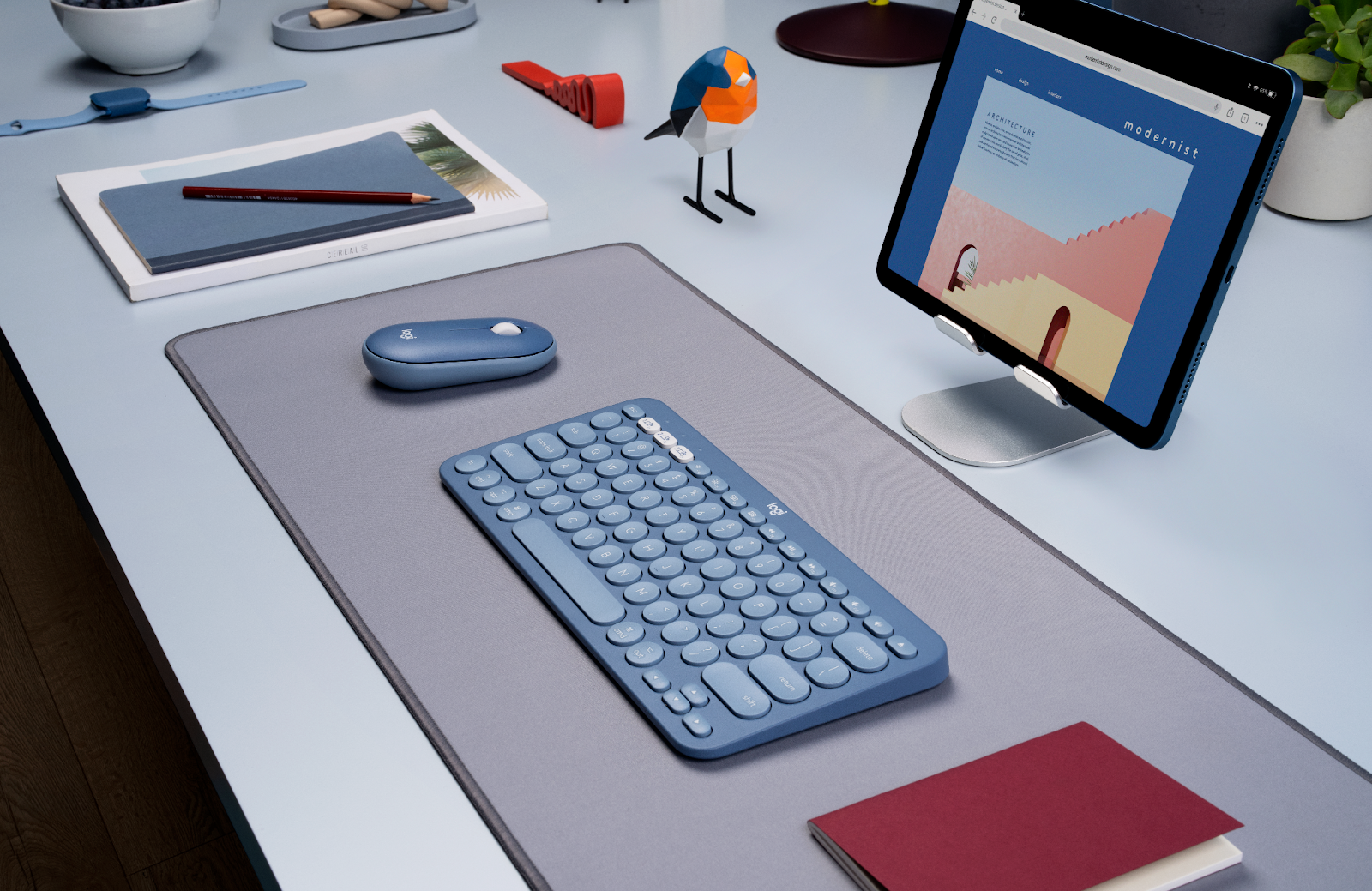
The new Logitech mouse and keyboard combo is here, pairing the K380 Keyboard with the M350 Pebble Mouse.

Targeted towards an audience who enjoys simplicity and aesthetics, the mouse is a tiny, ultra-quiet, Bluetooth unit featured in new Lavender Lemonade, Sand, and Blueberry colors to match your setup. It has a unique and super small shape that is something unique to adjust to but plenty comfortable.

The keyboard is offered in the same colorways so as to create the perfect combination of peripherals for your home office or other desk space. Both devices feature multiple-device connectivity.

You can have up to three different devices paired with your keyboard, while the Pebble mouse allows for two different connections at once thanks to the included USB receiver. Both devices put an extreme emphasis on looking great, with a super slim profile and simple characteristics.

M350 Pebble Mouse Highlights

The Pebble mouse does indeed live up to its name. It is one of the smallest wireless computer mice that I’ve used.

It features the all important Dual Connectivity which can be achieved with regular Bluetooth 3.0 and the Logi Bolt USB Receiver hidden underneath the top plate of the casing. A tiny button on the bottom of the mouse allows you to switch between these connections instantly, adding to your capacity for productivity.

Additionally, it has an ultra-silent set of switches and a scroll wheel that make very little noise. The mouse is great for shared spaces.

The general shape of the casing is pretty basic, but it has some subtle differences that make it special. First off, the height of the mouse slants down towards the primary buttons in a way that I haven’t seen from any other mice.

From above, it is particularly bland unless you opt for one of the brighter colorways. I don’t have a big problem with this, though, as it creates a nice look for just about any desk space, and strongly avoids some of the gaudiness that comes with other mice.

One thing to take note of, though, is that the mouse is very small. Even with fairly small hands, I had to make a bit of an adjustment to the way I like to hold mice to accommodate the size of the Pebble. But after just a week of use, it was no longer an issue for me; I actually found that I really enjoyed the slimmer silhouette.

K380 Keyboard Highlights

The K380 Keyboard has an ultra slim design as well. With a “75%” layout and round keys, it has a super cool look. It rests nearly flat on the desk with a slight rise like many other keyboards and is plenty compact for use on just about any size of desk.

The round keys may be a deal-breaker for some, and it took me a while to adjust to them, but I think they look great, especially when paired with the particularly round Pebble mouse.

It has a full row of function keys that allow for screenshots, swapping between paired devices (F1 – F3), playback control, volume control, and a few others, like a caret browsing toggle button. I think the Logitech K380 Keyboard has a super slick design overall for anybody who wants a minimal desk setup, and the functionality is on par or better compared with any other 75% layout keyboard.

The switches of the keyboard are not silent like the Pebble mouse, but rather have a lightweight clickiness to them. It isn’t loud by any means, or like a mechanical keyboard, but there is definitely significant audible tapping involved as you type away all day. I am not terribly impressed by the overall feel of the switches, though, as I prefer either a more solid, gratifying click, or a noiseless, smooth press. This keyboard seems to be right at a middle ground that I don’t quite have a taste for.

A Wonderful Value

One of the best things about this peripheral combo is the price. The K380 keyboard can be bought for just $39.99 on Logitech’s site, and the Pebble mouse can also be found there for $29.99. For a combined price of just $70, I think it’s a great deal especially considering the quality that always comes with Logitech products. 

If you like other compact keyboards from Logitech, this combo is worth a shot, especially for productivity while on the go. Thanks to the size and slim profiles of both devices, you can easily tuck them away in just about any bag.

You can achieve a portable, lightweight, multi-device setup with the K380 and Pebble mouse. Not to mention the fact that the keyboard and mouse can be paired to anything that supports Bluetooth 3.0, which includes Microsoft Surfaces, iPads, laptops, and PC.

Conclusion

I will leave my final thoughts as simplified as possible. The mouse is ultra-small, ultra-quiet, and ultra-simple. These three things put together make an awesome combo for basic on-the-go or at-home needs. The price is fantastic considering the renown of Logitech.

The keyboard has a unique layout thanks to the uncommon 75% design with the round keys. The functionality of the multi-device connection is something that should be included on every Bluetooth keyboard in the future without a doubt.

Again, the price for a Bluetooth keyboard from Logitech is well beyond reasonable. It isn’t feature packed, and I’m not impressed with the switches.

Paired with the Pebble mouse, it becomes an extremely high-value keyboard purely from aesthetics, simplicity, and compatibility. It had everything you need for most day to day uses.

Have more fun with solitaire with these tips

0

Whether online or offline, the card game solitaire is a popular pastime in many countries. If you follow common tips, you’ll get stuck less quickly and have a lot of fun playing this game for one.

Basic rules

If you have never played solitaire before, you need to familiarize yourself with the basics. The game consists of the cards Ace, the digits from two to ten, as well as Jack, Queen and King. The object of the game is to distribute the cards in this order and sorted by suit into four empty piles, the stacks. In addition to these stacks, there are seven longitudinal rows, also called stacks. These contain twenty-eight cards. The twenty-four remaining cards lie on the stick.

Note the number of cards

Players should keep in mind the distribution of playing cards on the stack: There is one card on the left longitudinal row. To the right, there is one more card with each successive row. Thus, there are seven cards on the right edge. Since only the card on top is visible, players should give preference to the stacks on the right. Otherwise, cards needed for a move may remain hidden in the longer stacks.

Points give hints

The points the player gets per turn depend on the specific ruleset of the solitaire version. Some rules concern placing cards on the stacks: if the player moves a card from the stick into a stack, he gets twice as many points for doing so as for moving it into a lengthwise row. If a card is moved from the stacks back into the stacks, the player loses points. If you play solitaire online and want to break records, keep these rules in mind.

First moves: discarding aces

In order not to have to take back cards from the stacks, they should be discarded with care. The basic rule is that if players find an ace in the long rows or the face-up cards of the deck, they immediately move it to the stacks. This is because stacks and piles are filled in reverse: In the longitudinal rows, the player stacks from king to ace, on the stacks from ace to king. The ace can therefore take its place directly on the stacks. When playing solitaire online, the player moves cards by drag-and-drop or by double-clicking.

A throne for the king

Discarding aces early creates space. This allows more room for maneuvering the deck. Since this is in reverse order, players should pay attention to the king cards: If a stack is free, they place a king there. This is done fastest on the shorter left stacks. Then players follow order and suit to place the next cards. By the way, they can move more than one card as long as they are stacked correctly. So in between, smaller sequences can be built.

 What to do in case of alternatives?

If you are in the fortunate position of already having two kings face up, you have to decide when in doubt: Which card should go on an empty pile? Here it is advisable to choose the card to which a longer sequence can be applied. In this way, it is possible to move to the stacks more quickly. If two stacks are empty, players choose a red king and a black king. This leaves more options for more moves.

No more moves?

If you follow these tips, you should get far in your solitaire games. If they run out of ideas, Solitaire online allows players to view specific tips for the game.

The NFL and Google announce huge deal for Sunday Ticket

0

The NFL and Google have joined forces in a monumental deal for the exclusive rights to the Sunday Ticket starting in 2023. This marks the end of a nearly 30-year agreement with DirecTV with the move to Google’s live TV offering.

The NFL officially announced this deal and is already hyping it up on Twitter this morning. The rumor mill from NFL insiders is this is a 7-year deal giving YouTube TV a huge boost in potential customers. The NFL is the biggest game in US sports ratings dominating other sports with its consistent viewership.

The new Sunday Ticket on YouTube TV is set to be available in two forms. First, you can tack on the service as an add-on to your monthly YouTube TV subscription. Thankfully, moving away from complete lock-in like with DirecTV, Google and the NFL will also allow users access to the Sunday Ticket via standalone purchases with YouTube Premium Channels format.

As mentioned, this is a big win for Google to expand YouTube TV in both subscribers and its presence in the sports world. ProFootBallTalk reports Mt. View outbid others like Apple with an estimated $2.5 billion contract agreement for the 7-year deal. The NBC outlet also states that the cost will stay similar to that of the current DirecTV charges, which is roughly $300 per year.

What do our football fans think out there? Are you excited to see the Sunday Ticket finally out of the hands of DirecTV? Do you think this Google partnership makes it more or less appealing?

Review: Vankyo Performance V700W projector (Podcast)

In this episode of the AndroidGuys podcast, Scott Webster and Luke Gaul chat about the Vankyo Performance V700W projector. What is it, and how is it different from the other models we recently tested? Read on to learn more and listen to the podcast.

Be sure to subscribe to the AndroidGuys podcast through your favorite platform or add the AndroidGuys Podcast RSS feed to enjoy!

What is the Vankyo Performance V700W?

The Vankyo V700W is a 1080p projector that comes with a 120-inch screen. It features a pair of 5W speakers with Dolby Digital Plus but it can also pair to a Bluetooth speaker or soundbar for enhanced sound. The projector has keystone correction, screen zooming capability, and digital control for focus with some features accessible via the remote control.

Images can be projected up to 224-inches; it’s designed to work as a front projector as well as a rear one. Moreover, it can work upright and with its built-in pedestal, or upside-down and mounted to a ceiling.

Gallery

Features

  • 1920 x 1080 resolution
  • Comes with remote control and 120-inch screen
  • Projects up to 224-inches (18’6″)
  • Pair of built-in 5W speakers with Dolby Digital
  • Can be used to project from front, rear, and ceiling
  • Bluetooth 5.1
  • Two HDMI ports, two USB ports, and audio output
  • Blue light filtering
  • 3-year warranty

Listen to the Episode

Parting Thoughts

We like the versatility of this projector bundle and appreciate the generously sized screen that’s included in the box. For those who don’t plan to move their projector around very often, this one is a solid option. It works well whether mounting to the ceiling or projecting from the rear or front.

The projector does a respectable job of producing a loud and clear sound, but we’d likely opt for plugging into the 3.5mm audio port or connecting via Bluetooth.

With a maximum size of more than 18 feet (diagonally), the V700W is a great choice for those who like to entertain or have children. The 1080p resolution, bright image, and crisp contrast add up to a bundle worth checking out.

Where to Buy the Vankyo Performance V700W

You can learn more about the Vankyo Performance V700W at the manufacturer’s website where you can currently purchase one for about $300. It’s also available through Walmart and other retailers.