Vivo has expanded its S series portfolio with the launch of the Vivo S17e smartphone. The S17e phone is now official in China and regarding its global availability, Vivo usually launches the S series smartphones in the global markets under the V series. So we can expect Vivo S17e will come as a Vivo V29 series.
The Vivo S17e smartphone starts at CNY 2,099 (~$301) and comes in three beautiful color options- Sunny Blue, Sand Gold, and Midnight Black. The smartphone is now up for pre-order and sale will start from May 20 via Vivo’s official website in China.
Vivo S17e flaunts a 6.78-inch FHD+ AMOLED display with a 300Hz touch sampling rate, up to 1300 nits of peak brightness, and a 120Hz refresh rate. You’ll get a 64MP primary camera lens with OIS support and 2MP macro unit. There’s a 16MP front camera for selfies and video chats.
Under the hood, the smartphone is powered by a MediaTek Dimensity 7200 chipset paired with up to 12GB of RAM and 256GB of internal storage. Vivo S17e houses a 4,600mAh battery with 66W fast charging support. The device boots Android 13 based on OriginOS 3 out of the box.
OPPO has officially launched the latest 5G mid–range smartphone in the F series- the OPPO F23 5G in Indian markets. The F23 comes with decent features at decent pricing but compared to the predecessor, the smartphone hasn’t got any major upgrades in terms of processor and camera. The notable improvement is OPPO added 67W fast charging support. Have a look at the detailed specifications and pricing of the OPPO F23 5G smartphone.
OPPO F23 5G retails at ₹24,999 for the 8GB + 256GB variant and comes in Bold Gold and Cool Black color options. The smartphone is now available for pre-order via Amazon and OPPO.com and it will be up for sale starting from May 18th.
OPPO F23 5G smartphone is powered by a Qualcomm Snapdragon 695 processor (the same processor we saw in the F21 Pro, F21s Pro 5G smartphone) paired with 8GB of RAM and 256GB of internal storage and it also has up to 8GB virtual RAM support. One thing OPPO did it very well is the brand promised to offer 4 years of major OS updates and 5 years of security patch updates.
In terms of lenses, the smartphone features a triple rear camera setup at the back- a 64MP primary camera joined by a 2MP portrait lens and 2MP macro lens and it has a 32MP selfie camera for capturing video chats and selfies. The smartphone is backed by a 5,000mAh battery (which is up from 4.500mAh) with a 67W (up from 33W) fast charging support.
OPPO F23 5G sports a 6.72-inch FHD+ LTPS LCD panel with a 120Hz refresh rate, 680 nits of peak brightness, and a 240Hz touch sampling rate. The device boots Android 13 based on ColorOS 13.1 out of the box.
The mophie Powerstation Pro AC (2023) is a portable power bank designed to charge your devices on-the-go. It features a high-capacity 27,000mAh rechargeable battery, which can charge multiple devices at once, including laptops, smartphones, tablets, and other USB and/or AC-powered devices.
Read on to learn more or [check out the podcast]() (also embedded below) to see what we thought of the Mophie Powerstation Pro AC.
Noteworthy Features
Up to 100W output via AC
Up to 140W shared output using multiple ports
27,000mAh internal battery
Two-year warranty
LED battery level indicator
Made from up to 50% post consumer recycled plastic
Gallery
Thoughts and Conclusion
One of the standout features of the Powerstation Pro AC is its ability to provide AC power, allowing you to charge devices that require a wall outlet. The power bank features an AC outlet that can deliver up to 100 watts of power, which is sufficient to power small laptops, cameras, and other AC-powered devices.
In addition to the AC outlet, the Powerstation Pro AC also features two USB-C ports and a USB-A port, allowing you to charge multiple devices simultaneously. The USB-A port supports fast charging up to 20W while the USB-C ports provide up to 60W and 20W PD for each, respectively.
The Powerstation Pro AC isn’t designed specifically for outdoor or rugged use, but it does appear to have a fairly strong build to it. Additionally, the built-in wrist strip makes it easy to carry around and less prone to take a spill when outside.
The mophie Powerstation Pro AC is a versatile and durable portable power bank that can keep your devices charged and powered on-the-go. Given that so many of our gadgets use these three port types, this one is a terrific all-in-one device for long weekends on the go or extremely busy days working remotely and on the road.
The Homey Bridge is a powerful and versatile device that allows you to control all of your smart home devices from a single app. Whether you’re looking to increase your home security or simply streamline your daily routine, the Homey Bridge has something to offer.
One of the key benefits of the Homey Bridge ($69) is its ability to integrate with a wide range of smart home devices. This means that no matter what kind of smart home products you currently own or plan to buy in the future, the Homey Bridge can likely work with them.
From smart locks and security cameras to smart thermostats and lighting, the Homey Bridge can control it all. And if you’re cobbling together a system that employs a variety of brands or protocols, you’ll be just fine.
One of the most notable features of the Homey Bridge is its powerful automation capabilities. With the Homey app, you can create custom rules and routines that automate many aspects of your home. For example, you could set up a routine that turns off all of the lights and locks the doors when you leave the house, or a rule that automatically turns on your lights when you arrive home. Another great feature of the Homey Bridge is its integration with Google Home and Amazon Alexa.
The Homey Bridge supports a wide range of protocols and standards, making it compatible with many smart home devices. Some of the protocols and standards it supports include:
Zigbee: Zigbee is a low-power wireless communication protocol used for home automation. It allows devices to communicate with each other and with a central hub, like the Homey Bridge.
Z-Wave: Z-Wave is another wireless protocol for home automation, similar to Zigbee. It operates on a different frequency band and has a longer range than Zigbee.
Bluetooth
Wi-Fi
Infrared
These protocols and standards are widely used in the smart home industry, so the Homey Bridge’s support for them makes it a versatile and powerful hub for controlling a wide range of smart home devices.
In terms of security, the Homey Bridge also has a lot to offer. With support for a wide range of smart home security devices, including cameras, sensors, and smart locks, you can keep your home secure and monitor activity from anywhere.
As to how many devices one can connect or integrate with the Homey Bridge, well that’s up to the user. A free account allows for up to five devices. To help get a feel for the much bigger picture, however, the Homey Bridge comes with three free months of Homey Premium. This opens the door to unlimited devices, insight, and more.
Using Homey Premium it’s possible to create complex flows with multiple actions and conditions, giving you a whole new way of dealing with your smart home. It also provides users with access to an expanded selection of apps and devices.
Homey Bridge users can create an unlimited number of flows — automated sequences of actions triggered by specific events or conditions.
Homey Premium provides a range of benefits and features that are designed to enhance the functionality and convenience of the Homey ecosystem. That is to say, it’s a great product to have if you’re building out a smart home one or two devices at a time.
The Homey Bridge is a great choice for anyone looking to streamline their smart home experience and take control of their devices. With its wide range of compatibility, powerful automation capabilities, and unlimited flows, it’s a must-have for any serious smart home enthusiast.
Whether you’re looking to increase your home security or simply make your daily routine more efficient, the Homey Bridge is worth considering, especially at just $69.
The XGIMI MoGo 2 Pro, now shipping, is a successor to one of my favorite digital projectors of the last few years. Not only is it sized right and pretty portable, it’s powered by Android TV and makes for a great entertainment device. Priced $599, it comes with a $50 discount for a limited time.
The XGIMI MoGo 2 Pro is a small projector that weighs about 2.5lbs and occupies as much space as a roll of paper towels. It’s wrapped in brushed aluminum and looks great on any shelf, regardless of your environment.
While it’s quite portable, it does require a power source, but the included power cord is long enough to reach outlets that might be harder to reach. You can also use it with a portable battery bank, although this will automatically enable an Eco mode which reduces brightness and audio.
One of the major selling points of the projector is the uninterrupted keystone feature, which corrects perspective and focus on the fly. This means you can point the projector at any flat surface from pretty much any angle, and it will adjust the image without having to back out to a specific screen. This feature makes it great for portable use, as you don’t have to spend time adjusting the picture.
On the back of the projector, there is an HDMI 2.0 port with ARC, a USB 2.0 port, a 3.5mm output, and a USB Type-C port for power. The MoGo 2 Pro requires 65W of power, which can be found in many high-end charging solutions. XGIMI’s decision to use a Type-C port instead of a proprietary plug or DC connector opens the door to portable batteries and power stations.
A pair of 8W speakers are located on the sides and feature a number of Dolby certifications, which pump enough sound to fill the average living room. If you’re using it outside for camping or projecting on the garage, you’ll be pleased with the volume and clarity. The projector doesn’t have an internal battery, but this isn’t an issue for most people, as there is usually an outlet within reach.
The lens is located on the top right corner of the front with a CMOS camera and 3D ToF sensor that handles the keystone correction. The 1080p picture looks great in dim and lower light thanks to the 400 ISO Lumens bulb.
The projector can create a 60-inch screen at about 1.6m or approximate an 80-inch screen at a little over two meters, so you can easily project an image that’s bigger than your current television without needing a large room or wide open space.
Diagonal Sizes
38 inches @1m (1.8m*0.5m)
76 inches@2m (1.7m&0.9m)
114 inches@3m (2.5m*1.4m)
151 inches@4m (3.4m*1.9m)
189 inches@5m (4.1m*2.4m)
227 inches@6m (5m*2.8m)
The projector does not have Netflix installed on it, but an included pamphlet tells you how to go about sideloading it. With a throw ratio of 1.2:1, the picture quality is great with excellent colors and high contrast, especially in a dark room. Dancing between the various modes will yield different results, each of which is fairly noticeable as you cycle through them.
The MoGo 2 Pro runs on AndroidTV 11, which works as a user interface and is easy to set up upon taking it out of the box. A few minutes after you plug it in, you’ll be watching content from a variety of sources. It’s not too unlike what you get with the NVIDIA Shield, so the transition is nearly seamless.
While there may be more powerful or more portable projectors out there, the XGIMI MoGo 2 Pro sits perfectly in the middle of a Venn diagram of quality home entertainment devices. If you’re looking for a great portable projector, the MoGo 2 Pro is definitely worth checking out.
Google just wrapped up its Google I/O 2023 event with a new smartphone, the first foldable phone and tablet, and many new exciting features. Google announces a new AI feature for Gmail on Wednesday at its Google I/O 2023 event. Gmail’s this new AI feature will write entire emails for you.
Google calls it “help me write”, basically this feature is an upgrade to the auto-replies that Google already embedded in Gmail. Furthermore, during a presentation, the CEO of Google Sundar Pichai beautifully demonstrated this feature by taking the example of asking an airline for a refund for a flight.
This Gmail’s new AI feature gathers all the context of the emails which you previously exchanges with the airlines and writes an entire mail asking for a refund. And obviously, you can edit the message the way you want and then you are ready to send it. The feature is really helpful for many folks that reduces their writing efforts and most importantly it saves time on mindless emails.
Formerly known as the “Vital”, the Sidetrak Select is a 1080p HD resolution, 23.8” desktop monitor featuring an ultra slim, edgeless design with the intent of enhancing productivity and expanding your workspace at home or in the office. It can act as a standalone monitor, and it features an HDMI port as well as a VGA port. It also features a Kensington Security Slot for theft protection.
The Select monitor is compatible with Windows, Mac, and Chrome OS for maximum ease of integration into your current setup. It comes out of the box with a power cord and wall adapter as well as an included HDMI cable, so you can be sure that you will have everything needed for full functionality.
The power button/joystick is a unique quirk, but it took me far too long to figure out the joystick part, which allows for adjusting brightness and switching between input channels.
The full dimensions of the display are 21 x 15.5 x 0.32 inches, weighing in at 7lbs. For those seeking technical details, the color depth is 8 bit, featuring 16.7 million colors with a 50% color gamut. Of course, next to my OLED laptop monitor it doesn’t seem to be anything special, especially in the darker range; if you aren’t using it as a home theater, I find the color output to be perfectly reasonable for a monitor of this class.
With a brightness of 250 Cd/m2, a contrast ratio of 3000:1, a resolution of 1920 x 1080, and a refresh rate of 60-75 Hz, the Select is not exactly a powerhouse product, but it can absolutely do the job as a supporting peripheral.
Features & Setup
Of course, there isn’t too much depth to discuss here, but I’d like to touch on the simplicity of setup with this monitor. All I needed to do was connect the HDMI cable, the power cord, and press the power button. The monitor immediately booted up and detected the HDMI input automatically.
My laptop detected the new monitor connection and I was able to seamlessly extend or mirror my display to the Select monitor. Attaching the base stem and legs was equally simple, requiring only a small screwdriver (though none was specifically provided).
As the monitor is simply meant to be an extension to your desktop, rather than a primary display, it only features two possible input ports: one VGA and one HDMI. Personally, I feel that this is all that I need, but If you’re looking for one monitor to do it all, there will be better options for you.
I did notice that there is little customization as the “joystick” power button/menu navigator allows only for brightness adjustment In addition, it’s worth mentioning that this monitor does not feature built in audio output however this is pretty standard.
Regardless, the monitor did meet my expectations for all intended purposes over the few weeks that I’ve had it. I did appreciate the “matte” anti-glare finish that the monitor features, and apparently there is a subtle blue light-filtering at play to help reduce your eye strain.
I didn’t find myself struggling or straining after periods of extensive use of the monitor, so it passed that test as well. In addition, the edgeless design all but eliminates the bezel on three sides of the screen. This makes for a better looking product as well as a less noticeable transition between displays. In my opinion, this is an essential part of the external design of any desktop monitor, and SideTrak nailed it. Another pass!
Overall
The main talking point of this product, I feel, is its price. For the many people who may feel that money is, in fact an object, $179.99 is no small price to pay for a secondary display. I feel that the price tag is a bit on the high end within this class of monitors, as many other reasonable displays of similar dimensions and resolution (only 1080p, after all!) can be found for around $100-$140.
Of course, I cannot say that I was not happy with this product. The edgeless aesthetics exceed my expectations, and the matte, anti-glare, anti-blue light screen makes for an easy, calming viewing experience.
My main concern with the product is the high cost and relatively average features and lack of customizability. However, don’t get me wrong, it is most definitely not unreasonable for the quality offered by SideTrak.
In a world where technology constantly evolves, Google’s latest creation, the Google Pixel Tablet, marries smart display tech with a traditional Android tablet. Combining cutting-edge features, sleek design, and seamless integration with Google’s ecosystem, the tablet could usher in a new way of work and play.
The Google Pixel Tablet is a device designed to be your helpful companion around the clock. Whether you’re at home or on the go, this tablet is packed with features to enhance your entertainment and keep you connected.
Let’s dive into what makes the Google Pixel Tablet your next must-have device.
Immersive Entertainment at Your Fingertips
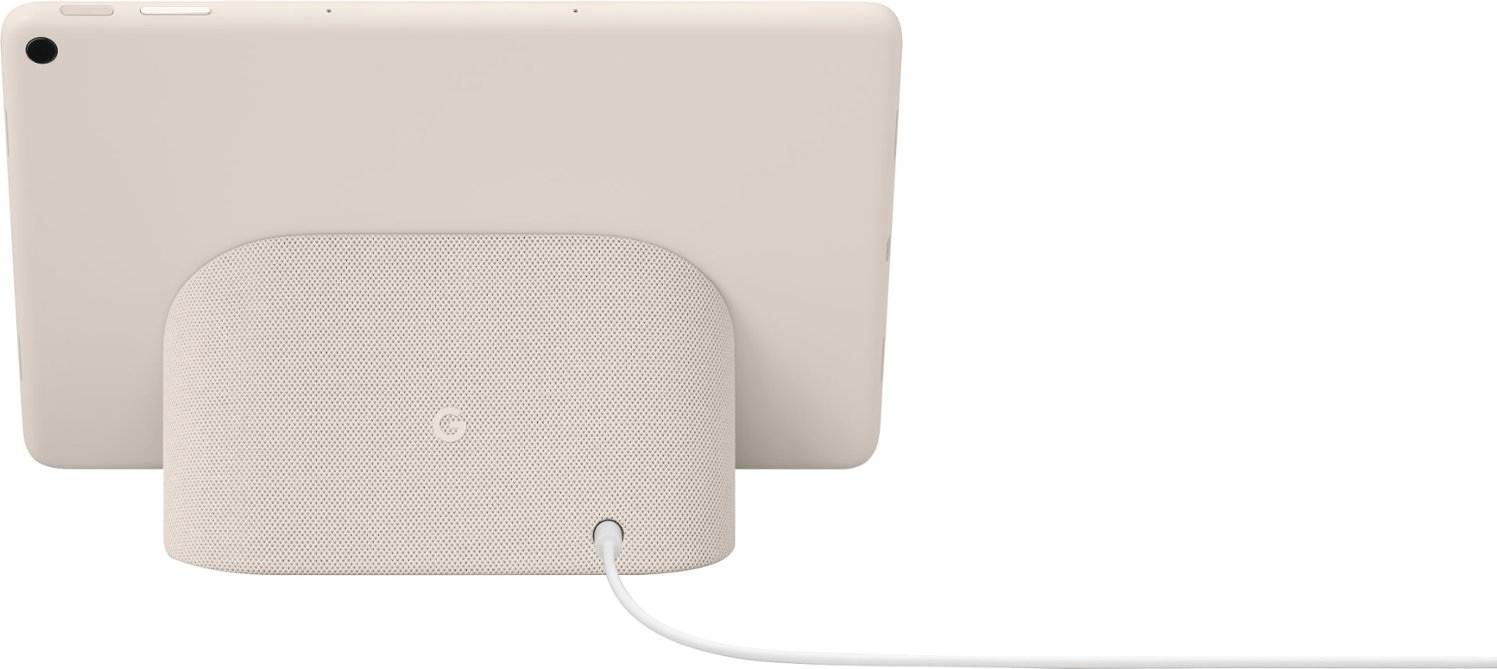
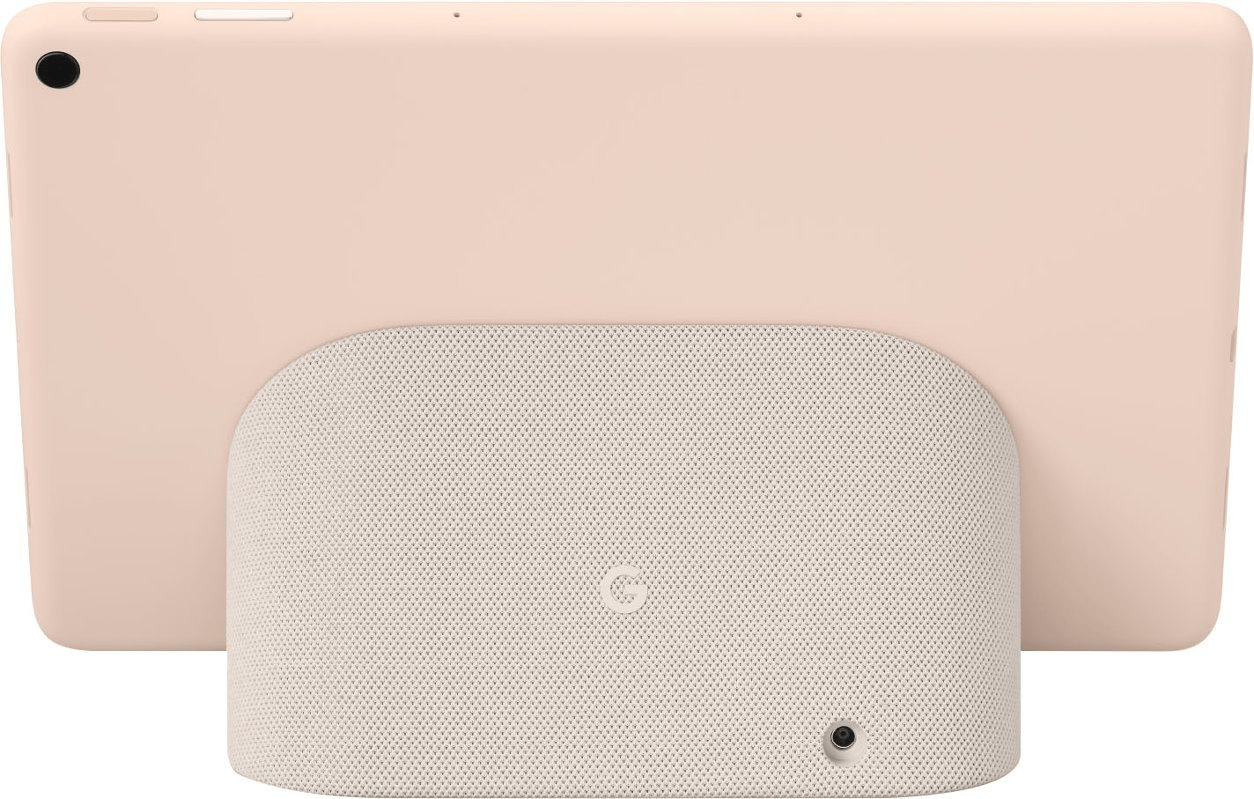
With its stunning 11-inch display and powerful speakers, the Pixel Tablet is your ticket to an incredible entertainment experience. Whether you’re streaming your favorite shows, enjoying music, or playing games, the tablet delivers impressive visuals and crystal-clear sound. Its sleek design, featuring vibrant colors (Porcelain, Hazel, and Rose) and a textured aluminum enclosure, ensures it not only looks great but feels great too.
Enhanced Apps and Pixel-Perfect Performance
The Google Pixel Tablet works well with popular apps like YouTube, Spotify, and Disney+ to provide a seamless browsing and viewing experience on its larger screen. You’ll enjoy optimized interfaces that make navigation easier and content more enjoyable. And with its fast performance and long-lasting battery life, thanks to the Tensor G2 chip, you can dive into your favorite games without missing a beat.
Boost Your Productivity with AI-Powered Features
The Pixel Tablet is here to help you get more done in your day-to-day tasks. Over 50 Google apps have been recently optimized for this tablet, including Google Meet, which offers crisp and high-definition video calling.
With advanced AI camera technology and the Tensor G2 chip, your video calls will always look their best, adjusting to your lighting and surroundings in real-time.
The tablet’s larger screen and split-screen functionality allow you to multitask effortlessly, whether it’s editing photos with powerful tools or using Assistant voice typing for efficient email composition.
Security and Smart Home Integration
Your personal information is safeguarded with the Pixel Tablet’s robust security features. With the Tensor G2 and Titan M2 security chip, multiple layers of protection ensure your data remains safe and secure.
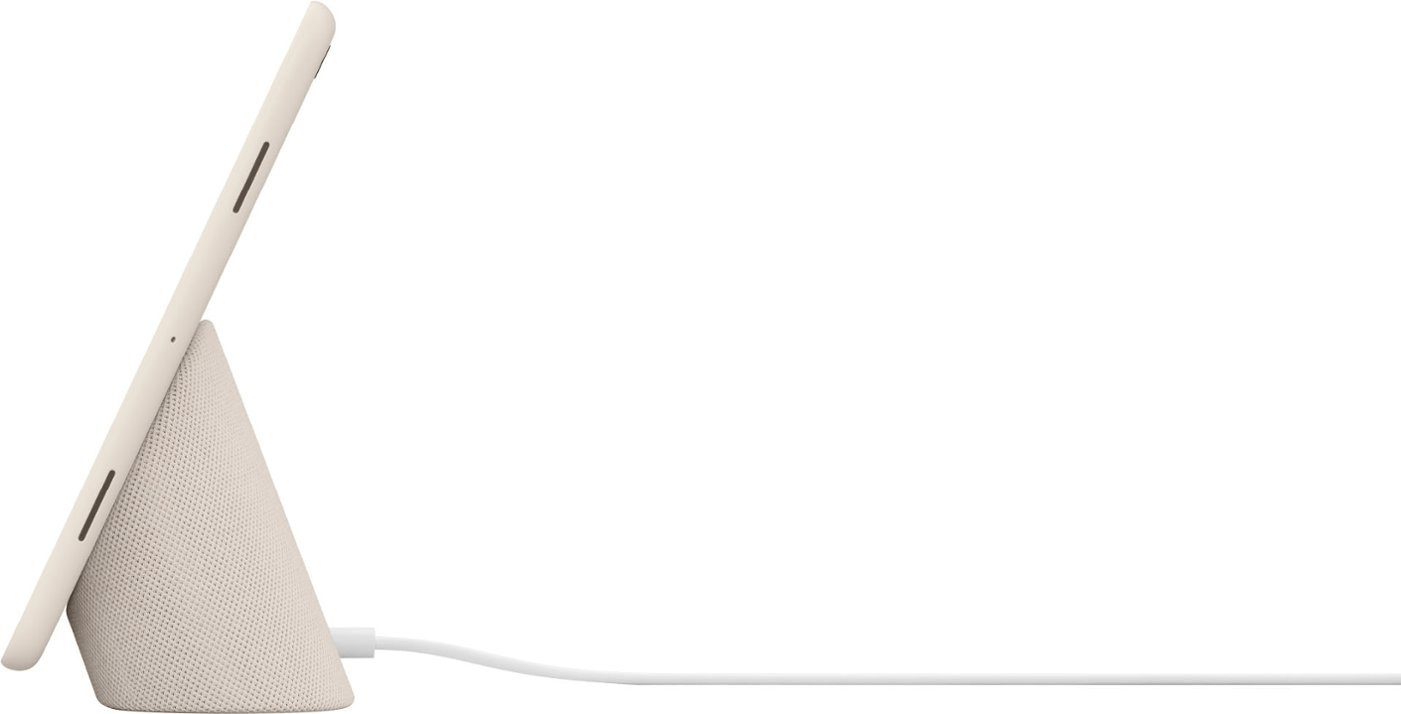
The tablet seamlessly integrates with your smart home through the Charging Speaker Dock. This convenient accessory charges your tablet while providing immersive sound with four times the bass.
The Google Pixel Tablet introduces an exciting feature called Hub Mode, which transforms your tablet into a versatile home hub. With Hub Mode, your Pixel Tablet becomes a central command center for your smart home, offering an array of convenient functionalities.
When the Pixel Tablet is in Hub Mode, it seamlessly connects with your compatible smart home devices, putting control right at your fingertips. With a simple tap of the Google Home icon, you gain instant access to your favorite smart home features. Whether you want to check your video doorbell feed, adjust the thermostat, or turn on the lights in the living room, the Pixel Tablet makes it effortless.
The Pixel Tablet in Hub Mode offers a hands-free experience, allowing you to interact with your smart home using just your voice. It functions as a voice-activated helper, responding to your commands and performing various tasks. You can ask questions, set reminders, create shopping lists, and even control compatible devices, all without lifting a finger.
The Pixel Tablet is the first tablet to feature Chromecast built-in. This means you can effortlessly cast videos, music, and other content from your phone directly to the tablet’s larger screen while it’s in Hub Mode. Enjoy a seamless transition as you switch between devices and continue your entertainment experience without interruption.
Where to Get Your Pixel Tablet
Excited to get your hands on the Google Pixel Tablet? You can pre-order it online today bundled with the Charging Speaker Dock for $499. It will be available in select countries, including the U.S., Canada, U.K., Germany, France, and more, starting June 20. Visit the Google Store and other authorized retailers to secure your order and embark on a new level of entertainment and productivity with the Pixel Tablet.
Nothing had released the first smartphone, which fans believed was a big deal. Now, the company is working on another Nothing Phone. Simply referred to as Nothing Phone (2), the smartphone is billed for unveiling this summer.
The news surfaced on Twitter, revealing some of the biggest aspects of Nothing Phone (2).
However, some features of the device are being leaked and it shows it will be a premium offering. One of its biggest features is the Snapdragon 8+ Gen 1 chipset. Already, we can see the rear of the smartphone and that gives us some ideas on how the phone will be.
Phone (2) design
The design shows a textured area as well as sloping lines and circular shapes. These reside alongside a red LED which some analysts believe is the video recording indicator that was also featured on the Phone (1).
Specs and features of Phone (2)
The Twitter leak information showed that the smartphone will feature a 6.55-inch Full HD+ AMOLED display. It resembles that of Phone (1) screen. In addition to that, it is expected that the device will arrive with a 120Hz refresh rate.
There are speculations that it could arrive in three variants at the RAM+Storage configurations. There could 8GB+128GB, 8GB+256GB, and 12GB+256GB. The ability to expand the storage or not remains to be seen when it is finally announced.
As per the camera department, it may boast a 50MP main snapper with OIS, supported by other nice features. The battery may likely be a big one of up to 5,000 mAh with fast charging capacity.
The good thing about this latest leak is that the smartphone is leaving the mid-range level and entering the high-end league. This will also definitely affect the price range as well, when compared to the predecessor.
We await more information come this summer, when the phone will be launched.
After months of rumors and leaks the Google Pixel Fold is official. Available for pre-order immediately, shipping starts next month. This innovative new device combines the helpfulness of Pixel with a sleek design that unfolds into a compact tablet, giving you even more ways to use your phone.
The Pixel Fold boasts a thin and durable design that fits perfectly in your hand and slips effortlessly into your pocket when it’s closed. But flip it open, and you’ll be greeted by a stunning 7.6-inch screen, thinner than any other foldable phone on the market.
To create this foldable design Google had to redesign several Pixel components, including the camera, battery, speakers, and haptics technology. The custom-built hinge, which lends to the phone’s slimness, is the most durable one of its kind on the market. And while it looks like a premium device in every sense, the Pixel Fold is IPX8-rated, so users don’t need to worry about water splashes.
When the phone is closed you can use the exterior screen to carry out all the usual tasks such as responding to messages, browsing the web, and utilizing handy Pixel features such as Direct My Call, Call Screen, Hold for Me, and Clear Calling.
Once opened, the Pixel Fold is pretty much a full-on tablet experience. Many of your favorite apps have been optimized to make the most of the larger screen, whether you’re binge-watching your favorite shows, diving into a good book, or getting work done. The recently revised Taskbar lets user seamlessly switch between apps or use compatible apps side-by-side in split-screen mode.
Tabletop mode lets you prop up the Pixel Fold to enjoy content without needing a tripod. This mode is especially handy for YouTube, as the top half of the screen displays your video while the bottom half offers (coming soon) playback controls.
As you might expect, the Pixel Fold boasts incredible camera capabilities. With features like Super Res Zoom (with 5x optical zoom), Real Tone, Night Sight, and Portrait photography, you can capture stunning photos with ease. Plus, you can use Magic Eraser and Photo Unblur in Google Photos to perfect your shots.
The Rear Camera Selfie feature on the Pixel Fold allows you to snap high-quality selfies using the exterior screen as your viewfinder. The 48-megapixel main camera ensures your selfies look amazing.
And there’s more excitement to come! When Android 14 launches later this year, you can look forward to the Dual Screen interpreter mode on the Pixel Fold. It’ll utilize both the inner and outer screens to facilitate live conversations and translations. Say goodbye to language barriers and enjoy more natural conversations, all without huddling around a single screen.
Pre-Order
You can pre-order ($1,799) the Pixel Fold today, and it will be available in two stunning colors: Porcelain and Obsidian. As a bonus, when you pre-order in the U.S., you’ll also receive a Google Pixel Watch, absolutely free.
If you’re eager to find out which countries the Pixel Fold will be available in check out this support page on Google.