Home Blog Page 273

Snapdragon Summit 2023: Qualcomm unleashes new S7 and S7 Pro Gen 1 Sound platforms

0

Qualcomm’s Snapdragon Summit 2023 kicks off at Maui Hawaii, unveiling next-generation chipsets. Today, Qualcomm introduced two new sound platforms the S7 and S7 Pro Gen 1 that take the sound experience even further.

The growing demand for true wireless earbuds and headphones with premium audio features is all-time high since the usage of earbuds and headphones is considered crucial for activities such as commuting, working, and gaming. According to Qualcomm’s latest sound report, over 73% of consumers want premium sound features including spatial audio, clear voice calls, and lower audio latency on their devices. 

These are Qualcomm’s most advanced audio platforms ever- the Qualcomm S7 and S7 Pro Gen 1 sound platform, specially designed for headphones, earbuds, and speakers. The combination of high performance, low-power computing, on-device AI, and advanced connectivity sets a new benchmark in the era of audio innovation, delivering immersive and personalized audio experiences. These latest sound platforms are designed for audio products including earbuds, headphones, and speakers, as of now. Qualcomm has no plans to expand it to further devices, said Guy Gampell Product Marketing Manager at Qualcomm in an interview with the AndroidGuys. 

Qualcomm S7 and S7 Pro Gen 1 Sound Platforms: Unleash Next-level Audio Experiences

Qualcomm is taking a sound experience even further with its latest addition of two new Qualcomm S7 and S7 Pro sound platforms in the portfolio. The latest platforms bring meaningful upgrades over the last-gen Qualcomm S5 Gen 2 sound platform. 

Qulacomm totally revamped the architecture of these platforms to achieve significant numbers when it comes to performance. The S7 and S7 Pro Gen 1 both sound platforms are power-efficient, delivering six times more compute power and almost 100 times more AI power than the last generation platforms

Qualcomm packs a dedicated Qualcomm Micro eNPU 64GOPS AI engine with a DSP 2x500MHz cores, 1x250MHz core, and 10.6MB of RAM (up from 2.64MB in the last generation) in both platforms that ensures a new tier of audio performance. 

Features Comparison
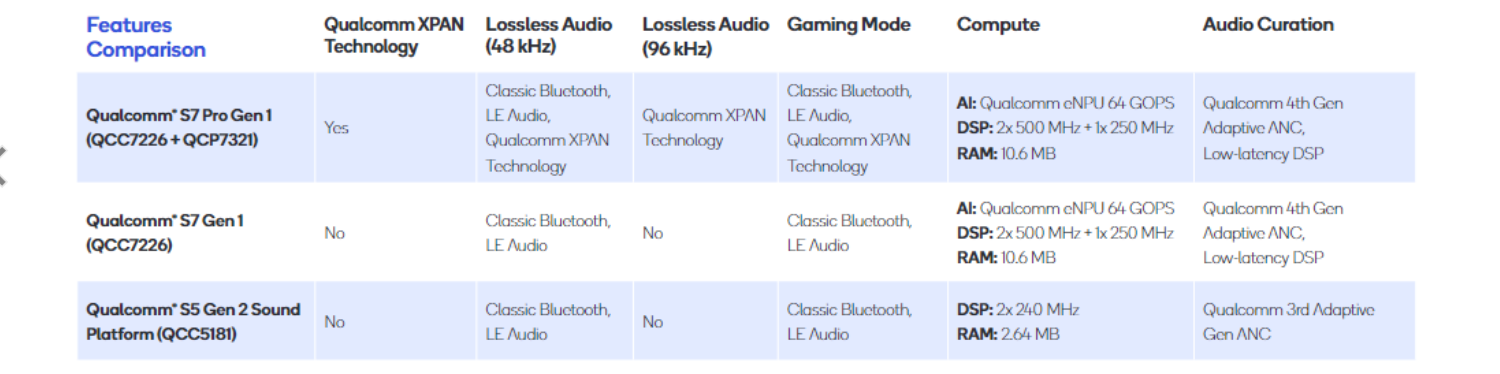
Both platforms use on-device AI to improve hearing enhancement technologies and deliver a more seamless user experience by tracking user needs throughout the day and optimizing as per conditions. For example, by using On-device AI learning, if you are on call, it can intelligently switch to ANC mode and once the call ends it will automatically switch to transparent mode. 

The S7 and S7 Pro Gen 1 support Qualcomm’s 4th Gen Active Noise Cancellation which the firm claims offers the strongest-ever ANC performance in conditions like busy office, cafe, or on streets. The 4th Gen ANC automatically and dynamically adapts, providing strong ANC performance based on different environmental conditions.

Furthermore, Qualcomm packs dedicated cores for audio curation including hearing loss compensation, ANC, Transparency, and noise management. Both chipset supports the latest Bluetooth v5.4 connectivity establishing a faster and seamless connection with the device. You get Hi-Fi grade stereo audio codec and Bluetooth LE Audio experiences including Auracast and Broadcast Audio offer great sound experience.   

What makes the S7 Pro Gen 1 So Pro

Qualcomm integrated its revolutionary XPAN technology in the S7 Pro Gen 1 platform that keeps your earbuds connected even when your phone is in another room, or a another floor of your building. With the XPAN technology, the Qualcomm S7 Pro Gen 1 platform brings high bit-rate audiophile music streaming which delivers over WiFi at a power consumption level that means you get a stunning lossless audio quality ranging from 92KHz to 192KHz.

OUKITEL to Unveil 120W, 5G WP30 Pro Flagship Rugged Phone and 12’’ Stylish OT5 Tablet on 11.11.2023 at AliExpress

0

EDITOR NOTE: This is a promoted post and should not be considered an editorial endorsement

Oukitel, a top rugged phone manufacturer, will amaze the world once again as their groundbreaking WP30 Pro flagship rugged phone addresses two major issues plaguing the industry: weak processor performance and lengthy charging times. The WP30 Pro will be officially unveiled during the 2023 Double 11 Global Shopping Festival. Alongside the WP30 Pro, Oukitel will also debut their stylish 12-inch OT5 smart tablet. 

WP30 Pro: 15 Mins to Charge 50% – Experience the 120W Super-fast Charging That Even Overshadows iPhone 15 and Samsung Galaxy S23 Ultra 

The WP30 Pro proudly introduces two game-changing features to the rugged phone industry. Firstly, it revolutionizes charging technology with the world’s first 120W super-fast charging. Equipped with a 11000mAh battery capacity, the WP30 Pro reaches 50% of its capacity in just 15 minutes. No more waiting for hours to recharge. Notably, the ultra-fast 120W charging power surpasses even the iPhone 15 and Samsung Galaxy S23 Ultra. 

The WP30 Pro breaks another record by being the world’s first rugged phone to adopt a flagship 5G processor, the MediaTek 5G Dimensity 8050 chipset. This 5G chipset scores up to 820,373 points on Antutu 10, doubling the performance of the MediaTek Helio G99 commonly used in many mid-range rugged phones. Users can bid farewell to the sluggish performance often associated with rugged phones and embrace a whole new world.

Equipped with a 6.78″ FHD+ front display, the Oukitel WP30 Pro also features a 1.8-inch back display. The addition of the back display makes the phone an even better outdoor companion by showcasing battery and music status, step count, and various notifications.

OT5: Ignite More Fun with a 12” TÜV SÜD Eye-Friendly Screen, MediaTek G99, and up to 36GB RAM

The OT5 tablet is another captivating addition, which boasts a large 12-inch 2K screen for a captivating visual experience. The 2K screen is TÜV SÜD-certified to protect eyes. It filters out harmful blue light, providing eye protection and comfort in low-light conditions. With this feature, it’s children-friendly as well.

Other highlights on the OT5 include a powerful MediaTek Helio G99 processor, 11000mAh battery, up to 36GB RAM, and 256GB ROM storage.

The WP30 Pro rugged phone and OT5 tablet will be launched during the 2023 AliExpress Double 11 Shopping Festival. They have not announced the final debut price. Interesting buyers could stay tuned to Oukitel for more details. 

Purchase the WP30 Pro from AliExpress or Oukitel’s website. The OT5 is also available at AliExpress and Oukitel’s official site.

About OUKITEL

OUKITEL is a high-tech corporate brand of “Shenzhen Yunji Intelligent Technology Co., LTD” based in Shenzhen, China. This company integrates research and development, design, production, sales and after-sales service. With a partner network of more than 130 dealers in 60 countries, OUKITEL products are distributed throughout Europe, Asia, North and South America. 

Follow OUKITEL for more information on Facebook, Youtube and Twitter.

Stellar Android Data Recovery Tool

Your phone data is one of the most valuable things you own these days. Knowing that is secured during daily use via cloud backups and onboard storage is great, but what happens when you need an emergency deletion reversal? Tools like Stellar Android Data Recovery Tool hope to solve this issue with a desktop software suite.

What does it do?

Stellar is a desktop app for Windows PCs that allows you to scan your mobile devices for recoverable files. The file types include photos, messages, videos, audio, contacts, call history, and personal documents.

Take Advantage of an Exclusive Limited-Time Deal

Stellar uses proprietary algorithms to efficiently search all available memory on your devices to help recover as much data as possible. It’s compatible with all the major Android manufacturers as well. This includes OnePlus, Samsung, and Motorola running at least Android version 6.

How does it work?

Using Stellar Android Data Recovery is as simple as it gets. Once you get the .EXE file from Stellar’s website, you’re just a few clicks away from having the free trial of the desktop suite. This gives you a brief walkthrough of what to expect in the initial view.

From there, you will want to plug in your Android device and continue the steps in the desktop app. This will include a few extra steps on your phone like enabling developer options, USB debugging, and finally allowing the phone to act as a USB storage device.

After taking a few minutes to scan your phone’s internal memory, you’ll get a preview of all the photos, videos, audio, and documents available to be restored. Now, this is also where you’ll have to decide just how valuable this information is to your wallet. It will take at least the Standard user license of $30 to fully recover your data.

The good thing is that the Stellar scanning process found all my recently deleted files and you should be able to restore most user data. Each device is different, but the Stellar team has a great reputation and confidence in their product after our testing experience.

Conclusion

Data recovery is a niche market but can be invaluable in the right circumstances. Stellar Android Data Recovery is a great option for those looking to get those long-lost baby photos back from mistaken deletion. Finally, at just $30, it could be a steal to have that piece of mind and data back on your device in under an hour.

Hit the link below to get started with Stellar Android Data Recovery today with a quick download.

Download the Stellar Android Data Recovery Tool

Limited-Time Deal!

Take advantage of a deep discount and score Stellar Android Data Recovery Software for just $19 for up to three devices. That’s about $40 off the normal rate, which is quite the savings!

XREAL Unveils Next-Gen AR Smart Glasses: A Leap Towards Impeccable Virtual Experiences

0

The realm of Augmented Reality (AR) is ever-enticing, and the unveiling of new AR/MR gadgets always piques my curiosity. Among the plethora of futuristic gadgets, AR smart glasses stand out as a premier device to delve into virtual realms.

XREAL (previously known as Nreal) has been at the forefront of the AR smart glasses arena, with its first-generation Xreal Air smart glasses making notable strides by amassing over 100,000 sales last year.

Not resting on its laurels, XREAL has enriched its Air series with the launch of the advanced Xreal Air 2 and Air 2 Pro AR smart glasses. These new entrants are touted as the zenith of AR smart glasses, offering an unparalleled virtual experience, be it listening to music, streaming media, handling calls, or diving into gaming realms with Xbox, PS5, or Nintendo.

Target User Demographic

The latest Air 2 series is a beckoning for anyone yearning to embark on an AR adventure. With its user-friendly interface and an array of features, it’s an enticing offer for both AR novices and aficionados alike. Comparatively, while Rokid’s newly unveiled next-gen Max AR glasses present a formidable competition, XREAL’s offerings edge ahead with superior performance, resolution, and an expansive virtual display.

Where to Learn More or Purchase

Eager customers can pre-order the Air 2 and Air 2 Pro in the US and UK through XREAL’s official website, Amazon, or other authorized resellers, with shipping set to commence in November 2023. The Air 2 is priced at $399/£399, a minor escalation from its predecessor, while the Pro version starts at $449/£449.

Initial Impressions

Upon the first encounter, the Air 2 series retains the aesthetic of its predecessor but brings a wave of ergonomic improvements, making them lighter and more comfortable. The innovative adjustable design, coupled with the new 3-stake adjustable Rake system, promises a snug fit for all head sizes. Moreover, the transition from a Sony 0.68 Micro-OLED to a 0.55 Micro-OLED display unveils a realm of crystal clear imagery with a 1920 x 1080p maximum resolution, a refresh rate of 120Hz, and a commendable peak brightness of 500 nits.

The auditory experience too has been revamped, boasting an improved cinematic sound system with open-ear-styled dual speakers. The user interface is intuitive with essential controls for screen and volume adjustments seamlessly integrated into the design.

Adding a cherry on top is the 3DoF (3 Degrees of Freedom) head-tracking ability, enriching interactions within the virtual environment, making the Air 2 series not just a gadget, but a portal to immersive virtual experiences.

The Air 2 series, priced at $399, is emerging as a worthy contender for anyone looking to venture into the AR domain without burning a hole in their pocket. As I delve deeper into testing these AR glasses, a comprehensive review will follow soon, so stay tuned.

Meross Matter Smart Plug Mini review

Matter is the alliance between multiple smart home gatekeepers like Amazon, Apple, and Google to provide a protocol that works across software ecosystems. The new initiative was announced almost three years ago and consumers are finally starting to see options they can purchase.

I’ve been testing the new Matter Smart Plug Mini from Meross for a few weeks now and if this is how Matter works from other companies, I’m all in on the future of cross-platform smart home support.

Design

The Meross Matter Smart Plug Mini isn’t reinventing the wheel here. Honestly, you’d have a hard time picking it out from the rest of the mini-lineup. The real changes are all internal with the new hardware and firmware to support all the separate smart home ecosystems.

Otherwise, the Matter Smart Plug Mini is a single outlet connection with WiFi-enabled smart home support. The Matter logo is printed on the front to let you know it supports the new goodies and the left side houses an LED-lit manual power button.

Connecting to your home

I’ve successfully connected the Meross Matter Smart Plug Mini to both Apple’s and Google’s Home apps. The setup is pretty much the same as you would do any Apple Home product. You scan the QR code and essentially follow the instructions. One prerequisite for both seems to be you have to have a hub for this to work. For me, that meant a HomePod and Google Nest Mini speaker.

This QR setup is now also how you initially set up the Meross Matter Smart Plug Mini in Google’s Home app as well. The key difference in both apps is now when you want to share access to a different protocol like Apple, you have to allow access in a new menu option for Matter support.

Once this access is granted you’ll be given a new QR code to scan from within the app you originally used to integrate the Meross Matter device. I’ve tried this in both directions and it just works from either Google to Apple or Apple to Google. Each gives access and allows the second app to set up the Meross Matter Smart Plug Mini as a new device.

Conclusion

As I mentioned in the opening, I feel like this is the future of smart home interoperability we’ve been promised coming to fruition. Meross made a new generation of a previous device that simply works across smart home ecosystems with minimal input from the user.

Even better, the new Meross Matter Smart Plug Mini is still cost-effective. You can snag a single for just $18 or a two-pack for only $35. This only adds a few dollars premium on the existing WiFi models from Meross. So, what are you waiting on? Hit the links below and use our discount code: androidguys10 for an extra 10% off via the Meross site.

TCL Phone Buyer’s Guide

0

TCL is a Chinese electronics company that is known for its TVs, displays, and smartphones. TCL smartphones are typically affordable and offer good value for money.

As of October 2023, TCL offers a variety of smartphones in different price ranges. Here is an overview of the key devices available from TCL today:

TCL 40XE 5G

The TCL 40XE 5G is the company’s entry-level 5G smartphone for 2023. It is powered by the MediaTek Dimensity 700 chipset and comes with a 6.56-inch IPS LCD display with a 90Hz refresh rate. The phone also has a triple-lens rear camera system with a 50MP main sensor, an 8MP ultrawide sensor, and a 2MP macro sensor.

The TCL 40XE 5G is a good choice for users who want an affordable 5G smartphone with good performance and features. It is a good option for general users and gamers alike.

TCL 40 XL

The TCL 40 XL is a mid-range smartphone with a focus on photography. It is powered by the Qualcomm Snapdragon 680 chipset and comes with a 6.75-inch AMOLED display with a 90Hz refresh rate. The phone also has a triple-lens rear camera system with a 50MP main sensor, an 8MP ultrawide sensor, and a 2MP macro sensor.

The TCL 40 XL is a good choice for users who want a mid-range smartphone with good photography capabilities. It is also a good choice for general users who want a mid-range smartphone with a high refresh rate display and a good camera system.

TCL 40 NXTPAPER

The TCL 40 NXTPAPER is a mid-range smartphone with a unique display that is designed to be easy on the eyes. It is powered by the MediaTek Helio G88 chipset and comes with a 6.6-inch NXTPAPER display with a 90Hz refresh rate. The phone also has a triple-lens rear camera system with a 50MP main sensor, an 8MP ultrawide sensor, and a 2MP macro sensor.

The TCL 40 NXTPAPER is a good choice for users who want a mid-range smartphone with a display that is easy on the eyes. It is also a good choice for general users who want a mid-range smartphone with a high refresh rate display and a good camera system.

TCL 30 V 5G

The TCL 30 V 5G is a budget-friendly 5G smartphone with a large battery. It is powered by the MediaTek Dimensity 700 chipset and comes with a 6.67-inch IPS LCD display with a 90Hz refresh rate. The phone also has a triple-lens rear camera system with a 50MP main sensor, an 8MP ultrawide sensor, and a 2MP macro sensor.

The TCL 30 V 5G is a good choice for users who want a budget-friendly 5G smartphone with a large battery. It is also a good choice for general users who want a budget-friendly smartphone with a high refresh rate display and a good camera system.

Who is the target user for each TCL device?

TCL 40XE 5G: Budget-minded users, general users who want an affordable 5G smartphone

TCL 40 XL: General users who want a mid-range smartphone with good photography capabilities

TCL 40 NXTPAPER: Users who want a mid-range smartphone with a display that is easy on the eyes

TCL 30 V 5G: Budget-minded users, general users who want a budget-friendly 5G smartphone with a large battery

I saw the clamshell foldable phone with the best camera setup

0

One of the major advantages of Clamshell phones is- they are very compact and easy to handle. Just flip it and it easily slips into your pocket. Although the clamshell phone I’m talking about does not come from the brand that has maximum contribution in the foldable market, you know where I’m pointing. 

You can say it is a trendsetter brand when it comes to the revolution of the clamshell foldable smartphone, forcing every foldable manufacturer to follow a large cover screen factor- I think you already traced the brand, if not it’s none other- the OPPO. 

OPPO unveiled its third-generation clamshell foldable smartphone the Find N3 Flip to the global market which brings solid upgrades over the last year’s Find N2 Flip in terms of design, camera specs, and internal hardware. 

Best camera setup I’ve seen on any clamshell foldable phone

OPPO’s design engineers are very open when it comes to trying new designs. And, the latest gen foldable phone cement that. OPPO packs a triple rear camera setup at the back in a very creative way that looks absolutely stunning. And yes, it is the first clamshell foldable phone to feature a triple camera kit, the highest on any clamshell-type phone.

You get a Sony’s IMX890 50MP main camera that comes with an OIS (optical Image Stabilization) support. The main unit is joined by a 48MP ultra-wide sensor with 115° field of view and a 32MP telephoto lens with 2x optical zoom. On the front, there is a 32MP snapper for the selfies. OPPO is the first to offer a dedicated telephoto zoom lens on the clamshell phone.

New cover screen

Flexion Hinge offers a great flipping experience with almost an invisible crease when unfolded. Furthermore, the hinge allows one to hold the phone at different positions anywhere in 45°-120° degrees. OPPO claims that its hinge is very sturdy and flexible and can withstand up to 600,000 folds. Up front, you are welcome with a stunning 6.8-inch FHD+ OLED LTPO Pro-XDR display with a 1-120Hz refresh rate, 1440Hz PWM dimming, and 1600 nits of peak brightness. You get a fully functional 3.26-inch cover screen which allows you to use it as a standalone display and is capable enough to run every app on it. 

Featuring MediaTek’s high-end Dimensity 9200 flagship processor at the helm which handles gaming and multitasking things flawlessly. It houses a 4,300mAh battery that easily offers a day-long juice on a single charge and a 44W fast wired charger fills the tank within minutes. 

OPPO Find N3 Pricing and Availability

The Find N3 Flip is available for pre-order through OPPO’s website and comes in a sole 12GB + 256GB variant that costs $1089. OPPO offers three beautiful color options for the Find N3 Flip- Misty Pink, Sleek Black, and Cream Gold. 

Xiaomi Phone Buyer’s Guide

0

Xiaomi is a Chinese electronics company that is known for its affordable and high-quality smartphones. Xiaomi phones are typically popular among budget-minded consumers and tech enthusiasts alike.

As of October 2023, Xiaomi offers a variety of smartphones in different price ranges. Here is an overview of the key devices available from Xiaomi today:

Xiaomi 13

The Xiaomi 13 is the company’s flagship smartphone for 2023. It is powered by the Qualcomm Snapdragon 8 Gen 2 chipset and comes with a 6.7-inch AMOLED display with a 120Hz refresh rate. The phone also has a triple-lens rear camera system with a 200MP main sensor, an 8MP ultrawide sensor, and a 5MP telemacro sensor.

The Xiaomi 13 is a good choice for users who want a powerful and feature-rich smartphone at a competitive price. It is especially well-suited for gamers and mobile photographers.

Xiaomi 13 Pro

The Xiaomi 13 Pro is a slightly more expensive alternative to the Xiaomi 13. It shares many of the same features as the base model, but it has a slightly larger 6.8-inch AMOLED display with a 120Hz refresh rate and a quad-lens rear camera system with a 200MP main sensor, an 8MP ultrawide sensor, a 5MP telemacro sensor, and a 5MP periscope telephoto sensor with 50x digital zoom.

The Xiaomi 13 Pro is a good choice for users who want the most powerful and feature-rich Xiaomi smartphone available. It is especially well-suited for gamers, mobile photographers, and users who need a smartphone with a powerful zoom camera.

Xiaomi 13 Ultra

The Xiaomi 13 Ultra is the company’s ultra-premium flagship smartphone for 2023. It is powered by the Qualcomm Snapdragon 8 Gen 2 chipset and comes with a 6.9-inch AMOLED display with a 120Hz refresh rate. The phone also has a quad-lens rear camera system with a 200MP main sensor, an 8MP ultrawide sensor, a 5MP telemacro sensor, and a 5MP periscope telephoto sensor with 100x digital zoom.

The Xiaomi 13 Ultra is a good choice for users who want the best possible smartphone camera experience. It is also a good choice for power users who need the most powerful and feature-rich Xiaomi smartphone available.

Xiaomi 12S Ultra

The Xiaomi 12S Ultra is the company’s flagship smartphone for 2022. It is still a great option for users who want a powerful and feature-rich smartphone at a competitive price. It is powered by the Qualcomm Snapdragon 8+ Gen 1 chipset and comes with a 6.7-inch AMOLED display with a 120Hz refresh rate. The phone also has a triple-lens rear camera system with a 50MP main sensor, a 48MP ultrawide sensor, and a 48MP periscope telephoto sensor with 120x digital zoom.

The Xiaomi 12S Ultra is a good choice for users who want a powerful and feature-rich smartphone with a great camera system. It is also a good choice for power users who need the most powerful Xiaomi smartphone available.

Who is the target user for each Xiaomi device?

Xiaomi 13: Power users, gamers, mobile photographers

Xiaomi 13 Pro: Power users, gamers, mobile photographers, users who need a smartphone with a powerful zoom camera

Xiaomi 13 Ultra: Power users, mobile photographers, users who want the best possible smartphone camera experience

Xiaomi 12S Ultra: Power users, gamers, mobile photographers

Exploring 8 Amazing Android Security Features and Best Practices

0

To safeguard your valuable data housed on your Android phone it is imperative to fortify its security measures. Neglecting this could leave your data vulnerable to cyberattacks. While a multitude of Android phones come equipped with built-in security components like biometrics, it falls upon you to tailor your device settings to your specific privacy requirements. Here are the Android security features that you should apply.

Top Android security tips

#1 Enable 2FA

Android users can enhance their security with two-factor authentication, which involves a two-step verification process. This security measure is becoming standard across various platforms, not just limited to Android settings.

To protect your accounts, especially those with sensitive data, enable 2-factor authentication wherever possible. Here’s how you can get started:

  1. Access the “Settings” on your Android device.
  2. Choose “Google.”
  3. Select “Manage my Google Accounts.”
  4. Scroll down to your email and tap on “Security.”
  5. Locate “2-Step Verification.”
  6. Open your browser.
  7. Choose “Get Started” and follow the provided instructions.

#2 Audit app permissions

When installing an app, it typically requests permission to access various hardware and system services like the microphone, camera, location, and more. It’s easy to mindlessly tap through these notifications, but some apps may collect and sell your location data to marketing firms, even if it’s unnecessary for their functionality. Fortunately, Android 11 onwards automatically resets permissions for unused apps. Nevertheless, it’s always beneficial to occasionally perform an audit of your app permissions.

To ensure apps only have access to necessary services, follow these steps:

  • Go to Settings > Privacy > Permission Manager
  • Review each section to confirm no apps have access to unnecessary services.

If you’re running Android 12 or later, you can also check the Privacy Dashboard:

  • Go to Settings > Privacy > Privacy Dashboard
  • Get an overview of recent app access.

#3 Enable VPN

One of the key privacy tips for Android is VPN. It offers something that a default smartphone can’t do. It’s wise to figure out how to set up a VPN on Android. The principle is quite simple: install VeePN for Android and connect to remote servers. Specifically, VeePN protects your data, hides IP and DNS addresses, encrypts the channel, prevents DDoS attacks, and fights phishing and viruses.

#4 Activate automatic updates

To ensure the security and privacy of your device, it is important to keep both the operating system and downloaded apps up to date. You can enable automatic updates for apps by following these steps: open the Google Play Store app, tap Menu, go to Settings, select Network preferences, and enable Auto-update apps. The operating system, on the other hand, updates automatically by default, so there is no need to worry about that.

#5 Check the security of your Google account

Google collects a significant amount of data about your activities, some of which you may be uncomfortable with the company storing. While it’s nearly impossible to completely stop Google’s data collection on devices running an Android operating system, you can have some control over what is collected and how long it’s stored. These settings are tied to your Google account.

  • To manage your privacy settings, you can use Google’s Privacy Checkup feature or access each setting directly from your phone. Open Settings > Privacy > Activity controls to make the necessary changes.
  • Under the “Web and app activity” setting, Google collects various data, including Maps data, Search history, and Assistant usage. Enabling this setting allows Google to use factors like search history and location to provide you with specific results or ads. If you prefer to limit data retention, you can ask Google to delete the data every few months. Additionally, you can delete audio recordings if you use Google Assistant.
  • Google keeps a record of your location history using your phone. While this feature offers benefits like improved search results and event notifications on Google Calendar, most people can disable location history with little impact on using Google Maps or related apps.
  • For YouTube, your search and watch history is tracked. If you’re uncomfortable with this, you can pause the tracking. Other YouTube data, such as comments and survey answers, can be found on the “Other Google activity” page.
  • In the Google Photos settings, you don’t have many privacy options, but you can enable the “Remove geolocation in items shared by link” option to remove location information from your photos.
  • If you prefer not to see personalized ads on Google’s services, you can disable them in the ad settings.
  • On the “Other Google activity” page, you’ll find a collection of almost all the data you’ve provided across Google’s platforms. Consider deleting or reviewing items such as Place answers, news preferences, and product survey responses.

#6 Safe Browsing

The Android safe browsing feature alerts users when attempting to access a potentially harmful website or download a suspicious app.

To enable Safe Browsing:

  1. Navigate to “Settings.”
  2. Select “Privacy.”
  3. Activate the checkbox beside “Safe Browsing.”

Additionally, be selective while choosing an internet browser for your Android device. This does not replace the need for a VPN. It is wise to use at least free VeePN for your Android device. Opt for privacy-oriented ones like DuckDuckGo that support private searches and browsing.

#7 Lock screen controls

To ensure device security, a passcode must be entered to gain access by enabling a lock screen. Having a lock screen provides greater security compared to not having one. Follow these steps to turn on or change your lock screen:

  1. Access Settings.
  2. Click on Lock Screen.
  3. Enter your current passcode if activated.
  4. Modify your Screen lock type.

#8 Block access to the camera or mic

On Android, you can easily control access to your camera and microphone on a per-app basis. However, sometimes you may prefer to have a clearer indication of when these functions are being used or to temporarily limit access overall. One way to achieve this is by accessing the Quick Settings menu and blocking the camera and microphone. This method proves handy especially when you wish to avoid navigating through various software options or simply require peace of mind during call interruptions.

Conclusion

Android offers a number of tools that focus on device security. However, most of us ignore them or do not use them to their full potential. This article offers a solution and instructions to make your Android device more resilient in the face of cyber attacks.

InfiRay P2 Pro Thermal Camera Review

If you’ve ever watched the movie Predator and wished you had heat vision, then the P2 Pro is the product you’ve been searching for. Our friends over at InfiRay were nice enough to send one out for review and I’ve spent the last few weeks testing it out.

Features

The InfiRay P2 Pro is a compact and versatile thermal camera with a sensitivity of -4 degrees Fahrenheit to 1112 degrees Fahrenheit, also known as -20 degrees Celsius to 600 degrees Celsius in metric. It utilizes an infrared sensor with a resolution of 256 x 192 and is capable of producing detailed images that are 1.6 megapixels in size with an accuracy of ±2 degrees Celsius.

Speaking of size, the P2 Pro weighs in at only nine grams, making it so minuscule and lightweight that you can barely tell you have anything attached to your phone or tablet while using it. Packing the sensor and lens into this tiny metal body is an awe-inspiring feat, and it’s impressive that InfiRay was able to pull it off. Additionally, the compact size also makes it possible to get the P2 Pro into tight spaces when using it with the included USB extension cable.

The macro lens is another handy accessory found in the box, and it uses magnets to attach quickly and easily to the P2 Pro. With the macro lens, it is possible to get a close-up view of circuit boards and other small materials for a more precise temperature reading.

Finally, we can’t discuss the features without mentioning the P2 Pro app. This is where you’ll be able to view everything once the camera is connected to your mobile device. The app provides you with up to 11 different color palettes to choose from, as well as displaying the temperature in Fahrenheit or Celsius. It also offers a photo and video mode that records in 25 frames per second for smooth playback.

User experience

Having used the InfiRay P2 Pro for the past few weeks, I can vouch that it is easy to use and convenient to carry with me everywhere I go. Once the app is installed, it will ask to launch each time you connect the P2 Pro to your phone. However, I’d caution against checking the box to make that happen by default because then the app wanted to launch for every USB Type-C device I connected to my smartphone.

I found the P2 Pro very useful for analyzing the temperature of everything around me. Whether it was checking the temp of my electronics and mobile devices, looking for where warm air is leaking into the house, or checking up on my hot water heater and the engine in the car. Overall, it became a great tool to have on hand, and it’s also a lot of fun to check the running temperature of everything around you.

For the most part, the app works well. It was easy to turn off the watermark that’s enabled by default and set the temperature to Fahrenheit. Afterward, I was able to start checking and photographing everything around the house. The P2 Pro app even has tools to help you pinpoint the exact areas you want temperature readings and it can output an analysis that can be saved and referenced later on.

Another useful feature is that the P2 Pro app allows you to use the back camera on your phone simultaneously with the attached camera. This makes it possible to see a normal and thermal view in a single photograph. Considering, it can be difficult to decipher what some items are in infrared view, having an image of both together can be invaluable.

One thing to note, photos were always saved as if they were taken in the portrait orientation, even though I used it exclusively in landscape view. This can be easily fixed by rotating the images manually, but it would have been nice if they were saved in the proper orientation to begin with.

Another minor issue I encountered was the app occasionally refused to connect with the camera if I had used it previously that day. Disconnecting the camera, swiping the app away from the overview menu, and plugging the camera back in fixed this.

Last but not least, the P2 Pro runs without draining a ton of power. InfiRay rates it for 5-7 hours of use with a Samsung phone. In my experience, I never used it for longer than an hour on any given day and I didn’t notice a significant impact on the battery.

Final thoughts

The P2 Pro from InfiRay can be an essential tool for many professionals and engineers, as well as being a lot of fun to play with for curious individuals like myself. It’s light, compact, uses a premium and rugged aluminum body, and has a feature-packed app with all the tools and settings you could ask for.

If you’re interested in picking one up for yourself the P2 Pro can be purchased from Amazon or InfiRay’s website for $299. At this time, there’s even a $50 off coupon available through Amazon dropping the price down to $249.

Buy from Amazon Buy from InfiRay