UGREEN has just unveiled its latest innovation in the world of portable charging – the Nexode 100W 20000mAh Portable Charger. Packed with cutting-edge technology and advanced features, this powerhouse of a power bank aims to change the way users stay charged on the move.
Powerful Charging Capabilities
With 100W Max Fast Charging and the ability to charge up to three devices simultaneously, the Nexode 100W is the ultimate source for power on the go. Equipped with two USB C ports (USB C1 100W+ USB C2 30W) and one 22.5W USB A port, this portable charger is designed to meet the diverse charging needs of tech-savvy individuals.
Whether you’re charging a MacBook Pro 16″ or an iPhone 15, the Nexode 100W delivers fast and efficient charging, reducing waiting time and maximizing device enjoyment.
Rapid Recharge Technology
Say goodbye to long waiting times for your power bank to recharge. The Nexode 100W features a USB C1 port that not only fast charges connected devices but also provides 65W efficient charging for the portable charger itself.
With a full charge taking just 2 hours – a remarkable 5 times faster than ordinary power banks – the Nexode 100W is always ready for action, eliminating the need for prolonged waiting times.
Engineered for Modern Lifestyles
Designed to meet 5-7 days of battery life, the UGREEN Nexode 100W 20000mAh can fully charge an Google Pixel 8 up to 4.5 times and a MacBook Air 15” up to 1.1 times. The digital LED screen provides a clear indication of the remaining battery level, offering users a quick and accurate glance at the charging status. No more guessing based on a few little LEDs.
Portable and Space-Saving Design
Despite its powerful capabilities, the Nexode 100W is designed to be portable and space-saving. Advanced technology enables the shrinking of the battery size without compromising charging efficiency, making it 20% lighter than similar power banks. This reduction in weight significantly alleviates the burden on users during their journeys, ensuring convenience without sacrificing performance.
Versatile Compatibility
This versatile fast-charging portable charger caters to a range of devices in daily life, including laptops, tablets, and smartphones such as MacBook Pro 16″, Chromebook Plus, iPad Pro/Air, Galaxy S23 Ultra, Pixel 7 Pro, and more. Additionally, it supports smaller devices like AirPods, fitness trackers, and smartwatches.
Availability
The UGREEN Nexode 100W 20000mAh is available from Amazon UK for RRP £79.99 (Currently on sale for £63.99) and $79.99 (on sale for $63.99) on Amazon.com.
The Kamrui AK1 Plus Mini PC aims to provide a compact and efficient computing solution for users looking for a balance between performance and affordability. With an Intel N95 processor, 16GB of RAM, and 512GB of storage, it positions itself as a capable option for home offices, media consumption, and light productivity tasks.
Before diving in, here’s a bit about who might be interested in the Mini PC and who might want to look elsewhere for their needs.
The Kamrui AK1 Plus Mini PC is best suited for:
Home Office Users: Ideal for those needing a compact, quiet PC for document editing, web browsing, and office applications.
Media Consumers: Works well as a home theater PC (HTPC) with smooth 4K video playback.
Students and Remote Workers: Provides an efficient and affordable workstation with dual-monitor support.
Basic Productivity Users: Suitable for tasks like email, online meetings, and content consumption.
It is not ideal for power users, gamers, or those needing extensive connectivity and high-speed networking.
Design and Build
The Kamrui AK1 Plus has a small form factor, measuring 5.04 x 5.04 x 2.05 inches and weighing only 0.38kg. Its plastic construction keeps it lightweight while maintaining a modern and visually appealing design. The black chassis with blue LED accents adds a subtle aesthetic touch, and the illuminated power indicator gives it a distinctive look.
For users with limited desk space, the included VESA mount allows the mini PC to be attached to the back of a monitor, effectively creating an all-in-one setup. The unit’s compact size and mounting flexibility make it a good choice for home offices and small workspaces.
Connectivity and Ports
Despite its small footprint, the Kamrui AK1 Plus offers a variety of connectivity options:
2 x USB 2.0 ports
2 x USB 3.0 ports
1 x Gigabit Ethernet port
2 x HDMI ports (supports dual 4K displays at 60Hz)
3.5mm audio jack
WiFi (dual-band 2.4GHz/5GHz)
Bluetooth 4.2
The dual HDMI ports enable multi-monitor setups, which can be useful for productivity tasks. However, the limited number of USB 3.0 ports may require users to use a USB hub if they have multiple high-speed peripherals. The lack of USB-C is a notable omission, though, especially as many modern devices rely on it for connectivity and power.
Performance
Powered by the Intel N95 processor with four cores, the AK1 Plus provides reasonable performance for its target audience. The included 16GB of DDR4 RAM and 512GB SATA M.2 SSD contribute to smooth multitasking for everyday tasks such as web browsing, office applications, and media playback.
Graphics performance is handled by integrated Intel UHD Graphics running at 1.2 GHz. While not suited for gaming or demanding creative workloads, it performs well in multimedia applications. The mini PC supports 4K video playback at 60Hz and functions effectively as a home theater PC (HTPC). Video streaming and local playback are smooth, making it a solid choice for passive media consumption.
User Experience and Setup
The Kamrui AK1 Plus comes with Windows 11 Home pre-installed and activated, allowing users to set it up quickly. The out-of-the-box experience is streamlined, with minimal bloatware. The system runs quietly and maintains low temperatures, with the CPU maxing out at 52°C even under load. The fan remains unobtrusive, making it suitable for noise-sensitive environments.
One issue noted during setup was an error when attempting to update Windows, which required troubleshooting. Additionally, while the device performed well in general use, it showed signs of slowing down during intensive tasks, particularly in benchmark tests and software updates.
On a few occasions I had to reboot the Mini PC as it seemed to hang up somewhere. I could not figure out what was causing the issues but it felt like the memory ran away with itself even after simply powering on. You know how your PC just randomly locks up when browsing with a bunch of tabs open? It was that, but just sitting at the home screen. These types of situations diminished over time, and once I got the feel for what the PC could handle, it seemed to settle in.
Expandability and Serviceability
The AK1 Plus includes a detachable storage expansion base, allowing users to install a 2.5-inch SATA SSD up to 2TB. This provides an easy way to increase storage without replacing the primary drive. However, the internal design limits upgradeability. The cooling shroud is secured with adhesive, making it difficult to access and upgrade the internal SSD without risk of damage.
A minor issue with the external drive dock is the misaligned foam padding, which may affect the fit of certain 2.5-inch SSDs. While this is not a deal-breaker, it introduces a potentially unnecessary complication for users looking to expand storage.
Audio and Networking
Audio output is handled via a standard 3.5mm jack, and Bluetooth 4.2 is available for wireless peripherals. The inclusion of Gigabit Ethernet provides reliable wired networking, while dual-band WiFi ensures adequate wireless connectivity. However, the lack of WiFi 6 or 2.5GbE networking options limits its appeal for users who need high-speed data transfers or advanced networking capabilities.
Value for Money
Priced at $149, the Kamrui AK1 Plus offers a compelling value proposition. The combination of an Intel N95 processor, 16GB RAM, 512GB SSD, and Windows 11 Home is competitive in this price range. The VESA mount, dual HDMI support, and external storage expansion add to its appeal, making it a strong option for users needing a basic workstation or media PC.
However, the lack of USB-C, limited upgradeability, and basic networking options may make it less suitable for users with more demanding connectivity or performance needs.
Pros and Cons
Pros:
Compact and lightweight design
Quiet operation with effective thermal management
Dual HDMI ports supporting 4K@60Hz output
Expandable storage via external SATA SSD dock
Pre-installed and activated Windows 11 Home
Affordable pricing for the included hardware
VESA mount included for flexible placement
Cons:
No USB-C ports
Only two USB 3.0 ports
Networking limited to 1Gbps Ethernet and WiFi 5
Internal SSD upgradeability hindered by adhesive use
Some system applications take up a notable portion of RAM
Final Verdict
The Kamrui AK1 Plus delivers a strong balance of affordability, performance, and compact design. It works well as a home office PC, media center, or light productivity machine. Its quiet operation and dual 4K display support make it a practical choice for users who need an unobtrusive workstation or entertainment hub.
That said, the lack of USB-C, limited high-speed networking options, and internal upgrade challenges might make it less attractive to power users or those needing more flexibility.
For users looking for an affordable and compact mini PC for everyday computing tasks, the Kamrui AK1 Plus remains a worthwhile option. If you can splurge a little bit for the extra storage, it’s worth it.
EDITOR NOTE: This is a promoted post and should not be considered an editorial endorsement
Kik is a popular social networking platform that was launched back in 2010. This app works like WhatsApp and other instant messaging apps that utilize Wi-Fi or mobile data to send text messages and share multimedia files such as photos, sketches, emojis, and GIFs.
Sadly, Kik is one of the most dangerous apps for kids. It facilitates anonymity and encourages users to interact freely with strangers, making it a haven for child molesters and bullies.
What Makes Kik So Popular Among Children?
Apart from being free to use, Kik allows teens to chat discreetly with their friends and share interesting content swiftly and efficiently. In addition, this app comes with an integrated browser that provides access to the internet without having to log out.
However, Kik is a hotbed for violent, pornographic, and offensive content that can instill bad morals in innocent children. That’s why it is vital for parents to utilize high-quality tracking apps to monitor who their kids engage with on Kik.
mSpy is a dedicated parental control app designed with a Kik Monitoring feature that provides users with a birds-eye view of their loved ones’ interactions on the app. With mSpy, I can track my daughters iphone or see all their sent and received chat messages of my child, shared photos, group conversations and more.
How Can Kik Be Dangerous for Your Kid?
Kik is an unsupervised digital platform that can potentially cause harm to minors. Here are a few ways that Kik can be unsafe for children:
Availability of Sexual Content
There are numerous sexual predators on Kik who randomly send explicit photos to genuine users. Their aim is to recruit minors into their perilous web. Despite boasting 300 million registered users worldwide, the majority of those users are between 13 and 24 years old.
Most parents are still oblivious to the potential dangers posed by this app – the main one being the grooming of teenagers and young children.
A High Risk of Predators
Kik is often referred to as a predator’s paradise. You’ll find thousands of child molesters, swindlers and convicted felons there posing as friendly folk who are looking to form new connections. Perplexingly, you can use any username or profile photo you like on Kik – this freedom allows such dangerous individuals to slip through the cracks.
Kik Contains No Safeguards
This platform doesn’t have any security/privacy features in place. After all, it’s all about anonymous communication. Rather than install proper safety controls, Kik collaborates with law enforcement to identify and nab potential criminals who prey on users within the app.
The corporation has also enforced an open-door policy to encourage members to report inappropriate content they come across while using Kik.
Users Can Hold Conversations With Random Strangers
Kik users are allowed to engage in anonymous discussions with unfamiliar people. As such, children and naïve individuals could fall prey to the beguiling traps of sex offenders and perverts while using the app. You can nip such risky situations in the bud by installing a tracking tool on the target device.
Final Thoughts
Kik is a potentially toxic platform that’s highly unsuitable for kids. Parents can opt for safer, child-friendly options for their little ones instead of allowing them to install Kik. Better yet, you can monitor your loved one’s phone and see who they chat with on Kik and similar networking apps. This type of hands-on parental supervision should go a long way in keeping them safe.
Vivo’s renowned gaming smartphone sub-brand, iQOO, is acclaimed for its powerful gaming devices designed to redefine speed, style, and performance. In its pursuit to lead and excel, iQOO recently unveiled its latest flagship series, the iQOO 12.
The iQOO 12 series includes the base model iQOO 12 and the high-end iQOO 12 Pro. However, there’s a twist: the Pro variant is exclusively available in Chinese markets, while the standard iQOO 12 is introduced to international audiences. Both variants are equipped with Qualcomm’s latest and most potent processor, the Snapdragon 8 Gen 3, positioning them as the most formidable flagship smartphones currently available.
iQOO has completely overhauled the design of the new iQOO 12, making it even more striking and appealing than its predecessor. The brand has infused the iQOO 12 with numerous flagship features, from cutting-edge camera technology and a stunning display to top-tier processors.
I have been using the iQOO 12 Legend Edition for eight days now, and I have much to share about its performance, camera, battery life, and more. Without further ado, let’s dive into this detailed review.
iQOO 12: Pricing and availability
The iQOO 12 has officially launched in global markets, starting at $599 for the base model featuring 12GB RAM and 256GB of internal storage. The higher-end variant, with 16GB RAM and 512GB storage, is priced at $660. It will be available worldwide from mid-December in two signature editions: the Legend Edition and the Alpha.
The Legend Edition, in white, is adorned with BMW’s iconic tri-color stripes, known as the “Clous de Paris pattern,” symbolizing the racing spirit of BMW M Motorsport. The Alpha Edition, in contrast, features a sleek black color finished with Fluorite AG glass.
IQOO has pushed the limits with the creation of the iQOO 12, a gaming smartphone that stands out for its power and design. A significant change is noticeable in the camera setup on the back. Let’s delve into the camera module’s design first. iQOO has completely overhauled the previous camera module, introducing what it calls the “Porthole” design.
The iQOO 12 features a “Squircle” shaped camera module—a fusion of a square and a circle. This design, reminiscent of portholes found in ships and airplanes, offers a unique perspective, akin to viewing the world from within a plane. Both the Legend and Alpha editions, despite their contrasting appearances, incorporate this distinctive design, making the phone stand out with its unique look.
From the moment I unboxed it, I was captivated by its premium feel and elegant design. The iQOO 12 Legend edition, which I received for review, features a white Porcelain Enamel glass back with 3D-pyramid nano-optical textures, offering a smooth and luxurious feel.
The clean white shade, coupled with the classic BMW M Motorsports legendary tricolor stripes engraved on the lower left side, alongside the iQOO logo, enhances its classic appearance. This minimalist design, balanced with subtle “BMW M Motorsport” branding and a sophisticated white texture, renders it a premium-looking smartphone. The “Porthole” camera design is the icing on the cake, adding to its allure.
The iQOO 12 Legend’s entire frame, including the camera bump, boasts a gleaming silver finish, crafted from aluminum alloy, giving it an exceptionally shiny and luxurious appearance. On the right side of the device, you’ll find the power button and volume rocker, conveniently placed for easy access. The left side remains sleek and uncluttered, with no buttons interrupting its smooth profile.
In terms of ports, the bottom of the phone houses a USB Type-C charging port, a speaker grill, a SIM tray, and the primary microphone. The top side features the secondary microphone, an IR Blaster, and an additional speaker grill, rounding off its comprehensive design.
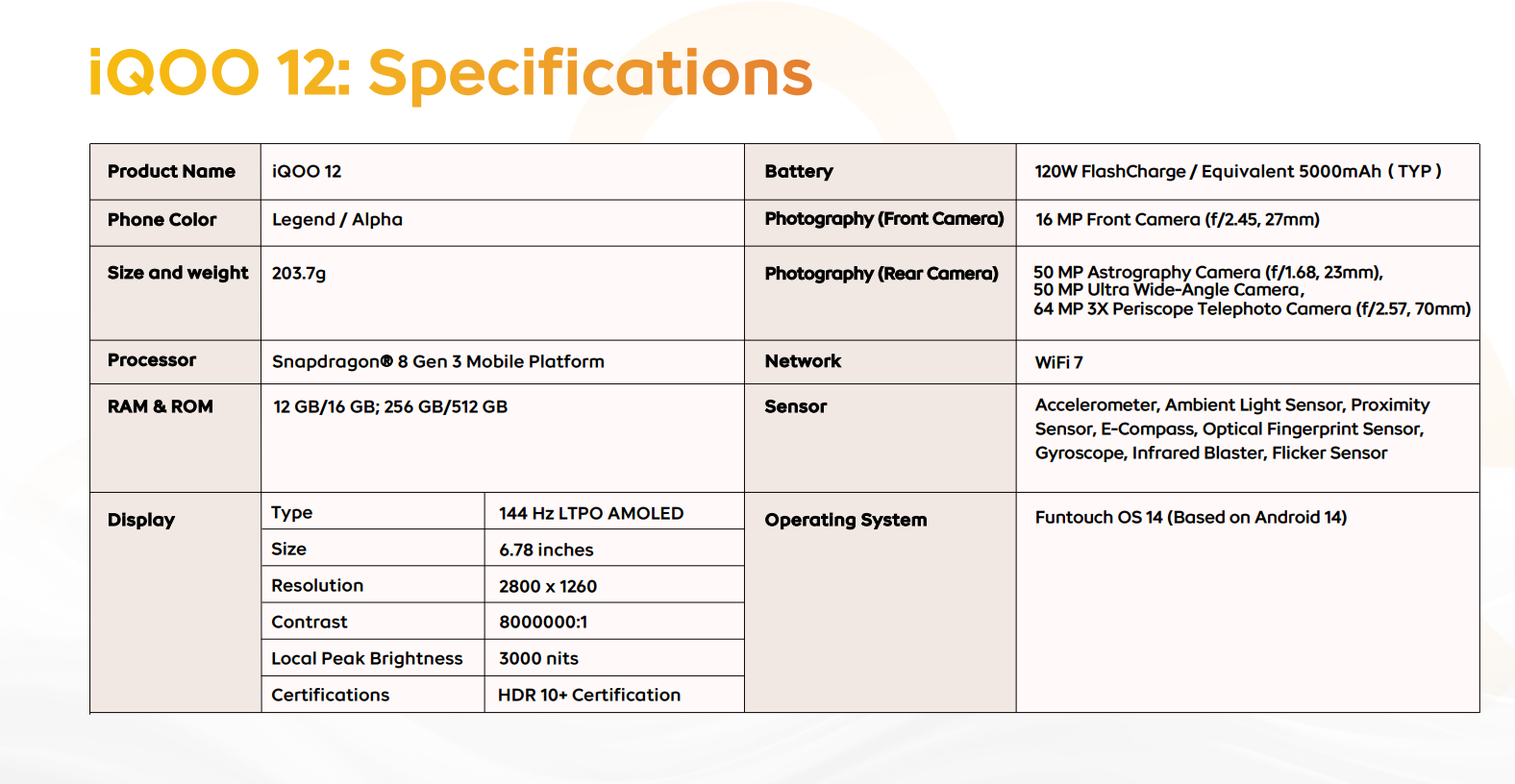
In terms of dimensions, the iQOO 12 has a weight of 203.7 grams and a slim profile at 8.1mm in thickness. While it’s not the thinnest or lightest flagship on the market, its Porcelain Enamel Glass back exudes luxury from the moment you hold it. However, the glass-back design does make it somewhat slippery, despite the decent grip provided by the 8.1mm thick silver frame around the edges. For added safety, using the included case is advisable. iQOO conveniently includes a transparent silicone protective case in the box, which not only enhances grip but also safeguards against accidental drops.
Overall, the iQOO 12 looks and feels premium in hand. The large and noticeable camera bump adds to its exceptional appearance but does contribute to the phone’s heft. This isn’t surprising, considering it houses key gaming components like X-axis linear haptic and haptic motors.
Specifications
iQOO 12 Legend: Screen
144Hz 1.5K resolution AMOLED panel
3000 nits of peak brightness
The iQOO 12 boasts a stunning 6.78-inch flat 1.5K resolution (2800 x 1260) LTPO AMOLED screen, supporting HDR10+ and offering a peak brightness of an impressive 3000 nits. Users have the flexibility to adjust both resolution and refresh rate; for my tests, I maximized these settings to fully experience the display capabilities of this powerhouse.
At 3000 nits of peak brightness, the iQOO 12 claims the title of the brightest phone currently on the market, surpassing the Samsung Galaxy S23 Ultra by 70%. This exceptional brightness ensures outstanding visibility under sunlight, allowing every screen element to be seen clearly.
The phone’s high-resolution AMOLED panel is not only bright but also delivers vibrant, natural, and immersive visuals, enhancing the experience of watching movies and gaming. The refresh rate can be boosted up to a maximum of 144Hz, offering an ultra-smooth and fluid scrolling experience. The iQOO 12 features adjustable refresh rate settings, including a Standard mode that locks the rate at 60Hz, a Smart Switch that intelligently adjusts the rate based on screen content, and a High Refresh mode that enables 144Hz for a smoother display, albeit with slightly increased battery consumption.
In my daily use, I experienced no lags or inconsistencies, and the touch sensitivity was highly responsive to even light touches and swipes. The phone performed smoothly and responsively during gaming sessions. Additionally, it features 2160Hz PWM dimming and a low blue light filter, making the device comfortable to use in dark conditions without straining the eyes. The dual-directional stereo speakers provide an immersive sound experience for gaming and deliver loud, clear vocals for music.
iQOO 12 Legend: Cameras
64MP Periscope Telephoto lens
100x digital zoom
Gaming phones have traditionally prioritized hardware performance, often settling for average camera capabilities. However, the landscape is shifting with new gaming smartphones that incorporate flagship-level camera features. The iQOO 12 is a prime example of this evolution.
The iQOO 12 features a distinctive Porthole design for its rear camera module, inspired by the spirit of adventure. This large and unique module accommodates a triple rear camera setup, including a 50MP main camera with OIS and EIS support, a 50MP ultra-wide-angle camera, and a 64MP triple-zoom periscope telephoto lens. This lens offers 3x and 10x periscope zoom capabilities, along with 100x digital zoom.
In terms of videography, the device supports 8K at 30fps, 4K at 60/30fps, and 1080p at 60/30fps recording. On the front, there is a 16MP camera for selfies and video calls, though its video recording capability is limited to 1080p at 30fps.
iQOO has integrated an array of impressive camera features into the iQOO 12. These include Astro mode for capturing the night sky, Supernight for low-light photography, Supermoon for full moon shots, Snapshot for quick captures, along with Long Exposure, Fisheye, Panorama, and more. Additionally, photos can be taken in three distinct modes: Natural, Vivid, and Textured.
The 50MP OV50H main camera, equipped with a sizable 1/1.3-inch sensor, excels in taking high-quality shots. It produces images with well-balanced contrast, intricate details, and accurate, realistic colors. I have taken several samples with the main camera, and the results are nothing short of spectacular. The images are crisp and rich in detail, with colors that are vibrant and true to life.
Similarly, the 50MP ultrawide lens performs admirably. The images captured are noise-free, and the dynamic range is impressively wide. The enhanced night mode of the phone allows for capturing highly detailed photos even in challenging low-light conditions.
3x
3x
10x
10x
10x
Night Mode
iQOO 12- 1x
The 64MP periscope telephoto camera of the iQOO 12 excels in capturing portraits, showcasing accurate separation between background and foreground details, along with impressive blurring effects.
I tested the camera with 1x wide, 3x telephoto, and 10x telephoto zoom shots. The results at 1x and 3x zoom were exceptionally good, while the 10x zoom lens performed surprisingly well, although I noted some loss of detail at 10x digital zoom. The Super Macro mode is a standout feature, allowing stunning captures at 1x, 3x, and 6x zoom with high detail and accurate colors.
The 16MP selfie camera performs adequately in bright conditions but lacks richness. It supports portrait effects, which produce decent results with pleasing blur effects.
Super macro 1x
Super macro 3x
Super macro 6x
However, my main concern with the iQOO 12 is its 16MP front-facing camera, which falls short of expectations. It feels reminiscent of older camera models, delivering only average results. Additionally, its video recording capability is limited to 1080P at 30fps, which is quite disappointing. For a flagship device, a minimum of 2K recording capability is anticipated. Even mid-range devices, such as the Infinix Zero 30 5G, offer up to 4K at 60fps with their front cameras.
In terms of videography, the iQOO 12 strikes a fine balance, offering recording capabilities up to 4K with notably improved stabilization. The overall video quality is impressive, characterized by clarity and freedom from noise.
I also experimented with recording videos in 8K at 30fps, but found the quality somewhat lacking. The image stabilization at this resolution was not as effective, and there was a noticeable absence of an image quality boost.
iQOO 12 – Astro Mode
Overall, the iQOO 12 stands as the premier choice for mobile photography enthusiasts. It boasts an impressive array of rear camera lenses, capable of capturing high-quality images with remarkable detail and vibrant colors, both day and night. The adage ‘Never judge a book by its cover’ aptly applies to this phone’s camera system, which serves as a testament to its exceptional capabilities
iQOO 12 Legend: Performance and Battery
Qualcomm’s most powerful Snapdragon 8 Gen 3 chipset
16GB of RAM + 512GB of storage
120W flash charge is the best in the segment
The iQOO 12 marks the brand’s inaugural venture featuring Qualcomm’s cutting-edge Snapdragon 8 Gen 3 processor, built on the 4nm TSMC architecture. This powerful chipset is paired with the latest Adreno 750 graphics processor, delivering a performance boost of 25%. It also boasts 16GB of LPDDR5X RAM and ultra-fast UFS 4.0 512GB internal storage. Additionally, iQOO has integrated a specialized Supercomputing Chip Q1 display processor to elevate the mobile gaming experience to new heights. We’ll delve deeper into this later, but first, let’s explore the chipset’s performance through benchmark analysis.
I conducted numerous benchmark tests on the iQOO 12, and it consistently achieved significantly higher scores compared to many of its rivals. This chipset excels in all areas, whether you’re gaming or running benchmark assessments. Regarding thermal performance, the device underwent the Wild Life Extreme Stress benchmark test, which entails running a high-graphics video on a loop for twenty minutes straight. Throughout this test, the phone exhibited only a slight warmth, which is negligible.
Now, let’s delve into real-world testing. To evaluate the Snapdragon 8 Gen 3’s capabilities, I played demanding titles such as Genshin Impact, PUBG Mobile, and COD Mobile on the iQOO 12, all at high graphics settings. What do you think happened next? You guessed it right! This chipset effortlessly handles any demanding titles or tasks thrown at it.
My gaming experience on this device has been nothing short of outstanding. During 1.5 hours of gameplay across Genshin Impact, PUBG Mobile, and Call of Duty, I experienced no lags or slowdowns; everything was exceptionally smooth and responsive.
Thanks to its 6K vapor chamber with a four-zone cooling system, the phone remains only slightly warm, even under heavy stress and after playing games for around 2 hours.
Genshin Impact- Normal mode
Genshin Impact- Monster mode
The iQOO’s bespoke Supercomputing Chip Q1 display processor significantly elevates the display performance, ramping up frame rates to a smooth 144fps. This enhancement perfectly aligns with the screen’s 144Hz high refresh rate, resulting in a crisper, more seamless, and responsive visual experience.
The iQOO 12 is powered by a substantial 5,000mAh graphite battery, supporting 120W ultra-fast charging. Impressively, the 120W charger can fully recharge the device from 0 to 100% in just 23 minutes and 49 seconds. Reflecting on my personal use, which included casual gaming, browsing social media, camera testing, taking calls, responding to messages, and watching anime, I found that the phone still had 19% battery remaining at the end of the day. Therefore, it’s fair to conclude that with typical usage, the iQOO 12 comfortably lasts an entire day on a single charge, with no issues.
iQOO 12 5G: Software
FunTouch UI is fun to use
The global variant has loads of bloatware
The first action I took after unboxing the iQOO 12 was to uninstall all the pre-loaded apps and games from the device. This step ensured a clean, bloatware-free environment, offering me peace of mind.
Even in their flagship models, iQOO includes some bloatware, which can be somewhat disappointing for users. However, it’s worth noting that these pre-installed apps and games can be easily removed.
The iQOO 12 operates on the Android 14 operating system, enhanced by iQOO’s own FunTouchOS 14 right out of the box. iQOO has committed to providing three major Android software updates (up to Android 17) along with four years of security patch updates. The FunTouch UI on iQOO is engaging and user-friendly, making it accessible for all users. Its UI interface is intuitive, and the smooth, responsive animations contribute to an overall excellent user experience.
You should buy this if…
You want a phone with powerful hardware
You want a phone with the flagship camera setup
You want a dedicated gaming phone
You want a long-lasting battery life with ultra-fast charge support
You shouldn’t buy this if…
You want a clean software experience
You want a curved screen
You want a long-term software experience
Final Thoughts
The iQOO 12 nearly ticks all the boxes, flawlessly blending each element to create a holistic flagship experience. It boasts blazing fast performance, a premium glass back construction with a minimalist aesthetic inspired by the BMW M Motorsport design, a 144Hz AMOLED panel, a top-tier camera system, and reliable battery life, making it a complete flagship package. Impressively, it starts at just $599. Undoubtedly, it’s one of iQOO’s finest creations. In terms of style and materials, the BMW M Motorsport, or the ‘Legend’ edition, exudes a more mesmerizing and enticing charm compared to the ‘Alpha’ variants.
Beyond gaming performance, the iQOO 12’s camera system also deserves commendation. It performs exceptionally well, even in low light conditions, and the super macro mode is particularly impressive for capturing close-up shots.
Living in a home with well water comes with its challenges. The water quality isn’t always up to par, leading my wife and son to prefer store-bought five-gallon jugs for drinking. Also, our bathtub often shows light orange traces due to minerals, and appliances like our coffee maker require frequent cleaning or parts replacement.
I’m not too fussed about the taste, but I’m aware it’s not the best water. Plus, spending about $35 monthly on water and the hassle of store trips is less than ideal.
Enter The Well from Lang, a countertop device that promises not just savings in the long run, but also the convenience of flavor additives with adjustable strength and the ability to dispense both hot and cold water.
Delivering 1.5 liters of filtered water in about six minutes, it seems like a potential game-changer for my family’s water woes. Let’s dive in to see if The Well truly stands up to its promises.
On Paper it’s Fantastic
The Lang The Well Water Filter addresses several critical needs in today’s health and environmentally conscious society. Firstly, it offers a sustainable alternative to bottled water, significantly reducing plastic waste and the environmental footprint associated with bottled water production and disposal.
Secondly, by enhancing tap water with essential minerals like potassium and magnesium, it promotes health and wellness, offering a convenient source of mineral water that can contribute to nutritional balance.
Additionally, the filter’s ability to improve the taste and quality of tap water can encourage more water consumption, contributing to better hydration and overall health. Its convenience and ease of use make it an attractive option for homes and small offices, potentially increasing access to cleaner, healthier drinking water.
In a world where water quality and sustainability are growing concerns, products like the Lang The Well play a vital role in providing practical solutions that benefit both individual health and the environment.
The Well system features a top-notch filtration setup, much like the ones used in big bottling plants. It’s super effective at getting rid of just about everything you don’t want in your water – think arsenic, lead, all sorts of chemicals, and even tiny microplastics. Here’s how it works:
Sediment Filter: This is the first line of defense. It catches bigger bits like dirt, making sure the next filters can do their job without getting clogged up.
Activated Carbon Filter: This one’s great at removing chlorine and other stuff that can make water taste or smell weird.
Reverse Osmosis Filter: The star of the show! It’s like a super-fine net that catches even the smallest harmful particles, ensuring your water is clean and safe.
But What About the Real World?
Setting up the Lang The Well involves a few straightforward, but time-consuming steps. First, you need to assemble the device, which typically includes attaching the filters and the mineral packs. The device comes with a sediment filter, an activated carbon filter, and a reverse osmosis filter, which need to be installed in the specified order. It’s all very easy to do, but you’ll need to allocate a good 15 minutes or more of standing near it because you’ll be adding and pouring water.
Finally, if you choose to use the flavor infusion feature, you would insert the flavor cartridge into the designated slot. This allows you to enjoy flavored mineral water at your convenience.
Throughout this process, it’s important to follow the manufacturer’s instructions closely to ensure that the device is set up correctly and operates efficiently. Regular maintenance, such as replacing the mineral packs and filters as needed, is also crucial for the long-term performance of the water filter.
Over the last few weeks I’ve found it to be a mixed bag of modern convenience and minor inconveniences. The device certainly makes a statement on my countertop with its sleek, modern design. However, it does take up a considerable amount of space, rendering part of my counter less functional.
The water quality, on the other hand, is undeniably superior. The taste is noticeably improved, and I love the ability to adjust the flavor intensity. This feature has been particularly delightful, offering a customizable drinking experience.
For about $18 you can add a flavor box to your unit, making up to 50 liters of Peach, Orange, or other flavor. Users can dial the flavor intensity up and down getting more or less of the taste. Thus far the Lemon has been good but on full strength it comes across as a bit “synthetic”.
From a financial perspective, this filter is a sound investment. I used to spend over $7 on 5-gallon water jugs, not to mention the hassle of fetching them every few Saturdays. This device has eliminated that chore and expense, offering long-term savings and convenience. To be clear, this device will save us money after about one year of usage.
However, there are some areas where The Well falls short. The ‘cold’ water option doesn’t quite hit the mark, often dispensing water that’s more at room temperature. But the hot water function is impressive, providing water that’s just right for my tea.
One aspect that could use improvement is the water reserve capacity. I find myself refilling the container frequently, which can be a bit of a nuisance. A larger reserve or a standby filtration option would greatly enhance the user experience, making it more seamless and less disruptive.
Between the three of us in the home, we find that we’re each waiting a few minutes at a time for even a tall glass of water. Moreover, sometimes we like to add a flavor and sometimes we don’t. We’re not able to keep the water in the container because we’ll be dancing back and forth between plain and flavored so we’ve resorted to adding it to a pitcher and putting it in the fridge. We’ve also done this because it’s colder, too.
via Lang
Parting Thoughts
In conclusion, while The Well has its drawbacks, particularly in terms of size and water capacity, the benefits of having fresh, mineral-enriched water at home, both in terms of taste and cost savings, are significant. It’s a step forward in making my daily hydration more enjoyable and environmentally responsible.
At $400 it’s a big ask and a commitment of countertop space. And a little patience at times, too. It took a few weeks of knowing what the experience is like before settling in and feeling like I would recommend this. I’d say that if you can get it on sale ($25-$50 off), or bundle it somehow, you’ll be doing alright. Otherwise, it might be a bit frustrating and “not worth the effort”.
Black Shark, the renowned technology company, has just announced the launch of its latest smartwatches, the Black Shark S1 Pro and Black Shark S1 Classic. These new offerings aim to revolutionize the wearable market with their cutting-edge features and sleek designs.
Elevating the Benchmark: Black Shark S1 Pro
The Black Shark S1 Pro is a bold and stylish smartwatch that sets a new standard for design. With its 1.43” AMOLED Ultra-Clear Display, users can expect crystal-clear visuals and an immersive viewing experience. What’s more, the S1 Pro boasts an impressive 15-day battery life, ensuring that users can stay connected without the constant need for charging.
Fitness enthusiasts will also be delighted to know that the S1 Pro supports over 100 sports modes for comprehensive tracking and enables users to stay connected on the go with ENC Bluetooth Calling. And for those who love personalization, the S1 Pro offers compatibility with ChatGPT and a selection of AI watch faces.
Timeless Elegance: Black Shark S1 Classic
The Black Shark S1 Classic seamlessly combines elegance with advanced technology. Featuring a 1.43” AMOLED screen and a 12-day extended battery life, this smartwatch ensures uninterrupted connectivity throughout day-to-day endeavors. The calling experience is enhanced with ENC Bluetooth Calling, and fitness tracking capabilities support over 100 sports modes.
Pricing and Availability
The Black Shark S1 Pro is priced at $76.90/€76.90, while the Black Shark S1 Classic is priced at $66.90/€66.90. Both smartwatches are available for purchase on the official Black Shark website, with shipping locations in the United States and Europe. Additionally, there is a limited-time offer on AliExpress for the Black Shark S1 Pro, with a special price of $39.90 available from December 11th to December 15th, 2023.
Navigating the vast landscape of smartphones for AT&T can be a daunting task. But fear not, tech enthusiasts and casual users alike. This curated roundup delves into the top contenders in each category, helping you find your ideal match. Whether buying for yourself or someone you know, we’re here to help you get to the bottom of things quickly.
If unparalleled performance and innovative features are your top priorities, the Google Pixel 8 Pro stands alone. This flagship powerhouse boasts the next-generation Tensor G3 processor, guaranteeing seamless multitasking and blazing-fast app loading.
Your visual senses will be captivated by the stunning LTPO OLED display, with its smooth refresh rate and vibrant colors that bring content to life. And for the shutterbug within, the Pixel 8 Pro’s triple-camera system, featuring Google’s renowned computational photography, captures breathtaking photos and videos in any lighting condition.
Whether you’re a demanding professional, a dedicated gamer, or a photography aficionado, the Pixel 8 Pro delivers an unmatched user experience.
For those seeking a smartphone that packs a punch without breaking the bank, the Google Pixel 6a is the perfect companion. This entry-level marvel, powered by the Tensor G2 processor, offers a smooth and responsive experience. The vibrant OLED display delivers captivating visuals, while the capable camera system ensures you never miss a precious moment.
The Pixel 6a shines as a reliable daily driver, ideal for first-time smartphone users, budget-conscious shoppers, and anyone who desires a phone that performs beyond its price tag.
Striking the Perfect Balance
Google Pixel 7a
For users who crave a phone that excels in both performance and affordability, the Google Pixel 7a emerges as the clear victor. This mid-range marvel features the powerful Tensor G3 processor, ensuring smooth operation and handling even demanding applications with ease.
The 90Hz OLED display delivers a buttery-smooth experience, while the versatile dual-camera system captures stunning photos and videos. Whether you’re a social media enthusiast, a casual gamer, or simply want a reliable phone for everyday tasks, the Pixel 7a offers a compelling proposition that blends value and performance seamlessly.
For tech enthusiasts and early adopters who crave the cutting edge of mobile technology, the Samsung Galaxy Z Fold5 awaits. This innovative phone unfolds to reveal a stunning, tablet-sized display, transforming your mobile experience.
Multitasking becomes effortless, content consumption reaches a whole new level, and productivity takes a leap forward with the expansive canvas. The Galaxy Z Fold5 further elevates your mobile experience with its powerful camera system and refined design, solidifying its position as a must-have for tech-savvy users who embrace the future of mobile technology.
Your Voice Matters
While we’ve explored a diverse range of smartphones, the world of mobile technology is constantly evolving, and your opinion matters.
Do you believe a different phone deserves the top spot in its category? Share your favorite AT&T devices in the comments section below.
In the early parts of October, AndroidGuys reported the availability of Android 14 OS, coming with new features. Since then, the operating system has been rolled out to different devices.
This month, the update will hit Samsung Galaxy Tab S9 FE, S21 FE, and other Android devices.
Samsung OTA updates in Europe & U.S
However, Samsung has been doing over-the-air (OTA) updates on dozens of devices, pausing briefly in order to start the new OTAs. It appears that most or all newly launched Galaxy products will automatically inherit Android 14.
Meanwhile, the update for Samsung Galaxy S21 FE is also getting a boost with the One UI 6.0 this week. The good news is that this update has appeared on the Verizon Galaxy S21 FE in the U.S, but unlocked models and other regions may get this sooner or later.
The new updates coming to Galaxy Tab S9 FE and the S21 FE is occurring only in Europe at this time. Devices will be getting One UI 6.0. Also, the new release includes the November 2023 security patch.
According to 9to5google, cellular models and other regions will surely embrace the new updates in weeks to come.
At the present time, several Galaxy A devices are being updated. For example, the Galaxy A52s is now receiving updates in select regions in Europe such as Bulgaria, Germany, and the Netherlands. The updates coming to the device is about 2.29GB. Other regions in Europe will soon get this latest updates.
The A52s was launched with Android 11 but after that, has been updated, with the third update bringing in the Android 14-based One UI 6.0 update.
How to find the update on your device
If you live in the areas mentioned above, you could check if your Android device is able to update. Just navigate to Settings >> Software update >> Download and Install. If the firmware isn’t available for your device, you won’t see it. If you see it, just download it and flash it manually if the OTA update isn’t available yet.
For writers, the quest for the perfect typing tool is unending, yet the mechanical keyboard often emerges as the undisputed champion for boosting productivity. Its tactile feedback revolutionizes the typing experience, outshining traditional keyboards.
My journey through various brands led me to the Akko keyboard, generously provided by Akko for review. The OnePiece-themed Calligraphy 5108S special edition is not just a keyboard; it’s a tribute to the beloved anime.
Adorned with intricately carved OnePiece characters, pirate flags, and a unique font, this mechanical keyboard is not only a functional masterpiece but also a collector’s dream for any OnePiece enthusiast.
It’s a wired keyboard with solid key switches, a compact layout, and eye-grabbing RGB lighting. I put it on the test to check out whether it’s worthy of being one of the best mechanical keyboards on my list.
The unboxing experience with Akko’s OnePiece Calligraphy 5108S special edition mechanical keyboard was a good one. The one thing I liked about the special edition is- you get everything from the keyboard to the box which is fully customized with the special edition theme. My first impression of the OnePiece Calligraphy 5108S mechanical keyboard was great – It feels sturdy and slightly heavy.
Design
100% layout
OnePiece-themed PBT keycaps
Sturdy build with no flex
Akko opts out with a 100% layout design for the OnePiece Calligraphy 5108S mechanical keyboard that enables good functionality. It has a sturdy plastic chassis build that feels solid and slightly heavy with no flex. Finished in the signature grey color on the sides, looks quite attractive and premium.
The 100% layout did feel quite large but it gives you entire control under your hands from the number pad, alphabetical keys, and additional function keys, to F series keys. However, I’m a fan of 65% which makes me quite comfortable while using but some people still prefer 100%. If you are a big space saver then this keyboard isn’t your thing. As for dimensions, the OnePiece Calligraphy 5108S measures 442 x 132 x 41mm (17 inches) and weighs approximately 1.5kg- as I already mentioned above the keyboard did feel slightly heavy in hand.
The Akko Calligraphy 5108S is a marvel of engineering, boasting PBT material keycaps with Akko’s proprietary CS Sakura switches. These switches offer a smooth and tactile experience, far surpassing the durability and feel of the ABS plastic found in standard entry-level gaming keyboards.
Akko’s meticulous use of Dye Sublimation printing technology brings every detail to life on these switches. From the intricate OnePiece characters and symbols to the Japanese texts, each element is exquisitely carved, adding a unique flair to the keyboard. The striking three-color palette of yellow, white, and grey not only enhances the keyboard’s aesthetic but also pays homage to the OnePiece universe.
The space bar, featuring OnePiece’s main character, Luffy, in an aggressive stance, and highlighted with the series’ name in bold red Japanese script, radiates the essence of pirate adventures. Complementing this is the enter key, finished in an iconic yellow with the OnePiece logo, adding a striking touch to this exceptional keyboard.
As for connectivity, there is no dongle or Bluetooth connectivity, it only supports a USB-C port placed on the back side of the keyboard. With the built-in sturdy dual kickstands, the keyboard provides a nice range of height adjustments.
Performance
Excellent Typing experience
Good key travel
Solid PBT keycaps
The OnePiece Calligraphy 5108S has sturdy PBT keycaps with the top surface of the keys having rounded curves that feel excellent while typing. It has linear-type keys with a total travel of 4mm and the N-Key rollover support lets you type as many keys as you like at once.
There is a dedicated calculator, volume control, and mute keys on the keyboard which I liked the most. Akko does offer OnePiece-themed one full set of functional keys which you can easily swap out with the help of a switch puller to change with the original one.
Switching from my daily driver mechanical keyboard to OnePiece Calligraphy 5108S was hassle-free- meaning I didn’t take any time to adjust my hands on the keys, thanks to the rounded OSA keycaps. As for the typing experience, it was great and so satisfying to type, and listening to the keycap’s clacky sound was even more pleasing. The mechanical keyboards do make noise while typing but that isn’t the case with Akko’s Calligraphy 5108S- It was quieter than my mechanical keyboard.
I played some titles like NFS Payback and Valorant with the OnePiece Calligraphy 5108S keyboard. My experience was excellent thanks to its compact size switches.
Software and Lighting
Mesmerizing RGB lighting
Programming software support
The Akko OnePiece Calligraphy 5108S enhances user experience with the Akko Wired Manager Software. This software enables key remapping and macro creation, allowing for a more personalized keyboard setup.
While RGB lighting on mechanical keyboards is a matter of personal taste, the OnePiece Calligraphy 5108S offers a range of lighting options, including a unique ‘music rhythm’ preset that synchronizes with the beats of your music.
Users can also tailor the RGB lighting to their liking using the Akko Wired Manager software. Additionally, the keyboard features a dedicated game mode in the software, designed to optimize keyboard performance for gaming.
You should buy this if…
You are a OnePiece anime fan
You want a mechanical keyboard with solid switches and sturdy chassis
You want RGB lighting with dozens of presets
You shouldn’t buy this if…
You don’t want a customized edition
You prefer a minimal layout design
Final Thoughts
The Akko OnePiece Calligraphy 5108S mechanical keyboard strikes a notable balance between form and function. Its compact design, combined with durable PBT keycaps, ensures a satisfying clack with each keystroke, making it ideal for both typing and gaming. The fully customizable RGB lighting and the ability to remap keys or create macros through the Akko Wired Manager software add to its versatility. Additionally, the ease of swapping keys heightens its appeal as an affordable, yet highly functional mechanical keyboard, suitable for gamers and typists alike.
However, the absence of hot-swappable keycaps support is a minor drawback, limiting the ability to customize switch types for varied typing experiences. The keyboard’s weight, approximately 1.5kg, might be a consideration for those who frequently travel with their keyboard. While it features USB Type-C connectivity, the lack of Bluetooth options slightly narrows its flexibility in wireless setups.
Priced at $119, the Akko OnePiece-themed Calligraphy 5108S stands out in the market as an affordable yet sturdy option. Its solid build, combined with an excellent typing and gaming experience, makes it a valuable addition, especially for those seeking an anime-themed keyboard to enhance their setup.
Unlocking the full potential of Verizon’s powerful network requires a smartphone that fits your needs and budget. Whether you’re a tech enthusiast seeking the latest and greatest, a first-time user just entering the mobile world, or someone who values a good deal, this guide is your key to finding the perfect phone.
Pushing the boundaries of mobile technology, the Pixel 8 Pro reigns supreme as the ultimate powerhouse for tech-savvy users. Its next-generation Tensor chip delivers lightning-fast performance, handling demanding tasks like gaming and video editing with ease. Capture breathtaking photos and videos with the advanced camera system, while the Pixel’s trademark AI features elevate the user experience to a whole new level. The Pixel 8 Pro is the ultimate investment for those who demand the absolute best.
Just starting your smartphone journey or simply looking for a reliable option that won’t break the bank? The Galaxy A03s offers a smooth and user-friendly Android experience without sacrificing affordability. Its large display is perfect for browsing, streaming, and keeping up with your online world. Enjoy a long-lasting battery life that keeps you connected throughout the day, making the Galaxy A03s a reliable and affordable companion for everyday tasks.
Finding the perfect balance between performance and affordability can be tricky. The Pixel 7a strikes the perfect chord, offering a powerful mid-range processor that tackles everyday tasks with ease, even handling light gaming. Capture stunning photos and videos with the impressive camera system, and enjoy the user-friendly features powered by Google’s AI technology. The Pixel 7a delivers a well-rounded experience at a price that won’t disappoint, making it an excellent choice for most users.
Experience the future of mobile technology with the groundbreaking Galaxy Z Fold5. This foldable phone boasts a large, expansive display that unfolds into a tablet-like experience, offering a new way to work, play, and consume content. Multitask with ease by having multiple apps open simultaneously on the expansive screen. The Z Fold5 is a statement piece for those who embrace innovation and want the cutting edge of mobile technology in their hands.
Your Voice Matters
We’ve carefully selected these top contenders to represent the best phones Verizon has to offer, but we understand that individual needs and preferences vary. Do you think we missed the mark in any of the categories? Share your thoughts in the comments! Let us know what your favorite Verizon phone is and what makes it your top pick. We’re always eager to hear from our readers and learn about their mobile experiences.