Home Blog Page 240

SwitchBot Lock Pro Makes a Key Entrance into Smart Homes

0

SwitchBot, a prominent player in the retrofitting smart home industry, on Friday introduced its latest innovation, the SwitchBot Lock Pro. This retrofit smart lock combines convenience, security, and ease of installation, setting a new standard for smart home devices.

With a retail price of $119.99/£139.99/€139.99, the Lock Pro is now available for pre-order at a special price of $89.99/£99.99/€99.99 on SwitchBot’s official website. The device is expected to hit the shelves by the end of April.

The Lock Pro distinguishes itself by offering a universal fit for various local market locks, allowing users worldwide to upgrade their existing door locks easily. This feature eliminates the need for drilling, ensuring the door and lock remain unharmed, and the original key functionality is preserved.

Supported lock types include Euro Profiles, Knob Cylinders, and more, with anticipated support for UK Oval Cylinders and Swiss Round Cylinders by late April. Furthermore, SwitchBot offers 3D printing after-sales services for additional lock compatibility.

Security is a top priority for SwitchBot Lock Pro, featuring advanced fingerprint recognition with a 0.3s recognition time and a 98% success rate. It also provides 15 different unlocking solutions, including one-time passcodes, remote unlocking, voice commands, and the innovative Quick Key for a single-click unlocking experience.

Battery life is significantly improved, with the Lock Pro operating on 4 x AA batteries to deliver up to nine months of power, surpassing its competitors. An optional Dual Power Pack extends this to 12 months, ensuring continuous operation even when one battery needs recharging. The device also includes a passive power supply option for emergency access.

The Lock Pro is at the forefront of smart home integration with its support for Matter, enabling seamless connectivity with other smart devices for a fully integrated home automation experience. The SwitchBot Hub Mini Matter Enabled, sold separately, facilitates this integration.

Other notable features include auto-lock, real-time notifications, low battery alerts, and virtual/emergency passcodes, enhancing security and user convenience.

SwitchBot Lock Pro and its main bundle, which includes the Keypad Touch and Hub Mini Matter Enabled, are available for pre-order at discounted rates on SwitchBot’s official website for the US, EU, and UK markets.

Xiaomi Redmi Note 13 Pro+ 5G review

0

The Xiaomi Redmi Note 13 Pro+ is a significant step up in the Redmi series, offering a blend of high-end features in a mid-range smartphone. It stands out for its unique design elements such as a curved display and, in some cases, a vegan leather back panel, distinguishing it notably from its predecessors and contemporaries. 

Xiaomi’s Redmi line is often priced lower and more affordable for consumers, offering strong choices at the middle of the pack. It consists of a number of models for 2024, including versions that offer 4G connectivity. Here, we’ll take a look at how things shape up for the Redmi Note 13 Pro+.

Design

The design of the Xiaomi Redmi Note 13 Pro+ marks a significant departure from its predecessors, establishing itself as the most distinctive model in the Redmi Note series. Its standout feature is the curved display, a first in the series, which not only gives it a modern and elegant appearance but also enhances the ergonomic handling of the phone.

This curved screen, paired with thin bezels, aligns the Redmi Note 13 Pro+ with the aesthetic standards of contemporary mid-range smartphones from brands like Oppo, OnePlus, and Vivo.

Another notable aspect of its design is the vegan leather back panel for select color options. This choice of material is a departure from the usual glass or plastic backs found in most smartphones. The vegan leather adds a touch of sophistication and premium feel to the device, making it stand out in the crowded mid-range segment. 

To be clear, the review unit we received (Midnight Black) has a polycarbonate material that’s both shiny and attractive. But it’s also quite the oil magnet, picking up fingerprints and smudges quite easily.

The phone also boasts an IP68 rating, signifying a high level of protection against water and dust. This feature, traditionally reserved for high-end smartphones, adds a layer of durability and reliability to the Redmi Note 13 Pro+, making it more versatile and suitable for a wider range of environments and usage scenarios.

Overall, the Redmi Note 13 Pro+’s design is a thoughtful blend of aesthetic appeal and practical features. It successfully bridges the gap between mid-range and high-end smartphones, offering a premium look and feel without compromising on functionality. 

Display

The Xiaomi Redmi Note 13 Pro+ boasts a display that is a key highlight of its design and functionality. The device features a 6.7-inch OLED screen, which is notable for its curved edges. This curvature not only contributes to the sleek and modern aesthetics of the phone but also enhances the user experience by making side swipes more natural and comfortable.

I do find it interesting that they’re introducing this sort of display experience while others are starting to walk away from it. I don’t mind it too much but it can be rather aggravating for some.

One of the primary characteristics of this display is its vividness. By default, the screen is set to a vivid mode that enhances color saturation, making images and videos pop with more vibrant colors.

This can be particularly appealing for users who enjoy a more dynamic and lively display. However, for those who prefer more natural and true-to-life colors, the phone also offers the option to switch to a standard mode, which provides a more muted and realistic color representation.

The Redmi Note 13 Pro+ and its 120Hz refresh rate offer smooth and fluid motion, which is especially noticeable when scrolling through content or playing games. This high refresh rate is a feature commonly found in higher-end smartphones and is a welcome addition to a mid-range device. Another welcome, and functional aspect of the display is the inclusion of an in-display fingerprint sensor.

Battery

The Xiaomi Redmi Note 13 Pro+ is equipped with a large 5,000mAh battery which is quite substantial and aligning with what is expected in modern smartphones.

In real-world usage, this battery capacity translates to a full day of use, or even more, depending on the intensity of the tasks performed. Users can expect around six hours of screen-on-time, or plenty reliable for activities like browsing, social media, video streaming, and gaming.

The efficient battery management, coupled with the power-saving features of the MIUI software, ensures that the phone can sustain prolonged periods without the need for frequent recharging, which is a significant advantage for users who are often on the go or have limited access to charging facilities during the day.

One of the most impressive features of the Redmi Note 13 Pro+ is its support for 120W fast charging. The charging speed is exceptionally rapid, with the phone capable of being fully charged in under 25 minutes. 

It’s worth noting that while the Redmi Note 13 Pro+ excels in fast wired charging, it does not support wireless charging. This might be a consideration for users who prefer the convenience of wireless charging solutions.

Performance

The heart of the Redmi Note 13 Pro+ is the MediaTek Dimensity 7200 Ultra chipset. This processor is a solid choice for mid-range smartphones, providing a good balance of power and efficiency. It is capable of handling everyday tasks such as web browsing, social media, and video streaming with ease.

The device comes with up to 12GB of RAM, which is more than sufficient for multitasking and keeping multiple apps running smoothly in the background. This amount of RAM ensures that the phone can manage intensive tasks and switch between apps without noticeable lag. Few phones offer more RAM these days and it’s easily more than most people need.

For gaming, the Redmi Note 13 Pro+ delivers a competent performance. It can handle popular games like Real Racing 3, Candy Crush Saga, and Clash of Clans without any issues. The phone also supports higher-end games and can run them at high graphics settings, thanks to the capable GPU integrated with the Dimensity chipset, and all of that RAM.

However, it’s worth noting that while the Redmi Note 13 Pro+ is a solid performer in gaming, it may not be the top choice in its price range for hardcore gaming enthusiasts. Other devices in a similar price bracket, like the iQOO Neo 7 Pro and the Poco X6 Pro, might offer better gaming performance. If anything, it’s a little more bang for the buck, performance-wise.

Software

The Redmi Note 13 Pro+ runs on MIUI 14 based on Android 13. MIUI is known for its feature-rich interface, but it also comes with plenty of bloatware and, in this case, ads within the Game Turbo mode, which might detract from the user experience.

From what I have gathered, some other users have reported some issues with the software, including UI lags and unnecessary notifications. Xiaomi has indicated that these issues might be addressed in future updates, including the potential for HyperOS integration.

Xiaomi has committed to providing three years of major OS updates and four years of security patches for the Redmi Note 13 Pro+. This commitment is a positive sign for users who want to keep their devices up-to-date with the latest software and security features. It means the phone will eventually receive updates up to Android 16.

The camera experience on the Xiaomi Redmi Note 13 Pro+ is a mix of high-end features and practical functionality, making it a significant aspect of the phone’s overall appeal.

Camera

The Redmi Note 13 Pro+ sports a triple-camera setup on the back. The primary camera is a 200 MP sensor, which is quite impressive, especially for a mid-range smartphone. This high-resolution sensor is capable of capturing a significant amount of detail.

Accompanying the primary camera are an 8-megapixel ultra-wide-angle lens and a 2-megapixel macro lens. The ultra-wide lens expands the field of view, useful for landscape or group shots, though its performance is average.

The macro lens, with its limited 2-megapixel resolution, tends to produce less detailed images and might not be very practical for everyday use.

As one would expect, the 200-megapixel main camera is the star of the show, producing images with good detail and clarity. It performs well in various lighting conditions, capturing clean and noise-free images both during the day and in low-light scenarios.

Despite its high resolution, the camera tends to produce images with a contrasty look, which might make some photos appear slightly dull. This is more of a software processing choice, and some users might prefer this aesthetic.

The ultra-wide camera, while not as impressive as the main sensor, does a decent job for what it is. It’s sufficient for casual photography but doesn’t match the detail and quality of the primary camera.

Xiaomi’s camera software includes various modes and features that enhance the photography experience. These include standard modes like portrait, night, and pro mode, offering users flexibility and control over their shots.

The camera app is generally user-friendly, allowing easy access to different settings and features, which is beneficial for users who like to experiment with their shots.

Performance

In terms of everyday usage, the Redmi Note 13 Pro+ is more than capable of delivering a smooth and responsive experience. Whether it’s for general use, media consumption, or light to moderate gaming, the phone performs reliably.

The in-display fingerprint sensor adds a layer of convenience and security, functioning quickly and accurately for unlocking the device.

The Xiaomi Redmi Note 13 Pro+, and its combination of a capable processor, ample RAM, and a user-friendly interface makes it a suitable choice for most users. While it may not be the absolute best in class for gaming or software finesse, it offers a balanced performance that will meet the needs of most users looking for a reliable and versatile smartphone.

Conclusion

The Xiaomi Redmi Note 13 Pro+ presents itself as a formidable contender in the mid-range smartphone market, offering a blend of premium features often reserved for higher-end models.

Its unique design, characterized by a curved display and a vegan leather back, imparts a luxurious feel uncommon in its price range. The IP68 rating adds a layer of durability, making it a practical choice for everyday use.

The Redmi Note 13 Pro+ is an excellent choice for those seeking a mid-range smartphone that punches above its weight. It expertly balances premium features with practical functionality, making it suitable for a wide range of users.

While it faces stiff competition in its segment, the Redmi Note 13 Pro+ holds its own with its unique design, impressive camera, and outstanding battery and charging capabilities. It’s a phone that delivers a premium experience without the premium price tag, making it a smart choice for anyone looking for a new smartphone in 2024.

I’m glad to see that the global unlocked devices are more US-friendly in 2024 than a few years ago and eagerly await each new generation. For around $400 you have a pretty impressive and well-rounded phone in the Redmi Note 13 Pro+.

It may not be the first choice for most US consumers, and that’s understandable, but if you’re keen on trying alternatives to the old guard, I’ve been warm to Xiaomi and its Redmi line for some time now. This model is already being recommended in my circles.

Bitcoin-Friendly Cloaked Wireless Launches New Mobile Rate Plans

0

In an effort to combat the increasing risk of unauthorized SIM swaps and port-out attacks, Cloaked Wireless has introduced a range of mobile plans designed to provide users with enhanced security.

Now available across the United States, these plans aim to safeguard mobile users’ privacy and data integrity. Starting from $25 to $75, customers have the option to choose from various plans on what is being touted as the most secure network available.

An intriguing aspect of Cloaked Wireless‘s offering is the acceptance of Bitcoin as a payment method, marking it as the first wireless provider in the US to do so. This move not only highlights the company’s innovative approach but also its dedication to cybersecurity and customer convenience.

Cloaked Wireless has taken a unique approach to ensure user security, focusing on reducing the risk of SIM swap attacks, which have become a significant concern in today’s digital age. By limiting access to user data and employing advanced authentication technologies, the company ensures that customers have complete control over their account and personal information.

Cloaked Wireless Rate Plans

Signing up for Cloaked Wireless is straightforward. New customers can choose their plan, create an account, and opt to pay using either a credit card or Bitcoin. Each plan includes custom security features and comes with the option of an eSIM or a traditional SIM card. Furthermore, the company promotes a BYOE (Bring Your Own Everything) policy, allowing customers to use their unlocked phones and retain their existing numbers.

A key feature of Cloaked Wireless’s service is the elimination of human error in SIM swap attacks. The company has removed the ability for staff to modify or authorize account changes, instead relying on secure procedures for account creation and authentication. Additionally, Cloaked Wireless commits to not selling user data to third parties, further enhancing privacy protections.

As a mobile virtual network operator (MVNO), Cloaked Wireless provides an affordable yet secure option for consumers looking to avoid traditional service pitfalls. The company was founded by experts in crypto, privacy, and security, including Jonathan Wilkins and Jeremy Hill, who bring a wealth of experience to this venture. Their goal is to address the prevalent issue of SIM swap attacks that have affected hundreds of thousands of users and resulted in significant financial and data losses.

To celebrate the launch, Cloaked Wireless is offering a lifetime free wireless service to BTC core developers with more than 10 commits, demonstrating its support for the Bitcoin community. This promotion is a testament to the company’s commitment to not only providing secure mobile services but also supporting innovation in the cryptocurrency space.

For more information on the plans and the special promotion for BTC core developers, visit www.cloakedwireless.com and www.cloakedwireless.com/btc.

Bob and Brad Launch New Massage Devices to Combat Back and Neck Pain

0

Renowned Minnesota-based brand, Bob and Brad, known for their expertly designed therapeutic products, today announced the launch of two innovative massage devices: the EZ Back massage cushion and the C2 Pro Massage Gun. Founded by experienced physical therapists, Bob and Brad’s latest offerings aim to provide users with effective relief from back and neck pain through cutting-edge technology.

About Bob and Brad

Bob and Brad stand at the forefront of therapeutic product design, backed by over 60 years of combined experience in physical therapy. With a strong following on YouTube and accolades from reputable media outlets, their products are not just tools for relaxation but are endorsed by professionals for their therapeutic benefits.

Introducing the EZ Back

Priced at an introductory offer of $47.99 (originally $69.99) in the US and £59.49 (originally £69.99) in the UK, the EZ Back is available on Amazon. This device features an ergonomic design and four deep-kneading 3D massage nodes to simulate the experience of a professional Shiatsu massage. It’s tailored for anyone in need of relaxation, from athletes to office workers.

The EZ Back’s one-button control makes it easy to switch between heat and massage modes, enhancing blood circulation and offering customized relief. A safety feature ensures the device automatically turns off after 15 minutes of use. Its unique design also allows for targeted massage on various body parts, including shoulders, calves, and more.

The C2 Pro Massage Gun

The C2 Pro is now available for $89.99 with a special discount coupon, down from its original price of $109.99, exclusively on Amazon US. This versatile massage gun integrates dual heat and cold therapy with powerful percussion, making it ideal for use at home or on the move. The ability to switch between heat to promote blood flow and cold to reduce swelling offers users flexible pain relief options.

Bob and Brad have utilized their deep knowledge of physical therapy to equip the C2 Pro with features like variable speed levels up to 3200 RPM and five unique massage heads. These innovations aim to stimulate blood flow, alleviate soreness, and support muscle health.

ZTE launches world’s first 5G+AI eyewear-free nubia Pad 3D at MWC24

0

ZTE has again proven to the world that it’s a leading provider technology solutions by showcasing nubia Pad 3D II. Along with other gadgets, nubia presented this neo tech device at the MWC Barcelona 2024.

The new 5G+AI eyewear-free 3D nubia Pad II presents to consumers a truly immersive 5G+AI eyewear-free 3D experience. Through this means, ZTE continues to usher in pioneering 3D solutions for various industries. Here has come to stay, the power groundbreaking technological advancements, and deep integration of 5G+AI.

Examine the nubia Pad 3D II visual experience

nubia Pad 3D II is enhanced by an AI processing engine. However, it distinguishes itself at the display as features were greatly improved. For example, the unique liquid crystal lenses is powered by integrated image processing algorithms.

Also, it renders 3D images with enhanced realism and natural vibrancy. When compared to its predecessor, the new nubia Pad 3D II achieves an 80 percent increase in 3D resolution and a 100 percent boost in 3D brightness.

See Also: Nubia Watch Review

Furthermore, it boasts comprehensive optimization in 3D crosstalk, 3D color, and 3D power efficiency. In these ways, the device enhances users’ 3D visual experience. It is equipped with an AI eye-tracking engine that makes use of high-speed visual sensors and eye-detection algorithms.

It can’t go wrong with an 86-degree ultra-wide viewing angle, so users can enjoy flawless 3D experience from almost all directions.  Other features are found below.

Main Features

  • 12.1-inch 2.5k large screen, supporting q 2560×1600 resolution, and 144Hz refresh rate
  • 3D content enriching the full-scenario multi-screen experience
  • Free conversion from 2D to 3D possible with Neovision 3D Anytime Technology
  • Top-level flagship configuration, 5G for 3D experience – covers most countries globally
  • Equipped with Qualcomm Snapdragon 8 Gen 2 chipset
  • 512GB of storage offering immense computing power and robust performance
  • 10000mAh large battery with 66W fast charging
  • Symmetrical quad speakers producing immersive 3D sound effects

According to nubia Senior Vice President at ZTE, Ni Fei, ZTE has been actively investing in research and development for eyewear-free 3D technology and ecosystem.

Ottocast Picasou 2 CarPlay and Android Auto AI Adapter

Ottocast has quickly become one of our top picks for seamlessly integrating wireless CarPlay or Android Auto into your vehicle. This company offers a wide range of devices designed to help you ditch the cables next time you hop into your car. Among its latest innovations is the Picasou 2, which brings a full Android UI into the mix, elevating the in-car experience.

Design

Right out of the box, the Ottocast Picasou 2 presents a sleek, disc-style appearance. It features a circular design topped with an LED ring that can be customized to display different colors, adding a touch of personalization. On one side, there’s a convenient slot for an ejectable SIM and TF card combo. This feature proves to be quite beneficial for accessing certain software functionalities we’ll delve into shortly.

Connectivity is robust with the Picasou 2. At the base of the device, there’s a USB-C input that connects to your car’s existing infotainment system. This setup facilitates a Bluetooth connection, allowing for the adapter’s interface to be wirelessly projected. Additionally, there’s a mini HDMI port capable of delivering full 1080p output, ensuring high-quality visuals for your media content.

Internally, the Picasou 2 is equipped with 4GB of RAM and 64GB of internal storage, ensuring smooth operation and ample room for apps and media. The storage can be expanded via the TF card slot, supporting up to 2TB of additional space. This capacity offers more than enough storage and performance for virtually any use case.

Software

The device offers three main options for wirelessly projecting content onto your car’s screen. The first two options are fairly standard: depending on your smartphone, you can use either Android Auto or iOS CarPlay. If you’ve previously relied on a wired connection, simply establishing a Bluetooth link to the Picasou 2 will provide you with the same functionality, but without the hassle of cables.

The third option is where the Ottocast Picasou 2 stands out—and also where it might cause some confusion. Dubbed the OttoDrive UI, it essentially runs a custom version of Android 10 directly within your vehicle. This innovative approach offers a robust and user-friendly interface, granting access to all your favorite mobile apps, even those not natively supported by Android Auto or CarPlay. This feature significantly broadens the scope of accessible applications and services while on the move.

Despite the innovative approach Ottocast takes with the car infotainment system, I’ve encountered what I perceive to be a significant drawback for most users. To access the internet, the device requires either an additional SIM card equipped with a data plan or necessitates sharing your phone’s internet connection via a hotspot. This workaround for connectivity feels cumbersome, especially when compared to the more stable and straightforward options provided by Android Auto or CarPlay.

The scenarios where this expanded functionality might surpass the default offerings from Apple and Google seem limited, perhaps most applicable in an RV entertainment setup or for screens mounted on the back of headrests for passenger entertainment. However, these use cases still demand a secondary internet connection, complicating the setup further. Yet, for passengers, the allure of accessing additional apps such as YouTube or other video streaming services might justify the extra effort.

One redeeming feature is the ease of switching between interfaces. Users can seamlessly transition between operating systems or from CarPlay/Android Auto to the OttoDrive UI with just a button press. This flexibility allows for a quick swap to the preferred interface as needed, whether for CarPlay/Android Auto users or those wanting to dive into the OttoDrive experience.

Performance

Despite the aforementioned drawbacks, the Picasou 2 delivers impressive performance. Each interface operates smoothly, aligning with its promises, and I encountered minimal issues. Notably, the Ottocast’s connection and launch times are among the quickest I’ve experienced, facilitating swift access to your preferred interface. The device also excels in latency, with negligible delay between commands and their execution, ensuring a responsive user experience.

Conclusion

The Ottocast Picasou 2 AI box ambitiously aims to enhance in-car entertainment options for travelers. Though the concept is compelling, in practice, it might complicate the straightforward appeal of Android Auto or CarPlay.

However, for those with specific needs that align with the Picasou 2’s capabilities—such as requiring all three projection options—this device proves to be an excellent choice. The ability to effortlessly integrate Auto or CarPlay with a full Android system could be the perfect addition for your next journey, offering a tailored entertainment experience.

Available through the company’s official store ($245), the Ottocast Picasou 2 positions itself in a distinct market niche. While it may seem costly, its unique offering justifies the investment for users seeking a versatile infotainment solution. Use my code ANDREW20 for 20% off your purchase.

Waze Rolls Out New Updates to Enhance Your Driving Experience

0

Waze, the popular navigation app known for its real-time road insights, has launched a series of updates aimed at making your driving experience safer and more convenient. Leveraging feedback from local drivers, community members, and municipal partners, these enhancements are designed to offer improved road navigation, parking solutions, and more.

Here’s what’s new:

1. Simplified Roundabout Navigation: Navigating roundabouts just got easier. With contributions from local Waze community members, you’ll now receive clear instructions on when to enter, which lane to choose, and where to exit roundabouts.

This feature is rolling out globally, first to Android users this month and to iOS users later in the year.

2. Alerts for First Responder Safety: A new update brings advance alerts when emergency vehicles are stopped along your route. This feature allows you to adjust your driving to ensure safety for both you and first responders.

Initially available in the US, Canada, Mexico, and France for both Android and iOS users, with plans to expand to other countries.

3. Speed Limit Alerts: To help avoid speeding tickets, Waze is now providing alerts for upcoming decreases in speed limits along your route. This global update is available to all Android and iOS users, ensuring you have ample time to adjust your speed accordingly.

4. Advanced Hazard Warnings: Building on its hazard alert features, Waze now offers early warnings for sharp curves, speed bumps, and toll booths, courtesy of updates from the driver community. This enhancement aims to provide a smoother and safer driving experience, available globally to all users this month.

5. Enhanced Parking Information: In partnership with Flash, Waze now offers detailed information about parking garages, including costs, coverage, accessibility, valet options, and the availability of EV charging stations.

Additionally, you can reserve parking spaces directly through the Waze app. This feature will start rolling out in the coming weeks in over 30,000 parking garages across the U.S. and Canada, including major cities like New York, Chicago, and Montreal.

6. Route Preference Insights: Recognizing that drivers often prefer familiar routes, Waze is introducing a feature that allows you to see detailed information about your favorite routes, including live traffic updates and delays.

This will enable you to compare and choose the best route for your journey. This global update is available on Android and iOS starting this month.

Elevate Your Driving Journey with Waze

By incorporating real-time data and community insights, Waze continues to improve the driving experience for millions around the world. Update your app today and take advantage of these new features on your next drive.

Skullcandy Intros EcoBuds: Sustainability in True Wireless Earbuds

0

Skullcandy, the renowned audio brand, has unveiled its latest innovation – the EcoBuds True Wireless Earbuds. Launching as the company’s most sustainable offering yet, these earbuds set a new standard in the audio industry with their environmentally conscious design and production. Available globally for $39.99 MSRP at select retailers and Skullcandy.com, EcoBuds represent a significant stride towards reducing environmental impact without sacrificing quality or affordability.

The EcoBuds are crafted using 65 percent certified recycled plastics and contain 57 percent less heavy metals compared to similar products, achieving a 50 percent reduction in carbon footprint. This milestone was identified through an environmental impact analysis conducted with Ecochain, pinpointing lithium batteries as a major contributor to carbon emissions in wireless audio products. In response, Skullcandy developed a battery-free charging case for the EcoBuds, significantly lowering their total carbon footprint to 1.35kg CO2eq.

Skullcandy’s VP of Marketing, Justin Regan, highlighted the industry’s trend towards increasing battery sizes, often exceeding actual consumer needs, and its environmental repercussions. EcoBuds challenge this norm by offering an optimal battery life that caters to daily use without contributing to unnecessary lithium waste.

EcoBuds do not compromise on functionality or sound quality. They boast an eight-hour battery life with a Rapid Charge feature – just 10 minutes of charging delivers two hours of playtime. Furthermore, the earbuds come equipped with an integrated USB-C cable for reverse charging from your phone, ensuring you stay connected throughout the day.

Designed with the eco-conscious consumer in mind, EcoBuds feature a minimalistic design in a “Glacier” colorway, inspired by the natural beauty Skullcandy aims to preserve. The earbuds come with premium audio quality, a noise-isolating fit, multiple EQ modes, Bluetooth® (v5.2) connectivity, IPX4 sweat and water resistance, and intuitive touch controls for a seamless listening experience.

EcoBuds stand out not only for their sustainability credentials but also for making high-quality sound more accessible. They embody Skullcandy’s commitment to challenging industry standards and prioritizing the planet without compromising on performance.

For additional details on EcoBuds and to explore Skullcandy’s full range of audio products, visit Skullcandy.com or connect with them on social media.

Viofo VS1 Tiny Dash Cam review: Don’t judge a dash cam by its size

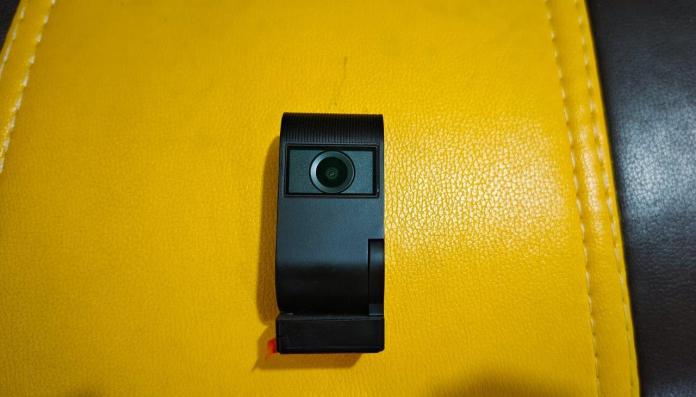
Viofo’s latest entry into their dashcam lineup, the VS1 Tiny Dash Cam, addresses a common issue with traditional models: their bulky design often occupies too much space on the windshield, potentially obstructing the driver’s view, especially in cars with smaller windshields. This compact dash cam is a boon for vehicles with limited windshield real estate.

While there are other compact options on the market, many fail to meet the height requirements of most vehicles. Viofo’s innovative VS1 model offers an excellent solution, alleviating visibility and space concerns with its pocket-sized design. To achieve such a compact form factor, Viofo opted to eliminate the rear screen, making the device as convenient as possible.

I tested the Viofo VS1 dashcam to evaluate its performance. Below are my comprehensive insights on the Viofo VS1 Tiny Dash Cam. Let’s dive into the review.

Viofo VS1 Tiny Dash Cam:  Price and Availability 

The Viofo VS1 Tiny Dash Cam is priced at $149.99 / £134.95 but is currently available for $109.99 / £114.35, thanks to a $40 discount from Viofo. It can be purchased through Viofo’s US and UK websites. The package includes several accessories, such as an SD card, a USB Type C cable, and a hardwiring kit for permanent installation, among others.
Viofo VS1 Tiny Dask Cam: Unboxing 

Viofo VS1 Dash Cam Pros

  • Compact design suitable for any car.
  • Decent video and audio quality.
  • Intelligent voice control enhances user experience.
  • 5MP Sony Starvis 2 image sensor for superior image quality.
  • Easy connectivity with both plug-in and hardware options.

Cons:

  • Limited to a maximum video resolution of 2K 1440p.
  • No preview screen on the rear side.

Viofo VS1 Dash Cam: Design and Build 

My unboxing experience with the VS1 dash cam was highly positive. The design truly stands out for its compactness; it’s so small that it fits easily in the palm of my hand. The build quality, featuring hard plastic, feels premium and durable. Diverging from other Viofo models, the VS1 showcases a 180° rotation capability,

The overall design of the dash cam is impressively compact and lightweight, making it comfortable to hold without feeling cumbersome. On the front, it features a camera lens coupled with a movable joint, allowing for up to 180° rotation. This flexibility ensures you can capture the road at the ideal angle. The rotating design also enables the dash cam to double as a vlogging camera, recording crisp and clear videos.

For mounting, it comes with a standard 3M sticky pad on the bottom, ensuring secure attachment to your vehicle. On the left side, there’s a convenient mic on/off button alongside an SD card port, while the right side houses a USB Type C port for powering the camera.

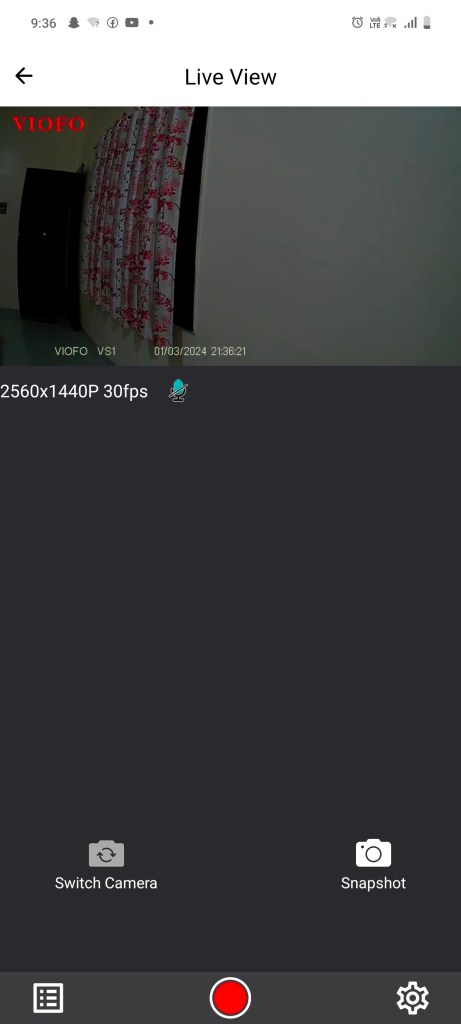
The Viofo VS1 model stands out for its compactness, measuring just 1.31 inches in width and 3.03 inches in length, positioning it as one of the smallest and lightest dash cams available. It lacks a rear screen, necessitating the use of Viofo’s app for live previews. Additionally, all recordings can be reviewed via a micro-SD card, offering a convenient way to manage your footage.

Viofo includes an array of accessories with the dash cam right out of the box: a charger, a USB-C data cable, a mount sticky pad, a trim removal tool, windshield static stickers, and a 32GB Viofo memory card. For those seeking a more permanent setup, Viofo also offers a hardwire kit and a Bluetooth controller, which are available for purchase separately.

Viofo VS1 Dash Cam: Key Features

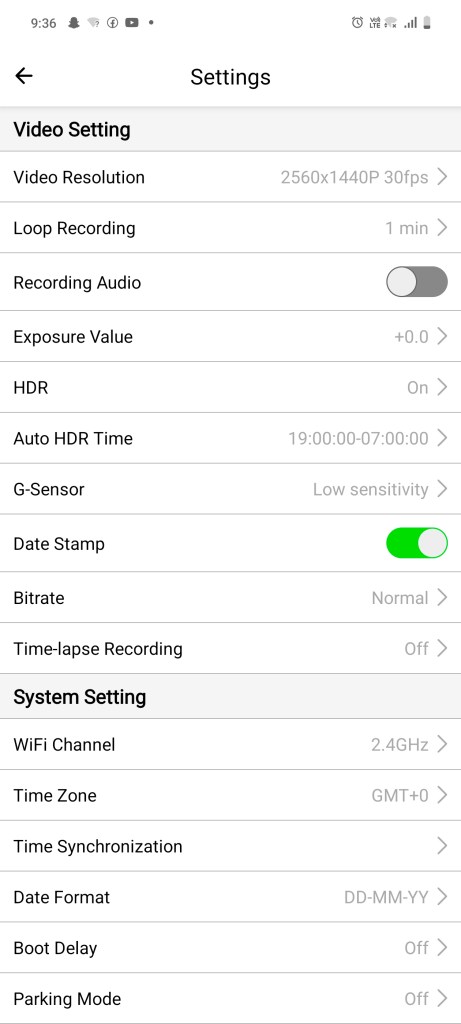
The Viofo VS1 boasts a 5.12MP IMX675 sensor, enhanced by Sony Starvis 2 technology, capable of recording video up to 2K 1440p at 30fps. It supports high dynamic range (HDR) to improve image quality, balancing bright and dark areas for clearer visuals. The lens automatically adjusts to lighting conditions, ensuring detailed captures in various environments, from night drives to tunnel transits.

With a 140° viewing angle and an F/1.8 aperture, the lens offers a wide and clear view of the road. Intelligent voice command support enables hands-free operation, allowing for photo capture, recording control, and WiFi toggling, among other functions, without distracting from driving.

The dash cam supports dual-band 2.4GHz and 5GHz WiFi for swift and secure data transfer, facilitating easy video previews and sharing via the Viofo app.

A notable feature is the 24/7 parking monitoring, activated with the HK5 hardwire kit. This feature protects your vehicle in your absence, initiating recording upon motion detection and capturing video from 15 seconds before to 30 seconds after the event. It also includes a G-sensor for recording during sudden impacts or collisions and supports time-lapse recording at up to 10fps without audio to conserve SD card space.

Viofo VS1 Dash Cam: VIOFO Companion App

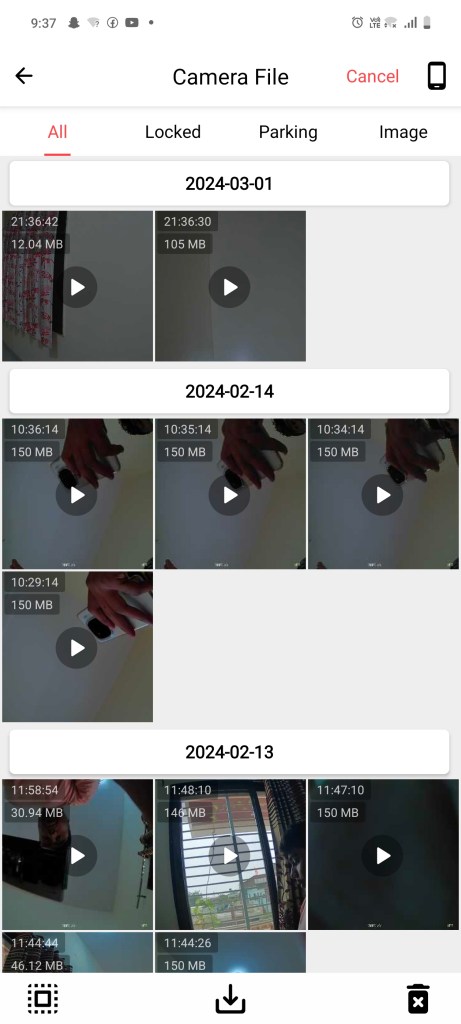
In lieu of a physical preview screen, Viofo offers the Viofo app as a solution. Available for both Android and iOS, the app allows users to preview, share, and download recorded videos and images. The footage also displays essential details like date and time on the screen’s bottom right corner, enhancing user experience and video management.

Viofo VS1 Dash Cam: Performance

Viofo provides two options for powering the dash cam: a plug-in option for easy access and a hardwire option for a more permanent setup. I chose the plug-in method for its simplicity. It’s advisable to use the static sheets included in the package for mounting the dash cam, rather than applying the sticky pad directly to the windshield.

Setting up the Viofo VS1 dash cam was straightforward. After inserting the SD card and powering on the device, a quick press of the SD card button activated the recording and enabled WiFi. This allows for easy connection to a smartphone for live previews, given the absence of a built-in screen on the dash cam. Alternatively, the SD card can be inserted into a laptop to access the recordings and images.

After using the Viofo VS1 dash cam for about a week, I was notably impressed by the quality of the footage. It captured every detail of the surroundings with clarity, from trees and road signs to vehicle numbers. The Sony Starvis 2 image sensor ensures a clear view of both the road and, when the lens is rotated, the cabin, providing both safety and peace of mind.

Final Thoughts 

The Viofo VS1 dash cam, with its sleek, compact design and advanced Sony Starvis 2 image sensor, distinguishes itself as a standout option in the dash cam market. It’s well-suited for any vehicle, regardless of windshield size, and it doesn’t obstruct the driver’s view.

The absence of a rear screen is a minor drawback, but the VIOFO companion app effectively compensates for this by allowing users to preview, share, and download footage easily, thanks to the support for WiFi 5GHz.

Overall, the Viofo VS1 ticks almost all the boxes for features within its price range. Offering a compact design, high-quality imaging, WiFi support, a user-friendly app, and more, all for just $109.99, it represents a comprehensive package for anyone in the market for a dash cam.

Latest Pixel Feature Drop: What’s New for Your Device

0

Google’s latest Feature Drop for Pixel devices is rolling out, packed with enhancements aimed at making your Pixel experience even smoother and more integrated into daily life. Here’s what’s new across Pixel Phones, Watches, and Tablets.

For Pixel Phones:

  • Call Screen Enhancements: The Call Screen feature now includes a “hello” chip for silent callers, prompting them to speak up. Google Assistant can now also inform callers to wait if you can’t pick up immediately.
  • Direct Instagram Sharing: Capture and share 10-bit HDR videos on Instagram Reels and upload Ultra HDR photos directly to your feed, leveraging your Pixel’s camera capabilities.
  • Circle to Search on Pixel 7: Previously exclusive to Pixel 8, Circle to Search is expanding to Pixel 7 and 7 Pro. Access Google Search directly from any app by circling or highlighting content without app switching.

For First-Gen Pixel Watch:

  • Advanced Workout Features: First-gen Pixel Watch users now get Pace Training and Heart Zone Training, complete with haptic and voice cues for pace and heart rate zone management. A redesigned workout UI and new auto-start/stop features for various exercises enhance the experience.
  • Fitbit Relax App: The Fitbit Relax app for guided breathing exercises is now available, helping you find moments of calm throughout your day.
  • Public Transit Directions: Google Maps on Wear OS now provides public transit directions directly on your Pixel Watch, including real-time departure times and transit options.

For the Pixel Portfolio:

  • Selective Screen Sharing: App screen sharing allows you to share specific apps instead of your entire screen during video calls, available on Pixel Tablet, Pixel Fold, and Pixel 5a with 5G and newer.
  • Easy Device Pairing: A new pairing feature streamlines connecting previously used Bluetooth accessories and Fast Pair devices via the Connected Devices settings.
  • Google Docs Markups: Handwrite annotations in Google Docs using your finger or stylus on your Pixel device, offering a range of tools for more flexible document review.
  • Improved Toolbar on Pixel Tablet: The Gboard voice toolbar minimizes the digital keyboard into a toolbar when voice input is activated, freeing up screen space for multitasking.

These updates begin rolling out today and will continue over the next few weeks, enhancing productivity, health tracking, and overall device integration into your daily routine.