Home Blog Page 224

Anker 568 USB4 Docking Station Review

I’m sure most of you have come across Anker by now. Whether you’ve been in the market for an iPhone or Android cable, or a reliable battery pack, chances are you’ve stumbled upon products from this company. But did you know that they also offer more advanced options, such as the impressive Anker 568 USB4 docking station?

I’ve had the opportunity to test out this new USB-C dock, which comes packed with features and retails for around $200. However, there is one downside that’s worth considering. Join me as I take a closer look at the pros and cons of this product in the full review.

Design

The Anker 568 shares a huge amount of DNA from the slightly larger, and slightly more premium, Anker 578 Thunderbolt 4 dock. The Anker 568 has a single USB4 downstream type-C connection to plug into your laptop or capable desktop for all outputs and 100W of charging. This is on the side of the device and has a decent 3 foot-long cable, which is an improvement over the seriously short 2.3ft lead of the Anker 578 Thunderbolt Dock.

Around the back is where most of the business is done with outputs. Here you’ll find 4 USB-A ports, two DisplayPorts, and an HDMI out. This allows for up to three monitor outputs from a single connection to the upstream computer via this Anker 568 docking station.

Around the front, you have two USB-C ports capable of 30W of charging or 40Gbps of file transfers. This creates a well-rounded setup that should get you most of your monitors, peripherals, and charging needs down to a single device.

Daily Usage

Using the Anker 568 USB4 Dock has been fantastic with one caveat. It’s taken anything I’ve thrown at it while using Chrome OS, Windows, or Linux. All the outputs and ports function as they should and switching between them by simply unpluggging the single USB-C port has been the workflow I’ve been missing in my home office.

But if you are a Mac user, I might skip this dock and look at the true Thunderbolt 4 version Anker 578. And especially if you have DisplayPort monitors. This is due to a limitation of Mac OS not supporting multi-stream transport. This is when you daisy chain dual displays over DisplayPort from a single upstream connection.

Mac will only see this combination as a single monitor and will not extend to the second display. You will only get a mirrored output. I didn’t have a second type of monitor and both of mine are identical, but even using an HDMI to DisplayPort cable had the same results.

For Mac users, you should either stay away from dual DisplayPorts or do like I did and use the Anker 578. This allowed me to circumvent the single channel that runs the dual DisplayPort and HDMI with the additional Thunderbolt4 out exclusive to the 578. I was able to extend to my second display with a TB to DP cable off Amazon.

Conclusion

Unleash the Power of Connectivity with Anker 568 USB4 Docking Station

Anker has solidified its reputation for high-quality mobile accessories and is now making waves in the realm of desktop computing. The Anker 568 USB4 Docking Station is a testament to this commitment, boasting robust construction, an impressive selection of 11 ports, and the capability to deliver up to 100W of power through a single dongle.

What’s more, the price is incredibly enticing, priced at just $130. This positions the Anker 568 as a standout contender in the USB-C docking landscape. Don’t miss out on the opportunity to experience seamless connectivity – secure yours directly from Anker or via our exclusive Amazon links.

Order from Anker | Purchase on Amazon

Purchase the Anker 568 USB4 Docking Station from Anker.com

Purchase the Anker 568 USB4 Docking Station from Amazon.com

Tineco Offers Up FLOOR ONE Stretch S6 with Lay-Flat Design

0

For those of you struggling with cleaning dust in tough to reach or typically inaccessible areas in your home, Tineco introduces the FLOOR ONE Stretch S6. A state-of-the-art cordless hard floor cleaner, it’s crafted to excel in spaces that were previously challenging to clean effectively.

Key Feature: 180° Lay-Flat Design

The primary feature of the FLOOR ONE Stretch S6 is its 180° Lay-Flat Design. This allows the floor cleaner to access low and tight spaces easily, like under beds and sofas, ensuring thorough cleaning coverage without the need for physical strain.

Compact and Maneuverable

Despite its strong cleaning capabilities, the Stretch S6 presents a compact 5.1-inch profile. This slim build allows the cleaner to navigate tightly spaced areas and maintain strong suction, thanks to its 3-Chamber Dirty Water Separation system, which keeps the motor safe and operational in various positions.

Advanced Cleaning Technology

Enhancing its performance, the FLOOR ONE Stretch S6 features Tineco’s MHCBS™ Technology. This system ensures a consistent supply of fresh water to the brush roll, which prevents the re-deposit of dirt and guarantees a spotless finish on floors.

FlashDry Self-Cleaning System

To simplify maintenance, the Stretch S6 incorporates the FlashDry Self-Cleaning System. This includes a hot water wash at 158°F to clean the brush roll and an efficient 5-minute flash drying feature to prevent mold and odors, ensuring the machine is hygienic and ready for its next use.

Ergonomic Design

The machine is not just powerful but also designed with user comfort in mind. Features like Mini Assist Wheels make the cleaner easy to handle, reducing physical strain. The repositioned clean water tank and 45° swivel head further enhance usability, making the cleaning process as comfortable as possible.

Availability and Pricing

The Tineco FLOOR ONE Stretch S6 is now available with a manufacturer’s suggested retail price of $599 USD. It can be purchased directly from the Tineco official webstore or the Tineco Amazon store.

Purchasing a Mesh WiFi System: A Comprehensive Guide

We live in a time where seamless connectivity has become as essential as electricity in our homes and workplaces. As such, understanding the backbone of your internet ecosystem—such as a mesh WiFi system—is crucial.

This advanced network solution represents a leap beyond the limitations of traditional routers, offering unparalleled internet coverage and robust connectivity across extensive areas. Whether you are battling frustrating WiFi dead zones in your sprawling home or need consistent signal strength in a multi-level office building, a mesh WiFi system could be the transformative solution you need.

Let’s delve into what makes these systems so effective, and why they might just be the key to unlocking a new level of digital efficiency and reliability in your daily life.

What is a Mesh WiFi System?

A mesh WiFi system is a wireless network setup that consists of multiple nodes or access points working together to create a seamless and unified WiFi coverage across your home or office space. Unlike traditional routers which rely on a single point of access, mesh WiFi systems use interconnected nodes that communicate with each other to extend the range and strength of your WiFi signal.

The distinctive advantage of a mesh system lies in its ability to eliminate dead zones and provide consistent connectivity throughout your entire property. By distributing the network across multiple nodes, users can experience better coverage and improved speeds regardless of their location within the premises. This feature makes mesh systems ideal for larger homes, multi-story buildings, or areas with obstructions that may hinder traditional WiFi signals.

Assessing Your Needs

When considering a mesh WiFi system, it’s important to assess the size of the area requiring coverage. Whether you’re in a small apartment, a sprawling house, or a commercial space, understanding the square footage will help you determine the number of nodes needed to ensure optimal coverage.

If you’re experiencing dead zones or weak signal areas with your current setup, a mesh WiFi system can effectively address these issues by extending the reach of your wireless network. Additionally, knowing the number of devices connecting to your network and their bandwidth requirements will allow you to select a mesh system that can handle the demands of your connected devices efficiently.

Performance Considerations

To ensure a smooth online experience, it’s crucial to evaluate the speeds required for your internet activities such as streaming, gaming, and downloading. A high-performance mesh network can accommodate multiple devices simultaneously, providing reliable speeds even during peak usage times.

Advanced features like tri-band technology and dedicated backhaul channels can optimize performance by managing traffic effectively and reducing interference between nodes. These enhancements contribute to a more stable and speedy connection, especially in scenarios where numerous devices are competing for bandwidth.

Ease of Setup and Use

The ease of setting up and managing your mesh WiFi system can greatly impact your experience as a user. Look for systems that offer straightforward installation processes and intuitive management interfaces, including mobile apps for convenient control of network settings.

Manufacturer-backed customer support is also essential in case you encounter technical issues or need assistance with your system. Features like parental controls, guest networks, and other management tools add convenience and customization options to tailor your network to suit your specific needs.

Compatibility and Future-Proofing

Ensure that the mesh system you choose is compatible with your existing IoT devices and smart home systems to maintain seamless integration across your technology ecosystem. Future-proofing is crucial in technology investments, so opting for a system that supports the latest WiFi standards like WiFi 6 or 6E will provide longevity and ensure compatibility with upcoming devices.

By selecting a mesh system with forward-looking capabilities, you can stay ahead of technological advancements and adapt to emerging connectivity requirements without the need for frequent upgrades or replacements.

Security Features

Security is paramount when it comes to your WiFi network. It’s important to inquire about the security protocols supported by the mesh system to safeguard your data and privacy. Regular firmware updates from the manufacturer are essential to address potential security vulnerabilities and ensure that your network remains protected against evolving threats.

Advanced security features like VPN support, WPA3 encryption, and antivirus integrations provide additional layers of defense against cyber threats, enhancing the overall security of your network infrastructure. Prioritizing security features in your mesh WiFi system can offer peace of mind and protect your digital assets from unauthorized access or malicious activities.

When exploring the cost vs. value aspect of mesh WiFi systems compared to traditional routers, it’s essential to consider the initial investment. Typically, a mesh WiFi system may have a higher upfront cost than a standard router, primarily due to the inclusion of multiple nodes to create a seamless network across larger areas.

Moreover, ongoing costs need to be factored in as well. Some mesh WiFi systems may require subscription fees for advanced features or services, so it’s important to research and understand these additional expenses to make an informed decision.

Shopping for Your Solution

In terms of the comparison between cost and potential benefits, the benefits of a mesh WiFi system are often evident in its superior coverage, faster speeds, and overall improved user experience. The initial cost may be higher, but the long-term benefits of reliable connectivity and seamless network coverage are worth considering.

Moving on to brand and reviews, it is crucial to delve into the reputation of the mesh system you are considering. Reviews can provide valuable insights into the reliability and performance of the product. Look for feedback on factors such as network stability, speed consistency, and ease of setup to gauge the system’s overall performance.

Additionally, consider the brand’s credibility in terms of customer satisfaction and support. A reputable brand will not only deliver a high-quality product but also offer reliable customer service to address any issues or queries that may arise.

While researching reviews, pay attention to any common issues reported by current users. This information can highlight potential concerns or challenges you may face with the mesh WiFi system and help you make an informed decision based on real user experiences.

By weighing the cost, benefits, brand reputation, and user feedback carefully, you can make a well-informed decision when choosing a mesh WiFi system that best suits your needs for reliable, high-performance network connectivity.

LG Reveals New Xboom Go XG8T and XG2T Waterproof Wireless Speaker

0

The American electronics tech giant LG has added two new portable wireless speakers to its audio gear – the Xboom Go XG8T and Xboom Go XG2T. Both speakers boast rugged, compact, and portable designs that you can easily carry on the go. However, the former falls under the premium category, giving solid competition to the likes of Bose’s SoundLink Max, while the latter comes with an affordable price point. 

Coming for a price of $379, the Xboom Go XG8T boasts a full-range woofer and two tweeters that work in harmony to balance different frequencies and produce impressive sound. Additionally, LG also packs a signature Sound Boost EQ mode that boosts sound performance, filling the room with enhanced bass, natural mids, and crystal-clear vocals. 

The XG8T features multi-color LED lights, customizable with the XBOOM App, allowing users to select from a wide range of colors that enhance each song and mood for an enriched audio experience.

The XG8T and XG2T are rated IP67 to withstand the elements, making them ideal for pool parties and nights around the campfire. The ultra-light XG2T weighs just 0.7 pounds which means you can easily carry it in your backpack without worrying about excessive weight. Furthermore, LG XG8T and XG2T come equipped with soft and durable fabric adjustable straps which lets you carry the speaker over your shoulder. 

Both speakers feature lithium-ion batteries; LG claims that the XG2T can last up to 10 hours of battery life on a single charge, while the premium XG8T offers up to 15 hours of playback. LG packed multi-color LED lights in the XG8T speaker, you can even customize the LED lights as per your mood via the Xboom companion app. 

LG Xboom Go XG8T starts at $379.99 while the Xboom XG2T costs $79.99. LG’s new speakers are now available for purchase via LG.com and LG’s authorized retailers. Both speakers are available in the sole Black color option.

Yaber unveils first gimbal-equipped new home cinema projectors V12 and U12

0

Emerging projector manufacturer brand Yaber has introduced two new projectors in its portfolio – the V12 and U12. Yaber packs a range of impressive features in these next-generation projectors that take your home entertainment experience to the next level.

The U12 and V12 projector comes with a dustproof optical engine that is easily adaptable to different environments and offers a great viewing experience. The 700 ANSI lumens brightness offers a clear, crisp, and bright screen while effectively blocking the generation of black spots. 

The 20W built-in speakers with Dolby Atmos support ensure crisp dialogues and booming soundtracks, so users can enjoy a cinema-like experience in their homes. 

Yaber incorporated a rotatable gimbal into the V12 and U12 that lets you adjust the projector up to 30 degrees vertically, allowing users to easily project their favorite content onto any wall or surface. There is also a portable handle to carry the projector conveniently on the go.

Both devices project up to 160-inch screens with native 1080p FHD resolution support and are capable of displaying 4k content with stunning clarity and vibrant colors. Yaber’s latest-gen projectors are equipped with intelligent automatic focus and keystone correction capabilities which automatically adjust the focus, offer a clear and sharp image, and keep you free from tedious setup steps. 

In terms of software, the V12 and U12 run on Linux OS out of the box. Additionally, both have built-in Netflix, YouTube, Prime Video, and other streaming platforms. So you can easily access your favorite content with just one click. It also has WiFi 6 and Bluetooth v5.2 fast and seamless connectivity support that lets you stream videos without buffering. 

Yaber V12 starts at $499 but thanks to the early bird pricing offer, it’s now available at a 40% discounted price which brings down to $299. The projector is now available for purchase via Amazon in the US. While, the U12 projector retails at $339 and is available in Europe, the Middle East, and Latin America.

Boox Note Air 3C Review

I’ll be honest, I’m not a huge reader. I might read three to four books a year. I do enjoy a good comic book binge a few times a year, though. In this vein, I’ve always felt that an e-ink display of an e-reader made more sense than a full-fledged tablet for me. Unfortunately, most of these are only black and white, but finally the tech has come around to bring more vibrant colors to these devices. One such new e-reader is the Boox Note Air 3C.

Design

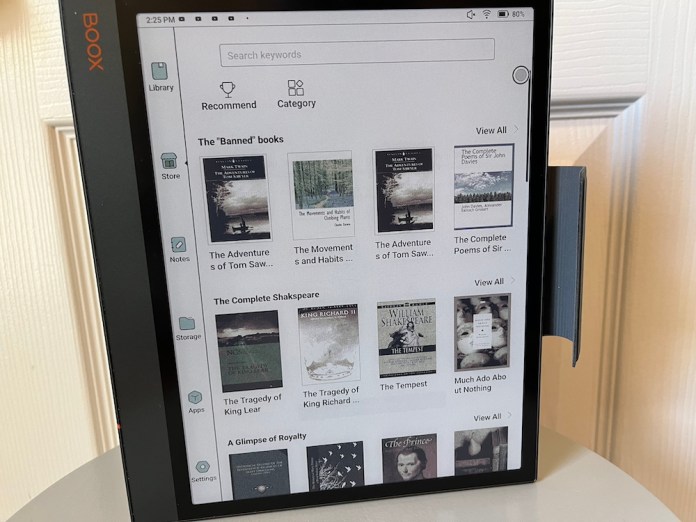
The first thing that really stood out on opening the box of the Boox is the fit and finish of this e-reader. Most of this market is dominated by cheaper materials like plastic housings. This is not the case AT ALL with the Note Air 3C. The e-reader screams premium build quality with a full aluminum chassis. I wasn’t expecting this to feel so good out of the box, but Boox nailed the materials here.

The Note Air 3C revolves around the 10.3 e-ink screen. This is also made from a more premium glass with a secondary cover lens over a traditional plastic variant. The Kaleido Carta 1200 glass is capable of a full array of up to 4,096 color gradients and has a max resolution of 2480×1860 in black and white with color outputting 1240×930.

The sides of the devices are relatively slim on ports, breaking up the unibody aluminum frame. This is going to date my nerd, but it reminds me of an older HTC device from a build aspect. On the left of the Note Air 3C is a dual speaker grill and USB-C for charging/data, assuming you are holding it in the natural portrait orientation.

To the top of the screen is a flush power button that doubles as a fingerprint sensor. The only other notable is on the right side is a magnetic induction strip for the included pen to store and charge. There’s also a magnetic case that has a loop to keep the pen secure while in transit. The entire package is well-thought-out and shows that Boox took its time designing the Note Air 3C.

Software

Another great feature of the Boox Note Air 3C is that it runs Android 12 and the Play Store natively. This gives you all the options to read content that you could possibly think of having. The default Neoreader and library features are very good for anything you own DRM-free, but being able to install Kindle, Kobo, Nook, and Play Books all on the same device makes it nearly unmatched.

Boox has been working on its operating system and managing the screen tech for several generations now, and the Air Note 3C is the best I’ve seen from the company. There is definitely still some ghosting and other UI quirks that are just a part of e-ink readers, but they have mitigated that as much as possible.

Graphics heavy reading like busy comic books or magazines are the only time I’ve seen this outside of video playback. On the same note, however, video is manageable. Watching YouTube or online videos would bring previous generations to a screaming, frozen halt, but the Note Air 3C can handle it fairly well. It’s never going to go toe-to-toe with your iPad, but I watched the latest Deadpool trailer without the Air 3C stalling out.

The pen inputs is another positive for Boox here. The note-taking, annotation, and general sketching you can do with the Note Air 3C is really good. I normally don’t use this a ton on my iPad, but the more paper-like display made this more appealing.

Battery life

Boox doesn’t offer a true estimate for, but I’ve been getting a week of usage per charge with the Note Air 3C. This makes it a very compelling option and the first tablet hybrid I’ve used consistently as a tablet. It lasts so long in standby that I don’t have charger anxiety every time I pick it up. I simply grab the Note Air 3C and pick up where I left off a few days ago.

Conclusion

As mentioned, this is the most I’ve used a tablet as a tablet. Traditionally, to make it worth the purchase, I’ve used iPads and Android options as more of a laptop replacement first and tablet second. The Book Note Air 3C has been comfortably used as a tablet and made me want to use it more and more. The fantastic reading experience combined with the note-taking make it a superb e-reader capable of tablet things.

The one knock I’d give the Boox is at $500, it’s got to be almost a needed purchase. The competition of something like the Amazon Kindle Scribe make it harder to pull the trigger. But if you love note-taking and reading on a more flexible Android platform, I’d argue it beats the Scribe and even the ReMarkable 2 hands down when all the included accessories are considered. It can literally be both of those devices in a single package, and even at $100 more may be worth it to you.

Purchase the Boox Note Air 3C from Boox.com

Mobvoi unveils the TicWatch Pro 5 Enduro for outdoor adventurers

0

Mobvoi has introduced a new TicWatch Pro 5 Enduro smartwatch specially designed for outdoor adventurers. The new version brings solid improvements over the last iteration of TicWatch Pro 5 including improved battery life, advanced fitness features, and much more.

The slightly tweaked version of the original TicWatch 5 Pro is powered by a Snapdragon W5+ Gen 1 chipset paired with 2GB of RAM and 32GB of internal storage. It runs on Google’s Wear OS out of the box. Mobvoi claims that the Enduro can offer up to 90 hours of battery life on Smart mode and 45 days on Essential mode. For comparison, the Enduro can last 10 hours more than the Pro 5’s 80-hour battery life. 

The TicWatch Pro 5 Enduro features a stunning 1.43-inch AMOLED display with 466 x 466-pixel resolution. The Sapphire crystal glass-coated display protects the watch from accidental falls and scratches. Additionally, the Enduro features a US-MIL-STD 810H certification, 5 ATM water resistance, a tweaked rotating crown, and a Barometer. 

Mobvoi also added more professional workouts such as cross-country skiing, crunches, and more. The smartwatch offers 110+ professional workouts that are tailored to various fitness goals, said Mobvoi. The smartwatch seamlessly integrates with multiple fitness apps such as Strava, adidasRunning, and Nike Run Club, enabling users to view their workout data directly on the smartwatch display.  

Furthermore, Mobvoi has overhauled TicExercise which now features a larger UI for clearer visuals. You can track all your health data such as blood oxygen monitoring, VO2 Max, one-tap measurement, heart-rate monitoring, and workout metrics via the Mobvoi Health app. Mobvoi also added a new Snoring detection feature and a 12-month free VIP sleep subscription in the Mobvoi Health app.

The TicWatch Pro 5 Enduro starts at $349.99 and comes only in the Obsidian color option. The smartwatch is now available for purchase via Mobvoi’s website and other authorized sellers.

Award-winning VQ & Laura Ashley China Rose Kitchen Appliances are Ideal for Summer

0

Laura Ashley and VQ present their latest line of small appliances, designed to bring both style and efficiency to your daily routine. From the portable smoothie maker to the versatile slow cookers, each product in the China Rose collection combines the timeless beauty of Laura Ashley designs with cutting-edge technology, ensuring that every meal is not just cooked, but crafted with perfection.

If you’re done with the clean and minimal aesthetic and ready to add a pop of character to your kitchen, you’ll want to check out the Laura Ashely China Rose line.

Laura Ashley China Rose Portable Smoothie Maker

The VQ Laura Ashley Portable Smoothie Maker is a convenient and stylish solution for enjoying delicious smoothies, juices, and protein shakes on-the-go. Priced at £39.99, this USB rechargeable device features a 25,000-rpm engine with six stainless steel cutter blades, perfect for crushing through ice and firm foods in a 450ml juice cup. The one-touch operation and compact design make it an ideal companion for busy days.

Laura Ashley China Rose Hand Blender 4-in-1 Set

The VQ & Laura Ashley Hand Blender Set (£69.99) is a versatile kitchen companion, featuring a powerful 500-watt motor and stainless-steel blades for efficient food processing tasks. With robust blending accessories, ergonomic design, multiple speed settings, and a stylish China Rose finish, this set offers both performance and style in your culinary adventures.

Laura Ashley China Rose Hand Mixer

At £59.99, the VQ Laura Ashley Hand Mixer boasts a 300-watt motor with 5-speed settings for effortless whisking, beating, and mixing. The handheld design features a sleek China Rose print, stainless steel beaters, and dough hooks, making it a stylish and functional addition to any kitchen.

Laura Ashley China Rose 3.5L Slow Cooker

The VQ Laura Ashley 3.5L Slow Cooker, priced at £59.99, offers a convenient solution for preparing family meals. With 3 heat settings and a keep warm function, this slow cooker ensures delicious dishes at all times. The tempered glass lid, dishwasher-safe pot, and non-slip feet make cooking and cleaning hassle-free.

Laura Ashley China Rose 6.5L Slow Cooker

For larger meals, the VQ Laura Ashley 6.5L Slow Cooker (£79.99) provides ample capacity and 3 heat settings, including a keep warm function. Featuring the same elegant China Rose design, dishwasher-safe pot, and 2-year manufacturer’s guarantee, this slow cooker promises tasty meals with ease.

Motorola Refreshes moto g stylus 5G for 2024

0

Motorola has just taken the wraps off the newest addition to its moto g family, the moto g stylus 5G – 2024. Featuring an enhanced stylus and a stunning 6.7″ pOLED display with Dolby Atmos for immersive entertainment, the everyman handset aims to raise the bar for mobile users.

Enhanced Stylus for Unleashing Creativity

The moto g stylus 5G – 2024 comes equipped with a built-in stylus that allows users to seamlessly jot down notes, edit photos, sketch artwork, and navigate various apps. The new stylus integrates effortlessly with the Moto Note app, enabling users to start writing without unlocking their phone for enhanced productivity.

Cinematic Entertainment at Your Fingertips

Feast your eyes on cinema-quality entertainment with the vibrant 6.7″ pOLED display, boasting a 120Hz refresh rate for a smooth viewing experience. Paired with Dolby Atmos technology and stereo speakers, the device offers an immersive audio-visual treat. The Full HD+ (FHD+) resolution ensures sharp, detailed images without pixelation.

Capture Unforgettable Moments with Clarity

The moto g stylus 5G – 2024 features an advanced 50MP Ultra-pixel camera system with Optical Image Stabilization (OIS) on the main camera and a 32MP front camera with enhanced low light sensitivity for crystal-clear selfies and group shots, day or night, capturing memories with unmatched detail.

Power-Packed Performance and Battery Life

With a 5000mAh battery, the moto g stylus 5G – 2024 delivers over a day of battery life, keeping you connected and entertained throughout the day. The device also supports 30W TurboPower fast charging, providing 40 hours of power in less than 30 minutes, ensuring that you can quickly get back to your daily tasks.

Aesthetic Appeal and Comfort

Crafted with meticulous attention to detail, the moto g stylus 5G – 2024 boasts an ultrathin, ergonomic profile that is both stunning and comfortable to hold. The vegan leather finish not only adds a touch of luxury but also offers a soft, grippable texture for added convenience.

Availability and Pricing

In the United States, the moto g stylus 5G – 2024 will be available unlocked at major retailers like Amazon.com, Best Buy, Walmart, and motorola.com starting May 30, with an MSRP of $399.99. For Canadian consumers, the device will be available at motorola.ca on the same date, priced at $499.99 CAD, with subsequent availability at select carriers and national retailers.

In the coming weeks, the handset will come to Metro by T-Mobile, AT&T, Cricket, Boost Infinite, Boost Mobile, Consumer Cellular, UScellular, Spectrum, Xfinity Mobile, Google Fi Wireless, Optimum Mobile, and on Straight Talk, Total by Verizon, and Visible.

Sennheiser’s new Accentum true-wireless earbuds bring signature sound and modern features

0

Sennheiser is known for its premium yet reliable audio gear. Sennheiser added a new member to their portable portfolio – the Accentum true wireless earbuds. Sennheiser packed all the modern features in the Accentum true wireless from signature Sennheiser acoustics to dynamic wireless capabilities, and excellent sound quality. 

The company’s most affordable audio gear costs $100 while the premium ones like Momentum True Wireless 4 earbuds come with a $300 price tag. Sennheiser is now filling the gap in its portable portfolio with new $200 Accetum earbuds offering Sennheiser’s premium quality sound and convenient features without breaking the bank. 

Sennheiser collaborated with Sonova – a leading hearing aid manufacturer – to achieve an ideal balance of stability and comfortable ergonomic design for the new Accentum true wireless earbuds. The new custom bean-shaped design ensures great fit and comfort, said Sennheiser. Four pairs of ear tips are included in the box, which you can choose as per your ear size for a comfortable fit. 

Each earbud boasts a Sennheiser’s proprietary 7mm dynamic True Response transducer that delivers powerful and engaging bass, crisp treble, and natural mids. The company also packed ultra-low distortion drivers into the earbuds, the same drivers found in other brand’s premium Accentum, Momentum, and audiophile headphones. 

The Accentum True wireless earbuds feature hybrid Active Noise Cancellation (ANC) technology that filters out unwanted background noise and lets you enjoy your work and music without interruptions. The transparency mode keeps you connected with your surroundings while listening to your favorite tracks. You can easily switch between ANC and transparency modes via simple tap gestures or the Sennheiser smart control app. 

Additionally, the earbuds support Qualcomm AptX, SBC, AAC, and LC3 codecs via Bluetooth 5.3. In terms of battery, the Accentum wireless earbuds offer up to 8 hours of battery life on a single charge and 28 hours with the case. It has quick charging support; the 10 minutes of charging offers an hour of playback time. The earbuds also have Qi wireless charging support. 

Accentum True Wireless earbuds retail at $199.99 and are available in Black and White color options. The earbuds are now available for pre-order via Sennheiser’s official website and will officially be released on May 21.