Satechi has recently introduced a new line of slim multi-port adapters designed with both style and functionality in mind. The updated lineup includes a 4-in-1 Slim Multi-Port Adapter 4K, a 6-in-1 USB-C Slim Multi-Port Adapter, and a 7-in-1 USB-C Slim Multi-Port Adapter with Ethernet. These refreshed models maintain the same pricing as previous versions but boast faster power delivery and improved data transfer speeds.
Known for their sleek design, Satechi aims these adapters at Mac and PC users, particularly those in creative fields or business professionals who require dependable connectivity. With multiple ports integrated into a single, portable unit, these adapters cater to the connectivity needs of users dealing with the increasingly minimalist port configurations of modern devices.
7-in-1 USB-C Slim Multi-Port Adapter with Ethernet
Adapter Highlights:
7-in-1 USB-C Slim Multi-Port Adapter with Ethernet
Ports: Gigabit Ethernet, 4K HDMI (60Hz), 100W USB-C PD charging, two USB-A 3.2 Gen 2 ports, micro/SD card readers.
This model is perfect for those often immersed in network-intensive tasks, offering robust options for connectivity and ensuring a swift, reliable internet connection.
6-in-1 USB-C Slim Multi-Port Adapter
Ports: 4K HDMI (60Hz), 100W USB-C PD charging, one USB-A 3.2 Gen 2 port, one USB-A 2.0 port, micro/SD card readers.
A more streamlined choice without Ethernet, this adapter still delivers the flexibility users seek for their various peripherals while fitting snugly in a laptop sleeve.
4-in-1 Slim Multi-Port Adapter 4K
Ports: 4K HDMI (60Hz), 100W USB-C PD charging, two USB-A 3.2 Gen 2 ports.
The simplest of the bunch, this model caters to users wanting an efficient, high-speed solution without any extra frills.
4-in-1 USB-C Slim Multi-Port Adapter 4k
Enhanced Speed and Charging Power
One of the primary upgrades across these adapters is the USB-A ports now supporting the USB 3.2 Gen 2 standard, elevating data transfer speeds to a whopping 10Gbps. This impressive upgrade significantly reduces file transfer times, keeping those who juggle multiple devices happy and productive.
The adapters also deliver boosted power capabilities of up to 100W, ensuring that users can charge their power-hungry devices without fear of battery drain. With this enhanced capacity, keeping devices charged while multitasking becomes a breeze.
Thoughtful Design for Durability and Compatibility
Satechi’s commitment to premium, minimalist design shines through with durable aluminum enclosures, tangle-free braided cables, and reinforced necks for added durability. The compact USB-C connector improves compatibility for tighter setups, ensuring that users can connect easily, even with protective cases in the way. With color options like Space Gray, Silver, and Black, these adapters not only work seamlessly with modern devices but also look the part.
These multi-port adapters are ideally suited for those who frequently transition between home, studio, and office settings. They allow for efficient connectivity in a compact format, helping to reduce the clutter that often accompanies tech setups.
Pricing and Availability
The new slim multi-port adapters from Satechi hit the market starting September 26th, with a pricing structure that won’t make wallets weep:
7-in-1 USB-C Slim Multi-Port Adapter with Ethernet – $79.99
6-in-1 USB-C Slim Multi-Port Adapter – $69.99
4-in-1 Slim Multi-Port Adapter 4K – $59.99
Every model comes in stylish colors—Space Gray, Silver, and Black—available directly from Satechi’s website.
Xiaomi has extended its gaming monitor portfolio by launching three new gaming monitors – the Xiaomi Mini LED gaming monitor G Pro 27i, the Xiaomi G27 Qi, and the Xiaomi G24i. Xiaomi’s new gaming monitors aim to deliver outstanding performance, stunning visuals, and a premium gaming experience without breaking the bank.
Starting at $329.99, the G Pro 27i gaming monitor boasts a 27-inch WQHD 2560 x 1440 resolution Mini LED display combined with an HDR1000 and 1000 nits peak brightness, and 99% DCI-P3 wide color gamut, delivering stunningly realistic visuals. The panel also has 100% sRGB and 97% Adobe RGB support with 1.07 billion colors, providing stunning detail and depth while playing games.
The G Pro 27i boasts a high 180Hz refresh rate and lightning-fast 1ms response time, ensuring ultra-smooth and crisp visuals that keep you ahead in the fast-paced games. Furthermore, there is also FreeSync technology support that eliminates screen tearing and stuttering and provides a seamless gaming experience. Xiaomi’s latest gaming monitor also comes with TUV Low Blue Light Certification which effectively reduces eye strain and makes it perfect for extended gaming sessions.
Along with the G Pro 27i, Xiaomi also introduced the G27Qi and G24i affordable gaming monitors. The G27Qi features a 27-inch IPS 2K display with an ultra-high 180Hz refresh rate and 1ms response time coupled with Adaptive FreeSync technology, offering a fluid gameplay without any lags or stutters. The IPS panel with a 178° viewing angle provides vibrant colors and crystal-clear visuals, taking your gaming experience to a whole new level.
Coming to the last model, the Xiaomi G24i comes with a 23.8-inch IPS display size, boasting the same 180Hz refresh rate and rapid 1ms response time as the G Pro 27i and G27Qi. The panel has Fast IPS technology which produces stunning colors with high accuracy and sharpness. Xiaomi also offers an HDR display enhancement feature for the G24i which further highlights rich contrasts and intricate details, bringing games to life with crispier details, and deeper shadows.
Speaking about pricing, the Xiaomi G27Qi is priced at $179, while the G24i retails at $119. Xiaomi’s three latest gaming monitors are now available for purchase via Amazon and Walmart.
Yale, a prominent name in smart home security, has launched its latest innovation, Yale Code. This electronic keypad lock provides reliable, keyless security in a sleek, user-friendly design, priced at an accessible $99. Yale Code is now available for purchase at ShopYaleHome.com, with Amazon and other retailers to follow.
Simple and Effective Security
Yale Code stands out by not requiring a smartphone app. All operations, including adding and removing entry codes, setting up Auto-Lock, and adjusting sound settings, are managed directly on the lock within seconds. This straightforward approach makes Yale Code an excellent choice for those desiring key-free access without the complexity of smart locks or app-based solutions. It’s also ideal for securing side or interior doors in homes or vacation rentals.
User-Friendly Installation
Garrett Lovejoy, Vice President of Connected Category Management at Fortune Brands Innovations, emphasizes, “Yale Code offers the ease of use and trusted security that the Yale brand is renowned for. This product expands our portfolio, providing simplicity, security, and affordability tailored to user preferences.”
Installing Yale Code is hassle-free, requiring no professional assistance or in-app setup. The battery-operated lock eliminates the need for wiring or wall outlets. Once installed, users can create up to 20 custom entry codes directly on the lock, facilitating easy access sharing with family, friends, trusted visitors, and renters.
Design and Durability
Available in Black Suede and Satin Nickel finishes, Yale Code features a sleek, minimalist design inspired by the Yale Assure Lock 2 collection’s “less is more” philosophy, complementing any home aesthetic. The backlit push-button keypad is fade and scratch-resistant, ensuring visibility and durability at any time of day.
For those seeking reliable, key-free security without smart connectivity, Yale Code is an excellent solution. Purchase Yale Code now for $99 at ShopYaleHome.com, with availability on Amazon and additional retail outlets coming soon.
Mobile gaming has come a long way since the days of pixelated birds and addictive candy-crushing adventures. Today’s smartphones are veritable powerhouses, capable of rendering stunning visuals, complex mechanics, and immersive experiences that rival their console counterparts. This rapid evolution has not only changed the way we play, but it’s also reshaped the entire gaming industry.
From Casual to Competitive: A Spectrum of Experiences
Gone are the days when mobile games were solely relegated to short, casual bursts of play. The rise of powerful processors and high-resolution displays has opened the door for a wider variety of genres to flourish on mobile platforms. From sprawling open-world RPGs like Genshin Impact to the strategic depths of chess variants, smartphones now offer experiences that cater to a diverse range of player preferences. The rise of esports on mobile has further blurred the lines between casual and competitive gaming. Games like PUBG Mobile and Call of Duty: Mobile host thriving professional scenes, attracting millions of viewers and fostering a sense of community among players.
The Rise of Crypto Casinos: A Controversial Trend
The integration of blockchain technology has also impacted the mobile gaming landscape. The emergence of crypto casinos, online gambling platforms that utilize cryptocurrencies as their primary form of currency, has sparked debate. Proponents argue that crypto casino like luckyblock.com offer increased security, anonymity, and faster transactions. However, concerns remain regarding the volatility of cryptocurrencies and the potential for addictive gambling behavior. Regardless of the ongoing debate, crypto casinos represent a new frontier in mobile gaming, one that likely holds both promise and peril.
Cloud Gaming: Streaming the Future of Mobile Gaming
One of the most exciting advancements in mobile gaming is the emergence of cloud gaming services. Platforms like Google Stadia and Microsoft xCloud allow players to stream high-end games directly to their smartphones, bypassing the limitations of mobile hardware. This opens up a world of possibilities, allowing users to experience graphically demanding titles that would otherwise be impossible to run on their devices. Cloud gaming is still in its nascent stages, but it has the potential to further democratize access to AAA gaming experiences, making them available to a wider audience than ever before.
Monetization Models: A Balancing Act
The freemium model remains the dominant force in mobile gaming. While it allows for wider accessibility, it often comes at the cost of intrusive advertisements and in-app purchases that can significantly impact gameplay. Developers are constantly exploring new ways to monetize their games, with subscription models and battle passes emerging as popular alternatives. Finding the right balance between free-to-play elements and engaging content is crucial for developers to retain players and generate revenue.
Beyond Gaming: The Mobile Platform as a Multipurpose Entertainment Hub
The impact of mobile gaming extends beyond the realm of entertainment. Mobile games have become powerful marketing tools, with developers leveraging in-app advertising and brand partnerships to reach a vast and engaged audience. Additionally, mobile games are increasingly being used in educational settings, offering interactive and engaging ways to learn new skills and concepts. The future of mobile gaming looks bright, with constant advancements in technology and innovative developers pushing the boundaries of what’s possible on these pocket-sized powerhouses. As the lines between gaming, entertainment, and education continue to blur, mobile games are poised to become an even more dominant force in our lives.
It’s OnePlus season again. We’ve been on a tear of reviews from the company. We’ve covered the OnePlus Nord Buds 3 Pro earbuds, OnePlus Watch 2R, and the new OnePlus Pad 2. Well, the company is back with another set of earbuds. The latest in the flagship Buds Pro series is out with a third generation, and they set the bar pretty high. Let’s dive into what the OnePlus Buds Pro 3s bring to the OnePlus lineup.
Design
The first thing that hit me out of the box is the new case design. Yes, the case design. I’ve never seen a more handsome one, so I’m going to mention it here. The charging storage bin is wrapped in a faux leather material that adds a premium look and fantastic texture. It’s a small way to innovate between releases that I’ve never really considered, but glad OnePlus did.
After opening the case, you reveal the latest OnePlus Buds Pro 3 earbuds. Here, you find a familiar design to last year’s model. The teardrop and stemmed design is wrapped in a metallic finish but adds a new feature not found in the Buds Pro 2s. This is a new capacitive control strip.
Using this strip, you can now swipe up and down to actively control volume. You still have squeeze to pause/play and long press to activate other features like ANC profiles or voice assistants, but the addition of volume controls makes the Buds Pro 3s top of class.
Other design features are proximity sensors for knowing when your Buds Pro 3 earbuds are actually in your ears. You get spatial audio that works both on Android and iOS for a head tracking audio experience. Active noise cancellation is also on board, as well as clear calls powered by AI filtering.
Pairing is a breeze with any device, but especially on Android. The Google Fast Pair Protocol gives you an almost instant pop-up when a supported phone or
tablet is within range. This brings it up to par with first-party options in the Apple ecosystem, but for our fans of Google’s operating system.
Audio and calls
Let’s build off that final paragraph and dive into the audio and calls while generally using the OnePlus Buds Pro 3 earbuds. Simply, they are great. Audio is balanced, the spatial mode is pretty solid, and I think these are the best ANC Buds OnePlus has released to date.
Music playback is fantastic and robust for earbuds. OnePlus has always excelled at this, and the Buds Pro 3s add to this value. From deep bass in hip-hop, to more acoustics in bluegrass, I’ve found the EQ levels and performance top-notch. The same is true for simple vocal listening like podcasts. I’ve found that most earbuds are good at one or the other, but OnePlus has struck a balance here that works.
Voice calls are another great talking point when testing the OnePlus Buds Pro 3 earbuds. My calls came through crisp and clear on my end, with the AI filtering really lending a hand to block out background noises. The other participants in my talk time also said the audio was great, which is good feedback that other earbuds sometimes struggle.
Battery life
We all know endurance away from a charger is subjective, but I’ve found the OnePlus Buds Pro 3s to hit most of the company’s estimates in my test time. With ANC off and around 50% volume, you can achieve up to ten hours of playback per charge. Turning on ANC will drop this timetable down to somewhere between five and six hours, depending on the audio codec your phone supports.
This puts the overall battery life in the good to pretty good range when considering the market. Adding the case battery to recharge on the go, and you can get up to a maximum of 43 hours of total playback. There is fast charge built into the case to give you a 13 hours bump in just ten minutes. To completely refill capacity, it takes up to 70 minutes.
Wireless charging is also supported thanks to the Qi standard. This might be one of my few gripes with the case, though. For some reason, it has to be upside down to charge. It’s a small thing, but it is completely against the grain of any other device I’ve ever tested. Whether it’s another earbuds case, phone, watch, or tablet, I’ve never seen the charging orientation be face down. It’s weird and literally forced me to pull the manual out of the box.
Final thoughts
Pinnacle Selection represents our highest honor, one reserved for products that stand out in design, performance, and overall value.
Products earning this distinction exemplify excellence across the board, delivering an experience that truly rises above the rest.
When you see the badge, you’re looking at the best of what’s available in its category.
OnePlus has slowly become one of my favorite manufacturers in mobile tech over the years. The expansion and polish its brought to provide a full ecosystem to its users is admirable. The OnePlus Buds Pro 3 earbuds add to this lineup with a real, premium wireless audio option for its users. Oh, and the Buds Pro 3s are great with any other paired device too, regardless of operating system.
You can snag the new Buds Pro 3 earbuds in two colors this year: Midnight Opus (black) and Lunar Radiance (cream) for a retail price of $180. Right now, OnePlus is offers $30 off for the launch window. So, what’s the delay, get yours now at the link below.
UGREEN brought some exciting gadgets to IFA 2024, and they’re not just about sleek design—they’re about practicality, power, and performance. The theme this year is “UGREEN IFA: Activate You,” and if you’re a gadget fan, there’s plenty to see.
One device that might have you clearing space on your desk is the UGREEN Nexode Power Bank 20000mAh 145W. This gadget isn’t just another brick-sized power bank. It’s a multi-talented powerhouse that acts both as a portable power bank and a desktop charging station.
It can charge four devices at once, which means you won’t have to play “which device needs the juice more?” The built-in HD TFT smart display tells you what’s going on with your power levels, so no guessing games there either. Plus, with 100W fast charging, you’ll have your devices powered up faster than you can remember where you left the charger. Bonus: it even has a wireless magnetic charging pad for your phone, making it a bit of a show-off.
On the storage front, UGREEN’s NASync Series takes the hassle out of data management. These storage devices let you access files from just about anywhere. Whether you’re working from your laptop, streaming from your TV, or scrolling on your phone, the NASync keeps everything within reach. Running on Intel Core i5 processors and dual 10GbE network ports, these things are fast.
UGREEN’s own operating system makes navigation a breeze, even for those who aren’t exactly “tech-savvy.” And if you’re into the future of storage, check out the concept debut of the NASync AI NAS—because artificial intelligence doesn’t have to stay stuck in sci-fi movies.
For Apple fans, the Uno Series has a bit of character—literally. With its robot-inspired design and emoji-filled smart display, charging just got more fun. It’s not just a pretty face either; this series was designed with iPhone users in mind, packing fast charging into power banks, wireless chargers, and more. The Uno Series is dropping in the U.S. around mid-September, so iPhone users who are tired of boring, generic chargers can soon add a bit of personality to their setup.
If you need serious connectivity, the UGREEN Revodok Thunderbolt 5 Docking Station might be your new best friend. It’s one of the first to feature Intel’s Thunderbolt 5 technology, which translates to lightning-fast data transfers and impressive video output.
With three Thunderbolt 5 ports and the option for a Bandwidth Boost that hits up to 120 Gbps, it’s no slouch when it comes to handling multiple devices at once. Think of it as the tech-savvy version of juggling—except this dock doesn’t drop the ball.
Roborock has introduced a new range of smart home cleaning devices at IFA 2024, celebrating their 10th anniversary in style with five fresh gadgets. From sleek robotic vacuums to a cordless vacuum and even a washer-dryer, the lineup aims to make cleaning a little less of a chore and maybe, just maybe, something you don’t mind doing.
First up are the Roborock Qrevo Curv and Qrevo Edge. These two feature a Dual Anti-Tangle System, which basically means they’ve figured out how to deal with the hairball apocalypse that most vacuums just give up on. The AdaptiLift Chassis lets them handle different floor types, so whether you’ve got carpet, hardwood, or a floor that your dog treats like a dirt runway, these vacuums are ready. They can even jump small thresholds like tiny robot gymnasts.
Roborock Qrevo Curv and Qrevo Edge:
Dual Anti-Tangle System: Prevents hair from tangling with DuoDivide Main Brush and FlexiArm Arc Side Brush.
AdaptiLift Chassis: Adjusts up to 10mm to handle various floor types and navigate thresholds up to 4cm high.
Multifunctional Dock 3.0: Features 75°C hot mop washing, removing over 99.99% of bacteria from the spinning mops.
Roborock Qrevo Slim:
For those who need something that can squeeze into tight spots, there’s the Roborock Qrevo Slim, which claims the title of the industry’s slimmest 3D ToF navigation vacuum. At just 8.2 cm tall, it’s the vacuum equivalent of a cat sliding under the couch. Speaking cat’s, it features obstacle recognition tech, so it won’t knock over your pet’s water bowl or get tangled up in cords like it’s on a mission to test your patience.
Slimmest 3D ToF navigation vacuum, standing at just 8.2 cm high.
Equipped with StarSight™ Autonomous System, featuring dual-light 3D ToF technology and RGB camera for advanced obstacle recognition.
11,000Pa suction with FlexiArm Side Brush, DuoRoller Riser Brush, and upgraded Multifunctional Dock 3.0 for hands-free cleaning.
If cordless vacuums are more your speed, the Roborock H5 might be what you’re looking for. It offers strong suction in a lightweight design—perfect for when you’ve only got a few minutes to get things clean but still want to do the job right. It weighs just 1.82 kg, so you won’t feel like you’re lugging around a small appliance just to clean up some crumbs.
Roborock H5:
Cordless handheld vacuum with 158AW suction power.
Weighs just 1.82kg with the motorized mini brush attached.
Features a nine-cyclone dust separation system and a five-stage filtration system for thorough cleaning.
Rounding things out is the Roborock Zeo Lite, their smart washer-dryer with Zeo-cycle technology. This means it uses fancy drying tech to keep your clothes from getting cooked at high temperatures. This model can handle 10 kg of laundry in the wash and 6 kg for drying, so you can toss in a full load and let it do the rest. The whole cycle takes just an hour, and there’s no need to swap things from washer to dryer, making laundry day a little less of a hassle.
Roborock Zeo Lite:
Smart washer-dryer with Zeo-cycle technology for gentle drying at moderate temperatures.
Handles 10kg of laundry for washing and 6kg for drying, completing a cycle in just one hour.
27 customizable wash and dry modes, accessible via the Roborock App, with auto detergent dispensing and adjustments based on load weight.
Roborock’s new lineup will soon be available in Western Europe, with more details on pricing and availability coming through their official online store and selected retailers. Moreover, they will be available in additional markets following their debut in Europe.
Pricing and Availability
Roborock Qrevo Curv is priced at €1499.99 in Western Europe. The pre-order sale will run from September 9th to September 22nd with early-bird discounts.
Roborock Qrevo Slim is priced at €1299.99 in Western Europe.
Roborock H5 is priced at €299.99 in Western Europe. The pre-order sale will run from September 9th to September 22nd with early-bird discounts.
A Norway-based company’s distraction-free tablet now gets even better with its new iteration. reMarkable has introduced a new Paper Pro e-ink tablet in its focus-friendly tablet lineup. The successor to the original reMarkable 2 which was launched back in 2020 brings massive upgrades and significant improvements, making it the brand’s best e-ink tablet to date.
reMarkable’s latest offering is advertised as the world’s thinnest color paper tablet, bringing a front light, best-in-class keyboard, larger display than before, and much more. Here’s everything you need to know about the latest reMarkable Paper Pro tablet.
The reMarkable completely overhauled the Paper Pro tablet design. The new Paper Pro tablet comes with a larger 11.8-inch custom-made Canvas color display, which is up from the 10.3 inch on the remarkable 2 we recently reviewed. But there’s a catch, the tablet only allows nine different colors when taking notes, writing, or sketching on it. However, reMarkable claims that the device supports thousands of colors. The brand didn’t go with the faded colors of the Kaleido display found in its immediate rivals such as Boox and Kobo. Instead, reMarkable used a Gallery display technology on its latest color tablet.
The larger display now is more responsive than before, offering the best writing and reading experience ever on a paper tablet. Another big upgrade over the original is the company added a front light to the latest Paper Pro tablet, making it readable even in low-light conditions. However, there is no option to control the color temperature of the light.
Speaking about the dimensions, it is just 5.1mm thin, making it the world’s thinnest e-ink tablet. The interesting thing is that despite its thin design it doesn’t compromise on the battery as it rated to last up to two weeks on a single charge. Under the hood, the Paper Pro tablet is powered by a new 1.8GHz quad-core Cortex A53 processor paired with 2GB of RAM and 64GB of internal storage, which is 8 times more than the previous model.
The new display now offers 12ms ultra-low latency with the new Marker stylus, which the company claims to offer a 40% improvement over the reMarkble 2. reMarkable also announced a new Type Folio Keyboard for the Paper Pro tablet. The new Type Folio now comes with a better key travel and backlit which is a solid upgrade over the existing model.
The new Paper Pro tablet retails at $579 with the standard marker. The tablet with the Market Plus version is priced at $629. The new Type Folio comes at a slightly expensive side, retailing at $229. Remarkable also offers Book Folio for Paper Pro comes in six colors and finishes, starting at $89.
OnePlus is a relatively young, but potent manufacturer in the Android market. While it may have started as the new upstart, the company is now entrenched as a true leader in the mobile space using Google’s operating system.
Last year, OnePlus dropped one of the best Android tablets you can buy with, the OnePlus Pad. The company is back this year with an iterative update with the Pad 2. How does this one match up to the previous generation? Let’s find out in this full review of the OnePlus Pad 2.
Design
The first thing that hits you out of the box is how thin this tablet is. At just 6.49mm, this is one of the most svelte devices of this size. It really is iPad Air levels of thinness. OnePlus’ machining is fantastic, and the quality of the Pad 2 is great. It’s slightly larger and heavier than the last gen, but the premium feel and impressions are top-notch.
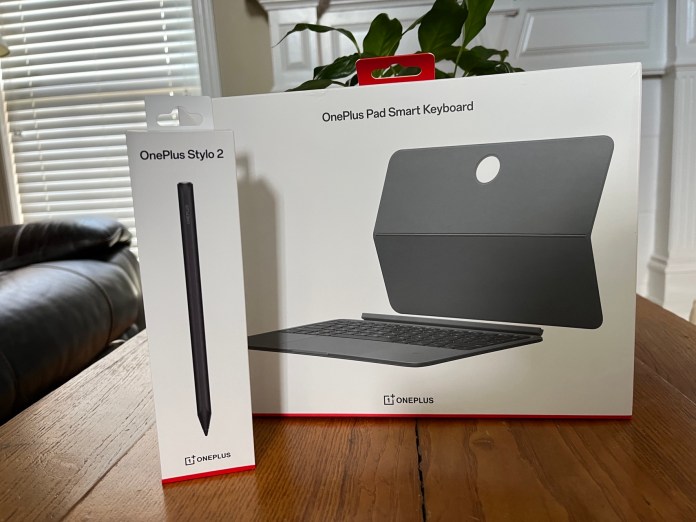
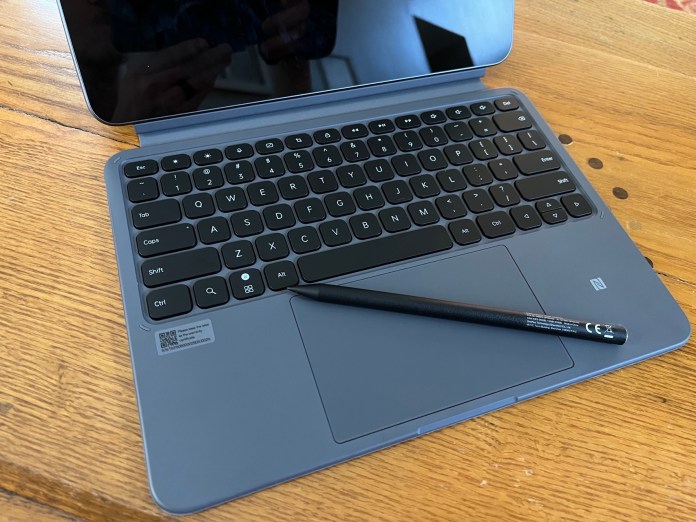
You have a few physical buttons with the power and four speaker grilles at the top. To the right, you have volume rockers. Below the volume keys is a magnetic strip for the optional OnePlus Stylo 2 pen. At the bottom, while in portrait orientation, you have the USB-C charging port and four speaker grilles. To the left, or bottom in landscape, you have three pogo pins that sync data and power to the Smart Keyboard.
The screen on the front of the OnePlus Pad 2 is an exceptional panel. The 12.1-inch screen is capable of Dolby Vision with a resolution of 3000×2120 pixels. The variable refresh rate of 144Hz is above average as well. Things just pop off this screen, even in a bright environment. The 900 nits of max brightness also lend to this.
Internally, OnePlus never skimps on specs, and the powerhouse behind the Pad 2 is like a finely tuned race car. OnePlus is powered by a Snapdragon 8 Gen 3 processor capable of handling gaming tasks. This can be paired with single SKUs; either a 12GB/256GB combination of RAM and storage. There are some rumblings that in other regions there’s a lesser model with 8GB/128GB, but in the US, this is the only option.
Software and performance
Internals mean nothing if the user experience can’t harness that horsepower. Thankfully, OnePlus has nailed this again this year. Running OxygenOS 14, which in turn features Android 14 as the underpinnings, makes for a great user environment. OnePlus generally takes user feedback to heart, and it shows in their products.
Overall, the OnePlus Pad 2 is an Android tablet running Android 14. You get the more “desktop-like” interface and taskbar at the bottom much like any other tablet. Digging deeper shows things like the dedicated Recents button and App Launcher introduced last year. It’s small tweaks that start to surface the more you use the Pad 2.
Taking those mentioned reactions from previous devices, OnePlus also added the exceptional tiling methods for multitasking called Open Canvas. This was originally revealed on the OnePlus Open foldable, and many of us were disappointed that it has yet to make it to the OG OnePlus Pad. Thankfully, it’s here now on the Pad 2 and offers up to three apps via a drag and drop interface on the screen at a single time.
Being able to fully take advantage of the real estate of essentially a small laptop screen makes Open Canvas a killer feature for the OnePlus Pad 2. This easily makes this tablet one of the best multitasking models you can find from any mobile device maker today. It is worth mentioning, that this only seems to work when you turn off gesture navigation with the taskbar always visible.
The same is true with other OnePlus devices you may own. If you sign up for a OnePlus account, the units will recognize one another while in proximity and easily share features. This includes Wi-Fi credentials, automated hotspot from the phone if the Pad 2 loses Wi-Fi, and shared clipboards, docs, and photos.
You can’t have computing devices in 2024 without AI. OnePlus agrees and has a few new AI features here as well with the Pad 2. OnePlus plans a huge feature drop in September, but for now it’s mainly AI Eraser and Smart Cutout in the photos application. This allows you to remove unwanted folks and objects in recent photos.
Keyboard and Stylo 2
We’ve covered a ton of thoughts, and haven’t even gotten to the main accessories. Our review process included these optional add-ons during our testing period. Adding the OnePlus Pad Smart Keyboard ($150) and the Stylo 2 ($100) can also add a hefty sub-charge to your wallet.
Both the keyboard and Stylo 2 work as expected. I like that the new Smart Keyboard offers a more traditional detachable setup with slightly better orientation options. The previous gen pretty much sat right on top of the Function keys, and this allows for much better key travel when using the top lines of the keyboard.
The Stylo 2 feels good in the hand and does stylus things. I’m not a huge pen user on tablets, but the Stylo 2 does things like writing texts, quick notes, and sketching well enough. It’s on par with options from any other manufacturer.
One small thing worth a note are the magnets. I found myself constantly dropping the Stylo 2 off the side of the Pad 2. I feel like the magnets aren’t as strong as the previous model. The same is true for the back panel case with the kickstand. I found I regularly removed the entire thing while just trying to prop out the stand portion. Neither are deal-breakers, and common with this type of hybrid setups, but worth a mention.
Battery life
Battery life has been phenomenal. The internal, 9510mAh battery is almost impossible to run dead in a single session. I found I got multiple days of general usage. Standby is where the tablet really shines. OnePlus estimates this at up to 40 days of idle use, and I’d say this is fairly accurate in my usage. I’ve kept the unit idle for a couple of days at a time with minimal percentage drops.
When you do need to top off the battery bank, the Pad 2 includes the SUPERVOOC charging protocol that allows for almost over-the-top fast charging via it’s chargers and cables. The OnePlus Pad 2 is capable of taking up to 67 Watts of power with the appropriate hardware and included charging brick. This allows for fully charging the tablet in 80 minutes and just 10 minutes of charge getting you back 23 percent.
Final thoughts
Pinnacle Selection represents our highest honor, one reserved for products that stand out in design, performance, and overall value.
Products earning this distinction exemplify excellence across the board, delivering an experience that truly rises above the rest.
When you see the badge, you’re looking at the best of what’s available in its category.
In my mind, the evaluation of the OnePlus Pad 2 is simple. This is the best Android tablet you can spend your money on at the moment. Especially if you own an OnePlus phone. The sharp screen, robust audio, OnePlus integrations, and Open Canvas make this the most compelling tablet, to possible laptop replacement, I’ve used outside an iPad.
Even at the full retail pricing, I think the Pad 2 is more than worth it. Thankfully, at the time of this review, OnePlus has some great incentives to sweeten the deal. You get a $50 discount on the tablet as well as the Stylo 2 and Smart Keyboard case with the “trade-in any device” option. Even better, you get a free Folio Case 2 that is essentially the Smart Keyboard minus the keyboard.
At current pricing, you can have the 12GB/256GB edition kit with Stylo 2 and Smart Keyboard for just $575USD with an eligible trade-in device. And that includes the Folio Case 2 as free gift. So, get it while it’s hot before the deals run out.
At the IFA Berlin 2024 event, Reolink unveiled the Altas PT Ultra, which represents a significant advancement in home security. This cutting-edge product stands as the world’s first 4K UHD continuous recording battery camera, offering an array of remarkable features that position it as a leader in the smart security industry.
As Reolink celebrates 15 years in the market, they continue to focus on technological advancements that meet the real-world needs of their customers. Fabrice Klohoun, Marketing Manager at Reolink, shared that the rebranding goes beyond cosmetic changes, aiming to communicate their core values effectively—primarily how their technology can protect families and improve daily life.
The Altas PT Ultra showcases Reolink’s promise: “Be Prepared, Be Ahead.” It directly addresses common security camera gripes such as missed events, frustrating battery life, and poor night vision. With continuous 4K video recording, stunning full-color night vision, a wide field of view, and a robust 20,000mAh battery, this camera is designed to give users peace of mind without the fuss.
The camera’s crowning glory is its ability to record in uninterrupted 4K UHD with an 8MP sensor. Thanks to its 20,000mAh battery—double that of typical competitors—it can run for 12 hours a day for up to 8 days on a single charge. Users can customize recording schedules through Reolink’s apps and enjoy the innovative pre-recording feature that captures 10 seconds of footage before motion is detected, so nothing important slips through the cracks.
When night falls, the Altas PT Ultra doesn’t skimp on performance. It uses Reolink’s ColorX technology to maintain full-color detail in extremely low light—no more grainy black and white views that make one feel like they’re stuck watching a suspenseful noir film. The camera’s wide F1.0 aperture lets in a whopping four times more light than conventional infrared models, all without extra lighting aids.
With the ability to rotate 360° horizontally and vertically, users can enjoy complete coverage of their surroundings. Smart detection features ensure that alerts only happen for people, vehicles, or pets, giving users control over what matters most. Forget monthly subscription fees; this camera offers core functionalities without added costs.
The Altas PT Ultra will become available in Europe, North America, and Australia, starting September 25. With this launch, Reolink continues to drive ahead in the home security camera market, keeping families covered and their technology cutting-edge—because in the world of home security, it’s all about staying a step ahead of the unexpected. Here is a list of found hyperlinks from the provided text: