Amazon Prime Day just got louder! For a limited time, SOUNDBOKS is offering an impressive 20% discount on their top-tier SOUNDBOKS 4 and SOUNDBOKS Go (Read our review!) speakers. Whether you’re planning a backyard BBQ, a beach party, or simply want to enjoy high-fidelity sound on the go, this deal is worth tuning into.
Compact yet mighty, the SOUNDBOKS Go delivers 121dB of immersive sound. Designed to withstand the elements, it’s splashproof, shockproof, and boasts a swappable 40-hour battery. Perfect for those who need portability without compromising on performance, the SOUNDBOKS Go also allows wireless pairing with other SOUNDBOKS speakers via TeamUP for a richer audio experience. Plus, the SOUNDBOKS App offers customizable sound profiles, EQ settings, and remote controls to tailor your listening experience.
Step up your sound game with the next-generation SOUNDBOKS 4. Featuring a robust 126 dB output and up to 40 hours of playtime, this speaker is engineered for both indoor and outdoor events. Enhanced audio quality comes from redesigned drivers and refined audio routing, ensuring every beat is crystal clear. The SOUNDBOKS 4 also offers smart connectivity, a customizable grill, and an IP65-rated electronics coating, making it as durable as it is powerful. Connect up to five speakers with SKAA technology to amplify your gatherings effortlessly.
Who Should Consider This Deal?
SOUNDBOKS speakers are ideal for:
Music Enthusiasts: Those who crave high-quality sound without compromise.
Event Planners: Perfect for both small gatherings and larger outdoor events.
Adventurers: Durable and portable, these speakers can keep up with any adventure.
Tech Savvy Users: Enjoy smart connectivity and customizable audio settings through the SOUNDBOKS App.
How Long Will This Deal Last?
While Amazon Prime Day typically runs for a limited time, specific end dates for the SOUNDBOKS discount haven’t been disclosed. It’s best to act swiftly to secure these savings before the deal fades away.
Learn More and Grab Yours Today
Ready to elevate your audio experience? Visit SOUNDBOKS on Amazon to explore the full range of features and take advantage of the 20% Prime Day discount. Whether you opt for the versatile SOUNDBOKS Go or the powerhouse SOUNDBOKS 4, your next sound adventure is just a click away.
Don’t miss out—turn up the volume and make this Prime Day one to remember with SOUNDBOKS!
If you’ve been eyeing a pair of high-quality earbuds, now’s the perfect time to make the jump. Amazon’s Big Deals Days are in full swing today and tomorrow, bringing Jabra’s latest and greatest earbuds to enticing new prices for the first time.
What’s on Offer?
Jabra’s Elite series has long been a favorite among audio enthusiasts, and for good reason. These earbuds deliver exceptional sound quality, comfort, and advanced features tailored to both casual listeners and active users. Whether you’re commuting, working out, or simply enjoying your favorite tunes, there’s a Jabra Elite model to suit your lifestyle.
Current Deals:
Elite 10 Gen 2 – Now $199.99 (30% off, originally $279.99)
Elite 10 – Now $169.99 (32% off, originally $249.99)
Jabra’s Elite lineup caters to a diverse audience. If you’re a fitness enthusiast seeking durable, sweat-resistant earbuds with a secure fit, the Elite 8 Active models are perfect for you. For those who prioritize the latest technology and premium sound, the Elite Gen 2 variants offer cutting-edge features. Meanwhile, the Elite 4 and Elite 5 provide excellent value for everyday use without compromising on quality.
Don’t Miss Out – Limited Time Only
These promotional prices are available exclusively during Amazon’s Big Deals Days, which run today and tomorrow. It’s a fleeting opportunity to snag top-tier earbuds at a fraction of their usual cost.
Learn More and Grab Your Deal
Ready to elevate your audio experience? Head over to Amazon’s Big Deals Days page to explore these Jabra Elite offers and find the perfect pair for your needs. Whether you’re upgrading your current earbuds or gifting someone special, these deals are too good to pass up.
For additional information, high-resolution images, or to request a product review, feel free to reach out. Happy listening!
Lorex has announced its first 2K Dual-Lens Indoor Pan-Tilt security camera. The company’s new camera is equipped with two high-definition lenses, delivering expansive coverage of your home with the ability to monitor two separate areas simultaneously.
The Pan-Tilt security camera offers a 360-degree panoramic view with auto-tracking capabilities to monitor moving subjects across the room. The Auto-tracking feature offers the ability to set presets, allowing you to configure up to 8 locations for instant navigation of multiple high-traffic areas without the need for manual panning.
The security camera can record up to 2k resolution, offering crisp details with great clarity. Lorex also packs night vision into the Pan-tilt camera, giving you clear footage even in complete night vision. Furthermore, it has integrated local AI processing that further boosts the overall footage quality.
You get a one-touch call button positioned on the front of the camera which allows you to directly contact the account holder when assistance is needed. It has a smart security lighting (SSL) LED band at the bottom, allowing you to customize the settings to serve as a nightlight or ambient mood lighting for a lounge area. The 2K pan-tilt security camera has a 180-degree rotatable top lens and a one-tap privacy button that enables privacy mode, and instantly disables both cameras from recording, providing complete peace of mind and control over privacy.
The Lorex 2K Dual Lens Indoor Pand-Tilt security camera starts at $99.99 and is now available via BestBuy in the USA and Canada.
Amazon’s October Prime Day is almost here, which means it’s time to scope out some holiday shopping deals a little early. This year, Nextbase is serving up discounts on a selection of their high-quality dash cams. Whether you’re thinking of adding an extra layer of security to your daily drives or gifting peace of mind to someone else, these deals are worth checking out.
What’s It Good For? This isn’t just any old dash cam—it’s a “watch over your car from anywhere” cam. With features like Emergency SOS Mode, Witness Mode, and Smartsense Parking, this model is like having a tiny security guard in your vehicle. It even records in crisp 1440p resolution, so you can count every pebble on the road.
Perfect For: The driver who likes to be connected and prepared for anything.
What’s It Good For? All the cool features of the iQ 2K but in 1080p resolution, making it a strong contender for those who want the tech perks without the extra price tag. Ideal for those who think “less pixels, same protection.”
Perfect For: Drivers who want premium features without the premium price.
What’s It Good For? This one’s built with fleet drivers and commercial vehicles in mind. The inbuilt Wi-Fi lets you seamlessly transfer footage to your phone or tablet—no complicated cable setup required. It’s got a clean, no-nonsense design, and it’s easy to mount and forget about (until you need it).
Perfect For: Business owners who want to keep tabs on the road.
What’s It Good For? A solid entry-level dash cam for anyone who doesn’t need all the fancy features but still wants reliable video recording. The 222G is easy to set up and has a Click&Go magnetic mount, which is tech-speak for “just snap it in place and hit the road.”
Perfect For: Drivers looking for a dependable, budget-friendly option.
When’s the Sale? Lightning Deal on October 9, 2024, from 7:45 a.m. to 7:45 p.m. PDT.
Whether you’re decking out your own dashboard or planning ahead for gift season, these Nextbase deals won’t hang around long. Make sure to jump on Amazon during Prime Day and snag these savings before they speed away!
NUU for Business has rolled out its latest smartphone, the X10 5G, at the Mobile World Congress (MWC) in Las Vegas, held from October 8-10, 2024. This device is crafted to meet the needs of business professionals seeking high performance without emptying their wallets, blending impressive specifications with a wallet-friendly price.
Unpacking the X10 5G Specs
The X10 5G features a generous 6.8-inch HD+ display that delivers a solid experience, perfect for everything from app navigation to video conferencing or document review while on the move.
Running on the MediaTek Dimensity 6100+ Octa-Core processor, the X10 5G balances power and efficiency skillfully. With 4GB of RAM and 128GB of internal storage, it’s ready to tackle a range of business tasks—from handling complex applications to managing large files.
The device’s 13MP AI-powered camera brings added versatility, ideal for high-quality video calls or documenting work in the field. With a 90Hz refresh rate, users can enjoy smooth scrolling and transitions, which is a welcome surprise for phones in this price category.
Battery life won’t be an issue with a robust 5,000mAh battery that promises to last through long workdays. Plus, it supports 15W USB-C fast charging, allowing for quick top-ups when necessary.
The NUU for Business Rebranding
Alongside the launch of the X10 5G, NUU has transitioned from its former identity as NUU Enterprise to NNU for Business. This rebranding highlights a strengthened focus on delivering adaptable and scalable Android-based solutions tailored specifically for business teams. Tim Clemens, COO of NUU for Business, expressed that the change signals their commitment to understanding and meeting the distinct needs of their business clientele with customized hardware.
This pivot means NUU is dedicated to creating devices that can accommodate the diverse demands of industries ranging from logistics to healthcare.
Expanding the X Series Lineup
The X10 5G isn’t flying solo; it will be supported by the X7 and X7 Plus, both designed as entry-level models that offer secure and dependable solutions for businesses needing cost-effective mobile options. While they may not be as feature-rich as the X10, these models still ensure devices that deliver the necessary performance and security demanded by enterprise IT departments.
Experience NUU for Business at MWC
Attendees at MWC Las Vegas can swing by Booth 1008 in the West Hall of the Las Vegas Convention Center to get a firsthand taste of the X10 5G and the complete X Series. For those interested in a deeper conversation about how NUU for Business solutions can make an impact, appointments for discussions can be scheduled online.
For further information on the X10 5G and the entire X Series, the company directs visitors to its website, nuuforbusiness.com.
The TCL QM7/QM751G QLED TV serves as a solid mid-range option in TCL’s 2024 lineup, fitting somewhere in between the top-tier QM8/QM851G and the more affordable Q6/Q651G line. Powered by TCL’s AIPQ PRO processor, the QM7 shines with brightness levels reaching up to 2,400 nits and features up to 1,500 dimming zones, varying with screen size.
Design: Sleek, Stylish, and Slightly Reflective
The QM7 boasts a modern and elegant design characterized by thin bezels on three sides, with a slightly thicker border at the bottom. The front displays reflective branding near the top right corner, which might catch your eye when the sun is just right—perfect for those who enjoy a bit of light show with their TV viewing.
The metal-brushed finish of the borders adds a touch of sophistication, while the sturdy stand, crafted from metal encased in plastic, ensures the TV remains stable, even if your pet decides to investigate its sturdiness.
The 65-inch model rests on a center-mounted metal stand, elevating the TV by about 3.5 inches. This clever design allows soundbars to slide neatly underneath without blocking your view. For larger models, such as the 98-inch variant, TCL opts for side-mounted feet, maintaining a clean and balanced look that fits well in various living spaces.
I’m currently using the TV with the metal stand; however, I plan to transition to a wall mount in the near future. I was concerned that having the TV elevated around chest height on a stand might prove to be a challenge. Would it wobble or move as people walk around, or play with a puppy in the room? Suffice it to say, it’s heavy enough and weighted properly that it doesn’t seem to be going anywhere. That said, I still think it will ultimately work better on the wall and tidy the room up a bit.
Features: Packed with Modern Goodies
Loaded with a variety of contemporary features, the QM7 supports Dolby Vision, HDR10+, and HDMI 2.1 bandwidth, enabling 4K resolution at 144Hz and 1080p at 240Hz. It includes Variable Refresh Rate (VRR) support and AMD FreeSync Premium Pro, catering to gamers seeking smooth and rage-free gameplay. The TV is IMAX Enhanced Certified, ensuring that your movie nights feel like a trip to the cinema without the popcorn.
Running on Google TV, the QM7 provides access to a vast selection of streaming apps and integrates seamlessly with Google Assistant, Amazon Alexa, and Apple Homekit. This integration allows for hands-free voice control, making it easy to search for content, control smart home devices, and get updates without lifting a finger—unless you enjoy pressing buttons for fun.
I’ve long been an advocate for Android/Google TV as the smart platform for TVs, streaming sticks, and projectors. It’s evolved nicely over the years and feels fully fleshed out. For a generation of people growing up without the proverbial cord, all of the content is presented in an intuitive manner with its algorithmically enhanced personalization and customization options.
Hardware Features
Display:
Screen Sizes: Available in 55-inch to 98-inch variants
Panel Type: QLED with mini-LED backlight technology
Resolution: 4K Ultra HD (3840 x 2160)
Refresh Rate: 120Hz native, supports up to 144Hz on selected ports
Dimming Zones: Up to 1,500 for enhanced contrast and black levels
Brightness: Peaks at up to 2,400 nits for vibrant HDR highlights
HDMI 3 & 4: Standard bandwidth, with HDMI 4 featuring eARC for high-quality audio
USB Ports: 2 for media playback and device connectivity
Ethernet Port: For stable wired internet connection
Audio Outputs: Optical audio out and headphone jack for versatile sound options
Antenna/Cable Connector: Built-in tuner support
Composite Video Input: For older devices
Audio:
Built-in Speakers: Support for DTS and Dolby audio formats via eARC HDMI port
Gaming Features:
Variable Refresh Rate (VRR): Reduces screen tearing for smoother gameplay
AMD FreeSync Premium Pro: Enhances gaming performance by synchronizing the display’s refresh rate with the GPU
IMAX Enhanced Certification: Optimizes content for an enhanced cinematic experience
Remote Control:
Design: Slim, motion-activated backlight for easy use in the dark
Buttons: Dedicated buttons for popular streaming services like Netflix, YouTube, and Amazon Prime Video
Voice Control: Built-in microphone for issuing voice commands directly from the remote
Setup: Easy Peasy with a Dash of Tech Savvy
Setting up the TCL QM7 is a breeze, thanks to the aforementioned intuitive Google TV interface that makes navigation smooth and straightforward. The TV accommodates multiple input resolutions up to 4K at 144Hz, with HDMI 1 and 2 handling the highest refresh rates.
Managing cables is hassle-free, thanks to the stand’s built-in cable management system, keeping your setup clean and reducing the risk of tripping over stray wires during movie marathons. Running cables down the spine of the stand is nice and easy once you’ve got it in place.
The remote included with the QM7 is both functional and user-friendly. It features a motion-activated backlight, dedicated buttons for popular streaming services, and a built-in microphone for voice commands. Whether you’re adjusting the volume, switching inputs, or searching for your favorite show, the remote is designed to make your experience seamless and efficient.
General Performance: Versatile and Vivid
The QM7 performs admirably across various viewing scenarios. In darker settings, its excellent contrast and deep blacks enhance the viewing experience, making every scene more immersive. The impressive HDR brightness ensures that highlights stand out, adding depth and detail to action-packed sequences and breathtaking landscapes alike.
In well-lit rooms, the TV’s high SDR brightness and decent handling of reflections make it a reliable choice, minimizing glare and maintaining picture clarity. The fast response time reduces motion blur, making it suitable for sports enthusiasts, gamers, and those who might wish to use the TV as a PC monitor.
Worth noting here, the viewing angles are somewhat restricted, leading to slight color washout when viewed from the sides. This limitation means the best picture quality is achieved when you’re directly in front of the screen, so gathering around might require a bit of strategic seating arrangement. Thankfully, these are larger TVs to begin with and you’ll rarely have that much of an issue.
Out of the box, the Cinema mode tends to display slightly warm HDR colors. While the default settings offer a vibrant and engaging picture, a quick calibration can fine-tune the color balance to better match your preferences, ensuring that everything from movie scenes to gaming visuals looks just right.
I invite you to spend a bit of time with the settings, playing around with what Google TV offers and how TCL configures things. A couple of settings to be enabled or disabled could dramatically change your experience or simply make things flow easier.
Audio: Clear Dialogues, Meh Bass
The QM7 supports advanced audio formats like DTS and Dolby through its eARC HDMI port, ensuring high-quality sound when paired with compatible receivers or soundbars. However, the built-in speakers have their limitations. Dialogue is clear and easily understandable at low to moderate volumes, but the TV struggles a touch with bass performance at higher volumes. This makes it less suitable for noisy environments or those who enjoy booming soundtracks.
For a more robust audio experience, pairing the QM7 with an external sound system is recommended. This setup not only compensates for the built-in speakers’ shortcomings but also enhances the overall sound quality, making your viewing experience more immersive and enjoyable.
Fortunately, I find that I rarely have to get the volume up beyond lower levels for my needs. And the criticism only comes because I am conditioned to look for drawbacks. Am I ever going to crank the volume for a house party? No, those days are behind me. But the sound will be more than adequate for a playoff game.
Value: Bang for Your Buck
Priced at $1,499.99 for the 65-inch model, the QM7 provides excellent value, especially when discounts bring the price closer to $1,000. TCL TVs are often available at attractive markdowns, making the QM7 an appealing choice for those seeking premium-like features without the steep cost.
Pros
Bright picture with strong contrast
Comprehensive gaming features, including VRR and FreeSync Premium Pro
Hands-free Google Assistant voice control
Supports Apple AirPlay and Google Cast
Sleek and sturdy design
Cons
Limited viewing angles leading to color washout from the sides
Built-in audio lacks strong bass and distorts at high volumes
Warm HDR colors in Cinema mode out of the box
Awarded to products with an average rating of 3.75 stars or higher, the AndroidGuys Smart Pick recognizes a balance of quality, performance, and value.
Products with this distinction deserve to be on your short list of purchase candidates.
Final Verdict: An Excellent Value with Minor Quirks
The TCL QM7/QM751G QLED TV is a versatile and value-packed option for those seeking balanced performance across various usage scenarios. Its bright display and robust feature set make it suitable for both entertainment and gaming, catering to a wide range of preferences and needs.
While it has minor drawbacks in viewing angles and built-in audio quality, these can be mitigated with external sound solutions and optimal viewing positions.
Priced competitively, especially when discounted, the QM7 is a commendable choice in the mid-range TV market. Whether you’re a gamer looking for responsive performance, a movie enthusiast craving vivid visuals, or someone seeking a reliable all-rounder, the QM7 delivers on multiple fronts without demanding an extravagant investment.
Oura has rolled out the Oura Ring 4, the newest addition to its line of health and sleep trackers. This latest version arrives with an upgraded sensing system that adjusts to individual fingers, a lighter titanium build, and a fresh look for its companion app. Orders open on October 3, and shipping starts on October 15. Priced at $349, it sits $50 above the base Gen 3 model but matches the cost of the Horizon edition.
The Oura Ring first gained a spotlight during the pandemic for its role in tracking NBA players’ health. Since then, it’s found its way onto the fingers of celebrities like Jennifer Aniston and Gwyneth Paltrow. But the world of wearable tech has changed since then, with new contenders like Samsung’s Galaxy Ring jumping into the ring—pun intended.
The Oura Ring 4 aims to refine the basics: improving accuracy, battery life, and comfort while staying true to its sleek design. Jason Russell, Oura’s VP of consumer software product, shared that they focused on making the ring a better fit for everyone.
“Not all fingers are created equal,” Russell quipped. “Our arteries and veins are all over the place, which can mess with signal quality.”
To counter that variability, the Oura Ring 4 introduces a “smart sensing” system that tailors readings to the wearer’s finger. It also features twice as many signal pathways as the Gen 3 and packs two triple-LED systems—each with red, green, and infrared light—compared to the Gen 3’s single setup. The titanium exterior and interior are designed to reduce stray light interference and deliver cleaner readings, or at least that’s the pitch.
While the Oura Ring 4 doesn’t detect sleep apnea, it can provide more detailed data on breathing disturbances, which users can bring up with their healthcare providers. An Oura-conducted study showed a 120% improvement in blood oxygen sensing and more accurate detection of breathing disturbances, though it’s worth noting that these improvements are based on internal testing.
The design has gotten a few tweaks too. The Oura Ring 4 weighs in at 3.3 to 5.2 grams, depending on size, shaving off a bit of heft compared to the Gen 3’s 4 to 6 grams. The ring’s sizes now range from 4 to 15, accommodating a broader range of finger shapes. It comes in brushed silver, black, gold, rose gold, and stealth finishes, and the black edition has a glossy sheen that might make it the fashion statement your smartwatch could never be.
Battery life has been extended up to eight days, a slight boost over the Gen 3’s maximum of seven. This means users can track sleep and health metrics for a longer stretch without needing to charge.
Oura’s app has undergone a rework, with a streamlined interface split into three tabs: Today, Vitals, and My Health. The Today tab surfaces information that’s more immediately relevant, while Vitals and My Health focus on individual metrics and long-term trends. The change should make it easier for users to find what they’re looking for and sidestep the maze of menus in the old app.
The real test, of course, is whether the Oura Ring 4’s upgraded sensors and new algorithms deliver on their promises. But for those looking to accessorize their health tracking game with a smart ring that doubles as a sleek piece of jewelry, Oura’s latest model might just be the right fit—finger and all.
Unistellar’s Odyssey Pro is a compact smart telescope tailored for astronomers seeking a comprehensive, all-in-one solution for both viewing and imaging the night sky. Priced at $3,999 (yeah, that’s right), it offers a more affordable entry point compared to Unistellar’s premium EVSCOPE 2 while maintaining a smaller, more portable form factor.
Let’s break down the Odyssey Pro.
Keeping in mind that smart telescopes, or telescopes for that matter, are not the normal bread and butter for our outlet. That is to say, we’re certainly not as well-versed in the — wait for it — space and don’t have other models for comparison. With that being said, we certainly have our thoughts on the experience, particularly as it pertains to its “smart” aspect.
Design
The Odyssey Pro sports a sleek matte black finish, with a pricier red edition available for those who like a pop of color in their stargazing gear—because why shouldn’t your telescope match your favorite superhero cape?
Measuring 431 x 204 x 134 mm and weighing around 13lbs when mounted, it’s reportedly significantly lighter and more compact than Unistellar’s older models. This makes it easier to store without turning your living room into a mini observatory. We still find ourselves leaving the telescope set up and sitting on the tripod but it doesn’t take up that much space.
A standout feature is the Nikon-made digital eyepiece, complete with a diopter adjustment wheel. Think of it as the telescope’s version of adjustable brightness on your smartphone. This is a key distinction from another model, the Odyssey.
Features
The Odyssey Pro is packed with impressive features that cater to both novice and seasoned astronomers:
Digital Eyepiece: Developed in collaboration with Nikon, this eyepiece provides a live view of celestial objects, allowing you to switch between direct observation and the digital display on your phone seamlessly.
Automated Controls: Forget the days of manual focusing and collimation. The Odyssey Pro handles these adjustments internally, letting you focus more on spotting the Big Dipper rather than fiddling with knobs.
Unistellar Mobile App Integration: Control your telescope via a dedicated mobile app, selecting from over 5,000 celestial objects. It’s like having a personal tour guide for the night sky.
Deep Dark Technology: This proprietary technology minimizes light pollution and noise, ensuring clear images even in urban environments. Perfect for city dwellers who can’t help with the light bleeding into frame.
Solar Observation Capability: With a separately purchased solar filter, you can safely observe and image the sun. Just remember: never look directly at the sun without proper protection.
Setup
Setting up the Odyssey Pro is a breeze with the physical component taking but a couple of minutes. From there you’ll turn to the mobile app for much of the remaining experience.
Tripod Assembly: Extend the legs of the sturdy tripod and secure them using the lever-action clasps. The built-in spirit level bubble helps ensure your setup is as level as a perfectly balanced seesaw.
Mounting the Telescope: Attach the telescope body to the tripod using the provided mounts. It’s stable enough to handle enthusiastic astronomers and the occasional curious pet.
Powering On: Press the single power button, and the LED indicators will confirm it’s ready to explore the cosmos.
App Configuration: Download the Unistellar app on your smartphone or tablet. Connect to the telescope via Wi-Fi, and the app will align the telescope with the night sky based on your location.
General Performance
The Odyssey Pro shines in capturing images of nebulas and star clusters, even in light-polluted areas. Objects like the M57 Ring Nebula and the Hercules globular cluster (M13) appear clear and vibrant, thanks to the Deep Dark Technology. It’s like having a window to the universe that filters out the city lights.
Astrophotography: The 4.1-megapixel Sony Exmor CMOS sensor combined with image stacking capabilities allows for detailed astrophotography. You can capture long exposures of deep-sky objects, revealing intricate details such as dust lanes and star formations. Plus, you can download raw data files for further editing in software like Adobe Photoshop or PixInsight.
Solar Observations: When equipped with a solar filter, the Odyssey Pro provides safe and detailed views of the sun, including sunspots.
Planetary Viewing: While the Odyssey Pro excels with deep-sky objects, it’s weirdly less impressive for planetary observations. Images of Jupiter, for example, might lack the detail you’d get with more specialized planetary telescopes. It’s not a deal-breaker, but keep your expectations in check unless you want to see more detail than a daytime horoscope.
Using the Odyssey Pro is like having a personal astronomer at your fingertips. The initial setup is quick, allowing you to go from unboxing to stargazing in minutes—no PhD in astrophysics required. The mobile app deserves a special mention for making the entire experience seamless and enjoyable.
Unistellar App: The app is intuitive and user-friendly, guiding you through the process of selecting celestial objects to observe. It leverages your device’s GPS to align the telescope accurately, ensuring you’re looking at the right spot in the sky. Navigating through the app feels like flipping through a well-organized photo album of the cosmos, minus the awkward family photos.
Once connected, the app offers a catalog of over 5,000 celestial objects, complete with detailed information and easy-to-follow navigation. Selecting an object is as simple as tapping its name, and the telescope does the rest—slewing to the target, adjusting focus, and even enhancing the image for better visibility. It’s perfect for those nights when you want to impress friends with your stellar tech without having to explain the complexities of celestial navigation.
As someone who is new to telescopes, I was surprised by how the experience is almost entirely driven by the phone. The live view through the digital eyepiece complements the app by providing a direct observation experience. Watching celestial objects come into focus on both your phone and through the eyepiece adds a layer of excitement and engagement. It’s ideal for sharing the stargazing experience with family and friends, making it more interactive and less of a solo activity.
Once you’ve set up the sturdy tripod and mounted the Odyssey Pro, powering it on is where the magic begins. The telescope uses your smartphone’s GPS data to understand exactly where you are on Earth. This geolocation is crucial because it helps the telescope determine its position in the sky without you having to lift a finger. Simply open the Unistellar app, and the telescope starts the alignment process automatically.
The Odyssey Pro employs a technique called plate-solving to match the view through its optics with a star map. Essentially, the telescope takes a quick snapshot of the night sky, compares it to its internal database of star patterns, and calculates the precise orientation needed to lock onto your chosen celestial object. It’s like having a digital navigator that ensures you’re pointing at the right spot without getting lost in a sea of stars.
Despite its advanced technology, the Odyssey Pro isn’t perfect. If there are obstructions like trees or buildings blocking the telescope’s path to a celestial object, the app might struggle to lock onto the target on the first try. You might find yourself giving the telescope a little nudge—or a few gentle reminders via the app—to get it back on track. Additionally, I found a setting in the app that more or less tells the telescope approximately how much of the sky is visible around you. This was helpful in areas where the houses, trees, and buildings in my area were a bit taller.
As you observe through the digital eyepiece or the app, the Odyssey Pro continuously fine-tunes its alignment to maintain a steady view of your selected celestial object. This live feedback loop ensures that even minor shifts in position, perhaps caused by a slight breeze or movement of the tripod, are quickly corrected.
Unlike traditional telescopes that offer a range of focal lengths through interchangeable eyepieces or adjustable settings, the Odyssey Pro is designed for simplicity and automation. The Odyssey Pro handles all focusing internally, eliminating the need for manual adjustments. This means that users cannot manually select different focal distances. Instead, the telescope automatically adjusts the focus based on the celestial object you’re observing. Whether you’re gazing at a distant nebula or a closer star cluster, the Odyssey Pro ensures that the image remains sharp without any input required.
For beginners or those who prefer a straightforward, user-friendly experience, this automated focusing system is a significant advantage. It removes the complexity often associated with telescope setups, allowing you to enjoy stargazing without the hassle of tweaking settings. Simply select your target in the app, and the Odyssey Pro does the rest. As a newbie I really enjoyed this part of the experience.
However, thinking about more advanced astronomers who might enjoy customizing their viewing experience, the lack of manual focal distance control might feel restrictive. Traditional telescopes offer the flexibility to switch eyepieces or adjust settings to achieve different magnifications and fields of view, catering to a wide range of observational needs. The Odyssey Pro’s fixed focal system means you’re somewhat limited to the preset configurations optimized by Unistellar — for better or worse.
Value
At $3,999, the Odyssey Pro is a premium smart telescope, offering a blend of portability, ease of use, and advanced imaging capabilities. Compared to Unistellar’s other models, it strikes a good balance between affordability and feature set. While it’s pricier than some competitors I’ve looked up, I’ve also found that others who have reviewed this telescope find the build quality and integrated technologies justify the cost.
It’s an investment in your astronomical adventures, to be sure. Its value is certainly something that I’ve been slowly appreciating more as I spend more time with it, reading up on other models.
Battery
The Odyssey Pro runs on a removable lithium-ion battery, providing up to five hours of operation. This should cover most stargazing sessions, allowing you to explore the night sky without constantly hunting for power outlets. For those longer nights or impromptu observation parties, you can easily connect to a portable battery pack. The USB-C plug makes it easy to grab your laptop charger for power, too.
Pros and Cons
Pros:
Compact and Lightweight Design: Easy to store and transport without feeling like you need a gym membership to carry it.
Automated Focusing and Collimation: Simplifies operation, making it accessible for beginners who aren’t keen on becoming telescope mechanics.
High-Quality Nikon Digital Eyepiece: Enhances the live viewing experience, allowing direct observation alongside app-based imaging.
Effective Image Quality in Light-Polluted Areas: Deep Dark Technology minimizes the impact of urban light pollution, enabling clear views of faint celestial objects.
User-Friendly Mobile App Integration: Facilitates easy selection and navigation to over 5,000 celestial objects.
Sturdy and Stable Tripod: Ensures steady observations and reduces vibrations for clearer imaging.
Cons:
High Price Point: At $3,999, it’s a significant investment.
Limited Performance for Planetary Viewing: Images of planets may lack the detail and clarity you might imagine in your head.
Digital Eyepiece May Not Appeal to Traditionalists: Users preferring an entirely optical viewing experience might find the digital eyepiece less satisfying.
Separate Purchase Required for Solar Filter: Adds to the overall cost for those interested in daytime solar observations.
Verdict
The Unistellar Odyssey Pro is a robust smart telescope that caters to both beginner and intermediate astronomers seeking a convenient and automated stargazing solution. Its design emphasizes portability and ease of use, making it suitable for those who prefer a hassle-free setup and operation. The inclusion of a Nikon digital eyepiece enhances the viewing experience, allowing for both app-based and direct observation.
While the Odyssey Pro excels in capturing deep-sky objects and performing well in urban settings, it falls short in planetary imaging and carries a premium price tag. Potential buyers should weigh these factors against their specific needs and budget considerations.
The Odyssey Pro stands as a reliable and high-quality option and seems to justify its placement in Unistellar’s lineup. It offers a balance of advanced features and user-friendly design that makes astrophotography and night-sky exploration more accessible.
Alternative
If the Odyssey Pro isn’t the right fit for you, consider the Unistellar Odyssey. At $2,299, this model lacks the Nikon digital eyepiece and offers a slightly lower camera resolution (3.7 megapixels). It’s a more affordable option for those who don’t need the enhanced viewing experience of the Pro model. All things considered, and given my expected usage, that might be where I point others like me.
Awarded to products with an average rating of 3.75 stars or higher, the AndroidGuys Smart Pick recognizes a balance of quality, performance, and value.
Products with this distinction deserve to be on your short list of purchase candidates.
Final Thoughts
The Unistellar Odyssey Pro smart telescope combines sleek design, cutting-edge technology, and ease of use, making it an excellent choice for those eager to explore the night sky without the usual hassles of a telescope.
Priced at $3,999, it offers a more portable option compared to Unistellar’s premium models, fitting neatly into smaller spaces and being lighter to carry. The Nikon-made digital eyepiece adds a unique feature, allowing for direct observation alongside the app’s digital display—perfect for sharing the wonder with friends and family.
Setting up the Odyssey Pro is refreshingly straightforward, letting you go from unboxing to stargazing in minutes. Its performance excels when capturing nebulas and star clusters, even in areas with light pollution, thanks to Deep Dark Technology.
While it doesn’t deliver the same level of detail for planetary imaging, the overall experience remains impressive, especially for those new to astronomy. Although the price is on the higher side, the combination of portability, automation, and quality imaging makes the Odyssey Pro a worthwhile investment for anyone looking to enhance their stargazing adventures.
Whether you’re a beginner or an enthusiastic hobbyist, this smart telescope makes exploring the cosmos both accessible and enjoyable.
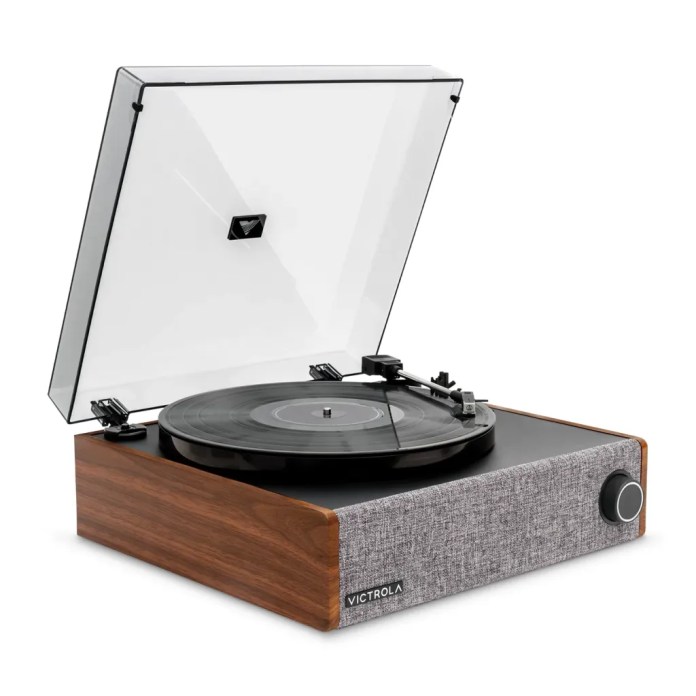
Victrola, a household name in home audio for over a century, has rolled out two new offerings that should make vinyl enthusiasts perk up their ears. The Century 6-in-1 Wood Music Center and Eastwood LP Hybrid Record Player are both now up for grabs on Victrola.com, Amazon.com, and select retailers. These additions bring a mix of classic aesthetics and modern tech that appeal to those who love retro vibes with a side of Bluetooth connectivity.
The Victrola Century 6-in-1 is a great pick for anyone looking to cover all their listening bases in one go. It’s got a 3-speed turntable, CD player, cassette deck (yes, really), and Bluetooth connectivity. With so many ways to play your tunes, it’s the one-stop shop for anyone whose music collection spans vinyl to digital. It even features Victrola’s VINYLSTREAM Bluetooth output, which means you can stream your favorite records through Bluetooth speakers or headphones without a tangle of cables. Just don’t forget where you put the remote.
Century 6-in-1
The Century lineup includes a few versions to suit different tastes. The base model comes with a simple LED display and compact feet, making it ideal for squeezing onto a crowded bookshelf. The Century Signature+ model, on the other hand, includes a stylish clock face and legs for a more eye-catching floor display. All options come in Walnut, Black, or Natural finishes, so whether your space is minimalistic or mid-century modern, you should be covered.
Century Signature+Century Signature+
Meanwhile, the Eastwood LP Hybrid Record Player makes its debut as the first full-size turntable in the Eastwood family. It comes with a full-size 12-inch platter, a suspended speaker system, and enough features to keep the most dedicated audiophiles happy. The suspended speaker system helps cut down on vibrations and skips, meaning you can crank up the volume without worrying about your record jumping around like it’s at a rock concert.
What’s under the hood? The Audio-Technica AT-3600L cartridge, for starters. It’s built to provide consistent, smooth playback, so those delicate instrumental solos come through just right. The Eastwood LP also supports Bluetooth input, making it easy to stream music from your phone. And, like the Century, it’s got VINYLSTREAM Bluetooth output to wirelessly transmit your vinyl tracks to any compatible speaker. Think of it as a modern twist on your dad’s old record player, minus the blown-out speakers and missing needle.
The Century is priced at $149.99/£159.99, and the Eastwood LP Hybrid Record Player is available for $199.99/£219.99. Both models are ready for purchase in Walnut, Black, and Natural finishes. Whether you’re adding to a growing vinyl collection or just need something sleek for the living room, these new releases have a little something for everyone.
Creating a smooth digital setup at home is more crucial than ever. Whether you’re a media buff who demands flawless 4K streaming, a family wanting simple setup and management, or a smart home enthusiast aiming to link multiple devices securely, it’s important to have the right equipment.
We recently reached out to one of the more prominent names in this space, Synology, to see what it might recommend for home and small office needs. The brand was gracious enough to send along its DS923+ NAS and RT6600ax router for consideration. Having installed and used the pair for a few weeks, we’ve since found to be a an excellent mix of performance and simplicity. Together, these gadgets turn your home into a smart entertainment center with strong networking capabilities and easy-to-use interfaces.
Read on to learn more about each of the products and how they might fit into your home. Among the previously mentioned use cases, the Synology products are also a good option for other needs, including archiving data and old photos and other media, working with large video and audio files for content creation, and creating a secure network.
Meet the DS923+
Imagine your family has a huge collection of photos, home videos, and all those holiday memories scattered across different devices—phones, tablets, maybe even some old USB drives. Keeping everything organized and accessible can feel like trying to herd cats, right?
That’s where the Synology DS923+ comes in. Think of it, among other things, as a super-smart digital family photo album that sits right in your home. It’s like having your own personal library where all your important files, movies, and pictures are stored safely in one place.
Ripped a bunch of your old DVD’s or somehow found yourself with a bunch of things that may or may not be from the digital high seas? Keep reading.
Here’s how it works:
Super Organized Storage: Just like a bookshelf organizes your books, the DS923+ neatly stores all your digital stuff. You can easily add more “shelves” (storage space) as your collection grows, so you never run out of room.
Easy Access for Everyone: Whether someone’s on their phone watching a family video or you’re on the computer sharing pictures with cousins far away, everything is just a click away.
Safe and Sound: Think of it as a vault for your digital treasures. It automatically backs up your files, so even if something happens to one device, your memories are still safe and sound.
Smooth Streaming: If your family loves movie nights, the DS923+ makes sure everyone can watch their favorite films in stunning quality without any annoying pauses or glitches.
User-Friendly: You don’t need to be a tech wizard to use it. Setting it up is straightforward, and managing your files is as simple.
In a nutshell, the Synology DS923+ is like having a reliable, organized, and easy-to-use digital hub for all your family’s important stuff. It keeps everything in one place, makes sharing and accessing files a breeze, and ensures your memories are protected for years to come. Perfect for keeping the whole family connected and your digital life running smoothly!
Powered by a quad-core AMD Ryzen processor and up to 32GB of DDR4 memory, the DS923+ ensures speedy data transfers and smooth 4K media streaming. Its expandable storage, featuring four bays and the option to add more expansion units, gives you plenty of space for all your movies, music, and photos. Plus, no more fighting over who gets to stream the latest blockbuster first!
Key Features:
Powerful Hardware: AMD Ryzen quad-core CPU and up to 32GB DDR4 memory for top-tier performance.
Scalable Storage: Four drive bays with the option to expand, perfect for your growing media collection.
4K Streaming: Supports Plex Media Server and other streaming apps for uninterrupted high-definition viewing.
Advanced Data Protection: Btrfs file system with snapshots and comprehensive backup solutions keep your media safe.
User-Friendly Design for Effortless Setup
Synology gets that not everyone speaks “tech.” That’s why the DS923+ and RT6600ax are designed with simplicity in mind. Sure, they’re full of incredible features and customization, and the deeper you dig, the more you find, but doesn’t have to be the case. You can use these “casually”, too.
The intuitive DiskStation Manager (DSM) interface lets you set up and manage your NAS with minimal effort. Whether you’re backing up family photos, sharing files, or setting up automated tasks, DSM makes complex processes straightforward and accessible. It’s like having a tech-savvy friend who actually explains things clearly.
Key Features:
Intuitive Interface: DSM offers a user-friendly dashboard for easy navigation and management.
One-Touch Setup: Quick and straightforward installation processes get you up and running fast.
Comprehensive Support: Extensive online resources, tutorials, and responsive customer support are there to help whenever you need.
Even if you’re not a tech wizard, the DS923+ and RT6600ax are remarkably easy to install and manage, removing the usual headaches associated with powerful networking and storage solutions. This means everyone in the family can enjoy the benefits without needing a degree in computer science.
Meet the RT6600ax Router
Having an awesome file management system is great, but it’s practically useless without a quality network. That’s where the router comes into play. In this case, of course, we’re looking at the RT6600ax.
Imagine your home is like a bustling city, and the internet is the traffic that keeps everything running smoothly. Now, think of the Synology RT6600ax router as the super-efficient traffic controller that ensures everything moves seamlessly without any jams.
Here’s how it works:
Lightning-Fast Internet: Just like having a wide, well-maintained highway, the RT6600ax provides ultra-fast internet speeds. Whether you’re streaming your favorite shows, playing online games, or video chatting with family, everything runs smoothly without annoying slowdowns.
Handles Multiple Devices with Ease: In today’s homes, there are tons of gadgets—smartphones, tablets, smart TVs, maybe even a few smart home devices like lights or thermostats. This router can handle all of them at once without breaking a sweat.
Easy Setup: You don’t need to be a tech expert to get this router up and running. It’s designed to be user-friendly, so setting it up is as simple as following a few easy steps.
Secure and Safe: Just like a good neighborhood has security to keep things safe, the RT6600ax has built-in security features to protect your home network from unwanted visitors. It keeps your personal information secure, so you can browse, shop, and communicate with peace of mind.
Smart Home Friendly: If you have smart devices around the house, this router makes sure they all work together smoothly. It can prioritize important tasks, like making sure your video calls don’t get interrupted while someone else is streaming a movie.
Parental Controls: If you have kids, you might appreciate the parental controls. It allows you to manage and monitor what your children access online, ensuring they have a safe and appropriate internet experience.
Reliable Connection Everywhere: No more dead zones where the Wi-Fi just doesn’t reach. This router ensures a strong and consistent connection throughout your entire home, whether you’re upstairs, downstairs, or even in the backyard.
The Synology RT6600ax router is like the ultimate traffic controller for your home’s internet. It keeps everything running smoothly, ensures all your devices stay connected without hiccups, and keeps your digital life safe and secure—all without requiring you to be a tech whiz. It’s a great investment for making sure your home stays connected and operates seamlessly, no matter how many devices you have or what you’re doing online.
The Synology RT6600ax router is built to deliver strong network performance and integrate seamlessly with your smart home devices. Featuring Wi-Fi 6 (AX) technology, it offers ultra-fast and reliable internet connectivity, supporting multiple devices without slowing down. Advanced features like parental controls, VPN support, and comprehensive security protocols keep your smart home secure and well-managed. It’s like the superhero of your home network, minus the cape.
Key Features:
Wi-Fi 6 Technology: Enhanced speed and capacity to handle numerous connected devices at once.
Advanced Security: Built-in security features protect your network from external threats.
Smart Home Management: Easily manage and prioritize smart devices, ensuring critical applications run smoothly.
Parental Controls: Monitor and control internet access for family members, creating a safe online environment.
Smart home enthusiasts will appreciate the RT6600ax for its ability to manage and secure numerous smart devices effortlessly. Paired with the DS923+, it means that your entire home network is optimized for both entertainment and smart home automation, creating a cohesive and efficient digital ecosystem. Magical, right?
Ecosystem Synergy: Seamless Integration of NAS and Router
As you’d expect, the two of these products are designed to work well with each other. And that, they certainly do. Pairing the DS923+ NAS with the RT6600ax router creates a unified network solution that maximizes performance and ease of use. The router’s solid connectivity complements the NAS’s powerful storage capabilities, allowing for smooth file sharing, remote access, and media streaming across all your devices.
Synergistic Benefits:
Unified Management: Control both storage and network settings from a single Synology interface.
Enhanced Performance: Optimize data flow and network traffic for smoother streaming and faster access to stored media.
Comprehensive Security: Protect your entire digital environment with integrated security features from both devices.
Content Creators Everywhere You Look
Look around and you’ll see content creators and aspiring vloggers pretty much everywhere you turn. If that’s something you’re into now, or are considering, the DS923+ is worth investing in. It’s a few years old now, but there’s a reason it’s still readily available.
As a content creator, managing large files and collaborating seamlessly are essential for workflow. The Synology DS923+ NAS offers expansive and scalable storage, allowing one to organize high-resolution videos, RAW photos, and audio recordings in one centralized location. With four drive bays that can be easily expanded, you should never run out of space, ensuring that a growing library is always neatly organized and easily accessible.
Performance is key when editing and streaming content. Powered by a quad-core AMD Ryzen processor and up to 32GB of DDR4 memory, the DS923+ delivers lightning-fast data transfers and smooth 4K media streaming. This means you can edit your projects directly from the NAS without frustrating delays and stream your work to clients or audiences effortlessly. Automated backups and robust data protection features, including the Btrfs file system and version control, safeguard your valuable work against accidental loss or hardware failures.
Collaboration becomes a breeze with the DS923+. Share specific folders or projects with your team members and utilize Synology Drive for real-time collaboration on documents and presentations. Additionally, media streaming capabilities allow you to showcase your work professionally, whether you’re presenting to clients or sharing with a global audience. Integrated creative tools like Photo Station, Video Station, and Synology Moments enhance your workflow, making it easier to organize, showcase, and manage your creative assets.
Investing in the Synology DS923+ is not just about storage—it’s about enhancing your entire creative process. By reducing reliance on costly cloud services and providing a secure, private workspace, the DS923+ offers long-term value and reliability. It’s a cost-effective solution that supports your creativity, allowing you to focus on producing amazing content without worrying about technical limitations. Elevate your content creation journey with the Synology DS923+ and experience a streamlined, efficient, and secure workflow.
Conclusion
With the Synology DS923+ NAS and RT6600ax router, turning your home into a smart entertainment hub is a breeze. Enjoy high-quality 4K streaming, easy setup, and comprehensive smart home integration—all backed by Synology’s commitment to reliability and user satisfaction. Whether you’re a media enthusiast, a family seeking simplicity, or a smart home lover, Synology’s all-in-one solution takes your digital lifestyle to the next level.
Check out how Synology can boost your home’s connectivity and entertainment by exploring the DS923+ and RT6600ax today. Visit Synology’s website for more information and to experience the seamless integration firsthand.