Home Blog Page 164

OxygenOS 15 Hands-on: A Fusion of Speed and AI

0

OxygenOS 15, the latest operating system from OnePlus, embodies the company’s community-driven philosophy by integrating user feedback with cutting-edge technology. Described as the “lightest, fastest, and most user-friendly” operating system to date, OxygenOS 15 focuses on delivering a “Fast and Smooth experience,” a hallmark of the OnePlus brand.

Enhanced Speed and Responsiveness

  • Parallel Processing Technology: This innovative feature enhances animation interactions, resulting in smoother transitions between apps, even when switching rapidly or under heavy loads. This addresses the lag experienced in previous versions due to animation rendering loss, ensuring a consistently stable and smooth experience.
  • Reduced System Storage: OxygenOS 15 has undergone a significant reduction in system storage, shrinking by almost 20% compared to its predecessor. This optimization frees up valuable space for personal use, allowing users to store more apps and files without compromising efficiency.

AI-Powered Features for Enhanced Productivity and Creativity

OxygenOS 15 seamlessly integrates the new OnePlus AI, designed to streamline everyday tasks and empower users with advanced functionalities.

Image Enhancement Tools:

  • AI Detail Boost (Cloud): This feature transforms low-resolution or cropped images into stunning 4K visuals within seconds. It automatically identifies pixelated images in the photo album and offers one-click enhancement, salvaging those seemingly unusable photos and turning them into high-definition keepsakes.
  • AI Unblur (Cloud): Blurry photos can now be a thing of the past with AI Unblur, which automatically fixes blurry images without requiring additional apps. This ensures precious moments are preserved with optimal clarity.
  • AI Reflection Eraser (Cloud): Reflections that often spoil shots taken through glass can be easily removed with this feature. It eliminates both strong and subtle reflections with a single tap, restoring natural and realistic content without distortion, even when people are in the frame.

Smarter Search and Note-Taking:

  • Intelligent Search (Cloud+On-Device): This AI-driven feature revolutionizes on-device search by enabling users to search across apps (Settings, Files, and Notes) using natural language processing. It interprets user queries to return the most relevant results, moving beyond traditional keyword searches for faster, smarter search capabilities.
  • Circle to Search (Cloud): This feature allows users to quickly search for images or text on the screen by drawing a circle or tapping and marking. Activated with a simple long press of the navigation bar or Home Button, Circle to Search facilitates effortless searching without leaving the current app, especially useful for visual searches or hard-to-describe items.
  • AI Notes (Cloud): AI Notes enhances productivity by automatically organizing notes, highlighting important points, and improving readability. It also offers features like expanding or reducing content, adjusting formality, and correcting grammar, ensuring well-structured and polished notes for efficient idea summarization and detailed report drafting.

Additional AI Features:

  • Pass Scan (On Device): This feature enables users to quickly scan paper boarding passes and add them to Google Wallet. It works from both the camera and photo album, offering convenience and flexibility by eliminating the worry of lost or misplaced boarding passes.
  • AI Toolbox 2.0—AI reply (Cloud): Integrated within the AI Toolbox accessible from the smart sidebar, AI Reply intelligently understands conversations and generates contextually relevant replies in chat apps.
  • Gemini (Cloud): Available in OnePlus’s upcoming flagship devices, Google Gemini will be the default assistant, enhancing creative and operational capabilities. This advanced assistant aids in writing, planning, and learning, with Gemini Live allowing verbal interactions for brainstorming, simplifying complex topics, and rehearsing for important moments with real-time responses in over 40 languages.

Thoughtful Design Enhancements for an Elevated Experience

  • Delightful Design: OxygenOS 15 introduces design enhancements that elevate the user experience. Updated Shelf Cards feature a fresh half-tone color scheme and expanded card sizes for a more visually pleasant and personalized interface. The addition of popular apps like Zomato and Blinkit on the Shelf enriches scene views, making daily interactions more dynamic and enjoyable. Shimmering effects during charging, app installations, and unlocking create a smoother, more immersive experience. Refinements to the Gaussian blur effect in the Control and Notification Centers, applying real-time color mixing based on the background wallpaper, result in a more seamless and visually cohesive interface. Exquisitely redesigned icons reflect OnePlus’s aesthetic philosophy, radiating a clean and serene elegance while preserving classic geometry.
  • Burdenless Experience: OxygenOS 15 emphasizes a seamless, burden-free experience.
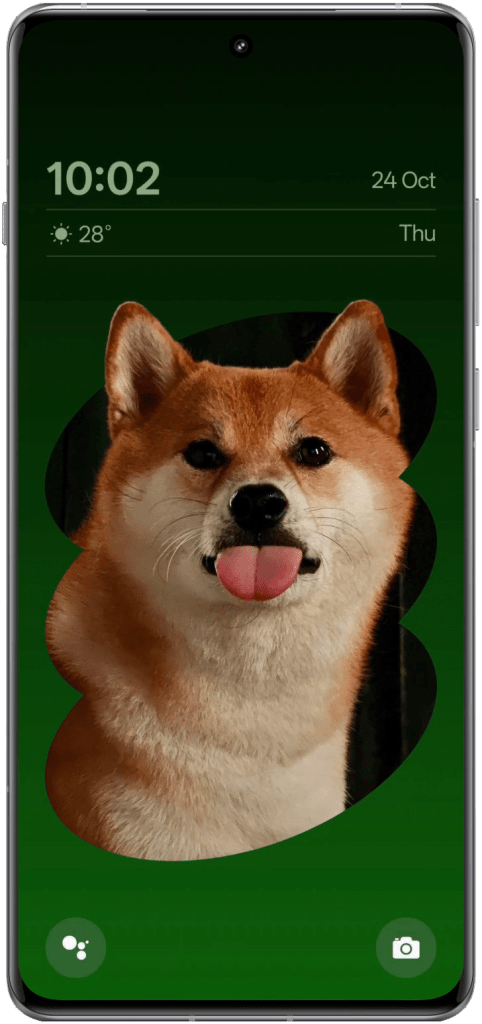
  • OnePlus OneTake: This feature ensures smooth visual transitions from the Always-On Display (AOD) to the lock screen and main screen, providing a coherent and intuitive experience. The one-click image matting function allows users to adapt photos as wallpapers with the “Depth” feature, making the subject stand out without obstruction, further enhancing personalization and visual appeal.
  • Open Canvas: This feature expands to more OnePlus devices on candy-bar phones, enhancing multitasking with seamless two-app split-screen interactions. It allows users to switch between apps seamlessly while maintaining window sizes, making multitasking more convenient and efficient.
  • Share with iPhone: This feature simplifies file sharing between OnePlus and iPhone devices. OnePlus users can activate file sharing through a built-in settings option, while iPhone users need to download the “O+Connect” app. This cross-platform capability fosters a more accessible sharing experience, highlighting OxygenOS 15’s commitment to enhancing user convenience.

Enhanced Safety and Security Features for Peace of Mind

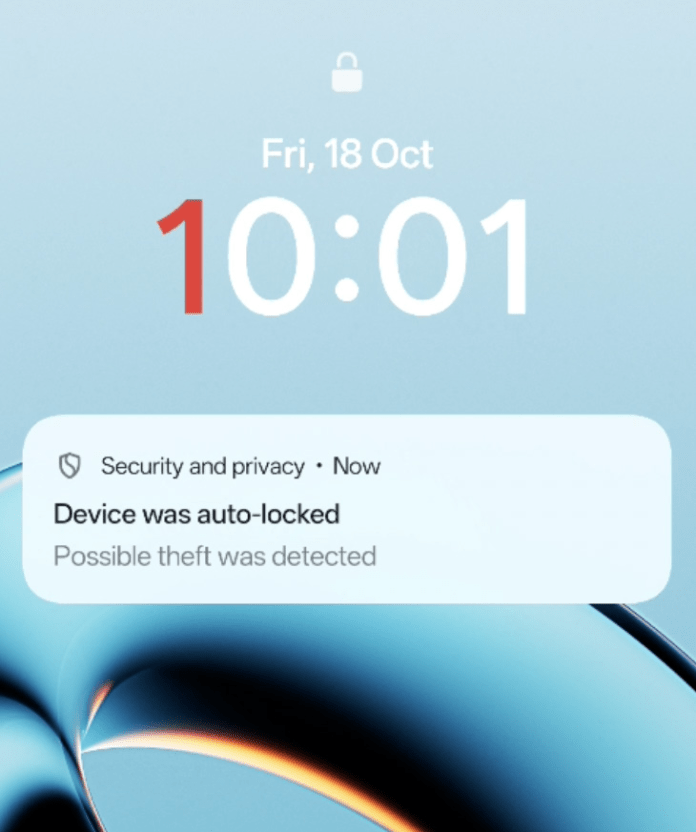
  • Theft Protection: OxygenOS 15 introduces comprehensive theft protection mechanisms, automatically locking the device when theft activity is detected, such as sudden acceleration detected by the gyroscope. Additional protections include remote locking through the FindMyDevice portal, offline locking if the phone remains offline or if the SIM card is removed, and biometric verification for sensitive actions like disabling anti-theft functions.
  • Google Play Protect Live Threat Detection: This feature leverages the Google Play Protect system to analyze app behavior and detect potential malware. Suspicious activity triggers data to be sent to Google Play Protect for verification, and confirmed malicious apps are blocked, safeguarding user data.

In conclusion, OxygenOS 15 represents a significant leap forward in the evolution of OnePlus’s operating system, seamlessly blending speed, AI, and thoughtful design. Its focus on user feedback, coupled with the integration of cutting-edge technology, results in a highly personalized and intuitive user experience that caters to a wide range of needs, from enhanced productivity to robust security.

Outlaw Audio RR2160MkII Integrated Amplifier Review

Venturing outside my usual review territory, I recently found myself evaluating the Outlaw Audio RR2160MkII integrated amplifier. While I don’t frequently delve into high-end audio equipment, I can certainly recognize quality when I hear it and notice when music sounds better. This amplifier proved to be a pleasant surprise, offering both impressive features and solid performance.

The Outlaw Audio RR2160MkII makes a strong impression in the integrated amplifier arena with its impressive suite of features and solid performance, all priced at a reasonable $999.

Hailing from Massachusetts and established in 1999, I’ve found that Outlaw Audio has a reputation for crafting audiophile-grade products. From my time with it, the RR2160MkII continues this legacy by offering a versatile solution for modern audio enthusiasts.

Why Consider Owning a Receiver for Your Audio Setup

Before diving into the review, it’s important to consider why a product like the Outlaw Audio RR2160MkII remains relevant in today’s digital age. While streaming and wireless connections are widespread, many consumers still appreciate the traditional ways of connecting and enjoying music.

Just as vinyl records have experienced a resurgence, there’s a significant audience that values the tactile and reliable nature of wired connections. Additionally, enthusiasts often prefer accessing their music from a variety of sources, making an integrated amplifier a versatile and essential component in their audio setup.

A receiver serves as the heart of a dedicated audio system, offering centralized control for all your music sources. Whether you’re connecting a turntable, CD player, streaming device, or smartphone, a receiver simplifies switching between inputs, reducing cable clutter and enhancing organization. It not only amplifies your audio signals with clarity and power but also supports high-resolution audio formats, ensuring that every detail in your favorite tracks is vividly reproduced.

Modern receivers come equipped with versatile connectivity options, including analog, digital, and USB ports, allowing you to connect a wide range of devices effortlessly. Many also feature built-in streaming capabilities, giving you easy access to services like Spotify and Qobuz directly from the receiver. Additionally, customizable sound settings such as equalizers and room correction help tailor the audio output to your personal preferences and room acoustics. Investing in a high-quality receiver ensures superior sound quality, future-proofs your setup against evolving audio technologies, and enhances your overall listening experience.

Design

The RR2160MkII is a hefty unit, measuring 5.75 inches high, 17.1 inches wide, and 16.5 inches deep. Its industrial design, inspired by art-deco-era radios, sports a steampunk front panel that might not win any beauty contests but certainly stands its ground. The front face is quite busy, housing numerous buttons, dials for volume, bass, treble, and balance, along with multiple USB inputs. This design choice mirrors the amplifier’s feature-rich nature but does mean you’ll need a dedicated spot to display this bulky performer.

I find it would like right at home in today’s modern rooms but yet it still feels like something you’d see in your uncle’s setup from back in the day- whether that was the 80’s, 90’s, or early 2000’s.

Features

Outlaw Audio didn’t hold back with the RR2160MkII’s features. It boasts four analog inputs, a phono preamplifier, two digital coaxial inputs, two optical inputs, three USB-A ports, and a USB-B port. Additionally, it includes two subwoofer outputs and built-in Wi-Fi for internet radio streaming.

The accompanying app allows users to stream from platforms like Spotify, Tidal, and Qobuz, making it easier than ever to access your favorite tunes. For those into nitty gritty details, the Burr Brown chipset DAC and an amplifier that delivers up to 100 watts per channel into eight ohms and 165 watts into four ohms ensure that this amplifier is not just feature-packed but also powerful.

Setup

Setting up the RR2160MkII involves connecting various audio sources, including turntables, CD players, and streaming devices. The amplifier supports both wired Ethernet and Wi-Fi connections, though entering network credentials via the front-panel interface can feel a bit like solving a puzzle.

The Outlaw Audio app simplifies streaming setup, providing access to multiple streaming services and allowing control from your smartphone or tablet. While the absence of an HDMI input aligns with its audio-focused design, you might be forgiven for looking for one on the back.

General Performance

The amplifier delivers a neutral sound profile, maintaining clarity and accuracy across different volume levels. Testing it with my most high-end speakers revealed no noticeable distortion, even at higher volumes. Its power delivery ensures that it can drive demanding speakers effectively, making it suitable for both entry-level and, I’d easily assume more seasoned audiophile setups.

Audio Quality

The RR2160MkII shines in audio reproduction, handling a variety of music genres with precision. Tracks like Jimi Hendrix’s “All Along the Watchtower” and Pink Floyd’s “Shine On You Crazy Diamond” showcased the amplifier’s ability to deliver detailed instrument separation and maintain audio integrity at high volumes. Sprinkling in Daft Punk, Kishi Bashi, and Max Richter proved to be an enjoyable experience. There’s something so cozy and comfortable when hearing music that was engineered with love through quality speakers, headphones, and receiver.

The built-in DAC performed admirably, uncovering subtle nuances in recordings and ensuring high-resolution audio playback. Additionally, the phono preamplifier supports both MM and MC cartridges, catering to vinyl enthusiasts with diverse cartridge preferences.

Remote Control

While the RR2160MkII boasts an impressive array of features, the remote control leaves a bit to be desired. The supplied remote is a standard universal model—fully functional and key-lit—but its ergonomics are less than stellar.

The volume up/down buttons are buried amidst a sea of similarly sized and shaped buttons, making it a bit of a treasure hunt to find the right one when you need it. Navigating through numerous functions can sometimes feel like searching for a needle in a haystack, detracting slightly from the overall user experience. However, once you get the hang of it, the remote still serves its purpose without major hiccups.

Value

At $999, the RR2160MkII offers significant value by integrating multiple high-end features into a single unit. I had to do a bit of investigating but found that when compared to competitors (PS Audio Sprout 100, NAD C 3050, and Cambridge Audio CXA81), the Outlaw Audio provides more input options and higher power output without a hefty price tag. This comprehensive feature set makes the RR2160MkII an attractive option for those seeking an all-in-one audiophile solution without breaking the bank.

Warranty

Outlaw Audio backs the RR2160MkII with a two-year warranty, providing peace of mind regarding the product’s longevity and reliability. This warranty coverage enhances the overall value proposition, ensuring that users can invest confidently in the amplifier.

Setup and Listening Experience

During extensive listening sessions, the RR2160MkII demonstrated its ability to handle various audio sources seamlessly. Whether streaming high-resolution files from USB or accessing streaming services, the amplifier maintained consistent audio quality. The inclusion of bass management features allows for effective integration with subwoofers, enhancing the overall soundstage without overworking the main speakers.

Pros

  • Extensive input options, including MM and MC phono preamplifiers
  • High power output of up to 165 watts per channel into four ohms
  • Built-in Wi-Fi and comprehensive streaming capabilities via the Outlaw Audio app
  • Robust audio performance with a neutral sound profile and detailed reproduction
  • Two-year warranty providing added value and reliability

Cons

  • Industrial and large design may not suit all aesthetics or spaces
  • Somewhat cluttered front panel with numerous buttons and dials
  • Outlaw Audio app interface feels a bit outdated
  • Lacks HDMI input and on-board Bluetooth connectivity
  • Remote control ergonomics could use improvement

Verdict

The Outlaw Audio RR2160MkII integrated amplifier delivers a compelling package for audiophiles seeking a feature-rich and high-performing amplifier without exceeding a $1,000 budget.

Its robust design accommodates a wide range of inputs and streaming options, while its powerful amplification ensures compatibility with high-end speakers. Despite some design and interface drawbacks, the RR2160MkII offers exceptional audio quality and value, making it a strong contender in the integrated amplifier market.

Whether you’re building an entry-level audiophile system or upgrading an existing setup, the RR2160MkII deserves serious consideration—and maybe a little shelf space. As someone who has a handful of products spaced around the home, I look forward to consolidating things and putting them in a central location, giving them a new lease on life.

Hisense Launches PL2 Laser Cinema Projector

0

Hisense has expanded its home theater offerings with the introduction of the PL2 Laser Cinema ultra-short throw (UST) projector, targeting those who crave both top-notch performance and sleek design. The PL2 showcases Hisense’s knack for integrating advanced technology with stylish aesthetics, making it a fitting addition to any living space – because who doesn’t want a mini Hollywood in their living room?

Featuring Hisense’s X-Fusion laser technology, the PL2 produces billions of vibrant colors, letting users customize their viewing experience with projection sizes from 80 to 150 inches. Whether you’re watching the latest blockbuster or a marathon of your favorite series, the PL2 adapts to fit various room sizes. Its ultra-short throw design means setting it up is a breeze, perfect for those who prefer minimal fuss over their entertainment setup – no need to wrestle with mounts and cables.

The PL2 is designed to fit seamlessly into any room, boasting a 0.22 throw ratio that allows for a large cinematic screen even in compact spaces. It brings 4K picture quality enhanced by 4K AI upscaling and immersive audio from two top-firing, built-in Dolby Atmos speakers, ensuring that both visuals and sound meet high cinematic standards – making movie nights feel like a trip to the cinema without the overpriced popcorn.

Visual performance is boosted with Dolby Vision and HDR10 support, delivering accurate colors and clear imagery. With 2,700 ANSI lumens of brightness and a native contrast ratio of 3,000:1, the PL2 ensures sharp images with deep blacks and bright highlights. Features like Filmmaker Mode, Auto Low Latency Mode (ALLM), and Motion Estimation/Motion Compensation (MEMC) cater to a variety of viewing preferences, from movies to sports and gaming – because versatility is key when you have diverse tastes (or a family with diverse tastes).

Running on the user-friendly Google Smart TV OS, the PL2 offers easy access to popular streaming services such as Netflix, YouTube, Disney+, Hulu, and Amazon Prime Video. It works well with Control4, AirPlay 2, and Apple HomeKit, allowing connectivity with other smart devices in the home. The projector’s active 3D capability adds depth to animation and action-packed content, enhancing the viewing experience – because who doesn’t want to feel like they’re part of the action?

Priced at $2,497.97, the PL2 is available for purchase through the Hisense Shop, Amazon, and Projectorscreen.com. With its thoughtful design and advanced features, the PL2 Laser Cinema projector is set to provide a premium home theater experience suited to diverse lifestyles and living spaces – proving that you don’t need to be a tech guru to enjoy top-tier entertainment.

How Smartphones are Making Cryptocurrencies More Accessible

0

Smartphones have been revolutionizing various aspects of the daily life of most people around the world, impacting anything from communication to finance. A significant shift has been the way smartphones are driving accessibility and adoption of cryptocurrencies. This is especially the case for the population who traditionally have been excluded from the financial system. To make cryptocurrencies more accessible, various trends and advancements of mobile technology have been playing a pivotal role. As a result of mobile technology, cryptocurrencies are more accessible, secure, and user-friendly for millions of people worldwide. 

The rise of mobile-based cryptocurrency access

In recent years, cryptocurrency usage has surged, especially due to the convenience of accessing digital assets via mobile devices. According to Backlinko, as of 2024, there is an estimated 4.88 billion people who own a smartphone. This is an increase of 635 million new smartphone users between 2023 and 2024. As more people are owning smartphones, and more people have access to smartphones than to traditional banking services, the potential of using mobile devices as gateways to financial inclusion is immense. 

With the rise of mobile wallets and cryptocurrency apps, people can manage, trade, and store their digital assets with ease. The apps removed the dependence on costly infrastructure, including physical bank branches, as people now can transact directly on the blockchain. As a result, there has been an increase in mobile-based cryptocurrency adoption. For example, in various developing countries, banking infrastructure can be sparse or inaccessible, and this is where mobile technology has been a game-changer. Furthermore, mobile-based cryptocurrency is also expanding beyond the banking and investment world. The rise of mobile crypto casinos has taken people by storm due to the large amount of oeprators being available. It has enabled people to leverage their cryptocurrencies for wagering at online casinos. The selection of online crypto casinos has increased exponentially the past years, leading to sites reviewing crypto casinos to help guide in the decision of which platform to engage in. By clicking the link, you will find a great source to read reviews about crypto casinos, and tutorials and description tailored to beginners in the crypto casino realm. 

Financial inclusion through mobile crypto solutions

Cryptocurrencies and decentralized finance (DeFi) platforms provide an alternative to traditional financial systems. Individuals can now access a variety of financial services from their smartphones, which used to be unavailable to them. It is possible to send and receive payments, trade digital assets, and take out loans and earn interest on savings, all done through DeFi applications. Having this option has especially been valuable in regions where unstable banking systems is common, or where the national currency is highly volatile. 

According to Santander, there is still 1.4 billion people who remain unbanked as of 2023. However, one potential solution to this, which could include more people to the global financial markets, could be mobile-based cryptocurrencies. Since these platforms leverage blockchain technology, these digital assets allow for peer-to-peer transactions, which are both faster and cheaper than traditional banking methods. These platforms can also bypass the challenges posed by unreliable financial institutions, providing autonomy to users. 

The key challenges of security and trust

Even though mobile cryptocurrencies are being highly adopted globally, security continues to be a significant concern. Mobile devices are per default vulnerable to hacking, phishing attacks, and other security breaches, and this can lead to the loss of funds. In an attempt to mitigate these risks, cryptocurrency apps continue to enhance security features. These features include multi-factor authentication (MFA), biometric verification, and hardware wallet integrations. Al these features provides additional layers of protection for mobile users. 

Another challenge to be addressed is the need to build trust in these digital financial services. Statements from industry experts have emphasized the importance of instilling confidence in users. The most important factors to consider enabling this are through security measures, clear regulations, and consumer education. For many people, cryptocurrencies are still perceived with skepticism due to their volatility as digital assets, and due to concerns about fraud and theft. Providing transparent, user-friendly mobile applications which prioritize security and privacy will be key to overcoming these challenges. 

The role of fintech and crypto wallets

Within the fintech sector there continues to be a growing competition, which is also pushing the need for more sophisticated, secure, and user-friendly cryptocurrency wallets. More traditional financial institutions such as banks and payment processors are starting to integrate crypto services. This means that people can expect that mobile-based cryptocurrency solutions will become more accessible and mainstream. 

Some of the leading crypto wallets have already made significant strides to make the user experience more simplified. These apps have been designed to have easy-to-navigate interfaces and educational resources. This helps users understand how to safely store, trade, and manage digital assets. These innovations are very crucial in the development towards accessibility, as they are reducing the learning curve for the mass public, while making cryptocurrency more approachable for everyday smartphone users. 

Concluding remarks

It is evident that in the digital era we live in, smartphones have become the main tool to access various services and items, including cryptocurrencies. Making cryptocurrencies available through smartphones has been democratizing finance for millions of people around the world, as it breaks down barriers that the traditional banking system has been posing in some regions. Mobile-based cryptocurrency solutions are expanding financial inclusion, which creates new opportunities for wealth-building and economic participation. 

With more people gaining access to smartphones and mobile internet, it is expected that the role of smartphones will continue to transform the cryptocurrency landscape. 

EDITOR NOTE: This is a promoted post and should not be considered an editorial endorsement

BOOX Unveils Trio of Upgraded eInk Tablets Focused on User Experience

0

BOOX has introduced three new gadgets—Note Air4 C, Palma 2, and Note Max—at its annual event, each packing thoughtful updates in design, hardware, and software while keeping things straightforward for users.

Note Air4 C: Colorful Creativity Meets ePaper

The Note Air4 C steps into the spotlight as the newest member of BOOX’s Note Series, sporting a tablet-like interface that makes navigating apps and customizing the home screen feel like a breeze. Priced at $499.99 in the US, £499.99 in the UK, and €549.99 in the EU, it’s ready for action on BOOX’s official sites and Amazon.

Featuring BOOX Super Refresh (BSR) Technology and a Kaleido 3 color E Ink screen, the Note Air4 C delivers a brighter display with sharper contrast, making your screen time more pleasant. An octa-core CPU and 6GB of RAM work together to boost performance by 50%, ensuring multitasking feels smooth and effortless. Whether you’re reading, browsing, or diving into detailed visuals, you can tweak the refresh settings to match your activity. Plus, the paper-like writing surface and responsive stylus make jotting down notes feel just like pen on paper—minus the ink stains.

Palma 2: Pocket-Sized Power for Everyday Use

Upgrading its 2023 predecessor, the Palma 2 maintains its compact, phone-sized charm while packing some impressive upgrades. Available for $279.99 in the US, £279.99 in the UK, and €299.99 in the EU through BOOX’s official channels, Palma 2 is perfect for one-handed use, helping you keep a healthy tech-life balance without juggling devices.

The Palma 2 features a 6.13-inch E Ink Carta 1200 screen with 300 PPI, offering crisp, paper-like clarity that makes reading a joy. Under the hood, an octa-core CPU and 6GB of RAM, along with 128GB of storage, ensure you have plenty of space for apps and books. Running on Android 13, it grants access to the Google Play Store for all your favorite apps. Extras like a fingerprint sensor add a layer of privacy, while dual-tone front lights keep your screen visible in any lighting. A 16MP camera for scanning documents and dual speakers for decent audio round out its feature set, making it a handy companion for both work and travel.

Note Max: Big Screen, Bigger Ideas

Expanding the Note lineup, the Note Max boasts a spacious 13.3-inch display, ideal for those who need plenty of screen real estate for tasks like document reviews, handling complex PDFs, or annotating research. Coming to the BOOX Shop in the next few weeks, the Note Max sports a sleek, light grey shell that’s just 4.6mm thick—proof that big can still be stylish.

Its Carta 1300 E Ink display offers excellent readability without front lighting, helping you stay focused without the glare. Powered by a 2.8GHz octa-core CPU, 6GB of RAM, and 128GB of storage, the Note Max handles demanding applications with ease. Features like split-screen mode, advanced PDF tools, and broad app compatibility make multitasking a smoother experience, perfect for those who like to keep several projects open at once.

Smart Firmware for a Smoother Ride

All three devices run on Android 13 and feature BOOX Super Refresh (BSR) Technology alongside robust octa-core CPUs, ensuring everything runs without a hitch. BOOX’s latest firmware updates bring AI-integrated tools like Smart Scribe and text recognition, making note-taking and idea organization a cinch. New features include outline creation in the Notes app, better PDF interactions, flexible shape editing, and the upgraded NeoReader engine V3, which enhances multilingual typography and background OCR for seamless text recognition.

BOOX’s latest offerings highlight the company’s knack for blending functionality with user-friendly design, catering to a variety of needs from creative brainstorming to detailed document management.

Where to Buy and Pricing Recap

  • Note Air4 C: $499.99 (US), £499.99 (UK), €549.99 (EU) available on BOOX (US/EU) and Amazon (US/UK).
  • Palma 2: $279.99 (US), £279.99 (UK), €299.99 (EU) available on BOOX (US) and BOOX (EU).
  • Note Max: Coming soon to the BOOX Shop.

JBL Tour Pro 3 Review

JBL’s latest flagship earbuds, the Tour Pro 3, aim to tick every box a discerning listener might have. Packed with more features than a Swiss Army knife, they’re geared up to handle everything from work calls to workout playlists.

After putting them through their paces, we’re here to break down what these earbuds get right and where they leave room for improvement. Spoiler alert: there’s very little we should ask for beyond what’s on offer here.

Design

The JBL Tour Pro 3 keeps the look of its predecessor but with a few key tweaks. The case now features a 30% bigger touchscreen, giving you more space to swipe and tap. The case itself is still a bit chunky, but considering it can act as a remote control for the earbuds, it’s like carrying around a tiny command center in your pocket. It’s a bit like complaining an SUV is bulky compared to a hatchback—you’re getting a lot of extra functionality in return.

The earbuds have also been beefed up, likely to house the new dual drivers and more mics. With an IP55 rating for dust and water resistance, these earbuds should survive a sweaty workout or an accidental drop in the dirt. There’s a broader selection of ear tips now, including memory foam tips, so users can finally stop complaining about fit issues (at least until they find something else to nitpick).

Features

Here’s where things get a little crazy. The Tour Pro 3 case isn’t just for charging—it’s a control hub, transmitter, and possibly the coolest daily use accessory we’re using. Want to change tracks or adjust volume without touching your phone? Done. Need to switch ANC modes or tweak EQ settings? Easy. The case even supports Auracast, so sharing audio with a friend or tapping into shared broadcasts becomes as simple as flipping a switch. The list of features is long.

The Auracast support is a nice touch for the few devices that are compatible, and the dual audio codec support (LDAC and LC3plus) means you’ll get high-res audio on compatible devices. Audiophiles, take note: this could be your new best friend.

Setup and Customization

Setting up the Tour Pro 3 is a breeze. Pairing takes seconds, and once connected, the JBL Headphones app opens up a smorgasbord of customization options. Adjust EQ settings, set up different profiles, or dive into the spatial audio settings. Want your left earbud to control volume and the right to skip tracks? You got it. There’s a slight limitation with the control configuration—you have to pick and choose between volume, playback, or ANC, and that might lead to some tough decisions. But, hey, first world problems, right?

The app can be a bit moody at times, occasionally crashing or refusing to connect, but I suspect this could (or should) be ironed out with an update.

Performance

The Tour Pro 3 delivers solid performance in almost every aspect. Connectivity is stable thanks to Bluetooth 5.3, and audio latency is low, making these buds perfect for video calls, gaming, or binge-watching your favorite shows.

The wear sensors reliably pause music when you take out an earbud and resume when you pop it back in.

Call quality is solid, too, with better noise suppression during calls—though your voice might still sound a bit wobbly in very noisy environments. But let’s be real, your boss isn’t going to care if there’s a slight wobble when you’re trying to explain why that deadline got missed.

Value

With a price tag of $300, the Tour Pro 3 isn’t exactly a budget-friendly option. But considering the number of features packed into these earbuds and the smart case, it offers solid value for those who like to tinker with settings and demand a high level of functionality.

Compared to other premium models, it’s like getting a few extra gadgets built right into your earbuds. Of course, if you’re someone who prefers simplicity, all these bells and whistles might just feel like… well, a lot of bells and whistles.

Audio Quality

Sound quality on the Tour Pro 3 is a definite highlight. The dual-driver design means that lows, mids, and highs each get their own path, resulting in clear separation and detail. There’s a slight emphasis on bass, which makes these great for bass-heavy tracks, but the sound remains balanced enough for a variety of genres. If you’re listening to an audiobook, for example, you won’t feel like the narrator is delivering their lines from the bottom of a well.

LDAC support allows for high-res audio streaming on compatible Android devices, and the Tour Pro 3 keeps distortion levels low, even at higher volumes. If you want to tweak the sound, the JBL Headphones app offers a robust 10-band equalizer with several presets, so you can get the exact tone you’re looking for.

The spatial audio feature, which can create an expanded soundstage, works well for certain tracks but might make others sound a bit off. Your favorite jazz song might suddenly sound like it’s being played in a wind tunnel.

Play around with the settings a bit as you get into your preferred music and you’ll surely land on something that you love.

Battery Life

The Tour Pro 3 boasts impressive battery life, with up to eight hours of playback time on a single charge when using ANC, and up to 11 hours without it. The case can recharge the earbuds three times, giving you a total of around 32 to 44 hours, depending on how much you’re using ANC or spatial audio.

Charging options include USB-C and wireless charging, and there’s a quick-charge feature that provides up to four hours of playback after just 10 minutes of charging. That’s great news if you often find yourself forgetting to plug things in until your morning run is about to start.

Warranty and Support

JBL includes a standard one-year warranty with the Tour Pro 3, which covers defects in materials and craftsmanship. It doesn’t cover accidental damage or loss, so try not to leave these in the pocket of your jeans before tossing them in the wash.

For software-related issues, the JBL Headphones app has built-in diagnostics tools, which makes troubleshooting a bit easier (assuming the app is cooperating, of course).

Final Thoughts

The JBL Tour Pro 3 is packed with tech that will delight anyone looking for more than just another pair of wireless earbuds. The smart case alone is a standout feature, providing capabilities that go beyond just charging.

With solid audio quality, extensive customization options, and advanced connectivity features, the Tour Pro 3 offers a lot to love. It’s like the Swiss Army knife of earbuds—loaded with everything you might need and a few things you didn’t even know you wanted.

There are a few minor drawbacks, such as the app’s occasional bugs and a somewhat busy user interface, but these are minor hurdles when weighed against the product’s strengths. Seriously, these feel like you’re getting a sneak peak at one of tomorrow’s better audio products.

If you’re a tech enthusiast or someone who enjoys having every setting at your fingertips, the Tour Pro 3 is worth checking out. Just be prepared to spend a little time exploring everything it can do—there’s a lot under the hood.

Get to Know: LetPot Air Hydroponic Gardening System

0

The LetPot Air Hydroponic Gardening System offers an innovative solution for those looking to grow fresh herbs, vegetables, and flowers indoors, regardless of gardening experience. This smart hydroponic system connects to a user-friendly app that allows you to monitor plant growth in real-time, manage water levels, lighting, and temperature automatically, and even receive alerts for necessary interventions.

It removes the guesswork with the app’s built-in plant encyclopedia, guiding users step-by-step through the setup process. With hydroponic methods, plants grow up to 20% faster and yield 25% more than traditional soil gardening, making it an ideal choice for busy individuals or families wanting to incorporate fresh produce into their lives.

Crafted from high-quality, BPA-free materials, the LetPot system also features a 3.5-liter water tank that can sustain plants for up to 21 days without needing a refill. Whether you’re a seasoned gardener or just starting, LetPot makes indoor gardening accessible and efficient.

Specs & Features

  • Smart hydroponic system with intuitive app control
  • Built-in plant encyclopedia for easy plant selection
  • Real-time monitoring of growth status
  • Automatic management of water level, light, and temperature
  • Alerts for nutrient solution and water capacity
  • 24-watt full spectrum LED lighting system
  • Light customization tailored to growth phases
  • Up to 300% faster growth rates compared to conventional methods
  • Adjustable LED lighting rod (extends up to 16 inches)
  • 3.5-liter water tank supports 14-21 days of growth without watering
  • BPA-free premium resin materials
  • Lifetime premier customer support
  • Designed for limited spaces and indoor use
  • Suitable for growing herbs, vegetables, and flowers effortlessly

What is the LetPot Air Hydroponic Gardening System?

The LetPot Air Hydroponic Gardening System is an innovative indoor gardening solution designed for those looking to grow plants easily and efficiently, without the need for soil. This system utilizes hydroponics, allowing users to cultivate herbs, vegetables, and flowers in a soil-free environment. The integration of smart technology through a dedicated app facilitates real-time monitoring and control of plant growth, making it ideal for beginners and seasoned gardeners alike.

What are the Key Features of LetPot’s System?

LetPot’s hydroponic system offers several notable features that contribute to its ease of use. The built-in plant encyclopedia within the app provides a wealth of information, guiding users through the process of plant cultivation. By simply selecting the desired plant, users can follow tailored steps to set up the hydroponic environment and activate automatic controls.

The system maintains optimal plant care by automatically adjusting water levels and nutrients, sending alerts to users if the nutrient solution or water level is insufficient. This feature ensures that plants receive the proper care without constant monitoring.

Another standout component is the powerful 24-watt full-spectrum LED lighting system. This lighting promotes rapid plant growth, enabling plants to flourish up to 300% faster than those grown in soil. As a result, users can expect a higher yield from their gardening efforts.

Who Can Benefit from Using LetPot?

The LetPot Air Hydroponic Gardening System is particularly well-suited for individuals with limited space, such as apartment dwellers or those living in urban environments. Its compact design allows for effective use of available space, making it an attractive option for those who want to enjoy gardening in small areas.

Additionally, busy homeowners and families will appreciate the low-maintenance nature of this system. By automating various aspects of plant care, even those without prior gardening experience can successfully grow fresh produce. This ease of use opens up opportunities for anyone interested in cultivating their own herbs and vegetables, regardless of their skill level or time constraints.

What Else Should I Know?

LetPot’s system boasts an impressive water tank capacity of 3.5 liters, sustaining plants for up to 21 days without needing a refill. This efficient design minimizes the maintenance effort required, allowing users to focus on harvesting rather than ongoing care. The adjustable LED lighting rod can extend up to 16 inches, accommodating plants at different growth stages, which further enhances its usability.

The LetPot Air Hydroponic Gardening System presents a practical and efficient solution for those looking to engage in indoor gardening with minimal hassle. Its smart technology, user-friendly app, and strong performance metrics position it as a valuable tool for cultivating a wide range of plants right at home.

Learn more about the LetPot Air Hydroponic Gardening System. As of the time of publishing this post the price was $70.

Hisense CanvasTV QLED 2024 Review

The Hisense CanvasTV QLED 2024 is a mid-range 4K television that stands out in Hisense’s lineup with its unique design and functionality. Designed to double as an art piece when wall-mounted, it features a wood-like aluminum frame and includes a selection of landscapes and paintings. Taken as a whole, it looks like a real canvas, especially from across the room.

Available in 55 and 65 inches, the CanvasTV combines aesthetic appeal with a range of features aimed at enhancing both viewing and gaming experiences. How does it fare as a smart TV? Read on to learn what I think of the experience after a few weeks.

Design

The CanvasTV boasts an elegant wood-like aluminum frame that gives it the appearance of a framed artwork. This design is complemented by a matte-finish screen coating, which significantly reduces reflections, making it suitable for well-lit rooms.

The TV can be positioned on a tabletop using the included feet, which lift it approximately three inches from the surface, allowing most soundbars to fit below the screen. Alternatively, it comes with Hisense’s UltraSlim Wall Mount for those who prefer a flush-mounted setup. And really, this is the reason you’re considering it, right?

The build quality is robust, with the plastic back and aluminum frame providing a sturdy structure. The frame slightly obstructs the first row of pixels, but this is generally unnoticeable from a normal viewing distance. While the stand exhibits minor wobble when pushed front to back, it does not impact overall stability.

When you purchase your CanvasTV you’ll get a particular color for the frame; there are three options to choose from including White, Black, and Teak. The model sent to me for review was Teak, and I think it looks really striking and realistic as a frame.

Features

Equipped with four HDMI ports, two of which support HDMI 2.1 bandwidth, the CanvasTV is well-prepared for high-performance gaming and future-proof connectivity. These ports allow for 4K resolution at 144Hz and 1080p at 240Hz, catering to both gaming enthusiasts and standard users. The TV supports HDR10+ and Dolby Vision, enhancing the viewing experience with vibrant and lifelike colors.

Advanced audio formats from Dolby and DTS can be passed through the eARC port, ensuring high-quality sound when connected to compatible receivers or soundbars. The CanvasTV operates on the Google TV operating system (v12), offering a smooth and user-friendly interface with access to a wide range of apps. After years of checking out various smart TV platforms, I keep coming back to Google TV as the preferred experience.

The included remote is backlit, features dedicated buttons for popular streaming services, and supports voice commands via a built-in microphone.

Setup

Setting up the CanvasTV is straightforward, particularly for those opting for the tabletop configuration. Wall-mounting requires more effort due to the absence of a hanging template, and the instructions provided can be somewhat confusing.

Ensuring proper cable management is essential, as the rear ports are side-facing and become less accessible once the TV is mounted flush against the wall. Planning connections prior to mounting can mitigate potential hassles. Similarly, if you plan to plug in a game console or two, you’ll want to figure out the logistics of where they’ll sit, and how.

It takes two people to hang the TV on a wall; the included mount are easy to install and sturdy but the aforementioned instructions could be just a touch clearer.

General Performance

Picture Quality

The CanvasTV utilizes a KSF phosphor coating to deliver a wide color gamut, resulting in vibrant and lifelike colors. The matte screen further enhances visibility in bright environments by reducing glare. However, the absence of local dimming impacts the contrast ratio, making dark scenes appear washed out and less impactful. While the TV performs well with SDR content, HDR content lacks the brightness and contrast necessary for a fully immersive experience.

Color accuracy out of the box is subpar, with a tendency towards a cooler temperature and noticeable color mapping issues. Post-calibration, the picture quality improves significantly, achieving closer to the desired color temperature and better gamma settings. Despite these improvements, some color inconsistencies remain, particularly in very bright or dark scenes. I may continue to tinker with settings but I’m much happier with where it is now than what it had on the first day.

Don’t get me wrong; this is a generally great TV but much of the reason I like it is because of its artwork/canvas design. I like the matte finish, especially in my dining room, because it reduces and nearly eliminates any glare that a more traditional set might produce.

Gaming

For gamers, the CanvasTV offers a compelling package with its low input lag and support for variable refresh rates (VRR). The TV’s ability to handle 4K at 144Hz and 1080p at 240Hz makes it suitable for high-refresh-rate gaming. However, enabling VRR at 1080p @ 240Hz can result in frame skipping and desaturated colors, limiting performance unless VRR is disabled.

The CanvasTV is fully compatible with gaming consoles like the PS5 and Xbox Series X|S, supporting resolutions up to 4K @ 144Hz and features such as Auto Low Latency Mode. The inclusion of AMD FreeSync Premium ensures smooth, lag-free gameplay, enhancing the overall gaming experience.

Audio

The built-in speakers of the CanvasTV can reach high volumes but tend to produce a harsh sound, especially at louder settings. The lack of Dolby Atmos support further limits the audio experience, making the addition of a soundbar a worthwhile consideration for those seeking balanced and immersive sound quality.

I have another Hisense TV in my home that produces a more robust and evenly distributed sound. Understanding that the physical design doesn’t allow for the same components, I was a bit surprised how things sound on the lower end. More specifically, how it lacks a definite punch.

Value

Priced at $1,298 for the 65-inch model, the CanvasTV offers significant value compared to competitors like Samsung’s The Frame. The Frame, available in a broader range of sizes, starts at a higher price point and requires the purchase of an additional frame. In contrast, the CanvasTV includes an attractive magnetic frame in teak as standard, making it a more affordable option for those seeking a TV that also serves as a piece of art.

Overall Experience

Reviewing televisions isn’t the norm for our outlet, which typically focuses on smartphones, personal gadgets, wearables, etc. However, the Hisense CanvasTV QLED 2024 warranted an in-depth review due to its distinctive approach to blending technology with home decor. Having used more than a few televisions over the years, I can appreciate new tech and features. I won’t necessarily run benchmark tests or dive deep into specs, but I don’t do that with phones, either.

Personally, owning the CanvasTV has been a unique experience; it’s the first TV I’ve ever owned that has naturally sparked multiple inquiries from friends and family without any prompting. Its unique design and functionality set it apart from other televisions, transforming the traditional TV setup into something that resembles a work of art. I like leaving the Art Mode on and having it cycle through various preset pieces as well as images I’ve uploaded.

The CanvasTV changes the way a TV is presented in the home, akin to having pieces of art adorning your walls. This dual functionality opens the door to placing the TV in new and exciting locations around the home where a conventional TV might not fit aesthetically. Whether it’s in a living room, bedroom, or even a hallway, the CanvasTV integrates seamlessly, enhancing the room’s decor rather than dominating it.

Moreover, when I share the price point with others, there’s little hesitation or surprise, which says something about its competitive pricing. Unlike more expensive art TVs like Samsung’s The Frame, the CanvasTV offers a stylish and functional option without breaking the bank. This balance of design and affordability makes it an appealing choice for those looking to elevate their home entertainment setup without compromising on aesthetics or budget.

Navigating the complexities of TV technology—from color accuracy and HDR performance to gaming capabilities—was a refreshing departure from our usual coverage. The Hisense CanvasTV stands out not just for its design but also for its competitive feature set, making it a noteworthy contender in the mid-range 4K TV market. This review aims to provide our readers with a comprehensive understanding of how the CanvasTV performs both as a television and as an art display, ensuring that even those unfamiliar with TV specifications can appreciate its offerings.

Pros and Cons

Pros

  • More affordable than competing art TVs
  • Magnetic wood-like frame included
  • Matte-finish screen reduces reflections
  • No subscription required for included art
  • Backlit remote with dedicated streaming buttons
  • High refresh rate suitable for gaming

Cons

  • Wall-mount instructions are unclear and lack a hanging template
  • Rear ports are difficult to access once mounted
  • Pre-calibration color accuracy is poor
  • Built-in speakers produce harsh sound
  • No access to an art store for additional images
  • Limited size options (55″ and 65″) might turn some away

Conclusion

The Hisense CanvasTV QLED 2024 presents a compelling option for those looking to blend their television with home decor. Its competitive pricing, combined with a stylish design and robust feature set, makes it an attractive alternative to more expensive models like Samsung’s The Frame.

While there are areas for improvement, particularly in color accuracy and audio quality, the CanvasTV offers a balanced performance that caters to both entertainment and aesthetic needs. For users prioritizing design and value, the CanvasTV is a strong contender in the mid-range 4K TV market.

You can get more bang for your buck on another model from Hisense or other manufacturers, but standard wall-mounted TVs just don’t look the same. I have a feeling that this canvas style might be the wave of the future in my household, especially as they improve with each generation.

Get to Know: Thinkware ARC Dash Cam

0

Thinkware ARC Dash Cam delivers 2K QHD front and rear recording at 30fps, ensuring every moment on the road is captured with clarity. Its advanced Omnivision image sensor, combined with Wide Dynamic Range (WDR) technology, balances light and dark conditions, providing exceptional detail even in challenging environments.

Enhanced night recording is made possible with Super Night Vision 2.0, which significantly improves brightness and reduces noise in low light, ideal for night drivers. The dash cam comes equipped with features like Smart Parking Mode, which records incidents while your vehicle is parked, and an Energy Saving Mode to extend operation.

With built-in safety alerts for traffic signals and surrounding vehicles, plus seamless Wi-Fi pairing to iOS or Android devices, the ARC offers convenience and peace of mind. This product is great for any driver looking to enhance their road safety and security with easy installation and high-quality recordings.

Specs & Features

  • 2K QHD Front and Rear Recording: Captures stunning 2K 1440P footage at 30fps with enhanced contrast and precise color balance.
  • Super Night Vision 2.0: Improved video brightness and reduced noise in low-light conditions; supports Continuous Mode and Parking Mode.
  • Wide Dynamic Range (WDR): Balances colors in extreme lighting conditions to ensure clear images.
  • Smart Auto-Exposure (AE): Automatically adjusts exposure for clear footage in bright light.
  • Dewarping Video Technology: Minimizes image distortion from wide-angle lens, producing near-real images.
  • Parking Surveillance Mode: Records video evidence triggered by impacts/motions while parked.
  • Smart Parking Mode: Protects against heat damage by switching to low-power mode and records impacts only.
  • Energy Saving Mode: Reduces power consumption, recording only when triggered by impacts.
  • Time Lapse: Captures extended periods of video at 2fps without significant power increase.
  • Motion Detection: Initiates 20-second recording upon detecting motion or impact.
  • Easy Wi-Fi Device Pairing: Quick pairing with Android or iOS devices via THINKWARE DASH CAM LINK App.
  • High-Definition IPS Panel: Ensures color accuracy and better sunlight visibility.
  • LCD Touchscreen Viewer: 2.7” screen for adjusting settings and playback of recordings.
  • Traffic Signal Alert (TSA): Alerts when traffic light changes from red to green.
  • Front Vehicle Departure Warning (FVDW): Alerts when the vehicle in front starts moving.
  • Safety Camera Alert with GPS: Real-time alerts for speed and red light cameras; embeds GPS data into recordings (available in Canada and the USA).
  • Privacy Lock Mode: Password protection to secure footage from unauthorized access.
  • THINKWARE Dash Cam Memory Card Included: Comes with a compatible memory card to prevent recording failures.

What Is the Thinkware ARC Dash Cam?

The Thinkware ARC Dash Cam is a front and rear recording system designed to provide high-definition footage for drivers. It captures video in 2K QHD resolution at 30 frames per second and is equipped with advanced technology that enhances image quality, making it a reliable companion for those who prioritize safety and security while on the road.

What Are the Key Features?

One of the standout features of the Thinkware ARC is its Super Night Vision 2.0 technology. This system significantly improves nighttime recordings by enhancing brightness and reducing noise. It employs image signal processing and real-time adjustments to ensure that even in low light, details are captured clearly.

The Wide Dynamic Range (WDR) feature corrects images with color balance adjustments, helping to manage challenging lighting situations such as bright sunlight or strong shadows. Coupled with Smart Auto-Exposure (AE), the dash cam adapts quickly to varying light conditions for optimal footage clarity.

How Does It Handle Parking Surveillance?

Parking Surveillance Mode offers advanced protection while your vehicle is stationary. This mode activates due to motion or impact, providing valuable video evidence. The Smart Parking Mode incorporates energy-saving features to reduce power consumption, while Time Lapse records video at a lower frame rate, allowing for longer recording durations without draining the battery. Motion Detection further enhances security by capturing events when motion is detected.

What About User Convenience?

User-friendly design is evident in the Thinkware ARC. The device features easy Wi-Fi pairing with smartphones via the THINKWARE DASH CAM LINK App, allowing users to change settings and view recordings on the go. The 2.7-inch LCD touchscreen enhances accessibility, making it easy to navigate settings, playback footage, and access live view functions.

Who Should Use the Thinkware ARC?

This dash cam is an excellent fit for drivers seeking peace of mind through enhanced video surveillance. Ideal for everyday commuters, parents transporting children, and ride-share drivers, it provides crucial evidence in the event of incidents. The integration of safety alerts, such as Traffic Signal Alerts and Front Vehicle Departure Warnings, adds another layer of security, making it suitable for those who prioritize safe driving.

The inclusion of a memory card with the purchase ensures that users can start recording immediately, eliminating compatibility concerns with third-party storage solutions. All these features combine to create a versatile and reliable dash cam that caters to the needs of safety-conscious drivers.

Learn more about the Thinkware ARC Dash Cam. As of the time of publishing this post the price was $220.

DOOGEE Unveils S200 Rugged Smartphone: Tough Enough for Your Wild Side

0

DOOGEE has rolled out the S200, the newest member of its S series, tailored for those who need their smartphones to keep up with adventurous lifestyles. Combining durability with modern tech, the S200 is set to impress both rugged enthusiasts and everyday users alike.

Sporting a Mecha Design inspired by battle armor, the S200 doesn’t just look tough—it is tough. Its sleek, smooth lines give it a futuristic edge while reinforcing its robust build, making it a standout choice for anyone who’s ever wished their phone could survive a minor apocalypse.

The S200 introduces Dual Screen technology, offering a generous 6.72-inch main display with a 120Hz refresh rate and ultra-high resolution. This ensures that everything from scrolling through social media to streaming your favorite shows is smooth and crisp. The secondary rear-mounted display adds a layer of convenience, allowing quick access to essential functions without diving back into the main screen—perfect for multitaskers who like to keep things efficient.

Photography buffs will find a lot to love in the S200’s 100MP Ultra-Clear Camera. Enhanced by the Morpho Imaging Algorithm, this camera captures stunning details and vibrant colors. The built-in AI technology takes the guesswork out of shooting, automatically adjusting settings to make every photo look professionally done. Plus, the S200 can snap pictures underwater up to 5 feet (1.5 meters), so you can document your underwater adventures without worry. With 4K video and a 20MP Night Vision mode, your photo game is covered, whether you’re capturing sunset selfies or midnight landscapes.

Underneath its rugged exterior, the S200 is powered by the MediaTek Dimensity 7050 Octa-Core Processor, making it the first 5G rugged phone in DOOGEE’s S series. This 8-core, 6nm chip delivers impressive performance while keeping power consumption in check, meaning you can use your phone longer without hunting for the nearest power outlet. With up to 32GB of DDR5 RAM (12GB + 20GB Extended) and 256GB of ROM storage, the S200 handles multitasking like a champ and offers plenty of space for all your apps, photos, and files. Built-in WiFi 6 ensures that your downloads and streams stay fast, so buffering becomes a thing of the past.

Durability is front and center with the S200, constructed from aerospace-grade aluminum and reinforced components. It meets MIL-STD-810H standards and boasts IP69/IP69K protection levels, making it resistant to water, dust, sand, and other elements. Drop-tested on all sides, the S200 is built to endure whatever you throw at it—literally.

Battery life is another strong suit, with a 10,100mAh battery that keeps you going from sunrise to sunset. When it’s time to recharge, the 33W Fast Charging gets you back up and running in no time, and the reverse charging feature can lend a hand in emergencies—because who hasn’t needed to juice up a friend’s phone at a crucial moment?

Running on Android 14, the S200 offers improved performance and stability, along with enhanced privacy and security features, including fingerprint recognition. It’s a solid foundation that ensures your phone runs smoothly and keeps your data safe.

The DOOGEE S200 Rugged Smartphone is available on Amazon UK for £259.99 with a £70 discount voucher and Amazon.com. For those who prefer buying directly, the S200 can be purchased via the DOOGEE website for $399/£306.49 with an additional $50/£40 discount coupon currently up for grabs. Additionally, it’s available on AliExpress with a 37% discount, priced at $199/£165 from the regular $335/£265.