We love a good deal on our tech. Amazon does a yearly discount blitz with its Big Spring sales, making it one of the most anticipated shopping events of the year for tech enthusiasts. During the week-long sprint from March 25 through the 31st, Treblab and its subsidiaries are offering steep cuts to its lineups’ prices, allowing customers to snag incredible bargains on high-quality audio devices and accessories. This is the perfect opportunity for shoppers to upgrade their gadgets, as the discounts can reach nearly 50% off on select items, making it an unmissable event for both seasoned tech lovers and casual buyers alike.
Treblab Z7 Pro Headphones
The company’s most popular device is the Z7 Pro headphones. These over the ear wireless audio cans, are a great alternative to the top-tier brands you see on TV. They have a rich sound with noise cancellation, a 45-hour battery life, and a comfortable fit. At a 40% price decrease, now’s the time to add these to your shopping cart.
Next on the Prime list is the Treblab HD77 wireless speaker. This tiny beast has been one of our favorite party favors. With a small footprint, this Bluetooth speaker packs a big punch. Pack all that into a shell that’s both fun and ready for the outdoor elements, and this HD77 speaker might just be what you need before the Fall camping season.
You can’t have a Treblab sale without the X3 Pro earbuds. These sport-tuned buds have a hooked design to ensure they stay comfy and secure for any workout. We found these earbuds to really punch above their class and should be on any workout warrior’s shortlist of audio devices. With Bluetooth 5.0 and IPX7 ratings, you won’t be disappointed.
Need the bigger brother to the HD77? Then check out the Treblab HD-Max. Similar build and design, but with 20-hour battery life and more 50-Watt robust sound, the HD-Max can take on any party atmosphere you have planned. This wireless speaker is a banger with a carrying strap and USB-C output to also charge your other devices while on the go.
One of the lesser-known divisions of Trelab’s portfolio is its sister brand Turonic. This includes the Turonic GM5 Massage Gun. If you work out regularly and don’t have a massage gun, I’d highly recommend this one. The gun has five speeds and seven attachments to work on any ailments you’ve accrued.
OnePlus is excited to announce that on March 25 at 8 AM Eastern, our very own OnePlus Slim Magnetic Power Bank will be available for sale in the U.S. at OnePlus.com.
The 5,000 mAh battery is incredibly slim (9.6cm length, 6.9cm width, 0.90cm height) and lightweight at just 120 grams. This is done by utilizing high energy density battery cells, N52M magnets, and a body composed of aluminum alloy to reduce overall thickness and weight.
What’s more, in addition to wired USB-C charging, this power bank is able to wirelessly charge BOTH iPhones (MagSafe compatible) and Android mobile devices.
This will be available for purchase at OnePlus.com for $69.99 USD on its own, but from March 25 to April 30 we will offer bundles combining this accessory with our latest flagship, the OnePlus 13. We will also offer special coupons to existing OnePlus 13 owners who purchased this device on OnePlus.com.
Here is a summary of the deals available for the OnePlus Slim Magnetic Power Bank 5000mAh and related products:
OnePlus Slim Magnetic Power Bank 5000mAh Price: The power bank is priced at $69.99 and is available in the US only.
Open Sale: The open sale for the power bank begins at 8 AM EDT on March 25, 2025, on OnePlus.com.
Power Bank Bundle Offer (March 25 – April 30, 2025): Customers can purchase a OnePlus 13 with the power bank and a magnetic phone case at a discounted price. This offer is available on OnePlus.com and cannot be combined with trade-in promotions.
Bundle with OnePlus 13 (256GB) + Power Bank + Magnetic Case: Priced at $849.99, with $159.98 in savings.
Bundle with OnePlus 13 (512GB) + Power Bank + Magnetic Case: Priced at $949.99, with $159.98 in savings.
Coupons for OnePlus 13 Owners (March 25 – April 30, 2025): Customers who previously purchased a OnePlus 13 through Oneplus.com are eligible for two exclusive coupons. Users can retrieve these coupons by logging into their account on OnePlus.com and going to the ‘Coupon’ section.
Coupon 1:$20 off the Slim Magnetic Power Bank 5000mAh.
Coupon 2:$10 off the OnePlus 13 Magnetic Case (applies to all three case variants). This offer is available on OnePlus.com.
The Moto G Power 2025 is Motorola’s newest addition to its Power series, a family of phones known for long battery life and reasonable prices. I’ve tested plenty of mid-range phones over the years, and this one lands squarely in that under-$300 territory where every dollar has to work hard. Does the phone deliver on more than just longevity? Spoiler: it’s trying its best.
Motorola’s marketing team clearly wants us to think “luxury and durability,” and I’ll give them credit; it’s not just fluff. The vegan leather back actually feels quite nice and gives the phone a slightly upscale vibe you don’t usually find in the $300 club. It’s soft, grippy, and does a decent job resisting fingerprints, but it does love to collect lint. You’ll probably want a case if you plan to keep it looking clean.
With wireless charging, IP69 durability, and battery life that easily stretches past a day, the Moto G Power 2025 nails the basics—and throws in a few perks you rarely see under $300.
The phone has a plastic frame, but it doesn’t feel cheap. It’s surprisingly solid in the hand, with just enough heft to make it feel like a “real phone” and not a toy.
It’s bigger and heavier than the 2024 model, measuring 6.56 x 3.04 x 0.34 inches and weighing about 7.3 ounces. Not a huge deal unless you’re moving from something tiny. It’s available in two colors: Slate Gray and Leaf Green. I was sent the gray model and I am cool with it because I dig phones that don’t scream “look at me.”
Design-wise, it gets points for slim bezels, rounded corners, and a solid build. Buttons feel tactile, with a satisfying click. The fingerprint scanner is built into the power button, and there’s a front-facing camera tucked into a small circular cutout at the top of the screen. You’ve got the usual layout: SIM/microSD tray on the left, volume and power on the right, speaker and USB-C port on the bottom, and, thankfully, a 3.5mm headphone jack.
The phone is rated IP68/IP69 for water and dust resistance, which puts it in tough territory most phones at this price don’t venture into. It also boasts MIL-STD-810H certification, which means it can handle temperature swings and a bit of rough treatment. I didn’t toss it off a cliff or dunk it in soup, but it survived rain and a few accidental drops just fine.
Display and Specs
The Moto G Power 2025 comes with a 6.8-inch LCD screen, Full HD+ resolution (2388 x 1080), and a 120Hz refresh rate. It’s not OLED, so don’t expect the deep blacks and punchy contrast of a high-end panel, but it’s perfectly usable. Peak brightness hits 1000 nits in High Brightness Mode, which helped a lot under direct sun, though the screen can be a little reflective, and I did notice some uneven backlighting if I looked too closely. Most of the time, though, it wasn’t an issue.
Under the hood, there’s a MediaTek Dimensity 6300 chip, paired with 8GB of RAM and 128GB of storage. Motorola includes its RAM Boost trick, which lets you borrow from storage to simulate up to 24GB of RAM. It won’t magically turn this into a flagship, but it helps a bit with multitasking. You can expand storage up to 1TB via microSD, so no worries if you’re a photo hoarder or app collector.
The camera setup includes a 50MP main sensor with optical image stabilization and an 8MP ultra-wide lens. The camera app offers Portrait, Pro, Night Vision, Panorama, and even Tilt-Shift, though I wouldn’t call this a photography powerhouse. Photos look decent in good light. Video maxes out at 1080p at 30fps on both the front and rear cameras, which is a bit limiting, but expected at this price.
Setup and First Impressions
Unboxing the Moto G Power 2025 was quick and low-drama. Inside, I found the phone, a SIM tool, a USB-C to USB-C cable, legal info, and a quick start guide. No charger, though Motorola’s keeping up with the modern trend of making accessories optional. If you don’t already have a 30W charger lying around, add one to your cart. Or consider picking up something new since you’ve probably been sitting on a lower-powered for some time now.
Setup was typical Android: pick a language, connect to Wi-Fi, log into Google, and set up your security. I went with both face unlock and fingerprint (always good to have a backup). You can enable gesture navigation or switch to the classic three-button setup. There’s a clean UI here, and Motorola keeps bloatware to a minimum but the stock weather app did sneak in some ads, which felt a little tacky.
Let’s dive a bit deeper here.
Day-to-Day Performance
The Moto G Power 2025 ships with Android 15, layered with Motorola’s custom Hello UI. If you’ve used a Pixel phone, the vibe here will feel familiar. Motorola doesn’t mess too much with the Android formula, which I appreciate as they are no overloaded skins or bizarre app stores trying to reinvent the wheel. What you get is a clean, fast interface with a few thoughtful tweaks that tend to add value instead of clutter.
The Moto app is where Motorola hides most of its extras. I found useful tools like Peek Display, which shows notifications and clock info when you nudge the phone, and Moto Gestures, like the double karate chop to turn on the flashlight. (Still fun, still useful.)
Customization options are solid, too. You can tweak fonts, icon shapes, colors, and layouts without diving into third-party launchers. I also liked how easy it was to toggle between gesture navigation and the old-school three-button setup.
There’s also a Smart Connect hub, which is Motorola’s update to its Ready For platform. It lets you link your phone to tablets, PCs, and external displays. I tested it on a laptop, and it worked surprisingly well, what with its dragging files, replying to messages, and getting notifications without digging into my pocket. It’s not something I’d use every day, but if you juggle work across devices, it’s a handy option.
Family Space is another feature baked in, offering parental controls and screen time limits. My son is grown and out of the house, but I poked around, and it’s pretty intuitive. If you’re handing this phone off to a younger user, it gives you some peace of mind.
The phone supports two major Android updates and three years of security patches, which feels like a decent compromise in this price range. It’s not quite Samsung or Google territory, but better than the one-and-done approach that used to plague budget Android phones.
My one gripe? Ads. Specifically, in Motorola’s own stock weather app, which showed some banner-style promotions. It’s not a huge deal because truthfully you can replace it with a different weather app in 30 seconds. However, it was jarring to see on a phone that otherwise feels thoughtfully put together and “clean”.
Performance-wise, Hello UI feels light and snappy. Even with the slightly middling processor, the UI didn’t feel weighed down. App animations were smooth, and system settings were easy to navigate. Motorola doesn’t push a bunch of duplicate apps, either as you’ll mostly use Google’s apps for mail, browser, and calendar, which keeps things simple and consistent.
Motorola claims “smooth performance,” and that’s mostly true for the basics. Apps launch reasonably fast, scrolling feels fluid (thanks to that 120Hz refresh rate), and I had no trouble with email, messaging, or late-night social media doomscrolling.
But let’s be honest, this isn’t a performance monster. Reviews say the processor is a bit of a downgrade from the previous model, and I felt that at times. Opening multiple tabs in Chrome or switching between heavier apps led to the occasional hiccup. It’s not unusable, but you’ll notice the difference if you’re used to flagship speed or if you come in with the most critical of perspectives.
Gaming is a mixed bag. PUBG Mobile ran fine at medium settings, and PUBG New State even managed around 70–75fps. Genshin Impact? Not so much. It lagged and stuttered more than I’d like. So, casual games are fair game, but demanding titles are better left for something with more horsepower. Fortunately, I’m a pretty chill dude who prefers laid-back games.
Audio and Sound Quality
Speakers are stereo and support Dolby Atmos. Loudness is great and they’re more than enough for watching YouTube or taking calls on speaker, but if you crank the volume too high, you’ll hear some distortion. Low-end bass is predictably light, so music lovers might want headphones. Thankfully, Motorola included a 3.5mm headphone jack. Imagine that –listening to music without needing a dongle in 2025. Wild times.
Microphone quality seems solid. I didn’t have any complaints during calls or video chats. Depending on the version, you’ll either get two or three mics, which help with clarity.
Battery Life and Charging
Battery life is one of the Moto G Power 2025’s biggest strengths. The 5,000mAh cell got me through a full day and then some. On lighter days, I ended up with close to two days of usage. Testing from other sources clocked around 12 hours of screen-on time, which lines up with my experience. This thing just keeps going.
Charging is handled via 30W TurboPower which is fast enough to get from 0 to 50% in about half an hour if you’ve got the right charger. A full charge usually took 90 to 120 minutes, depending on the source. Wireless charging is capped at 15W, but even having that feature at all in this price range is a small win.
Warranty and Support
The Moto G Power 2025 comes with a standard 1-year warranty, but you can add Motorola’s Moto Care protection plans if you’re clumsy or just like peace of mind. The extended service plan runs about $39.99 and covers mechanical failures for another year.
Awarded to products with an average rating of 3.75 stars or higher, the AndroidGuys Smart Pick recognizes a balance of quality, performance, and value.
Products with this distinction deserve to be on your short list of purchase candidates.
If you want accidental damage protection, to cover things like drops, spills, and life’s little disasters pricing starts at $59.99 for 18 months or $69.99 for two years. These plans include up to three claims with deductibles that range from $29 to $100. You’ll need to buy that coverage within 30 days of getting the phone.
The Verdict
At $299.99, the Moto G Power 2025 makes a strong case for itself, especially if you care about durability, battery life, and the ability to charge wirelessly. It’s not the fastest phone around, and the LCD panel won’t win any beauty contests compared to OLED rivals but, for everyday use, it handles its business without complaint.
The rugged IP68/IP69 and MIL-STD-810H ratings give it serious protection, and the inclusion of wireless charging and a headphone jack adds practical value. If you need a reliable phone that won’t die on you mid-day and can survive a few bumps and spills, this one’s worth a look. If you want top-tier performance or a fancier screen, you might want to look elsewhere or track down a deal on last year’s model.
Would I recommend it? If you’re budget-conscious and durability ranks high on your list, absolutely. Just keep your expectations realistic when it comes to speed and maybe carry a microfiber cloth for the lint. Or just throw a nice case on it.
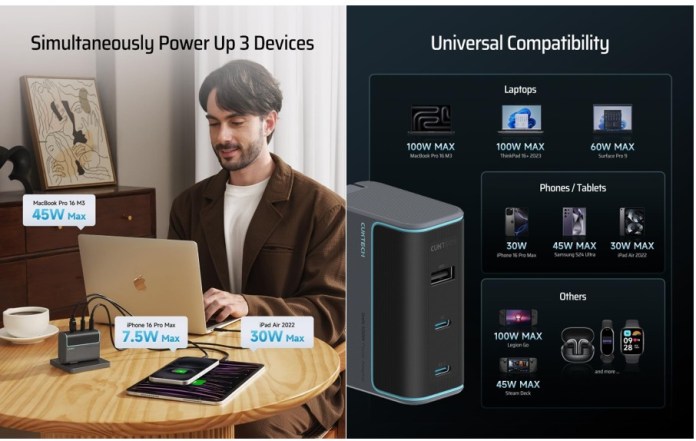
CUKTECH, a key player in the Xiaomi ecosystem, has introduced its latest charging innovation, the CUKTECH 10 100W 3-Port Multi-Device Fast Charging USB-C Wall Charger. Designed for users who juggle multiple devices, this powerhouse charger features two USB-C ports and one USB-A port, allowing for simultaneous charging without the clutter of multiple adapters.
Now available for $41.99 on Amazon, the charger currently comes with a 30% discount coupon, making it an even more compelling addition to any tech setup.
High-Speed Charging for All Your Devices
With a maximum output of 100W (and up to 120W fast charging for Xiaomi devices), the CUKTECH 10 ensures rapid and efficient power delivery for high-demand gadgets like MacBook Pros, gaming laptops, tablets, smartphones, and even gaming consoles. Whether it’s keeping a laptop charged during a workday or powering up a Nintendo Switch before a long flight, this charger is built for modern power needs.
Supporting multiple charging protocols, including Power Delivery (PD), Quick Charge (QC), and Programmable Power Supply (PPS), it optimizes power distribution based on the connected device. From iPhones and Samsung Galaxy devices to Pixelbooks and Steam Decks, the charger intelligently adapts to deliver the fastest, safest charge possible.
Compact GaN Tech for Maximum Efficiency
At the heart of the CUKTECH 10 is Gallium Nitride (GaN) technology, which allows for higher efficiency, lower heat output, and a more compact design than traditional silicon-based chargers. The result? A powerful yet portable charging solution that’s perfect for travel or everyday use.
For added convenience, the charger features foldable prongs, making it easy to slip into a bag without snagging on other items.
Bonus: High-Quality PD3.1 Cable Included
Unlike many fast chargers that leave you scrambling for a compatible cable, the CUKTECH 10 comes bundled with a 4.92-foot (1.5m) PD3.1-240W cable, capable of delivering up to 100W output for MacBooks, gaming laptops, and other high-power devices. With its extended length, users can charge comfortably, even when outlets are inconveniently placed.
Availability
The CUKTECH 10 100W 3-Port Multi-Device Fast Charging USB-C Wall Charger is available now for $41.99 on Amazon, with a limited-time 30% discount coupon.
If you rely on your devices throughout the day, having a reliable power source is non-negotiable. Whether you’re a student, a professional, or a traveler, keeping your laptop, tablet, or smartphone charged can make all the difference. CUKTECH recently began offering two new premium power banks designed to meet different charging needs, providing efficiency, power, and convenience.
The CUKTECH15 Ultra Power Bank and the CUKTECH30P Series 40000mAh 300W Power Bank stand out for their fast-charging capabilities, multi-device support, and thoughtful design. Whether you need a compact, everyday option or a high-capacity power station, these models are worth considering.
CUKTECH 15 Ultra Power Bank: Compact, High-Speed Charging for Daily Use
The CUKTECH 15 Ultra Power Bank is designed for users who need a fast, powerful, and portable charging solution. With a 20,000mAh battery capacity and 165W maximum output, this power bank is perfect for laptops, smartphones, and tablets. The inclusion of two USB-C ports and one USB-A port ensures broad compatibility across various devices.
With ultra-fast charging and a compact design, the CUKTech 15 Ultra keeps your devices powered up and ready to go—perfect for travelers, students, and professionals on the move.
Key Features
Ultra-Fast Charging: Supports PD3.1, allowing for a 70% charge in just 20 minutes.
Beast Mode: Provides enhanced power output for demanding charging needs.
Compact & Lightweight: Weighing only 1.3 pounds with dimensions of 5.98 x 2.25 x 1.75 inches, making it ideal for travel.
Real-Time Display: A 1.3-inch TFT color display provides essential charging insights and temperature warnings.
Multi-Device Compatibility: Features two USB-C ports and one USB-A port, supporting protocols such as PPS, QC, and PD3.1.
Dual-Port Input: Accepts up to 165W input power, ensuring quick recharging of the power bank itself.
Availability: Sold on Amazon in the USA, UK, Germany, Italy, Spain, and France.
Who Should Consider the CUKTECH 15 Ultra?
This power bank is well-suited for students, professionals, and travelers who require portable, high-speed charging. If you rely on multiple devices throughout the day and need a dependable power source, the CUKTECH 15 Ultra is a strong choice.
CUKTECH P Series (30) 40000mAh 300W Power Bank: Power for Heavy-Duty Users
For those requiring even greater capacity and versatility, the CUKTECH 30 Power Bank delivers an extensive power solution. With an ultra-large 40,000mAh battery, it can charge an iPhone 15 up to seven times or fully recharge a MacBook Pro.
Unmatched power and versatility—CUKTech P Series delivers high-capacity charging for multiple devices, making it the ultimate companion for remote work, travel, and adventure.
High Power Output: 300W maximum output, suitable for laptops, tablets, and other power-hungry devices.
Multiple Charging Options: Features two USB-C ports, two USB-A ports, and a 20W wireless charging pad, allowing users to charge up to five devices at once.
Intelligent Cooling System: Equipped with a gaming console-level cooling fan to maintain optimal performance.
LCD Display: Provides real-time updates on charging status, battery life, and power output.
Portable & Airline-Approved: Compact design with a built-in handle for easy transport; approved for air travel.
Availability: Available on Amazon and select online retailers.
Who Should Consider the CUKTECH 30 Power Bank?
This model is designed for power users, travelers, and creative professionals who require extended power without access to an outlet. Whether you’re working remotely, camping, or traveling abroad, this power bank ensures you stay connected and fully charged.
Choosing the Right CUKTECH Power Bank
Feature
CUKTECH 15 Ultra Power Bank
CUKTECH 30 Power Bank
Battery Capacity
20,000mAh
40,000mAh
Maximum Output
165W
300W
Charging Ports
2 USB-C, 1 USB-A
2 USB-C, 2 USB-A, 20W wireless
Fast Charging
70% charge in 20 minutes
Dual-way 140W flash charge
Display
1.3-inch TFT color screen
LCD screen
Weight
1.3 pounds
Handle-equipped for portability
Portability
Compact, lightweight
Airline-approved
Best For
Students, travelers, professionals
Heavy-duty users, remote workers, travelers
Final Thoughts
CUKTECH provides power banks that cater to different user needs. The CUKTECH 15 Ultra is the perfect everyday carry option for those who need fast, efficient charging, while the CUKTECH 30 is built for users who require maximum power capacity and multi-device charging. Both models uphold CUKTECH’s reputation for reliability, innovation, and convenience, making them excellent choices for modern tech users.
Both power banks are available on Amazon and CUKTECH’s website, making them easily accessible for those looking for dependable portable charging solutions.
Mobile gaming is easily the biggest thing to happen to casino gaming since the invention of blackjack. Having the ability to play your favorite games on the go changes everything. You don’t need to commit to an evening out at the casino.
With good mobile gaming apps, you can play while you wait in line at the DMV. You can win money on your favorite slot machine from the bathroom.
Many mobile casino apps are adapted from desktop versions. That’s not a terrible thing, but it does mean that the games aren’t as optimized as they could be. Android technology makes it possible for developers to create a very specific experience for gamers.
What is Android Technology?
It’s an operating system. An operating system is the core software that manages a device’s hardware and allows applications to run on it.
You don’t need to know the ins and outs of programming to appreciate the way it can improve your life. Basically, Android technology is the foundation for so many of your favorite applications. What makes Android different from, say, Apple’s iOS operating system is that it is open-source—meaning its source code is publicly available, allowing developers to modify and adapt it to their needs.
In technical terms, this means manufacturers and app creators can customize the system’s interface, optimize performance for specific devices, and add unique features without waiting for approval from a central authority. In other words, Android apps are often more customizable. From a designer’s perspective, there’s less friction—fewer restrictions and more freedom to create unique, tailored experiences.
On your end, the playing experience is that much smoother. Since Android is supported by a vast ecosystem of devices, from budget smartphones to high-end gaming tablets, this flexibility ensures that users of all kinds can find a device and gaming experience that fits their needs.
The Android Difference
Android technology prioritizes a “mobile-first” design concept. Many virtual casinos were made first for the desktop. This makes sense at face value. Desktop computers have been around longer than mobile devices. Isn’t it so easy to forget that Obama was president when the first iPhone came out? Not very long ago. Personal computers, on the other hand, stretch back to the Carter/Reagan era. And if we are sticking with presidential timelines, virtual gaming came to us in the Clinton era.
So much has changed technologically between these administrations. Early virtual casinos were built for big screens, controlled with a mouse and keyboard. When mobile gaming exploded, developers simply adapted those desktop designs for smaller screens. But that approach had flaws—clunky interfaces, slow loading times, and games that didn’t quite “feel right” on touchscreens.
Android-based casinos take a different approach. Instead of porting desktop games, they are designed from the ground up with mobile in mind. Touch-friendly controls, faster load times, and smoother performance are all key features. Many also integrate native Android functions, like biometric login and push notifications for bonuses or tournaments. The result? A gaming experience that feels seamless, natural, and built for the way people actually play today.
Great Apps Make Everything Better
They do. Android engineers are constantly finding new ways to make your favorite games easier to play on the go. AI integrations are making these apps more personalized and intuitive, but the most important aspects of the experience are still being shaped by humans. Every day, these apps improve—not only by enhancing convenience but also by prioritizing player safety.
The best casino apps now feature gentle nudges—non-intrusive but effective notifications that encourage players to take a step back. Is it time to take a break? These reminders help users reflect on their gameplay and spending habits: Am I playing responsibly? Am I sticking to my budget? The best applications help keep player behavior aligned with their personal goals and values.
That said, with so many apps to choose from, finding the right one can feel overwhelming. Not sure where to start? Check out this guide to the best casino apps. The sooner you find the right platform, the sooner you can start collecting rewards.
New/Better Features
The Android operating system also makes it easier for developers to integrate new and exciting features. For example, live betting. Personalized game recommendations. VR/AR feature integrations.
It’s funny. Casino games really don’t change much. The core mechanics of slot machines have been the same for 130 years. The way you experience these games does change. Even thirty years ago, could anyone imagine a day when people would play their favorite slot games while in line at the grocery store?
Bet on a sporting event hundreds of miles away while they wait to pick their kids up from school? Mobile gaming technology makes these things possible. Android operating systems help take these experiences to the next level.
EDITOR NOTE: This is a promoted post and should not be considered an editorial endorsement
The Vasco Translator E1 offers a practical solution for multilingual communication with its innovative earbuds. Supporting 51 languages in real-time, these earbuds allow for seamless conversations regardless of language barriers. The over-ear design ensures a comfortable and secure fit, making them ideal for extended use.
With touchless translation capabilities, users can engage in natural dialogue without the need to press buttons, promoting a more organic exchange. Leveraging Bluetooth 5.2, the device connects effortlessly to the Vasco Connect app, enabling personalized settings and adjustments.
Effortlessly break language barriers with the Vasco Translator E1—real-time, touchless translation in 51 languages, all packed into comfortable, over-ear earbuds designed for seamless conversations on the go.
Each earbud features dual microphones for precise audio capture, and the pairing with customizable LED indicators adds a unique touch. The earbuds are especially suited for international business meetings, travel adventures, and customer service roles in diverse linguistic environments. Priced at $349, down from $389, they offer a technology-driven approach to overcoming language barriers, making them a worthwhile consideration for frequent travelers and global professionals.
Specs & Features
Languages Supported: 51 languages in real-time
Design: Hygienic over-ear design for comfort and universal fit
Touchless Translation: Facilitates natural conversation flow without manual operation
Connectivity: Bluetooth 5.2; pairs with Vasco Connect app
Battery:
Each earbud: 70 mAh
Charging case: 400 mAh
Microphones: Two microphones in each earbud for precise audio capture
Features:
Assignable LED colors for different languages/users
Translation with phone screen off capability
App Integration: Vasco Connect app necessary for operation and settings management
Usage Scenarios: Ideal for international business meetings, travel, and multilingual customer service
Price: Regular price $389, currently available for $311
What Is the Vasco Translator E1?
The Vasco Translator E1 offers a practical solution for those who require seamless communication in multiple languages. Designed as a set of translator earbuds, it caters especially to travelers, international business professionals, and anyone engaging in multilingual interactions. This device supports real-time translation for an impressive 51 languages, allowing users to communicate effortlessly with speakers from around the globe.
How Do They Work?
These earbuds utilize advanced AI-driven technology to ensure accurate translations during conversations. The touchless translation feature means there is no need for manual operation; users can converse naturally without interruptions. With two microphones in each earbud, the device captures speech clearly, even in busy environments, enhancing the overall translation experience.
What Makes Them Comfortable?
The design of the Vasco Translator E1 prioritizes user comfort. The over-ear fit promotes a secure and hygienic experience, making them suitable for extended wear. They come with a charging case that provides additional power on-the-go and ensures that the earbuds remain ready for use whenever needed.
How Are They Powered?
Each earbud is equipped with a 70mAh battery, while the charging case boasts a 400mAh battery capacity. This combination allows for significant usage time without frequent recharging, which is beneficial for users who are constantly on the move.
What Is the Connectivity Like?
The Vasco Translator E1 features Bluetooth 5.2 connectivity, ensuring a stable and efficient connection to other devices. Users can easily pair the earbuds with their smartphones through the Vasco Connect app, which facilitates configuration and language settings.
Why Is It Suitable for Various Users?
Ideal for a range of applications, these translator earbuds are particularly advantageous for international business meetings and travel scenarios. They simplify communication in customer service roles that require interaction with diverse clientele.
We know a good thing when we see it.
The First-Rate Find badge recognizes products that go beyond standards in performance, design, value, and/or innovation. They also tend to boast interesting features or distinct hallmarks.
We don’t need to assign any formal scores to indicate that this one is worth your attention.
The combination of high-quality audio capture, extensive language support, and user-friendly design positions the Vasco Translator E1 as a dependable tool for anyone navigating language barriers in their daily interactions.
What Is the Cost?
The Vasco Translator E1 is priced competitively at $389, currently available for $311 as part of a Spring Break promo. It’s a practical investment for professionals and travelers alike. Learn more about the Vasco Translator E1.
Battery and its usage are a crucial concern for many smartphone users as several apps use up more battery energy than others. For instance, social media, navigation, and streaming services are some of the most well-known power-hungry apps. On top of this, many apps require background processes that quickly drain device battery. However, not all apps are battery hungry. Some gaming and iGaming apps are designed to maintain high efficiency with low power consumption.
Gaming and iGaming apps
Gaming apps are thought to drain battery out fast. However, unlike social media or navigation apps that continuously refresh in the background, many gaming apps optimize power usage. They don’t refresh in the background and only use power when actively running. This kind of optimization allows players to enjoy their games without worrying about their battery.
These principles are also often seen in iGaming apps like betting or casino applications. Card Player’s trusted reviews present a good list of casinos that are designed to offer a smoother, easier, and faster experience. These apps use lightweight graphics and optimized coding to reduce battery usage while keeping the games and features smooth and engaging.
Furthermore, iGaming apps are usually much lighter on a smartphone’s processor when compared to mobile games that require high-end processors because games sometimes contain intense situations where good graphics are a must. On the other hand, casino and betting apps have a wide range of games that don’t require anything special.
Why do some apps drain your battery so fast?
Understanding why some apps drain your battery fast is really important when you want to reduce your battery usage. There are some apps that continuously refresh themselves in the background, which does drain the battery. A good example is a location and navigation app like Google Maps, which, according to statistics, has over 1 billion users every month. Since location service apps continuously track user location even in the background, the device battery may drain out fast.
Social media apps also sometimes run in the background. Options like Facebook, Instagram, and TikTok are a few examples of battery-draining apps as they continuously need to fetch data, refresh feeds, or push notifications. This means that even when you are not using the apps, they remain active in the background.
There are also streaming services like Spotify which has over 675 million users. These apps require the continuous use of an internet connection to show video and audio in good quality. This kind of activity has heavy effects on battery life and health.
The role of background processes in battery drain
As earlier stated, some apps drain battery because they continuously refresh in the background. The most known app category that requires background activity is messaging apps. There are apps like Facebook Messenger, WhatsApp, and Snapchat that continuously refresh messages and send notifications even when not in use.
If you really think about your apps, most of them send you notifications, which means that they require some background activity. However, some apps like gaming and iGaming apps don’t require background processes. While gaming apps might push notifications from time to time, they are not frequent and won’t affect battery usage too much. iGaming apps, on the other hand, usually do not push notifications and only refresh when in use.
To reduce your battery usage, you can manage and limit app background activity in your phone’s settings. The main point is to at least restrict the non-essential seldom used apps you don’t frequently use. This will reduce your battery usage and even make it last longer.
How to identify and manage battery-draining apps
Now that we know why some apps use a lot of battery, we can go through how to identify and manage them. Nowadays, modern phones have built-in tools that are made to help users track which apps are using the most battery. Both Android and iPhone have their own statistics that show battery usage, which allows users to identify the apps that drain battery the most.
These statistics can be viewed easily. If you are using an Android, navigate to Settings > Battery > Battery Usage. On an iPhone, go to Settings > Battery. From the statistics, you can see which apps drain the battery the most and try to reduce their usage. This can be done easily by simply limiting their background activity or enabling battery-saving mode on your smartphone.
The first thing to do when limiting apps that drain battery is to disable infrequently used apps that track location. Additionally, you can uninstall apps that you don’t use or rarely use. Uninstalling apps also frees storage space on your smartphone, which can improve its overall performance.
Battery-saving tips for gaming and iGaming apps
There are a few ways to reduce your battery usage and extend its life when using gaming or iGaming apps. One of the most known ways is to adjust your screen brightness, since it usually uses the most battery. This can also help your eyes, as it reduces glare and lowers the amount of blue light emitted.
Another way is to enable power-saving mode on your phone. As of today, smartphones have their own power-saving mode, which will limit background activity and optimize the system’s performance to save battery. By activating this on your smartphone, you can extend your gaming sessions significantly.
Balancing performance and battery efficiency
While battery usage and its life are important, you should consider how your measures may affect performance before doing anything. While disabling or restricting apps can be effective, new phones are made to handle it. This means that you should not disable or restrict any apps that you frequently use, since it will affect their performance negatively.
Also, remember that battery life depends on your habits. For example, charging your phone through the night might reduce the battery life. Additionally, you should consider using battery management systems that will help you optimize your battery use.
Google has unveiled the Pixel 9a, the latest addition to its A-series lineup, offering premium AI-powered features, a refreshed design, and an upgraded camera—all at an impressive $499 price point. Equipped with the Google Tensor G4 chip, the Pixel 9a delivers many of the same smart capabilities found in the flagship Pixel 9 series, making it a compelling choice for those looking for cutting-edge AI performance at a budget-friendly price.
A Redesigned Look and Brighter Display
Pixel 9a introduces a 6.3-inch Actua display, the brightest ever on an A-series phone, reaching 2700 nits—a 35% increase over the Pixel 8a. With a 120Hz adaptive refresh rate, users can expect smooth scrolling and vibrant visuals.
The phone features a sleek, flat-edged design with rounded corners and is available in Peony, Iris, Porcelain, and Obsidian, giving users a mix of bold and classic color options.
Best-in-Class Camera Under $500
Google’s A-series phones have always been known for their impressive camera performance, and the Pixel 9a continues the trend. The phone features a 48MP main camera and a 13MP ultrawide camera, along with AI-driven photography tools:
Macro Focus: A first for the A-series, allowing users to capture extreme close-ups with fine details.
Add Me: Combines multiple group shots to ensure everyone—including the photographer—makes it into the final image.
Magic Editor: Uses AI to reposition subjects, enhance lighting, or even change elements in a photo—like replacing an overcast sky with a sunset.
Other familiar Pixel camera features—like Magic Eraser, Night Sight, and Astrophotography—return to enhance mobile photography.
Built to Last with an Extended Battery
Google claims the Pixel 9a has the best battery life of any Pixel device to date, offering:
30+ hours of standard use
100+ hours with Extreme Battery Saver
The phone is IP68-rated for water and dust resistance, making it more durable than past A-series models. Google is also committing to seven years of OS updates, security patches, and Pixel feature drops, extending the longevity of the device.
AI-Powered Assistance with Gemini
The Pixel 9a is the only sub-$500 phone with Gemini Nano, Google’s on-device AI, bringing premium features to a more affordable price range. Gemini AI enhances everyday tasks, working across apps like Maps, Calendar, and YouTube for seamless multitasking.
Gemini Live, coming soon, will allow users to interact with the AI assistant using voice, with the ability to show the assistant what’s on the screen or use the camera to get real-time contextual help.
Security, Parental Controls, and New Google Wallet Features
Security remains a focus, with the same top-rated security features found in the Pixel 9 and 9 Pro. Theft Protection, Car Crash Detection, and a built-in VPN ensure peace of mind.
For parents, Google Family Link offers an easy setup process with screen time controls and app approval settings. School Time mode helps limit distractions during class hours, and Google Wallet for kids is rolling out, allowing parents to manage their child’s digital payments.
Pricing and Availability
The Pixel 9a starts at $499 and will be available in April through the Google Store and retail partners. With flagship-level AI capabilities, an upgraded design, and a best-in-class camera at its price point, Google’s latest A-series phone looks to set a new standard for budget-friendly smartphones.
Google Wallet is expanding its reach to younger users with a new feature that allows kids in the U.S., U.K., Australia, Spain, and Poland to make digital payments under parental supervision. Rolling out over the next few weeks, the update enables children to tap to pay in stores and store supported passes like event tickets, library cards, and gift cards in one place.
A Safer Way for Kids to Pay
Google Wallet’s latest feature is designed with security in mind. Parents and guardians must provide consent before a child’s payment card can be added. To maintain oversight, they receive email notifications for every transaction, ensuring full visibility into their child’s spending habits.
Parental Controls via Family Link
Parents can manage their child’s Wallet experience through Google’s Family Link. This includes the ability to track recent purchases, remove payment cards, or disable access to passes when needed. The goal is to provide a seamless and controlled introduction to digital payments for younger users.
Availability and Next Steps
The update will roll out gradually across eligible regions, offering families a new way to navigate digital transactions safely. More details can be found on Google’s blog when the announcement goes live on March 19, 2025, at 7 AM PT: Google Wallet for Kids.
What Is Google Wallet?
Google Wallet is a digital wallet app that allows users to make contactless payments, store payment cards, and manage digital passes like event tickets, boarding passes, and loyalty cards. Available on Android devices and Wear OS, it serves as a convenient and secure alternative to carrying physical cards and cash.
Key Features of Google Wallet
Tap to Pay: Users can make purchases in stores using NFC-enabled devices.
Secure Card Storage: Debit and credit cards can be stored and used for payments.
Pass Management: Supports boarding passes, event tickets, transit cards, gift cards, and even digital IDs in some regions.
Integration with Google Services: Works alongside Google Pay for online and in-app purchases.
Security Measures: Includes biometric authentication, encrypted transactions, and the ability to remotely disable access if a device is lost or stolen.
Who Can Use It?
Google Wallet is available in many countries and supports various banks and financial institutions. With the recent update, it now extends to younger users under parental supervision, offering a safe way for kids to handle digital payments.